


WPComplete
A WordPress plugin that helps your students keep track of their progress through your course.

Solid choice
WPComplete is a solid plugin choice in 2026, with a few things worth checking first. It runs on 1K+ sites, is rated 4.1/5 and was last updated 1 month ago, and scores 67/100 on our health check.
- Only tested up to WordPress 6.8 (latest is 7.1)
Daily downloads
Download spikes usually follow a new release — each site that auto-updates counts as a download.
Rankings
Where WPComplete stands todayWordPress.org search rankings
Live position in the plugin search, top 100| Keyword | Position |
|---|---|
| courses lms | #44 |
| learning | #89 |
| membership | >100 |
| progress bar | #97 |
| teaching | #6 |
Version adoption
Share of active sites per release.
Rating breakdown
★★★★★★★★★★ 4.1 from 43 reviews
About WPComplete
From the official readme · v2.9.5.7Description
WPComplete has joined the iThemes family!
WPComplete is a WordPress plugin that helps your students keep track of their progress through your course or membership site.
All you have to do is pick which pages or posts can be marked as “Completed”.
There’s no programming required, it works with every WordPress theme, WordPress course plugin, and is ready to use instantly. Help your students complete the course you’ve put so much information, knowledge and heart into creating.
Free version
- Mark lessons as complete – students can complete lessons so they know how far they’ve progressed in your course.
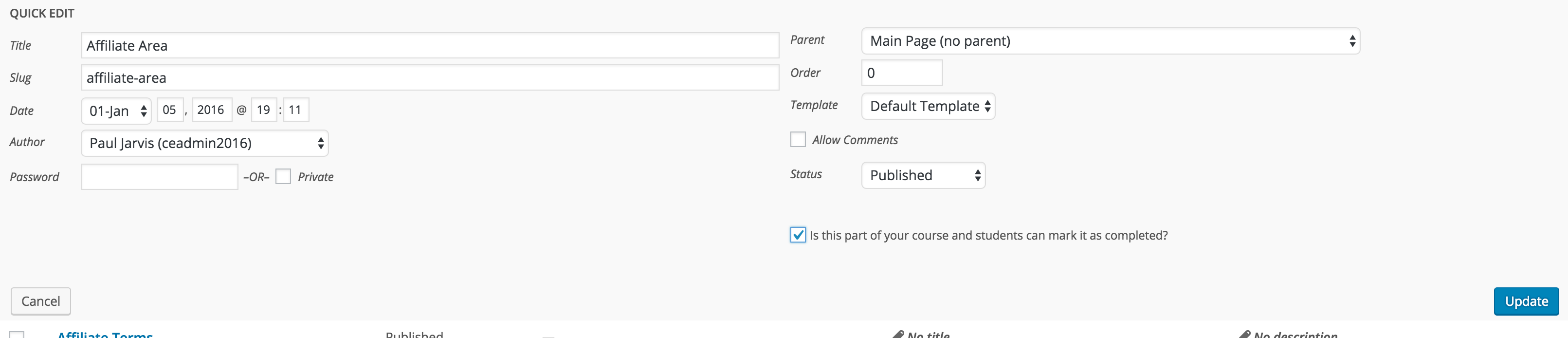
- Quick toggle – set which pages or posts are completable via Quick Edit or by editing the page/post.
- Any theme, any plugin – use WPComplete with any WordPress theme or membership plugin.
PRO version
WPComplete is available as a PRO version with lots of extra features to help you customize and visually show students their progress.
* Supports multiple courses within a single WordPress site.
* Supports multiple buttons per lesson (if each lesson has multiple aspects, think: completed video lesson, completed workbooks, completed spreadsheet)
* Custom post types – Using something other than pages and posts? Not a problem!
* Course progression – when a student clicks complete, they’re taken to the next lesson automagically.
* Dead-easy shortcodes – without any programming, add shortcodes for buttons, graphs, and completion text.
* Complete/Incomplete custom messages – show a message on each lesson that disappears if the complete button is pressed, or, show a message only if the complete button is pressed.
* View progress – see the number of students who’ve completed each lesson or percentage complete by each student.
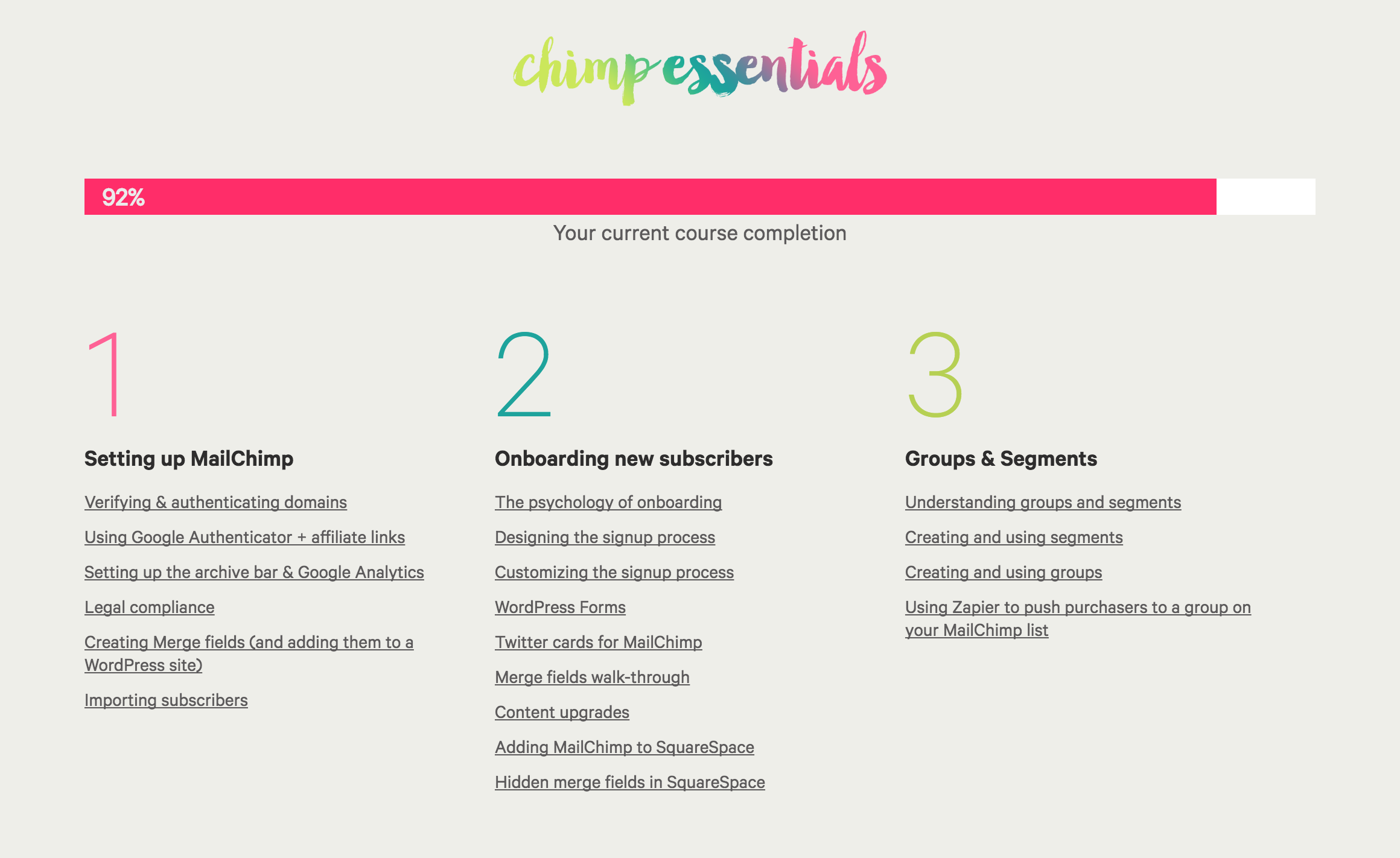
* Fancy graphs – use a bar or circle graph to display progress through your course via simple shortcodes.
* Completion indicators – visually show logged in students which lessons they have already completed.
* Dashboard widget – see how many buttons and users each course has, right on your admin dashboard.
* Customize everything – choose different wording for the completion buttons and/or pick colours for the buttons and graphs.
* Email support – we are available to quickly answer questions, fix bugs and take feature requests.
Although WPC is course platform agnostic, we’ve thoroughly tested it with: Restrict Content Pro, Memberful and WOO.
Please vote & enjoy
If you like WPComplete, please leave us a ★★★★★ rating. Your votes really make a difference! Thanks.
Installation
- Upload ‘wpcomplete.*.zip’ to your /wp-content/plugins/‘ directory or use the WordPress plugin uploader.
- Activate the plugin through the ‘Plugins’ menu in WordPress.
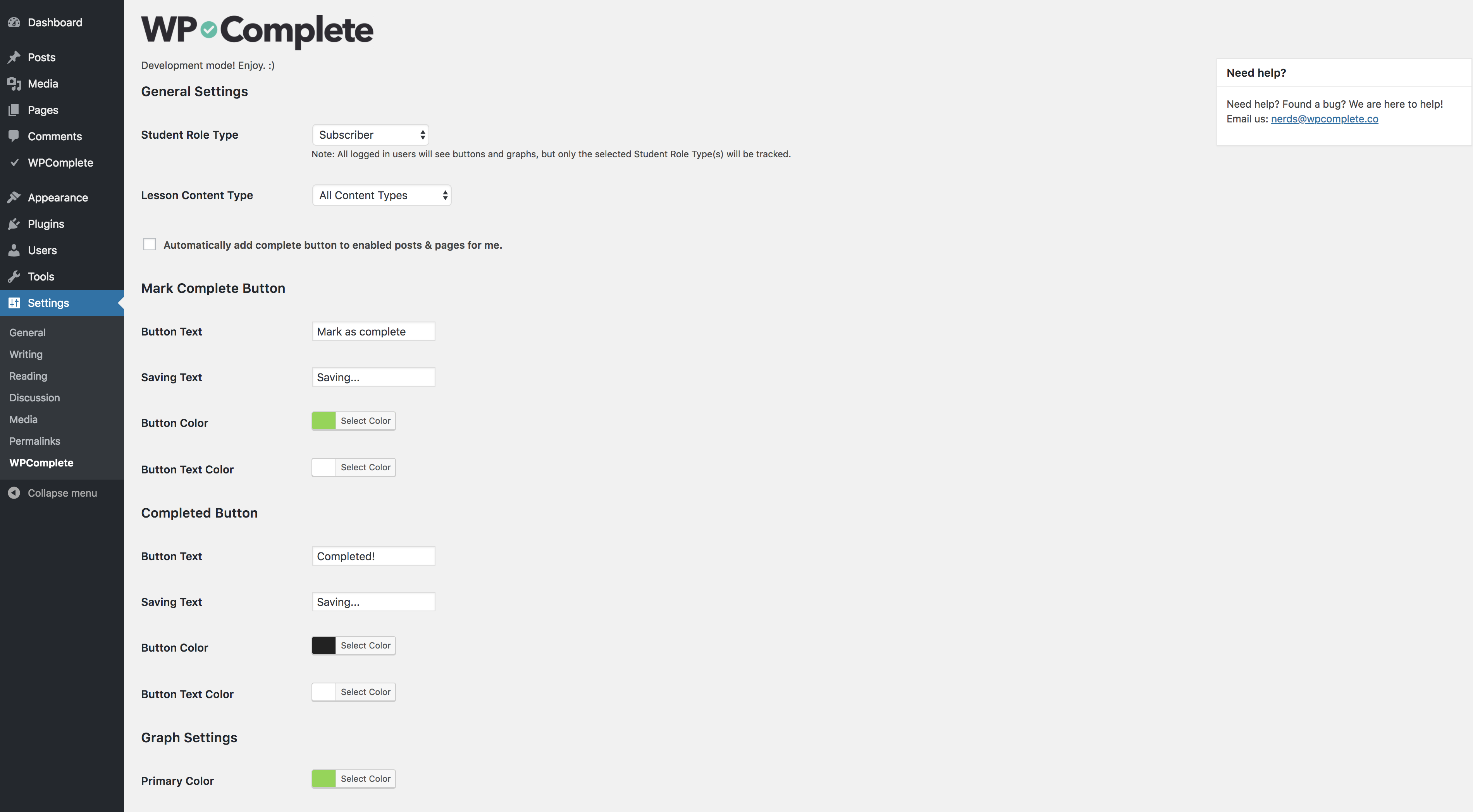
- Go to ‘Settings’ then ‘WPComplete’ to customize the text and colours.
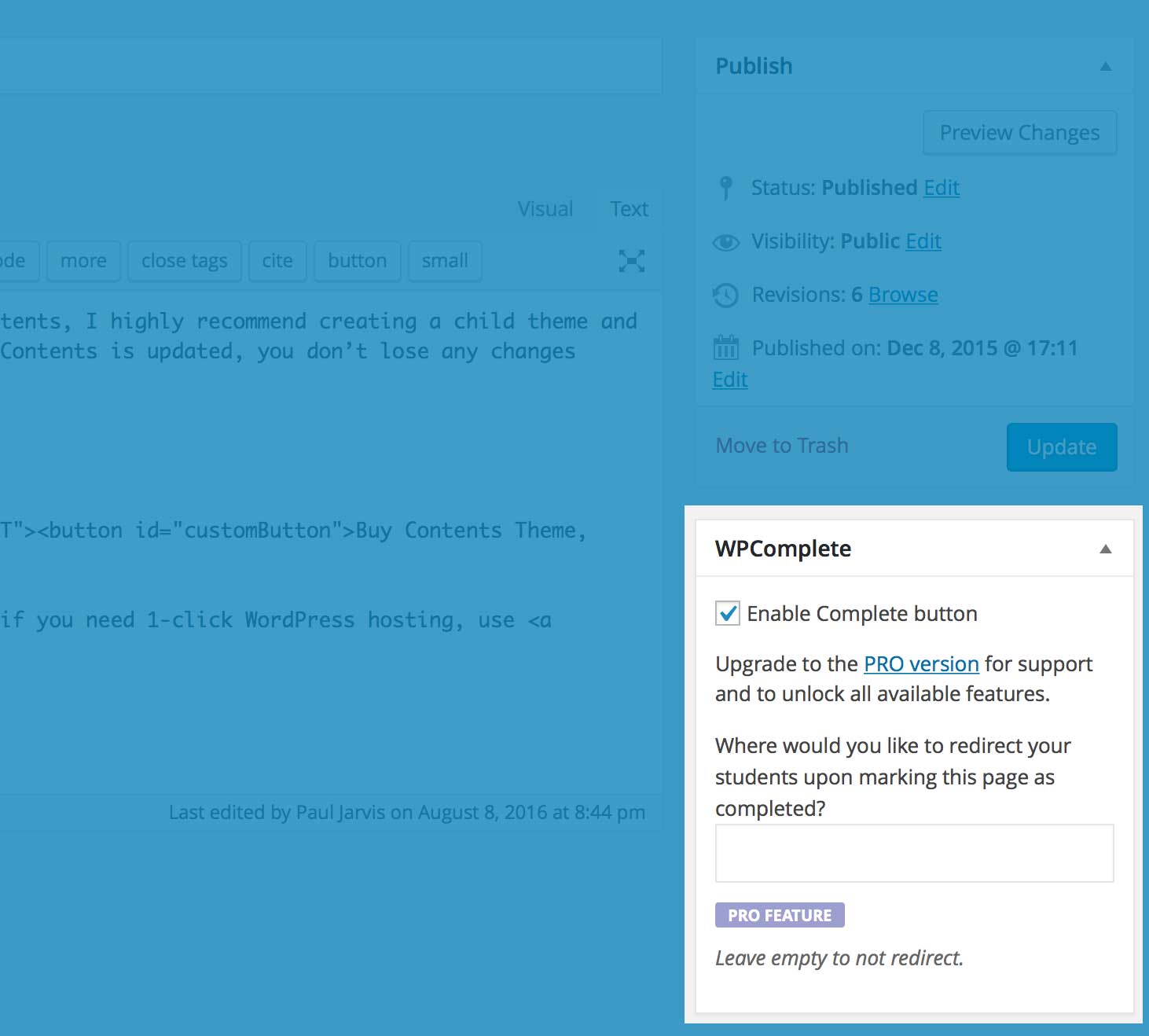
- Edit any page or post and check the box beside ‘Enable Complete button’ to set a page or post as completable.
Frequently asked questions
Found a security vulnerability?
Make sure you are reporting in a safe and responsible way. We take security very seriously. If you discover a security issue, please bring it to our attention right away! Below you will find all the methods to report security vulnerabilities: Report security bugs through the Patchstack Vulnerability Disclosure Program Check our Bug Bounty Program Reach out directly to us on security [at] stellarwp.com.
How do I enable a page so that it is completable?
To enable a page so that it’s completable: 1. Find the page from your WordPress admin page directory and click in to edit. 2. Scroll to the WPComplete meta box. 3. Check the “Enable Complete button” checkbox. 4. (Optional) Place the [wpc_complete_button] shortcode in the content of your post, where you want the button to exist. 5. Update or Publish the page to save the changes. 6. (Optional) On the WPComplete settings page, update your button’s custom css to update the appearance of your buttons.
How do I style the buttons?
There are two options to add custom branding/style your WPComplete buttons: 1. On the settings page (Settings > WPComplete) you can customize the following, without any programming or HTML/CSS knowledge: the color of the button, the color of the font on the button, the words on the button (for both completed buttons and incomplete buttons), and the wording for “Saving…”. 2. You can create and add your own custom CSS for buttons to add graphics, icons, rounded corners, etc, by adding your own CSS code to the Advanced Settings section. WPC buttons use the class: a.wpc-button with two states…
Why isn’t my button showing up?
It could be one of a couple reasons: 1. You’re not logged in to your wordpress site. Only logged in users can see the button. 2. That page doesn’t have buttons enabled. Make sure the Enable Complete button checkbox is checked in the WPComplete metabox when editting that page. 3. You don’t have Automatically add complete button to enabled posts & pages for me. checked and you haven’t added the [wpc_complete_button] shortcode to your page content. Still not showing up? Let us know and we can help figure out what’s going on.
How do I see how many students have completed each lesson?
Whether you use pages, posts or custom post types for your lessons, you can see on the list page (i.e. PAGES > ALL PAGES or POSTS > ALL POSTS) beside the published date a column for user completion is shown, which displays the number of students/total students and then the percentage. If you go to Users > All Users then the final column on the user table will show the number of lessons completed vs the total lessons for each user on your site.
Does WPComplete allow for multiple buttons per lesson?
Heck yes it does (in the pro version)! You can add your first button by adding the [wpc_complete_button] shortcode to any page content with WPComplete enabled. To add additional buttons, just make sure to provide each button with a specific name, like: [wpc_complete_button name="Button Name"] or [wpc_complete_button name="Video Module"] or [wpc_complete_button name="Workbooks"].
How do I delete courses in WPComplete?
Courses show up once you’ve added more than one lesson to them. To delete a course from WPComplete, simply remove all lessons from that course. Then the course will no longer show up on the list.
How do I list the lessons in my course and show if they are completed or not to students?
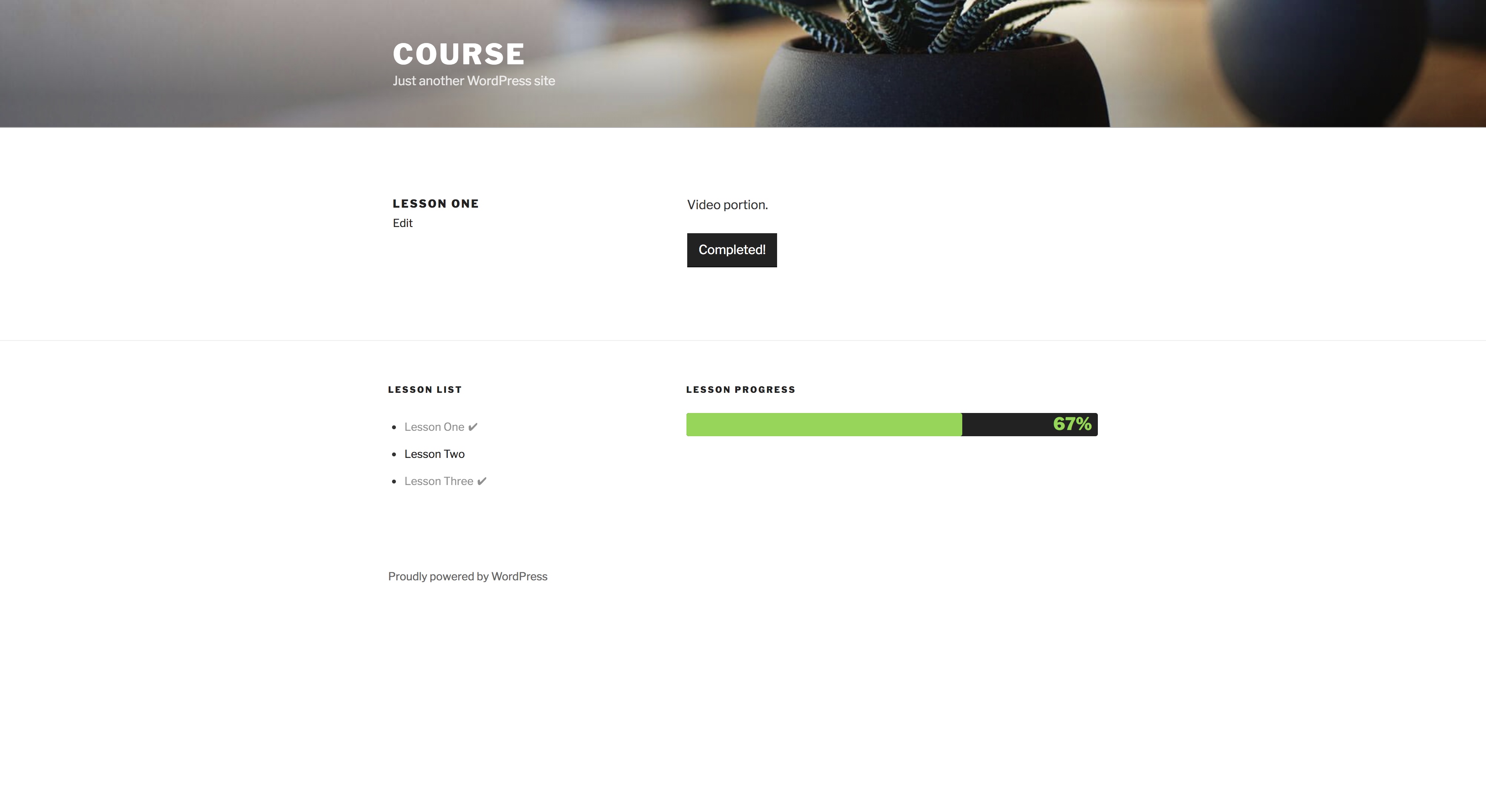
You’ll have to use your course software/LMS to show what lessons are available in your course, or simply create a list of pages that are lessons on any WP content. From any list (ordered or unordered), WPComplete automatically will show each user if they’ve completed the lesson or not, using custom CSS. We add this automatically for users who don’t want to edit code (completed lessons are faded slightly and a checkmark is added beside them). For customers who want to update the CSS, it’s found in Advanced Settings: li .wpc-lesson {} li .wpc-lesson-complete {} li .wpc-lesson-completed {…
What shortcodes are available in the pro version?
[wpc_button] or [wpc_complete_button] will add your complete button anywhere on the page or post. [progress_percentage] or [wpc_progress_percentage] will display the current student’s progress as a percentage (ex: 49%). [progress_ratio] or [wpc_progress_ratio] will display the current student’s progress as a ratio (ex: 10/35). [progress_graph] or [wpc_progress_graph] will display a radial (donut) graph showing the current student’s progress with percentage. [progress_bar] or [wpc_progress_bar] will display a bar graph showing the current student’s progress with percentage. [complete_button…
Can WPComplete handle multiple courses within the same WordPress installation?
Yes! Once you enable completion for a page or post, in the pro version, you will be given the option to assign it to a specific course. If you use any progress shortcodes, by default it will display the progress for the course of that post, but progress shortcodes also accept a course attribute if you want to force showing progress for a specific course. Ex: [wpc_progress_bar course=”All”] [wpc_progress_bar course=”My Awesome Course”]
Can I use this with custom post types?
Yes! By default, only posts and pages are enabled. But in the pro version, you have the ability to enable it for individual post types, including any custom types.
Can I style links to posts and pages that are completable?
Yes! In the pro version, we append the css class .wpc-lesson to ALL links to posts and pages. Links that have not been completed by the logged in student will also have the class .wpc-lesson-complete added. And links that have been completed by the logged in student will also have the class .wpc-lesson-completed added, along with some really basic styles that are easy to override manually.
I use OptimizePress. Can I use WPComplete?
Yes! OptimizePress is a little tricky to get working, but it does work! We automatically disable automatic insertion of the completion button, but you can easily add it where you want the button to show up! To add the button to your page: 1. Edit the page you want to add completion to. 2. You should already be on the OptimizePress tab (not the WordPress tab). 3. Click the Live Editor “Launch Now” button. 4. Click the “Add Element” button where you want to add your completion button. 5. Select a “Custom HTML / Shortcode” element. 6. In the “Content” field, insert the shortcode…
Changelog
Tons of optimization and fixes, along with new features and improvements for PRO accounts!
2.9.5.7
- Security Fix: Tightened security around user completion handling.
- Security Fix: Tightened security around button completion display.
2.9.5.6
- Security Fix: Tightened security around completion button handling.
2.9.5.5
- Security Fix: Tightened security when producing custom buttons.
2.9.5.4
- Security Fix: Tightened security around actions.
2.9.5.3
- Security Fix: Tightened security around
wpc_buttonshortcode.
2.9.5.2
- Bug Fix: Restored missing settings fields.
Screenshots


For developers
Is this your plugin? Show off the numbers.
Add a live badge to your site, docs or GitHub README. It updates on its own — no account needed.
FAQ
WPComplete: quick answers
Straight answers, pulled from live WordPress.org data.
Live data from WordPress.org · checked Sep 30, 2026
Is WPComplete free?
Yes. WPComplete is free to download and use from the official WordPress.org plugin directory.
Is WPComplete safe to use in 2026?
WPComplete is a solid plugin choice in 2026, with a few things worth checking first. It runs on 1K+ sites, is rated 4.1/5 and was last updated 1 month ago, and scores 67/100 on our health check.
How many websites use WPComplete?
WPComplete is active on 1K+ WordPress websites and has been downloaded 27,598 times since it launched in August 2016. It was downloaded 423 times in the last 30 days.
Does WPComplete work with WordPress 7.1?
WPComplete is officially tested up to WordPress 6.8.10, while the latest release is 7.1.2. It may still work, but try it on a staging site first.
When was WPComplete last updated?
The latest version, 2.9.5.7, was released on August 18, 2026 (1 month ago).
Who makes WPComplete?
WPComplete is developed and maintained by Nexcess.
Powered by PageForge
Want thousands of pages that rank like these? Build them in an afternoon.
This directory runs on the same engine as PageForge. Turn any spreadsheet, CSV or API into thousands of fast, SEO-ready WordPress pages — with schema, internal links and AI-written copy baked in.
- CSV, Google Sheets & API data sources
- AI content, schema & internal links per page
- Works with Elementor, Gutenberg, Yoast & Rank Math
- Free on WordPress.org — no credit card


