


WP Weixin
WordPress WeChat integration

Consider an alternative
WP Weixin shows warning signs in 2026 — compare the alternatives below before installing. It runs on 300+ sites, is rated 5/5 and was last updated 2 years ago, and scores 41/100 on our health check.
- Small user base (300+ active installs)
- No update in over a year
- Only tested up to WordPress 6.7 (latest is 7.1)
How does it stack up?
Side-by-side on installs, updates, ratings & support


![[凹凸曼]微信分享有图-WeChat Page Sharing](https://ps.w.org/apoyl-weixinshare/assets/icon-256x256.png?rev=2106118)
Daily downloads
Download spikes usually follow a new release — each site that auto-updates counts as a download.
Rankings
Where WP Weixin stands todayWordPress.org search rankings
Live position in the plugin search, top 100| Keyword | Position |
|---|---|
| #57 | |
| wechat share | #20 |
| 微信 | #16 |
| 微信公众号 | #15 |
| 微信分享 | #4 |
Version adoption
Share of active sites per release.
Rating breakdown
★★★★★★★★★★ 5 from 6 reviews
About WP Weixin
From the official readme · v1.3.18Description
WP Weixin provides integration between WordPress and WeChat. Register or authenticate users automatically in WeChat browser, use WeChat to create an account or authenticate on computers by scanning a QR code with WeChat, share posts in WeChat Moments and conversations or extend the plugin for more features!
Important notes
- Requires a China Mainland WeChat Official Account (Subscription or Service – Service is required if used with companion plugins dealing with payments).
- A domain used by WordPress must be registered in an Official Account’s backend.
- The plugin itself does not require programming knowledge, and provides really useful functionalities out of the box. Where it really shines though is when used by developers to extend its functionalities (mainly through the pre-initialised JS SDK, the WeChat Responder, and various provided functions, actions and filters).
- Make sure to read the “TROUBLESHOOT, FEATURE REQUESTS AND 3RD PARTY INTEGRATION” section below and the full documentation before contacting the author.
Overview
This plugin adds the following major features to WordPress:
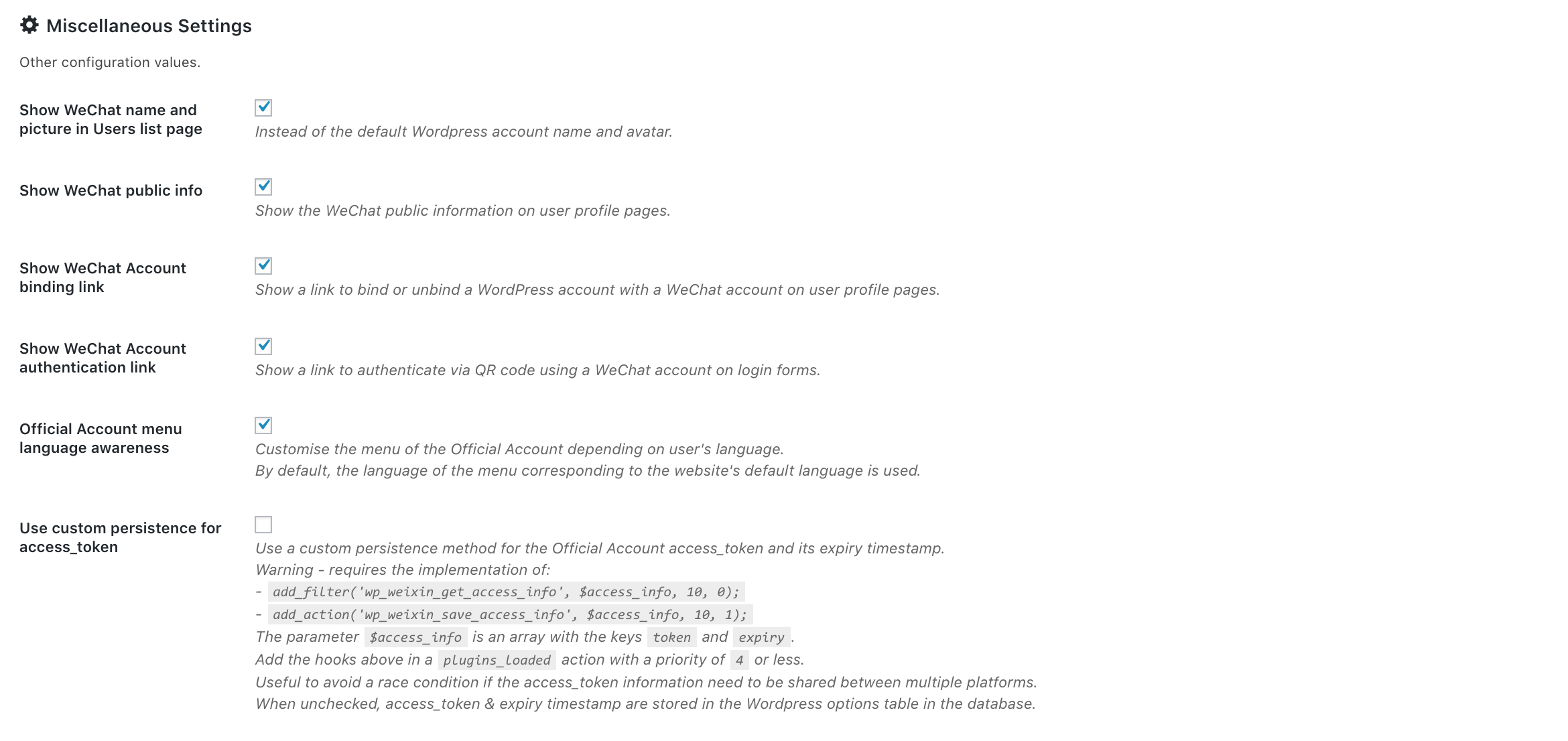
- WP Weixin settings page: configure the plugin with an Official Account (or as many as you want in multisite) in English or Chinese out of the box, with instructions for each option.
- WeChat Authentication: automatically create and authenticate users in WordPress in the WeChat browser, or allow users to scan a QR code with WeChat when using classic browsers (social login).
- WeChat Account Binding: let users bind/unbind their existing WordPress account with their WeChat account. Integrated with WooCommerce and Ultimate Member account pages, and may be integrated with any membership/account/profile plugin easily.
- WeChat Share: Share posts and pages on Moments or Send to chat, in a pretty way. Triggers JavaScript events for developers on success and failure.
- Force WeChat mobile: to prevent users from browsing the website outside of the WeChat browser. If accessed with a classic browser, the page displays a QR code.
- Force following the Official Account: to harvest WeChat followers, forcing users to follow the Official Account before accessing the content.
- WordPress Users screen override: to display WeChat names and WeChat avatars if they exist, instead of the default values in the user screen.
- WP Weixin QR code generator: to create custom codes.
- Menu integration: allows to set the Official Account menus in WordPress when the WeChat Responder is enabled.
- Welcome message: sends a welcome message in WeChat when a user follows the Official Account ; allows to do so with WordPress when the WeChat Responder is enabled.
- Developers – WeChat Responder: for developers to receive and respond to calls made by WeChat’s API.
- Developers – WeChat JS_SDK: the
wxJavaScript global variable is pre-configured with a signed package to leverage the JavaScript SDK of WeChat in WordPress themes more easily.
Compatible with WooCommerce, WooCommerce Multilingual, WPML, Ultimate Member, WordPress Multisite, and many caching plugins.
Companion Plugins
- Woo WeChatPay: a payment gateway for WooCommerce.
- WP Weixin Pay: an extension to enable money transfers to an Official Account.
- WP Weixin Broadcast: broadcast WordPress posts to WeChat followers, directly from WordPress
Developers are encouraged to build plugins and themes integrated with WeChat with WP Weixin as a core, leveraging its publicly available functions, actions and filters, or directly make use of the provided SDK.
If you wish to see your plugin added to this list, please contact the author.
Advanced – Multisite
WP Weixin supports multisite installs of WordPress, wether using domain/subdomains or subdirectories. It can even support multiple Official Accounts, provided the proper filters are implemented. For more information, see a more extensive description of the multisite settings, and the Multisite section of the documentation.
Unlike some plugins (commercial, obfuscated, and with dubious security standards), WP Weixin does not and will not rely on a crossdomain script dumped at the root of WordPress, but prefers to leverage the standard WordPress functions, actions and filters.
Troubleshoot, feature requests and 3rd party integration
Unlike most WeChat integration plugins, WP Weixin and its companion plugins published by the same author are provided for free.
WP Weixin is regularly updated, and bug reports are welcome, preferably on Github. Each bug report will be addressed in a timely manner, but issues reported on WordPress may take significantly longer to receive a response.
WP Weixin and all the companion plugins have been tested with the latest version of WordPress – in case of issue, please ensure you are able to reproduce it with a default installation of WordPress, Storefront theme if WooCommerce is active, and any of the aforementioned supported plugins if used before reporting a bug.
Feature requests (such as “it would be nice to have XYZ”) or 3rd party integration requests (such as “it is not working with XYZ plugin” or “it is not working with my theme”) for WP Weixin and all its companion plugins will be considered only after receiving a red envelope (红包) of a minimum RMB 500 on WeChat (guarantee of best effort, no guarantee of result).
To add the author on WeChat, click here, scan the WeChat QR code, and add “WP Weixin” as a comment in your contact request.
Installation
This section describes how to install the plugin and get it working.
- Upload the plugin files to the
/wp-content/plugins/wp-weixindirectory, or install the plugin through the WordPress plugins screen directly. - Activate the plugin through the ‘Plugins’ screen in WordPress
- Edit plugin settings
Changelog
Make sure to deactivate all the companion plugins before updating. Make sure to backup your database if you plan to go back to v1.2 or v1.3 of WP Weixin. Make sure to update all the companion plugins to their latest version after WP Weixin has been updated. Make sure to flush the permalinks by visiting Settings > Permalinks (wp-admin/options-permalink.php) after WP Weixin and its companion plugins have been updated (if Multisite, on all the blogs where the plugin is active). Make sure to flush all the cache if an Object Cache plugin is used (Redis, W3 Total Cache, APC Object Cache, ...) after WP Weixin and its companion plugins have been updated.
1.3.18
- Fullfill “If disabled, users will simply be identified with a cookie using their WeChat public information during their session, but not authenticated in WordPress.” when “Enable WeChat authentication” is left unckecked
- Fix:
wp_weixin_get_bind_linkandwp_weixin_unbind - Added
wp_weixin_metabox_post_typesfilter to allow other post types to use the metabox
1.3.17
- Sanitization of admin settings
- SDK refactor
- Cleanup and formatting
- WordPress tested up to: 6.7
1.3.16
- Remove WooCommerce compatbility tag (reason: irrelevant)
1.3.15
- Fix user avatar
- WordPress tested up to: 6.4
- Added
WP_WEIXIN_API_DISABLEDconstant to prevent calling WeChat API when set totrue - Minor cosmetic improvements – admin interface
- Added
wp_weixin_is_followerfunction - Check existence of several
$_SERVERvalues before using them - Ultimate Member compatibility improvements
- Optimise refresh user info
- Fix: save alternate thumbnail URL for WeChat Share
- Revamp responder: better event handling, pre-register user upon following the OA, optimization
- Update codebase with
wp_doing_ajaxfilter - Add
$classparameter towp_weixin_get_auth_link - Added
WP_WEIXIN_ALLOW_DESKTOPconstant to turn off WeChat desktop reztriction - Use
wx.updateTimelineShareDataandwx.updateAppMessageShareDatainstead ofupdateTimelineShareDataandupdateAppMessageShareData - Minor improvements, fixes, and compatibility updates
1.3.14
- Call
'wp_login'action when automatically logging in with the WeChat browser
1.3.13
- Make sure not to show frontend error on default login page
Screenshots




For developers
Is this your plugin? Show off the numbers.
Add a live badge to your site, docs or GitHub README. It updates on its own — no account needed.
Best WP Weixin alternatives
All wechat plugins →

![[凹凸曼]一键微信登录](https://ps.w.org/apoyl-weixin/assets/icon-256x256.png?rev=2799176)



FAQ
WP Weixin: quick answers
Straight answers, pulled from live WordPress.org data.
Live data from WordPress.org · checked Oct 6, 2026
Is WP Weixin free?
Yes. WP Weixin is free to download and use from the official WordPress.org plugin directory.
Is WP Weixin safe to use in 2026?
WP Weixin shows warning signs in 2026 — compare the alternatives below before installing. It runs on 300+ sites, is rated 5/5 and was last updated 2 years ago, and scores 41/100 on our health check.
How many websites use WP Weixin?
WP Weixin is active on 300+ WordPress websites and has been downloaded 20,058 times since it launched in April 2018. It was downloaded 147 times in the last 30 days.
Does WP Weixin work with WordPress 7.1?
WP Weixin is officially tested up to WordPress 6.7.9, while the latest release is 7.1.2. It may still work, but try it on a staging site first.
What PHP version does WP Weixin need?
WP Weixin requires PHP 7.0 or higher. Most hosts run PHP 8.x today, so it works on any modern WordPress hosting.
When was WP Weixin last updated?
The latest version, 1.3.18, was released on March 10, 2025 (2 years ago).
Who makes WP Weixin?
WP Weixin is developed and maintained by Alexandre Froger.
What are the best alternatives to WP Weixin?
The most popular alternatives to WP Weixin are Online Contact Widget-多合一在线… (700+ installs), Wechat download 付费下载 (200+ installs) and 导入微信文章 (Import Articles fro… (200+ installs).
Powered by PageForge
Want thousands of pages that rank like these? Build them in an afternoon.
This directory runs on the same engine as PageForge. Turn any spreadsheet, CSV or API into thousands of fast, SEO-ready WordPress pages — with schema, internal links and AI-written copy baked in.
- CSV, Google Sheets & API data sources
- AI content, schema & internal links per page
- Works with Elementor, Gutenberg, Yoast & Rank Math
- Free on WordPress.org — no credit card


