



Divi Gravity Forms (WP Tools)
Embed gravity forms in Divi visual builder. Add styles for gravity forms border, background, title, description, inputs, labels, placeholder, errors, submit button & more. Premium version has 7-day FREE trial. No…

Use with caution
Divi Gravity Forms (WP Tools) works, but test it on a staging site before relying on it in 2026. It runs on 2K+ sites, is rated 5/5 and was last updated 9 months ago, and scores 55/100 on our health check.
- Only tested up to WordPress 6.9 (latest is 7.1)
How does it stack up?
Side-by-side on installs, updates, ratings & support


Daily downloads
Download spikes usually follow a new release — each site that auto-updates counts as a download.
Rankings
Where Divi Gravity Forms (WP Tool… stands todayWordPress.org search rankings
Live position in the plugin search, top 100| Keyword | Position |
|---|---|
| divi | #26 |
| divi5 | #3 |
| gravity forms | #41 |
| GravityForms | #7 |
| gravityforms divi | #2 |
Version adoption
Share of active sites per release.
Rating breakdown
★★★★★★★★★★ 5 from 8 reviews
About Divi Gravity Forms (WP Tools)
From the official readme · v9.1.0Description
Embed gravity forms in Divi visual builder. Add styles for gravity forms border, background, title, description, inputs, labels, placeholder, errors, submit button & more. Premium version has 7-day FREE trial. No upfront payments needed.
It has dependencies on the following,
- Divi Theme – Affiliate link
- Gravity Form – Affiliate link
With the FREE plugin you can,
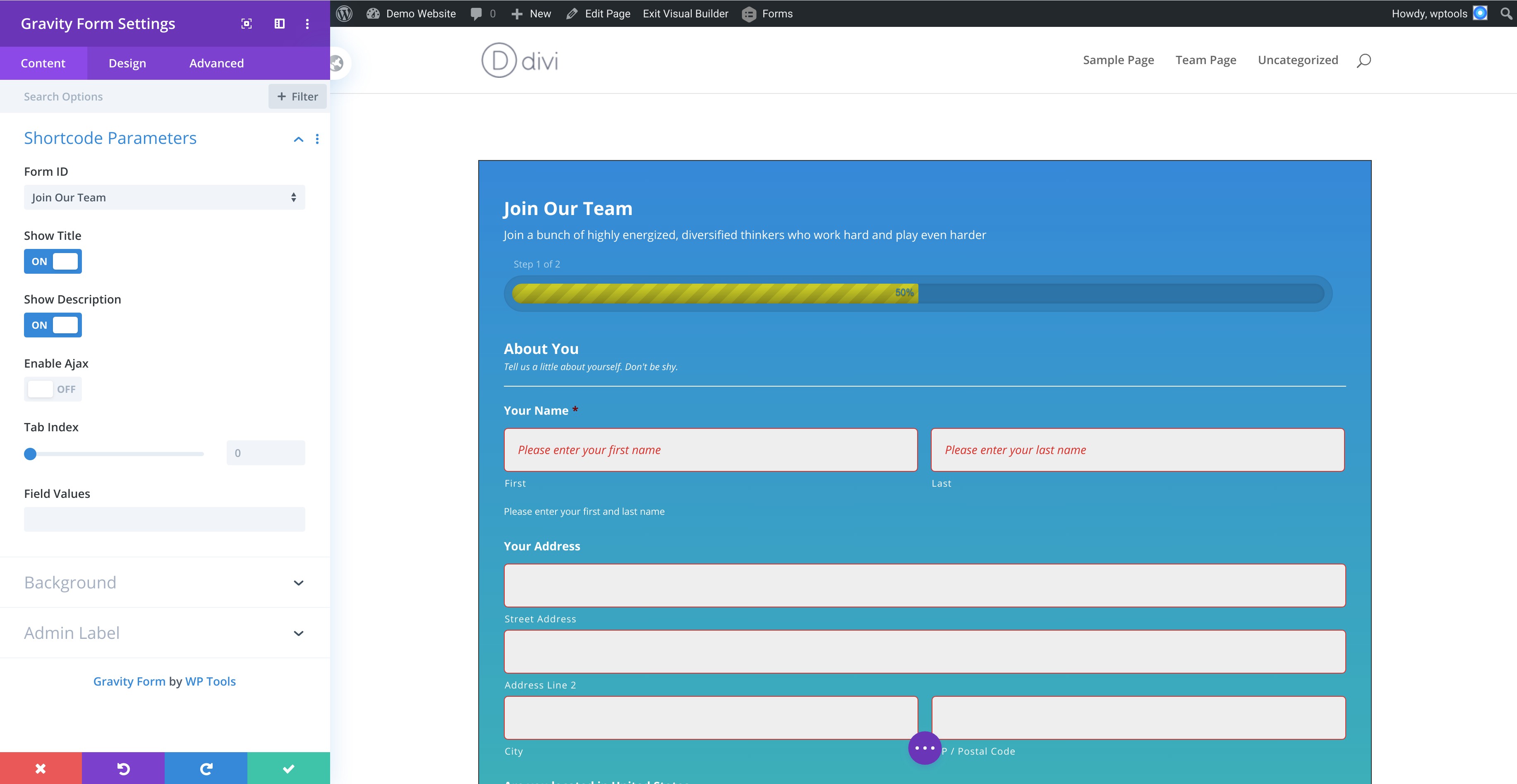
* Add a gravityform on a divi page using the visual builder.
* Configure the gravityform shortcode params
Gravityform Shortcode Parameters
- Show Title – Toggle to display the form title. Defaults is
on - Show Description – Toggle to display the form description. Defaults is
on - Ajax – Toggle to use AJAX to submit the form. Defaults is
off - Tab Index – Specify the starting tab index for the fields of this form
- Field Values – Specify the default field values.
- Example: field_values=’check=First Choice,Second Choice’. See also https://docs.gravityforms.com/using-dynamic-population/ for detailed information on dynamic population.
Premium Plugin
Premium plugin is available at https://wptools.app/wordpress-plugin/gravity-forms-divi-module/
We offer a 7-day FREE trial on the premium plugin.
Style Form Background, Spacing & Border
Set color, gradient, image or video backgrounds. Add border, margin & padding to form wrapper.
Style Gravity Form Title
Style the title typography and spacing using the divi module
Style Gravity Form Description
To render gravityform description, toggle the Show Description to on in Gravityform Shortcode Parameters.
Style the description typography and spacing using the divi module
Style Gravity Form Section Break Field
Section break field adds a content separator to your gravity form – https://docs.gravityforms.com/section-break/
Style the content’s title, description, spacing and border color using the divi module.
Style Input Fields, Input Wrapper & Input Placeholder
- Input fields are text, textarea, checkbox and radio fields.
Input Wrapperwraps an input field. Manage input wrappers margin and padding.- Add background, border and rounded corners for text, textarea and dropdown fields.
- Manage typography for input fields in the
Input Generalsection.- Manage checkbox and radio typography settings in
Checkbox/Radiosection.
- Manage checkbox and radio typography settings in
- Manage margin and padding for text fields.
- Manage typography for input placeholder text.
Style Label, Sub-Label & Input Field Description
Style gravityform’s label, sub-label and description for the inputs.
Set typography and spacing for them.
Style Field Wrapper
A field wrapper wraps the input field, label, sub-label and description.
Manage the field wrappers padding and margin in divi.
Style Form & Field Validation Errors
- Form Validation Error is a general validation error text for the whole form.
- Manage typography, border color, margin and padding.
- Field Validation Error shows the validation per field.
- Manage typography, border color, background color, margin & padding.
Style Forms Submission Confirmation Message
Form submission displays a message. Style typography & background of the confirmation message.
Style Gravityform Button
Set button alignment, typography, border, rounded corner and background color with hover styles.
Style Consent Field & Description
A gravityform consent field is a checkbox accompanied by description.
It’s a compulsory field.
Style the checkbox’s and description’s typography, margin & padding
Style Gravityform Footer
Footer wraps the form buttons. Manage margin and padding for this element.
Style Progress Bar
A multi-step gravityform has a progressbar at the top.
Style the progressbar title’s typography, progressbar’s background and font color.
Custom CSS Setting
A fine-grained control over writing custom css for large number of form elements
Installation
How to install the Divi Gravity Forms (WP Tools) plugin and get it working.
- Upload
plugin-name.phpto the/wp-content/plugins/directory - Activate the plugin through the ‘Plugins’ menu in WordPress
Frequently asked questions
What are the dependencies for this plugin?
Plugin depends on * Divi Theme * Gravity Form
Changelog
9.1.0
- Updated: Styling for divi 5 module
9.0.0
- Added: Divi 5 integration with backward compatibility
8.5.3
- Bug Fix: Issue with content description css
8.5.2
- Updated: Freemius SDK
8.5.1
- Updated: Freemius SDK
8.5.0
- Added: Support for “Orbital” theme in the divi builder and admin notice to inform user if default theme is set to orbital
Screenshots

For developers
Is this your plugin? Show off the numbers.
Add a live badge to your site, docs or GitHub README. It updates on its own — no account needed.
Best Divi Gravity Forms (WP Tools) alternatives
All divi plugins →





FAQ
Divi Gravity Forms (WP Tools): quick answers
Straight answers, pulled from live WordPress.org data.
Live data from WordPress.org · checked Sep 28, 2026
Is Divi Gravity Forms (WP Tools) free?
Yes. Divi Gravity Forms (WP Tools) is free to download and use from the official WordPress.org plugin directory.
Is Divi Gravity Forms (WP Tools) safe to use in 2026?
Divi Gravity Forms (WP Tools) works, but test it on a staging site before relying on it in 2026. It runs on 2K+ sites, is rated 5/5 and was last updated 9 months ago, and scores 55/100 on our health check.
How many websites use Divi Gravity Forms (WP Tools)?
Divi Gravity Forms (WP Tools) is active on 2K+ WordPress websites and has been downloaded 76,059 times since it launched in October 2019. It was downloaded 355 times in the last 30 days.
Does Divi Gravity Forms (WP Tools) work with WordPress 7.1?
Divi Gravity Forms (WP Tools) is officially tested up to WordPress 6.9.9, while the latest release is 7.1.2. It may still work, but try it on a staging site first.
What PHP version does Divi Gravity Forms (WP Tools) need?
Divi Gravity Forms (WP Tools) requires PHP 7.2.5 or higher. Most hosts run PHP 8.x today, so it works on any modern WordPress hosting.
When was Divi Gravity Forms (WP Tools) last updated?
The latest version, 9.1.0, was released on December 29, 2025 (9 months ago).
Who makes Divi Gravity Forms (WP Tools)?
Divi Gravity Forms (WP Tools) is developed and maintained by wptools.
What are the best alternatives to Divi Gravity Forms (WP Tools)?
The most popular alternatives to Divi Gravity Forms (WP Tools) are Supreme Modules Lite (200K+ installs), Popups for Divi (100K+ installs) and Divi Torque Lite (50K+ installs).
Powered by PageForge
Want thousands of pages that rank like these? Build them in an afternoon.
This directory runs on the same engine as PageForge. Turn any spreadsheet, CSV or API into thousands of fast, SEO-ready WordPress pages — with schema, internal links and AI-written copy baked in.
- CSV, Google Sheets & API data sources
- AI content, schema & internal links per page
- Works with Elementor, Gutenberg, Yoast & Rank Math
- Free on WordPress.org — no credit card


