


WP Sitemap Page
Add a sitemap on any of your page using the simple shortcode [wp_sitemap_page]. Improve the SEO and navigation of your website.

Solid choice
WP Sitemap Page is a solid plugin choice in 2026, with a few things worth checking first. It runs on 200K+ sites, is rated 4.8/5 and was last updated 3 months ago, and scores 76/100 on our health check.
- Proven at scale on 200K+ active sites
- Loved by users — 4.8/5 from 205 reviews
- Tested with the latest WordPress (7.1)
How does it stack up?
Side-by-side on installs, updates, ratings & support


Daily downloads
Download spikes usually follow a new release — each site that auto-updates counts as a download.
Rankings
Where WP Sitemap Page stands todayWordPress.org search rankings
Live position in the plugin search, top 100| Keyword | Position |
|---|---|
| generator | #98 |
| html sitemap | #9 |
| page list | #2 |
| site map | #22 |
| sitemap | #4 |
Version adoption
Share of active sites per release.
Rating breakdown
★★★★★★★★★★ 4.8 from 205 reviews
About WP Sitemap Page
From the official readme · v1.9.6Description
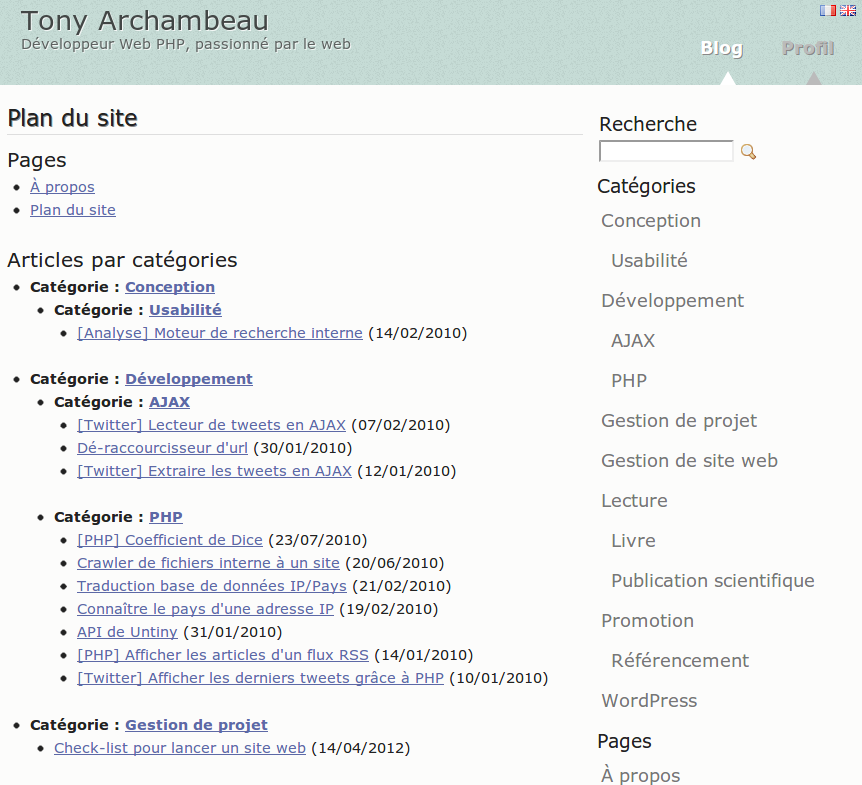
An easy way to add a sitemap on one of your pages becomes reality thanks to this WordPress plugin. Just use the shortcode [wp_sitemap_page] on any of your pages. This will automatically generate a sitemap of all your pages and posts.
Be carefull, this plugin do not generate an XML sitemap. It only allow you to list all your pages and posts on a single page. This is a sitemap for human not for search engines bots.
Why this plugin is useful?
Such a sitemap is useful for many reasons:
- Easy navigation for the users. They can find easily pages or previous posts
- Improve the SEO of a website
Current features
- Display all pages, posts and categories
- Display the Custom Post Type (such as: “event”, “book” …)
- Display the taxonomies
- Display only one kind of content using the attribute “only”, like
[wp_sitemap_page only="page"] - Easy to use
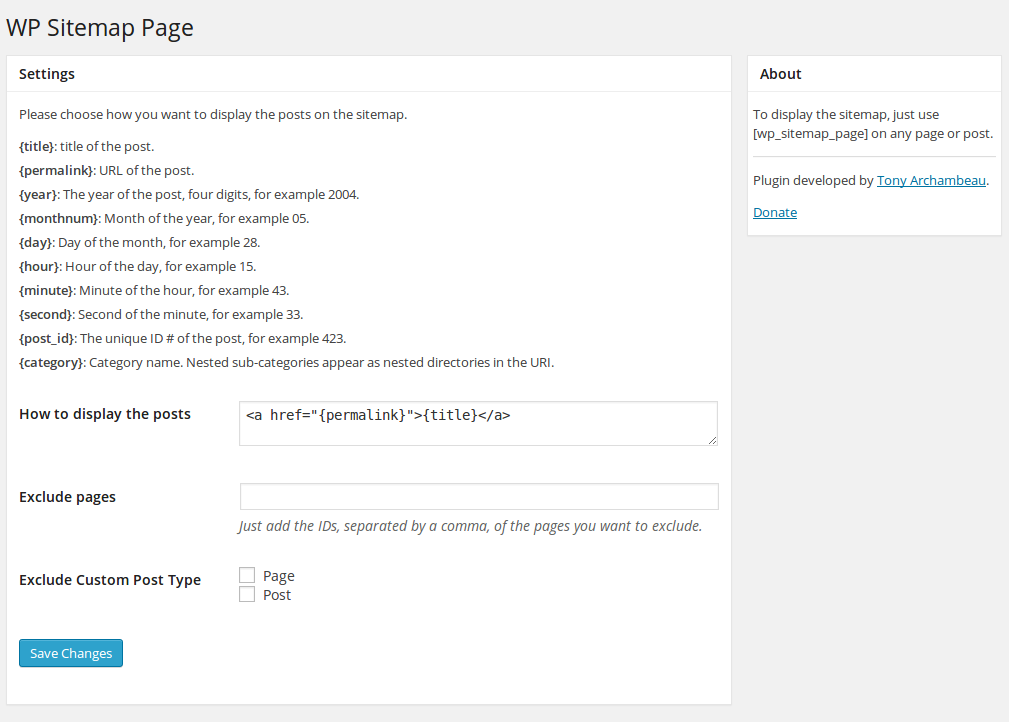
- Possibility to customize the way it will be displayed through the admin panel
- Possibility to exclude some pages or some Custom Post Type (CPT)
- Posts and categories displayed hierarchically
- Has CSS class to customize it if you want
- Available in multi-languages (cf. English, French, Russian, Italian, Spanish, Dutch, Czech, Persian …). You can add your own translation if you want
Want a WordPress developer? Want to add a translation? Feel free to contact me.
How to uninstall WP Sitemap Page
To uninstall WP Sitemap Page, you just have to de-activate the plugin from the plugins list.
Installation
- Unzip the plugin and upload the “wp-sitemap-page” folder to your “/wp-content/plugins/” directory
- Activate the plugin through the “Plugins” administration page in WordPress
- Create a new page where you plan to set-up your sitemap
- Use the shortcode [wp_sitemap_page] on this page. Save the page and visualize it. That’s it, your sitemap should be visible on this page.
Changelog
1.9.6
Release date: 22 august 2026
- Compatible with WordPress 7.1
1.9.5
Release date: 15 april 2025
- Compatible with WordPress 6.8
1.9.4
Release date: 19 april 2024
- Compatible with WordPress 6.5
1.9.3
Release date: 25 november 2023
- Compatible with WordPress 6.4
1.9.2
Release date: 07 november 2022
- Compatible with WordPress 6.1
1.9.1
Release date: october 2021
- fix PHP warning message
Screenshots
For developers
Is this your plugin? Show off the numbers.
Add a live badge to your site, docs or GitHub README. It updates on its own — no account needed.
Best WP Sitemap Page alternatives
All generator plugins →




FAQ
WP Sitemap Page: quick answers
Straight answers, pulled from live WordPress.org data.
Live data from WordPress.org · checked Nov 17, 2026
Is WP Sitemap Page free?
Yes. WP Sitemap Page is free to download and use from the official WordPress.org plugin directory.
Is WP Sitemap Page safe to use in 2026?
WP Sitemap Page is a solid plugin choice in 2026, with a few things worth checking first. It runs on 200K+ sites, is rated 4.8/5 and was last updated 3 months ago, and scores 76/100 on our health check.
How many websites use WP Sitemap Page?
WP Sitemap Page is active on 200K+ WordPress websites and has been downloaded 3,658,719 times since it launched in November 2012. It was downloaded 27,006 times in the last 30 days.
Does WP Sitemap Page work with WordPress 7.1?
Yes. The developer has tested WP Sitemap Page up to WordPress 7.1.4, the latest release. It requires WordPress 3.0 or newer.
When was WP Sitemap Page last updated?
The latest version, 1.9.6, was released on August 21, 2026 (3 months ago).
Who makes WP Sitemap Page?
WP Sitemap Page is developed and maintained by Tony Archambeau.
What are the best alternatives to WP Sitemap Page?
The most popular alternatives to WP Sitemap Page are SMK Sidebar Generator (10K+ installs), Child Theme Wizard (10K+ installs) and FakerPress (10K+ installs).
Powered by PageForge
Want thousands of pages that rank like these? Build them in an afternoon.
This directory runs on the same engine as PageForge. Turn any spreadsheet, CSV or API into thousands of fast, SEO-ready WordPress pages — with schema, internal links and AI-written copy baked in.
- CSV, Google Sheets & API data sources
- AI content, schema & internal links per page
- Works with Elementor, Gutenberg, Yoast & Rank Math
- Free on WordPress.org — no credit card


