



External Store for Shopify
Display products from your Shopify store on your WordPress website using shortcodes. Fast, cached and secure.

Solid choice
External Store for Shopify is a solid plugin choice in 2026, with a few things worth checking first. It runs on 2K+ sites, is rated 3.4/5 and was last updated 3 weeks ago, and scores 77/100 on our health check.
- Actively developed — last update 3 weeks ago
- Tested with the latest WordPress (7.1)
- Momentum — downloads up 476.5% vs the previous 30 days
- Low rating so far — 3.4/5 from only 5 reviews
How does it stack up?
Side-by-side on installs, updates, ratings & support



Daily downloads
Download spikes usually follow a new release — each site that auto-updates counts as a download.
Rankings
Where External Store for Shopify stands todayWordPress.org search rankings
Live position in the plugin search, top 100| Keyword | Position |
|---|---|
| catalog | #92 |
| ecommerce | >100 |
| embed | >100 |
| products | >100 |
| shopify | #3 |
Version adoption
Share of active sites per release.
Rating breakdown
★★★★★★★★★★ 3.4 from 5 reviews
About External Store for Shopify
From the official readme · v1.7.0Description
Display Shopify products on your WordPress website with simple shortcodes.
Free features
- Product grid and collection shortcodes with search filter
- Responsive grid with configurable columns, sorting and price display
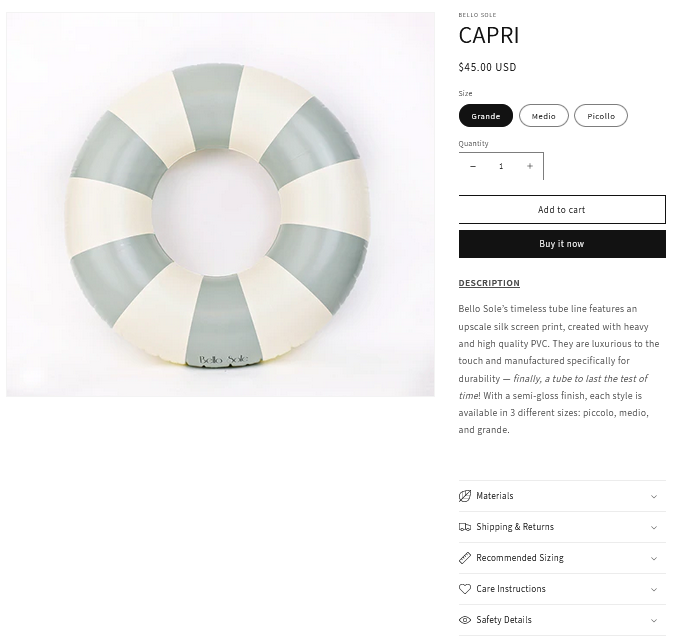
- Single product page with gallery, price, sale price and sold out label
- Product structured data (JSON-LD) for better search results
- Built-in cache for fast pages, plus a Clear cache button
- Test connection, shortcode generator and one-click disconnect in the settings
- Secrets are never printed back into the settings page
- Accessible, translatable and lazy loaded images
Premium features (plug and play)
If the pro folder exists, the premium features switch on automatically. If it does not exist, the free version keeps working exactly as before.
- JS cart drawer with variant and quantity support, live cart counter and checkout button
- Quick “Add to cart” buttons inside the product grid
- Sale badges and list / cards layouts
[wp-shopify-related]related product recommendations[wp-shopify-cart-button]cart button anywhere- Premium product templates
New attributes in 1.7.0
[wp-shopify type="products" columns="4" sort="title" reverse="yes" show-price="yes"]
Sort values: title, price, newest, best-selling (collections also support manual and default).
How it works?
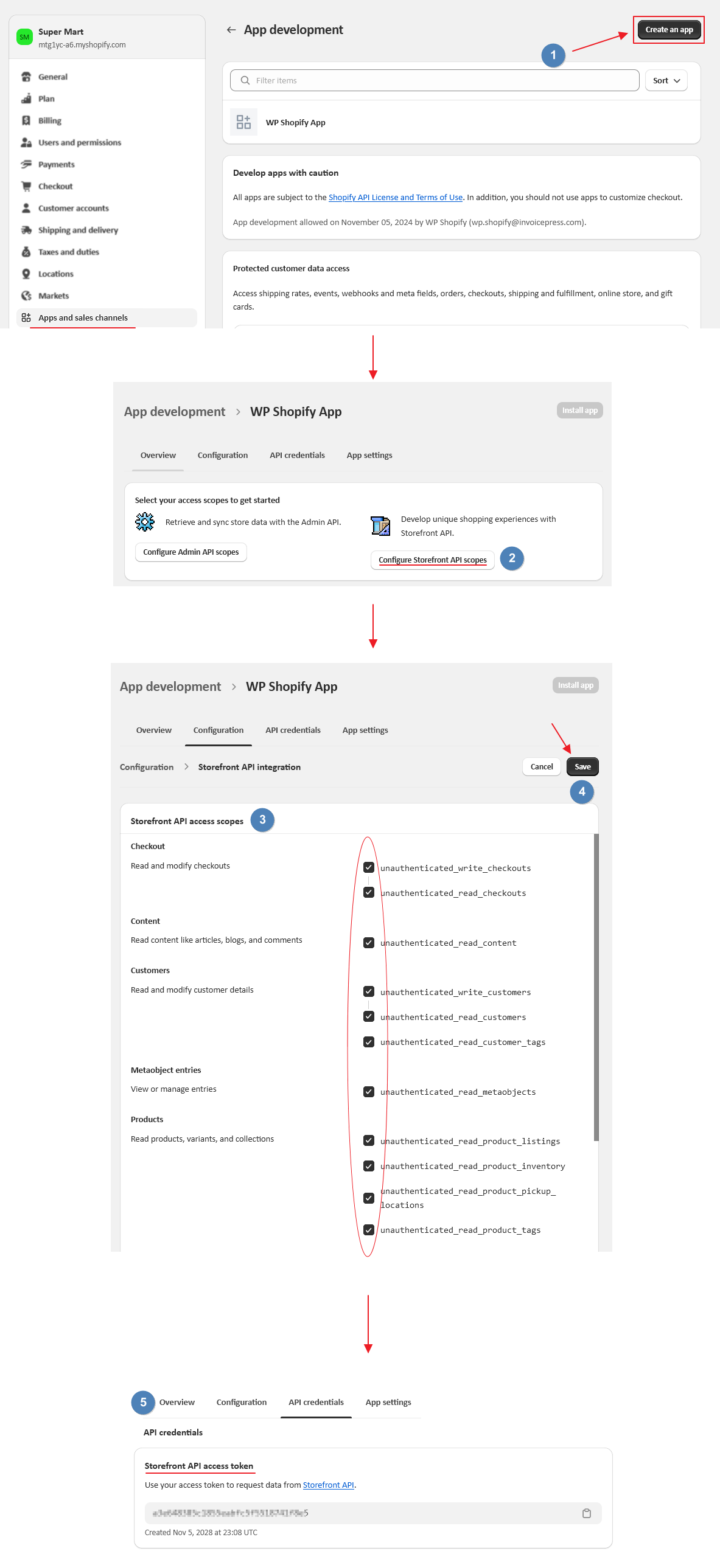
A) Set up all the apis as directed by the App
B) Set up two new pages on your WordPress website
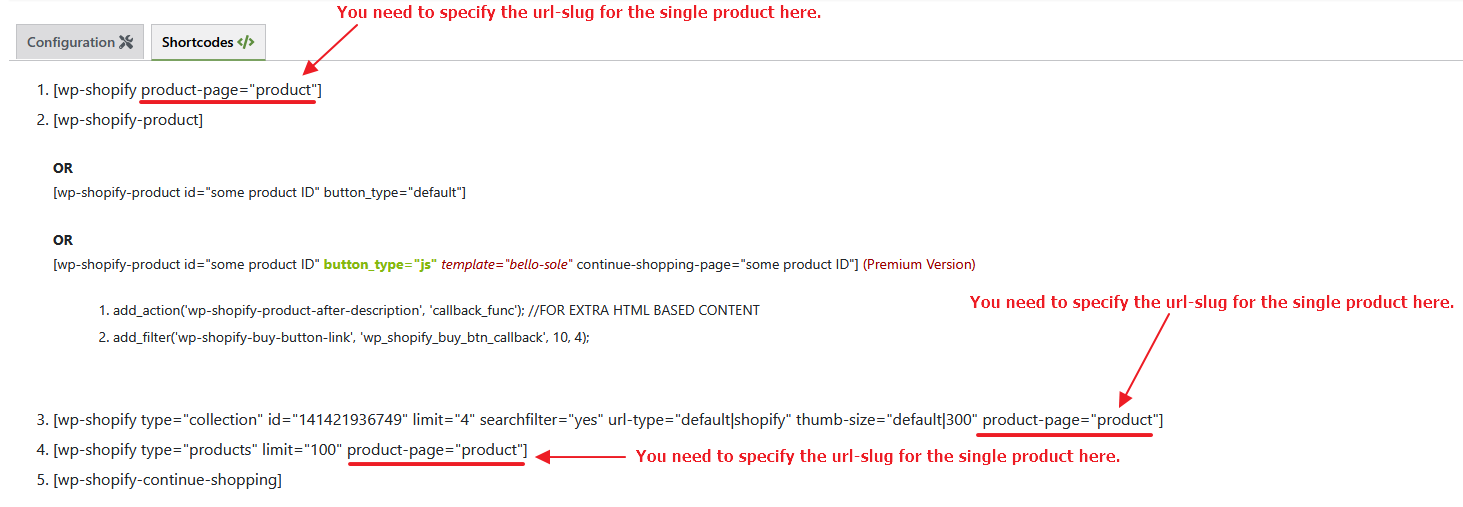
Page #1 Set the permalink to shopify (or products, shop, catalogue etc.) and add code [wp-shopify type=”products” limit=”100″ url-type=”default”]
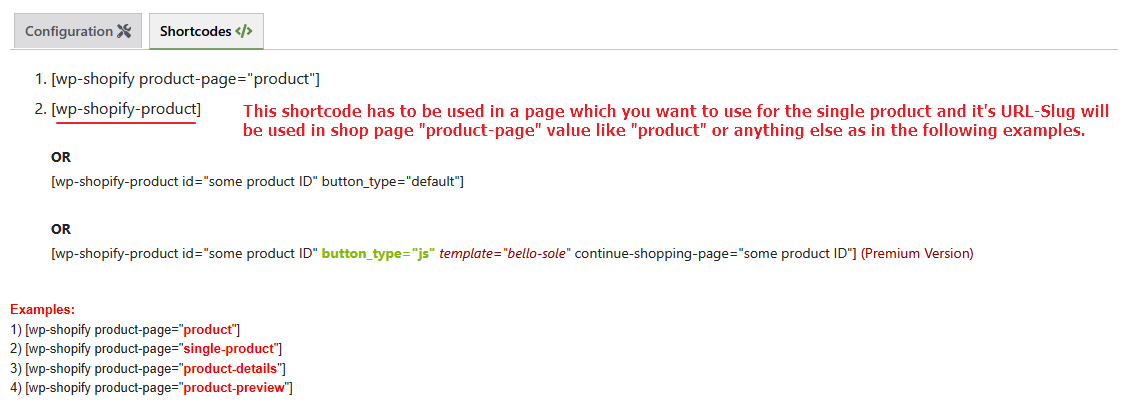
Page #2 Set the permalink to product (note there is no “s” at the end of the product in the url, the slug/permalink should be with exactly “product”) and insert code [wp-shopify-product] (this is where product redirect link to shopify store will work on your WordPress website)
C) Modify the layout of your WordPress website pages with the CSS
Installation
Note: This is a two-part install; you have to do some configuration on your Shopify store admin, then you must install code on your WordPress site.
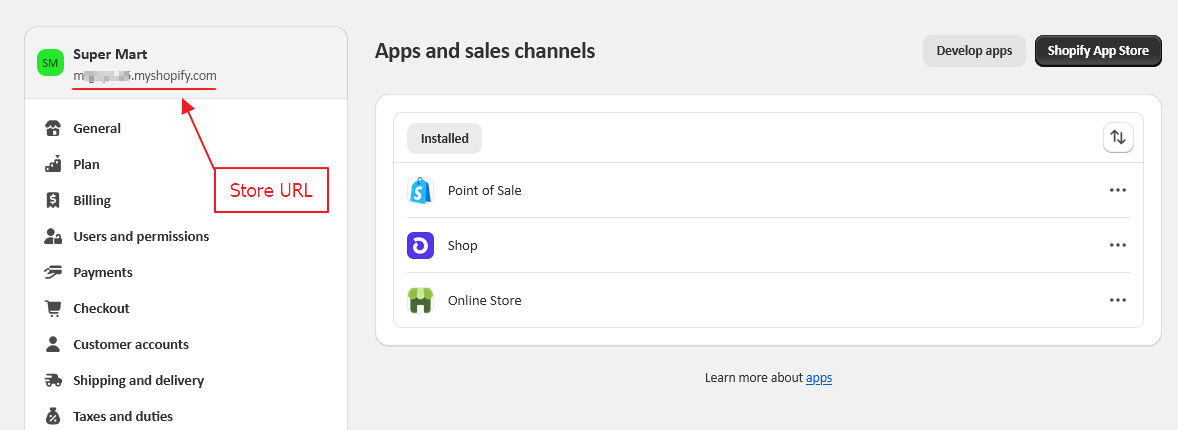
In your Shopify admin, do the following:
- Login to the Shopify 2 Admin Panel.
- Go to Apps, then click the “Manage private apps” link at the bottom of the page.
- Click the “Generate API credentials” button.
- Set the Private app name to “Product Display” and be sure you have Read access to Products, variants and collections.
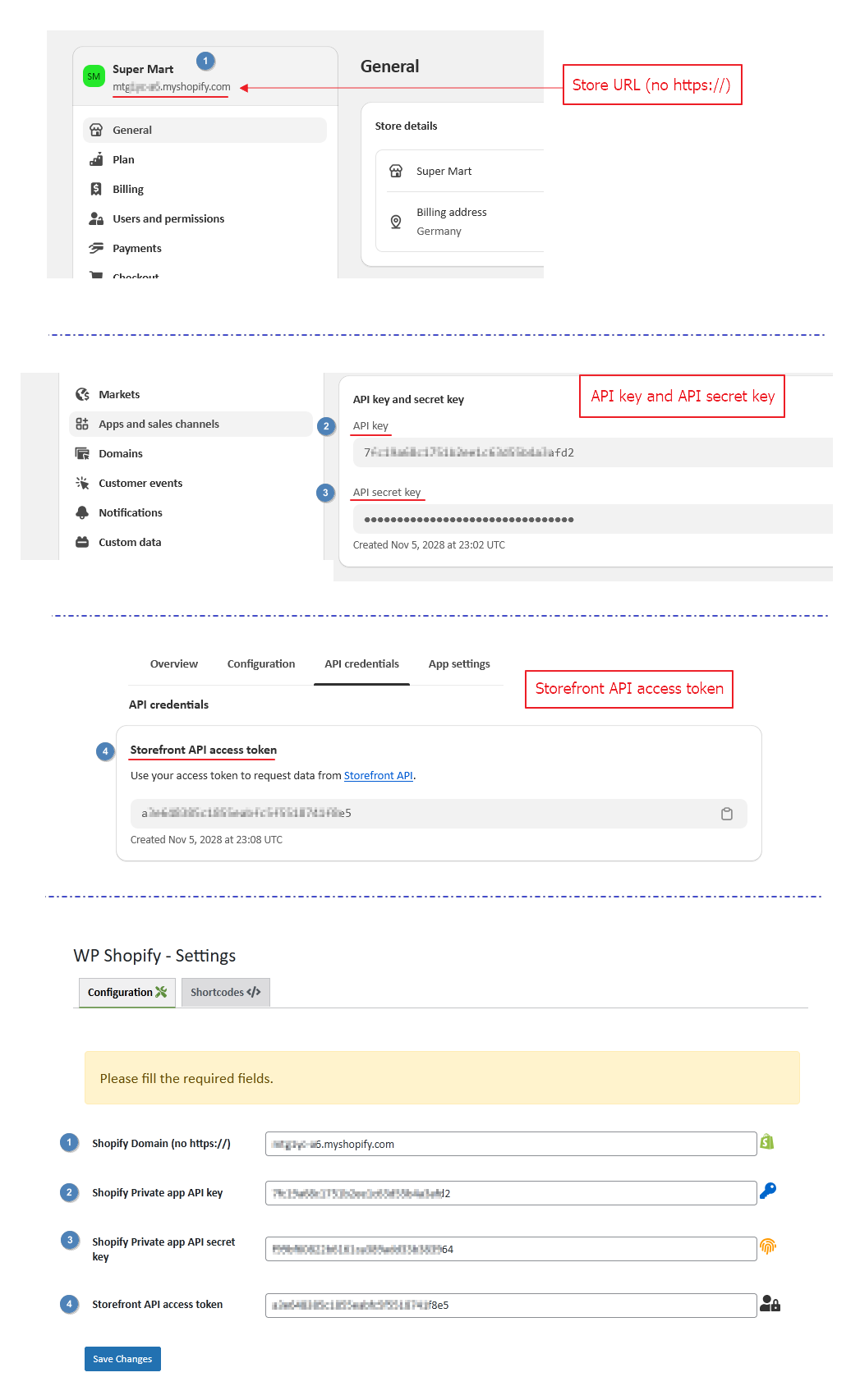
- Click the save button, and note your Private app API key and Password.
Install the WordPress part of this mod as usual (using the Install button
on the mod page on WordPress.org). The follow these steps:
- In your WordPress admin, do the following:
– In Plugins->Installed Plugins, click the “Activate” link under WP Shopify.
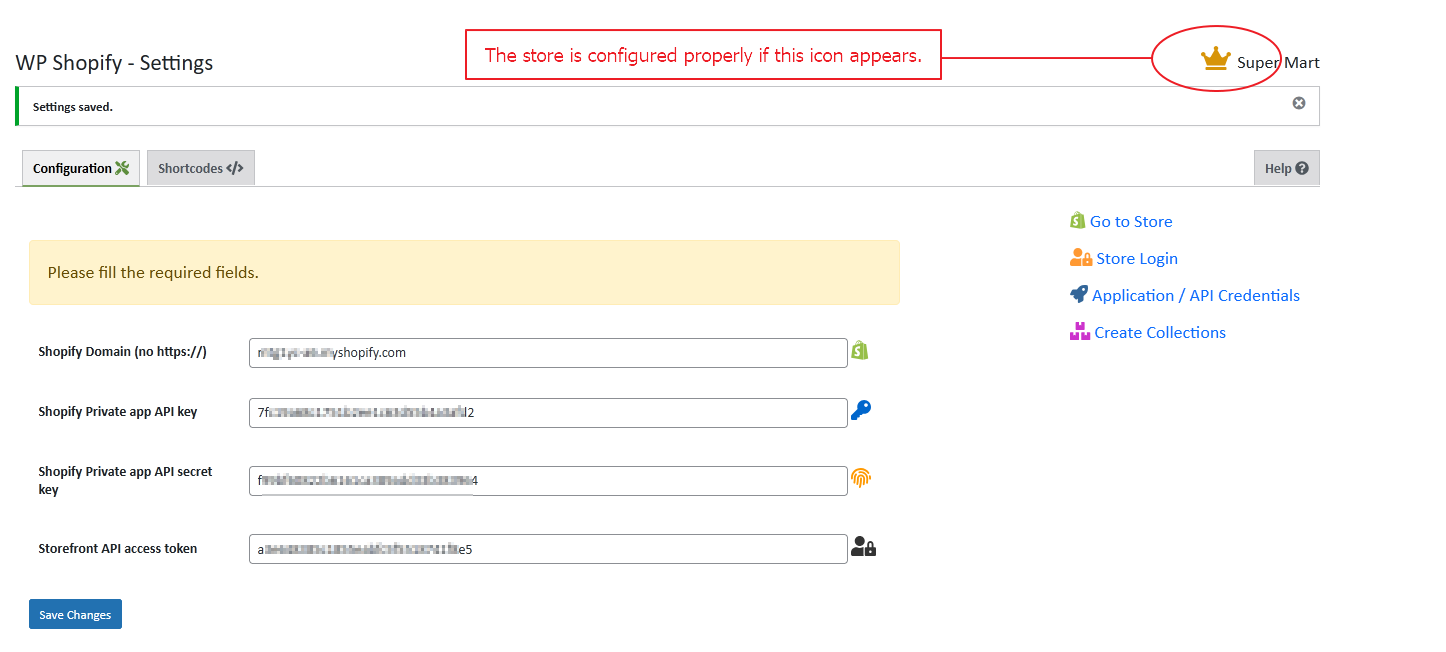
– In Settings->WP Shopify, set your Shopify URL, API Key and password.
To show a specific product on your blog, use the shortcode
[wp-shopify-product] with parameter “id” as a self closing tag.
So showing product 617935406 would be done as follows:
[wp-shopify-product id=”617935406″]
The id is shown in the URL when you edit a product in your admin.
Changelog
Security hardening, caching, new shortcode attributes and a Tools tab. Because Shopify credentials are no longer printed on the settings page, leave the secret fields blank to keep the saved values.
1.7.0
- Security: Storefront API requests are now built from validated values only (numeric ids, whitelisted sort keys), which removes the GraphQL injection risk from the product id in the URL.
- Security: All shortcode output is escaped, settings are sanitized and validated, secret fields are no longer printed into the settings page and AJAX actions require the manage_options capability.
- Security: The Shopify domain is validated (no IPs or paths), API calls use the WordPress HTTP API and the hard-coded session cookie was removed.
- Security: The debug helper is limited to administrators with WP_DEBUG enabled.
- New: Response cache with a configurable duration and a Clear cache button.
- New: Tools tab with Test connection, status information and Disconnect.
- New: Shortcode generator on the settings page.
- New: columns, sort, reverse and show-price shortcode attributes.
- New: Compare-at (sale) price, sold out label and Product structured data (JSON-LD).
- New: Optional price formatting in the website language.
- New: Search filter now shows a message when nothing matches and works with several lists on one page.
- New (Premium): Cart drawer with variant and quantity support, quick add buttons, sale badges, list / cards layouts, [wp-shopify-related] and [wp-shopify-cart-button].
- Improvement: Responsive CSS grid, lazy loaded images, scripts and styles load only where needed, versioned assets for proper browser caching.
- Improvement: Storefront API updated, deprecated fields removed, premium /pro folder is loaded after the core so it works as a clean add-on.
- Improvement: The gallery thumbnail switch on the single product page now works on the front end.
- Compatibility: Tested with WordPress 7.1. Requires WordPress 5.8 and PHP 7.4.
- Cleanup: Plugin data (settings and cache) is removed when the plugin is deleted.
1.6.0
- Security: Hardened premium template inclusion against potential Local File Inclusion (LFI) risks by adding sanitize_file_name(), strict whitelist validation, and fallback to ‘default’ template in shortcode handler. [22/02/2026 / Thanks to patchstack / timomangcut & @ratputin]
- Improvement: Enhanced input sanitization in shortcode attributes for better overall security and reliability.
- Compatibility: Tested with latest WordPress and Shopify API changes.
1.5.9
- New: Limit attribute default value fix. [01/09/2025 / Thanks to Maryam KJ]
1.5.8
- New: Plugin name updated for users convenience. [26/08/2025 / Thanks to WordPress Plugins Team]
1.5.7
- New: product-page attribute added. [12/08/2025 / Thanks to Christopher Hutchins]
1.5.6
- Fix: Limit parameter in the shop shortcode. [04/08/2025 / Thanks to Sachin & Maddy Stillman]
Screenshots


For developers
Is this your plugin? Show off the numbers.
Add a live badge to your site, docs or GitHub README. It updates on its own — no account needed.


Best External Store for Shopify alternatives
All catalog plugins →





FAQ
External Store for Shopify: quick answers
Straight answers, pulled from live WordPress.org data.
Live data from WordPress.org · checked Nov 16, 2026
Is External Store for Shopify free?
Yes. External Store for Shopify is free to download and use from the official WordPress.org plugin directory.
Is External Store for Shopify safe to use in 2026?
External Store for Shopify is a solid plugin choice in 2026, with a few things worth checking first. It runs on 2K+ sites, is rated 3.4/5 and was last updated 3 weeks ago, and scores 77/100 on our health check.
How many websites use External Store for Shopify?
External Store for Shopify is active on 2K+ WordPress websites and has been downloaded 102,508 times since it launched in April 2018. It was downloaded 2,571 times in the last 30 days.
Does External Store for Shopify work with WordPress 7.1?
Yes. The developer has tested External Store for Shopify up to WordPress 7.1.4, the latest release. It requires WordPress 5.8 or newer.
What PHP version does External Store for Shopify need?
External Store for Shopify requires PHP 7.4 or higher. Most hosts run PHP 8.x today, so it works on any modern WordPress hosting.
When was External Store for Shopify last updated?
The latest version, 1.7.0, was released on October 29, 2026 (3 weeks ago).
Who makes External Store for Shopify?
External Store for Shopify is developed and maintained by Fahad Mahmood.
What are the best alternatives to External Store for Shopify?
The most popular alternatives to External Store for Shopify are eCommerce Product Catalog (7K+ installs), Ultimate Product Catalog (4K+ installs) and FlippingBook (2K+ installs).
Powered by PageForge
Want thousands of pages that rank like these? Build them in an afternoon.
This directory runs on the same engine as PageForge. Turn any spreadsheet, CSV or API into thousands of fast, SEO-ready WordPress pages — with schema, internal links and AI-written copy baked in.
- CSV, Google Sheets & API data sources
- AI content, schema & internal links per page
- Works with Elementor, Gutenberg, Yoast & Rank Math
- Free on WordPress.org — no credit card


