



WP Rollback – Rollback Plugins and Themes
Roll back (or forward) any WordPress.org plugin, theme, or block like a boss.

Safe pick
Yes — WP Rollback is a safe, well-maintained plugin to use in 2026. It runs on 200K+ sites, is rated 4.9/5 and was last updated 6 days ago, and scores 91/100 on our health check.
- Proven at scale on 200K+ active sites
- Loved by users — 4.9/5 from 215 reviews
- Actively developed — last update 6 days ago
- Tested with the latest WordPress (7.1)
- Momentum — downloads up 101.1% vs the previous 30 days
How does it stack up?
Side-by-side on installs, updates, ratings & support



Daily downloads
Download spikes usually follow a new release — each site that auto-updates counts as a download.
Rankings
Where WP Rollback stands todayWordPress.org search rankings
Live position in the plugin search, top 100| Keyword | Position |
|---|---|
| Downgrade | #2 |
| plugins | #4 |
| revert | #1 |
| rollback | #1 |
| version | #7 |
Version adoption
Share of active sites per release.
Rating breakdown
★★★★★★★★★★ 4.9 from 215 reviews
About WP Rollback
From the official readme · v3.4.0Description
Quickly and easily roll back any theme or plugin from WordPress.org to any previous (or newer) version without any of the manual fuss. Works just like the plugin updater, except you’re rolling back (or forward) to a specific version. No need for manually downloading and FTPing the files or learning Subversion. This plugin takes care of the trouble for you.
🔙 Roll Back WordPress.org Plugins and Themes
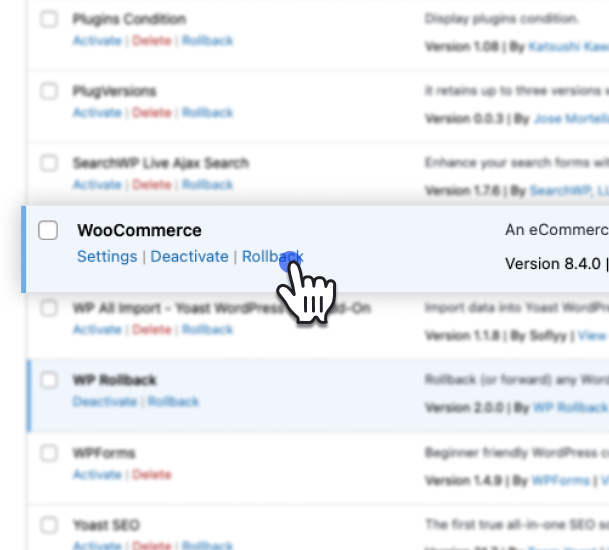
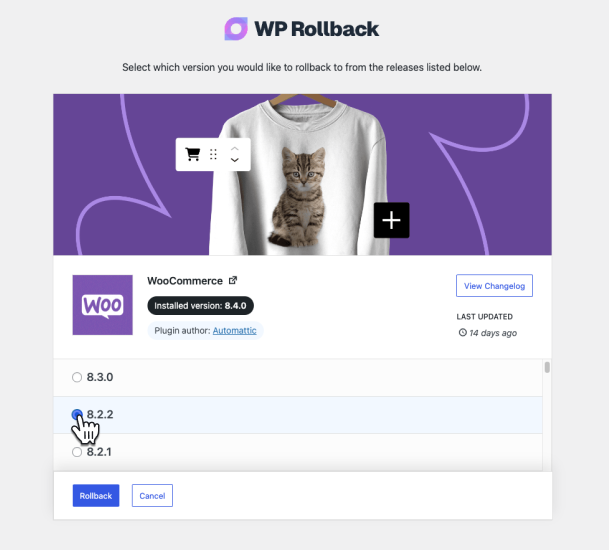
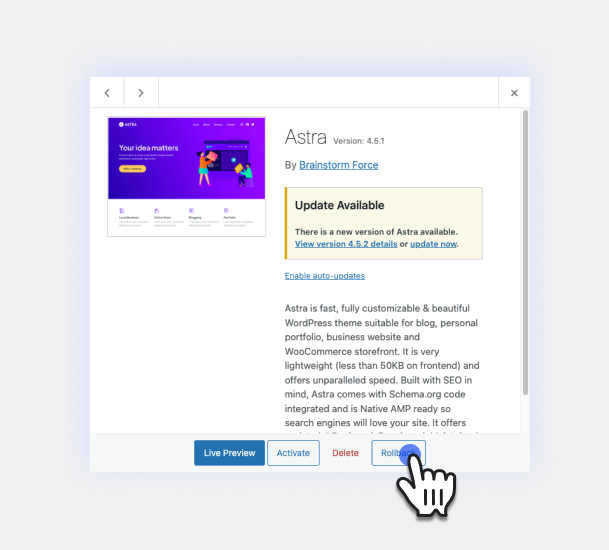
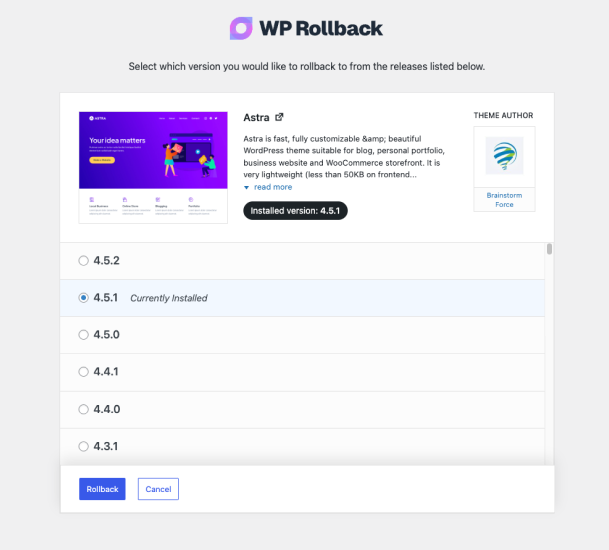
While it’s considered best practice to always keep your WordPress plugins and themes updated, we understand there are times you may need to quickly revert to a previous version. This plugin makes that process as easy as a few mouse clicks. Simply select the version of the plugin or theme that you’d like to roll back to, confirm, and in a few moments you’ll be using the version requested. No more fumbling to find the version, downloading, unzipping, FTPing, learning Subversion or hair pulling.
For advanced features including rollback support for premium plugins and themes you already have licensed and installed (Elementor Pro, Gravity Forms, WooCommerce extensions, Kadence Pro, Astra Pro, GeneratePress Premium, Divi, Envato/ThemeForest products, and more), comprehensive activity logging, multisite network management, and priority support, consider upgrading to WP Rollback Pro.
Muy Importante (Very Important): Always Test and Backup
Important Disclaimer: This plugin is not intended to be used without first taking the proper precautions to ensure zero data loss or site downtime. Always be sure you have first tested the rollback on a staging or development site prior to using WP Rollback on a live site.
We provide no (zero) assurances, guarantees, or warranties that the plugin, theme, or WordPress version you are downgrading to will work as you expect. Use this plugin at your own risk.
Translation Ready
Do you speak another language? Want to contribute in a meaningful way to WP Rollback? There’s no better way than to help us translate the plugin. This plugin is translation ready. Simply header over to the WP Rollback translation project that’s powered by WordPress.org volunteer translators. There you can contribute to the translation of the plugin into your language.
Support and Documentation
We answer all free user support requests on the WordPress.org support forum. For pro users, please submit your questions to WP Rollback Pro support.
WP Rollback was created to be as intuitive to the natural WordPress experience as possible. We believe that once you activate WP Rollback, you’ll quickly discover exactly how it works without question.
BUT!!
We do have documentation on our website. See WP Rollback Documentation.
External services
Besides WordPress.org, where it finds plugin and theme versions, WP Rollback connects to two services, and only when you ask it to.
WP Rollback newsletter (wprollback.com)
After a rollback, at the end of the 1-minute tour, and on the WP Rollback dashboard, you can subscribe to the WP Rollback newsletter: tips for safer WordPress updates, WP Rollback news, and the occasional deal. Nothing is sent unless you click Subscribe. When you do, your site sends the email address you entered and where the form was (for example, “free-plugin-rollback-complete”) to https://wprollback.com/wp-json/wp-rollback/v1/subscribe, which also sees your server’s IP address. You’ll get an email asking you to confirm, and every email has a link to unsubscribe.
Click “No thanks” to hide the form. To hide it for every user, return false from the wpr_newsletter_signup_enabled filter.
- Terms of service: https://wprollback.com/terms-of-service/
- Privacy policy: https://wprollback.com/privacy-policy/
WP Rollback’s Plugin Vault (hosted on Supabase)
When you open the rollback screen for a premium plugin or theme (one that isn’t on WordPress.org), WP Rollback asks Plugin Vault whether it has any versions of it, so the screen can tell you what WP Rollback Pro could restore. Your site sends only the plugin or theme’s folder name and whether it’s a plugin or a theme to https://vkdqaijmfyemronywzkv.supabase.co/functions/v1/vault-coverage, which also sees your server’s IP address. The request identifies WP Rollback and its version, not your site. The answer is a yes or no, cached for up to 12 hours. Nothing is sent for WordPress.org plugins and themes, on the Plugins screen, or in the background. If WordPress.org can’t be reached to confirm it doesn’t have the item, nothing is sent either.
To turn the check off, return ‘unknown’ from the wp_rollback_pre_vault_coverage filter.
- Terms of service: https://wprollback.com/terms-of-service/
- Privacy policy: https://wprollback.com/privacy-policy/
Installation
Minimum Requirements
- WordPress 6.5 or greater
- PHP version 7.4 or greater
- MySQL version 5.0 or greater
Automatic installation
Automatic installation is the easiest option as WordPress handles the file transfers itself and you don’t need to leave your web browser. To do an automatic install of WP Rollback, log in to your WordPress dashboard, navigate to the Plugins menu and click Add New.
In the search field type “WP Rollback” and click Search Plugins. Once you have found the plugin you can view details about it such as the point release, rating and description. Most importantly of course, you can install it by simply clicking “Install Now”.
Manual installation
The manual installation method involves downloading our donation plugin and uploading it to your server via your favorite FTP application. The WordPress codex contains instructions on how to do this here.
Updating
Automatic updates should work like a charm; as always though, ensure you backup your site just in case.
Changelog
3.4.0
- New: The Plugins and Themes screens now say when WP Rollback saved a backup of a premium plugin or theme before updating it.
- New: A premium plugin or theme’s rollback screen now says when its backup is saved on your site, with a “Restore it with Pro” button.
- New: Hide the backup labels on the Plugins and Themes screens with the
wp_rollback_show_backup_labelsfilter. - Enhancement: The Pro screen for a premium plugin or theme now says plainly whether Plugin Vault has versions of it.
- Fix: Rollbacks no longer stop at “Package not found” when the site’s Redis or Memcached object cache loses data between requests.
3.3.0
- New: After you install WP Rollback, a short welcome asks what you want to do and guides you through your first rollback or a 1-minute tour.
- New: Subscribe to the WP Rollback newsletter after a rollback or from the dashboard. Nothing is sent unless you click Subscribe.
- Fix: Going straight from one rollback screen to another now loads the new plugin or theme and no longer leaves the previous rollback’s completion message open.
- Fix: Rollback cleanup now only deletes the temporary package files WP Rollback created and leaves any other file alone.
- Fix: A premium plugin whose updater borrows a WordPress.org plugin’s name is no longer mistaken for that plugin, so a rollback can’t install the wrong one.
- Fix: When WP Rollback is network activated, subsites no longer get rollback commands in the command palette that open a page they don’t have.
3.2.0
- Enhancement: Pages load a little faster because WP Rollback no longer checks its backup folder on every request.
- Enhancement: Redesigned the main WP Rollback screen with a cleaner layout and a side-by-side look at what Free and Pro cover.
- Enhancement: The upgrade screen for premium plugins and themes has a clearer layout and explains what Plugin Vault is.
- Enhancement: Deleting WP Rollback now removes the settings it saved.
- Security: Backups now live in a private folder with a hard-to-guess name. Your existing backups are moved over automatically when you update.
- Fix: Plugins with date-style version numbers, like Theme Check, can now be rolled back instead of showing an “Invalid version key” error.
- Fix: Rolling back now works for plugins whose folder you’ve renamed to disable them during a conflict (e.g.
wp-rollback-disabled/). - Fix: A rollback no longer takes your site down with a fatal error on hosts where the temporary maintenance-mode file can’t be read.
- Fix: A successful rollback no longer reports a “critical error” or leaves visitors on the maintenance page (e.g. FooGallery 3.3.7 to 3.3.3).
- Fix: If a rollback can’t unzip the new files, the plugin or theme you had is put back instead of being left deleted.
- Fix: A rollback that fails partway through, like a download that times out, no longer leaves visitors on the maintenance page.
- Fix: On multisite with WP Rollback network-activated, rolling back a plugin or theme now turns on maintenance mode when any site uses it.
- Fix: When a PHP error stops a rollback, the message now shows the error and where to look instead of raw HTML code.
- Fix: Users who can update themes, but not plugins, can now roll back themes.
- Fix: A plugin or theme no longer shows or deletes backups belonging to another whose folder name starts the same way (e.g.
fooandfoo-bar). - Compatibility: WP Rollback now pauses itself with a notice when WP Rollback Pro 1.4.2 or older is active, since the two can’t run together.
- Compatibility: Tested up to WordPress 7.1.
3.1.2
- Fix: Resolved a fatal
TypeErrorthrown from theadmin_footer_textfilter when another plugin or theme passes a non-string value (such asnull) into the footer text chain. This affected sites running Classic Editor and other admin-customizing plugins, where the WP Rollback admin footer hook could blank out or partially break admin screens. The footer filter callbacks now safely accept and normalize any input type.
3.1.1
- New: WordPress Command Palette integration — press Cmd+K (Mac) or Ctrl+K (Windows) from any admin page and type “Rollback” to instantly find and navigate to any installed plugin or theme rollback. Type “Rollback plugin” to filter to plugins only, or “Rollback theme” for themes only.
- Enhancement: The default WordPress admin footer is now replaced with subtle WP Rollback branding on all WP Rollback pages — the left side shows “Thank you for using WP Rollback” and the right side shows the current plugin version.
3.1.0
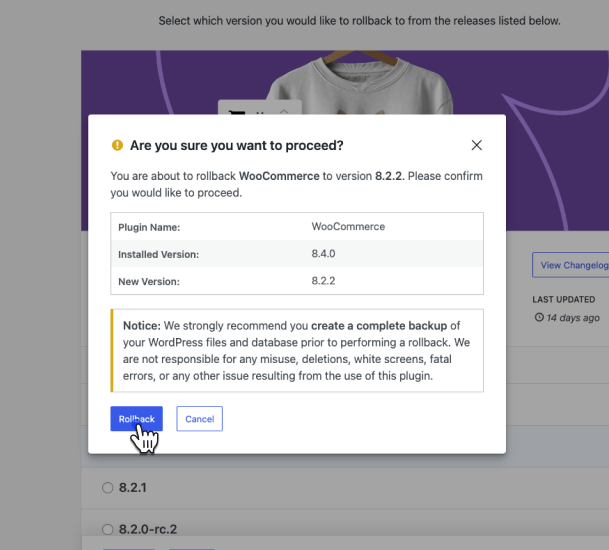
- Enhancement: Redesigned rollback confirmation modal — replaced the generic admin table with a visual version comparison showing the installed version and target version side by side, making the rollback action immediately clear at a glance.
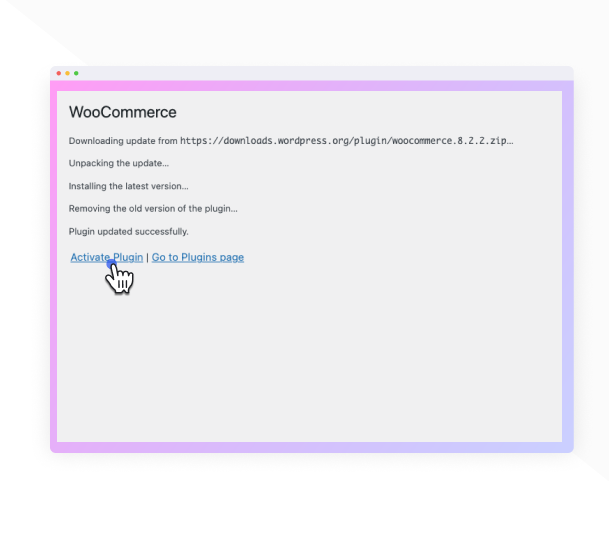
- Enhancement: Redesigned rollback progress modal — steps now display a shimmer skeleton before loading to prevent layout jump, running step messages appear in real-time, and the spinning header icon switches to a checkmark once all steps complete.
- Enhancement: Duplicate step message text is no longer shown while a step is actively running; the detail message now only appears on completion with meaningful server-side feedback.
- Enhancement: Added Lottie success animation to the rollback complete screen (Pro) along with redesigned “What’s next?” step cards featuring contextual icons.
- Fix: Rollback complete modal no longer shows a spurious scrollbar on the complete screen at typical viewport heights.
Screenshots
For developers
Is this your plugin? Show off the numbers.
Add a live badge to your site, docs or GitHub README. It updates on its own — no account needed.
Best WP Rollback alternatives
All Downgrade plugins →



FAQ
WP Rollback: quick answers
Straight answers, pulled from live WordPress.org data.
Live data from WordPress.org · checked Nov 17, 2026
Is WP Rollback free?
Yes. WP Rollback is free to download and use from the official WordPress.org plugin directory.
Is WP Rollback safe to use in 2026?
Yes — WP Rollback is a safe, well-maintained plugin to use in 2026. It runs on 200K+ sites, is rated 4.9/5 and was last updated 6 days ago, and scores 91/100 on our health check.
How many websites use WP Rollback?
WP Rollback is active on 200K+ WordPress websites and has been downloaded 5,188,129 times since it launched in May 2015. It was downloaded 271,717 times in the last 30 days.
Does WP Rollback work with WordPress 7.1?
Yes. The developer has tested WP Rollback up to WordPress 7.1.4, the latest release. It requires WordPress 6.5 or newer.
What PHP version does WP Rollback need?
WP Rollback requires PHP 7.4 or higher. Most hosts run PHP 8.x today, so it works on any modern WordPress hosting.
When was WP Rollback last updated?
The latest version, 3.4.0, was released on November 11, 2026 (6 days ago).
Who makes WP Rollback?
WP Rollback is developed and maintained by Devin Walker.
What are the best alternatives to WP Rollback?
The most popular alternatives to WP Rollback are WP Downgrade (100K+ installs), Core Rollback (20K+ installs) and Version Locker: Disable Upd… (100+ installs).
Powered by PageForge
Want thousands of pages that rank like these? Build them in an afternoon.
This directory runs on the same engine as PageForge. Turn any spreadsheet, CSV or API into thousands of fast, SEO-ready WordPress pages — with schema, internal links and AI-written copy baked in.
- CSV, Google Sheets & API data sources
- AI content, schema & internal links per page
- Works with Elementor, Gutenberg, Yoast & Rank Math
- Free on WordPress.org — no credit card


