


WP Hide Post — Hide Posts, Pages, Custom Post Types, and Control Products Visibility for WooCommerce
Hide posts, pages, media, and WooCommerce products from homepage, categories, search results, RSS feed, widgets, and REST API — without deleting content and keeping them accessible via direct links.

Solid choice
WP Hide Post is a solid plugin choice in 2026, with a few things worth checking first. It runs on 2K+ sites, is rated 5/5 and was last updated 5 months ago, and scores 68/100 on our health check.
- Momentum — downloads up 18.5% vs the previous 30 days
How does it stack up?
Side-by-side on installs, updates, ratings & support


Daily downloads
Download spikes usually follow a new release — each site that auto-updates counts as a download.
Rankings
Where WP Hide Post stands todayWordPress.org search rankings
Live position in the plugin search, top 100| Keyword | Position |
|---|---|
| content visibility | #32 |
| hide page | #10 |
| hide post | #6 |
| hide product | #7 |
| woocommerce | >100 |
Version adoption
Share of active sites per release.
Rating breakdown
★★★★★★★★★★ 5 from 5 reviews
About WP Hide Post
From the official readme · v2.0.4Description
Hide posts, pages, media, and WooCommerce products from homepage, categories, search results, RSS feed, widgets, and REST API — without deleting content and keeping them accessible via direct links.
👉 Try the Demo | Documents | Pro Version | Facebook Page
WP Hide Post gives you straightforward control over where your content appears on your WordPress site. Want a product to stay out of the shop page but still reachable by link? Need an article hidden from category and tag pages while editors can preview it?
This plugin helps you hide posts from the homepage, hide posts from category and tag pages, hide posts from search results, and even hide posts from RSS feed and REST API — all without deleting the content.
Perfect for content managers, store owners, and publishers who need flexible content visibility. Use it to hide WooCommerce products from shop and product search, hide custom post types from archive listings, or hide posts from widgets.
Isn’t that awesome! 😃 Keep reading, there’s more. 👇
Why choose WP Hide Post?
WP Hide Post is the simplest WordPress plugin to hide posts, pages, custom post types, and WooCommerce products without deleting them. Control where your content appears — on the homepage, category pages, search results, RSS feeds, widgets, or the REST API — while keeping direct links live for SEO and sharing.
🔑 Key Benefits
- Hide Posts Without Deleting: Quickly hide posts from the homepage, categories, tags, or search results while keeping them accessible by direct link.
- WooCommerce Product Visibility: Hide WooCommerce products from the shop page, product categories, or search without removing the product page itself.
- REST API Control: Manage REST API access control to keep sensitive content out of WordPress or WooCommerce endpoints.
- Media & Attachments: Hide attachments and media from search, feeds, and widgets without deleting files.
🔑 Key Features for Hiding WordPress Posts and WooCommerce Products
📌 Content Visibility Controls
Take full control of how your posts, pages, media, and custom post types appear across your site:
- Hide posts from the homepage or blog page without deleting them.
- Hide posts from category pages and tag archives to refine navigation.
- Hide posts from author pages and date archives for cleaner browsing.
- Hide posts from search results to prevent duplicate or outdated content from showing.
- Hide posts from RSS feed and XML feeds.
- Hide posts from the REST API to secure sensitive content.
- Hide posts from widgets such as “Recent Posts.”
- Hide navigation links (next/previous rel links).
- Hide single post pages when you need them to be private.
🖼 Media & Attachments Visibility
Control how your images, PDFs, and other media files are displayed:
- Hide media from the homepage, blog page, and archive pages.
- Hide media from tag, author, and date archives.
- Hide media from search results and feeds.
- Hide media from the REST API to limit external access.
- View hidden media in the Media list with a status column.
📄 Page-Level Visibility
Manage visibility for WordPress pages with precision:
- Hide pages from homepage listings.
- Hide pages from the REST API.
- Hide single pages when not intended for public access.
🛒 WooCommerce Product Visibility
Powerful WooCommerce integration for shop owners:
- Hide WooCommerce products from the shop page.
- Hide products from product category pages.
- Hide products from WooCommerce search results.
- Hide WooCommerce products in REST API endpoints.
- View hidden product status directly in the Products list.
⚙️ Advanced Management Tools
Optimize workflows and keep your site running smoothly:
- Performance-optimized storage using custom database tables with caching.
- Admin column for quick visibility status in post, page, media, and product lists.
- Widget integration to hide content from recent posts and sidebars.
- Quick edit functionality [Pro]: Toggle visibility directly from list screens.
- Bulk edit operations [Pro]: Update multiple posts, pages, or products at once.
- 404 Redirect option [Pro]: For posts, pages, custom post types, media, and WooCommerce products.
- Hide but keep in search results [Pro]: Hide from listings while allowing search engines to index.
- Hide Everywhere [Pro]: Completely remove content visibility across the entire site.
- Disable Hidden Column in admin lists [Pro]: Customize your admin screen view.
Use Cases for Hiding Posts, Pages, and WooCommerce Products
Hiding posts, pages, and WooCommerce products isn’t just about removing content — it’s about controlling visibility and managing how users and search engines interact with your site. Here are the most common scenarios:
- 🎯 Content Staging & Previews: Hide posts from homepage or category pages while keeping direct links live for editors, clients, or testers.
- 🛍️ Seasonal Product Control: Hide WooCommerce products from the shop page and product categories during off-season, but keep them accessible for SEO or promotions.
- 🔒 Membership Content Restriction: Hide posts from search results or archives and reveal them only to logged-in members or specific audiences.
- 📂 Content Cleanup: Hide outdated posts from RSS feed and author pages without deleting them, keeping your site fresh for visitors.
- 🔧 Developer & API Control: Hide custom post types or products from REST API endpoints to limit what data is exposed to external apps.
- 📰 Media & Attachment Privacy: Hide media files from widgets, search results, or tag pages to prevent clutter and maintain secure WordPress content management.
How the Plugin Works [A Brief Guide]
Quick, four-step workflow to hide posts, pages, media, and WooCommerce products from lists while keeping direct links live.
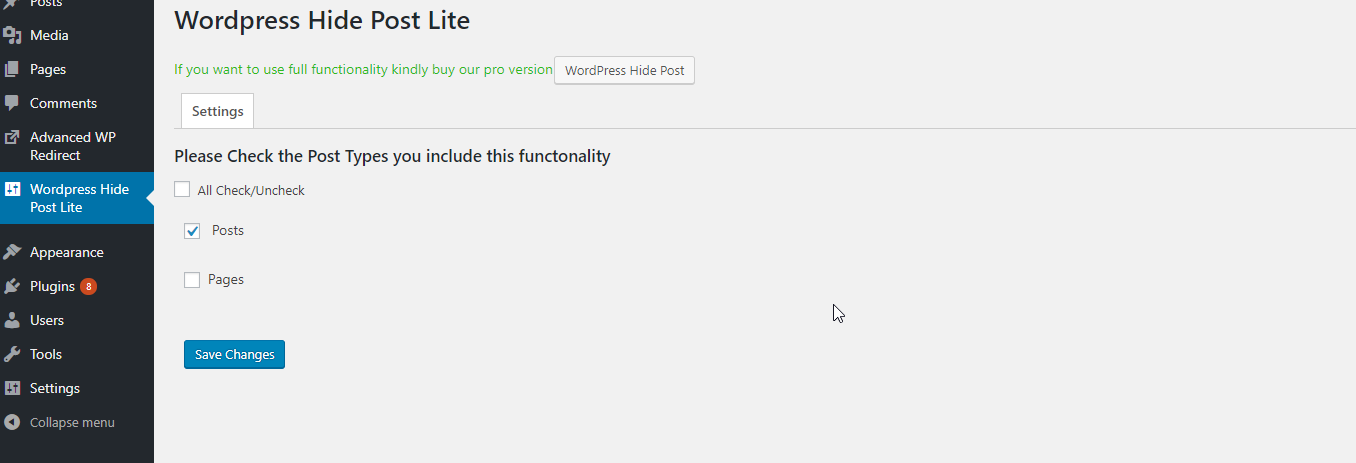
- Select Post Types — Pick which content types get visibility controls (Posts, Pages, Media, Products, custom post types). This lets you hide custom post types and hide WooCommerce products when needed.
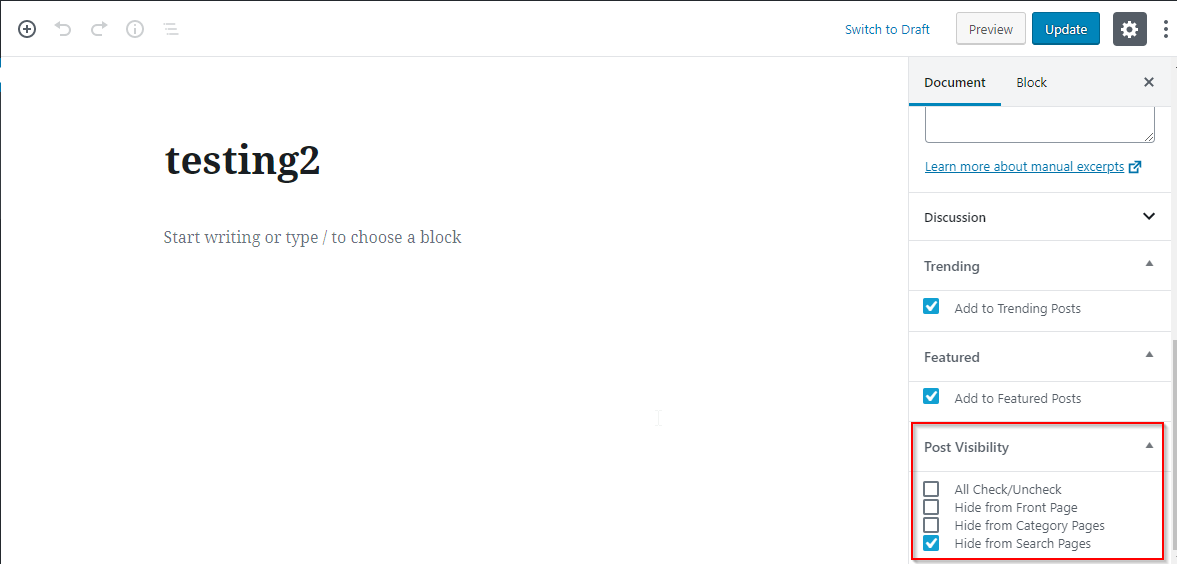
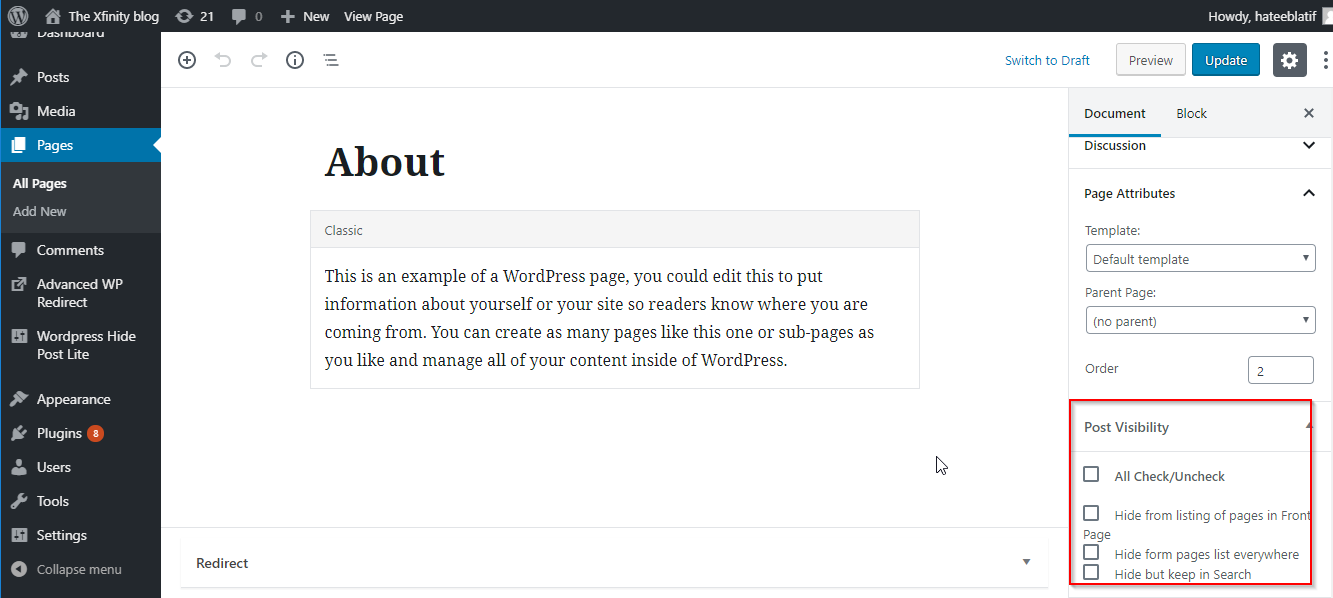
- Edit Content — Open the item and use the Post Visibility metabox. From here, you can toggle visibility options without deleting the content.
- Choose Locations — Check where to hide it: Front Page / Blog Page, Category, Tag, Author, Date Archives, Search Results, RSS Feed, Widgets (e.g., Recent Posts), REST API, or Single Page. Use combinations like hide posts from homepage and hide posts from search results as required.
- Save & Done — Update the item. The URL stays live for direct access, but the item will be hidden from the selected listings (shop, archives, widgets, REST API, etc.).
Pro tip: Upgrade for Quick Edit and Bulk Edit [Pro], Hide Everywhere [Pro], or 404 Redirect [Pro] to manage visibility at scale.
🆚 Free vs Pro: A Quick Comparison
Free Version Includes:
✔ Hide posts from the homepage, blog page, categories, tags, author pages, and date archives.
✔ Hide posts from search results, RSS feed, widgets, navigation links, and REST API.
✔ Hide single posts, pages, media, and WooCommerce products without deleting them.
✔ WooCommerce support — hide products from the shop page, product categories, and product search.
✔ Hide attachments and media from the homepage, archives, search results, and feeds.
✔ Custom database tables with caching for performance optimization.
✔ “Hidden” status column in admin lists (Posts, Pages, Media, Products).
✔ Widget integration for Recent Posts and other lists.
Pro Version Unlocks (everything in Free, plus):
✅ Quick Edit [Pro]: Toggle visibility instantly from list screens.
✅ Bulk Edit [Pro]: Manage multiple posts, pages, media, or products at once.
✅ 404 Redirect [Pro]: Redirect hidden content to a 404 page (posts in Free, all types in Pro).
✅ Hide but keep in search results [Pro]: Hide from listings but allow indexing for SEO.
✅ Hide Everywhere [Pro]: Completely remove content from all site locations.
✅ Disable Hidden Column [Pro]: Customize your WordPress admin view.
✅ Premium support & updates [Pro]
Plugin Links
Installation
Installation Requirements
To use WP Hide Post, make sure your WordPress site meets these requirements:
- WordPress 5.0 or higher
- PHP 7.0 or higher
- WooCommerce 5.0 or higher (only if you want to hide WooCommerce products or categories)
How to Install WP Hide Post
Follow these simple steps to install the plugin:
1. Log in to your WordPress dashboard.
2. Go to Plugins → Add New.
3. Search for “WP Hide Post.”
4. Find WP Hide Post by XfinitySoft and click Install Now.
5. Once installed, click Activate.
6. Open any post, page, media item, or WooCommerce product — you’ll see the Post Visibility metabox.
7. Check the boxes for where you want to hide the content (e.g., homepage, category pages, search results, feeds, REST API).
No coding required — just a few clicks to hide posts from the homepage, hide WooCommerce products, or control content visibility anywhere on your site.
Changelog
2.0.4
add support wordpress version 7.0
2.0.3 -2026-04-06
Fix sanitize of settings
add support wordpress version 6.9
2.0.2 -2025-12-10
Fix text domain issue.
Add support wordpress version 6.9
2.0.1 -2025-11-13
Fix All bug and issue.
2.0.0 – 2025-01-15
🎉 MAJOR RELEASE – Complete Feature Overhaul
✨ NEW FEATURES:
* ⚡ Custom Database Tables: Implemented high-performance custom database tables with indexing for faster queries
* 🗄️ Advanced Caching System: Added wp_cache and transients for optimal performance
* 🛒 WooCommerce Integration: Full WooCommerce support – hide products from shop page and product categories
* 📱 REST API Filtering: Complete WordPress REST API integration for all post types
* 📝 Blog Page Hiding: Added dedicated blog page (posts page) hiding functionality
* 📄 Single Post/Page Hiding: Hide individual post and page content from single views
* 🏷️ Tag Pages Hiding: Hide posts from tag archive pages
* 👤 Author Pages Hiding: Hide posts from author archive pages
* 📅 Date Archives Hiding: Hide posts from date-based archive pages
* 📡 RSS Feeds Hiding: Hide posts from RSS/XML feeds
* 🔗 Navigation Links Hiding: Hide from next/previous post navigation
* 📎 Attachment Support: Full media library/attachment hiding functionality
* 🎛️ Recent Posts Widgets: Hide posts from all recent posts widgets (fixed functionality)
* 📊 Admin Hidden Column: Visual indicator in admin post lists showing where posts are hidden
* 🔄 Data Migration System: Automatic migration from post meta to optimized database tables
* 🔌 Pro Version Auto-Deactivation: Prevents plugin conflicts when pro version is active
🔧 IMPROVEMENTS:
* 🏗️ Complete Code Restructure: Rebuilt plugin architecture for better performance and maintainability
* 🎯 Enhanced Meta Box System: Improved metabox functionality with better user experience
* 🔍 Better Query Optimization: Reduced database queries and improved caching strategies
* 📦 Modular Architecture: Separated functionality into dedicated classes for better code organization
* ⚙️ Settings Integration: Added proper settings controls for column visibility and features
🐛 BUG FIXES:
* ✅ Fixed recent posts widget hiding functionality
* ✅ Resolved column display issues in admin tables
* ✅ Fixed attachment/media library hiding
* ✅ Improved data consistency across different post types
* ✅ Enhanced nonce verification and security measures
⚠️ BREAKING CHANGES:
* 🔄 Database Structure: Plugin now uses custom tables (automatic migration included)
* 📁 File Structure: Some internal file structures have changed for better organization
* ⚙️ Settings Format: Some settings have been restructured (backward compatible)
🚀 PERFORMANCE:
* ⚡ Up to 70% faster query performance with custom database tables
* 🗄️ Advanced caching reduces server load significantly
* 📊 Optimized admin column display for large post counts
* 🔍 Improved search and filtering performance
1.1.0
Fix (CSRF) vulnerability.
Screenshots
For developers
Is this your plugin? Show off the numbers.
Add a live badge to your site, docs or GitHub README. It updates on its own — no account needed.
Best WP Hide Post alternatives
All content visibility plugins →




FAQ
WP Hide Post: quick answers
Straight answers, pulled from live WordPress.org data.
Source: WordPress.org
Is WP Hide Post free?
Yes. WP Hide Post is free to download and use from the official WordPress.org plugin directory.
Is WP Hide Post safe to use in 2026?
WP Hide Post is a solid plugin choice in 2026, with a few things worth checking first. It runs on 2K+ sites, is rated 5/5 and was last updated 5 months ago, and scores 68/100 on our health check.
How many websites use WP Hide Post?
WP Hide Post is active on 2K+ WordPress websites and has been downloaded 60,246 times since it launched in July 2019. It was downloaded 904 times in the last 30 days.
Does WP Hide Post work with WordPress 7.1?
WP Hide Post is officially tested up to WordPress 7.0.9, while the latest release is 7.1.5. It may still work, but try it on a staging site first.
What PHP version does WP Hide Post need?
WP Hide Post requires PHP 7.4 or higher. Most hosts run PHP 8.x today, so it works on any modern WordPress hosting.
When was WP Hide Post last updated?
The latest version, 2.0.4, was released on June 18, 2026 (5 months ago).
Who makes WP Hide Post?
WP Hide Post is developed and maintained by Xfinitysoft.
What are the best alternatives to WP Hide Post?
The most popular alternatives to WP Hide Post are Manage User Roles (10+ installs), WPSAL (Simple Access List) (<10 installs) and Smart Content Scheduler (<10 installs).
Powered by PageForge
One template and a spreadsheet. A real page for every search.
PageForge turns each row of a CSV into a WordPress page with its own title, URL, SEO fields and schema, built on the layout you already designed. Free on WordPress.org.
- CSV and XLSX, plus Google Sheets on Professional and Enterprise
- Its own title, URL, SEO fields and schema for every page
- Works with the block editor, Elementor, Divi and Avada
- Free on WordPress.org, no credit card