


WP Plugin Manager – Deactivate plugins per page
"WP Plugin Manager" is a plugin that allows you to disable plugins on specific pages, posts, or devices for better performance.

Safe pick
Yes — WP Plugin Manager is a safe, well-maintained plugin to use in 2026. It runs on 3K+ sites, is rated 4.4/5 and was last updated 3 weeks ago, and scores 89/100 on our health check.
- Actively developed — last update 3 weeks ago
- Tested with the latest WordPress (7.1)
How does it stack up?
Side-by-side on installs, updates, ratings & support


Daily downloads
Download spikes usually follow a new release — each site that auto-updates counts as a download.
Rankings
Where WP Plugin Manager stands todayWordPress.org search rankings
Live position in the plugin search, top 100| Keyword | Position |
|---|---|
| Disable Plugins | #54 |
| performance optimization | #64 |
| plugin manager | #5 |
| selective loading | #1 |
| wordpress speed | #72 |
Version adoption
Share of active sites per release.
Rating breakdown
★★★★★★★★★★ 4.4 from 23 reviews
About WP Plugin Manager
From the official readme · v1.4.16Description
Speed Up Your WordPress Site by 300% or More! 🚀
WP Plugin Manager is a powerful WordPress performance optimization tool that gives you complete control over which plugins load on each page of your website. Stop unnecessary plugins from loading where they’re not needed and dramatically improve your site’s speed and user experience.
Boost your WordPress site speed by selectively disabling plugins on specific pages, posts, and devices. The ultimate plugin optimization tool for better performance.
🚀 Get Pro Version | 📹 Watch Video Tutorial | 📚 Documentation | 💬 Support
Why Your Site Needs Plugin Manager
Every active plugin on your WordPress site loads its CSS and JavaScript files on EVERY page – even where they’re not needed. This creates:
- ❌ Slower page load times
- ❌ Higher server resource usage
- ❌ Poor user experience
- ❌ Lower conversion rates
- ❌ Negative SEO impact
Plugin Manager solves this problem by letting you disable plugins on specific pages, posts, or device types where they’re not required.
🎯 Key Benefits
- ⚡ Faster Loading Speed: Reduce page load time by up to 90%
- 📈 Better SEO Rankings: Google loves fast-loading websites
- 💰 Higher Conversion Rates: Every second of load time matters
- 🖥️ Reduced Server Load: Lower hosting costs and better stability
- 📱 Device-Specific Optimization: Different rules for mobile, tablet, and desktop
🛠️ Core Features (Free Version)
Plugin Control
* Selectively disable any plugin on specific pages or posts
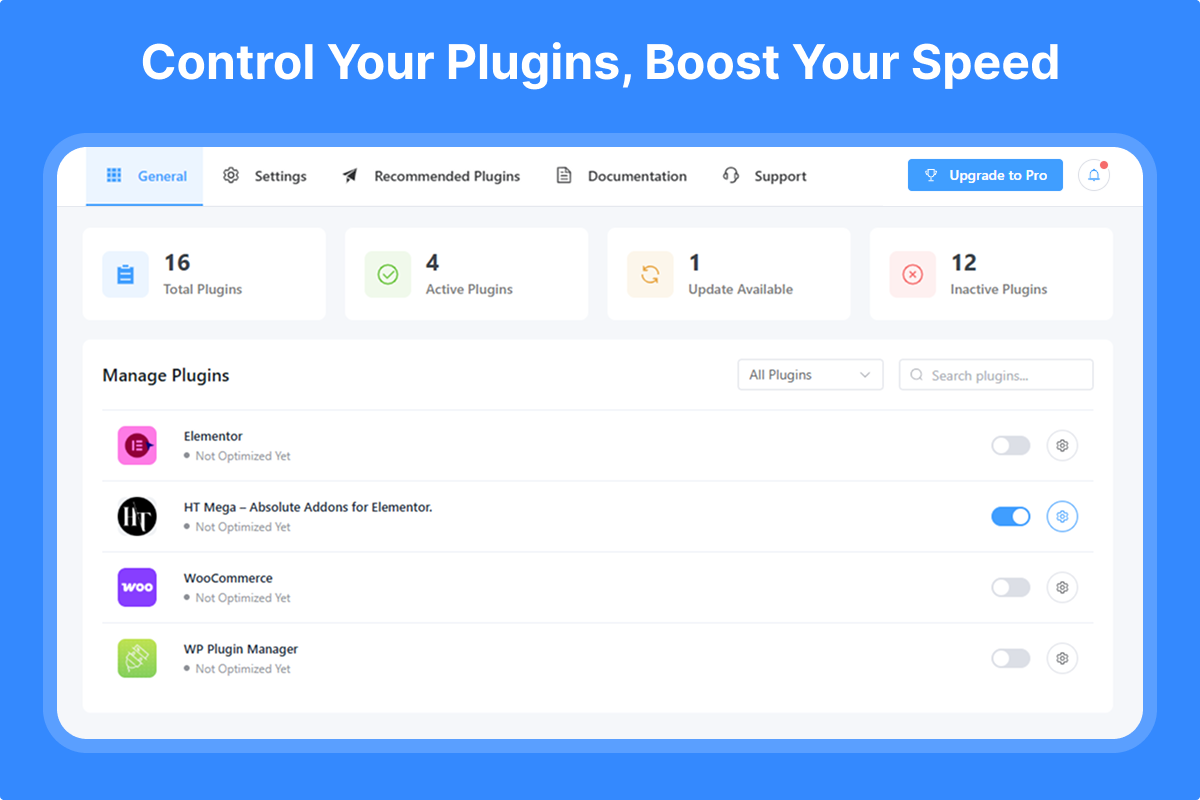
* Easy toggle switches for quick plugin management
* Visual dashboard showing all plugin statuses
* Search and filter plugins instantly
Page & Post Management
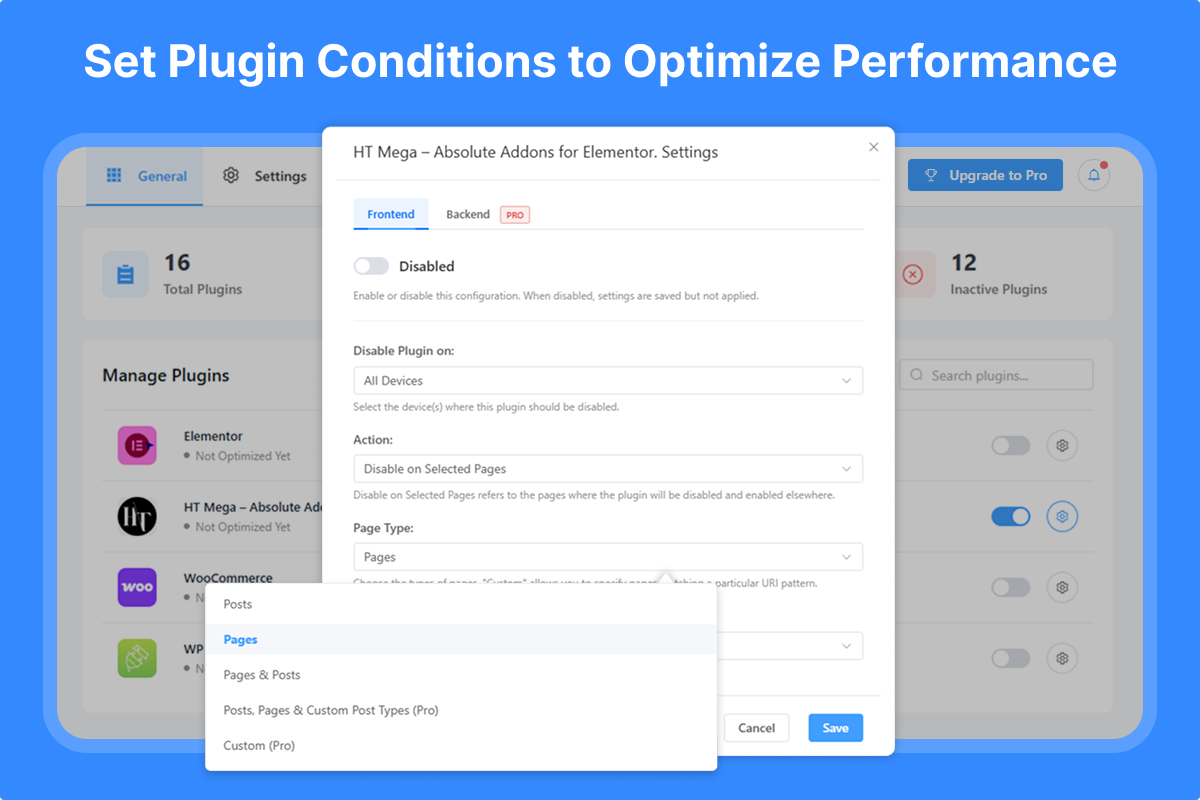
* Disable plugins on individual pages
* Disable plugins on specific posts
* Bulk selection for multiple pages/posts
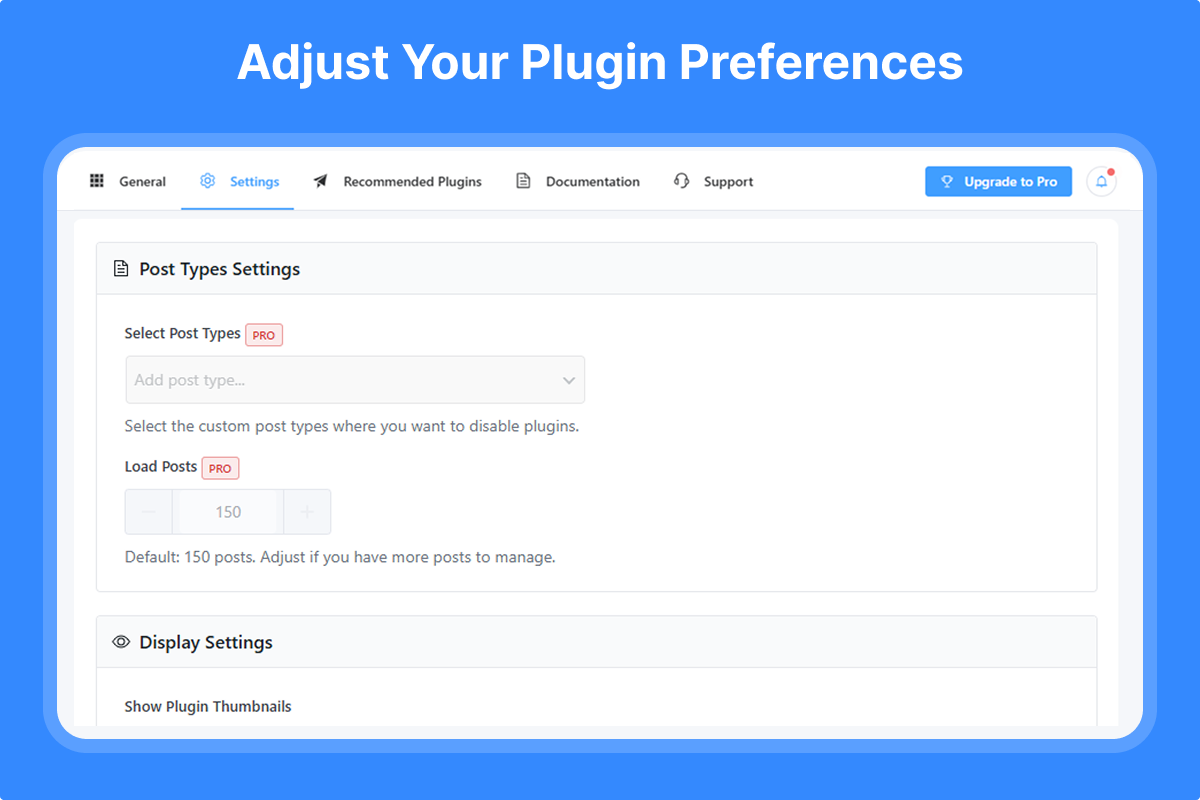
* Support for custom post types
User-Friendly Interface
* Intuitive plugin management dashboard
* Clear visual indicators
* No coding required
* Lightweight and fast
💎 Pro Features – Unlock All Features
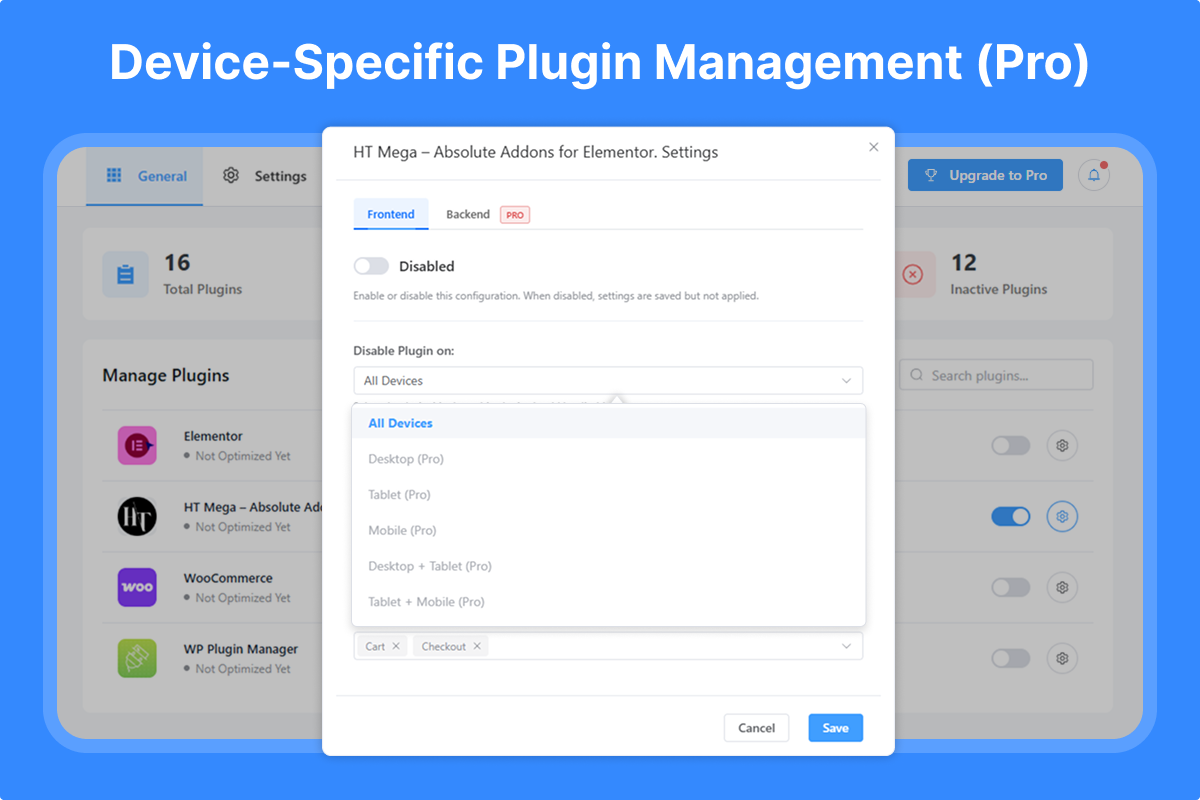
🔥 Advanced Device Targeting
* Desktop-only rules
* Tablet-specific optimization
* Mobile-focused settings
* Combined device rules (Desktop + Tablet, etc.)
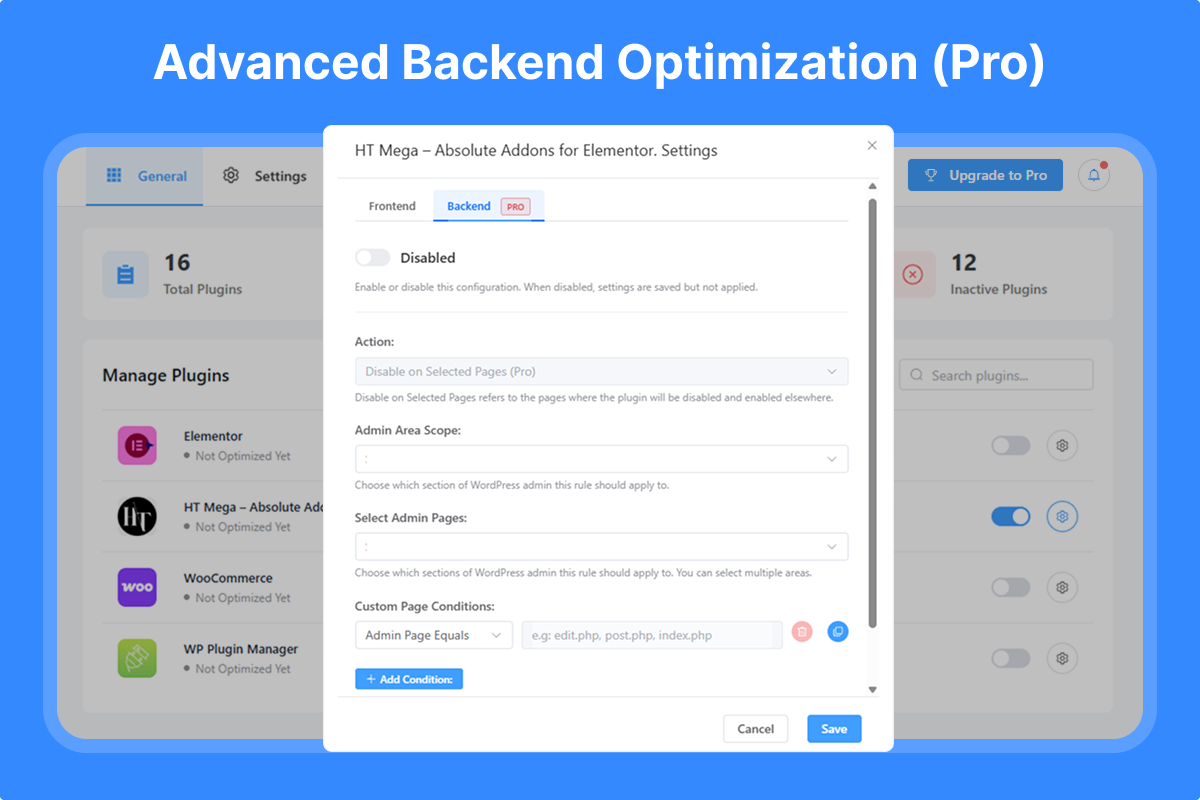
🔥 Backend/Admin Optimization
* Control plugins in WordPress admin area
* Specific admin page targeting
* Custom PHP file conditions
* Reduce admin panel load time
🔥 Advanced URL & Path Control
* Custom URL pattern matching
* Directory-based rules
🔥 Enhanced Features
* Enable plugins on selected pages (inverse logic)
* Extended post loading (manage 150+ posts)
* Multiple conditional rules
* Priority support
🏆 Why Choose Plugin Manager?
- Proven Results: Users report 50-90% improvement in page load times
- Easy to Use: No technical knowledge required
- Safe & Reliable: Doesn’t modify plugin files
- Instant Impact: See results immediately
- Regular Updates: Actively maintained and improved
- Expert Support: Professional help when you need it
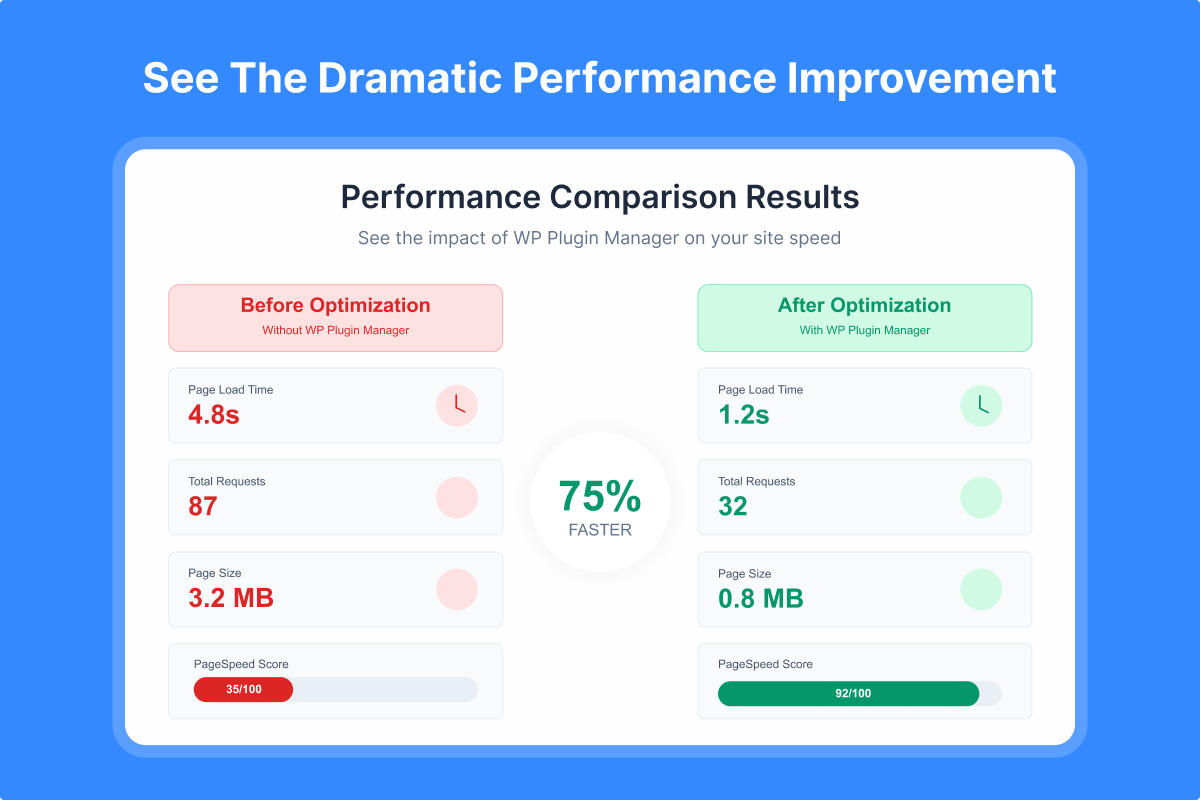
📊 Performance Impact
Before Plugin Manager:
* All plugins load on every page
* Unnecessary CSS/JS files everywhere
* Slow page load times
* High server resource usage
After Plugin Manager:
* Plugins load only where needed
* Minimal CSS/JS files per page
* Lightning-fast page loads
* Optimized server performance
🔧 Perfect For
- eCommerce Sites: Disable checkout plugins on blog pages
- Membership Sites: Control member-only plugin loading
- Business Websites: Optimize contact form plugin loading
- Blogs: Disable unnecessary plugins on article pages
- Portfolio Sites: Load gallery plugins only where needed
🌟 Join Thousands of Optimized WordPress Sites
Stop letting unnecessary plugins slow down your website. Install Plugin Manager today and experience the difference a well-optimized site can make!
Need Help? Check our documentation or contact our support team.
Other Products
Explore our other WordPress solutions to enhance your website:
- 🛍️ WooLentor – Transform your WooCommerce store with 125+ widgets, 85+ Gutenberg blocks, 34+ Modules and 110+ templates. Features include wishlist, product compare, variation swatches, and multi-step checkout. The ultimate alternative to ShopReady, Kadence, and JetWidgets.
- 🎨 HT Mega – Supercharge Elementor with 135+ widgets, 795+ ready made blocks, header/footer builders, and mega menus. Create stunning websites with post grids, sliders, forms, and more. Works seamlessly like HappyAddons, ElementsKit and Essential Addons.
- 📢 HashBar – Create unlimited notification bars for announcements, promotions, and alerts. Fully customizable with multiple display options.
- 📧 Extensions for CF7 – Extend Contact Form 7 with database storage, conditional fields, and Mailchimp integration. Capture and manage leads effectively.
- 💼 Whols – Professional wholesale pricing solution for WooCommerce. Set wholesale prices, minimum requirements, and custom registration fields. Alternative to Wholesale Suite and B2Bking.
- 📊 JustTables – Display products in customizable tables with pre-built columns. Perfect for catalogs and bulk ordering.
- 🎨 Swatchly – Add beautiful color, image, and label swatches to product variations. Enhance the shopping experience with visual selection options.
- 🎯 HT Slider – Create responsive sliders with custom styling, navigation, and pagination options. Display content by ID or category.
- 📝 HT Contact Form – Seamlessly integrate Contact Form 7 with Elementor. Drag, drop, and style your forms with ease.
Installation
Automatic Installation (Recommended)
- Go to Plugins > Add New in your WordPress admin
- Search for “Plugin Manager”
- Click Install Now and then Activate
- Navigate to Plugin Manager in your admin menu
Manual Installation
- Download the plugin ZIP file
- Go to Plugins > Add New > Upload Plugin
- Choose the downloaded file and click Install Now
- Activate the plugin
- Find Plugin Manager in your WordPress admin menu
First Steps
- After activation, visit the Plugin Manager dashboard
- Select a plugin you want to optimize
- Choose pages/posts where it should be disabled
- Configure device-specific rules (Pro)
- Save your settings and enjoy faster load times!
Frequently asked questions
Will this break my website?
No! Plugin Manager safely controls plugin loading without modifying any plugin files. If you disable a required plugin by mistake, simply re-enable it.
Can I use this with caching plugins?
Yes! Plugin Manager works perfectly with all major caching plugins. Clear your cache after making changes for the best results.
Does it work with all plugins?
Plugin Manager works with 99% of WordPress plugins. Some security or system plugins may need to remain active on all pages.
Can I disable plugins in the admin area?
Yes, but this is a Pro feature. The Pro version allows complete backend/admin area optimization.
Is there a performance impact from using this plugin?
No. Plugin Manager is extremely lightweight and actually improves performance by preventing unnecessary plugin loading.
Can I set different rules for mobile devices?
Yes! Device-specific targeting is available in the Pro version, allowing different rules for desktop, tablet, and mobile.
How much speed improvement can I expect?
Results vary based on your site, but users typically see 30-90% improvement in page load times.
Changelog
Version: 1.4.16 Date: 09 September 2026
- Added: Multisite support — configure plugin rules once at Network Admin level and apply them across every site, with the option to override on individual sites.
- Fixed: Plugins activated at the network level not appearing correctly in the plugin list.
- Fixed: “Optimize Now” quick action not disabling the plugin on the frontend by default.
- Fixed: Selected page/post targeting not matching correctly across different site domains.
- Tested: Compatibility with the latest version of WordPress.
Version: 1.4.15 Date: 23 August 2026
- Fixed: A few minor issues.
- Tested: Compatibility with the latest version of WordPress.
Version: 1.4.14 Date: 23 July 2026
- Fixed: A few minor issues.
- Tested: Compatibility with the latest version of WordPress.
Version: 1.4.13 Date: 17 June 2026
- Fixed: Post type select dropdown in Settings page now hides already-selected items from the list.
- Tested: Compatibility with the latest version of WordPress.
Version: 1.4.12 Date: 25 March 2026
- Fixed: Plugin incorrectly disabled on child pages when parent page was selected.
- Fixed: “All Pages” now applies to homepage and child pages.
- Fixed: “All Posts” incorrectly firing on homepage.
- Fixed: Individual post URL matching not working.
Version: 1.4.11 Date: 26 February 2026
- Improved: Admin notice display.
Screenshots
For developers
Is this your plugin? Show off the numbers.
Add a live badge to your site, docs or GitHub README. It updates on its own — no account needed.
Best WP Plugin Manager alternatives
All Disable Plugins plugins →FAQ
WP Plugin Manager: quick answers
Straight answers, pulled from live WordPress.org data.
Live data from WordPress.org · checked Sep 28, 2026
Is WP Plugin Manager free?
Yes. WP Plugin Manager is free to download and use from the official WordPress.org plugin directory. The developer also sells premium add-ons or a Pro version with extra features.
Is WP Plugin Manager safe to use in 2026?
Yes — WP Plugin Manager is a safe, well-maintained plugin to use in 2026. It runs on 3K+ sites, is rated 4.4/5 and was last updated 3 weeks ago, and scores 89/100 on our health check.
How many websites use WP Plugin Manager?
WP Plugin Manager is active on 3K+ WordPress websites and has been downloaded 139,051 times since it launched in January 2020. It was downloaded 3,188 times in the last 30 days.
Does WP Plugin Manager work with WordPress 7.1?
Yes. The developer has tested WP Plugin Manager up to WordPress 7.1.2, the latest release. It requires WordPress 5.0 or newer.
What PHP version does WP Plugin Manager need?
WP Plugin Manager requires PHP 7.4 or higher. Most hosts run PHP 8.x today, so it works on any modern WordPress hosting.
When was WP Plugin Manager last updated?
The latest version, 1.4.16, was released on September 9, 2026 (3 weeks ago).
Who makes WP Plugin Manager?
WP Plugin Manager is developed and maintained by HasThemes.
What are the best alternatives to WP Plugin Manager?
The most popular alternatives to WP Plugin Manager are Plugin Load Filter (7K+ installs), CrashGuard Lite (<10 installs) and Quick Disabler (<10 installs).
Powered by PageForge
Want thousands of pages that rank like these? Build them in an afternoon.
This directory runs on the same engine as PageForge. Turn any spreadsheet, CSV or API into thousands of fast, SEO-ready WordPress pages — with schema, internal links and AI-written copy baked in.
- CSV, Google Sheets & API data sources
- AI content, schema & internal links per page
- Works with Elementor, Gutenberg, Yoast & Rank Math
- Free on WordPress.org — no credit card


