



WP Mega Menu
If you have been dreaming of building a stunning mega menu on your WordPress site, our WP Mega Menu plugin is the ultimate solution. You can use Mega Menu for free to create rich and stunning navigation menus for your…

Consider an alternative
WP Mega Menu shows warning signs in 2026 — compare the alternatives below before installing. It runs on 8K+ sites, is rated 4.4/5 and was last updated 5 years ago, and scores 32/100 on our health check.
- No update in 4 years
- Only tested up to WordPress 5.8 (latest is 7.1)
How does it stack up?
Side-by-side on installs, updates, ratings & support



Daily downloads
Download spikes usually follow a new release — each site that auto-updates counts as a download.
Rankings
Where WP Mega Menu stands todayWordPress.org search rankings
Live position in the plugin search, top 100| Keyword | Position |
|---|---|
| mega menu | >100 |
| megamenu | #18 |
| navigation | >100 |
| responsive menu | >100 |
| wp-megamenu | #19 |
Version adoption
Share of active sites per release.
Rating breakdown
★★★★★★★★★★ 4.4 from 219 reviews
About WP Mega Menu
From the official readme · v1.4.2Description
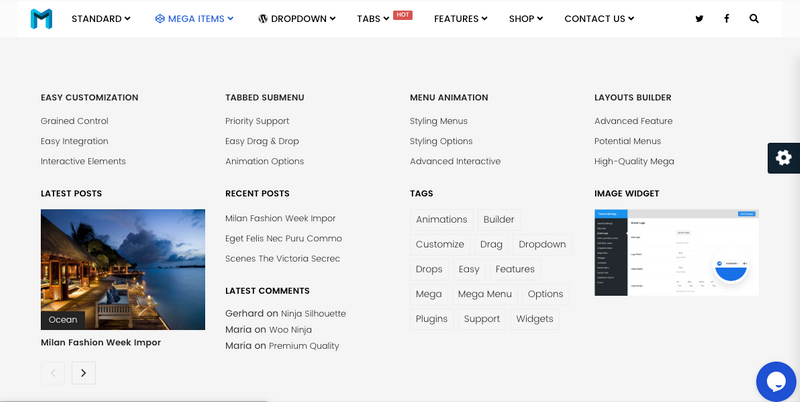
If you have been dreaming of building a stunning mega menu on your WordPress site, our WP Mega Menu plugin is the ultimate solution. You can use Mega Menu for free to create rich and stunning navigation menus for your website. Make menu themes, and customize the styles using drag-and-drop tools. Beautify the menu items with custom colors, fonts, and attributes. Use Mega Menu to build a navigation menu beyond imagination.
Plugin Demo
Features
Here are the most notable features of WP Mega Menu plugin. If you need any further information, please feel free to contact us. Below are the best offerings of WP Mega Menu.
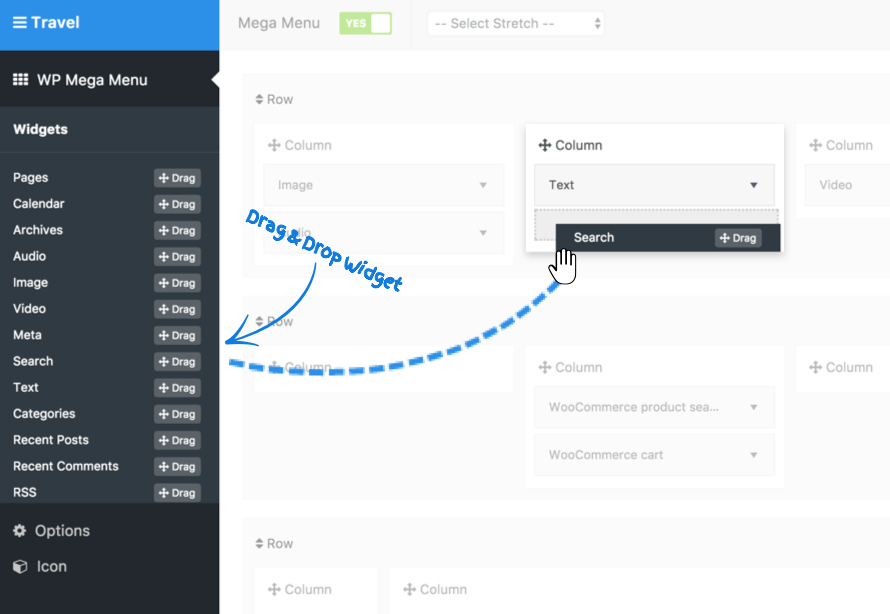
- Drag and drop menu builder panel.
- Widgets in menu.
- Multiple themes/skins option.
- Export/import themes
- Branding in logo
- Social icons
- Search bar in menu
- Menu labelling/badge, ex: hot, new, etc.
- Dashicons and Font Awesome icon support
- Stretch menu
- Responsive support
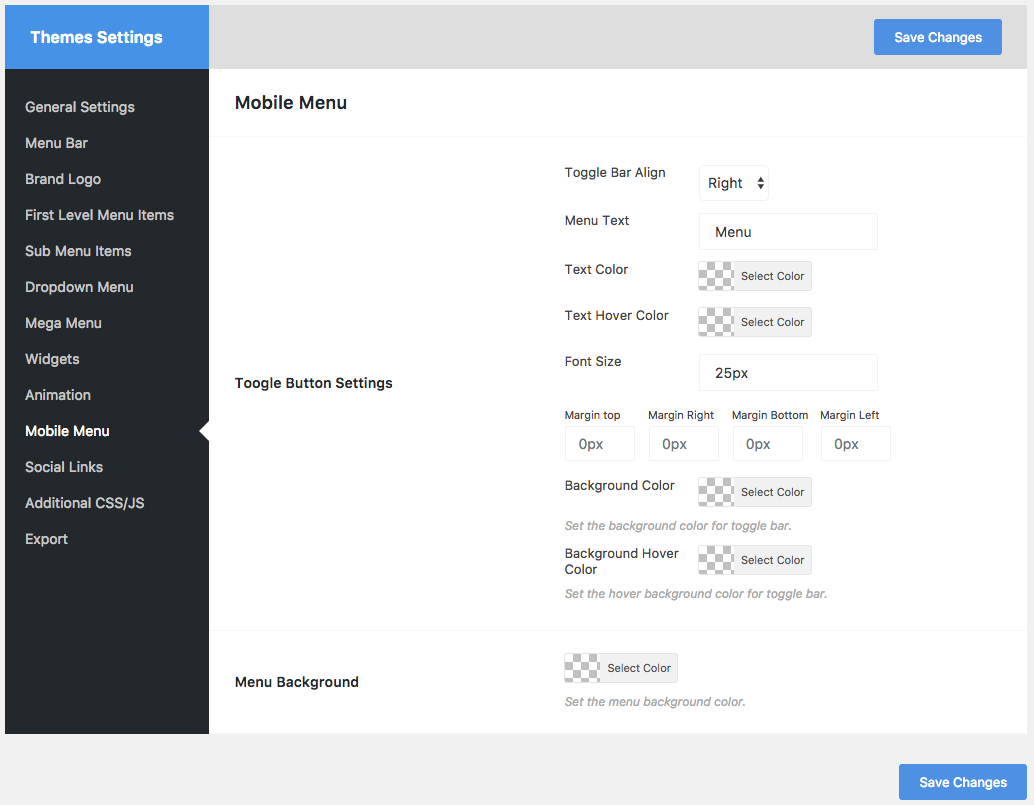
- Mobile menu support
- Menu background image
- Unlimited colors
- Google Fonts
- Unlimited options
Please let us know your feedback, if you think something can be more awesome in this plugin, we will love to add.
Author
Developed by Themeum
Installation
- Go to Dashboard > Plugins > Add New, then search WP Mega Menu and click Install Now.
- Upload ‘wp-megamenu’ to the ‘/wp-content/plugins/’ directory.
- Activate the plugin through the ‘Plugins’ menu in WordPress.
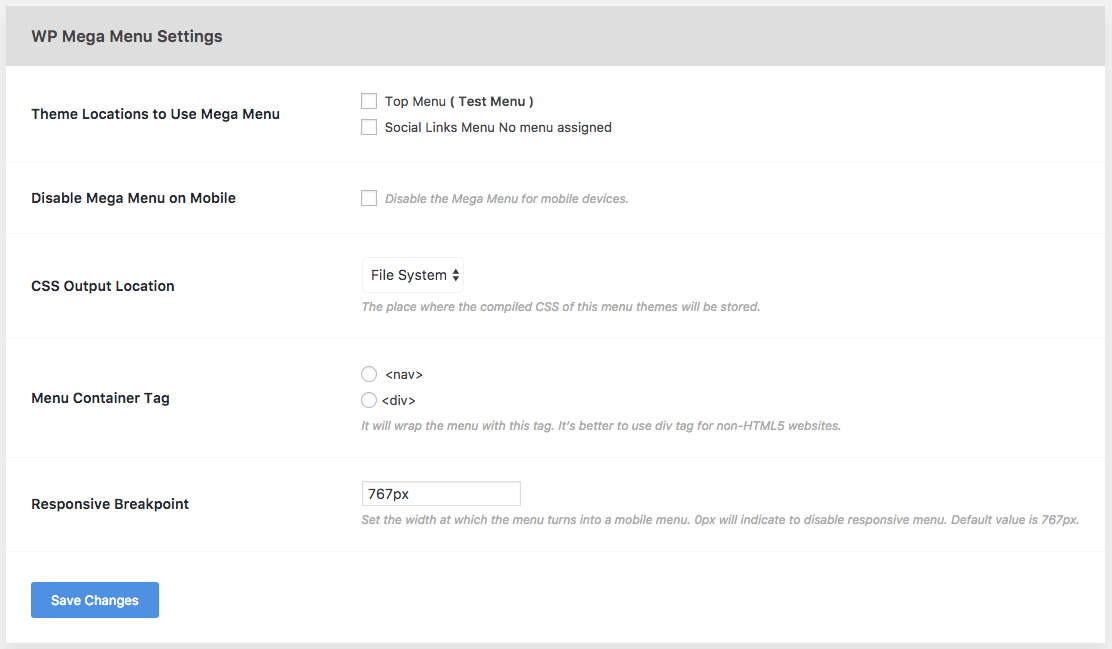
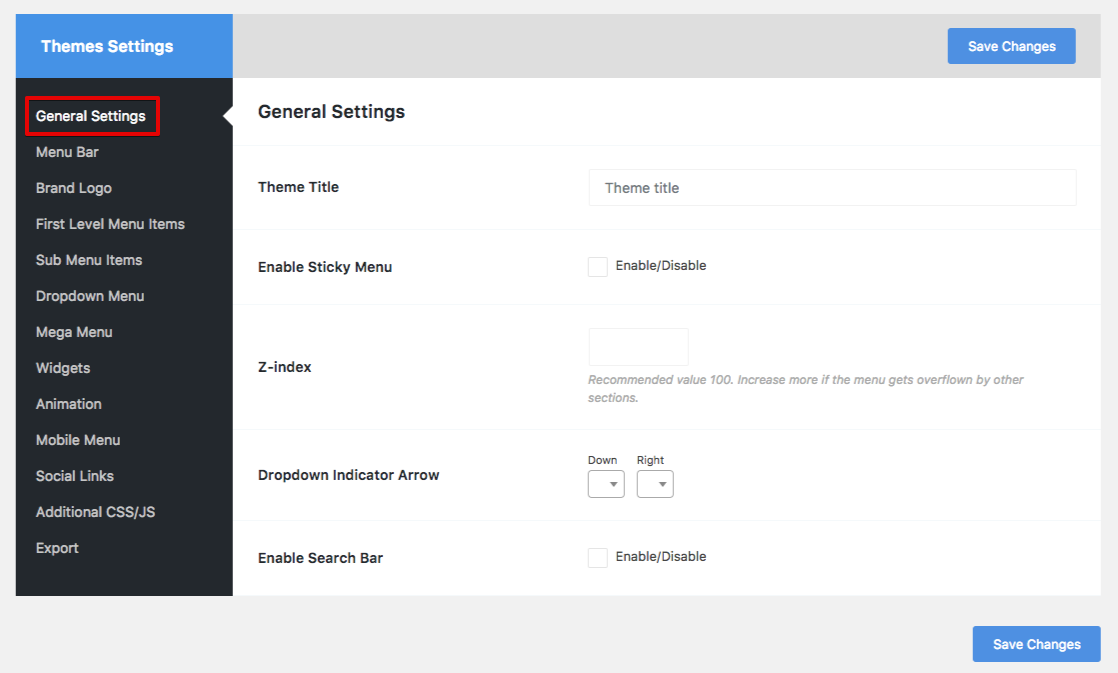
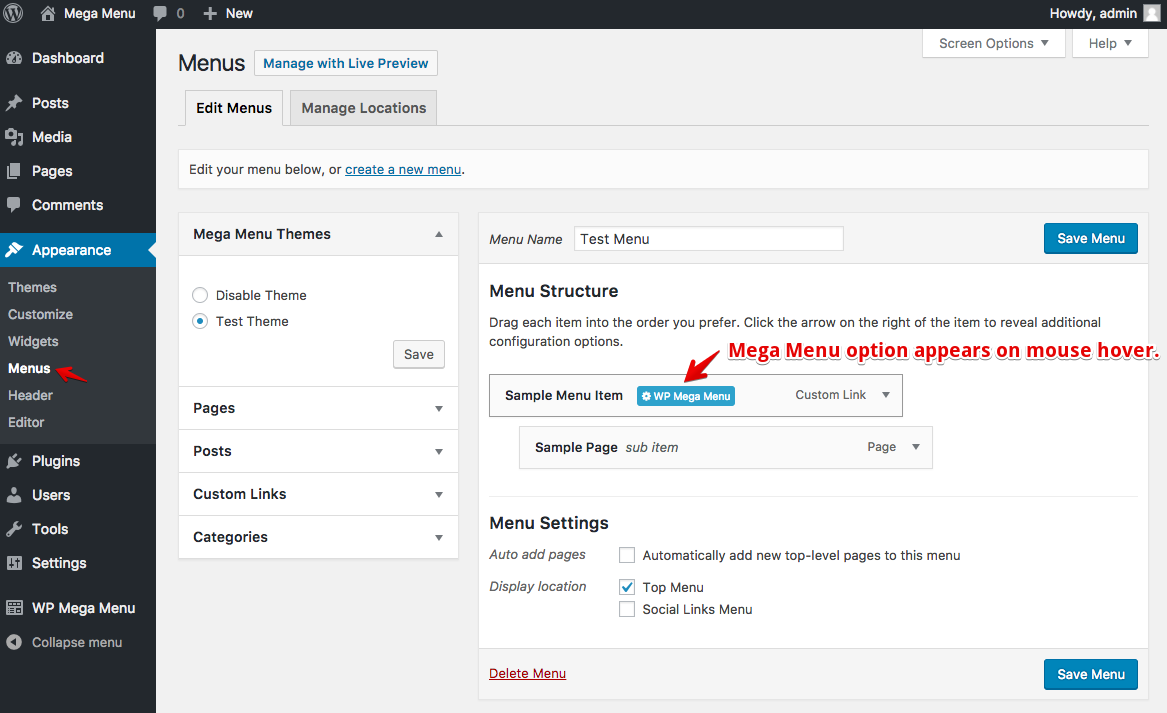
- Click on the new menu item “WP Mega Menu” and setup your settings.
Frequently asked questions
Q. Where can I get support?
A. You can get support by posting on the support section of this plugin on WordPress plugin directory, or on the Themeum support forums: https://www.themeum.com/support/.
Q. Can I use my existing WordPress theme?
A. Sure, you can use your existing WordPress theme with WP Mega Menu.
Q. Where can I report a bug?
A. Found a bug? Please let us know by posting on the support section of this plugin on WordPress plugin directory or directly on our support fourms: https://www.themeum.com/support/.
Q. Is WP Mega Menu free?
A. There are two versions of WP Mega Menu. One is free and another is Pro. The Pro version has some more advanced features that are not available in the free version.
Changelog
Nothing here
1.4.2
Fix: Theme export empty file issue
Update: Security update
1.4.1
Security Update
= 1.4.0 [June 25, 2021]
Update: Updated the Import and Export features
Update: Security Update
= 1.3.9 [June 23, 2021]
Update: Security Update
= 1.3.8
Fixed: PHP Error fix undefined index container_aria_label
= 1.3.7 [April 17, 2020]
Update: Security Update
= 1.3.6 [March 20, 2020]
Added: Compatibility with 10 more themes ( Astra, Divi, OceanWP, Storefront, GeneratePress, OnePress, StudioPress, Hestia, Heuman, Hello Elementor)
Update: Optimized the plugin’s code
Fixed: Localhost to live server mega menu static URL issue
Fixed: WPMM Theme hide issue
Fixed: Megamenu custom width input field issue
Fixed: “Unexpected output” or “headers already sent” warning during plugin activation
= 1.3.5 [March 3, 2020]
Update: Added prefix before classes
Fixed: WPMM version issue
Fixed: Login console issue
= 1.3.4 [February 27, 2020]
Update: WP Mega Menu search in full screen
Update: Custom image/icon upload option in a single menu
Added: WPMM Woo Product Widget
Added: WPMM Product Category Widget for WooCommerce
Added: WPMM Pricing Table Widget
Added: WPMM Video Widget
Added: WPMM Woo Cart integration
Added: Login/Signup options in menu
Added: Single menu description (theme support required)
Added: Single menu customization options in the theme settings
= 1.3.3 [January 24, 2020]
Updated: Classic blue and Modern dark theme update.
Fixed: Auto increase Inactive Widget problem.
Fixed: Background image delete icon not visible.
Fixed: Grid post and Woocommerce grid post widgets issue.
Fixed: Sticky menu width problem.
Fixed: Customizer dropdown issue.
Fixed: Icon issue in Megamenu Option.
Fixed: Open in new tab issue.
Fixed: CSS issue.
= 1.3.2 [September 9, 2019]
Added: Conditional menu item (if logged in)
Added: Search field placeholder text change option
Added: Option to change search placeholder (Pro)
Fixed: WooCommerce Shipping zone overlaps
Fixed: Menu disappear after resize
Fixed: Can’t upload brand logo (Avada theme)
Fixed: Grid Post & Grid WooCommerce category link is not working properly
= 1.3.1 [August 29, 2019]
Fixed: Known issues
= 1.3.0 [July 11, 2019]
Fixed: Problem with media uploading url
= 1.2.9 [July 9, 2019]
Added: SSL Support
= 1.2.8 [June 26, 2019]
Added: Now post category menu is clickable
Added: Close icon on mobile menu button
Added: Background option for sticky menu
Fixed: 3rd level Dropdown indicator issue is not showing
Fixed: Stretch Row issue is not working properly
Fixed: Mobile menu dropdown is not working (FontAwesome SVG issue)
Fixed: W3C Validation issue
Fixed: Stretch Row background image is not working
Fixed: Storefront mobile menu is not working.
Fixed: Grid post & Products widget post count issue
Fixed: Grid Woocommmerce widget category issue
Fixed: PHP error on Grid post & product widget.
= 1.2.7 [March 12, 2019]
Updated: Improved UX for enabling mega menu
Fixed: Some minor bugs
= 1.2.6 [March 04, 2019]
Fixed: Mega Menu theme was not uploading due to ext check issue
Fixed: Some known issue and bugs
= 1.2.5 [18/12/18]
Fixed: A small bug, website link was printed to plugins page
= 1.2.4 [23/10/18]
Added: Logo center menu ( Text/Image logo)
Added: Call To Action Button
Added: Gradient Background Option
Fixed: Stretch row left offset issue
Fixed: Stretch row border is not working
Fixed: Box Shadow is not working on stretch row
Fixed: Sticky menu issue
= 1.2.3 [27/09/18]
- Added: Gradient background option for menubar & first level menu item.
- Added: Specific border option for first level menu item.
- Fixed: Sticky menu issue.
- Fixed: Menu bar border radius issue.
- Fixed: Vertical menu z-index issue.
1.2.2 [25/09/18]
- Hotfix Update to fix a css build issue
1.2.1 [24/09/18]
- Added: Custom social icon support.
- Added: Two new predefined theme.
- Added: IcoFont Icon
- Added: Widget Search Option
- Added: Text Transform ‘none’ & ‘inherit’ option.
- Fixed: Cannot save dropdown menu option.
- Fixed: Cannot add multi-level dropdown menu icon.
- Fixed: Multi-level dropdown indicator is not showing properly
- Fixed: Some PHP warning.
- Fixed: Mobile menu animation issue.
- Fixed: Icon & Badge spacing & Alignment Issue.
- Fixed: FontAwesome 4 & FontAwesome 5 conflict issue
- Fixed: Multiple menu theme is not working properly
1.2.0 [10/09/18]
- Added : IcoFont Icon
- Added : Widget Search Option
-
Added : Text Transform ‘none’ & ‘inherit’ option.
-
Fixed : Cannot save dropdown menu option.
- Fixed : Cannot add multi-level dropdown menu icon.
- Fixed : Multi-level dropdown indicator is not showing properly
- Fixed : Some PHP warning.
- Fixed : Mobile menu animation issue.
- Fixed : Icon & Badge spacing & Alignment Issue.
1.1.9 [10/07/18]
- Added : Manual Menu Implementation Code Generator
- Added : Manual Menu Implementation ShortCode Generator
- Added : Manual Menu Implementation Code by Theme Location
- Fixed : Widget Item Displaced by Menu, col displaced issue
- Improved : Performance Improved
Screenshots
For developers
Is this your plugin? Show off the numbers.
Add a live badge to your site, docs or GitHub README. It updates on its own — no account needed.
Best WP Mega Menu alternatives
All mega menu plugins →





FAQ
WP Mega Menu: quick answers
Straight answers, pulled from live WordPress.org data.
Live data from WordPress.org · checked Sep 27, 2026
Is WP Mega Menu free?
Yes. WP Mega Menu is free to download and use from the official WordPress.org plugin directory.
Is WP Mega Menu safe to use in 2026?
WP Mega Menu shows warning signs in 2026 — compare the alternatives below before installing. It runs on 8K+ sites, is rated 4.4/5 and was last updated 5 years ago, and scores 32/100 on our health check.
How many websites use WP Mega Menu?
WP Mega Menu is active on 8K+ WordPress websites and has been downloaded 578,901 times since it launched in July 2017. It was downloaded 456 times in the last 30 days.
Does WP Mega Menu work with WordPress 7.1?
WP Mega Menu is officially tested up to WordPress 5.8.17, while the latest release is 7.1.2. It may still work, but try it on a staging site first.
When was WP Mega Menu last updated?
The latest version, 1.4.2, was released on November 3, 2021 (5 years ago).
Who makes WP Mega Menu?
WP Mega Menu is developed and maintained by Themeum.
What are the best alternatives to WP Mega Menu?
The most popular alternatives to WP Mega Menu are HappyAddons for Elementor (400K+ installs), Max Mega Menu (300K+ installs) and The Plus Addons for Element… (100K+ installs).
Powered by PageForge
Want thousands of pages that rank like these? Build them in an afternoon.
This directory runs on the same engine as PageForge. Turn any spreadsheet, CSV or API into thousands of fast, SEO-ready WordPress pages — with schema, internal links and AI-written copy baked in.
- CSV, Google Sheets & API data sources
- AI content, schema & internal links per page
- Works with Elementor, Gutenberg, Yoast & Rank Math
- Free on WordPress.org — no credit card


