



WP Maintenance Mode & Site Under Construction
A lightweight WordPress maintenance & coming soon plugin with live visual editing, modern templates, SEO protection, and zero bloat.

Solid choice
WP Maintenance Mode & Site Unde… is a solid plugin choice in 2026, with a few things worth checking first. It runs on 3K+ sites, is rated 3.5/5 and was last updated 3 weeks ago, and scores 74/100 on our health check.
- Actively developed — last update 3 weeks ago
- Tested with the latest WordPress (7.1)
- Momentum — downloads up 29% vs the previous 30 days
- Very few reviews so far
How does it stack up?
Side-by-side on installs, updates, ratings & support



Daily downloads
Download spikes usually follow a new release — each site that auto-updates counts as a download.
Rankings
Where WP Maintenance Mode & Site… stands todayWordPress.org search rankings
Live position in the plugin search, top 100| Keyword | Position |
|---|---|
| coming soon | #68 |
| countdown timer | #62 |
| maintenance mode | #15 |
| site unavailable | #2 |
| under construction | #5 |
Version adoption
Share of active sites per release.
Rating breakdown
★★★★★★★★★★ 3.5 from 4 reviews
About WP Maintenance Mode & Site Under Constr…
From the official readme · v5.3Description
WP Maintenance Mode & Site Under Construction is a modern, ultra-lightweight, and zero-bloat solution to put your WordPress site under maintenance, coming soon, or construction mode—without ever losing search engine rankings or visitor engagement.
Unlike traditional maintenance plugins that make you switch back and forth between complicated forms and separate preview tabs, this plugin introduces a revolutionary Live Visual Workspace. Type directly on the page, tweak layouts with instant feedback, point at any element to edit its color, and watch your changes come to life in real time.
✨ The Ultimate Admin UX: Design Right in the Live Preview
We built the admin interface around one core philosophy: What you see is what your visitors get.
- ✍️ Direct Inline Live Editing: No more guessing what text goes where. Click on the headline, eyebrow badge, description, or button directly on the canvas and type. Your changes update the settings and preview simultaneously with zero page reloads.
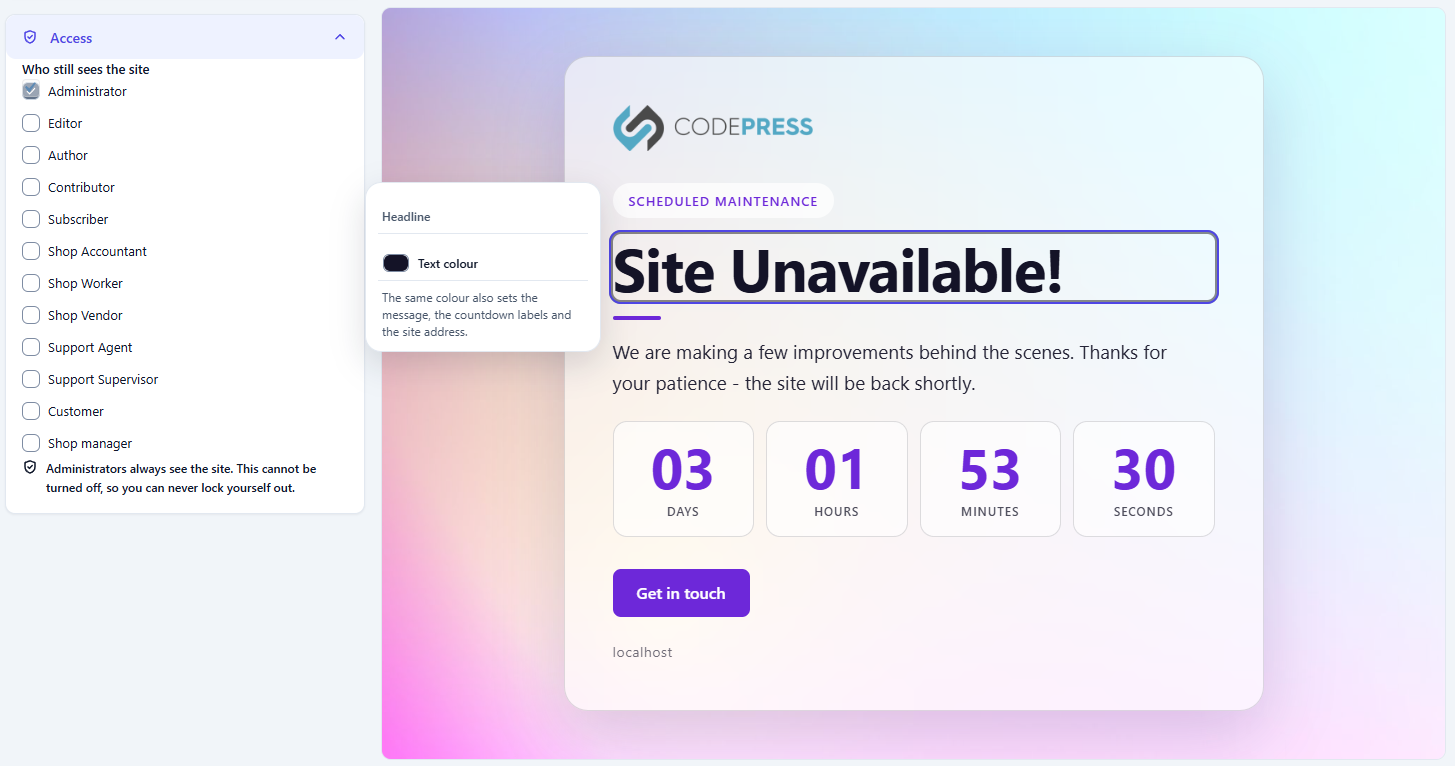
- 🎯 Intelligent Hover Colour Map: Move your mouse across the preview canvas. Hovering over a heading, button, or separator instantly highlights the element with a sleek floating badge that identifies its design token. Click the color chip to open your native OS color picker and repaint elements live as you drag.
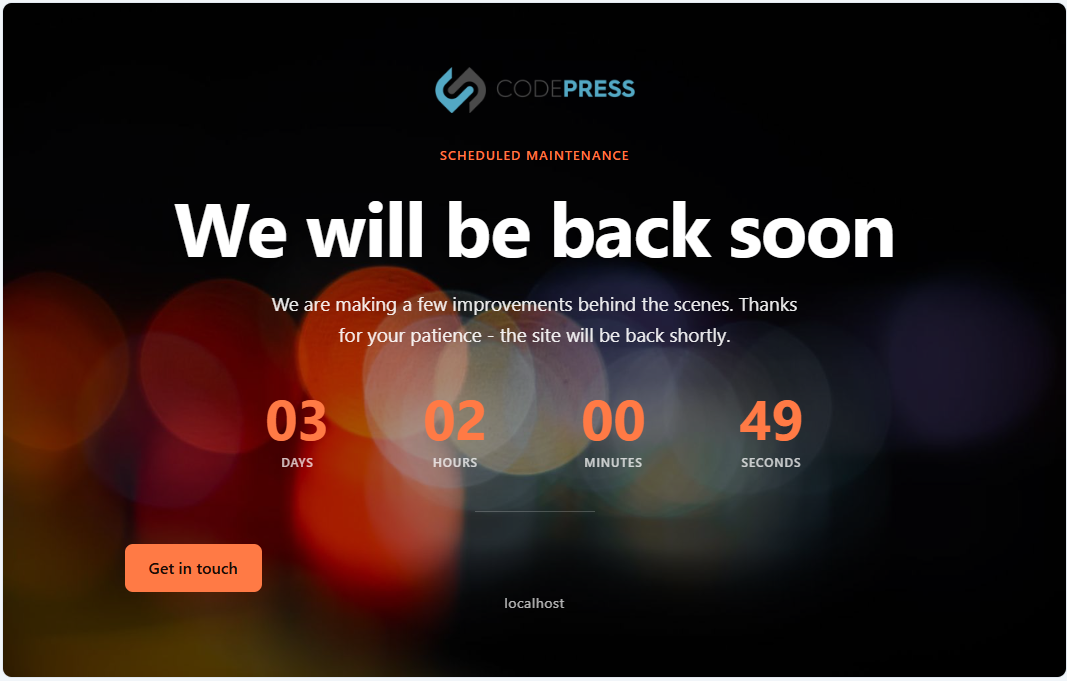
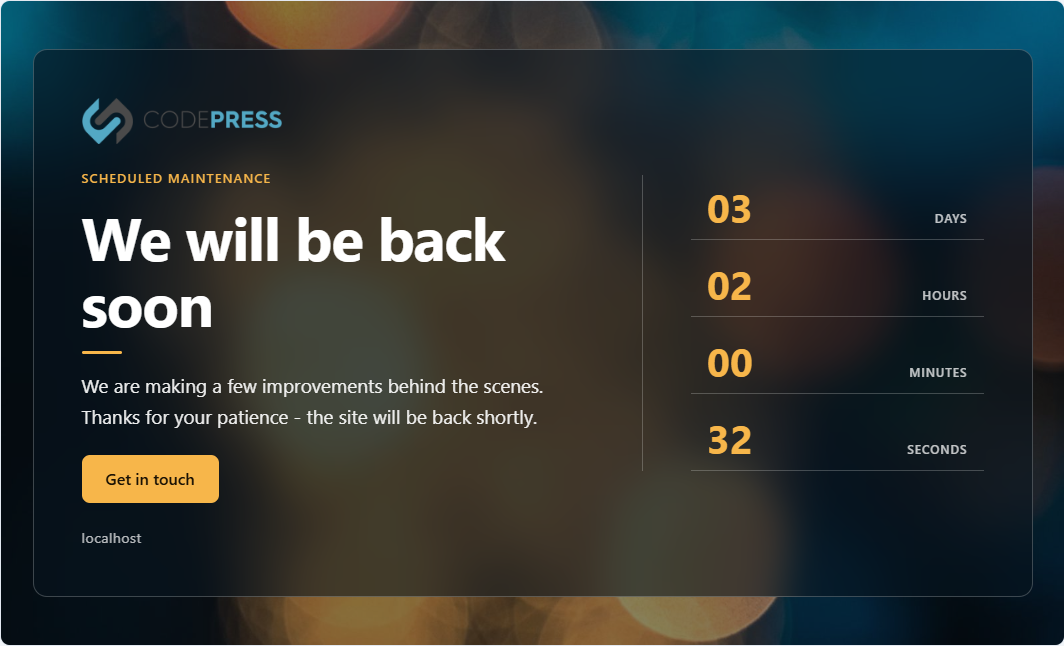
- ⚡ Zero-Reload Quick Design Toolbar: Docked right above the live preview canvas, the design toolbar gives you rapid access to layout modes (Centered, Left Focus, Minimal, Split), background modes, glassmorphism blur intensity, shading overlays, and theme accents.
- 📱 Multi-Device Viewport Emulation: Effortlessly toggle between Desktop, Tablet, and Mobile preview frames to ensure your under-construction page looks pixel-perfect across all screen sizes.
- 🛡️ Distraction-Free Notice Quarantine: Annoying third-party dashboard notices cluttering your screen? The built-in notice quarantine tray automatically captures and collates external notices into a neat, collapsible header tray so your design space stays clean and focused.
- 🔘 Instant Admin Bar Switch: Toggle maintenance mode on or off from any page on your site with a single click in the top WordPress admin bar.
🎨 Drop-in Templates & Preset Generator
- 9 Handcrafted Modern Templates: Ready-to-use, professionally designed templates featuring curated color palettes, elegant typography, and glassmorphism styling.
- Save as Preset: Created a look you love? Click “Save as Preset” to turn your customized palette, layout, and background into a brand-new template folder stored safely in your uploads directory (
wp-content/uploads/mm-suc-p-templates/)—completely immune to plugin updates! - True Drop-In Architecture: Add custom templates simply by dropping a folder into the directory. No code registration, hooks, or PHP edits required.
🔍 100% SEO-Safe & Search Engine Friendly
Putting your site down should never destroy your Google search rankings.
- Proper HTTP 503 Service Unavailable: Tells search engine crawlers (Googlebot, Bingbot) that downtime is temporary.
- Retry-After Header (3600s): Instructs search spiders to return in an hour without de-indexing your URLs.
- Automatic Robot Directives: Generates
noindex, nofollowmeta tags on maintenance pages to prevent indexing temporary placeholder text. - Zero-Cache Response Headers: Emits strict
nocache_headers()to avoid intermediate CDN and browser caching issues.
⏳ High-Converting Features for Launching & Rebranding
- ⏱️ Live Countdown Timer with Auto-Launch: Build anticipation for your product release. When the timer hits zero, the plugin automatically disables maintenance mode and smoothly reloads the page for visitors.
- 📬 Slide-Out Animated Contact Sheet: Keep communication channels open. Visitors click your contact trigger to slide open an elegant message sheet without leaving the page.
- 🤖 Spam-Proof & Rate-Limited Submissions: Features an invisible honeypot trap to silently neutralize spam bots, combined with secure HMAC SHA-256 IP transient rate limiting (max 4 attempts/15 mins).
- 👥 Granular Role-Based Bypass: Grant access to specific user roles (e.g., Editors, Authors, Clients) while keeping the site hidden from public visitors. Administrators are permanently safeguarded against accidental lockouts.
- 🖼️ Smart Logo Resolution Hierarchy: Automatically inherits your theme’s custom logo (Classic or Full Site Editing block themes) or lets you upload a custom maintenance logo with one click.
- 🚀 Zero External Bloat: No slow Google Fonts requests, external CDNs, or tracking scripts. Powered by 100% self-hosted vector SVGs, vanilla JavaScript, and modern CSS custom properties.
Key Features
- Live WYSIWYG Inline Editing: Click and edit text directly on the live preview canvas.
- Interactive Hover Colour Map: Point to any UI element to inspect and edit its exact color token in real time.
- Quick Visual Toolbar: Control layout structures, backgrounds, glassmorphism blur, and contrast shading on the fly.
- Drop-In Template Library: 9 beautiful bundled designs with support for custom community templates.
- Save as Preset Generator: Export your custom styles into independent, update-proof template packages.
- Smart Logo Inheritance: Automatically syncs with your WordPress site/theme logo or accepts custom media uploads.
- Real-Time Countdown Clock: Animated live ticking timer with automatic site go-live upon expiration.
- Slide-Out Contact Form: Zero-reload AJAX contact sheet with custom CTA button.
- Advanced Spam & Flood Protection: Invisible honeypot trap + IP rate limiting.
- SEO Safeguards: Emits HTTP 503, Retry-After header, and noindex/nofollow directives.
- Role-Based Access Control: Whitelist specific roles with permanent administrator lockout immunity.
- Admin Bar Quick Toggle: One-click maintenance switch with live status indicator.
- Notice Isolation Tray: Automatically sweeps distracting third-party dashboard notices into a collapsible bar.
- Lightweight & Privacy First: Zero external HTTP requests, zero tracking, zero CDN dependencies.
Installation
- Upload the
wp-maintenance-mode-site-under-constructionfolder to your/wp-content/plugins/directory (or search for it via Plugins > Add New in your WordPress admin). - Activate the plugin through the Plugins menu in WordPress.
- Go to Settings > Maintenance Mode (or click the quick switch in your Admin Bar).
- Customize your text inline, adjust your colors with the visual toolbar, pick a template, and toggle Maintenance Mode on!
Frequently asked questions
Can I edit the text directly on the maintenance page preview?
Yes! Just click on any text block (eyebrow tag, main headline, description message, or button text) in the live preview and start typing. Your changes are mirrored in the settings in real time.
Will putting my site under maintenance hurt my Google rankings?
No. The plugin sends an official HTTP 503 Service Unavailable header accompanied by a Retry-After: 3600 response header. This explicitly signals search engines that your site is undergoing temporary maintenance so they do not drop or de-index your URLs.
Can I let my clients or team view the live site while under construction?
Yes. Under the Access & Role Bypass accordion in the sidebar, simply check the user roles you want to grant access to (e.g., Editor, Author, Subscriber).
What happens when the countdown timer ends?
If you enable Auto-Disable, the plugin will automatically turn off maintenance mode the moment the timer reaches zero, and the frontend will reload to reveal your live site to visitors.
How do I create my own reusable template preset?
Customize your layout, background, and colors in the visual editor. Then scroll to the bottom of the Design & Styling panel and click Save as preset. Your design is saved into your wp-content/uploads/mm-suc-p-templates/ directory as an independent, update-safe template folder.
Changelog
5.3
- Fix: Prevented PHP stat warning when custom template presets directory does not exist yet.
- Fix: Added directory existence checks prior to filesystem modification time queries.
- Fix: Defensive safeguards for filesystem operations during legacy message migration.
5.2
- Fix: Resolved message management actions where View modal and Delete buttons were unresponsive.
- Improvement: Added row-level click support to inspect inquiries in the detail modal directly.
- Improvement: Added toast notifications container and error message extraction for admin message actions.
- Improvement: Design system token normalization for typography and spacing scales.
- Improvement: Added missing message counter localization strings.
5.1
- Improvement: Full WordPress Plugin Check compliance and i18n standards alignment.
- Improvement: Translators comments added for all localized strings with dynamic placeholders.
- Improvement: Modern automatic translation loading compatibility.
4.4.0
- New: Interactive Hover Colour Map — hover over preview elements to inspect tokens and trigger native color picking.
- New: Save as Preset — export customized palettes and layouts directly to the uploads directory.
- New: Preset intelligence that computes optimal contrast and text luminance on accent buttons.
- Fixed: Headline text rendering inconsistency with dark admin themes.
4.3.0
- New: Visual Design Toolbar placed directly above the live canvas.
- New: Dynamic color map engine with sentinel measurement.
- Improvement: Vertical template library list with live metadata and preview refresh.
4.2.0
- New: 9 bundled drop-in templates with drop-in folder architecture.
- New: Real-time WCAG contrast ratio calculations.
Screenshots




For developers
Is this your plugin? Show off the numbers.
Add a live badge to your site, docs or GitHub README. It updates on its own — no account needed.
Best WP Maintenance Mode & Site Un… alternatives
All coming soon plugins →





FAQ
WP Maintenance Mode & Site Under Co…: quick answers
Straight answers, pulled from live WordPress.org data.
Live data from WordPress.org · checked Sep 26, 2026
Is WP Maintenance Mode & Site Unde… free?
Yes. WP Maintenance Mode & Site Unde… is free to download and use from the official WordPress.org plugin directory.
Is WP Maintenance Mode & Site Unde… safe to use in 2026?
WP Maintenance Mode & Site Unde… is a solid plugin choice in 2026, with a few things worth checking first. It runs on 3K+ sites, is rated 3.5/5 and was last updated 3 weeks ago, and scores 74/100 on our health check.
How many websites use WP Maintenance Mode & Site Unde…?
WP Maintenance Mode & Site Unde… is active on 3K+ WordPress websites and has been downloaded 56,912 times since it launched in February 2020. It was downloaded 3,396 times in the last 30 days.
Does WP Maintenance Mode & Site Unde… work with WordPress 7.1?
Yes. The developer has tested WP Maintenance Mode & Site Unde… up to WordPress 7.1.2, the latest release. It requires WordPress 6.2 or newer.
What PHP version does WP Maintenance Mode & Site Unde… need?
WP Maintenance Mode & Site Unde… requires PHP 7.4 or higher. Most hosts run PHP 8.x today, so it works on any modern WordPress hosting.
When was WP Maintenance Mode & Site Unde… last updated?
The latest version, 5.3, was released on September 2, 2026 (3 weeks ago).
Who makes WP Maintenance Mode & Site Unde…?
WP Maintenance Mode & Site Unde… is developed and maintained by wp-buy.
What are the best alternatives to WP Maintenance Mode & Site Unde…?
The most popular alternatives to WP Maintenance Mode & Site Unde… are Maintenance (1M+ installs), LightStart (400K+ installs) and CMP (200K+ installs).
Powered by PageForge
Want thousands of pages that rank like these? Build them in an afternoon.
This directory runs on the same engine as PageForge. Turn any spreadsheet, CSV or API into thousands of fast, SEO-ready WordPress pages — with schema, internal links and AI-written copy baked in.
- CSV, Google Sheets & API data sources
- AI content, schema & internal links per page
- Works with Elementor, Gutenberg, Yoast & Rank Math
- Free on WordPress.org — no credit card


