



Email Template Designer – WP HTML Mail
Custom designed WordPress emails for your WooCommerce and EDD transactional emails, contact form notifications, your WordPress core emails, BuddyPress and many more. Create your own professional email design within a…

Safe pick
Yes — Email Template Designer is a safe, well-maintained plugin to use in 2026. It runs on 20K+ sites, is rated 4.8/5 and was last updated 3 days ago, and scores 93/100 on our health check.
- Proven at scale on 20K+ active sites
- Loved by users — 4.8/5 from 87 reviews
- Actively developed — last update 3 days ago
- Tested with the latest WordPress (7.1)
- Momentum — downloads up 345.1% vs the previous 30 days
How does it stack up?
Side-by-side on installs, updates, ratings & support



Daily downloads
Download spikes usually follow a new release — each site that auto-updates counts as a download.
Rankings
Where Email Template Designer stands todayWordPress.org search rankings
Live position in the plugin search, top 100| Keyword | Position |
|---|---|
| elementor | >100 |
| #39 | |
| email design | #8 |
| email template | #6 |
| woocommerce email | #58 |
Version adoption
Share of active sites per release.
Rating breakdown
★★★★★★★★★★ 4.8 from 87 reviews
About Email Template Designer – WP HTML Mail
From the official readme · v3.5Description
Custom designed WordPress emails for your WooCommerce and EDD transactional emails, contact form notifications, your WordPress core emails, BuddyPress and many more.
Create your own professional email design within a few minutes without any coding.
NEW in 3.4: WooCommerce support in free version!!
See how we design our WordPress emails within two and a half minutes
🔝 Top rated email design plugin with 75 ⭐⭐⭐⭐⭐ reviews
Read what users say about our email template plugin
⭐⭐⭐⭐⭐ Best Email Template Builder
🗣️ tillvb (@tillvb)⭐⭐⭐⭐⭐ Simple, flexible and very needed on WP!
🗣️ Richard Fila (@richardfila)⭐⭐⭐⭐⭐ Works great and is easy to use
Great plugin! Great support! Thank you very much!
🗣️ hirsala (@hirsala)⭐⭐⭐⭐⭐ On my Plugins’ Top List
🗣️ Anticosti (@anticosti)⭐⭐⭐⭐⭐ This is magic and should be default in WP!
🗣️ MarcelC (@imc67)
All in one email designer for your contact forms, WooCommerce, Easy Digital Downloads and many more…
🆓 Elementor Forms
🆓 WooCommerce – basic customization
🆓 Ninja Forms
🆓 Caldera Forms
🆓 Contact Form 7
🆓 Gravity Forms
🆓 Gravity Flow
🆓 HappyForms
🆓 WP Support Plus Responsive Ticket System
🆓 Birthday Emails
🆓 Ultimate WP Mail
🆓 Divi Theme contact forms
🆓 BuddyPress
🆓 Give – Donation and Fundraising
🆓 TeraWallet
🆓 WP E-Commerce
🆓 Formidable Forms
🆓 WP Foro
🆓 ACF Advanced Forms
🆓 Elementor Forms
🆓 Events Made Easy
🆓 Learndash Notifications
🆓 Matador Jobs
🆓 Memberpress
🆓 Modern Events Calendar
🆓 Uncanny Owl Groups
🆓 ShieldSecurity
🆓 The Newsletter Plugin
➕ WPForms and WPForms Lite
➕ WooCommerce – advanced customization
➕ Easy Digital Downloads
…
- Responsive & Device independent:
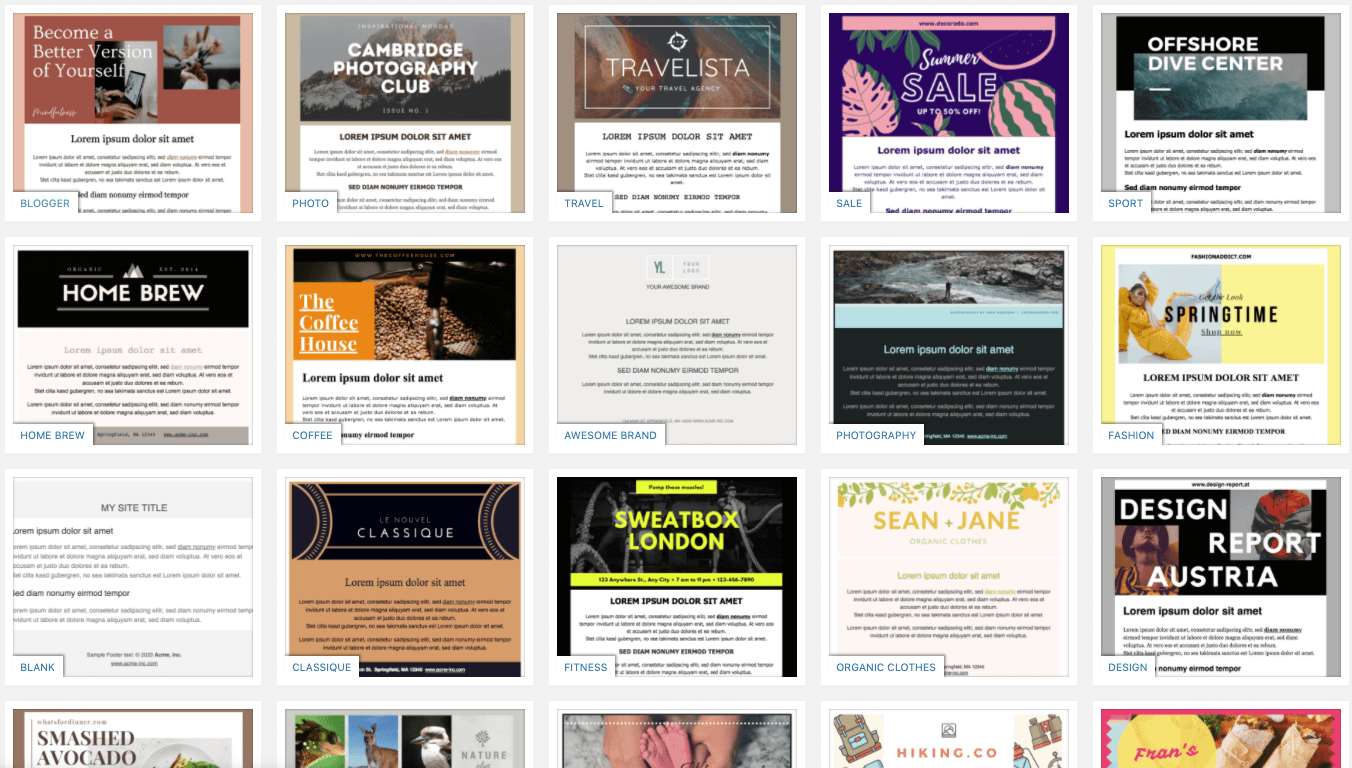
Our e-mail template has been tested in all major desktop, web and mobile mailclients. - Template library:
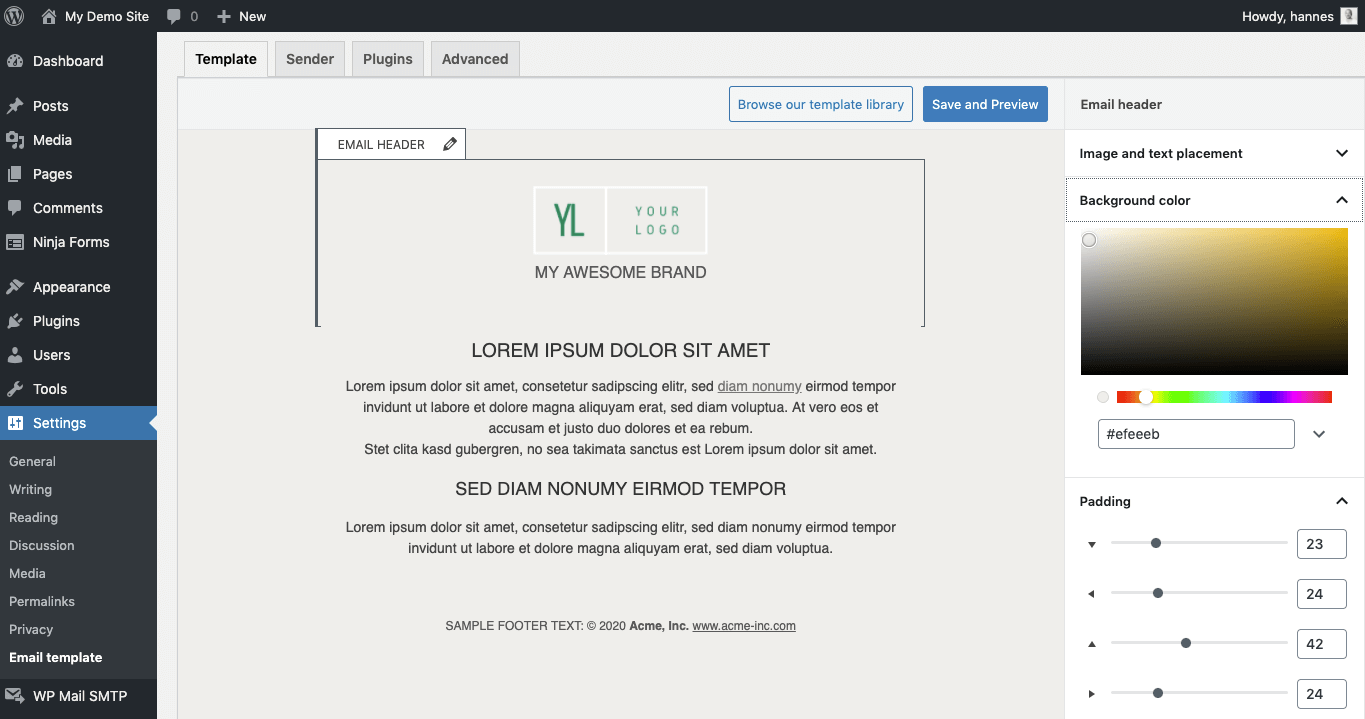
Start your email design with one of our templates created by professional designer - Text or image header:
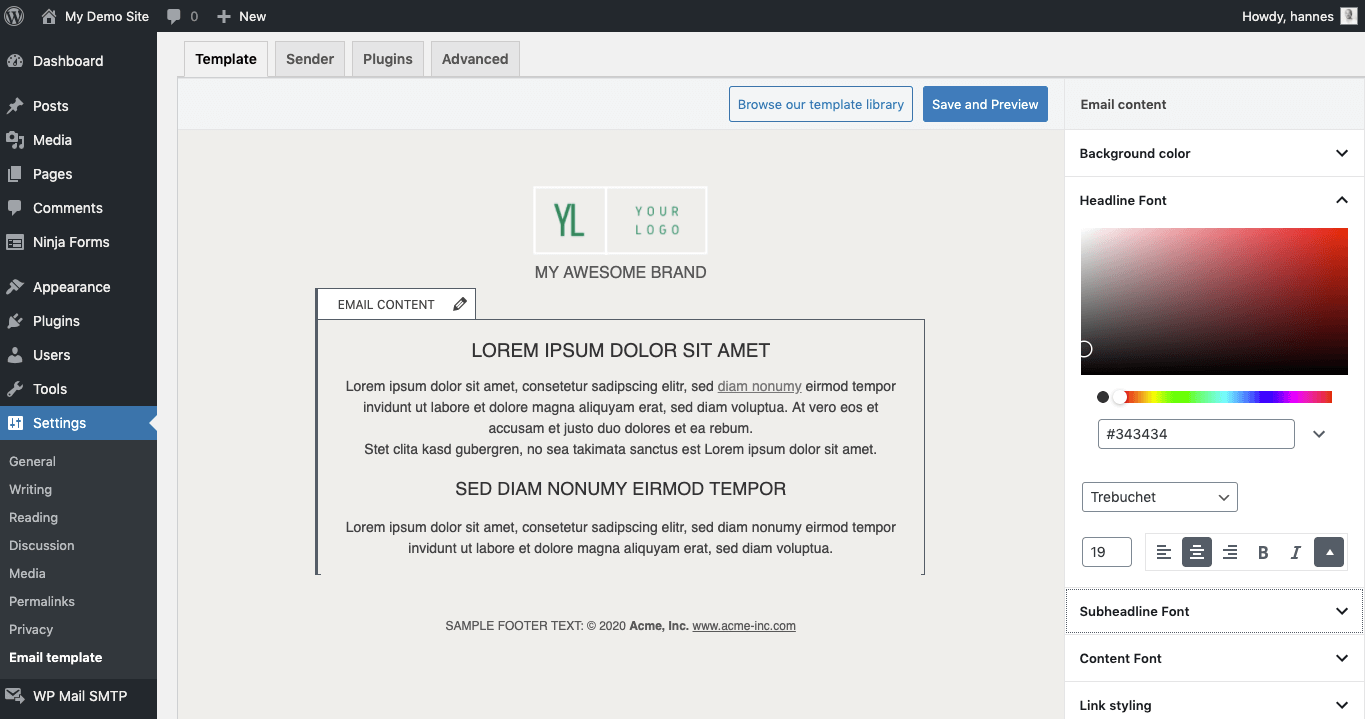
Either style your email header with colors and text, use your logo or design a banner. - Customize colors and fonts:
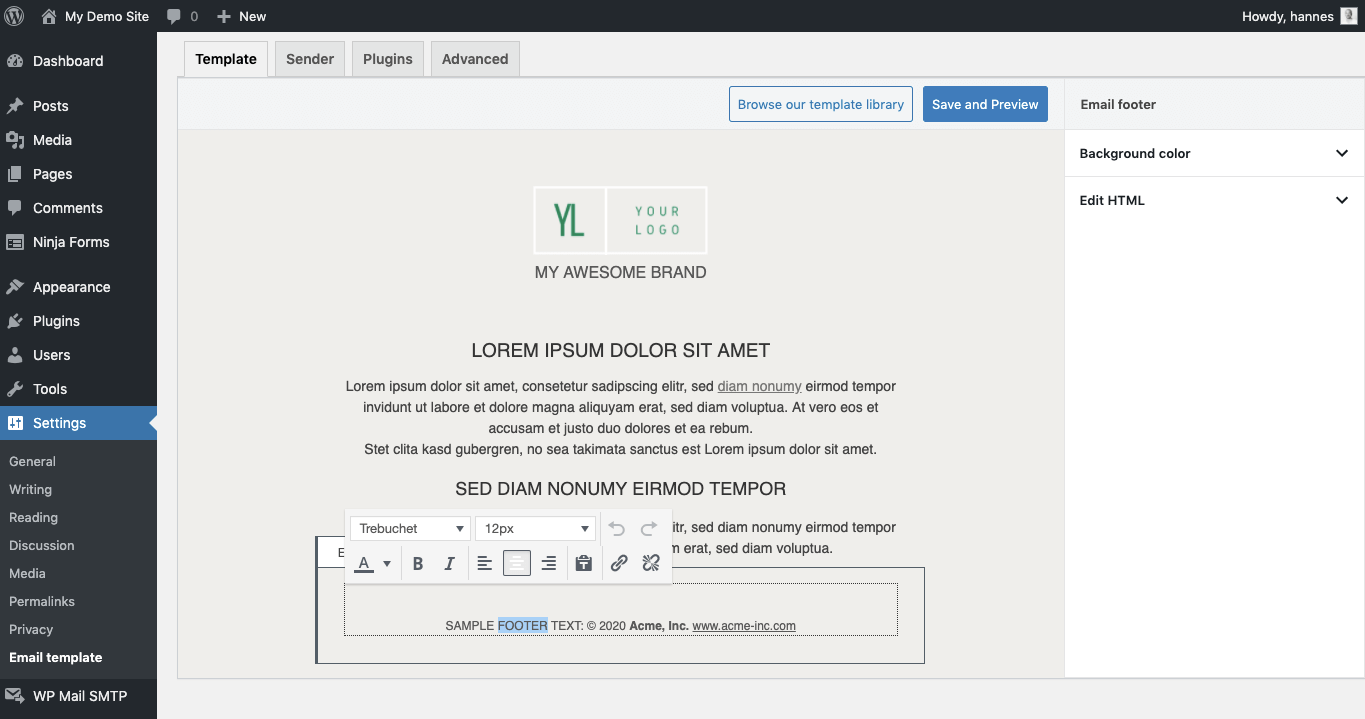
Different plugins send different emails but you can define global color and font settings for headlines, text, links and more to give all your emails a common professional look. - Add your companies legal information to the footer:
The email footer can contain links to your legal pages, your contact data or whatever you want. - Inline CSS:
Webclients do not override your styles, because we move all style definitions to inline styles. - Email test mode:
Redirect all emails to your own email address for testing or for your staging system. - Live Preview:
See all your changes immediately in the live preview.
★★★★★ pro addon WooCommerce Drag & Drop Email Customizer
trusted by more than 2000 pro users
Use our WooCommerce email customizer addon to customize all your store emails. For all standard emails you can also edit the email content as well as the products table.
Most emails from third party WooCommerce plugins can be styled and for some of them we created special integrations:
- Barcodes from YITH WooCommerce Bar Codes and QR Codes can be placed anywhere in your Emails
- You can change emails from WooCommerce Order Status Manager
- Insert custom checkout fields to your emails with Checkout Field Editor
- WooCommerce German Market is fully integrated
- With AutomateWoo you can use your email template for your abandoned cart mails and other automated emails
- WooCommerce Advanced Shipment Tracking
You can try the plugin in our WooCommerce Demo. - WooCommerce Germanized and Germanized Pro are integrated
get WooCommerce Email Customizer >
Easy Digital Downloads Email Customizer
Our second ecommerce extension is for Easy Digital Downloads. Using this simple add-on you can
- customize typography for items, variations and links
- format the products table
- see a preview of your EDD emails in desktop and mobile view
get Easy Digital Downloads Email Customizer >
Works with most email delivery plugins
- WP Offload SES
- Post SMTP Mailer/Email Log
- WP Mail SMTP
- wpMandrill
- …
Credits
- Thanks to Julie Ng for the great “Antwort” responsive email layout Antwort on Github
- Thanks to Tijs Verkoyen for his CSS-to-inline-styles PHP library CssToInlineStyles on Github
Translations
The plugin is currently available in following languages
- English (of course)
- German
- Spanish translation provided by Jose from Ibidem Translations
- Italian translation provided by @gablau and Ema from Ibidem Traduzioni
- Dutch
- Chinese
- Persian
Installation
Extract the zip file and just drop the contents in the wp-content/plugins/ directory of your WordPress installation and then activate the Plugin from Plugins page.
Frequently asked questions
Does it work for emails from plugin XYZ?
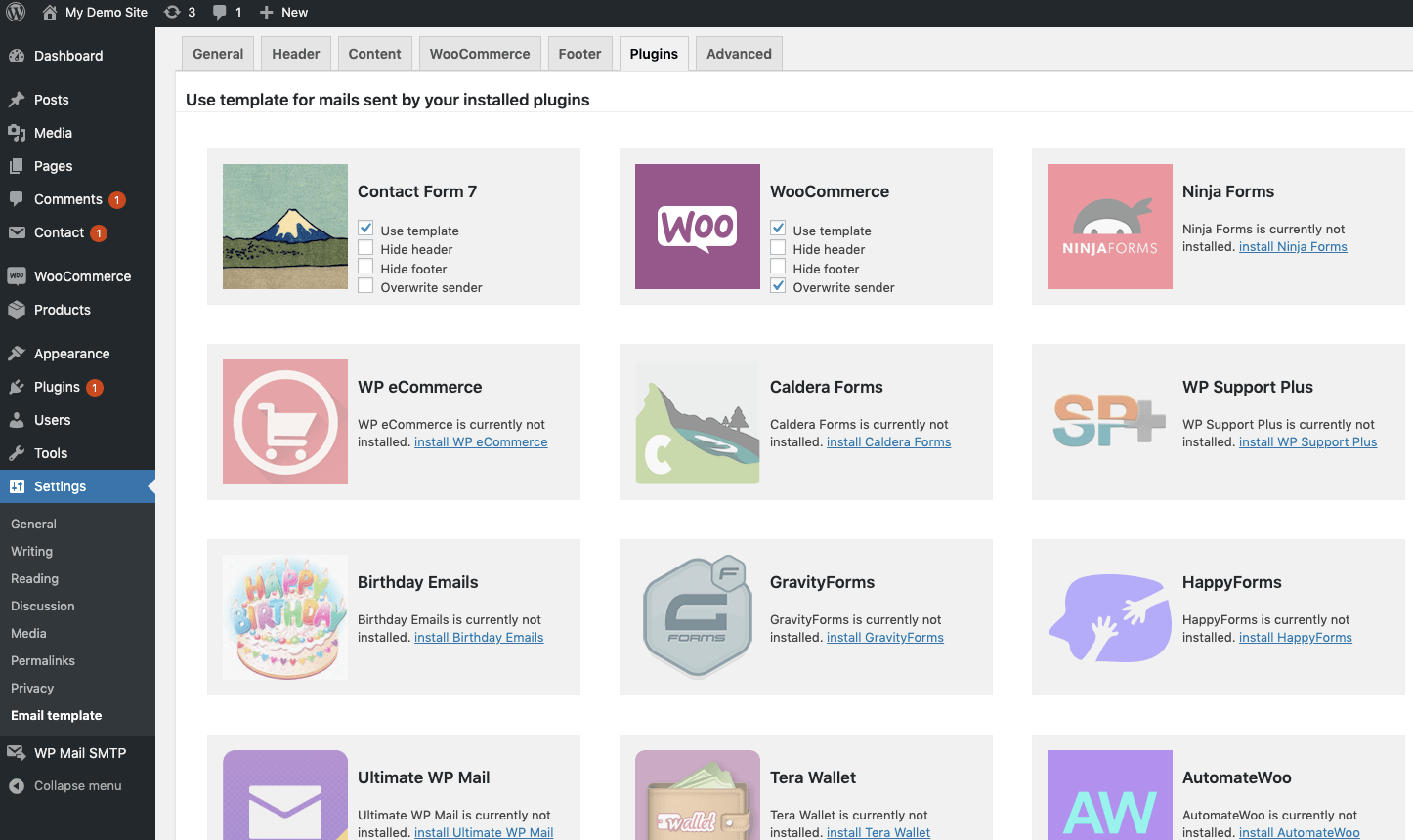
Our email designer has integrations for these plugins: AutomateWoo Birthday Emails BuddyPress Caldera Forms Contact Form 7 Divi Theme contact forms Easy Digital Downloads Fluent CRM Fluent Support Formidable Forms Give – Donation and Fundraising Gravity Flow Gravity Forms HappyForms Ninja Forms TeraWallet The Newsletter Plugin Ultimate WP Mail WooCommerce WPForms and WPForms Lite WP E-Commerce WP Foro WP Support Plus Responsive Ticket System Allthough we didn’t optimize WP HTML Mail for these plugins our users use it with many more plugins ACF Advanced Forms Elementor Forms Events Made Easy…
Why is my header image not visible?
The most common reasons are: * Your site is password protected so your email client can’t load the image. * You are using a local staging site that is not reachable by your mail client. * The image format is not supported by your mail client. Try a different image (PNG, JPG or GIF).
Can I send my newsletter campaigns with this plugin?
No, this is not a newsletter tool, it just makes your emails beautiful but doesn’t send custom ones.
How can I remove the gap at the header of my Contact Form 7 emails?
Go to your Contact Form 7 email settings and change email type from HTML to text. WP HTML Mail will take care of the HTML.
Can a customize the HTML code of the email header?
There’s a filter to change the header HTML code. Just add this to your (child-)themes functions.php: add_filter('haet_mail_header', function( $header ){ return 'hello world'; }); Of course you can display HTML code, not just text.
Can a customize the HTML code of the email footer?
There’s a filter to change the footer HTML code. Just add this to your (child-)themes functions.php: add_filter('haet_mail_footer', function( $footer ){ return 'hello world'; });
Can I add custom CSS code to my WordPress emails?
You can add your own CSS code for desktop and mobile. Just add this example to your (child-)themes functions.php and customize it: add_filter( 'haet_mail_css_desktop', function( $css ){ $css .= ' h1{ border-bottom: 2px solid green; } '; return $css; }); add_filter( 'haet_mail_css_mobile', function( $css ){ $css .= ' h1{ background:red; } '; return $css; });
How to disable the template for some emails?
Find anything all emails have in common. It may be the sender, a word in the subject or something in the email body. Then add this function to your (child-)themes functions.php and customize it. Return TRUE if the template should be used and FALSE if not. // return true if you want to use a template for current mail // return false if you want to leave the content of this email unchanged add_filter( 'haet_mail_use_template', 'customize_template_usage', 10, 2 ); function customize_template_usage( $use_template, $mail ){ // $mail['to'] ... // $mail['subject'] ... // $mail['message'] ... //…
Changelog
3.5
- FIXED: WooCommerce email preview
- FIXED: WooCommerce icon path and URL
- FIXED: Typo in the plugin
- UPDATED: WordPress version compatibility
3.4.9
- updated dependencies to fix a notice in PHP 8.3
- FIXED: Prevent Function _load_textdomain_just_in_time was called incorrectly notice
3.4.8
- FIXED: Sending test mails from WooCommerce tab
3.4.7
- ADDED: Support for Fluent Support Mailbox mails
- FIXED: EDD Pro not recognized as active
- FIXED: display error when sending e-mails with FluentCRM automation
- updated dependencies to fix a notice in PHP 8.1
3.4.5
- added support for The Newsletter Plugin
- FIXED: display error when sending e-mails with FluentCRM
- FIXED: twocol display error in Outlook iOS
3.4.2
- removed preview ajax call
Screenshots
For developers
Is this your plugin? Show off the numbers.
Add a live badge to your site, docs or GitHub README. It updates on its own — no account needed.
Best Email Template Designer alternatives
All elementor plugins →





FAQ
Email Template Designer: quick answers
Straight answers, pulled from live WordPress.org data.
Live data from WordPress.org · checked Sep 26, 2026
Is Email Template Designer free?
Yes. Email Template Designer is free to download and use from the official WordPress.org plugin directory.
Is Email Template Designer safe to use in 2026?
Yes — Email Template Designer is a safe, well-maintained plugin to use in 2026. It runs on 20K+ sites, is rated 4.8/5 and was last updated 3 days ago, and scores 93/100 on our health check.
How many websites use Email Template Designer?
Email Template Designer is active on 20K+ WordPress websites and has been downloaded 722,780 times since it launched in January 2015. It was downloaded 10,247 times in the last 30 days.
Does Email Template Designer work with WordPress 7.1?
Yes. The developer has tested Email Template Designer up to WordPress 7.1.2, the latest release. It requires WordPress 5.4 or newer.
What PHP version does Email Template Designer need?
Email Template Designer requires PHP 7.2 or higher. Most hosts run PHP 8.x today, so it works on any modern WordPress hosting.
When was Email Template Designer last updated?
The latest version, 3.5, was released on September 23, 2026 (3 days ago).
Who makes Email Template Designer?
Email Template Designer is developed and maintained by Hannes Etzelstorfer.
What are the best alternatives to Email Template Designer?
The most popular alternatives to Email Template Designer are Ultimate Addons for Element… (2M+ installs), Essential Addons for Elemen… (1M+ installs) and Royal Addons for Elementor (600K+ installs).
Powered by PageForge
Want thousands of pages that rank like these? Build them in an afternoon.
This directory runs on the same engine as PageForge. Turn any spreadsheet, CSV or API into thousands of fast, SEO-ready WordPress pages — with schema, internal links and AI-written copy baked in.
- CSV, Google Sheets & API data sources
- AI content, schema & internal links per page
- Works with Elementor, Gutenberg, Yoast & Rank Math
- Free on WordPress.org — no credit card


