



WP-GraphViz
A plugin to provide GraphViz functionality for WordPress sites.

Consider an alternative
WP-GraphViz shows warning signs in 2026 — compare the alternatives below before installing. It runs on 40+ sites, is rated 4/5 and was last updated 3 years ago, and scores 28/100 on our health check.
- Small user base (40+ active installs)
- Very few reviews so far
- No update in 3 years
- Only tested up to WordPress 6.2 (latest is 7.1)
How does it stack up?
Side-by-side on installs, updates, ratings & support


Daily downloads
Download spikes usually follow a new release — each site that auto-updates counts as a download.
Rankings
Where WP-GraphViz stands todayWordPress.org search rankings
Live position in the plugin search, top 100| Keyword | Position |
|---|---|
| diagram | #83 |
| dot | >100 |
| graph | >100 |
| graphviz | #1 |
| network | >100 |
Version adoption
Share of active sites per release.
Rating breakdown
★★★★★★★★★★ 4 from 3 reviews
About WP-GraphViz
From the official readme · v1.5.1Description
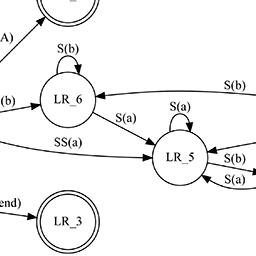
GraphViz is a powerful tool for visualising network and tree structures that connect objects.
This WordPress plugin provides a shortcode mechanism to create GraphViz graphics within blogs, using the shortcode mechanism.
It’s working is based on the viz.js code as provided by Mike Daines:
https://github.com/mdaines/viz.js
Special thanks goes to chrisy as author of TFO Graphviz, e.g. for providing the inspiration for this readme:
https://wordpress.org/plugins/tfo-graphviz/
How to use WP GraphViz
The shortcode syntax is:
[wp_graphviz <options>]
 <DOT code>
[/wp_graphviz]
Where <options> is anything from this list. All are entirely optional:
-
id="<id>"Provides the identifier used to link the generated image to an image map. If you use the
simpleoption then it also provides the name of the generated DOT graph container (since GraphViz uses this to generate the image map). If not given then an identifier is generated with the formwp_graphviz_Nwhere N is an integer that starts at one when the plugin is loaded and is incremented with use. -
output="<png|gif|jpg|svg>"Indicates the desired image format. Defaults to
png. -
simple="yes|no"The
simpleoption provides a very basic DOT wrapper around your code such that the following is possible:[wp_graphviz simple="yes"] a -> b -> c; [/wp_graphviz]The generated code would look like:
digraph wp_graphviz_1 {
    a -> b -> c;
}
See the
idoption for a description of where the name of thedigraphcomes from.simpledefaults tono. -
title="<title>"Indicates the title of the image. This is used in the
altandtitleattributes of the image reference. This defaults to an empty string. Note that image maps may indicate atitlestring which will appear in tool-tips.
Installation
- Upload
wp-graphviz.phpto the/wp-content/plugins/directory - Activate the plugin through the ‘Plugins’ menu in WordPress
- Use shortcode
[wp_graphviz]<dot code>[/wp_graphviz]in your posts or pages
Frequently asked questions
What is GraphViz?
GraphViz is a way of generating visualisations of structural relationships between objects. Almost any kind of diagram where something connects to something else can be drawn and automatically laid out using the DOT language.
How do I use this plugin?
Use the [wp_graphviz] shortcode. Various uses are explained in the “How to use” section.
How do I write DOT?
The online documentation for GraphViz is terse and not especially helpful, in particular the DOT language page is only helpful if you happen to be able to read an approximation of BNF. There are however several other introductions to Graphviz and DOT, including an excerpt on the O’Reilly LinuxDevCenter.com site. Another approach would be to look at the examples in the Graphviz gallery. If in doubt, find an example and experiment with it.
Changelog
Formal version, tested for WP 4.0. Added icon-128x128.png to support plugin icons.
1.5.1
- Tested for WordPress 6.2.2.
1.5.0
- Tested for WordPress 5.4.
1.4.0
- Tested for WordPress 5.0.
1.3.0
- Replaced viz.js with viz-lite.js to reduce footprint only supporting dot and svg options.
- Fixed shortcode handling keeping only those that work with viz-lite.
- Disabled wptexturize for WP_GraphViz shortcode.
- Formal version, tested for WP 4.7.4.
- Fixed translations.
1.2.1
- Fixed translation handling using localization functions.
1.2.0
- Formal version, tested for WP 4.6.1.
- Added shortcode parameters.
Screenshots

For developers
Is this your plugin? Show off the numbers.
Add a live badge to your site, docs or GitHub README. It updates on its own — no account needed.
Best WP-GraphViz alternatives
All diagram plugins →





FAQ
WP-GraphViz: quick answers
Straight answers, pulled from live WordPress.org data.
Live data from WordPress.org · checked Sep 28, 2026
Is WP-GraphViz free?
Yes. WP-GraphViz is free to download and use from the official WordPress.org plugin directory.
Is WP-GraphViz safe to use in 2026?
WP-GraphViz shows warning signs in 2026 — compare the alternatives below before installing. It runs on 40+ sites, is rated 4/5 and was last updated 3 years ago, and scores 28/100 on our health check.
How many websites use WP-GraphViz?
WP-GraphViz is active on 40+ WordPress websites and has been downloaded 3,994 times since it launched in August 2013. It was downloaded 99 times in the last 30 days.
Does WP-GraphViz work with WordPress 7.1?
WP-GraphViz is officially tested up to WordPress 6.2.13, while the latest release is 7.1.2. It may still work, but try it on a staging site first.
When was WP-GraphViz last updated?
The latest version, 1.5.1, was released on July 23, 2023 (3 years ago).
Who makes WP-GraphViz?
WP-GraphViz is developed and maintained by Jan DeBAAT.
What are the best alternatives to WP-GraphViz?
The most popular alternatives to WP-GraphViz are Scrollchart (100+ installs), PlantUML Renderer (100+ installs) and NinjaDraw (80+ installs).
Powered by PageForge
Want thousands of pages that rank like these? Build them in an afternoon.
This directory runs on the same engine as PageForge. Turn any spreadsheet, CSV or API into thousands of fast, SEO-ready WordPress pages — with schema, internal links and AI-written copy baked in.
- CSV, Google Sheets & API data sources
- AI content, schema & internal links per page
- Works with Elementor, Gutenberg, Yoast & Rank Math
- Free on WordPress.org — no credit card


