


WP-dTree
Legacy collapsible navigation trees for WordPress. For a modern alternative with native blocks, see Content Trees.

Safe pick
Yes — WP-dTree is a safe, well-maintained plugin to use in 2026. It runs on 2K+ sites, is rated 4.8/5 and was last updated 3 weeks ago, and scores 91/100 on our health check.
- Loved by users — 4.8/5 from 25 reviews
- Actively developed — last update 3 weeks ago
- Tested with the latest WordPress (7.1)
- Momentum — downloads up 180.2% vs the previous 30 days
How does it stack up?
Side-by-side on installs, updates, ratings & support



Daily downloads
Download spikes usually follow a new release — each site that auto-updates counts as a download.
Rankings
Where WP-dTree stands todayWordPress.org search rankings
Live position in the plugin search, top 100| Keyword | Position |
|---|---|
| archive | #63 |
| category | >100 |
| navigation | #93 |
| sidebar | #54 |
| tree | #10 |
Version adoption
Share of active sites per release.
Rating breakdown
★★★★★★★★★★ 4.8 from 25 reviews
About WP-dTree
From the official readme · v4.5.5Description
Looking for a modern alternative?
WP-dTree has a modern successor: Content Trees.
Content Trees offers native WordPress blocks with live previews, keyboard and screen-reader support, and on-demand post loading. It can run alongside WP-dTree, allowing you to replace your navigation trees gradually.
Existing widgets and settings are not migrated automatically, and some legacy features are not yet supported. Content Trees requires WordPress 6.3 or later; see its listing for current features and requirements.
WP-dTree remains supported for security and compatibility fixes. New feature development is focused on Content Trees.
WP-dTree features
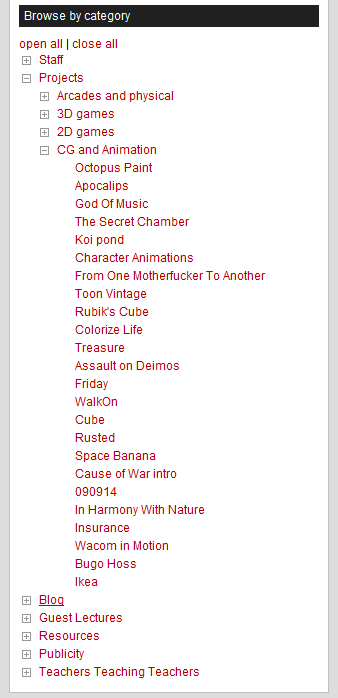
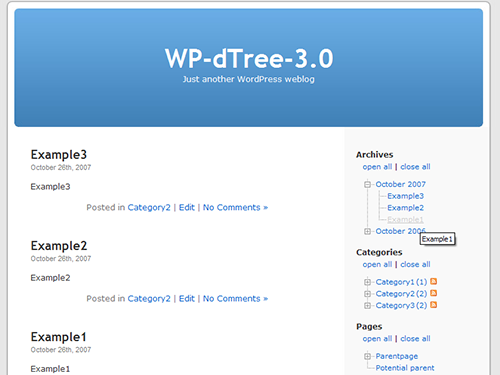
This plugin provides collapsible navigation trees for archives, categories, pages, links, custom taxonomies and menus. Use the widgets in a widget area or the template functions documented below. Archive trees can group posts by year and month.
Requires WordPress 6.0.1 or later and PHP 7.4 or later.
Additional Info
The original ‘WP-dTree’ was created by Christopher Hwang in ~2005. By 2007 Mr. Hwang seemed to have dropped of the internet for good so Ulf Benjaminsson forked the plugin in and named it ‘WP-dTree 3.0’ (note to self: having a release number in the title was stupid).
The fork was focused on performance improvements – mainly caching – but soon expanded to add a lot of new features and modernizations; compatibility with WP 2.7 through WP 3.3, widgets, out-of-the-box Scriptaculous support, link trees, feed icons and more.
For version 4.0 the entire plugin has been rewritten from scratch by Ulf, bringing it in line with the much matured WP 3.x API.
*WP-dTree (3.0 and up) is Copyright (C) 2007-2021 Ulf Benjaminsson (email: hello at my full name dot com)
*WP-dTree (3.x and lower) Copyright (C) 2006 Christopher Hwang (email: chris at silpstream dot com).
*dTree-JavaScript is Copyright (c) 2002-2003 Geir Landrö
This program is free software; you can redistribute it and/or modify
it under the terms of the GNU General Public License as published by
the Free Software Foundation; either version 2 of the License, or
(at your option) any later version.
This program is distributed in the hope that it will be useful,
but WITHOUT ANY WARRANTY; without even the implied warranty of
MERCHANTABILITY or FITNESS FOR A PARTICULAR PURPOSE. See the
GNU General Public License for more details.
You should have received a copy of the GNU General Public License
along with this program; if not, write to the Free Software
Foundation, Inc., 59 Temple Place, Suite 330, Boston, MA 02111-1307 USA
Installation
- Back up your site. Install the ZIP using Plugins -> Add New -> Upload Plugin, or upload the
wp-dtree-30folder to/wp-content/plugins/using FTP. - Activate the plugin through the ‘Plugins’ menu in WordPress
- Go to the ‘WP-dTree’ under ‘Settings’ to adjust your preferences
- Go to Appearance -> Widgets and add the widgets to a widget area supported by your theme.
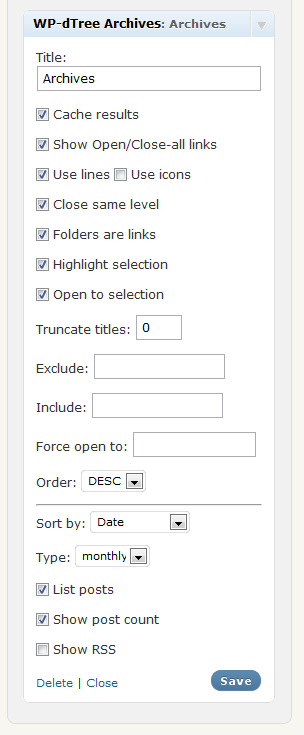
- Configure the active Widget to your liking
- Customize the presentation using your theme’s CSS. See the FAQ for selection highlighting.
For developers
WP-dTree exposes the following template tag functions:
wpdt_list_archives();wpdt_list_categories();wpdt_list_taxonomies();wpdt_list_menu();wpdt_list_pages();wpdt_list_links();wpdt_list_bookmarks(); //alias for wpdt_list_links
They function a lot like WordPress own wp_list_* functions:
- They take an (optional) query-string or associative array with arguments
- They print by default, but if passed ‘echo=0’ they return the string of markup
- Most of them use the WordPress namesake for generating noscript-content
Here’s an example:
<div class="dtree">
    <?php
    if ( function_exists( 'wpdt_list_archives' ) ) {
        wpdt_list_archives( 'type=yearly&useicons=1' );
    }
    ?>
</div>
I’ve tried to keep the same argument-lists as the WordPress “equivalents” but there are some discrepancies: style- and markup related arguments are not applicable to WP-dTree (but gets passed through for the noscript content).
There is also some inconsistency within WordPress, like some methods takes sortby while others takes sort_column. I’ve tried for WP-dTree to accept both but I’m sure I’ve missed a bunch of these cases.
So, to find out what arguments are definitely available grab the default $args:
wpdt_get_archives_defaults();wpdt_get_categories_defaults();wpdt_get_taxonomies_defaults()wpdt_get_pages_defaults();wpdt_get_links_defaults();wpdt_get_menu_defaults();
They all return associative arrays with all arguments defaulted.
Changelog
Introduces Content Trees, WP-dTree's modern successor, with guidance for gradually replacing your trees. WP-dTree continues to receive security and compatibility fixes.
4.5.5
- Introduce Content Trees, the modern successor to WP-dTree, with migration guidance and a permanently dismissible administrator notice.
- Clarify that WP-dTree continues to receive security and compatibility fixes.
4.5.4
- Reduce server work when building large menu trees.
- Require WordPress 6.0.1 or later to avoid the term-cache bug in WordPress 6.0.
- Avoid opening or highlighting an unrelated item when the requested item is absent from the tree.
- Prevent similarly named cookies from affecting remembered tree state.
- Fix newly added menu items sometimes missing from cached trees.
- Prevent tree controls from overwriting variables used by other scripts on the page.
4.5.3
- Fix PHP warnings and missing trees when widget settings are empty or incomplete.
- Respect disabled duplicate entries in category and custom taxonomy trees, including when limiting posts per branch.
- Keep posts under their first matching visible term and avoid missing or hidden-parent entries.
- Fix post listing on databases enforcing strict grouping rules.
- Fix custom taxonomy Show more titles and an error when using Show more with Advanced Post Types Order.
4.5.2
- Fix duplicate archive entries and inflated counts when filtering by several categories.
- Excluding an archive category now also hides posts that belong to other categories.
- Keep cached trees up to date when categories or custom taxonomy terms are edited, assigned or removed.
4.5.1
- Archive posts are now sorted before the monthly limit is applied.
- Keep posts with matching dates or other sort values in a consistent order.
- Reduce server work when building page, category and custom taxonomy trees.
4.5.0
- Fix stored and reflected cross-site scripting and protect settings changes against CSRF (CVE-2022-47423, CVE-2023-41662 and CVE-2023-41667).
- Harden tree output, query parameters and caching; rebuild old tree caches after upgrading.
- Update PHP and WordPress compatibility and preserve returned output from the archive template function.
- Respect unchecked widget options, including icons and lines, when settings contain explicit false values.
- Correct the selected-link underline CSS.
- Include posts published exactly at the start of a month in archive trees.
Screenshots
For developers
Is this your plugin? Show off the numbers.
Add a live badge to your site, docs or GitHub README. It updates on its own — no account needed.
Best WP-dTree alternatives
All archive plugins →



FAQ
WP-dTree: quick answers
Straight answers, pulled from live WordPress.org data.
Source: WordPress.org
Is WP-dTree free?
Yes. WP-dTree is free to download and use from the official WordPress.org plugin directory.
Is WP-dTree safe to use in 2026?
Yes — WP-dTree is a safe, well-maintained plugin to use in 2026. It runs on 2K+ sites, is rated 4.8/5 and was last updated 3 weeks ago, and scores 91/100 on our health check.
How many websites use WP-dTree?
WP-dTree is active on 2K+ WordPress websites and has been downloaded 142,433 times since it launched in September 2007. It was downloaded 2,771 times in the last 30 days.
Does WP-dTree work with WordPress 7.1?
Yes. The developer has tested WP-dTree up to WordPress 7.1.5, the latest release. It requires WordPress 6.0.1 or newer.
What PHP version does WP-dTree need?
WP-dTree requires PHP 7.4 or higher. Most hosts run PHP 8.x today, so it works on any modern WordPress hosting.
When was WP-dTree last updated?
The latest version, 4.5.5, was released on October 29, 2026 (3 weeks ago).
Who makes WP-dTree?
WP-dTree is developed and maintained by ulfben.
What are the best alternatives to WP-dTree?
The most popular alternatives to WP-dTree are Jetpack VaultPress (9K+ installs), Zippy (7K+ installs) and Posts List (7K+ installs).
Powered by PageForge
One template and a spreadsheet. A real page for every search.
PageForge turns each row of a CSV into a WordPress page with its own title, URL, SEO fields and schema, built on the layout you already designed. Free on WordPress.org.
- CSV and XLSX, plus Google Sheets on Professional and Enterprise
- Its own title, URL, SEO fields and schema for every page
- Works with the block editor, Elementor, Divi and Avada
- Free on WordPress.org, no credit card