



CopySafe Video Protection – Copy Protect Video
Display copy protected videos in WordPress pages and posts.

Use with caution
CopySafe Video Protection works, but test it on a staging site before relying on it in 2026. It runs on 100+ sites, is rated 3.7/5 and was last updated 5 months ago, and scores 60/100 on our health check.
- Small user base (100+ active installs)
How does it stack up?
Side-by-side on installs, updates, ratings & supportDaily downloads
Download spikes usually follow a new release — each site that auto-updates counts as a download.
Rankings
Where CopySafe Video Protection stands todayWordPress.org search rankings
Live position in the plugin search, top 100| Keyword | Position |
|---|---|
| copy protect video | #6 |
| protect movie | #1 |
| secure video | #19 |
| video drm | #2 |
| video protection | #12 |
Version adoption
Share of active sites per release.
Rating breakdown
★★★★★★★★★★ 3.7 from 6 reviews
About CopySafe Video Protection
From the official readme · v5.0Description
Copy protect video from all save and copy including screenshots and screen recording. This plugin enables the use of copy protected videos in WordPress posts and pages. Encrypted CopySafe Video can be played in ArtisBrowser.
Note: No other WordPress plugin can prevent all methods of copy on its own. The difference with Copysafe plugins is that they are a tool that enables the use of more efficient copy protection solutions that interact at system level where copy needs to be actioned.
CopySafe Video provides the most secure copy protection for video both online and offline. When displaying protected video online with domain lock applied, the video file cannot be used or displayed from anywhere else. With video now bound to your website, you can apply DRM rules to control access to the page via your WordPress member/subscription login system.
- Easy install.
- Upload and add copy protected video to web pages using WordPress editor tools.
- Ideal for Classic Editor – also supported in Guternberg and Elementor edtors.
- Allow/disallow by OS/device with minimum version checking to ensure the latest secuirty.
- Settings to control width and height of the video player area.
- Player automatically resizes to fit available space when browser resized.
- Safe from PrintScreen and all screen capture software.
- Videos can be encrypted for Domain Lock (locking to your website).
- Domain locked videos cannot be saved and displayed anywhere else.
- Special buffering enables video to play before download completes.
- Lossless encryption only increases file size by a few bytes.
For more information visit the CopySafe Video website.
More Info
- About Copy Protection
Implementation
Click on the [Video] media button above a post to upload and embed CopySafe Videos in your current post or page. When inserting a protected Video object, the necessary shortcode is automatically inserted into the post editor.
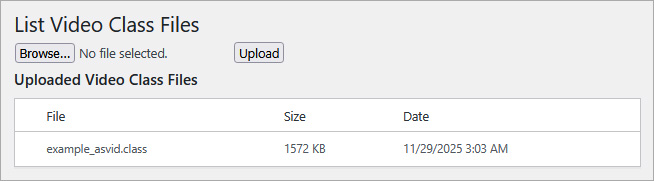
You can upload new Video class documents or select from a list of already uploaded videos. After selecting a video you can then set the security options to apply to the page such as:
- Allow/disallow ArtisBrowser OS and set minimum version requirement.
- Disable the option to view from computers using remote or virtual connections.
- Video width and height.
About
- The CopySafe Video Player is a free download and can be distributed by email, download or on disk with your protected Video documents.
- The CopySafe Video Player installer includes a secure reader and a browser plugin.
- The CopySafe Video Player is supported across all Windows computers since XP.
- Protected Videos for distribution by email, download and on disk are in .ENC format.
- Protected Videos for online viewing are in .CLASS format.
- The CopySafe Video Protector software is required to encrypt and convert Video for .ENC or .CLASS formats.
- Documents converted by an unlicensed (demo) version the Protector will have a watermark applied.
- Documents created by the “demo” version cannot be protected by DRM or Domain Lock
Licensing
- CopySafe Video is the most secure video protection solution on the planet.
- Licensing also enables the use offline DRM certs for video saved to USB.
- Licensing enables the use of “Domain Lock” on .CLASS videos to prevent unauthorized use.
- Use of the DRM validation service provided by the ArtistScope DRM Portal for free.
Other versions
CopySafe Video is a sophisticated application especially designed for a wide variety of scenarios.
- The CopySafe Video Encoder is available as Windows desktop software.
- Free DRM Hosting is provided with every CopySafe Video license.
For evaluation of DRM validation, create a demo account at the CopySafe DRM Demo website.
Limitations
- CopySafe Video is supported on all Windows computers since XP by using the ArtisBrowser. Mac users can run Windows via Bootcamp or install Parallels to run Windows. If support for all devices is required, the most secure solution for all devices is the ArtistScope Site Protection Software at https://artistscope.com
Installation
This section describes how to install the plugin and get it working.
- Upload the “wp-copysafe-video” folder and its contents to the “/wp-content/plugins/” directory.
- Activate the plugin through the ‘Plugins’ menu in WordPress.
- Check for the upload folder at “/wp-content/uploads/copysafe-video”.
- Set write permissions on this new folder for “everyone”.
- Check and modify the default settings to suit your pages.
- The Classic Editor works best for editing “shortcode”.
- Add CopySafe Video files using the [Video] button (in Classic Editor toolbar).
Click to download the CopySafe Video Install Guide
If you do not have any CopySafe Video encrypted videos for testing, you can create your own by downloading the demo version of CopySafe Video Encoder software or by using this test bundle which is not domain locked and can be displayed on any website.
If you have problems installing, email us from the artistscope.com web site for a faster response than the WP forum.
Changelog
5.0
- Allow/disallow access selectively for Windows, Mac, iOS and Android.
- Updated for current WordPress core.
- Tested for comptibility with WP 7.0.
4.0
- Major revision includes support for Classic, Gutenberg and Elementor editors.
- Allow/disallow access by OS/device.
- Set minimum ArtisBrowser version to ensure the latest security updates.
- Tested for comptibility with WP 6.9.
3.0
- Security update.
- Tested for comptibility with WP 6.8.
2.9
- Security update.
- Tested for comptibility with WP 6.6.
2.8
- Security update.
2.7
- Security update.
Screenshots
![CopySafe Videos can be added at the last position of the cursor by clicking the [Video] button.](https://ps.w.org/wp-copysafe-video/assets/screenshot-1.jpg?rev=3411813)

For developers
Is this your plugin? Show off the numbers.
Add a live badge to your site, docs or GitHub README. It updates on its own — no account needed.
Best CopySafe Video Protection alternatives
All copy protect video plugins →| Rank | Plugin | Active installs |
|---|---|---|
| 2 |
 Guest Video Protection – Copy Protect PDF & Video
The most secure copy protection for images, video and PDF. Prevent save, screenshots…
Guest Video Protection – Copy Protect PDF & Video
The most secure copy protection for images, video and PDF. Prevent save, screenshots…
|
<10 |
FAQ
CopySafe Video Protection: quick answers
Straight answers, pulled from live WordPress.org data.
Live data from WordPress.org · checked Oct 9, 2026
Is CopySafe Video Protection free?
Yes. CopySafe Video Protection is free to download and use from the official WordPress.org plugin directory.
Is CopySafe Video Protection safe to use in 2026?
CopySafe Video Protection works, but test it on a staging site before relying on it in 2026. It runs on 100+ sites, is rated 3.7/5 and was last updated 5 months ago, and scores 60/100 on our health check.
How many websites use CopySafe Video Protection?
CopySafe Video Protection is active on 100+ WordPress websites and has been downloaded 16,890 times since it launched in November 2019. It was downloaded 191 times in the last 30 days.
Does CopySafe Video Protection work with WordPress 7.1?
CopySafe Video Protection is officially tested up to WordPress 7.0.7, while the latest release is 7.1.3. It may still work, but try it on a staging site first.
When was CopySafe Video Protection last updated?
The latest version, 5.0, was released on May 26, 2026 (5 months ago).
Who makes CopySafe Video Protection?
CopySafe Video Protection is developed and maintained by ArtistScope.
What are the best alternatives to CopySafe Video Protection?
The most popular alternatives to CopySafe Video Protection are Guest Video Protection (<10 installs).
Powered by PageForge
Want thousands of pages that rank like these? Build them in an afternoon.
This directory runs on the same engine as PageForge. Turn any spreadsheet, CSV or API into thousands of fast, SEO-ready WordPress pages — with schema, internal links and AI-written copy baked in.
- CSV, Google Sheets & API data sources
- AI content, schema & internal links per page
- Works with Elementor, Gutenberg, Yoast & Rank Math
- Free on WordPress.org — no credit card


