


WP Advanced PDF
WP Advanced PDF is a pdf generator for posts to pages. This plugin enables your blog readers to create pdf of posts of your blog. WP Advanced PDF relies on the TCPDF class to render PDF. This makes WP Advanced PDF a…

Consider an alternative
WP Advanced PDF shows warning signs in 2026 — compare the alternatives below before installing. It runs on 700+ sites, is rated 2.7/5 and was last updated 4 years ago, and scores 30/100 on our health check.
- Small user base (700+ active installs)
- Mixed reviews — 2.7/5 from 18 ratings
- No update in 4 years
- Only tested up to WordPress 6.0 (latest is 7.1)
Daily downloads
Download spikes usually follow a new release — each site that auto-updates counts as a download.
Rankings
Where WP Advanced PDF stands todayWordPress.org search rankings
Live position in the plugin search, top 100| Keyword | Position |
|---|---|
| Bulk PDF | >100 |
| CedCommerce | #12 |
| >100 | |
| post | >100 |
| Wp advanced pdf | >100 |
Version adoption
Share of active sites per release.
Rating breakdown
★★★★★★★★★★ 2.7 from 18 reviews
About WP Advanced PDF
From the official readme · v1.1.7Description
WP Advanced PDF is a pdf generator for posts to pages. This plugin enables your blog readers to create pdf of posts of your blog. WP Advanced PDF relies on the TCPDF class to render PDF.
This makes WP Advanced PDF a completely self contained PDF generating plugin.
This plugin has possibility to limit access to pdfs to registered users or present links to all visitors.
Main features
- Feature to set Custom fonts for PDF
- Feature to set Stretching and Spacing for PDF
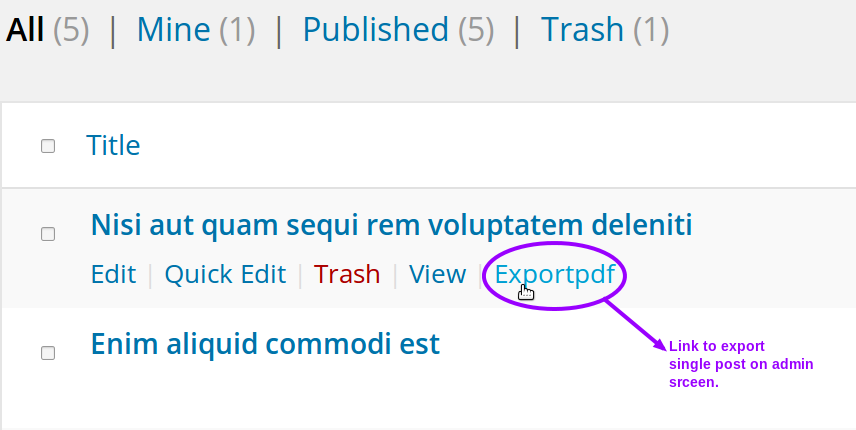
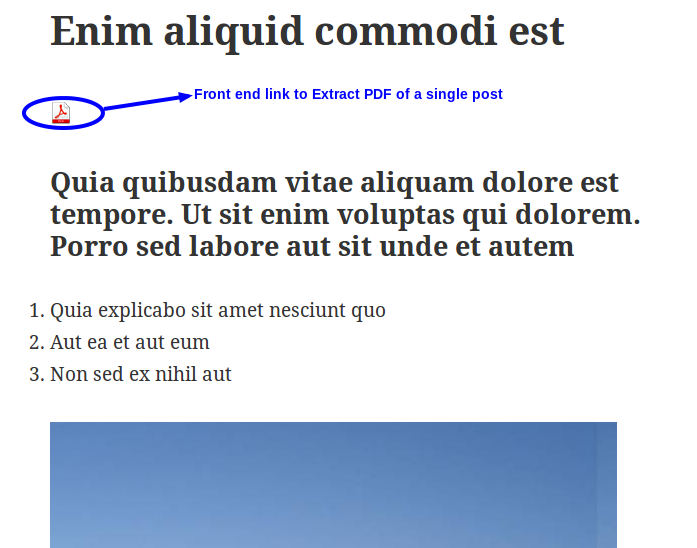
- Gives a pdf extract link into your blog and you blog reader can easily extract the blog on one click only
- You can include header logo to pdf.
- Can set custom bullet style.
- Can add watermark text and images to look PDF wonderful.
- Can customize fonts of header and content.
- Can easily change margins, alignment, and pages for your pdf.
- Can set file name for pdf. Default file name of plugin is Post Id.
- Have ability to generate pdf from cache to reduce load from server and can schedule backup of cache if Your blog is not updating too frequently and many more options.
- Can add custom style to post contents
- Can set default blog title for pdf
- Easy to use and install
- Easy to configure
Premium Feature Now In Free
Enhanced Custom Font Support
- Now fonts will be saved on wordpress upload directory instead of plugin’s directory keeping plugin size fix and safe.
WP ADVANCED PDF PRO FEATURES
- To get premium plugin click here
With all your support and help we have successfully launched premium version of this plugin with lots of useful and handy features. Along with the features of WP Advanced PDF following are the main features included in premium version:
Compatible with ACF
- Advanced Custom Fields Plugin for WordPress
META FIELD SUPPORT
- Ability to choose meta fields for each post types to be display on PDF.
- Ability to provide name of the meta fields to overwrite default name.
- Ability to include custom meta fields per post wise into PDF. Which will then also be present on general pdf setting page for all posts of particular post type.
CUSTOM SETTING
- Created a Default setting to go live as soon as activating plugin, excluding the headache of doing those settings first.
- Apart from default setting you can also make your Custom Settings as much as you can. This way you will play with those settings easily.
- Admin can apply custom setting and can remove them as well.
- Admin can get preview PDF of selected setting configuration’s.
SHORTCODE FEATURE
- Made a shortcode for PDF export button so that admin can place wherever he/she want. [ptpdf]
- If shortcode feature is activated then admin must have to use shortcode to show PDF export button.
PDF EXPORT LOG
- You can view log of exported PDFs.
- Can select what field to display in log like export date, post type etc through screen options.
- Can remove single log entry as well as can delete in bulk.
- Pagination is provided and log entries are listed by latest at top.
MINOR CHANGES
- Change layout of setting page for easy access.
- Changed icon of menu link
DEMO LINKS
Support
If you need support or have any question then kindly use our online chat window here or send us email at support@cedcommerce.com
Follow Us
- Our Official Website – http://cedcommerce.com/
- Our Facebook Page – https://www.facebook.com/CedCommerce
- Our Google+ Account – https://plus.google.com/u/0/118378364994508690262
- Our Twitter Account – https://twitter.com/cedcommerce
- Our LinkedIn Account – https://www.linkedin.com/company/cedcommerce
Installation
Automatic installation
Automatic installation is the easiest option as WordPress handles the file transfers itself and you don’t need to leave your web browser. To do an automatic install of WP Advanced PDF, log in to your WordPress dashboard, navigate to the Plugins menu and click Add New.
In the search field type WP Advanced PDF and click Search Plugins. Once you’ve found our WP Advanced PDF plugin you can view details about it such as the point release, rating and description. Most importantly of course, you can install it by simply clicking “Install Now”.
Manual installation
The manual installation method involves downloading our Product Auto Share plugin and uploading it to your webserver via your favourite FTP application. The WordPress codex contains instructions on how to do this here.
Frequently asked questions
How to change position buttons in content
Go to the Settings page and change value for the ‘Position of buttons in the content’ field.
Buttons for content do not appear on page
Go to the Settings page and change value for the ‘Display Options’ or ‘Availability’ fields.
Buttons for certain post type do not appear on page
Go to the Settings page and Check options ‘Allowed Post Types’ field.
How can I change the content pdf document ?
In order to change main content of pdf/print document you can use following filter: add_filter( 'the_post_export_content', {your_function} ); For example, add the following code to the ‘functions.php’ file of your theme: add_filter( 'the_post_export_content', custom_function ); function custom_function( $post_content ){ $my_content = 'Adipisci ipsam quod odit eius et et voluptas corporis.'; $more_content = ' Velit repudiandae earum ducimus odit excepturi cum laboriosam.'; return $my_content . $more_content; }
How I add different styles to pdf
To add style in pdfs, Go to Body Section, check Custom CSS and enter the required styles in textarea.
Changelog
Fixed Bulk action export pdf issue.
1.1.7
- Bug fix and design fix
1.1.6
- Bug fix
1.1.5
- Bug fix
1.1.4
- Fixed Bulk action export pdf issue.
1.1.3
- Added feature to send pdf in mail to users for selected user role whenever a post is published.
1.1.2
- Fixed the issue of using deprecated way of defining constructor
Screenshots



For developers
Is this your plugin? Show off the numbers.
Add a live badge to your site, docs or GitHub README. It updates on its own — no account needed.
FAQ
WP Advanced PDF: quick answers
Straight answers, pulled from live WordPress.org data.
Live data from WordPress.org · checked Oct 5, 2026
Is WP Advanced PDF free?
Yes. WP Advanced PDF is free to download and use from the official WordPress.org plugin directory.
Is WP Advanced PDF safe to use in 2026?
WP Advanced PDF shows warning signs in 2026 — compare the alternatives below before installing. It runs on 700+ sites, is rated 2.7/5 and was last updated 4 years ago, and scores 30/100 on our health check.
How many websites use WP Advanced PDF?
WP Advanced PDF is active on 700+ WordPress websites and has been downloaded 57,249 times since it launched in April 2016. It was downloaded 357 times in the last 30 days.
Does WP Advanced PDF work with WordPress 7.1?
WP Advanced PDF is officially tested up to WordPress 6.0.16, while the latest release is 7.1.2. It may still work, but try it on a staging site first.
When was WP Advanced PDF last updated?
The latest version, 1.1.7, was released on June 15, 2022 (4 years ago).
Who makes WP Advanced PDF?
WP Advanced PDF is developed and maintained by cedcommerce.
Powered by PageForge
Want thousands of pages that rank like these? Build them in an afternoon.
This directory runs on the same engine as PageForge. Turn any spreadsheet, CSV or API into thousands of fast, SEO-ready WordPress pages — with schema, internal links and AI-written copy baked in.
- CSV, Google Sheets & API data sources
- AI content, schema & internal links per page
- Works with Elementor, Gutenberg, Yoast & Rank Math
- Free on WordPress.org — no credit card


