



WorkWilla Recommendations
Turn browsing into buying with AI recommendations for WooCommerce — one ML model per store, trained on your catalog and orders.

Use with caution
WorkWilla Recommendations works, but test it on a staging site before relying on it in 2026. Was last updated 3 months ago, and scores 48/100 on our health check.
- Small user base (<10 active installs)
- Very few reviews so far
- Only tested up to WordPress 6.8 (latest is 7.1)
How does it stack up?
Side-by-side on installs, updates, ratings & support



Daily downloads
Download spikes usually follow a new release — each site that auto-updates counts as a download.
Rankings
Where WorkWilla Recommendations stands todayWordPress.org search rankings
Live position in the plugin search, top 100| Keyword | Position |
|---|---|
| cross-sell | >100 |
| machine learning | #85 |
| recommendations | >100 |
| upsell | >100 |
| woocommerce | >100 |
About WorkWilla Recommendations
From the official readme · v1.3.7Description
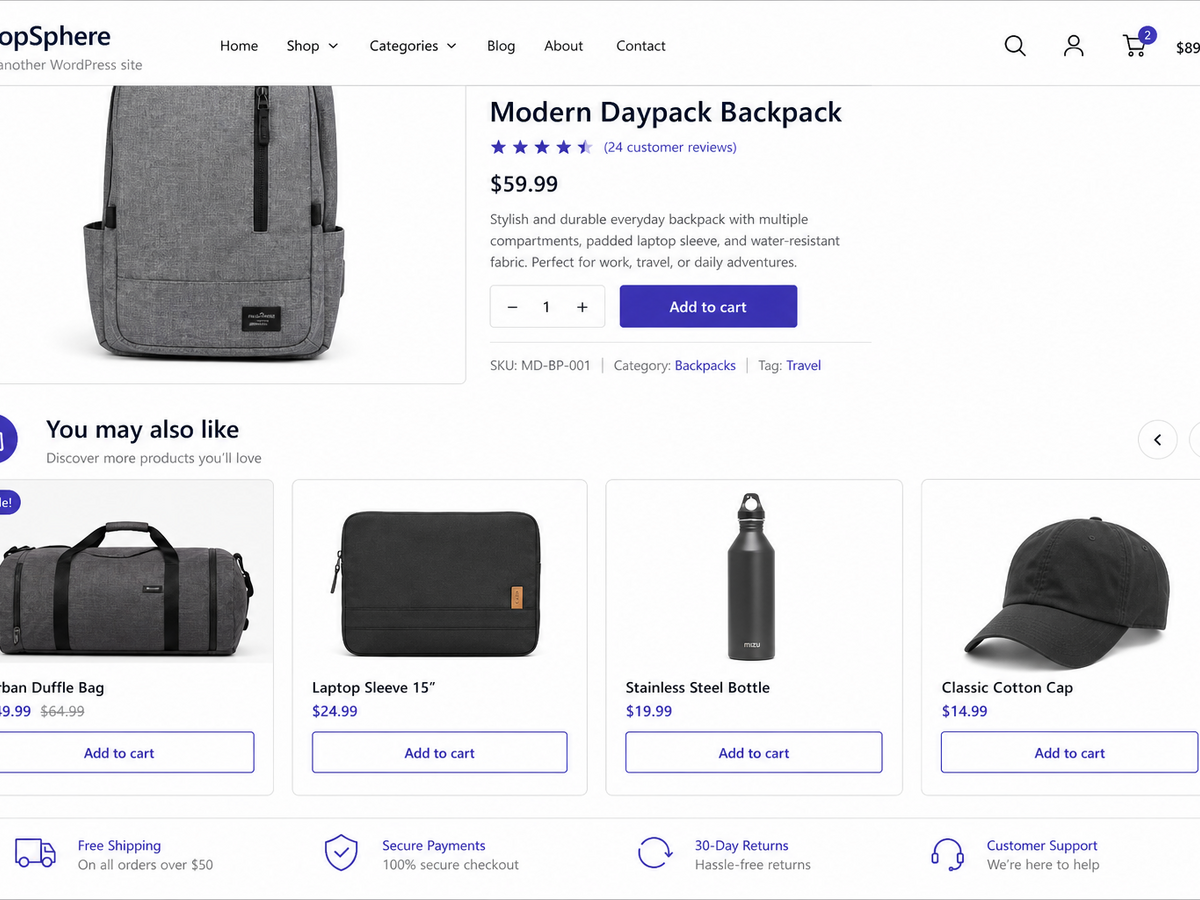
WorkWilla Recommendations brings smart product blocks to your WooCommerce storefront: on product pages and, optionally, in the cart. Instead of generic “related products,” each store gets its own machine-learning model trained on real catalog and order patterns — so suggestions feel relevant to your customers and your assortment.
Connect in minutes, export once, and let WorkWilla handle training and serving recommendations from the cloud. The plugin stays lightweight on your server; heavy ML work runs on WorkWilla infrastructure.
Why store owners choose WorkWilla
- Personalized blocks — “You may also like” on product pages; optional cart upsell block
- Your model, your data — separate ML model per store; data is never mixed with other shops
- Privacy-first export — customer emails and phone numbers are hashed on your site before anything leaves WordPress
- Works with guests — session-based signals when shoppers are not logged in
- Flexible placement — replace or supplement native WooCommerce related products
- Admin-friendly — connect, export, retrain, and monitor usage from WooCommerce → WorkWilla
- Developer-ready — filters and actions for titles, limits, payloads, product IDs, and HTTP headers (see Developer hooks on the settings page)
How it works
- Install and activate the plugin (WooCommerce 3.0+ required).
- Open WooCommerce → WorkWilla and click Connect to register your store.
- Run Export and train — the plugin sends your catalog and anonymized order history to WorkWilla.
- Recommendation blocks appear on the storefront once the model is ready.
Optional AJAX lazy-loading keeps pages fast. Out-of-stock products are excluded automatically using live WooCommerce stock status.
External service
This plugin requires a free or paid WorkWilla account. Machine learning training and live recommendations run on WorkWilla servers.
When you run Export and train, the plugin sends your full catalog and order export. WorkWilla applies plan quotas on the server side (training data volume, API requests per month, and similar limits). Billing and plan management happen on the WorkWilla dashboard — the plugin does not lock or disable built-in features based on your plan.
Run Export and train to build your first recommendation model.
Legal
Privacy and data sent to WorkWilla
When an administrator connects the plugin, WorkWilla receives:
- Store domain
- Administrator email address
- WordPress, WooCommerce, PHP, and MySQL version metadata
When recommendations are enabled, the plugin may send:
- Product catalog data (titles, categories, stock status) during export/training
- Anonymized order history (hashed customer identifiers, line items, dates) during export/training
- Recommendation request context (cart contents, recently viewed product IDs, anonymized session or user keys)
- Interaction events (product views, add-to-cart, purchases, block impressions and clicks)
Raw customer email addresses and phone numbers are hashed on your site before transmission. The plugin does not contact WorkWilla until an administrator explicitly connects the store.
As a store owner, inform your customers about data processing required for personalized recommendations, in line with applicable privacy laws.
Full details: WorkWilla Privacy Policy
Installation
- Upload the plugin folder to
/wp-content/plugins/or install from the WordPress.org plugin directory. - Activate through the Plugins menu.
- Ensure WooCommerce is active.
- Go to WooCommerce → WorkWilla, review the connection form, accept the Privacy Policy and Terms of Use, and click Connect.
- Run Export and train to build your first recommendation model.
Frequently asked questions
Does this plugin work without WooCommerce?
No. WooCommerce 3.0 or newer is required.
Does the plugin contact external servers before I connect?
No. External requests begin only after an administrator submits the Connect form on the WorkWilla settings page.
Is customer personal data sent to the cloud?
Only anonymized identifiers and catalog/order data needed for recommendations. Emails and phone numbers are hashed in the plugin before export.
Can I use the same account on staging and production?
Yes. Staging subdomains such as test., dev., stage., and demo. are treated as the same site family as your production domain.
How do I customize block titles or product count?
Use the settings page or the workwilla_recommendations_pdp_title, workwilla_recommendations_cart_title, and workwilla_recommendations_product_limit filters.
Is there a free plan?
Yes. WorkWilla offers a free starter tier. Usage quotas (API requests, training data volume) are enforced on the WorkWilla service, not by disabling plugin code. Paid plans are optional at workwilla.ru.
Changelog
WordPress.org release: improved listing copy and storefront assets; full export from the plugin with service-side plan quotas.
1.3.7
- Export sends the full catalog and order history from the store; plan quotas are enforced only on the WorkWilla server
- Optional cart recommendations block (admin setting)
- Recommendations exclude out-of-stock products using live WooCommerce stock status
- WordPress.org listing: readme, assets, contributor metadata, and directory copy limits (5 tags, 150-char short description)
1.3.6
- Optional cart recommendations block controlled by admin checkbox
1.3.5
- Recommendations exclude out-of-stock products using live WooCommerce stock status
1.3.4
- Improved export progress and plan usage display in admin
1.3.3
- Export log: localized messages, clearer server errors, auto-scroll to latest line
- Connect form reliability fix on the WorkWilla admin page
1.3.2
- Connect form runs on the correct admin page load hook (fixes silent Connect button)
Screenshots
For developers
Is this your plugin? Show off the numbers.
Add a live badge to your site, docs or GitHub README. It updates on its own — no account needed.
Best WorkWilla Recommendations alternatives
All cross-sell plugins →




FAQ
WorkWilla Recommendations: quick answers
Straight answers, pulled from live WordPress.org data.
Live data from WordPress.org · checked Sep 27, 2026
Is WorkWilla Recommendations free?
Yes. WorkWilla Recommendations is free to download and use from the official WordPress.org plugin directory.
Is WorkWilla Recommendations safe to use in 2026?
WorkWilla Recommendations works, but test it on a staging site before relying on it in 2026. Was last updated 3 months ago, and scores 48/100 on our health check.
How many websites use WorkWilla Recommendations?
WorkWilla Recommendations is active on <10 WordPress websites and has been downloaded 178 times since it launched in June 2026. It was downloaded 46 times in the last 30 days.
Does WorkWilla Recommendations work with WordPress 7.1?
WorkWilla Recommendations is officially tested up to WordPress 6.8.10, while the latest release is 7.1.2. It may still work, but try it on a staging site first.
What PHP version does WorkWilla Recommendations need?
WorkWilla Recommendations requires PHP 7.2 or higher. Most hosts run PHP 8.x today, so it works on any modern WordPress hosting.
When was WorkWilla Recommendations last updated?
The latest version, 1.3.7, was released on June 30, 2026 (3 months ago).
Who makes WorkWilla Recommendations?
WorkWilla Recommendations is developed and maintained by psprog.
What are the best alternatives to WorkWilla Recommendations?
The most popular alternatives to WorkWilla Recommendations are ShopEngine Elementor WooCom… (100K+ installs), One Click Upsell Funnel for… (1K+ installs) and Beeketing for WooCommerce (500+ installs).
Powered by PageForge
Want thousands of pages that rank like these? Build them in an afternoon.
This directory runs on the same engine as PageForge. Turn any spreadsheet, CSV or API into thousands of fast, SEO-ready WordPress pages — with schema, internal links and AI-written copy baked in.
- CSV, Google Sheets & API data sources
- AI content, schema & internal links per page
- Works with Elementor, Gutenberg, Yoast & Rank Math
- Free on WordPress.org — no credit card


