


Store Toolkit – WooCommerce Extensions, Quick Enhancements & Handy Tools
A huge set of Quick Enhancements and Handy Tools for WooCommerce – the ultimate WooCommerce booster!

Solid choice
Store Toolkit is a solid plugin choice in 2026, with a few things worth checking first. It runs on 8K+ sites, is rated 4.8/5 and was last updated 5 months ago, and scores 66/100 on our health check.
- Loved by users — 4.8/5 from 44 reviews
- Momentum — downloads up 18.5% vs the previous 30 days
- Only tested up to WordPress 6.8 (latest is 7.1)
How does it stack up?
Side-by-side on installs, updates, ratings & supportDaily downloads
Download spikes usually follow a new release — each site that auto-updates counts as a download.
Rankings
Where Store Toolkit stands todayWordPress.org search rankings
Live position in the plugin search, top 100| Keyword | Position |
|---|---|
| delete orders | #30 |
| store toolkit | #1 |
| woocommerce booster | #10 |
| woocommerce extensions | #14 |
| woocommerce tools | #30 |
Version adoption
Share of active sites per release.
Rating breakdown
★★★★★★★★★★ 4.8 from 44 reviews
About Store Toolkit
From the official readme · v2.4.5Description
Ever wished that WooCommerce would add just that one enhancement, that one little tool, that handy little thing that it’s missing?
Introducing Store Toolkit for WooCommerce! The must-install plugin for every WooCommerce store that lets you toggle quick enhancements and gives you handy tools that make your store better. It’s the ultimate WooCommerce booster!
Boost WooCommerce These Quick Enhancements
WooCommerce Quick Enhancements let you tweak and extend WooCommerce with just a the flick of a switch.
- Unlock the Edit Product screen for Product Variations
- Change the Add To Cart button text
- Adjust the number of products shown on product archives
- Auto complete zero total Orders
- Show related orders on the Order edit screen.
- Show used coupons on the Order Preview popup on the Order list view.
- Add an Empty Cart buton on the WooCommerce Cart and Cart Block.
- Change the Place Order button text on the Checkout and Checkout Block.
- Show Order custom Post meta from the Order edit screen
- Show Order Items custom Post meta on the Order edit screen
- Show Refund custom Post meta on the Order edit screen
- Show Subscription custom Post meta box on the Subscription edit screen
- Show Product custom Post meta box on the Product edit screen
- Show Coupon custom Post meta box on the Coupon edit screen
- Show Product Category custom Term meta box on the Category edit screen
- Show custom User meta box on the User edit screen
- Show Event custom Post meta box on the Ticket edit screen
- Show Booking custom Post meta box on the Booking edit screen
- Show Membership Plan custom Post meta box on the Membership Plan edit screen
- Show User Membership custom Post meta box on the User Membership Plan edit screen
Handy WooCommerce Tools
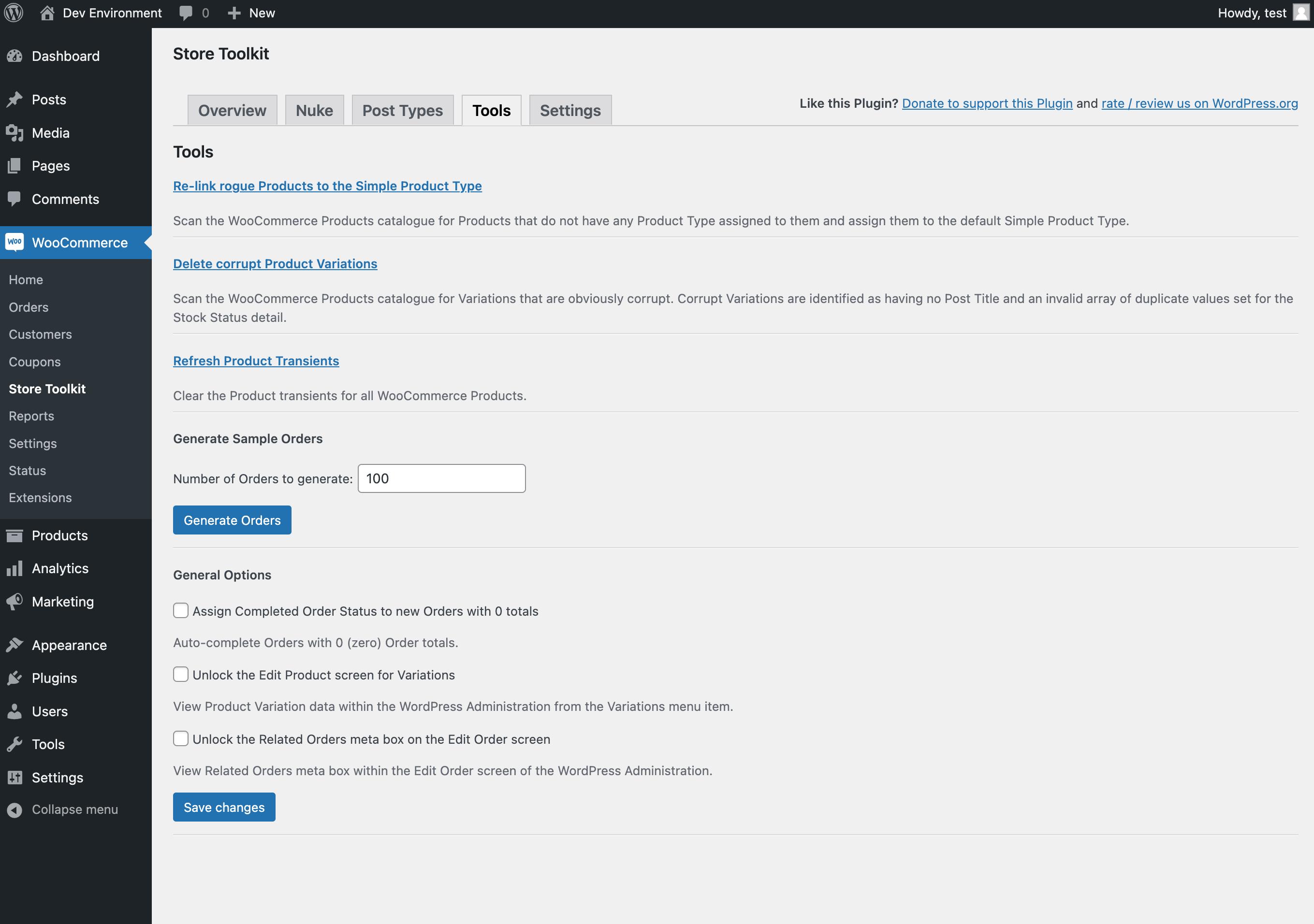
WooCommerce Tools to help you manage and maintain your store. Perform common maintance tasks and more.
- Re-link rogue Products to the Simple Product Type
- Delete corrupt Product Variations
- Refresh Product Transients
- Generate Sample Orders (great for testing!)
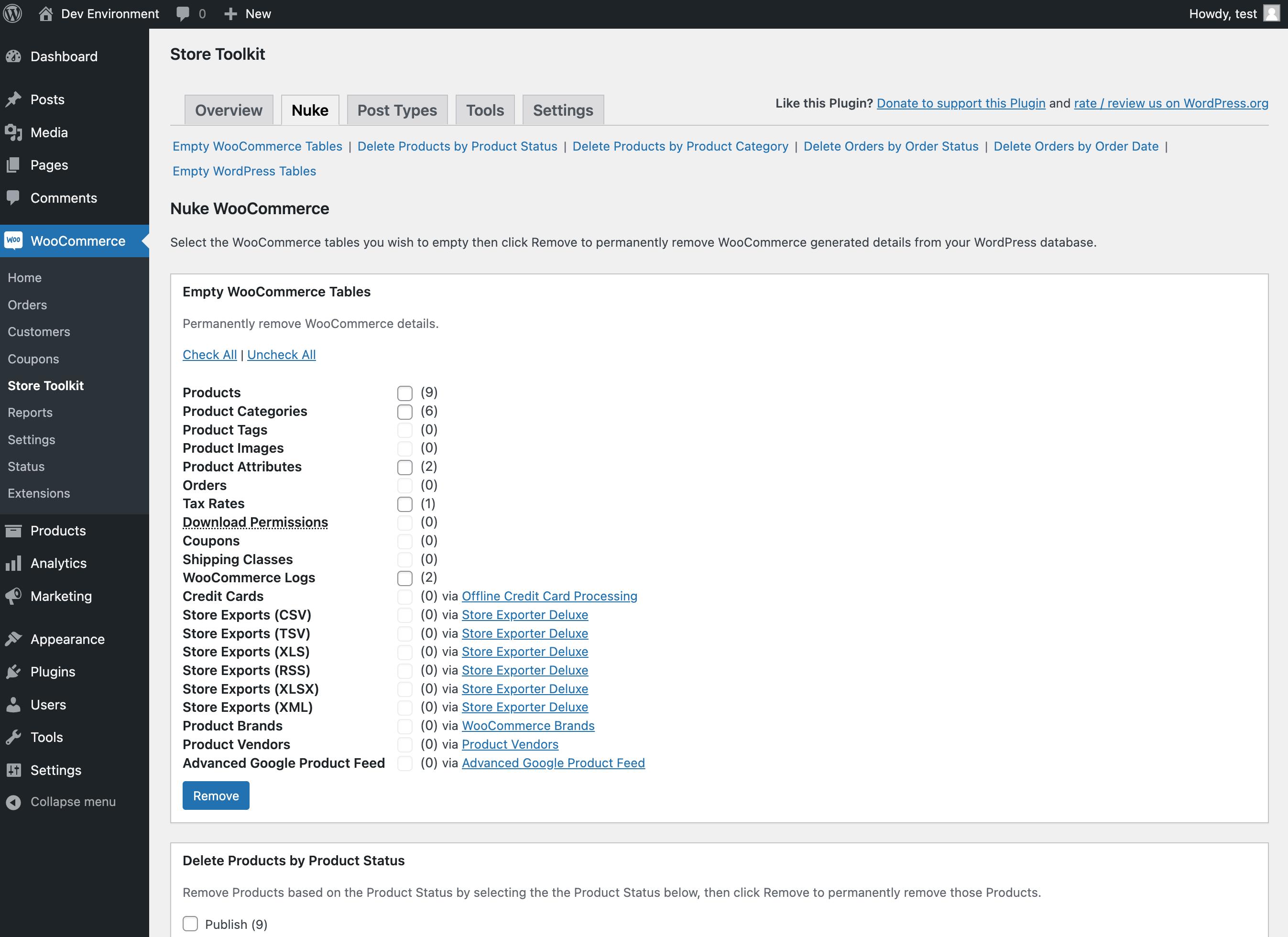
- Nuking Tools – 1-click mass delete orders, products, subscriptions, categories, tags, credit cards, logs, tax rates, images, and more.
- View and manage existing Orders of customers from the User Profile screen
- View number of Orders linked to each User from the Users screen
- List of all registered WordPress Image Sizes on WooCommerce > System Status screen
- Filter Orders by Billing Country from the Orders screen
- Filter Orders by Shipping Country from the Orders screen
- Filter Orders by Payment Method from the Orders screen
- WP-CLI support for limitless nukes
Nuking Tools for mass deleting WooCommerce data
- Products
- Variations
- Product Categories
- Product Tags
- Product Brands
- Product Vendors
- Product Images
- Product Attributes
- WooCommerce Logs
- Orders
- Order Items
- Tax Rates
- Download Permissions
- Coupons
- Shipping Classes
- WooCommerce Logs
- Advanced Google Product Feed
- Delete Products by Product Status
- Delete Products by Product Category
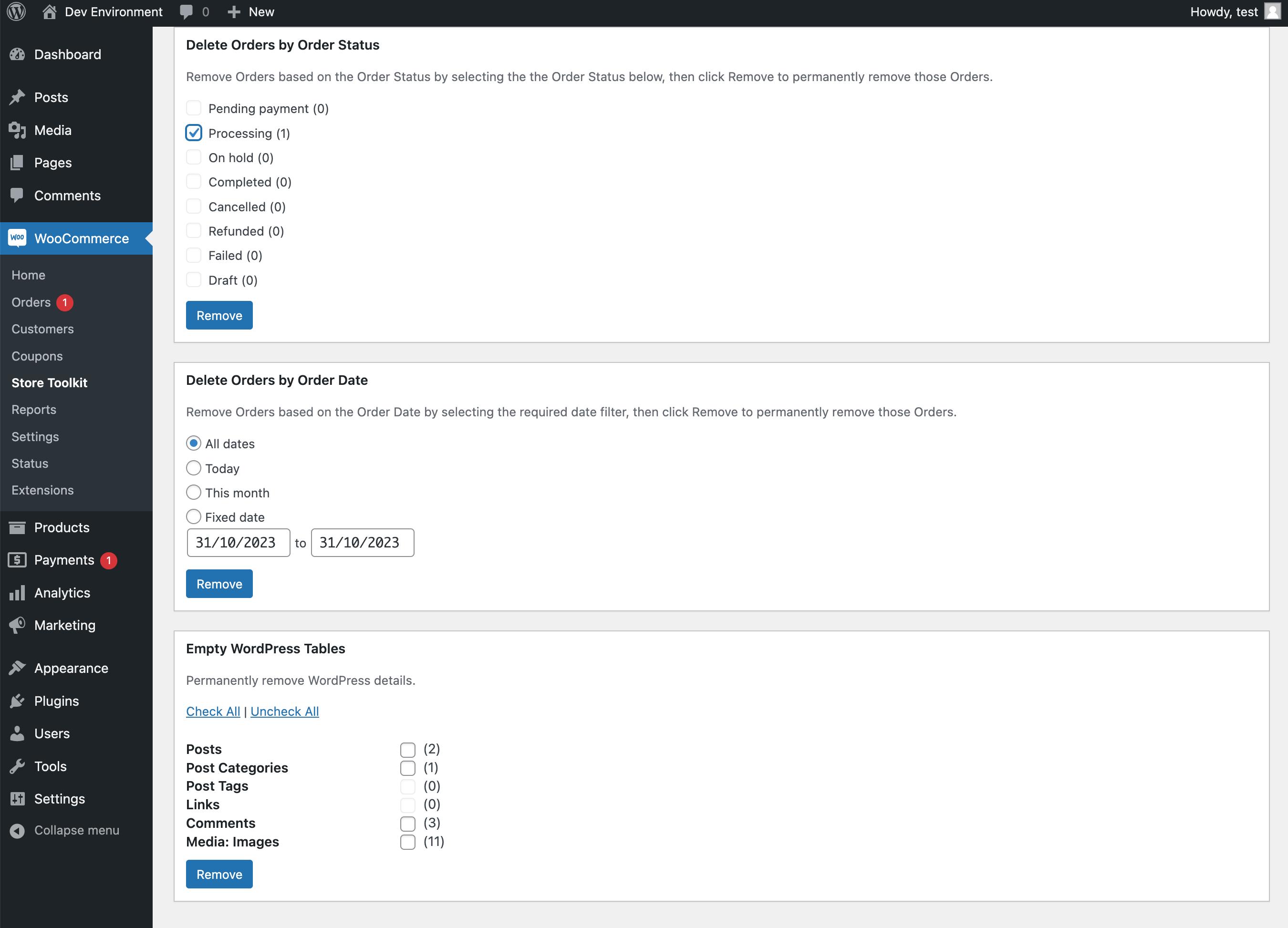
- Delete Orders by Order Status
- Delete Orders by Order Date
- Bulk permanently Delete Products from the Edit Products screen
- Posts
- Post Categories
- Post Tags
- Links
- Comments
- Media: Images
If you find yourself in the situation where you need to start over with a fresh installation of WooCommerce then a ‘nuke’ will do the job.
Check out our other solutions
Wholesale Suite – The #1 rated and easiest way to add wholesale features to your WooCommerce store.
Advanced Coupons – add loads of new advanced coupon features to WooCommerce including BOGO coupons, store credit, coupon rules, and more.
WC Vendors – turn your WooCommerce store into a multi-vendor marketplace just like Amazon, Etsy, Tripadvisor and more.
AdTribes Product Feed Pro – #1 plugin for generating WooCommerce product feeds for all your marketing channels.
Usage
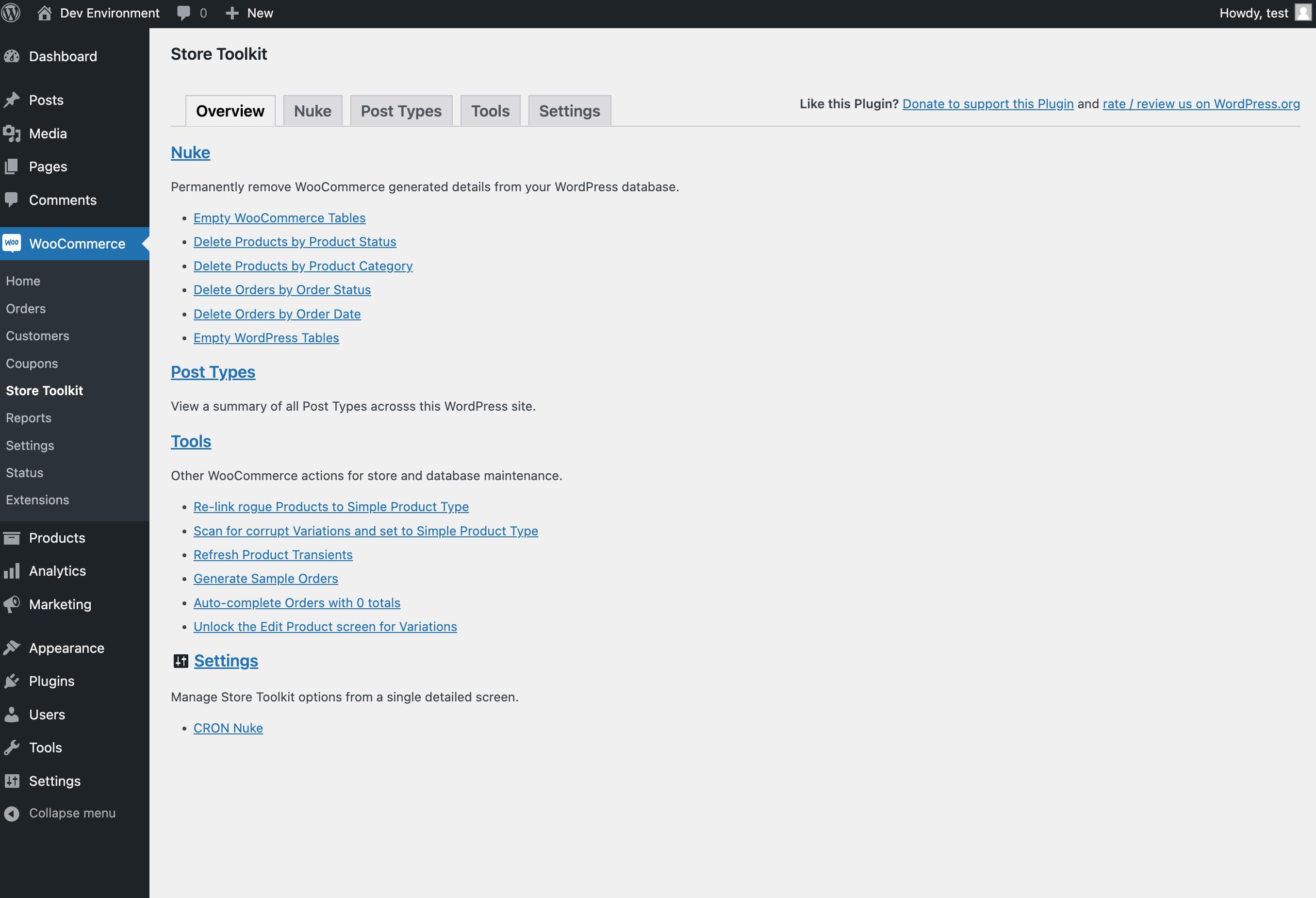
- Open Store Toolkit menu
- Quick Enhancements tab contains all the little enhancements you can turn on and off easily.
- Handy Tools tab contains an array of WooCommerce tools to help you maintain your store.
You’ll also find new Dashboard reports around sales and store details.
Support
If you have any problems, questions or suggestions please open a topic here on WordPress.org, open a new Support topic.
Reporting security issues
If you are here to report any sort of security issue with this Plugin please use this Report a Plugin vulnerability form.
https://visser.com.au/contact/
Disclaimer
It is not responsible for any harm or wrong doing this Plugin may cause. Users are fully responsible for their own use. This Plugin is to be used WITHOUT warranty.
Installation
- Upload the folder ‘woocommerce-store-toolkit’ to the ‘/wp-content/plugins/’ directory
- Activate ‘Store Toolkit for WooCommerce’ through the ‘Plugins’ menu in WordPress
That’s it!
Changelog
2.4.5
- Feature: Add SaveTo Wishlist Lite for WooCommerce as a 1-click install option on the About page.
- Feature: Add SaveTo Wishlist Lite for WooCommerce as a 1-click install option on the Growth Tools page.
- Bug Fix: Refresh stale Funnel Builder icon URL on the Growth Tools page.
2.4.4
- Bug Fix: Checkout “Place Order” Button Label Not Replacing in Checkout Block
- Bug Fix: Security Issue: Local file inclusion security issue (Windows machines only)
2.4.3
- Bug Fix: HPOS meta data issue on Order edit screen
2.4.2.1
- Improvement: Security and code improvements
2.4.2
- Bug Fix: Mixed use of apply_filters and do_action with same hook name
- Feature: Implement unit pricing for simple and variable products
2.4.1
- Bug Fix: Empty Cart button shows on legacy cart regardless of whether quick enhancement is on
- Improvement: Option to automatically delete product images when deleting a product
Screenshots
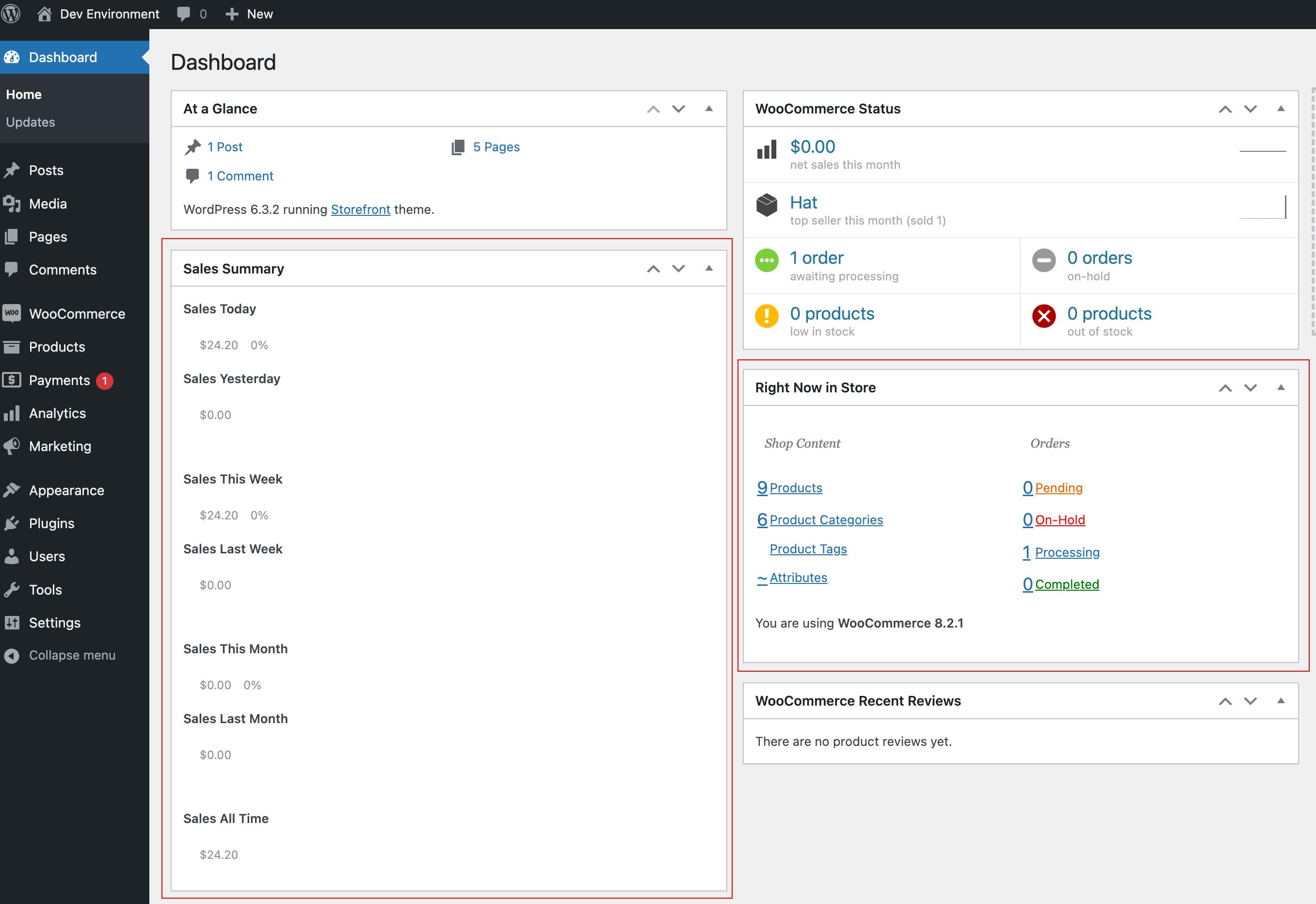
For developers
Is this your plugin? Show off the numbers.
Add a live badge to your site, docs or GitHub README. It updates on its own — no account needed.
Best Store Toolkit alternatives
All delete orders plugins →| Rank | Plugin | Active installs |
|---|---|---|
| 2 |
 WC Delete orders
This plugin lets you nuke all existing orders — please use with caution! |
200+ |
FAQ
Store Toolkit: quick answers
Straight answers, pulled from live WordPress.org data.
Source: WordPress.org
Is Store Toolkit free?
Yes. Store Toolkit is free to download and use from the official WordPress.org plugin directory.
Is Store Toolkit safe to use in 2026?
Store Toolkit is a solid plugin choice in 2026, with a few things worth checking first. It runs on 8K+ sites, is rated 4.8/5 and was last updated 5 months ago, and scores 66/100 on our health check.
How many websites use Store Toolkit?
Store Toolkit is active on 8K+ WordPress websites and has been downloaded 353,377 times since it launched in August 2012. It was downloaded 1,405 times in the last 30 days.
Does Store Toolkit work with WordPress 7.1?
Store Toolkit is officially tested up to WordPress 6.8.13, while the latest release is 7.1.5. It may still work, but try it on a staging site first.
When was Store Toolkit last updated?
The latest version, 2.4.5, was released on July 6, 2026 (5 months ago).
Who makes Store Toolkit?
Store Toolkit is developed and maintained by Josh Kohlbach.
What are the best alternatives to Store Toolkit?
The most popular alternatives to Store Toolkit are WC Delete orders (200+ installs).
Powered by PageForge
One template and a spreadsheet. A real page for every search.
PageForge turns each row of a CSV into a WordPress page with its own title, URL, SEO fields and schema, built on the layout you already designed. Free on WordPress.org.
- CSV and XLSX, plus Google Sheets on Professional and Enterprise
- Its own title, URL, SEO fields and schema for every page
- Works with the block editor, Elementor, Divi and Avada
- Free on WordPress.org, no credit card