


Predictive Search for WooCommerce
Predictive Search for WooCommerce gives your customers an awesome search experience delivering stunning 'live' product search results.

Solid choice
Predictive Search for WooCommer… is a solid plugin choice in 2026, with a few things worth checking first. It runs on 700+ sites, is rated 3.2/5 and was last updated 3 months ago, and scores 69/100 on our health check.
- Small user base (700+ active installs)
- Mixed reviews — 3.2/5 from 49 ratings
How does it stack up?
Side-by-side on installs, updates, ratings & support



Daily downloads
Download spikes usually follow a new release — each site that auto-updates counts as a download.
Rankings
Where Predictive Search for WooCo… stands todayWordPress.org search rankings
Live position in the plugin search, top 100| Keyword | Position |
|---|---|
| live search | #43 |
| Predictive Search | #1 |
| woocommerce | >100 |
| woocommerce search | #46 |
Version adoption
Share of active sites per release.
Rating breakdown
★★★★★★★★★★ 3.2 from 49 reviews
About Predictive Search for WooCommerce
From the official readme · v6.2.1Description
Predictive Search for WooCommerce engine delivers users instant and changing results as they type in the dropdown which shows the product thumbnail, product title and description. Users can click through from the dropdown to the ‘All Results Search page’ that features endless scroll.
KEY FEATURES
- Search objects include Product name, Post name, Page name
- Add Predictive Search box via the Predictive Search Widget or Predictive Search Shortcodes.
- Predictive Search engine delivers 100% accurate results, 100% of the time.
- Super-fast results even on sites with 1,000’s of products, posts and pages
- Results show in search box dropdown as soon as you start to type.
- Full in plugin search box and search results dropdown style and layout options
- Click through to see all search results on a designated page (features endless scroll)
- Pretty URL for the All Search Results pages.
PAGE BUILDER / TEMPLATE COMPATIBLE
Predictive Search is compatible with any WordPress theme or page builder that supports widgets or shortcodes.
PREDICTIVE SEARCH BOX
- Add Predictive Search box via the Predictive Search Widget or shortcode
- Set Placeholder text that shows in the search box on front end – example ‘Search Here’
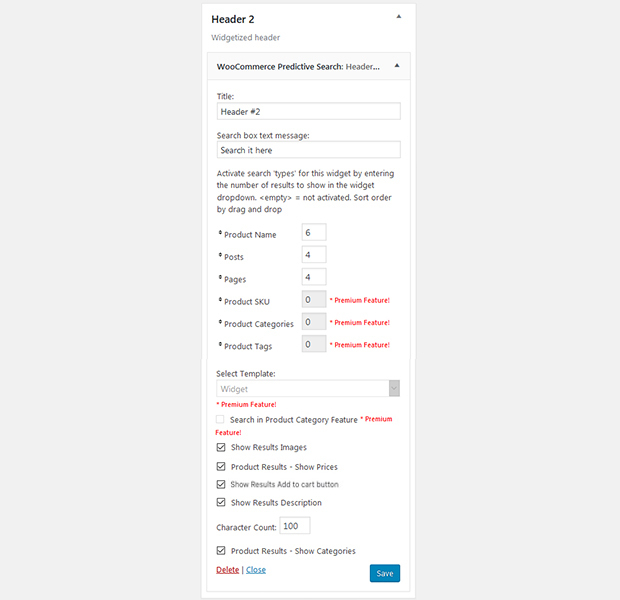
- Choose which objects- Products, Posts, Pages should be included in the search
- Set the number of results to show for each object type e.g. Products 6
- When there are more results than can show in the dropdown a link is added to the dropdown footer to see all results
- Set order that the search object shows in the dropdown and on the All Results Search page.
- Option to show just product, post, page title in results
- Option to show Product, Post or page feature image thumbnail with results
- Option to show description extract with results including the length in characters
- Option to show Product prices
- Option to show Add to Cart Button on serach box results.
STYLE & MOBILE
There are 2 customizable templates built in – Widget Template and Header Template. Style the Search Box and results dropdown then apply the template required from the Predictive Search Widget or shortcode.
NEW FEATURES
Recently added features
* Jan 2024 – Option to Add to Cart right from the search box dropdown product results.
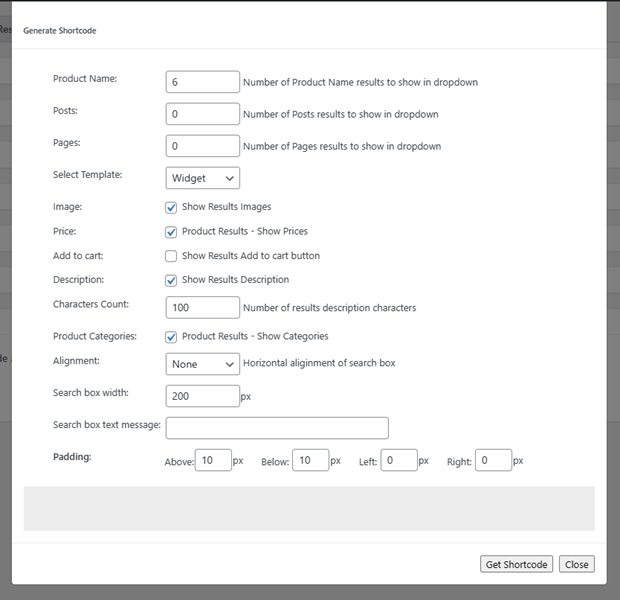
* Dec 2022 – Add Search box by shortcode, with built in shortcode generator. Supports all page builders.
* Feb 2020 – Mobile Search Display. Option on Widget and Header Templates to just show search icon in mobiles when clicked the search box opens. Great for search boxes placed in headers and other areas where space is limited in mobile.
* Feb 2020 – Second Search Box and results dropdown template (Header Template) added
* Jan 2020 – Completed upgrade of plugin frontend and backend PHP to Composer PHP Dependency manager (Jan 2020)
* Oct 2019 – Major re-write of the Search box dropdown user interface in mobile phones. As massive improvement in the user experience on mobiles.
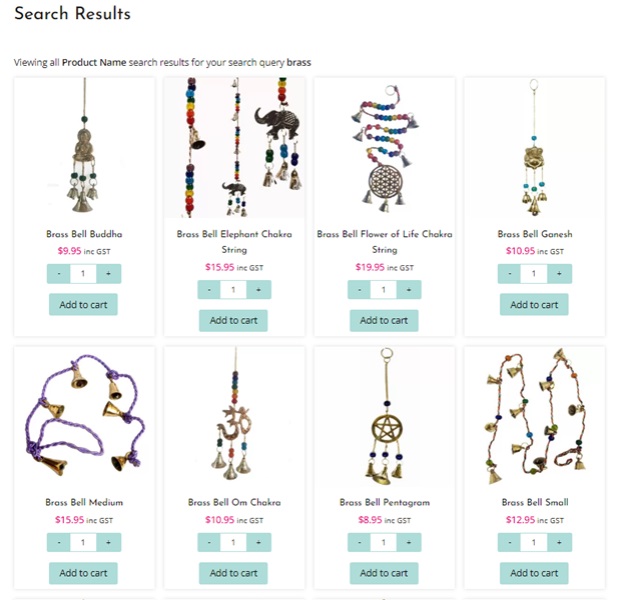
* Aug 2019 – Added Grid View of product results on All Search Results Page.
* Aug 2019 – Upgraded PS widget to work with Elementor and Elementor Pro. Add search box by widget to any Elementor Template
ALL SEARCH RESULTS PAGE
- On install the plugin auto creates a Predictive Search page with shortcode
- Page title and url can be edited to your liking
- All results search page has option to show results in list format (Default) or Grid view for products
- All results search page results show with endless scroll feature
- Option to set the number of results to show per endless scroll action – default is 10
- Option to show description extracts and set the number of description characters to show – default is 100 characters
- Option to show product SKU with Products search results
- Option to show product prices with Product search results
- Option to show Add to cart button with Product search results
- Option to show Categories meta for each Product and Post result
- Option to show Tags meta for each Product and Post result
- All results show with featured image thumbnails
EXCLUDE FROM SEARCH RESULTS
- Exclude any product from showing in Predictive Search results
- Exclude any post from showing in Predictive Search results
- Exclude any page from showing in Predictive Search Results
SPECIAL CHARACTERS
- Special Characters near match. Query strings that CONTAINS a special character eg d’E return all matches found for d’e and de.
- Special Characters Prepend and Append near match e.g. Query (Purple) will return all matches found for (Purple) and Purple.
- Option to turn Special Characters Function ON or OFF
- Option to select any Special Characters used on your site. Results returned with or without special character input
SINGULAR / PLURAL RESULT(s)
- Returns results when user adds plural (s) to search term – the s is ignored e.g. bike and bikes will both return the same results
TECHNICAL FEATURES
- Predictive Search Database is auto updated each time a Product, Post or Page is created, updated or deleted
- Manual Database Sync option to manually sync Predictive Search database with WooCommerce and WordPress databases if required
- No Conflict. Can be used in conjunction with any other Search plugin without conflicts occurring
- Results are cached not on your server but on the user’s machine via Backbone.localStorage.js (saving you oon bandwidth)
- NO-CACHE option – should be turned on when testing, OFF when not.
PREMIUM VERSION
For those that want a deeper store search there is the Premium Predictive Search plugin. The Premium has all of the features of the FREE version plus these advanced search features
- Additional Search objects – Product Attributes, Product SKU, Variation SKU’s, Product Category and Product Tags
- Search in Product Category Feature. From Search box use can select a Product category and Search just within that category or select a category and click the search icon and will open the Product category page
- Predictive Search PHP tag for adding search to your sites header (when header does not support widgets) or into theme templates
- Focus Keywords – Predictive Search meta section on each product page, post and page for setting ‘Focus Keywords and Keyword Phrases’
- Full integration with Yoast SEO and All in One SEO plugins
- Full integration with the Google Analytics Site Search Feature
- Performance enhancement settings for sites that have very large stores example 10,000+ products or posts
CONTRIBUTE
When you download Predictive Search for WooCommerce, you join our the a3rev Software community. Regardless of if you are a WordPress beginner or experienced developer if you are interested in contributing to the future development of Predictive Search or any of our other plugins on Github head over to the Predictive Search for WooCommerce GitHub Repository to find out how you can contribute.
Want to add a new language? You can contribute via translate.wordpress.org
USAGE
-
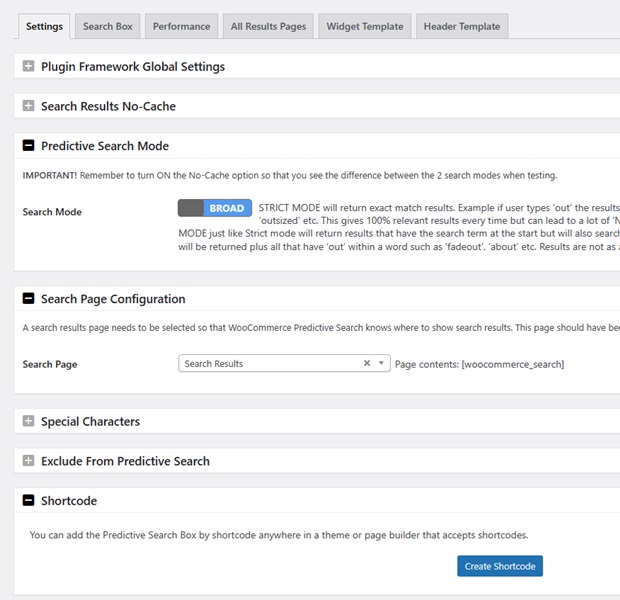
WP admin > WooCommerce menu > Predictive Search menu – Settings
-
Open the + Search Results No-Cache and turn On the Results No-Cache option while you are setting up and testing
-
Go to WordPress Appearance menu > Widgets
-
Locate Predictive Search widget and drag it into the sidebar where you want it to show.
-
Configure the search widget to show the desired results and meta on the frontend and click SAVE.
-
Now that Predictive Search is live on your site go back to the Predictive Search menu and on the Widget Template style the search box and results dropdown to match your theme.
-
Enjoy your outstanding quality site search
Installation
Minimum Requirements
- PHP version 7.4 or greater is recommended
- MySQL version 5.6 or greater is recommended
AUTOMATIC INSTALLATION
Automatic installation is the easiest option as WordPress handles the file transfers itself and you don’t even need to leave your web browser. To do an automatic install of Predictive Search for WooCommerce, log in to your WordPress admin panel, navigate to the Plugins menu and click Add New.
In the search field type “Predictive Search for WooCommerce” and click Search Plugins. Once you have found our plugin you can install it by simply clicking Install Now. After clicking that link you will be asked if you are sure you want to install the plugin. Click yes and WordPress will automatically complete the installation.
MANUAL
The manual installation method involves downloading our plugin and uploading it to your web server via your favorite FTP application.
- Download the plugin file to your computer and unzip it
- Using an FTP program, or your hosting control panel, upload the unzipped plugin folder to your WordPress installations wp-content/plugins/ directory.
- Activate the plugin from the Plugins menu within the WordPress admin.
Frequently asked questions
When can I use this plugin?
You can use this plugin only when you have installed the WooCommerce plugin.
Changelog
This release includes security hardening for the search and admin AJAX endpoints. Update is strongly recommended.
6.2.1 – 2026/07/02
- Security – Harden database queries used by the search and WPML lookup functions
- Security – Add capability checks to the sync and exclude-list admin AJAX actions
- Security – Escape reflected values in the search results output
- Security – Remove the SSL-verification bypass on outbound Google API requests
6.2.0 – 2026/04/09
- This maintenance release has bug fixes and compatibility with WordPress 7.0, WooCommerce 10.6
- Tweak – Tested for compatibility with WordPress 7.0
- Tweak – Tested for compatibility with WooCommerce 10.6
- Tweak – Improved plugin initialization sequence for better reliability
- Tweak – Update meta box for compatibility with WordPress 7.0 Block Editor
- Fix – Resolved PHP warnings on image size registration when settings are not yet saved
- Fix – Resolved admin interface loading issue on taxonomy edit pages
- Framework – Updated LESS compiler for compatibility with PHP 8.2 onwards
6.1.2 – 2025/06/12
- This maintenance release has 1 bug fix and compatibility with WordPress 6.8.1 and WooCommerce 9.9.3
- Tweak – Tested for compatibility with WordPress 6.8.1
- Tweak – Tested for compatibility with WooCommerce 9.9.3
- Fix – Validate args before generate sql command
6.1.1 – 2024/07/20
- This maintenance release has a security hardening patch. Please update now.
- Security – Securely output data to the user by escaping special characters, preventing them from being interpreted as code.
6.1.0 – 2024/07/12
- This release includes a security vulnerability patch plus compatibility with WordPress 6.6 and WooCommerce 8.9.3
- Tweak – Tested for compatibility with WordPress 6.6
- Tweak – Tested for compatibility with WooCommerce 8.9.3
- Tweak – Validate and correct block.json based schema from WordPress Block
- Fix – Correct number of items on popup results
- Security – Sanitize all parameters to prevent XSS injections.
6.0.1 – 2024/03/16
- This maintenance release has a bug fix on the search box dropdown results not redirecting to the item.
- Tweak – Test for compatibility with WooCommerce 8.6.0
- Tweak – Test for compatibility with WordPress 6.4.3
- Fix – Redirect to item link when click on the description item, same for item image and item name
Screenshots

For developers
Is this your plugin? Show off the numbers.
Add a live badge to your site, docs or GitHub README. It updates on its own — no account needed.
Best Predictive Search for WooComm… alternatives
All live search plugins →





FAQ
Predictive Search for WooCommerce: quick answers
Straight answers, pulled from live WordPress.org data.
Live data from WordPress.org · checked Sep 30, 2026
Is Predictive Search for WooCommer… free?
Yes. Predictive Search for WooCommer… is free to download and use from the official WordPress.org plugin directory.
Is Predictive Search for WooCommer… safe to use in 2026?
Predictive Search for WooCommer… is a solid plugin choice in 2026, with a few things worth checking first. It runs on 700+ sites, is rated 3.2/5 and was last updated 3 months ago, and scores 69/100 on our health check.
How many websites use Predictive Search for WooCommer…?
Predictive Search for WooCommer… is active on 700+ WordPress websites and has been downloaded 277,483 times since it launched in August 2012. It was downloaded 934 times in the last 30 days.
Does Predictive Search for WooCommer… work with WordPress 7.1?
Predictive Search for WooCommer… is officially tested up to WordPress 7.0.6, while the latest release is 7.1.2. It may still work, but try it on a staging site first.
When was Predictive Search for WooCommer… last updated?
The latest version, 6.2.1, was released on July 9, 2026 (3 months ago).
Who makes Predictive Search for WooCommer…?
Predictive Search for WooCommer… is developed and maintained by Steve Truman.
What are the best alternatives to Predictive Search for WooCommer…?
The most popular alternatives to Predictive Search for WooCommer… are Ajax Search Lite (70K+ installs), Advanced Woo Search (70K+ installs) and Advance Product Search- Voi… (9K+ installs).
Powered by PageForge
Want thousands of pages that rank like these? Build them in an afternoon.
This directory runs on the same engine as PageForge. Turn any spreadsheet, CSV or API into thousands of fast, SEO-ready WordPress pages — with schema, internal links and AI-written copy baked in.
- CSV, Google Sheets & API data sources
- AI content, schema & internal links per page
- Works with Elementor, Gutenberg, Yoast & Rank Math
- Free on WordPress.org — no credit card


