


Product Filter for WooCommerce by WBW
Filter products by categories, attributes, prices, and more. Elementor Compatibility. Shoppers easily find products with WooCommerce Product Filter

Safe pick
Yes — Product Filter for WooCommerce… is a safe, well-maintained plugin to use in 2026. It runs on 50K+ sites, is rated 4.8/5 and was last updated 5 days ago, and scores 94/100 on our health check.
- Proven at scale on 50K+ active sites
- Loved by users — 4.8/5 from 324 reviews
- Actively developed — last update 5 days ago
- Tested with the latest WordPress (7.1)
- Momentum — downloads up 19410% vs the previous 30 days
Daily downloads
Download spikes usually follow a new release — each site that auto-updates counts as a download.
Rankings
Where Product Filter for WooComme… stands todayWordPress.org search rankings
Live position in the plugin search, top 100| Keyword | Position |
|---|---|
| e-commerce filter | #1 |
| product filter | #2 |
| shop filter | #3 |
| woocommerce filter | #7 |
| woocommerce product filter | #6 |
Version adoption
Share of active sites per release.
Rating breakdown
★★★★★★★★★★ 4.8 from 324 reviews
About Product Filter for WooCommerce by WBW
From the official readme · v3.4.5Description
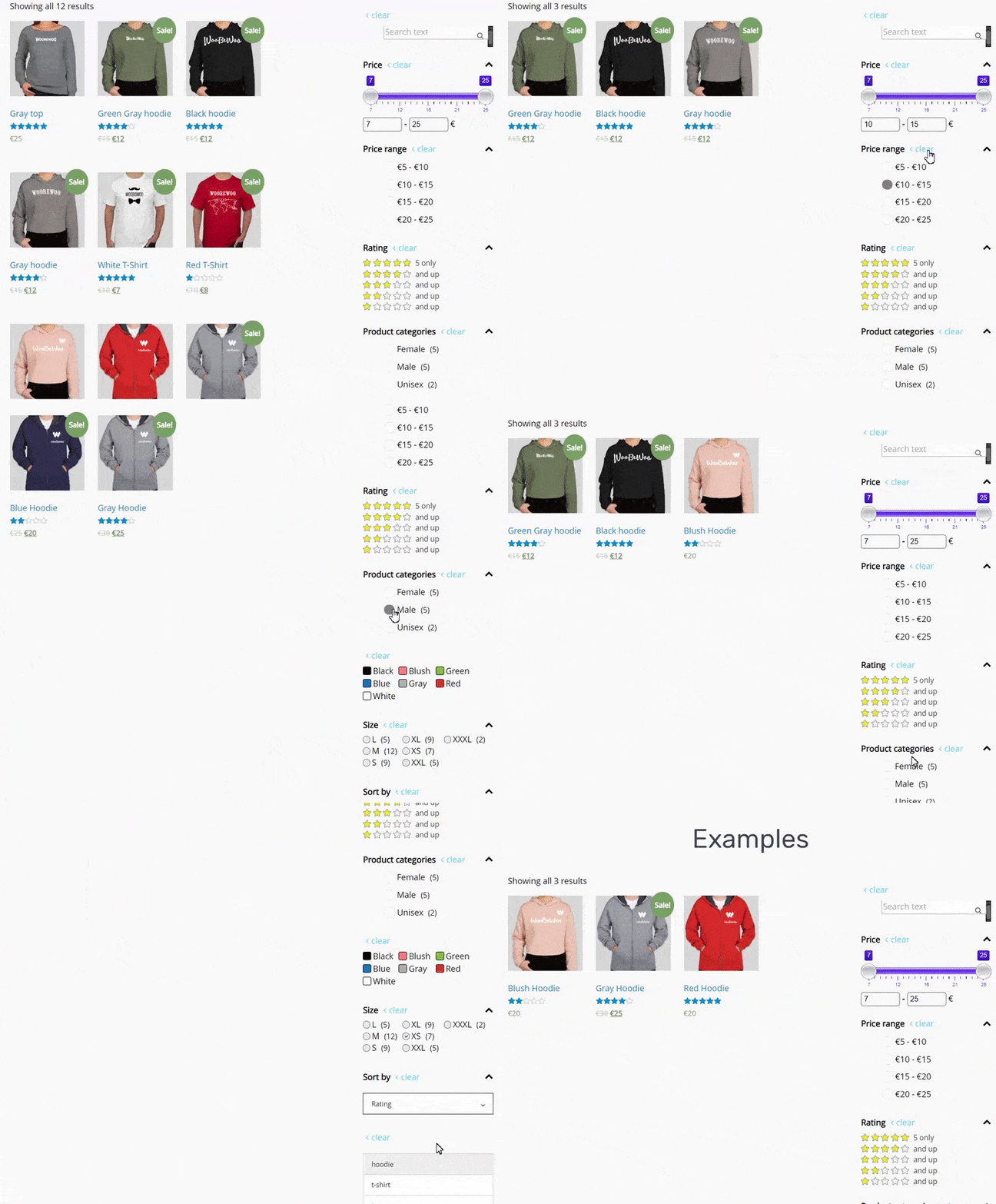
The WooCommerce Product Filter plugin enhances your store by allowing customers to refine their searches by price, categories, tags, taxonomy, attributes and more.
It’s fully customizable and 100% compatible with Elementor, giving you full control over filtering options.
WooCommerce Product Filter Key Features
Comprehensive Filtering
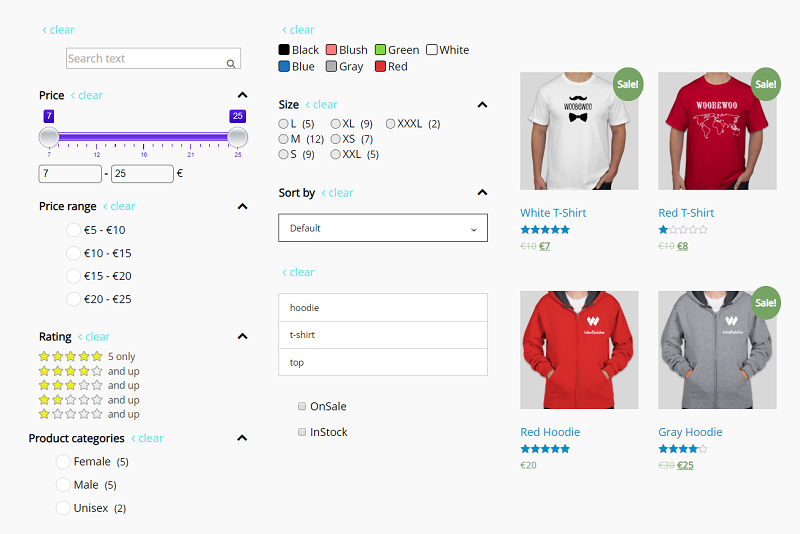
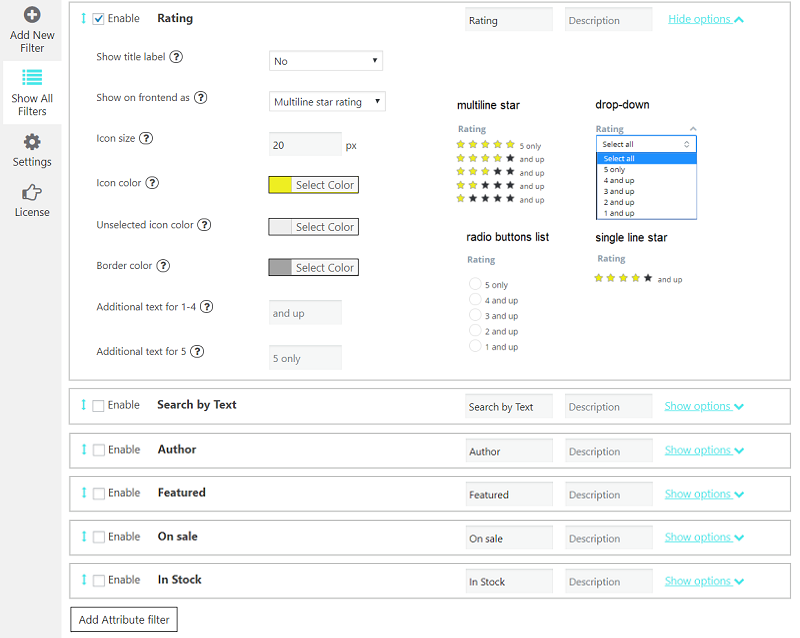
let customers filter products by: Price, Price range, Categories, Tags, Author, Featured, On Sale, In Stock, Rating, Search by text**, Attribute filters.
Flexible Display Options
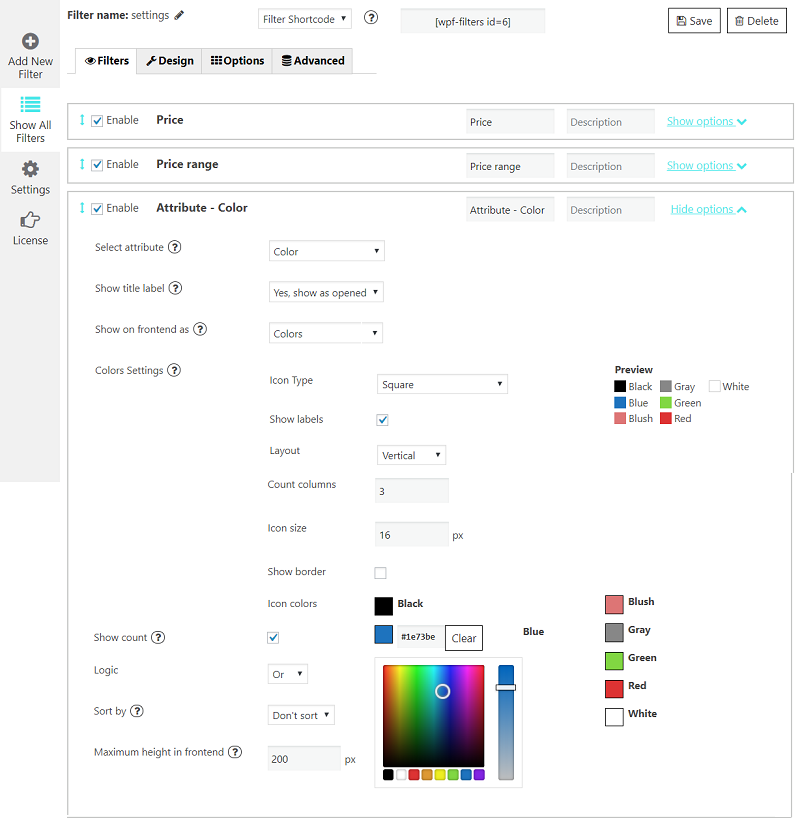
present the filters in various formats to suit your storefront’s design and user preferences. Options include: radio button list (single select) dropdown (single select), checkbox list (multi-select)** and icons** for attribute filters (colour, size, rating).
AJAX live search
Enable instant results without page reloads for a faster shopping with AJAX live search. AJAX search provides instant filtering results without the need to reload the page. This feature can be configured to activate immediately after a user selects their desired filter options and clicks the filter button, making product searches faster and more intuitive.
Elementor Integration
WooCommerce Product Filter compatible with Elementor. Seamlessly create and customize filters using Elementor’s interface.
All features of the WooCommerce Product Filter by WBW are accessible within the Elementor tab, providing a streamlined workflow for page building.
To help you get started, there’s a comprehensive video tutorial available that guides you through the process of setting up the WooCommerce Product Filter by WBW, ensuring you can make the most of its features to improve your online store’s functionality and user experience.
Product filters are the key things that allow your customers to view the products in a particular way and easily find the necessary items.
Statistics
Product Filter by WBW comes with a detailed filter statistics section to make it easier to collect, analyze data and subsequently support global business growth. Gather information about filtering and searching for products by your buyer and convert them into business solutions.
Live preview
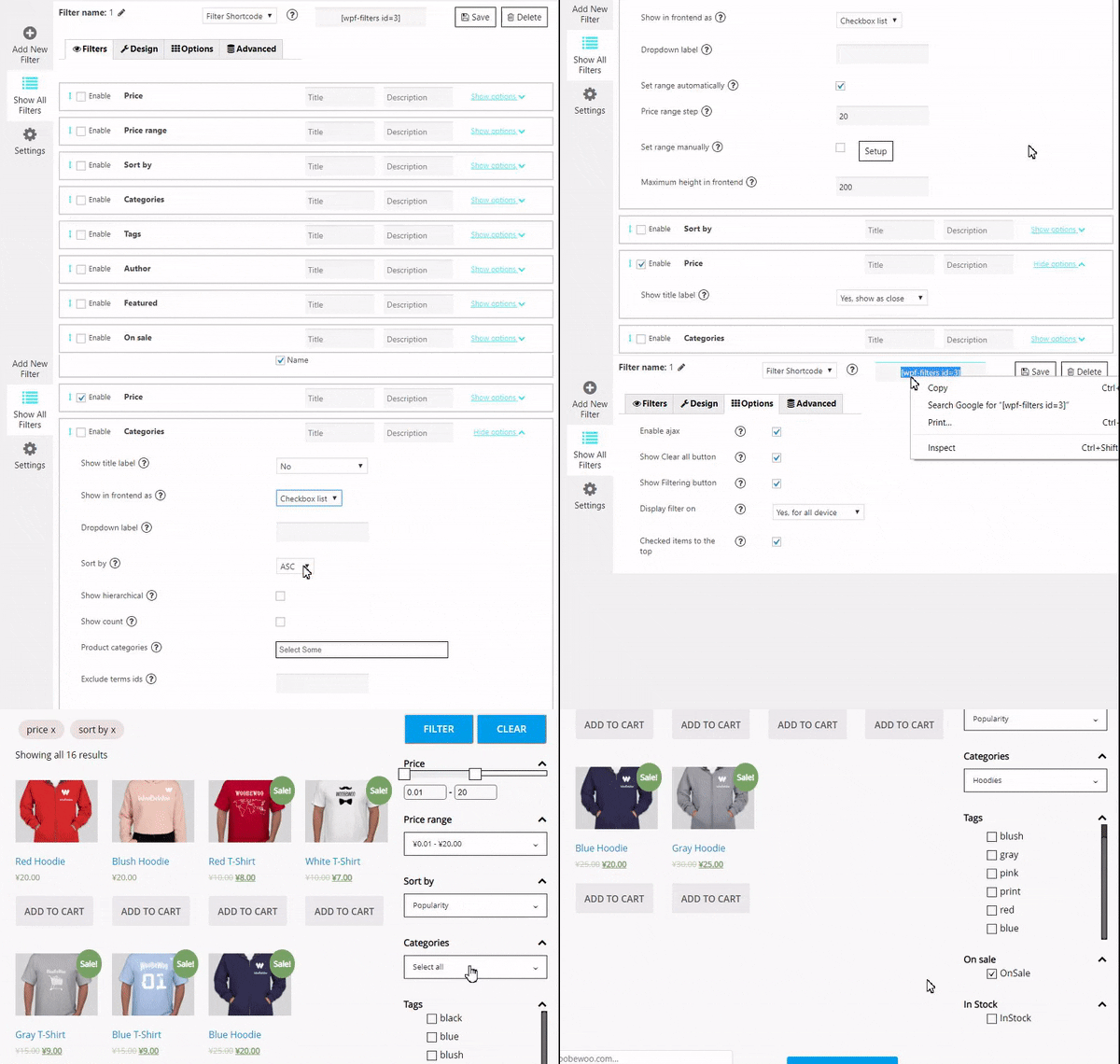
With Live Preview, the results will appear in the panel right at the moment you make changes to settings.
Variety of options for sorting products
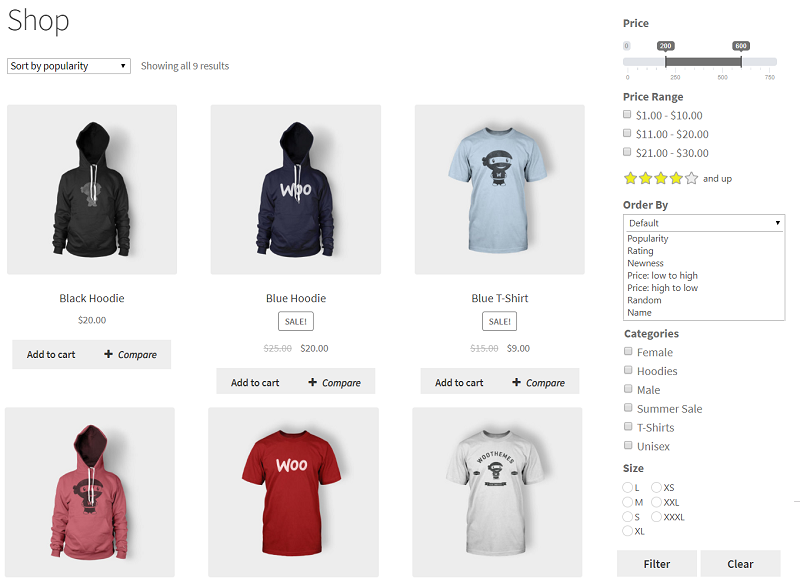
The product search plugin for WooCommerce allows sorting your products by popularity, rating, price, newness, alphabetical ascender, or descender.
Create new product filters in a few clicks
Easy to customize and set up. Just add a filter to every page using a widget or shortcodes.
Price filter design
Variation of skins: default, flat, big, modern, sharp, round, square. Custom setting for its design: color, symbol position, currency code or symbol, input fields.
Automatic price range settings with fixed step values
Adjust them manually and specify the exact value of every step as well.
Show Count and Recount products by selected filter
Recount the products by selected filters and display the exact number of products matching the filter results.
Fully responsive
The filter looks and works properly on different devices particularly mobile phones and tablets as well as desktops and laptops.
Support and suggestions for WooCommerce Product Filter Plugin
Ask your questions in the support forum, or contact us directly
Installation
a) VIA FTP
A download zip archive with WooCommerce Product Filter by WBW plugin
Extract files
Copy the folder with the plugin
Open via FTP folder \wp-content\plugins\
Paste plugin folder into here
Go to admin panel => Plugins => WooCommerce Product Filter by WBW press activate
B) DIRECT UPLOAD VIA ADMIN AREA
A download zip archive with plugin
Go to admin panel => Plugins => Add new
Choose the archive with a plugin and upload it
Wait until you get the notification installation went successfully
Press Activate button
C) VIA WORDPRESS REPOSITORY
Navigate to admin panel => Plugins => Add new
Type \” WooCommerce Filter Plugin by WBW”\ in the search field
Choose our plugin from the list and click \”Install\”
Wait until you get the notification installation went successfully
Press Activate button
Frequently asked questions
How to create a product filter for my website?
We have all the necessary options in one plugin. You can start to try them now, following this clarification. It’s really easy to make the required settings and add Filter Plugin to your online store. To manage with an installation and plugin settings, check the tutorial Main Settings
What are the criteria I can sort by
Now there is an ability to sort results by popularity, rating, newness, a price low to high and vice versa, randomly, by name, or by default order.
What are the settings available for each filter?
Depending on the type and specificity of the filter, you can configure: Filter title and description. Way to display a filter label on the page: no label, show as close/opened. Type: checkbox list/drop-down, multiple drop-down or icons. Drop-down label. Set a drop-down first option text. Show search and more.
How to add product filter to the store?
After creating the filter you can add a filer it in 2 ways: with shortcode and PHP code ( you can find them under the settings tab) or add WBW Product Filter widget. Input shortcode Copy Shortcode and paste it to your website content. Product Filter plugin will display the filter you created on the appropriate post/page using settings you tuned in this filter. Filter PHP code PHP code can be inserted at any place of the page code to display exactly in this place, for example in the header or footer of the page. Display Widget In case you are utilizing Product Filter in your internet store…
Is the Product filter plugin responsive?
WooCommerce Product Filter is fully compatible and responsive! A plugin is working and displaying perfectly on tablets or phones, making it easy and convenient for customers to enjoy their shopping time and make purchases on all devices.
Why do I need a product filter?
On the standard site, customers have to scroll a lot of pages and links to find a product. It is an exhausted and time-consuming process, and there is where the product filtering comes. This feature allows users to find their route to a product, tuning different characteristics. You can read about How to make the filtering works in the best way and find the tips Where to place a filter bar, how to display filters, how to present the most relative filters and not overload, customers.
My WooCommerce Product Filter plugin is not working?
If you have problems with the work of plugin or something is not working as it should follow these steps: * Test the plugin with a WordPress default theme, to be sure that the error is not caused by the theme you are currently using. * Deactivate all plugins you are using and check if the problem is still occurring. * Ensure that plugin version, theme version, and WordPress are updated and the problem has not already been solved in a later plugin update. If none of this advice helps you, contact us via support form on our websiteand describe your problem.
WooCommerce Product Filter plugin is not available in my language. What shall I do?
You may help us translate the plugin into your language and get the PRO version of the plugin for free as soon as it is released. If this method seems to be too complicated, please send us a request and we will let you know as soon as the WBW Filter plugin will be available in your localization.
Where do I report security bugs found in this plugin?
Please report security bugs found in the source code of the plugin through the Patchstack Vulnerability Disclosure Program. The Patchstack team will assist you with verification, CVE assignment, and notify the developers of this plugin.
External Services
This plugin connects to an external server provided by WooBewoo (woobewoo.com) to handle the following admin-side forms. No data is ever sent automatically — these requests only occur when an administrator explicitly submits one of the forms below from within the WordPress admin panel. Contact Us form: Sends the administrator’s name, email address, subject, message, site URL, and plugin version to woobewoo.com. Subscribe form: Sends the administrator’s email address and site URL to woobewoo.com. Rating form: Sends the administrator’s email address, rating score, feedback message, and site URL…
Changelog
This is the first release of the plugin.
3.4.5 – 21/09/2026
- Fix – Fixed checkbox checked state style issue.
- Dev – Removed
!importantfrom button styles.
3.4.4 – 09/09/2026
- Fix – Fixed fatal error when term data is returned as an object.
3.4.3 – 08/09/2026
- Fix – Filter – Appearance – Blocks – Fixed checkbox border issue.
- Fix – Fixed 404 error when paginating filtered results with multiple values.
- Fix – Security – Fixed potential JavaScript injection through the filter ID parameter.
- Fix – Fixed “Filter” and “Clear” text translation.
- Dev – Security – Escaped custom CSS output.
- WC tested up to: 11.1.
3.4.2 – 01/09/2026
- Fix – Fixed fatal error caused by the missing
class-woobewoo-pf-mod-installer.phpfile.
3.4.1 – 01/09/2026
- Dev – Renamed AJAX object.
3.4.0 – 31/08/2026
- Dev – Updated checkbox border color.
- Dev – Fixed “Filter” text translation.
- Dev – Security – Escaped shortcode output.
- Dev – Prefixed PHP class names with
WooBeWoo_PF_. - Dev – Prefixed class file names with
class-woobewoo-pf-. - Dev – Code refactoring.
- Tested up to: 7.1.
Screenshots
For developers
Is this your plugin? Show off the numbers.
Add a live badge to your site, docs or GitHub README. It updates on its own — no account needed.
FAQ
Product Filter for WooCommerce by W…: quick answers
Straight answers, pulled from live WordPress.org data.
Live data from WordPress.org · checked Sep 26, 2026
Is Product Filter for WooCommerce… free?
Yes. Product Filter for WooCommerce… is free to download and use from the official WordPress.org plugin directory.
Is Product Filter for WooCommerce… safe to use in 2026?
Yes — Product Filter for WooCommerce… is a safe, well-maintained plugin to use in 2026. It runs on 50K+ sites, is rated 4.8/5 and was last updated 5 days ago, and scores 94/100 on our health check.
How many websites use Product Filter for WooCommerce…?
Product Filter for WooCommerce… is active on 50K+ WordPress websites and has been downloaded 2,847,640 times since it launched in June 2018. It was downloaded 78,430 times in the last 30 days.
Does Product Filter for WooCommerce… work with WordPress 7.1?
Yes. The developer has tested Product Filter for WooCommerce… up to WordPress 7.1.2, the latest release. It requires WordPress 5.0 or newer.
When was Product Filter for WooCommerce… last updated?
The latest version, 3.4.5, was released on September 21, 2026 (5 days ago).
Who makes Product Filter for WooCommerce…?
Product Filter for WooCommerce… is developed and maintained by WBW Plugins.
Powered by PageForge
Want thousands of pages that rank like these? Build them in an afternoon.
This directory runs on the same engine as PageForge. Turn any spreadsheet, CSV or API into thousands of fast, SEO-ready WordPress pages — with schema, internal links and AI-written copy baked in.
- CSV, Google Sheets & API data sources
- AI content, schema & internal links per page
- Works with Elementor, Gutenberg, Yoast & Rank Math
- Free on WordPress.org — no credit card


