


PayPing Gateway For Woocommerce
افزونه درگاه پرداخت پیپینگ برای ووکامرس

Solid choice
PayPing Gateway For Woocommerce is a solid plugin choice in 2026, with a few things worth checking first. It runs on 1K+ sites, is rated 5/5 and was last updated 3 weeks ago, and scores 77/100 on our health check.
- Actively developed — last update 3 weeks ago
- Tested with the latest WordPress (7.1)
- Very few reviews so far
How does it stack up?
Side-by-side on installs, updates, ratings & support



Daily downloads
Download spikes usually follow a new release — each site that auto-updates counts as a download.
Rankings
Where PayPing Gateway For Woocomm… stands todayWordPress.org search rankings
Live position in the plugin search, top 100| Keyword | Position |
|---|---|
| gateway | #24 |
| payment | >100 |
| payping | #1 |
| woocommerce | >100 |
| درگاه پرداخت | #4 |
Version adoption
Share of active sites per release.
Rating breakdown
★★★★★★★★★★ 5 from 2 reviews
About PayPing Gateway For Woocommerce
From the official readme · v4.6.5Description
با استفاده از این افزونه فروشگاه خود را به درگاه آنلاین پرداخت بانکی متصل کنید.
هوکها برای توسعهدهندگان
میتوانید با هوکهای زیر رفتار درگاه را تغییر دهید یا رویدادهای پرداخت را دریافت کنید. پس از پرداخت موفق، هوکهای استاندارد ووکامرس (مانند woocommerce_payment_complete) نیز به شکل معمول اجرا میشوند.
اکشنها:
woo_payping_Payment_Success— پس از تایید موفق پرداخت. پارامترها:$order_id,$transaction_idwoo_payping_Payment_Failed— پس از تایید ناموفق پرداخت. پارامترها:$order_id,$transaction_id,$messagewoo_payping_Payment_Duplicate— هنگامی که پرداخت قبلا تایید شده باشد. پارامترها:$order_id,$transaction_idwoo_payping_Payment_Cancelled— هنگام انصراف کاربر در صفحه بانک. پارامترها:$order_idwoo_payping_Send_to_Gateway_Failed— هنگام خطا در ارسال سفارش به درگاه. پارامترها:$order_id,$message
فیلترها:
WC_payping_Gateway_Payment_api_url— آدرس API ساخت پرداختWC_payping_Gateway_Payment_api_args— آرگومانهای کامل درخواست ساخت پرداخت (شامل بدنه درخواست)WC_payping_Gateway_Payment_verify_api_url— آدرس API تایید پرداختWC_payping_return_refid— کد پیگیری بازگشتی از درگاهWC_payping_Currency— واحد پول مورد استفاده در محاسبه مبلغWC_payping_Description،WC_payping_Mobile،WC_payping_Email،WC_payping_Paymenter— اطلاعات پرداختکننده ارسالی به درگاهwoocommerce_order_amount_total_payping_gatewayوwoocommerce_order_amount_total_IRANIAN_gateways_before_check_currency،..._after_check_currency،..._irt— تغییر مبلغ نهایی پرداختwoo_payping_logo— آدرس لوگوی درگاهwoo_payping_order_panel_rows— ردیفهای نمایش داده شده در بخش «دادههای درگاه پیپینگ» در صفحه سفارشWC_payping_Config— فیلدهای تنظیمات درگاه
نمونه استفاده:
add_action( 'woo_payping_Payment_Success', 'my_payping_sync', 10, 2 );
function my_payping_sync( $order_id, $transaction_id ) {
    // کد شما
}<h3>Third-Party Services</h3>This plugin leverages the following third-party services:
- https://api.payping.ir: This plugin adds online payment functionality to the Woocommerce plugin, allowing us to process payments and check payment statuses through https://api.payping.ir.
Privacy Policy
This plugin follows strict privacy guidelines. When using the api.payping.ir service, user data is securely transmitted and stored following industry best practices.
Installation
- پوشه ‘woo-payping-gateway’ را در مسیر ‘/wp-content/plugins/’ آپلود کنید
- افزونه را از طریق منوی ‘افزونه ها’ در وردپرس فعال کنید
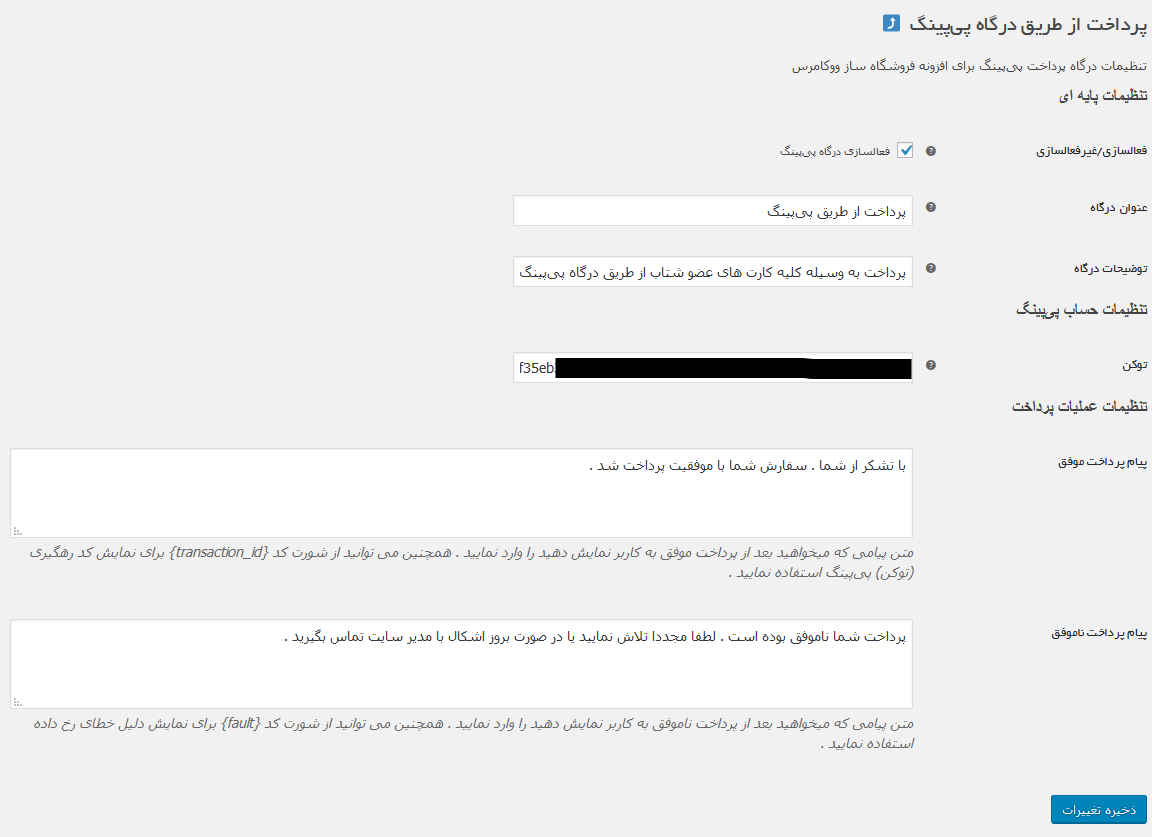
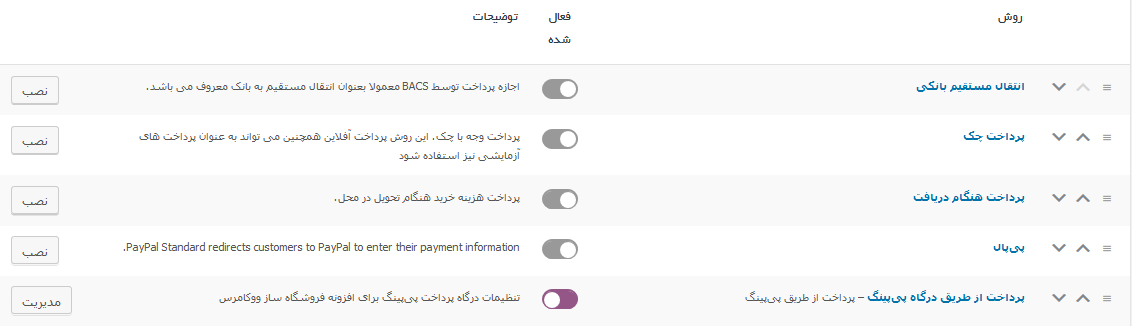
- تنظیمات افزونه را می توانید از طریق قسمت تنظیمات ووکامرس / پیکربندی/ درگاه های پرداخت انجام دهید
Frequently asked questions
توکن درگاه پیپینگ را از کجا دریافت کنم؟
پس از ثبتنام در پیپینگ، از داشبورد شخصی به بخش «درگاه پرداخت» بروید و با گزینه «ایجاد» یک توکن بسازید. توکن دریافتی را در فیلد توکن تنظیمات افزونه وارد کنید. هنگام ساخت توکن به تاریخ انقضا، آدرس وبسایت و دسترسیهای فعال شده دقت کنید.
پیشنیاز نصب افزونه چیست؟
وردپرس و ووکامرس (و در صورت استفاده، ووکامرس فارسی) را به جدیدترین نسخه بروزرسانی کنید. همچنین پیش از نصب، از نصب نبودن نسخه دیگری از افزونه پرداخت پیپینگ برای ووکامرس اطمینان حاصل کنید.
تنظیمات درگاه پیپینگ کجاست؟
از پیشخوان وردپرس به مسیر ووکامرس، پیکربندی، درگاههای پرداخت و سپس پیپینگ بروید و توکن و سایر تنظیمات درگاه را در همین صفحه وارد کنید.
هنگام مواجهه با خطای 401 در اتصال به درگاه چه باید کرد؟
این خطا معمولا به دلیل منقضی شدن توکن یا عدم تطابق آدرس وبسایت و دسترسیهای توکن با سایت شما رخ میدهد. توکن را در پنل پیپینگ ویرایش و «تعویض توکن» را انجام دهید، سپس توکن جدید را در تنظیمات درگاه جایگزین کنید.
چه واحد پولهایی پشتیبانی میشود؟
ریال، تومان، هزار ریال و هزار تومان پشتیبانی میشوند. مبلغ سفارش در زمان ارسال به درگاه بر اساس واحد پول فروشگاه به تومان تبدیل میشود.
آیا صفحه تسویه حساب بلوکی ووکامرس پشتیبانی میشود؟
بله. افزونه با Checkout Blocks ووکامرس سازگار است و درگاه پیپینگ به صورت خودکار در صفحه تسویه حساب بلوکی نیز نمایش داده میشود.
Changelog
بهبود نمایش خطاها و افزودن بخش اختصاصی پیپینگ به صفحه سفارش
4.6.5
بهبود نمایش پیام خطاهای درگاه پیپینگ و نمایش دلیل خطا به جای خروجی خام
افزودن بخش اختصاصی «دادههای درگاه پیپینگ» در صفحه سفارش همراه با تایملاین رویدادهای پرداخت
انتقال اطلاعات پرداخت پیپینگ از یادداشتهای سفارش به بخش اختصاصی درگاه
نمایش شناسه پیگیری (Trace ID) خطاها برای بررسی آسانتر با پشتیبانی پیپینگ
4.6.4
بهبود فرایند پرداخت و حذف صفحه میانی قبل از هدایت به درگاه
استفاده مجدد از کد پرداخت قبلی و ساخت پرداخت جدید در صورت تغییر مبلغ سفارش
بهبود بررسیهای تایید پرداخت و تطبیق مبلغ و کد پرداخت
رفع مشکل خواندن تنظیمات درگاه در تسویه حساب بلوکی
افزودن هوکهای رویداد پرداخت برای توسعهدهندگان
پاکسازی خودکار تنظیمات درگاه هنگام حذف کامل افزونه
بازنویسی راهنمای افزونه، افزودن پرسشهای متداول و بخش تصاویر
4.6.3
رفع مشکل عدم پرداخت مجدد سبد خرید در تسویه حساب بلاکی
رفع نمایش تکراری دکمه های پرداخت در زمان خطا
بهبود فرایند پرداخت و بازگشت از درگاه
4.6.1
بهبود عملکرد افزونه
4.6.0
بهبود عملکرد افزونه و رفع مشکلات گزارش شده
4.5.1
تغییر در ثبت توضیحات سفارش
Screenshots
For developers
Is this your plugin? Show off the numbers.
Add a live badge to your site, docs or GitHub README. It updates on its own — no account needed.
Best PayPing Gateway For Woocommer… alternatives
All gateway plugins →





FAQ
PayPing Gateway For Woocommerce: quick answers
Straight answers, pulled from live WordPress.org data.
Live data from WordPress.org · checked Oct 6, 2026
Is PayPing Gateway For Woocommerce free?
Yes. PayPing Gateway For Woocommerce is free to download and use from the official WordPress.org plugin directory.
Is PayPing Gateway For Woocommerce safe to use in 2026?
PayPing Gateway For Woocommerce is a solid plugin choice in 2026, with a few things worth checking first. It runs on 1K+ sites, is rated 5/5 and was last updated 3 weeks ago, and scores 77/100 on our health check.
How many websites use PayPing Gateway For Woocommerce?
PayPing Gateway For Woocommerce is active on 1K+ WordPress websites and has been downloaded 59,860 times since it launched in March 2019. It was downloaded 1,355 times in the last 30 days.
Does PayPing Gateway For Woocommerce work with WordPress 7.1?
Yes. The developer has tested PayPing Gateway For Woocommerce up to WordPress 7.1.2, the latest release. It requires WordPress 6.2 or newer.
What PHP version does PayPing Gateway For Woocommerce need?
PayPing Gateway For Woocommerce requires PHP 7.4.0 or higher. Most hosts run PHP 8.x today, so it works on any modern WordPress hosting.
When was PayPing Gateway For Woocommerce last updated?
The latest version, 4.6.5, was released on September 15, 2026 (3 weeks ago).
Who makes PayPing Gateway For Woocommerce?
PayPing Gateway For Woocommerce is developed and maintained by PayPing Dev.
What are the best alternatives to PayPing Gateway For Woocommerce?
The most popular alternatives to PayPing Gateway For Woocommerce are Payment Gateway Based Fees… (30K+ installs), Easy PayPal & Stripe Buy No… (10K+ installs) and ЮKassa для WooCommerce (9K+ installs).
Powered by PageForge
Want thousands of pages that rank like these? Build them in an afternoon.
This directory runs on the same engine as PageForge. Turn any spreadsheet, CSV or API into thousands of fast, SEO-ready WordPress pages — with schema, internal links and AI-written copy baked in.
- CSV, Google Sheets & API data sources
- AI content, schema & internal links per page
- Works with Elementor, Gutenberg, Yoast & Rank Math
- Free on WordPress.org — no credit card


