


Gkash Payment
Gkash Payment for WooCommerce.

Use with caution
Gkash Payment works, but test it on a staging site before relying on it in 2026. It runs on 80+ sites and was last updated 2 months ago, and scores 59/100 on our health check.
- Small user base (80+ active installs)
- Very few reviews so far
How does it stack up?
Side-by-side on installs, updates, ratings & support



Daily downloads
Download spikes usually follow a new release — each site that auto-updates counts as a download.
Rankings
Where Gkash Payment stands todayWordPress.org search rankings
Live position in the plugin search, top 100| Keyword | Position |
|---|---|
| checkout | >100 |
| E-Wallet | #37 |
| fpx | #16 |
| Gkash.My | #1 |
| visa | >100 |
Version adoption
Share of active sites per release.
About Gkash Payment
From the official readme · v1.3.0Description
Gkash Payment for WooCommerce.
Gkash Payment gateway Checkout allows you to securely sell your products and subscriptions online using In-Context Checkout to help you meet security requirements without causing your theme to suffer.
In-Context Checkout uses a modal window, hosted on Gkash.My’s servers, that overlays the checkout form and provides a secure means for your customers to enter their account information.
Also, with Integrated Gkash.My Setup (Easy Setup), connecting to Gkash.My is as simple as clicking a button , no complicated API keys to cut and paste, you just need to sign up as a Merchant with us at https://www.gkash.my
Installation
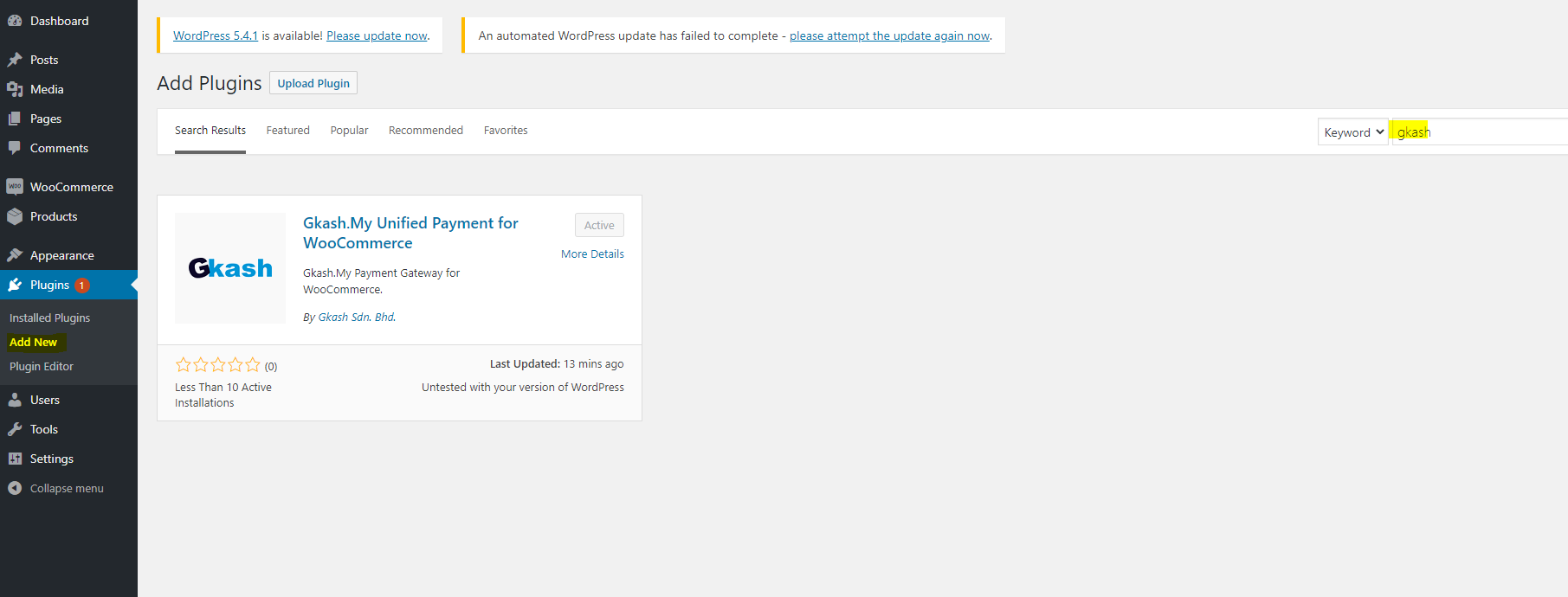
- On the side bar of your dashboard, click Plugins and select “Add New”.
- Search “Gkash Payment” on the search plugins to find this plugin to install.
- After the result from search, click Install Now to install the plugin to your wordpress.
- Go to your install plugin and active the installed plugin.
Automatic installation
Automatic installation is the easiest option as WordPress handles the file transfers itself and you don t need to leave your web browser. To do an automatic install of Gkash Payment, log in to your WordPress dashboard, navigate to the Plugins menu and click Add New.
In the search field type “Gkash Payment” and click Search Plugins. Once you ve found our eCommerce plugin you can view details about it such as the point release, rating and description. Most importantly of course, you can install it by simply clicking Install Now .
Frequently asked questions
Who can use this plugin?
Any merchant who sign up at https://www.gkash.my
What is the purpose for this plugin?
This plugin provide you a new payment method for your website , so customers have more choices to choose for their payment method.
Changelog
1.0.0
This is the first version of plugin, First Commit
1.0.1
Fix Bugs
1.0.2
Remove CartID2 so every cart id is unique
1.1.0
Check for order’s status, no action take once order is success
1.2.0
Added staging enviroment to allow testing
1.2.1
Added Title description ‘Official Gkash payment gateway for WooCommerce
1.2.8
Retrieve cart item
1.2.9
Simplify code
1.2.10
Fix save configuration bug
1.2.11
Fix shipping address bug
1.2.12
Fix phone number bug
1.2.13
Set timezone to UTC
1.2.14
Change logo image
1.3.0
Added support for WooCommerce High-Performance Order Storage (HPOS).
Fixed PHP 8.2+ deprecation notices, and tested with WordPress 7.0, WooCommerce 11.0 and PHP 8.4.
A successful callback’s amount and currency are now checked against the order total, and the order is put on hold if they do not match.
Fixed billing and shipping details being swapped when an order has a separate shipping address.
Fixed the gateway being offered when the store currency is not MYR.
A failed payment now keeps the order so the customer can try again, instead of cancelling it.
Pending payments are recorded as pending, and a repeated callback can no longer reopen an order that is already paid, cancelled or refunded.
The Gkash transaction ID is now saved on the order, the product description covers every item, and callback problems are logged under the “wcgkash” source.
Here’s a link to our website [Gkash.MY] ( https://www.gkash.my)
Screenshots


For developers
Is this your plugin? Show off the numbers.
Add a live badge to your site, docs or GitHub README. It updates on its own — no account needed.
Best Gkash Payment alternatives
All checkout plugins →





FAQ
Gkash Payment: quick answers
Straight answers, pulled from live WordPress.org data.
Live data from WordPress.org · checked Sep 29, 2026
Is Gkash Payment free?
Yes. Gkash Payment is free to download and use from the official WordPress.org plugin directory.
Is Gkash Payment safe to use in 2026?
Gkash Payment works, but test it on a staging site before relying on it in 2026. It runs on 80+ sites and was last updated 2 months ago, and scores 59/100 on our health check.
How many websites use Gkash Payment?
Gkash Payment is active on 80+ WordPress websites and has been downloaded 3,421 times since it launched in March 2019. It was downloaded 119 times in the last 30 days.
Does Gkash Payment work with WordPress 7.1?
Gkash Payment is officially tested up to WordPress 7.0.6, while the latest release is 7.1.2. It may still work, but try it on a staging site first.
What PHP version does Gkash Payment need?
Gkash Payment requires PHP 5.6 or higher. Most hosts run PHP 8.x today, so it works on any modern WordPress hosting.
When was Gkash Payment last updated?
The latest version, 1.3.0, was released on August 10, 2026 (2 months ago).
Who makes Gkash Payment?
Gkash Payment is developed and maintained by gkashdev.
What are the best alternatives to Gkash Payment?
The most popular alternatives to Gkash Payment are Brazilian Market on WooComm… (60K+ installs), reCAPTCHA for WooCommerce (40K+ installs) and Fluid Checkout for WooComme… (20K+ installs).
Powered by PageForge
Want thousands of pages that rank like these? Build them in an afternoon.
This directory runs on the same engine as PageForge. Turn any spreadsheet, CSV or API into thousands of fast, SEO-ready WordPress pages — with schema, internal links and AI-written copy baked in.
- CSV, Google Sheets & API data sources
- AI content, schema & internal links per page
- Works with Elementor, Gutenberg, Yoast & Rank Math
- Free on WordPress.org — no credit card


