



Custom Payment Gateways for WooCommerce
Add multiple custom payment gateways to WooCommerce e-commerce plugin.

Use with caution
Custom Payment Gateways for Woo… works, but test it on a staging site before relying on it in 2026. It runs on 3K+ sites, is rated 5/5 and was last updated 7 months ago, and scores 60/100 on our health check.
- Loved by users — 5/5 from 28 reviews
- Only tested up to WordPress 6.9 (latest is 7.1)
How does it stack up?
Side-by-side on installs, updates, ratings & support



Daily downloads
Download spikes usually follow a new release — each site that auto-updates counts as a download.
Rankings
Where Custom Payment Gateways for… stands todayWordPress.org search rankings
Live position in the plugin search, top 100| Keyword | Position |
|---|---|
| custom | #96 |
| gateway | #22 |
| payment | >100 |
| payment gateway | #35 |
| woocommerce | >100 |
Version adoption
Share of active sites per release.
Rating breakdown
★★★★★★★★★★ 5 from 28 reviews
About Custom Payment Gateways for WooCommerce
From the official readme · v1.6.6Description
This plugin allows you to create an infinite number of custom payment gateways for WooCommerce. After a payment gateway is created, you can edit its instructions and email sent to the customer directly in the WooCommerce payment settings menu.
Features:
♦ Create unlimited custom payment gateways
♦ Edit payment gateway instructions and customer emails in WooCommerce settings
♦ Easy customization of gateway options for customers
♦ Add multiple URLs to ping after an order is created
♦ Simple creation process for new payment gateways
Note: You will need to manually update the order status as the order progresses from On Hold/Processing, as this gateway has no way of tracking the order.
This plugin also includes non-intrusive ads (shown only in the backend) that help support the ongoing development and maintenance of the plugin. Please see our privacy policy for information on data collection.
Installation
Automatic installation
The easiest way to install Custom Payment Gateways for WooCommerce is through the automatic installation option. To do this, simply log in to your WordPress dashboard, navigate to the Plugins menu, and click on “Add New.”
In the search field, type “Custom Payment Gateways for WooCommerce,” and click on “Search Plugins.” Once you find our plugin, you can view details such as the rating, description, and the current version. To install the plugin, click on “Install Now,” and let WordPress handle the file transfer for you.
Manual installation
- Download the plugin zip file from the source (such as the WordPress plugin repository).
- Log in to your WordPress dashboard, navigate to the Plugins menu, and click “Add New.”
- Click the “Upload Plugin” button at the top of the page.
- Choose the plugin zip file you downloaded and click “Install Now.”
- Once the installation is complete, click the “Activate Plugin” button.
- You can now access the plugin through “Custom Payment Gateways” option in the admin menu.
Frequently asked questions
What is this all about?
This plugin allows you to create custom payment gateways for WooCommerce, including options for adding a logo and customizing email instructions to customers after payment. This makes it easy to add local payment solutions in your area, and you can easily update the order status of the order as the payment process progresses.
So where do I start?
After you install and activate the plugin, a new menu item “Custom Payment Gateways” will appear in the WooCommerce menu in the WordPress admin sidebar. Click on this menu item to create a payment gateway, and then further customize the payment gateway in the WooCommerce payment settings.
Is there a limit on the number of gateways I can create?
Currently, there is no limit. You can create as many custom payment gateways as you need.
Changelog
With each upgrade we try to resolve all issues and add new features.
1.6.6
- Fixed block-based checkout.
1.6.4
- Add WooCommerce Blocks checkout support.
- Optimize package dependencies and remove unused imports.
- Improve TypeScript configuration and type definitions.
- Replace unreliable current() function with array_key_first().
- Add automated version tagging in deployment workflow.
- Update to latest PHP polyfills (7.4-8.5).
1.6.3
- Rename plugin to comply with WooCommerce trademark guidelines.
- Add WooCommerce plugin dependency.
1.6.1 – 1.6.2
- Add support for High-Performance Order Storage.
- Minor Bug Fixes
1.6.0
- Send instructions email for specific order statuses.
1.5.0 – 1.5.10
- Set minimum supported version to 7.3.
- Allow opting in to usage analytics collection.
Screenshots


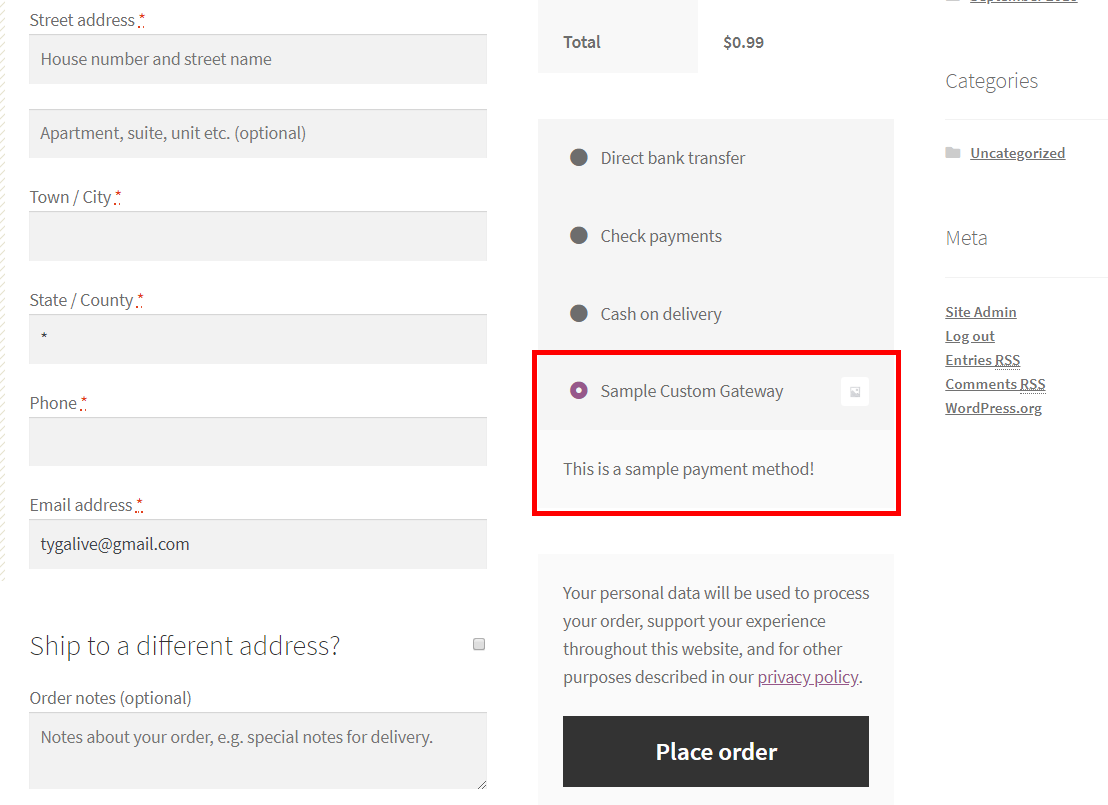
For developers
Is this your plugin? Show off the numbers.
Add a live badge to your site, docs or GitHub README. It updates on its own — no account needed.
Best Custom Payment Gateways for W… alternatives
All custom plugins →




FAQ
Custom Payment Gateways for WooComm…: quick answers
Straight answers, pulled from live WordPress.org data.
Live data from WordPress.org · checked Sep 27, 2026
Is Custom Payment Gateways for Woo… free?
Yes. Custom Payment Gateways for Woo… is free to download and use from the official WordPress.org plugin directory.
Is Custom Payment Gateways for Woo… safe to use in 2026?
Custom Payment Gateways for Woo… works, but test it on a staging site before relying on it in 2026. It runs on 3K+ sites, is rated 5/5 and was last updated 7 months ago, and scores 60/100 on our health check.
How many websites use Custom Payment Gateways for Woo…?
Custom Payment Gateways for Woo… is active on 3K+ WordPress websites and has been downloaded 33,141 times since it launched in July 2019. It was downloaded 591 times in the last 30 days.
Does Custom Payment Gateways for Woo… work with WordPress 7.1?
Custom Payment Gateways for Woo… is officially tested up to WordPress 6.9.9, while the latest release is 7.1.2. It may still work, but try it on a staging site first.
What PHP version does Custom Payment Gateways for Woo… need?
Custom Payment Gateways for Woo… requires PHP 7.3 or higher. Most hosts run PHP 8.x today, so it works on any modern WordPress hosting.
When was Custom Payment Gateways for Woo… last updated?
The latest version, 1.6.6, was released on February 19, 2026 (7 months ago).
Who makes Custom Payment Gateways for Woo…?
Custom Payment Gateways for Woo… is developed and maintained by Richard Muvirimi.
What are the best alternatives to Custom Payment Gateways for Woo…?
The most popular alternatives to Custom Payment Gateways for Woo… are White Label CMS (200K+ installs), Simple Custom CSS Plugin (100K+ installs) and ACF Photo Gallery Field (60K+ installs).
Powered by PageForge
Want thousands of pages that rank like these? Build them in an afternoon.
This directory runs on the same engine as PageForge. Turn any spreadsheet, CSV or API into thousands of fast, SEO-ready WordPress pages — with schema, internal links and AI-written copy baked in.
- CSV, Google Sheets & API data sources
- AI content, schema & internal links per page
- Works with Elementor, Gutenberg, Yoast & Rank Math
- Free on WordPress.org — no credit card


