



Digital Goods for WooCommerce Checkout
This plugin will remove billing address fields for downloadable and virtual products.

Safe pick
Yes — Digital Goods for WooCommerce C… is a safe, well-maintained plugin to use in 2026. It runs on 3K+ sites, is rated 4.5/5 and was last updated 4 weeks ago, and scores 86/100 on our health check.
- Loved by users — 4.5/5 from 41 reviews
- Actively developed — last update 4 weeks ago
- Tested with the latest WordPress (7.1)
- Momentum — downloads up 346.1% vs the previous 30 days
How does it stack up?
Side-by-side on installs, updates, ratings & support



Daily downloads
Download spikes usually follow a new release — each site that auto-updates counts as a download.
Rankings
Where Digital Goods for WooCommer… stands todayWordPress.org search rankings
Live position in the plugin search, top 100| Keyword | Position |
|---|---|
| checkout field editor | #9 |
| Checkout for Digital Goods. | #1 |
| custom fields | >100 |
| remove checkout fields | #11 |
| WooCommerce checkout | #23 |
Version adoption
Share of active sites per release.
Rating breakdown
★★★★★★★★★★ 4.5 from 41 reviews
About Digital Goods for WooCommerce Checkout
From the official readme · v3.8.5Description
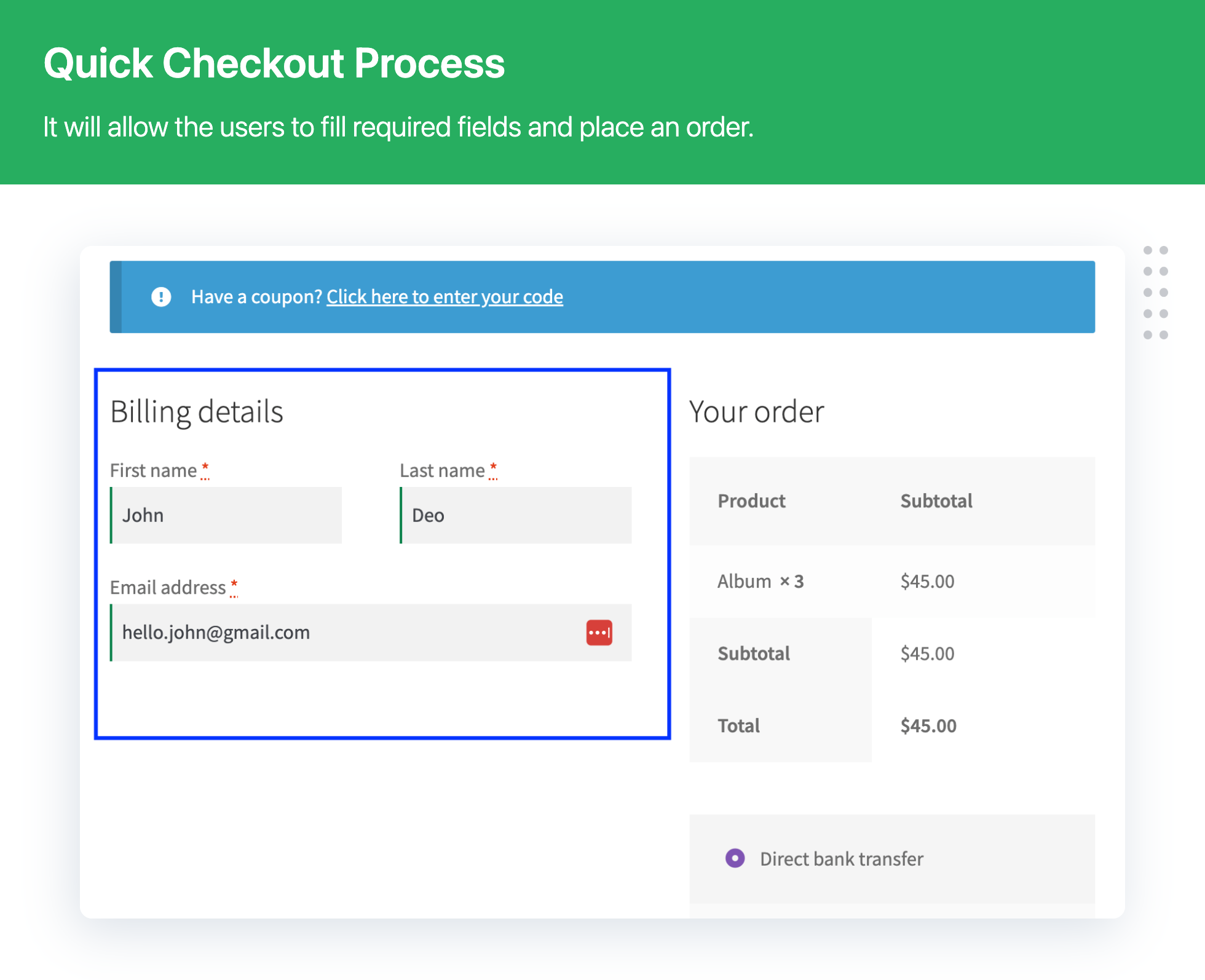
Digital Download Goods Checkout for WooCommerce, Plugin helps to remove unnecessary fields from the checkout page and make the process smooth and easy for customers.
👉 If you are selling downloadable digital products then you might not need customer’s billing and shipping address and customers expect to get the product as quickly as possible.
👉 This is ideal for selling file downloads and virtual products
👉 You can sell various types of downloads. For example pdf, ebook, photo, music, video, audio, mp3, etc
Key Benefit for WooCommerce store owner
🔑 Increased Sales
🔑 improves conversion rates
🔑 Checkout process easier and faster.
🔑 Reduce Cart Abandonment Rate
Plugin – VIEW LIVE DEMO
Free plugin: Need Technical Help? – Click here
Pro Plugin: PRE-SALE Questions – Click here or Review Help Document
💁 Key features Digital Goods for Checkout – Free Version
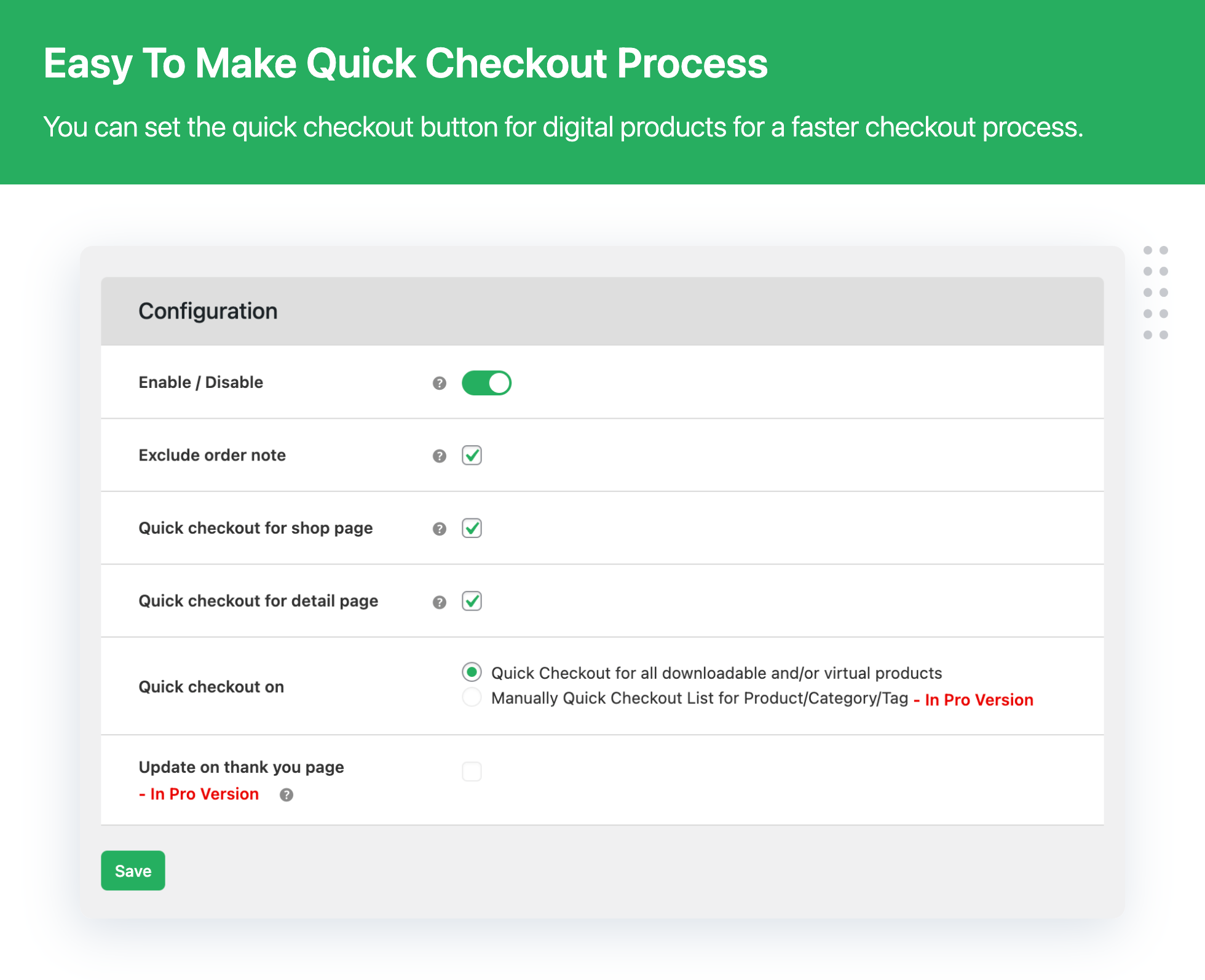
- Set quick checkout on All downloadable and/or virtual products
- Enable / Disable – Quick checkout button
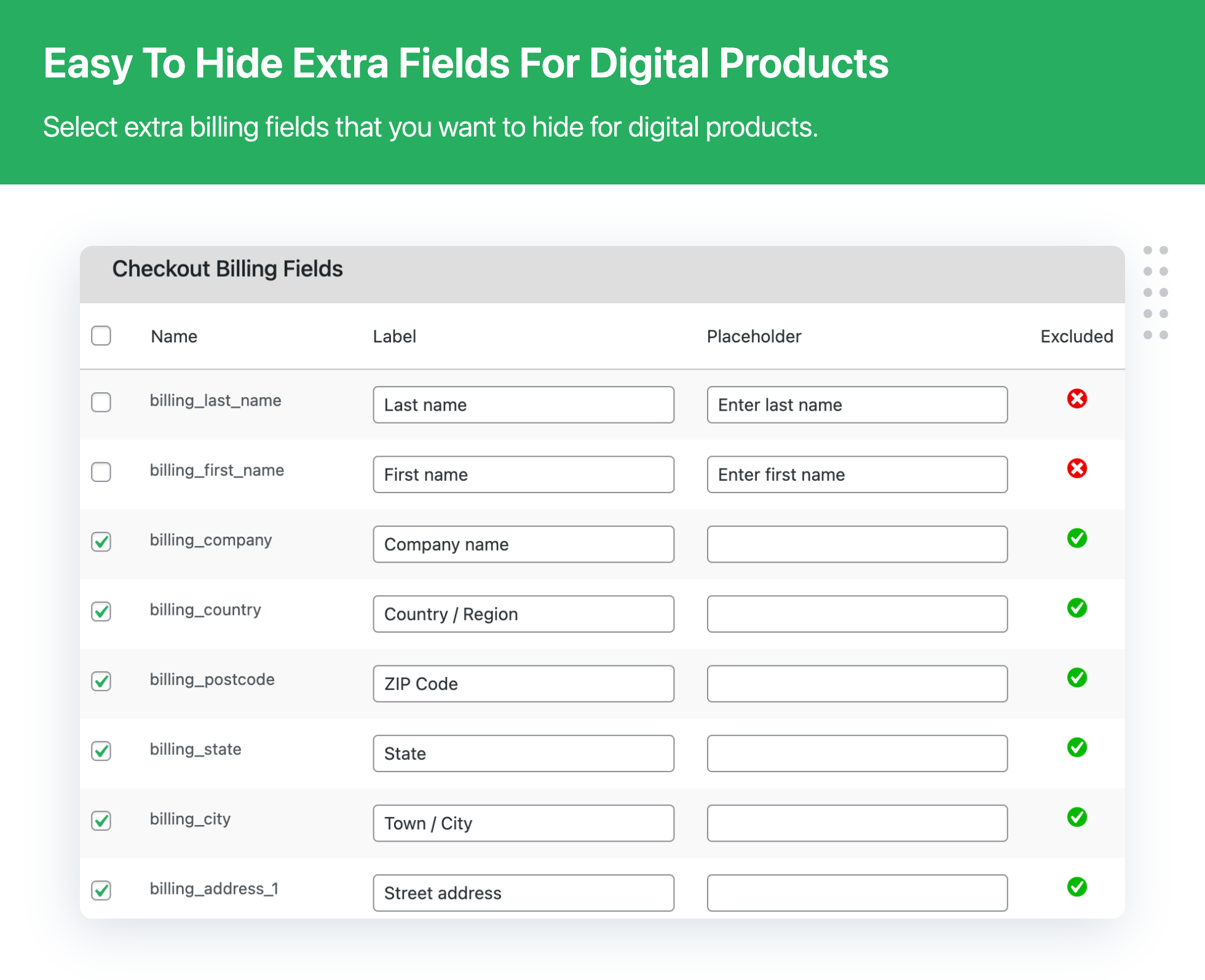
- Exclude multiple fields on checkout
- Set quick checkout button on the Shop page
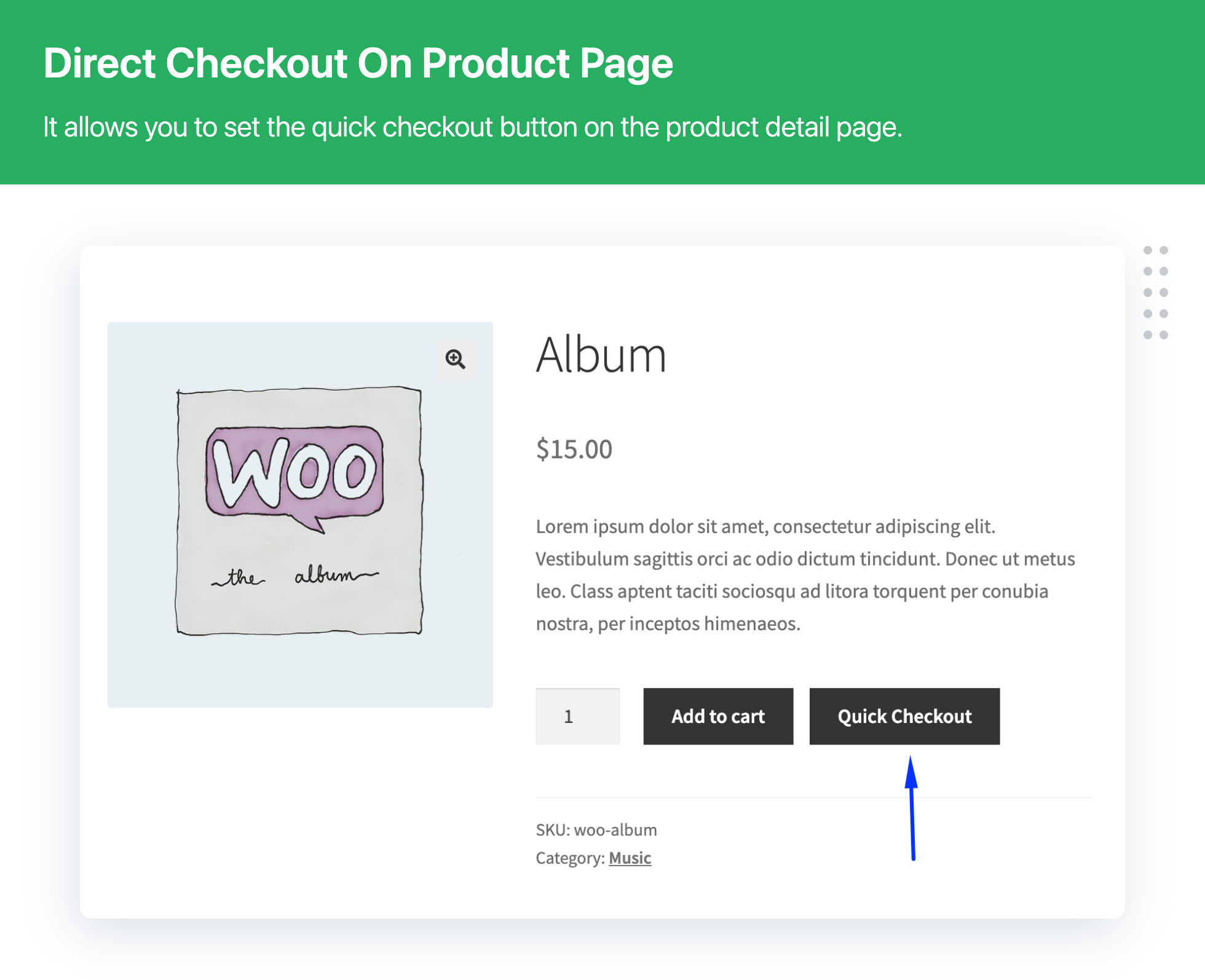
- Set quick checkout button on the Product Details page
- Enable or disable exclude order note on checkout
- Quick Checkout for all downloadable and All virtual products
- Insert the checkout process directly in the product page
- Quick checkout button display on single product page
- Plugin compatible with WooCommerce downloads and virtual products
- Allows to remove Unnecessary checkout fields from the checkout page
- Remove Unnecessary fields based on download products, categories, and tags
💁 Plugin will ideal for if you are selling below the item
- eBooks
- Audio files
- Video files
- Image files
- Excel documents
- PDF documents
- MS Word documents
- All downloads products
- All virtual products
💁 Here are the Featured Customer Reviews
🎉 Great Plugin & Great support service
🎉 Great Plugin, Prompt Response
🎉 Finally! Exactly what I needed! Thank you, So much for this clean, simple plugin.
🎉 Simply plug and play… This Plugin Rocks!
🎉 Awesome plugin..!!
➡️ Read All Review ⬅️
👉 Difference Between Lite and Pro plugin version
Check the detailed difference between Pro and Lite version – Click here
📣 PREMIUM: Digital Download Goods Checkout for WooCommerce
Need even more features? upgrade the premium plugin version to get all the advanced features.
- All free plugin features.
- Pro – Apply the “quick checkout” to all the digital products
- Pro – Apply the “quick checkout” to just selected categories or tags
- Pro – Customers fill in the additional fields after the payment
- Pro – Delayed account creation
- Pro – Set restricts with user role for the quick checkout button
Feature and Usage Guide for plugin Click below link
➡️ UPGRADE TO PRO NOW ⬅️
💁 Benefit of Using Plugin
👉 Significant Decrease in Time Taken in Checkout
With the lesser amount of information to fill and only essential steps to be taken for checkout, you reduce the time taken in the checkout process by your customers to a bare minimum. Sure, it will make them happy!
👉 Lesser Frustration and Easy Checkout
Though physical product deliveries require a significant amount of data from the customer, things are not the same in the case of digital products. So, just ask for information that is necessary and let the buyers download/use the product.
👉 Reduced Cart Abandonment Rate
By putting dozens of information fields on checkout form for digital products, you’re just making sure that your buyer gets frustrated and discards the process. Do not do that. Reduce their hassles and avoid order abandoning.
👉 Increased Sales of your Digital Goods
Quick checkouts and better user experience encourage people to purchase digital goods from you. So whenever you are selling a virtual or downloadable product, do not push your buyers to follow the same process as physical products.
💁 Contact Us
- Free plugin: Need Technical Help? – Click here
- Pro Plugin: PRE-SALE Questions – Click here or Help Document
EXPLORE OUR OTHER PLUGINS TO SUPERCHARGE YOUR WEBSITE:
👉 Premium WooCommerce Plugins list
- WPBricks Manager – Readymade Custom Gutenberg Blocks
- WooCommerce Extra Fees Plugin
- WooCommerce Extra Fees Plugin
- Hide Shipping Method For WooCommerce
- Product Attachment For WooCommerce
- Blocker – Prevent Fake Orders And Blacklist Fraud Customers
- Enhanced Ecommerce Google Analytics for WooCommerce
- Category Banner Management for Woocommerce
- Product Finder For WooCommerce
- Mass Pages Posts Creator For WordPress
- Conditional Discount Rules For WooCommerce Checkout
- WooCommerce Checkout For Digital Goods
- Advance Menu Manager For WordPress
- Page Visit Counter For WordPress
👉 Some of our other free WooCommerce plugins:
- Advance Search for WooCommerce
- Custom Order Status Per Product for WooCommerce
- Multipurpose Gutenberg Block
- Convert Classic Editor to Gutenberg Blocks
- Highlight Gutenberg Blocks
- Quick Bulk Variations Checkout for WooCommerce
- Quick Reports for Woocommerce
- Shipping Method Display Style for WooCommerce
- Template Manager for Gutenberg Block
- WP Custom field for Gutenberg Editor
Installation
Minimum Requirements
- WooCommerce 3.0 or higher
Automatic installation
Automatic installation is the easiest option as WordPress handles the file transfers itself and you don’t need to leave your web browser. To do an automatic install of Digital Goods for WooCommerce Checkout, log in to your WordPress dashboard, navigate to the Plugins menu and click Add New.
In the search field type Digital Goods for WooCommerce Checkout and click Search Plugins. Once you’ve found our plugin you can view details about it such as the the rating and description. Most importantly, of course, you can install it by simply clicking Install Now?.
Manual Installation
- Unzip the files and upload the folder into your plugins folder (/wp-content/plugins/) overwriting older versions if they exist
- Activate the plugin in your WordPress admin area.
Frequently asked questions
Q. Which fields plugin can hide / skip / remove unnecessary fields from the checkout page?
Ans: Remove or hide below of checkout fields: Company Name Last Name Billing Address Country Address line 1 and 2 Town / City State / County Postcode / ZIP Phone
Q. When will you hide/remove/skip the fields?
Ans: The fields will be hidden when the cart has only virtual products or download products.
Q Can I use this plugin for any type of product and hide the checkout field instead of digital products?
Ans: No, the plugin was specifically designed for digital products like downloads products and virtual products only.
Q Can I sell a physical product and Digital product on my WooCommerce website?
Ans: Yes, this plugin is useful. who want to sell both types of products like Digital products and physical products then they can use this plugin. If your cart has both products then it works default WooCommerce flow. But if your cart has an only digital product then it will remove an unnecessary field from the checkout page as per plugin setting.
Q Is this plugin able to detect digital goods from my e-commerce store?
Ans: Yes. If you will enable the plugin for all the digital goods, it will be deployed for all virtual and downloadable products that do not involve shipping.
Q Does WooCommerce Checkout for Digital Goods Plugin work for multilingual websites (or WPML)?
Ans: As of now, the plugin is not WPML-ready.
Q How many fields can be excluded from the checkout process?
Ans: We understand that different sellers have different requirements. So, we have not kept any limit on the number of fields. You can exclude as many form fields from the checkout process, according to your store’s needs.
Q Can I set a quick checkout button on the Product details page for Digital Download product in WooCommerce?
Ans: Yes, you can set the Quick checkout button on the Product details page for Digital Download product and virtual product in WooCommerce
Can I set a quick checkout button on the shop page for Digital Download product in WooCommerce?
Ans: Yes, you can set the Quick checkout button on the shop page for Digital Download product and virtual product in WooCommerce
Q Can I remove unnecessary fields from download products of categories, products, and tags?
Ans: Yes, you can remove unnecessary fields from download products of categories, products, and tags?
Q In which WordPress version this Plugin is compatible?
Ans: It is compatible with WordPress versions 3.8 and higher.
Q In which WooCommerce version this Plugin is compatible?
Ans: It is compatible with WooCommerce versions 2.6 and higher.
Changelog
Automatic updates should work great for you. As always, though, we recommend backing up your site prior to making any updates just to be sure nothing goes wrong.
3.8.5
- [Enhancement] – Full Checkout Block compatibility: hide/exclude country, custom fields, and field sorting on block checkout.
- [Enhancement] – Removed Checkout Block limitation notices after compatibility support.
- [Bug Fix] – Fixed PHP 8+ deprecation: automatic conversion of false to array in Quick Checkout settings.
- [Enhancement] – Compatible with WooCommerce 11.0.x
- [Enhancement] – Compatible with WordPress 7.1.x
3.8.4
- [Bug Fix] – Fixed empty checkout fields in plugin settings on first installation.
- [Enhancement] – Added a filter to customize the position and hook of the Quick Checkout button.
- [Enhancement] – Improved compatibility with Multi-Step Checkout setups.
- [Enhancement] – Compatible with WooCommerce 10.7.x
- [Enhancement] – Compatible with WordPress 6.9.x
3.8.3
- [New] – Reset checkout fields settings
- [Bug Fix] – Billing info not showing in order details (for physical products)
- [Bug Fix] – WooCommerce strings were altered when plugin active – fixed
- [Enhancement] – Optimized plugin user interface for better customer experience
- [Enhancement] – Compatible with WooCommerce 9.9.x
- [Enhancement] – Compatible with WordPress 6.8.x
3.8.2
- [Bug Fix] Quick fix related to the PHP Fatal error: Cannot access offset of type string on string
3.8.1
- [New] – Added a new option to change the “Add to Cart” button label
- [New] – Added a new option to change the “Quick Checkout” button label
- [Enhancement] – Tested plugin compatibility with Bricks Builder theme
- [Enhancement] – Plugin compatibility with WooCommerce Cart and Checkout blocks
- [Enhancement] – Compatible with WooCommerce 9.7.x
- [Enhancement] – Compatible with WordPress 6.7.x
3.8.0
- [Enhancement] – Plugin UI enhancement
- [Enhancement] – Compatible with WooCommerce 9.2.x
- [Enhancement] – Compatible with WordPress 6.6.x
Screenshots
For developers
Is this your plugin? Show off the numbers.
Add a live badge to your site, docs or GitHub README. It updates on its own — no account needed.
Best Digital Goods for WooCommerce… alternatives
All checkout field editor plugins →



FAQ
Digital Goods for WooCommerce Check…: quick answers
Straight answers, pulled from live WordPress.org data.
Live data from WordPress.org · checked Sep 26, 2026
Is Digital Goods for WooCommerce C… free?
Yes. Digital Goods for WooCommerce C… is free to download and use from the official WordPress.org plugin directory.
Is Digital Goods for WooCommerce C… safe to use in 2026?
Yes — Digital Goods for WooCommerce C… is a safe, well-maintained plugin to use in 2026. It runs on 3K+ sites, is rated 4.5/5 and was last updated 4 weeks ago, and scores 86/100 on our health check.
How many websites use Digital Goods for WooCommerce C…?
Digital Goods for WooCommerce C… is active on 3K+ WordPress websites and has been downloaded 196,683 times since it launched in October 2015. It was downloaded 2,962 times in the last 30 days.
Does Digital Goods for WooCommerce C… work with WordPress 7.1?
Yes. The developer has tested Digital Goods for WooCommerce C… up to WordPress 7.1.2, the latest release. It requires WordPress 5.0 or newer.
What PHP version does Digital Goods for WooCommerce C… need?
Digital Goods for WooCommerce C… requires PHP 7.2 or higher. Most hosts run PHP 8.x today, so it works on any modern WordPress hosting.
When was Digital Goods for WooCommerce C… last updated?
The latest version, 3.8.5, was released on September 1, 2026 (4 weeks ago).
Who makes Digital Goods for WooCommerce C…?
Digital Goods for WooCommerce C… is developed and maintained by Dotstore.
What are the best alternatives to Digital Goods for WooCommerce C…?
The most popular alternatives to Digital Goods for WooCommerce C… are Checkout Field Editor (Chec… (400K+ installs), CheckoutWC Lite (2K+ installs) and Custom WooCommerce Checkout… (2K+ installs).
Powered by PageForge
Want thousands of pages that rank like these? Build them in an afternoon.
This directory runs on the same engine as PageForge. Turn any spreadsheet, CSV or API into thousands of fast, SEO-ready WordPress pages — with schema, internal links and AI-written copy baked in.
- CSV, Google Sheets & API data sources
- AI content, schema & internal links per page
- Works with Elementor, Gutenberg, Yoast & Rank Math
- Free on WordPress.org — no credit card


