



CartSuite – Cart All In One For WooCommerce
Cart All In One For WooCommerce helps your customers view cart effortlessly.

Safe pick
Yes — CartSuite is a safe, well-maintained plugin to use in 2026. It runs on 5K+ sites, is rated 4.5/5 and was last updated 1 month ago, and scores 83/100 on our health check.
- Loved by users — 4.5/5 from 51 reviews
- Tested with the latest WordPress (7.1)
Daily downloads
Download spikes usually follow a new release — each site that auto-updates counts as a download.
Rankings
Where CartSuite stands todayWordPress.org search rankings
Live position in the plugin search, top 100| Keyword | Position |
|---|---|
| Cart All In One For Woocommerce | #3 |
| wc cart | #3 |
| wc mini cart | #1 |
| wc sticky cart | #1 |
| woocommerce mini cart | #9 |
Version adoption
Share of active sites per release.
Rating breakdown
★★★★★★★★★★ 4.5 from 51 reviews
About CartSuite
From the official readme · v1.1.26Description
One Click Checkout WooCommerce and boost your sales with WooCommerce Cart All in One plugin is intended to help customers fulfill their orders with a single click. One Click Checkout WooCommerce saves customers time by checking out directly on the sidebar cart, bypassing the cart page. Customers are not distracted in the ordering process. When a customer registers, One Click Checkout WooCommerce saves all of their important and relevant information. This also aids in the elimination of repetitive manual data entry. You will be surprised at how sales and revenues increase to take advantage of this plugin using the one Click Checkout WooCommerce technique.
WooCommerce Cart All In One Plugin is a powerful extension that helps to innovate the functions of the Cart on the WooCommerce Store. The plugin also provides users with many useful tools to design all the elements relating such as Sidebar Cart, Menu Cart, Sticky Add To Cart button, Checkout on Sidebar Cart, one click checkout WooCommerce, which will make your WooCommerce Store work more effectively.
Try the Demo | Documents | Premium version | Facebook group
Preview WooCommerce Cart All In One
How to install and use the plugin
Important Notice:
-
Plugin works based on WooCommerce plugin.
-
To handle WP’s Conditional Tags, this plugin uses eval() which is very dangerous because it allows execution of arbitrary PHP code. Therefore, please only fill this field with proper conditional tags which are validated and/or provided by trusted developers.
-
It is released on WordPress.org and you can use plugin as free to build themes for sale.
THE PLUGIN FEATURES
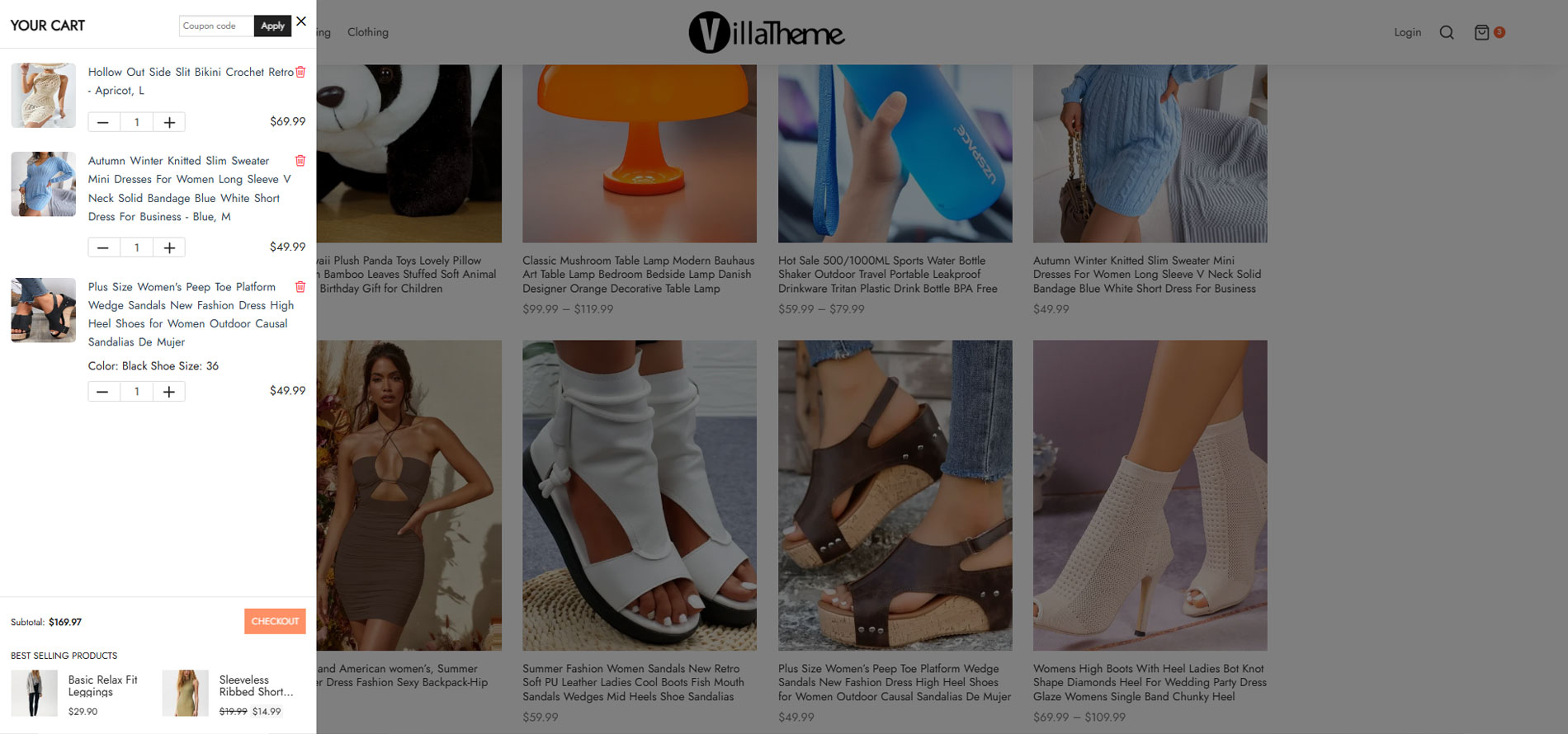
► SIDEBAR CART: Display Sidebar cart pop-up with all features of the cart page. Customers can add coupons, select quantity, remove items
-
Sidebar cart icon: display a small sidebar cart icon at the corner of the screen. Let the customer know how many products they have in their cart. And allow them to open the sidebar car pop-up.
-
Sidebar cart pop-up: the sidebar cart pop-up appear when a customer adds a product to the cart or click on the sidebar cart icon. The pop-up allows them to view their cart, use coupons or go to the check-out page directly.
-
Product information: the sidebar cart pop-up displays the information about products in the customer’s cart including product name, product image, price, quantity.
-
Change quantity: customers can change the quantity of each product directly in their cart.
-
Remove Product: a remove button appear next to each product name, allowing the customer to remove that product from their cart.
-
Cart Subtotal: display the subtotal amount, this amount does not include tax, shipping… and be the same as the subtotal amount on your cart page.
-
Cart total: display the cart total amount.
-
Update Cart button: when customers change quantity product in their cart, the update button allows them to update the cart total amount.
-
Use Coupon: Coupons can be applied on the sidebar cart pop-up. If the coupon is added successfully, the cart total amount will be reduced and the plugin will display a successful message. If the coupon can not be used, the plugin will display an unsuccessful message with the reason.
-
Checkout: a checkout button allows customers to go directly to the checkout page if they decide to purchase your items.
-
View Cart: go to the cart page directly with the View Cart button.
-
Related products: the related product option allows to display of related products at the bottom of the sidebar cart. You can choose to display the best-selling products, recently viewed products, or top-rated products.
-
Assign page: choosing the pages which display the sidebar cart.
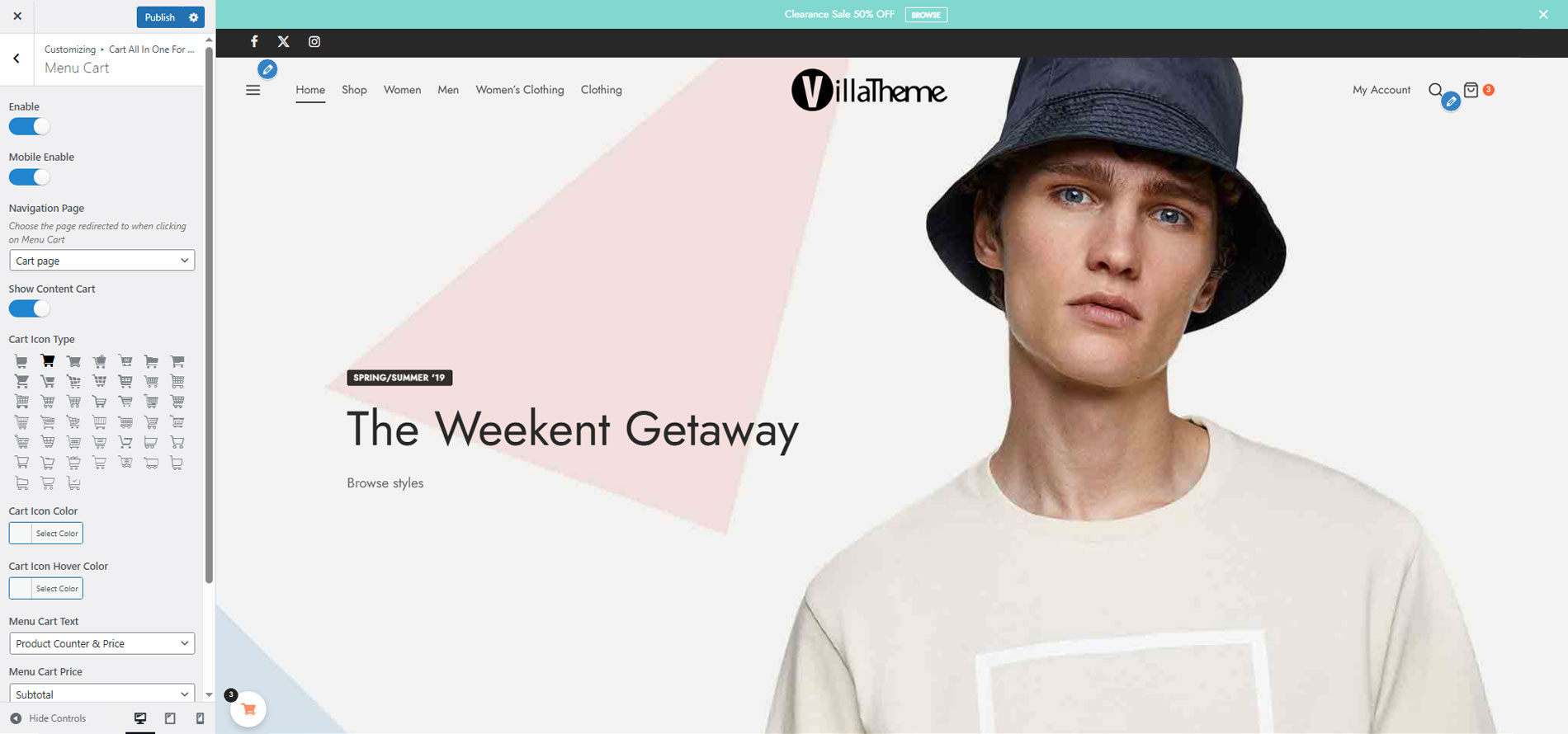
► MENU CART: The plugin adds a cart icon to the menus. It allows the customer to view the cart by hovering their mouse on the menu bar.
-
Menu Cart icon: the plugin will display a cart icon on selected menus. The icon will display the number of items in the cart.
-
Dropdown cart: display cart dropdown when customers hover their mouse over the menu cart icon.
► AJAX ADD TO CART: The AJAX Add to Cart option allows customers to add products to the cart from single product pages or quick view pop-ups without reloading the page. Besides that, the user can choose the products which are not to be applied to ajax add to the cart.
► ADD TO CART FOR VARIABLE PRODUCT: The plugin offers a custom Add to Cart button for the variable product. The customers can select variations and add the product to the cart in archive pages without going to the single product page.
-
Select option pop-up: in archive pages, when a customer clicks on the add to cart button of a variable product, a pop-up will appear allowing them to select the product variations. With the variation, pop-up customers can select product variations, quantity and then add the product to the cart.
-
Change the add to cart button label: change the label of the add to cart button to “select options” or any text you want. This option applies to variable products only.
► DESIGN: The plugin allows you to design the front-end of the sidebar cart, menu cart to match your website. The designs can be visible in the settings area before publishing.
-
Sidebar Cart:
-
2 styles: there are 2 sidebar cart style full height and pop-up.
-
4 position: you can put the sidebar cart in 4 positions.
-
8 styles of Sidebar trigger Event
-
12 loading type and change the color loading bar
-
Automatically open sidebar cart when adding products to the cart.
-
Add to cart animation: display an animation of the product “fly” to cart when clicking the add to cart button.
-
Open the sidebar cart when adding products to the cart.
-
Header: change background change, title, title color, apply coupon button color in the header area.
-
Product list: background color, product image radius, product title color, remove icon color. Change the title color when hovering the mouse on the product.
-
Footer: change the background color, checkout button text, checkout button color, view cart button text, view cart button color, cart total text color in the footer area.
-
Sidebar Cart icon:
-
5 front-end styles: The styles of sidebar icons are designed creatively to have more choices for users.
-
45 cart icons: There are many cart icon types from simple to eye-catching to suitable with many styles.
-
Customize the size of cart icon: Change the Sidebar cart icon size with the adjusting ruler.
-
Customize the position of cart icon: Choose the positions for sidebar cart icon on the site by the Sidebar Cart Horizontal and Sidebar Cart Vertical.
-
Shadow for box: Create the box-shadow to make it more impressed
-
Color Settings: Easily to set the color of sidebar cart icon, background, product counter, Border Radius. The users can choose the colors from the color picker or enter the color hex.
-
Menu Cart:
-
Navigation page: choose to redirect to the cart page or checkout page when clicking on the menu cart icon.
-
Show content: display the content of the cart when hover mouse on the menu cart icon.
-
45 cart icons for you to select.
-
Change the color of the cart icon and cart hover color.
-
Cart icon text: choose to display product quantity, total price, or both quantity and total price on the cart menu.
-
Choose to show the subtotal or total price on menu cart
-
Change the text color of the menu cart.
PREMIUM FEATURES
All features from the free version.
► Sticky Add To Cart Button: The plugin can display the Sticky add to Cart on single pages which helps to increase the rate of adding products to the cart from customers because Customers can add products without scrolling the bar to find the add to cart button. Moreover, there are options for excluding products or categories from showing the Sticky add to Cart.
-
Select Product to Preview: Help user design sticky add to Cart button easily and effectively
-
Templates: There are four templates of sticky add to cart button to choose
-
Positions: Set the positions for sticky add to Cart button.
-
Display of Product ratings and Product Quantity.
-
Set up the colors by color picker of text, background, icon…
-
Adjust the Border radius, image width, size of buttons…
► Recently Viewed Products: The plugin has an option for adding recently views products to the WooCommerce stores to remind customers about what they are interested in and helps them to buy the items they want quickly. Recently viewed products can add to the single product page or anywhere with the shortcode.
► Checkout area on Sidebar Cart – One click checkout WooCommerce: With the plugin, Checkout steps are integrated into Sidebar Cart. Customers can checkout directly on the sidebar cart without going to the checkout page. This feature will encourage the customers to complete their orders quickly and boost your sales.
-
Customize the steps of checkout: The plugin can convert all checkout steps to the sidebar Cart. It helps the Customer to save time to one click checkout WooCommerce without going to the check-out page.
-
Change the title of steps: Change the title of check-out steps to be suitable for the site.
-
Choose the icons available on checkout area on sidebar Cart: There are many available icons with different style to choose
-
Set up the color for background, icon, button and border-radius: The picker color and radius adjusting rules help to design the checkout out area easily and quickly.
And much more things are waiting for you discover
GET PRO VERSION or https://codecanyon.net/item/woocommerce-cart-all-in-one/30184317
Documentation
Plugin Links
MAY BE YOU NEED
9MAIL – WordPress Email Templates Designer
Abandoned Cart Recovery for WooCommerce
Advanced Product Information for WooCommerce
AFFI – Affiliate Marketing for WooCommerce
ALD – Dropshipping and Fulfillment for AliExpress and WooCommerce
Boost Sales for WooCommerce – Set up Up-Sells & Cross-Sells Popups & Auto Apply Coupon
Bopo – WooCommerce Product Bundle Builder
Bulky – Bulk Edit Products for WooCommerce
Catna – Woo Name Your Price and Offers
Checkout Upsell Funnel for WooCommerce
ChinaDS – Tmall-Taobao Dropshipping for WooCommerce
Clear Autoptimize Cache Automatically
COMPE – WooCommerce Compare Products
Coreem – Coupon Reminder for WooCommerce
CURCY – Multi Currency for WooCommerce – Smoothly on WooCommerce 9.x
Customer Coupons for WooCommerce
DEPART – Deposit and Part payment for Woo
Email Template Customizer for WooCommerce
EPOW – Custom Product Options for WooCommerce
EXMAGE – WordPress Image Links
Faview – Virtual Reviews for WooCommerce
FEWC – Extra Checkout Fields For WooCommerce
Free Shipping Bar for WooCommerce
GIFT4U – Gift Cards All in One for Woo
HANDMADE – Dropshipping for Etsy and WooCommerce
HAPPY – Helpdesk Support Ticket System
LookBook for WooCommerce – Shoppable with Product Tags
Lucky Wheel for WooCommerce – Spin a Sale
Notification for WooCommerce | Boost Your Sales – Recent Sales Popup – Live Feed Sales – Upsells
Orders Tracking for WooCommerce
Pofily – WooCommerce Product Filters
PRENA – Product Pre-Orders for WooCommerce
Product Builder for WooCommerce – Custom PC Builder
Product Size Chart For WooCommerce
Product Variations Swatches for WooCommerce
REDIS – WooCommerce Dynamic Pricing and Discounts
S2W – Import Shopify to WooCommerce
SUBRE – Product Subscription for WooCommerce – Recurring Payments
Suggestion Engine for WooCommerce
Thank You Page Customizer for WooCommerce – Increase Your Sales
TMDS – Dropshipping for TEMU and Woo
VARGAL – Additional Variation Gallery for WooCommerce
VIMA – Multi Customer Addresses for Woo
W2S – Migrate WooCommerce to Shopify
Installation
- Unzip the download package
- Upload
woo-cart-all-in-oneto the/wp-content/plugins/directory - Activate the plugin through the ‘Plugins’ menu in WordPress
Changelog
2026.08.22 – version 1.1.26
– Updated: Compatibility check with WP 7.1
– Updated: VillaThem support
2026.08.17 – version 1.1.25
– Updated: Compatibility check with WC 11.0
– Updated: Optimize code
2026.06.20 – version 1.1.24
– Updated: VillaTheme support
– Updated: Compatible with WP 7.0 and WC 10.8.1
2026.03.20 – version 1.1.23
– Updated: Compatible with WC 10.6
2026.02.06 – version 1.1.22
– Updated: Only specific conditional tags are supported in the “Assign page” option.
2026.01.23 – version 1.1.21
– Updated: VillaTheme support
2025.10.06 – version 1.1.20
– Updated: Update support class
2025.07.26 – version 1.1.19
– Updated: Compatibility with navigation block
– Updated: Compatibility with WC cart block
– Updated: Display the notification of adding products to the cart successfully after adding to the cart by Ajax without reloading
2025.02.28 – version 1.1.18
– Updated: Update support file
2024.12.28 – version 1.1.17
– Updated: Compatible with WP 6.7 and WC 9.5
– Updated: Update support class
2024.10.28 – version 1.1.16
– Updated: Compatible with WP 6.6 and WC 9.3
– Updated: Enhanced UX in customize
2024.04.26 – version 1.1.15
– Updated: Delete the old description for the ‘Assign page’ and add the link of the WC condition tag
2024.04.13 – version 1.1.14
– Updated: Compatible with WP 6.5 and WC 8.7
– Updated: Update support class
2023.08.04 – version 1.1.13
– Updated: Compatible Storefront menu
– Updated: Compatible Elementor v:3.15
– Updated: Update support class
2023.04.12 – version 1.1.12
– Updated: Compatible with ‘High-Performance order storage (COT)’
2022.12.15 – version 1.1.11
– Updated: Show on cart & checkout page
– Fixed: Add missing nonce
2022.10.17 – version 1.1.10
– Updated: Update support class
2022.05.30 – version 1.1.9
– Updated: Compatible with WP 6.0
– Updated: Update support class
2022.05.19 – version 1.1.8
– Updated: Update support class
2022.04.20 – version 1.1.7
– Updated: Update support class
2022.03.29 – version 1.1.6
– Updated: Update support class
2022.03.21 – version 1.1.5
– Updated: support class
2022.01.10 – version 1.1.4
– Updated: support class
2021.11.15 – version 1.1.3
– Fixed: Can not translate ‘Coupon code’ in the sidebar cart
2021.10.26 – version 1.1.2
– Added: New display style for the sidebar cart icon
2021.10.07 – version 1.1.1.0
– Fixed: Can not get list applied coupons
2021.07.31 – version 1.1.0.9
– Updated: support class
2021.06.26 – version 1.1.0.8
– Updated: Allow to change enable/disable special feature on the customizer
– Updated: support class
– Added: Option enable/disable show the product title link on Sidebar Cart List Products
2021.06.03 – version 1.1.0.7
– Fixed: Can not display the product plus slide
2021.06.02 – version 1.1.0.6
– Updated: Support class
2021.05.11 – version 1.1.0.5
– Fixed: refresh page after add to cart ajax on single product
2021.05.04 – version 1.1.0.4
– Fixed: Sidebar cart icon don’t show if horizontal/vertical is 0
– Fixed: fly product image to cart on single page
2021.04.09 – version 1.1.0.3
– Fixed: Ajax add to cart
2021.04.09 – version 1.1.0.2
– Added: Display style of products price on Sidebar Cart List Products
– Updated: Display style of variation pop-up
– Fixed: Find variation on variation pop-up
– Fixed: Style of loading icon
2021.03.01 – version 1.1.0.1
– Fixed: Change variation on variation pop-up
– Fixed: Update cart after adding product without refresh page
– Updated: Change product image size on the product plus slide
– Updated: Change time to show message popup
2021.01.26 – version 1.1.0
– Added: Link to pro
– Added: Exclude products which are not applied ajax add to cart
– Added: Hide the notification of adding products to cart successfully after adding to cart by Ajax
– Added: Set text of cart total on Sidebar Cart Footer
– Added: Quantity border color on Sidebar Cart List Products
– Added: Quantity border radius on Sidebar Cart List Products
– Added: Font size of Trash Icon on Sidebar Cart List Products
– fixed: Slide of Product Plus on Sidebar Cart Footer
– fixed: Menu cart doesn’t show
– fixed: Responsible on mobile if the address bar is visible
– Updated: Remove all ‘Sidebar Trigger Event Style’ and add 8 others
– Updated: Shake cart when add products to cart.
– Updated: New style of product quantity on Sidebar Cart
– Updated: Assign pages to show Sidebar Cart
– Updated: Link to documentation
2020.04.23 – version 1.0.9.1
– Update: support class
2020.04.11 – version 1.0.9
– fixed: Menu cart style
– Updated: Compatible with WP 5.4 and WC4.0
2020.03.23 – version 1.0.8.3
– updated: declare text domain
2020.03.16 – version 1.0.8.2
– updated: declare text domain
2020.02.10 – version 1.0.8.1
– fixed: Subtotals not visible in cart
2020.01.30 – version 1.0.8
– fixed: Add variation to cart with popup
– added: Hide popup after add variation to cart
2019.12.30 – version 1.0.7
– fixed: Disabling variation popup
– fixed: Changing variation “add to cart”
– fixed: able to add items to cart When Ajax add to cart is enabled
– fixed: add variation to cart When Ajax add to cart is enabled
– fixed: Fly to cart doesn’t work when adding the first item to cart
– fixed: Not calculating shipping in the final price when “total” is selected
– added: Show meta data of cart item
– added: Reduce size of sidebar cart icon
2019.11.16 – version 1.0.6
– Updated: Sanitize input data
/1.0.0 – 2019./
– Release version 1.0.0
Screenshots

For developers
Is this your plugin? Show off the numbers.
Add a live badge to your site, docs or GitHub README. It updates on its own — no account needed.
FAQ
CartSuite: quick answers
Straight answers, pulled from live WordPress.org data.
Live data from WordPress.org · checked Sep 26, 2026
Is CartSuite free?
Yes. CartSuite is free to download and use from the official WordPress.org plugin directory.
Is CartSuite safe to use in 2026?
Yes — CartSuite is a safe, well-maintained plugin to use in 2026. It runs on 5K+ sites, is rated 4.5/5 and was last updated 1 month ago, and scores 83/100 on our health check.
How many websites use CartSuite?
CartSuite is active on 5K+ WordPress websites and has been downloaded 245,168 times since it launched in June 2019. It was downloaded 2,008 times in the last 30 days.
Does CartSuite work with WordPress 7.1?
Yes. The developer has tested CartSuite up to WordPress 7.1.2, the latest release. It requires WordPress 5.0 or newer.
What PHP version does CartSuite need?
CartSuite requires PHP 7.4 or higher. Most hosts run PHP 8.x today, so it works on any modern WordPress hosting.
When was CartSuite last updated?
The latest version, 1.1.26, was released on August 22, 2026 (1 month ago).
Who makes CartSuite?
CartSuite is developed and maintained by VillaTheme.
Powered by PageForge
Want thousands of pages that rank like these? Build them in an afternoon.
This directory runs on the same engine as PageForge. Turn any spreadsheet, CSV or API into thousands of fast, SEO-ready WordPress pages — with schema, internal links and AI-written copy baked in.
- CSV, Google Sheets & API data sources
- AI content, schema & internal links per page
- Works with Elementor, Gutenberg, Yoast & Rank Math
- Free on WordPress.org — no credit card


