


Fraud Prevention For WooCommerce and EDD
It will Prevent fake orders and Blacklist fraud customers of your store.

Solid choice
Fraud Prevention For WooCommerc… is a solid plugin choice in 2026, with a few things worth checking first. It runs on 4K+ sites, is rated 3.7/5 and was last updated 1 month ago, and scores 79/100 on our health check.
- Tested with the latest WordPress (7.1)
Daily downloads
Download spikes usually follow a new release — each site that auto-updates counts as a download.
Rankings
Where Fraud Prevention For WooCom… stands todayWordPress.org search rankings
Live position in the plugin search, top 100| Keyword | Position |
|---|---|
| Blacklist customers | #2 |
| Blacklist fraud customers | #2 |
| fraud prevention | #1 |
| Prevent fake orders | #3 |
| WooCommerce Anti-Fraud | #2 |
Version adoption
Share of active sites per release.
Rating breakdown
★★★★★★★★★★ 3.7 from 23 reviews
About Fraud Prevention For WooCommerce and EDD
From the official readme · v2.3.5Description
Are fraudulent transactions causing headaches for your WooCommerce store? Level up your store security with our Fraud Prevention For WooCommerce and EDD plugin!
This plugin is not just an Fraud Prevention tool, but an overall safety solution. From custom fraud identification rules to advanced user blocking and comprehensive dashboard reports, it has all you need to secure your WooCommerce transactions effectively.
- Plugin Demo: View Demo
📒 KEY FEATURES
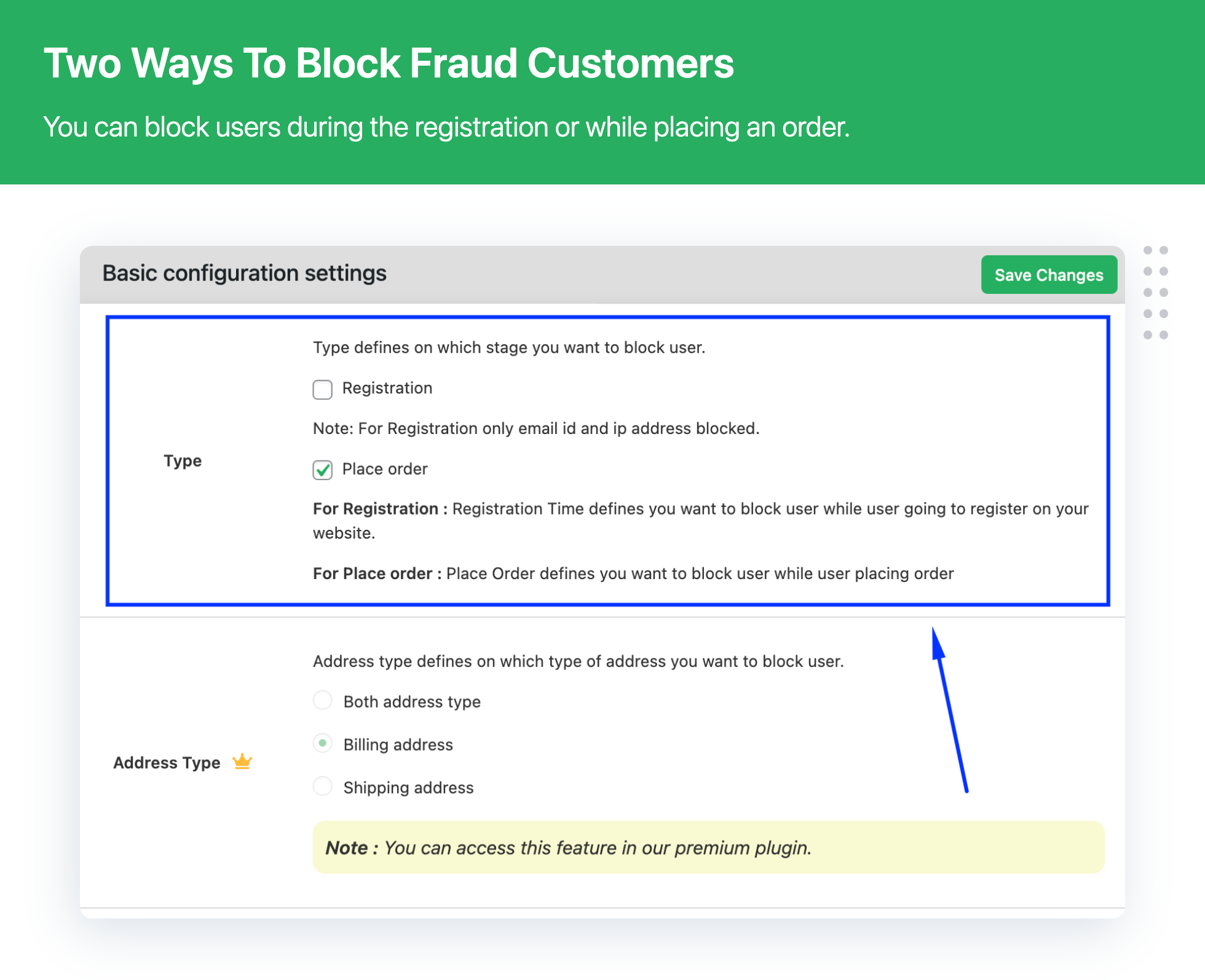
- Block fraud customer on User Registration
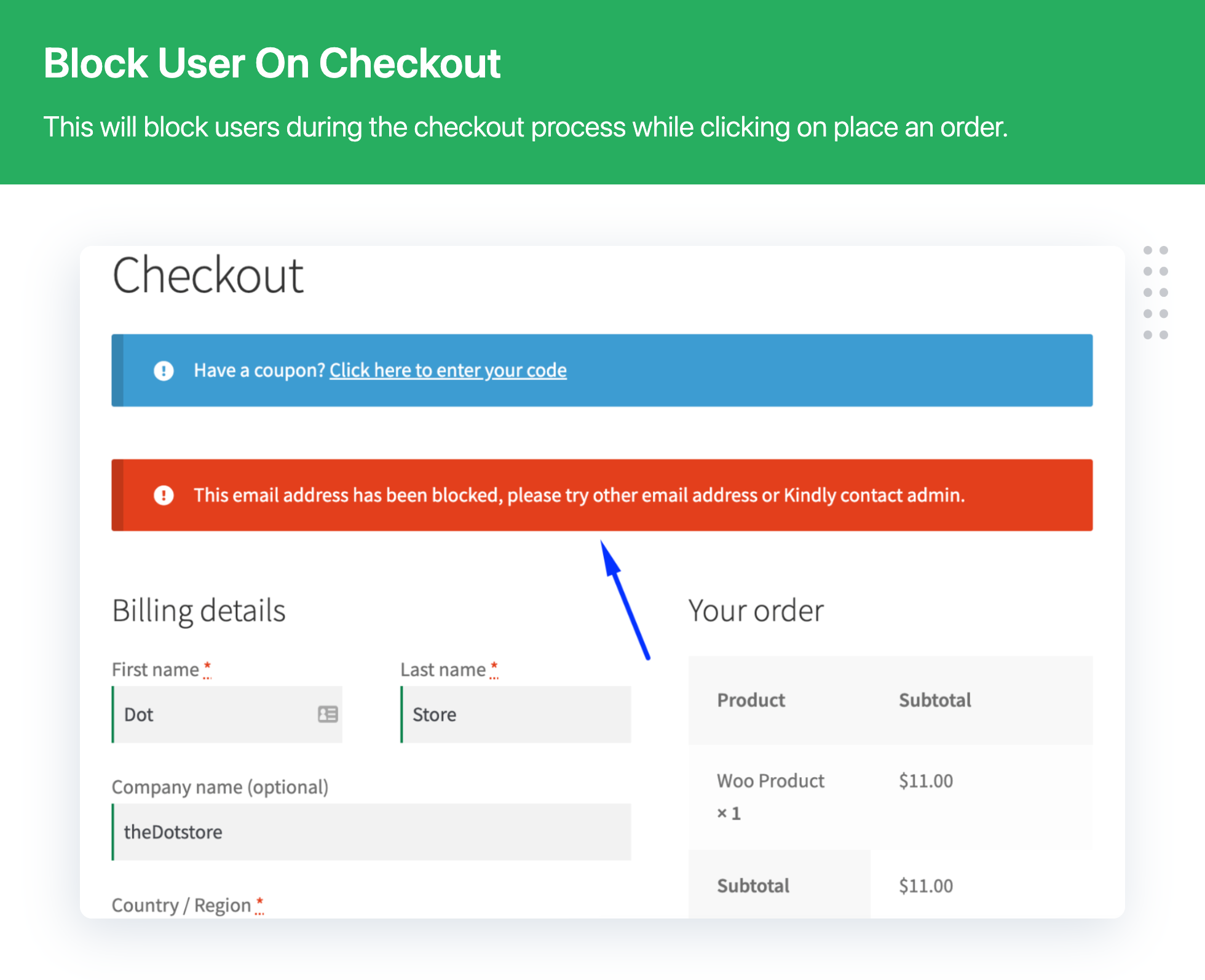
- Block fraud customer on checkouts
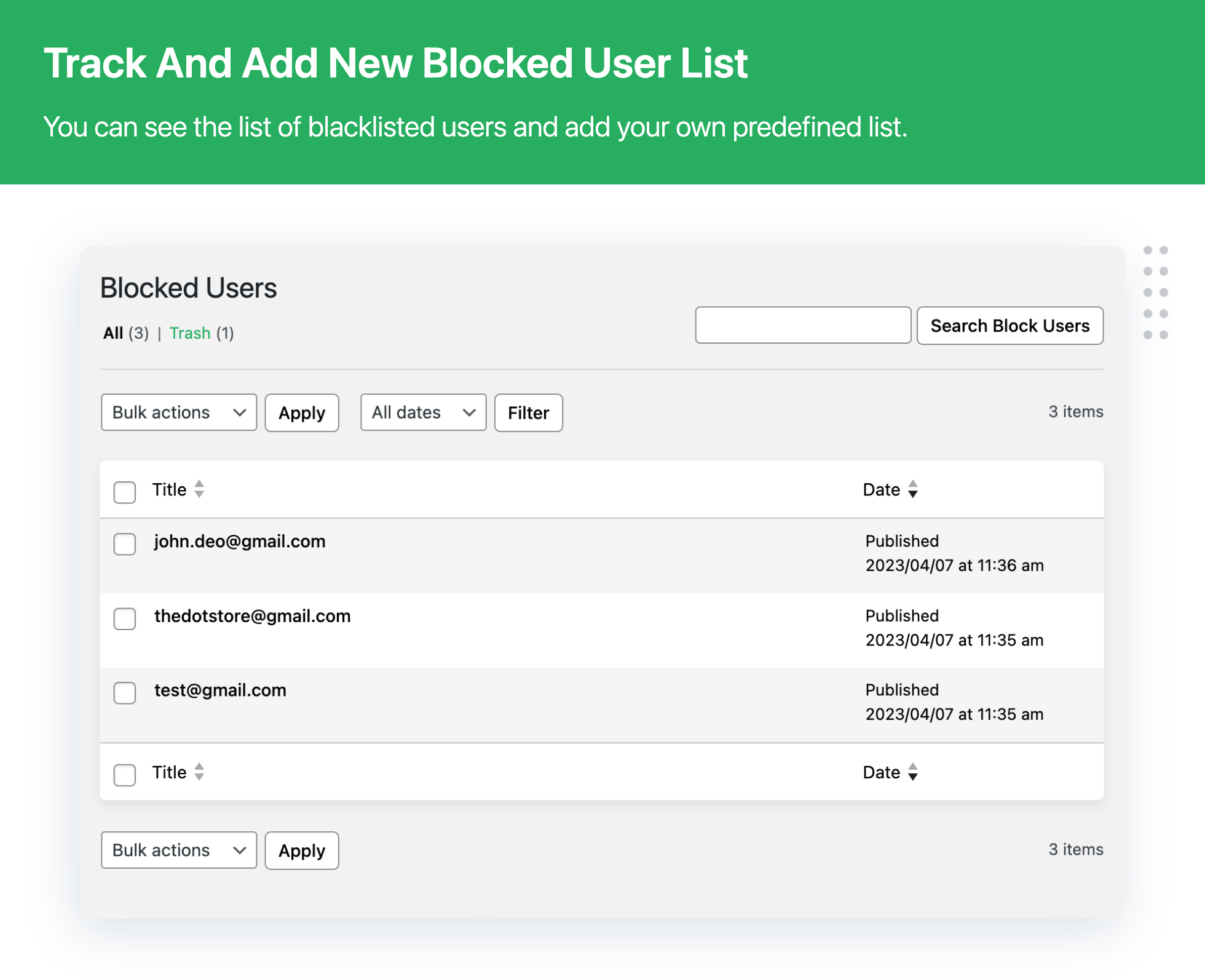
- View Blacklisted user details
- View Reports on the dashboard
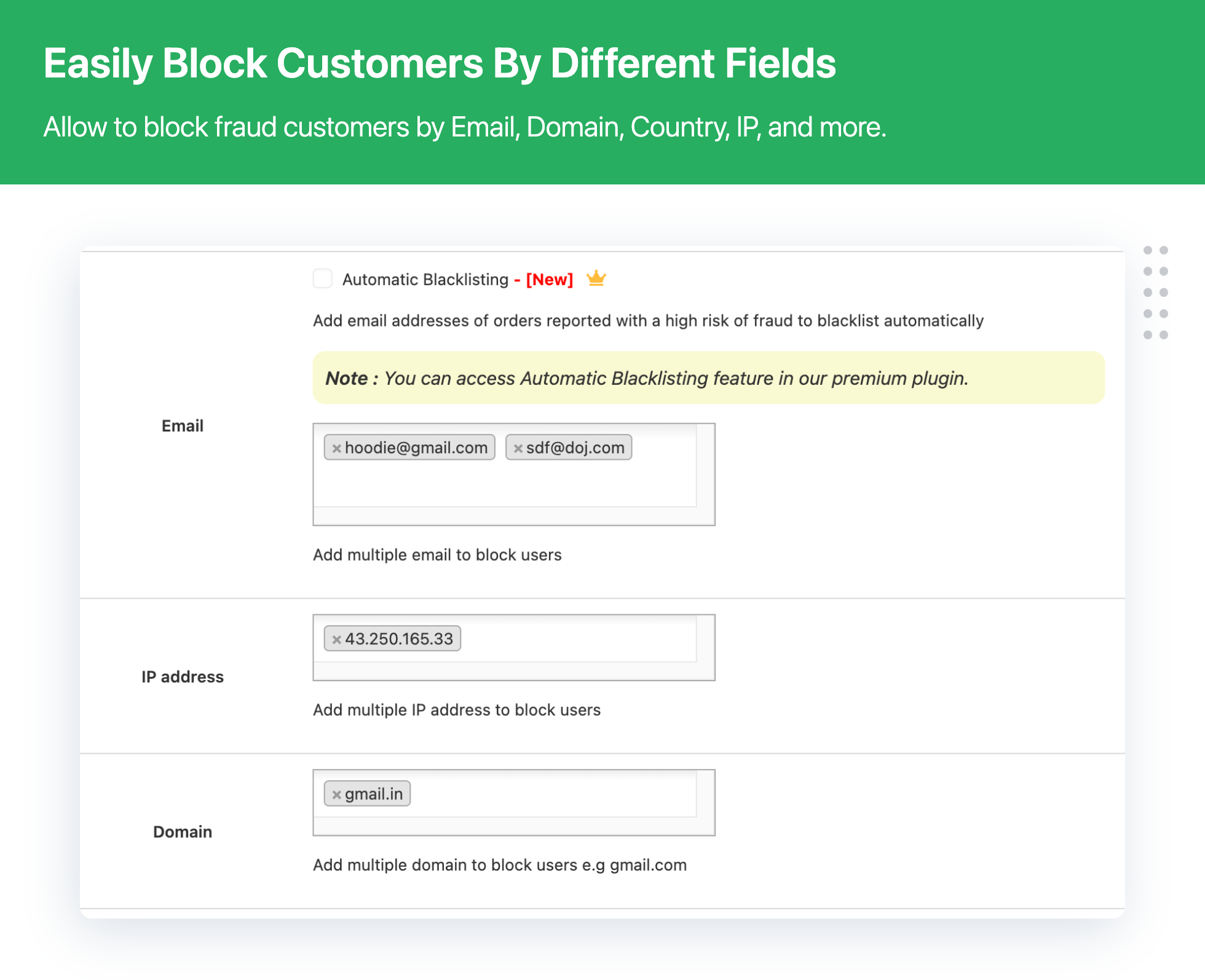
- Block fraud customer by Multiple IP addresses
- Block fraud customer by the Multiple States
- Block fraud customer by the Multiple Zip Code
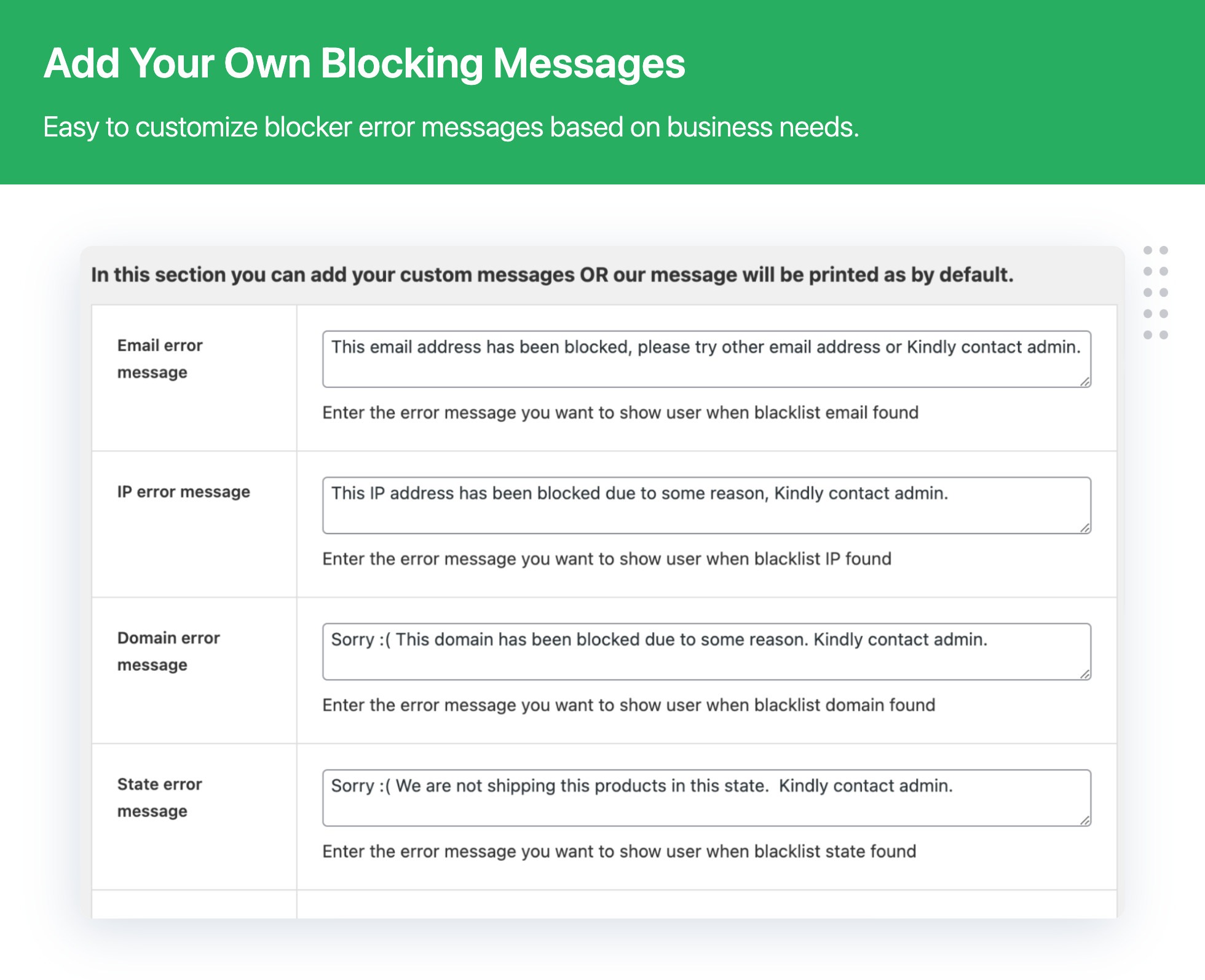
- Set Specific Custom Message for All blacklisted user
- Block fraud customer by suspicious email addresses
🚀 PLUGIN USE CASES
- Defending against fraudulent transactions: Use tailored fraud identification rules to prevent any fraudulent activity.
- Preventing fake account creation: Block registrations from suspicious email addresses or IP addresses.
- Bulk blacklisting: Easily upload a large list of blacklisted entities to maintain the integrity of your online store.
- Detailed oversight: Use dashboard reports to closely monitor the activities and orders on your store.
- Handling migration: Easily import/export plugin settings from one WooCommerce website to another.
⭐ REVIEWS (5-star by 100+ users)
- “Amazing tool to stop fraud orders. Their support team is very kind and helpful.” – Joseph Hill, General Manager
- “Definite must-have plugin for WooCommerce stores.” – Gavin Coleman, Business Head
- “Great plugin to prevent fake orders or customers.” – Vanessa Wilson, VP
- “Very satisfied with the results, will continue to use it for a long time.” – Peter Howells, CTO
- “This plugin offers many features. A very good tool that helps a lot.” – Kevin Jackson, Shop Manager
👀 WHAT MAKES US STAND OUT
At Dotstore, we focus on WooCommerce plugins that are easy to use, highly customizable, and most importantly, secure.
- Top-of-the-Line Customer Support: Our customer support is recognized for its responsive and accurate solutions to customer issues.
- Trustworthy Solutions: Our plugins are built with precision and integrity to endure performance optimization and security.
- Flexibility for Customization: Tailor our WooCommerce Fraud Prevention Plugin to your specific needs. Retail store or a membership business, we’ve got you covered!
- Easy Setup: All our plugins are user-friendly and intuitive, ensuring a smooth setup process for all.
Choose Dotstore, and get the most out of your WooCommerce store.
📣 PREMIUM: Fraud Prevention Plugin — Try Pro Version Today!
✅ NEED EVEN MORE FEATURES?
Upgrade to Fraud Prevention For WooCommerce and EDD PRO to get all the advanced features.
- All free plugin key features
- Pro – Block fraud customer by the user first name
- Pro – Block fraud customer by the user last name
- Pro – Block fraud customer by Multiple Domain
- Pro – Block fraud customer by the Mobile Phone
- Pro – Block fraud customer by the Shipping zone
- Pro – Block fraud customer by the User role
- Pro – Bulk upload blacklisted zip code by excel sheet
- Pro – Bulk upload blacklisted state by excel sheet
- Pro – Block external blacklist temporary email domains
- Pro – Import & Export Settings
- Pro – Block fraud customer by Multiple Domain extension e.g .com, .in, .uk
- Pro – Block fraud customer by Specific Web Browser like safari, chrome
💁 How to’s Plugin Guide
🔖 Expert Tips on Preventing Frauds for Your Online Store
🔖 How to Protect Your Ecommerce Store from Fraud Risks & Spam
🔖 The Definitive Guide to The WooCommerce Fraud Prevention Plugin
🔖 How to upload fraud customer data in the WooCommerce Fraud Prevention plugin?
🔖 How to block fraud customers by suspicious email addresses in WooCommerce?
🔖 How to hold a fraud order on WooCommerce?
🔖 How to block fraud customer orders on Registration and checkouts form in WooCommerce?
🔖 How to set up fraud Protection in WooCommerce?
📣 PREMIUM: Fraud Prevention Plugin — Try Pro Version Today!
☎️ CONTACT US
- Free plugin: Need Technical Help? – Click here
- Pro Plugin: PRE-SALE Questions – Click here or Review Help Document
💎 EXPLORE OUR OTHER PLUGINS TO SUPERCHARGE YOUR WEBSITE
👉 Premium WooCommerce Plugins list
- Flat-rate shipping plugins for WooCommerce
- WooCommerce Extra Fees
- Hide Shipping Method For WooCommerce
- Product Attachment For WooCommerce
- Advanced Product Size Charts Plugin
- Product Sample for WooCommerce
- Blocker – Prevent Fake Orders And Blacklist Fraud Customers
- Enhanced Ecommerce Google Analytics for WooCommerce
- Conditional Payments For WooCommerce
- Advanced USPS Shipping Plugin
- WooCommerce Multi-Vendor Shipping Addon
- Category Banner Management for Woocommerce
- Product Finder For WooCommerce
- Conditional Discount Rules For WooCommerce Checkout
- WooCommerce Checkout For Digital Goods
- WooCommerce Attribute Stock
Installation
- Download the plugin
- Upload the folder “woo-blocker-lite-prevent-fake-orders-and-blacklist-fraud-customers” to wp-content/plugins (or upload a zip through the WordPress admin)
- Activate and enjoy!
Frequently asked questions
How can I prevent fraudulent customers from completing transactions on the checkout page?
To secure your checkout page against fraudulent users, simply activate the WooCommerce Fraud Prevention plugin. Then, enable the condition for the checkout page within the plugin settings. This allows you to block users by their email, IP address, state, or ZIP code, ensuring only genuine transactions proceed.
What steps should I take to block fraudulent activity on the registration pages?
Protect your registration pages by activating the WooCommerce Fraud Prevention plugin and enabling the specific condition for registration pages in the settings. This feature lets you block potential fraudsters based on their email, IP address, state, or ZIP code, safeguarding your site’s integrity.
Can the plugin block users based on their IP address?
Yes, the WooCommerce Fraud Prevention plugin allows you to block users by IP address on both registration and checkout pages. You can enter multiple IP addresses into the plugin to cover various potential threats.
Is it possible to block fraudsters by state, ZIP code, domain, IP address, and email address?
Absolutely! Upon activating the plugin and configuring the necessary conditions for either registration or checkout pages, you can effectively block users based on a comprehensive list of identifiers, including state, ZIP code, domain, IP address, and email address.
Can I customize error messages for users who are blocked?
Yes, with the WooCommerce Fraud Prevention plugin, you have the flexibility to create custom error messages. This can be tailored specifically for each type of condition you’ve set, such as blocks by email, IP address, state, or ZIP code, enhancing the user experience even in denial situations.
How can I utilize an external blacklist, like one from GitHub, with this plugin?
The plugin supports the integration of external blacklists, including disposable/temporary email domains often listed on GitHub. Simply activate the plugin and enable the use of an external blacklist to enhance your site’s protection against fraudulent entities.
Where can I view a list of blocked users and their attempted transactions on my website?
Once the WooCommerce Fraud Prevention plugin is activated, you’ll have access to a comprehensive list of blocked users, including their email addresses and a record of how many times they attempted to place an order on your site. This feature gives you insightful data to monitor and adapt your security measures accordingly.
Does the plugin offer detailed reports on fraudulent activities?
Yes, the WooCommerce Fraud Prevention plugin provides detailed dashboard reports, presenting data on orders placed, users blocked, and suspected fraudulent activities, giving you clear insights into your store’s security status.
Can the plugin block users by additional parameters such as browser type?
Indeed, beyond email and IP address, the plugin allows for advanced blocking based on a variety of parameters including browser type, domain, domain extension, and more, giving you a comprehensive toolset to protect your store.
Is there a feature for importing or exporting blacklisted information?
The plugin supports bulk upload functionalities for blacklisting, allowing you to upload an Excel sheet with blacklisted details such as email addresses, ZIP codes, or states. This streamlines managing your store’s security efficiently.
Can I create specific fraud identification rules?
Customize your store’s security by establishing your own fraud identification rules and risk thresholds within the plugin. This enables you to tailor the security measures to fit your specific business needs perfectly.
Is there support for importing/exporting plugin settings for site migrations?
For users planning to migrate their WooCommerce store, the plugin facilitates importing/exporting of settings via a JSON file. This ensures that you won’t have to start from scratch, preserving your meticulously configured settings.
Changelog
Automatic updates should work great for you. As always, though, we recommend backing up your site prior to making any updates just to be sure nothing goes wrong.
2.3.5
- [Bug Fix] Fixed compatibility issues with WooCommerce High-Performance Order Storage (HPOS)
- [Bug Fix] Fixed an uncaught JavaScript type error
- [Enhancement] Compatible with WooCommerce 11.0.x
- [Enhancement] Compatible with WordPress 7.1.x
2.3.4
- [Bug Fix] Security patch and fixes
2.3.3
- [Bug Fix] Minor bug fixes
- [Enhancement] Compatible with WooCommerce 10.5.x
- [Enhancement] Compatible with WordPress 6.9.x
2.3.2
- [Enhancement] Security patch and updated freemius SDK
- [Enhancement] Compatible with WooCommerce 10.4.x
- [Enhancement] Compatible with WordPress 6.9
2.3.1
- [Bug Fix] Fixed strict comparison issue with configured values.
2.3.0
- [Bug Fix] Undefined variable warning fix
- [Enhancement] Compatible with PHP 8.3
- [Enhancement] Compatible with WooCommerce 10.3.x
- [Enhancement] Compatible with WordPress 6.8.x
Screenshots
For developers
Is this your plugin? Show off the numbers.
Add a live badge to your site, docs or GitHub README. It updates on its own — no account needed.
FAQ
Fraud Prevention For WooCommerce an…: quick answers
Straight answers, pulled from live WordPress.org data.
Live data from WordPress.org · checked Sep 28, 2026
Is Fraud Prevention For WooCommerc… free?
Yes. Fraud Prevention For WooCommerc… is free to download and use from the official WordPress.org plugin directory.
Is Fraud Prevention For WooCommerc… safe to use in 2026?
Fraud Prevention For WooCommerc… is a solid plugin choice in 2026, with a few things worth checking first. It runs on 4K+ sites, is rated 3.7/5 and was last updated 1 month ago, and scores 79/100 on our health check.
How many websites use Fraud Prevention For WooCommerc…?
Fraud Prevention For WooCommerc… is active on 4K+ WordPress websites and has been downloaded 148,816 times since it launched in September 2016. It was downloaded 2,391 times in the last 30 days.
Does Fraud Prevention For WooCommerc… work with WordPress 7.1?
Yes. The developer has tested Fraud Prevention For WooCommerc… up to WordPress 7.1.2, the latest release. It requires WordPress 5.3.0 or newer.
What PHP version does Fraud Prevention For WooCommerc… need?
Fraud Prevention For WooCommerc… requires PHP 5.6 or higher. Most hosts run PHP 8.x today, so it works on any modern WordPress hosting.
When was Fraud Prevention For WooCommerc… last updated?
The latest version, 2.3.5, was released on August 26, 2026 (1 month ago).
Who makes Fraud Prevention For WooCommerc…?
Fraud Prevention For WooCommerc… is developed and maintained by Dotstore.
Powered by PageForge
Want thousands of pages that rank like these? Build them in an afternoon.
This directory runs on the same engine as PageForge. Turn any spreadsheet, CSV or API into thousands of fast, SEO-ready WordPress pages — with schema, internal links and AI-written copy baked in.
- CSV, Google Sheets & API data sources
- AI content, schema & internal links per page
- Works with Elementor, Gutenberg, Yoast & Rank Math
- Free on WordPress.org — no credit card


