



ALD – Dropshipping and Fulfillment for AliExpress and WooCommerce
Transfer data from AliExpress products to WooCommerce effortlessly and fulfill WooCommerce orders to AliExpress automatically.

Solid choice
ALD is a solid plugin choice in 2026, with a few things worth checking first. It runs on 9K+ sites, is rated 3.7/5 and was last updated 1 month ago, and scores 68/100 on our health check.
- Tested with the latest WordPress (7.1)
How does it stack up?
Side-by-side on installs, updates, ratings & support

Daily downloads
Download spikes usually follow a new release — each site that auto-updates counts as a download.
Rankings
Where ALD stands todayWordPress.org search rankings
Live position in the plugin search, top 100| Keyword | Position |
|---|---|
| alidropship | #1 |
| alidropship woo | #1 |
| aliexpress dropshipping | #2 |
| aliexpress dropshipping plugin | #2 |
| dropship | #2 |
Version adoption
Share of active sites per release.
Rating breakdown
★★★★★★★★★★ 3.7 from 138 reviews
About ALD
From the official readme · v2.2.4Description
ALD – Dropshipping and Fulfillment for AliExpress and WooCommerce allows shop owners to import products from AliExpress to their own WooCommerce store. That helps shop owners easily possess and run their own business on the E-Commerce site with a wide range of products from AliExpress and earn more money from online business.
Now this plugin is Top 1 the best free AliExpress Dropshipping plugin for WooCommerce.
View Demo | Documents | Pro Version | Download extension | Facebook group
Preview ALD – Dropshipping and Fulfillment for AliExpress and WooCommerce
How to install and use the plugin
Install WooCommerce AliExpress Dropshipping Extension from Chrome Web Store
Install WooCommerce AliExpress Dropshipping Extension manually
Important Notice:
-
Plugin works based on WooCommerce plugin.
-
Your site need use SSL certificates to connect with chrome extension
-
Your permalink structure must NOT be “Plain”
-
We make no guarantees about the raw information imported from AliExpress provided by our plugin and will not be held liable if it is not accurate, complete, or up to date, or if it does not otherwise satisfy your specific needs. All risks regarding to raw information and the material may not be excepted and will not be our responsibility.
-
There may be instances when information provided through the plugin contains typographical mistakes, inaccuracies, or omissions come from AliExpress such as product descriptions, promotions, offers, pricing, shipping fee, availability, and delivery timeframes. Apart from official laws require, we make no commitment to correct, update, alter, or clarify such material.
-
It is released on WordPress.org and you can use plugin as free to build themes for sale.
FEATURES
► Import Products:
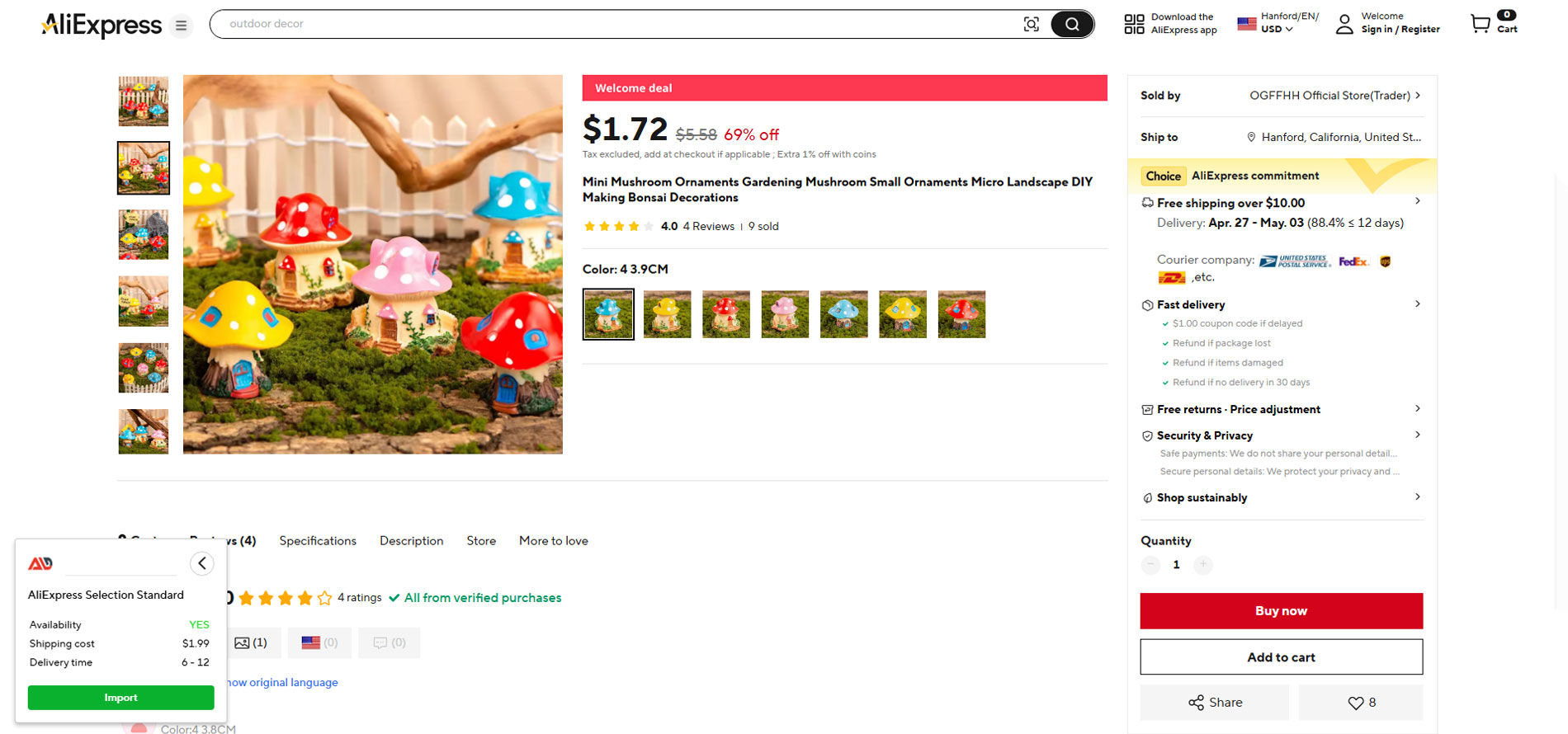
This plugin allows you to seamlessly import products from AliExpress to multiple WooCommerce stores simultaneously.
To get started, you can easily connect your stores with our extension using the WooCommerce REST API authentication method.
Important Note for a Smooth Setup: Before authenticating, please ensure that any Coming Soon, Under Construction, or Maintenance Mode plugins/settings are temporarily turned off. This allows our extension to establish a secure and successful connection with your site.
-
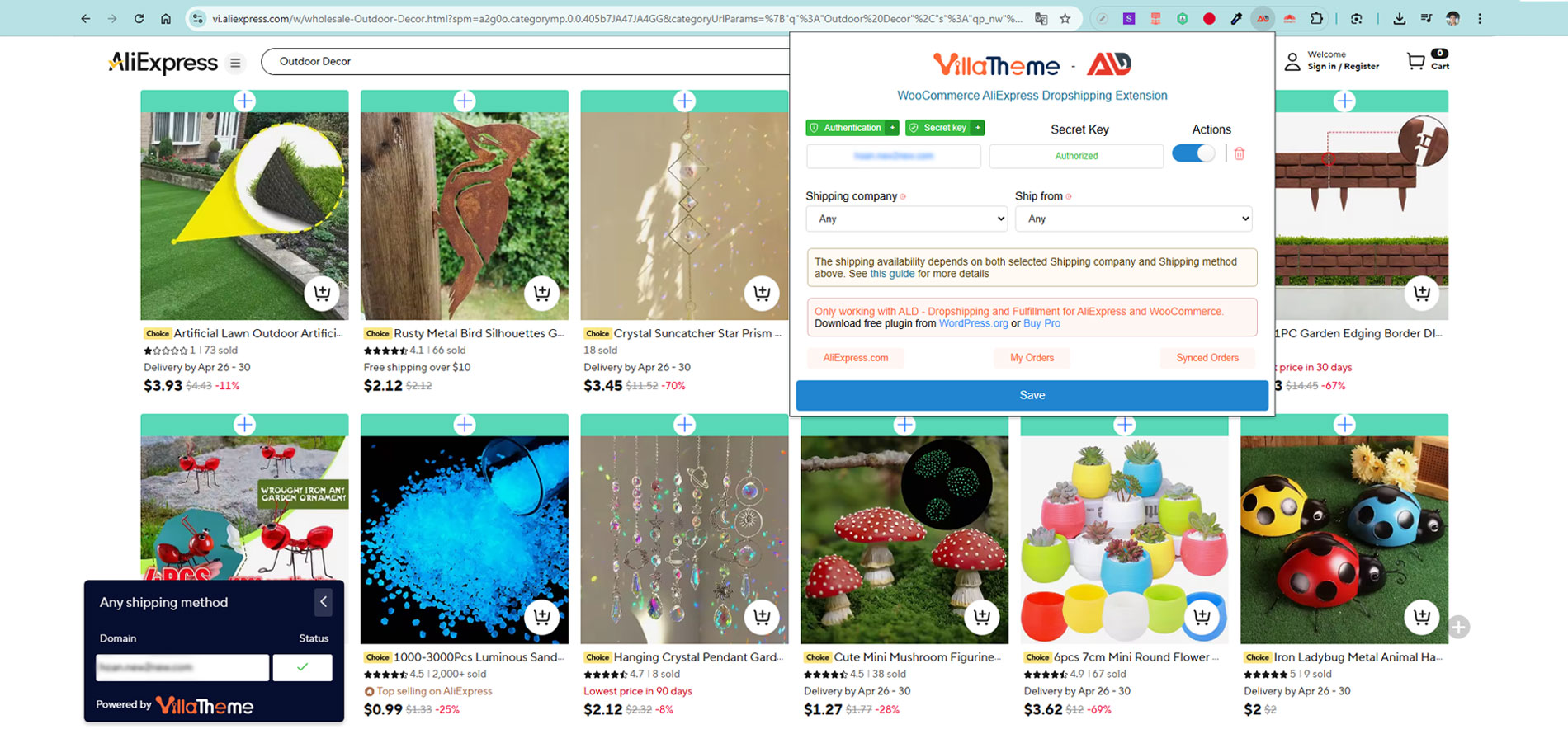
Import from single product page
-
Import from category page
► Configure rules for all imported products:
You can set general rules for all imported products in the product setting.
-
Global product attributes: You can choose to import attributes as global or custom attributes(newly added in 1.0.4)
-
Products Status: Choose a product status for all imported products from AliExpress. Product status can be: Publish, Pending or Draft.
-
Catalog visibility: This setting determines which shop pages products will be listed on.
-
Product description: Customizing product description after adding products to the import list.
-
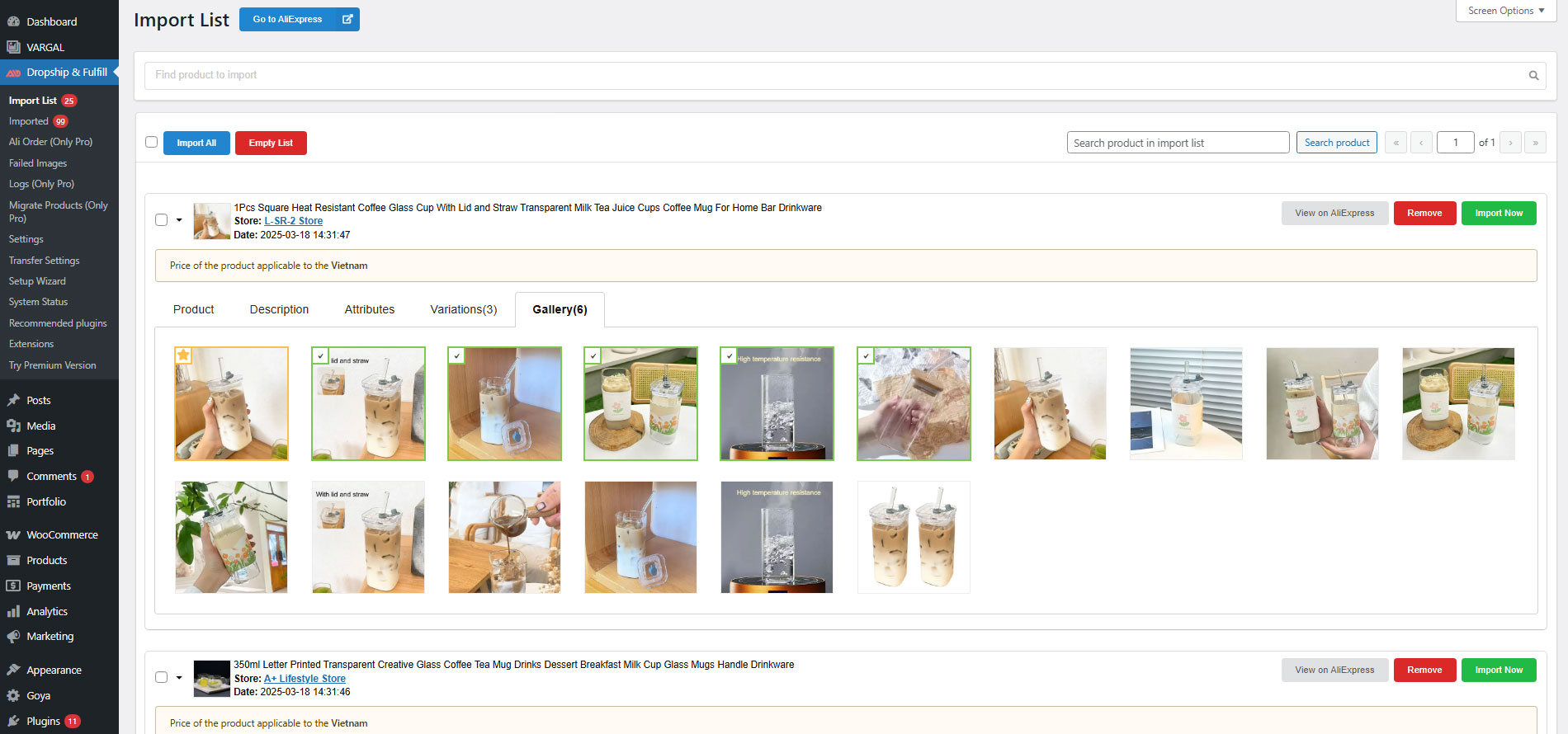
Select product images: Enable it, the first image will be selected as the product image and other images (except images from the product description) are selected in the gallery when adding the product to the import list.
-
Images from description: Image from product description can be downloaded to your server so that you can use other plugins to edit them to suit your store
-
Default categories: Categories which will be selected by default for products in Import list
-
Default product tags: Fill in the tag titles.
-
Product variations are visible on the product page: Enable to make variations of imported products visible on the product page
-
Manage stock: Enable to manage stock and import product inventory. if you disable this option, the product stock status will be set “Instock” and product inventory will not be imported.
-
Hide ship from: Enable to hide attribute ship from China.
-
Find and Replace: Search for strings in product title and description and replace found strings with respective values.
► Set up rules for the price of all products:
-
The Product Price setting: Allows you to set the price rules for all imported products.
-
Import products currency exchange rate: Allows you to set the exchange rate to convert the imported product-currency into an expected respective currency in your store.
-
Show shipping option: Shipping cost can now be added to product cost. You can choose shipping country and shipping company before importing products.
-
Rules for pretty price: You can automatically setup product prices based on your rules so that prices will be in pretty format before importing such as 23.67=>23.99, …
For example, the currency on AliExpress is USD. However, I want to convert it into VND on my Woo store, therefore I set the current exchange rate is 23000
If this field sets the value as 1, it means that there is no change in currency (USD as default)
-
Price from: In this field, you will set the price rules for multi quantity ranges. You can set a quantity range respectively with an action type.
-
Action: An action is set respectively with a quantity range. They can be: Increase by a fixed amount; Increase by percentage (%); Set to (a specific value)
-
Sale price: Set a rule for sale price. Note: Set -1 if there is no sale price
-
Regular price: Set a rule for regular price.
► Install rules for all products after fulfilling the order payment:
This Setting allows you to set the general rules for all products after fulfilling the order payment.
-
Carrier company: Select a default carrier company for all products from AliExpress in your WooCommerce store.
-
AliExpress Order notes: This note will add after an order is fulfilled with Chrome extension.
-
Show action: Order status to show a fulfilled action. You can set these statuses: Pending payment, On hold, Completed, Canceled, Refunded, Failed
► Configure simple product attributes:
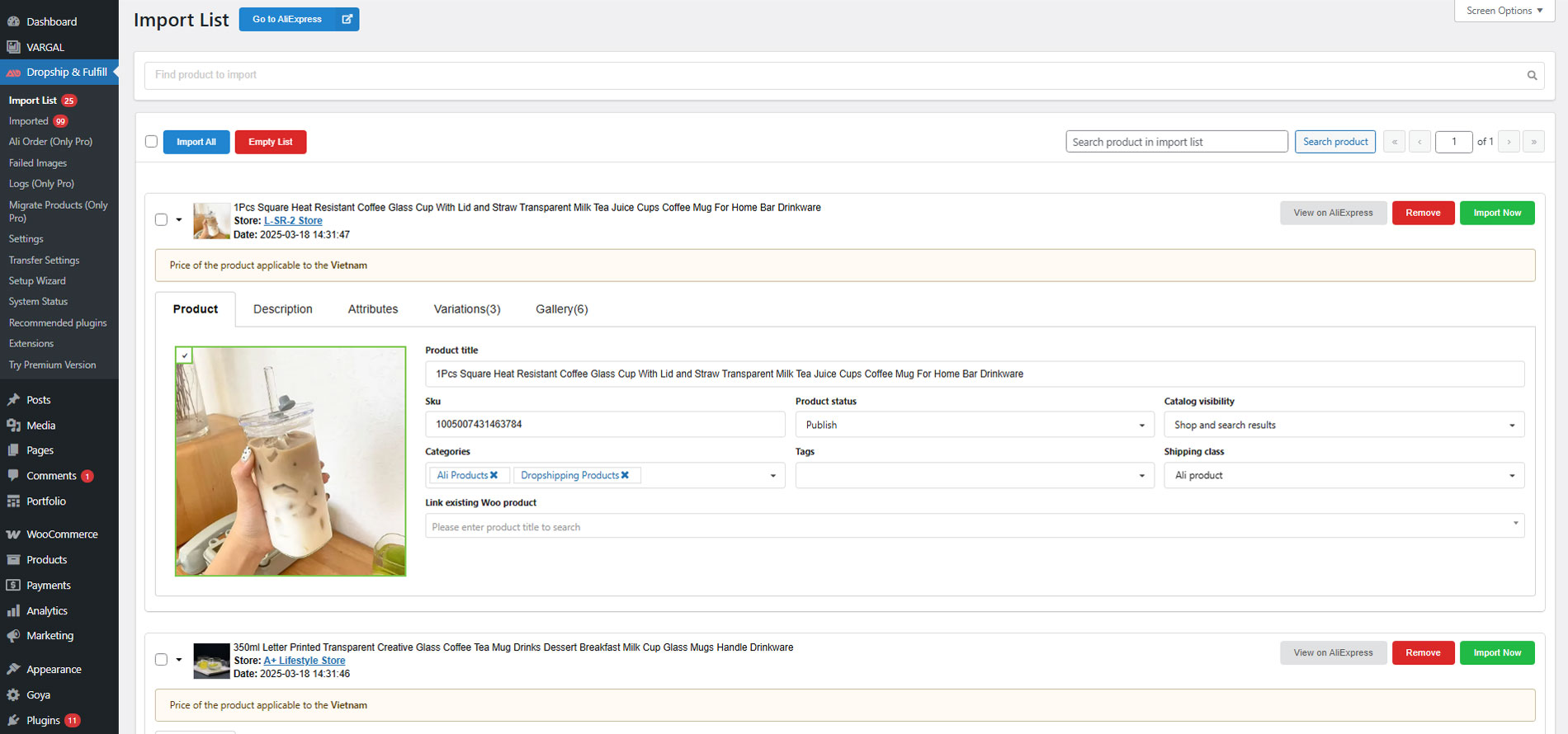
The products now are in the Import list where you can config product sku, price, edit attributes, select product images, variations… before pushing to WooCommerce store
-
Import all: Enable to import all products entirely on your Woo store.
-
Search product: Search for a product on the import list.
-
Product: Display the imported product attributes.
-
Product Attributes: You can edit product attributes name, values, remove unwanted attributes before importing
-
Description: Copy product description on AliExpress or you can edit it.
-
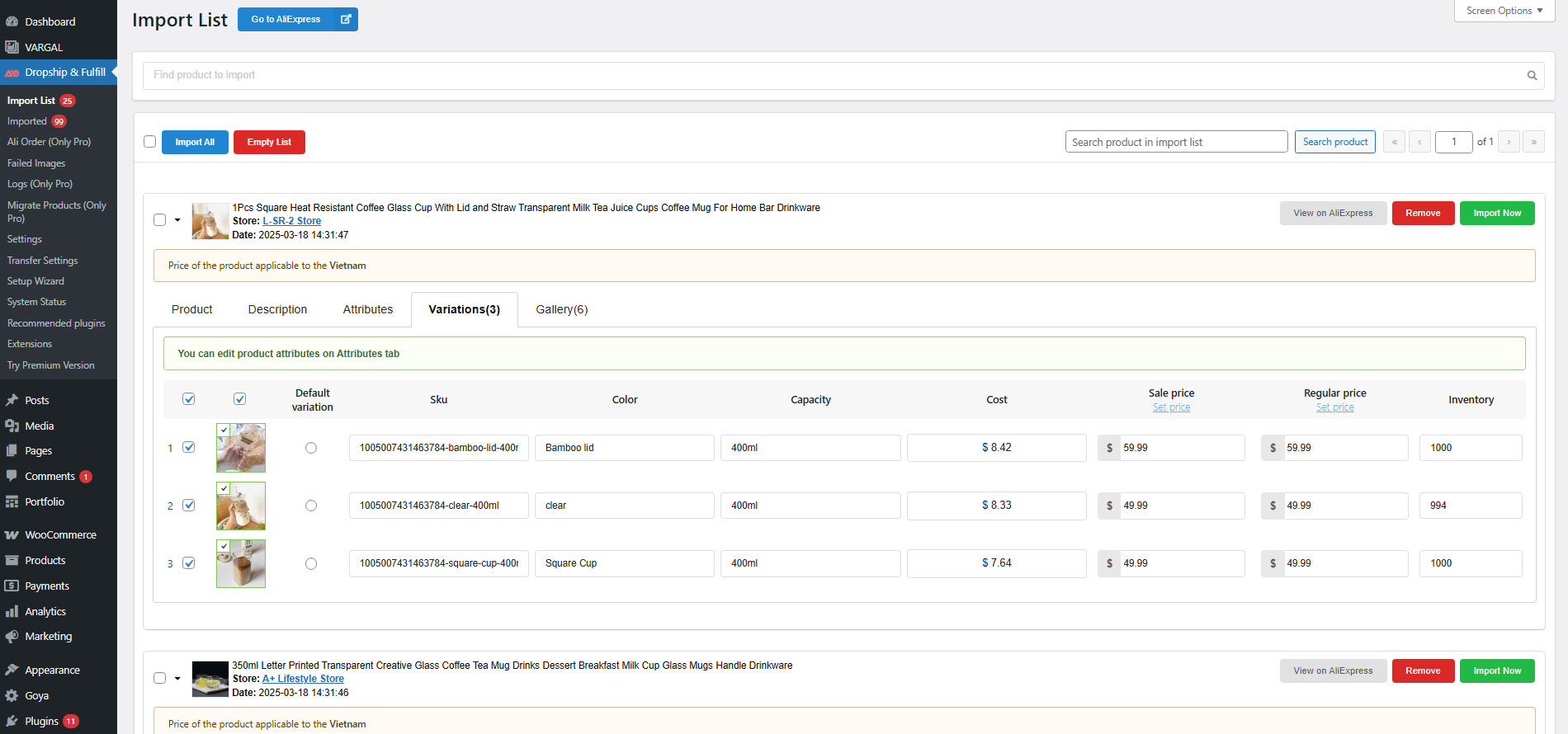
Variations: This setting allows you to customize and manage the variable products.
-
Gallery: Copy gallery on AliExpress or you can select one on your Woo store.
-
View product on AliExpress: Allow your to access AliExpress directly.
-
Import and Override: Select to import and override the product on your Woo store
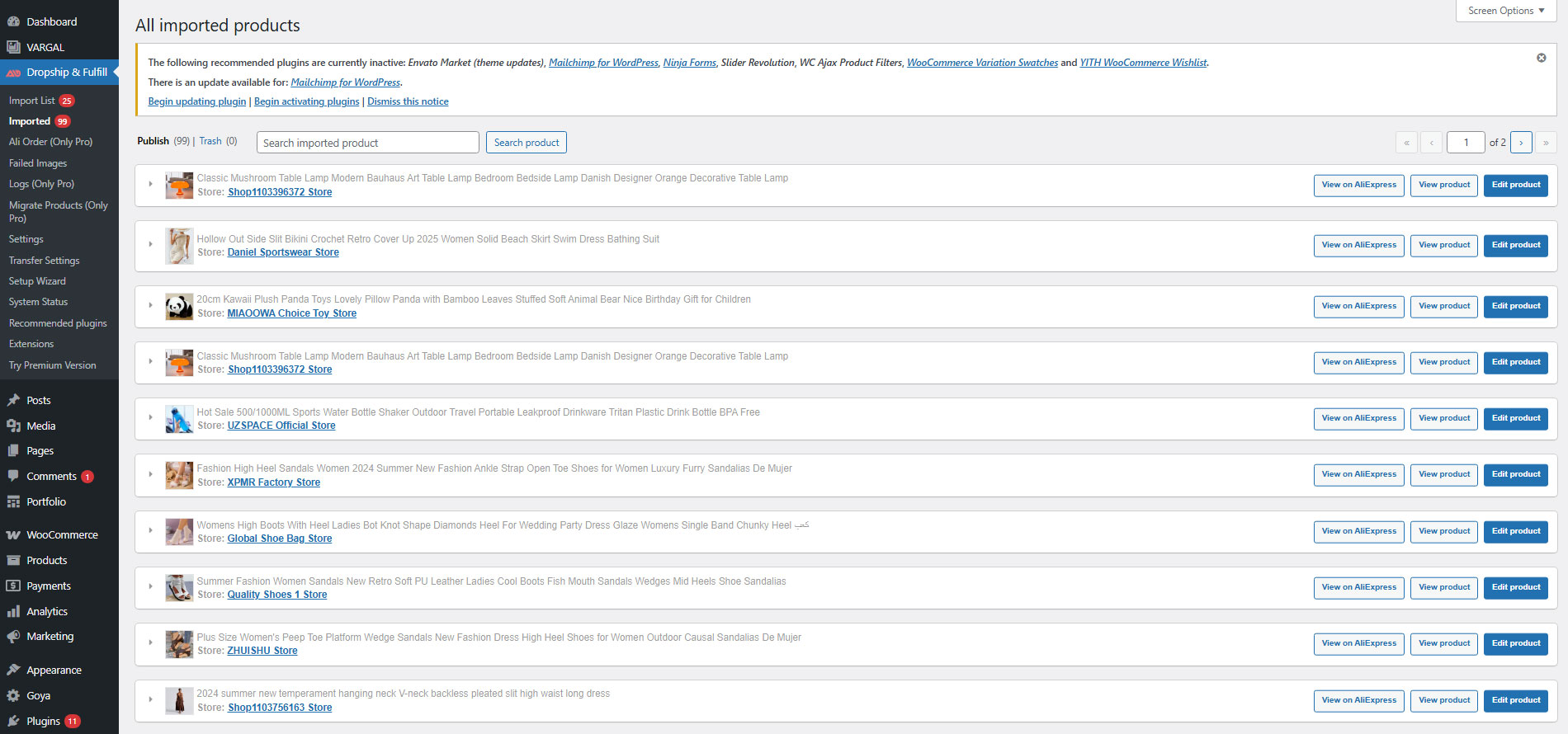
► Manage the imported product list:
You can manage briefly the product attributes in the Imported setting.
-
Product Title: Name of the product in your store.
-
Sku: Stock keeping unit of the product in your store
-
Cost: Price of the product on AliExpress
-
WooCommerce Price: Price of the product on your store
-
Delete: Delete the product on the imported list
-
Override: Override an alternative product on the initial one.
► Manage sold orders of the imported products:
You can distinguish between AliExpress orders with your initial store orders and manage them in the Order Setting in WooCommerce.
► Orders Tracking for WooCommerce: Compatible with Orders Tracking for WooCommerce so you can easily manage tracking data
► Variations Swatches: Compatible with Product Variations Swatches for WooCommerce. This makes product variations of your store beautiful and easy for customers to select just like AliExpress
PRO VERSION
-
All features from the free version: All your settings/imported products/fulfilled orders are remained after upgrading
-
Import product video: You can import product video and display video on a separate tab on single product page or use shortcode to display video in product description/short description …
-
Migration: If you are using anther AliExpress dropshipping plugin and want to migrate those products to use with our plugin, this feature will help you do the job quickly.
-
Frontend shipping: Instead of importing product including specific shipping cost, you can allow customers to select shipping company correctly based on their country just like shopping on AliExpress. Shipping companies can be masked to hide the fact that you are running a dropshipping business
-
AliExpress orders: A separated page to manage all your AliExpress orders where you can bulk fulfill orders or fulfill orders with extension
-
Bulk orders: Besides the ability to fulfill AliExpress orders one by one with the chrome extension, you can bulk fulfill your orders rapidly. This will save you tons of time.
-
Auto fulfill: This helps automatically fulfil AliExpress orders whenever someone purchases something on your site
-
Price and quantity sync: Product price and quantity can now be synced with AliExpress automatically using cron. If a product is out of stock/change price or is offline, you will receive email notification. You can also check the progress in the log file.
-
Tracking number sync: Similar to products, tracking number sync is automated. You don’t need to login to your AliExpress account only to check if tracking number is available for some orders then wait for them to sync.
-
Update exchange rate automatically: Schedule the plugin to update exchange rate daily at a specific time
-
Split variations into respective products: A lot of AliExpress products have too many variations(more than a hundred), you can use this feature to split those products into smaller ones for easier management
-
Product attribute mapping: Attributes of AliExpress product are usually in strangled terms and not user friendly so you will need to modify them before importing, this feature helps you save a lot of time from doing that boring task.
-
Marketplace: The premium version is made compatible with Dokan plugin. Vendors can import AliExpress products and have their own Import list, Imported and settings page within the vendor dashboard.
-
Premium support: With each purchase, you will have 6 or 12 months of premium support from VillaTheme.
-
Lifetime update:
MAY BE YOU NEED
9MAIL – WordPress Email Templates Designer
Abandoned Cart Recovery for WooCommerce
Advanced Product Information for WooCommerce
AFFI – Affiliate Marketing for WooCommerce
Boost Sales for WooCommerce – Set up Up-Sells & Cross-Sells Popups & Auto Apply Coupon
Bopo – WooCommerce Product Bundle Builder
Bulky – Bulk Edit Products for WooCommerce
Cart All In One For WooCommerce
Catna – Woo Name Your Price and Offers
Checkout Upsell Funnel for WooCommerce
ChinaDS – Tmall-Taobao Dropshipping for WooCommerce
Clear Autoptimize Cache Automatically
COMPE – WooCommerce Compare Products
Coreem – Coupon Reminder for WooCommerce
CURCY – Multi Currency for WooCommerce – Smoothly on WooCommerce 9.x
Customer Coupons for WooCommerce
DEPART – Deposit and Part payment for Woo
Email Template Customizer for WooCommerce
EPOW – Custom Product Options for WooCommerce
EXMAGE – WordPress Image Links
Faview – Virtual Reviews for WooCommerce
FEWC – Extra Checkout Fields For WooCommerce
Free Shipping Bar for WooCommerce
GIFT4U – Gift Cards All in One for Woo
HANDMADE – Dropshipping for Etsy and WooCommerce
HAPPY – Helpdesk Support Ticket System
LookBook for WooCommerce – Shoppable with Product Tags
Lucky Wheel for WooCommerce – Spin a Sale
Notification for WooCommerce | Boost Your Sales – Recent Sales Popup – Live Feed Sales – Upsells
Orders Tracking for WooCommerce
Pofily – WooCommerce Product Filters
PRENA – Product Pre-Orders for WooCommerce
Product Builder for WooCommerce – Custom PC Builder
Product Size Chart For WooCommerce
Product Variations Swatches for WooCommerce
REDIS – WooCommerce Dynamic Pricing and Discounts
S2W – Import Shopify to WooCommerce
SUBRE – Product Subscription for WooCommerce – Recurring Payments
Suggestion Engine for WooCommerce
Thank You Page Customizer for WooCommerce – Increase Your Sales
TMDS – Dropshipping for TEMU and Woo
VARGAL – Additional Variation Gallery for WooCommerce
VIMA – Multi Customer Addresses for Woo
W2S – Migrate WooCommerce to Shopify
WebPOS – Point of Sale for WooCommerce
WPBulky – WordPress Bulk Edit Post Types
Documentation
Plugin Links
Installation
- Unzip the download package
- Upload
woo-alidropshipto the/wp-content/plugins/directory - Activate the plugin through the ‘Plugins’ menu in WordPress
Changelog
2026.08.20 – version 2.2.4
– Updated: Compatible with WP 7.1
– Updated: Compatibility check with WC 11.0
2026.08.17 – version 2.2.3
– Updated: Change premium version url
2026.07.10 – version 2.2.2
– Added: Connect Chrome extension using WooCommerce REST API key.
2026.06.19 – version 2.2.1
– Removed: Secret key authentication for Chrome extension connection.
2026.06.04 – version 2.2.0
– Updated: Compatible with WP 7.0 and WC 10.8
2026.02.27 – version 2.1.17
– Updated: Compatibility with WC 10.5
2026.02.07 – version 2.1.16
– Updated: VillaTheme support
2026.01.24 – version 2.1.15
– Updated: VillaTheme support
2025.11.01 – version 2.1.14
– Updated: Compatibility with WC 10.3
2025.10.03 – version 2.1.13
– Updated: Improved compatibility with EXMAGE – WordPress Image Links Premium
– Updated: Compatible check with WC 10.2
– Updated: Update support class
2025.08.26 – version 2.1.12
– Fixed: Admin notice
– Fixed: Could not submit setup wizard step 2
– Updated: Compatible check with WC 10.1.1
– Updated: Update support class
2025.08.15 – version 2.1.11
– Updated: Compatible check with WC 10.0.4
– Updated: Update support class
2025.07.26 – version 2.1.10
– Updated: Compatible check with WP 6.8.2 and WC 10.0.3
– Updated: Update support class
2025.07.01 – version 2.1.9
– Updated: Compatible check with WP 6.8.1 and WC 9.9.5
– Updated: Update support class
– Updated: Compatible Vargal plugin by Villatheme
– Fixed: Fixed some servers will base64 encode when sending $_POST to the server
2025.04.25 – version 2.1.8
– Updated: file language
– Updated: Compatible WC 9.8.2
– Updated: Update support class
2025.04.18 – version 2.1.7
– Updated: Warning message for “Use the external link for image” option users and Video feature, regarding media access restriction
– Updated: file language
– Updated: Compatibility check with WP 6.8 and WC 9.8
2025.03.07 – version 2.1.6
– Updated: Compatible WC 9.7.0
– Updated: Update support class
2025.02.07 – version 2.1.5
– Added: Added an option for the “RFC/CURP meta field” to fulfill orders for customers in Mexico.
– Updated: Compatible WC 9.6
– Updated: Update support class
2024.12.12 – version 2.1.4
– Fixed: Fixed the error of not being able to save settings
2024.12.02 – version 2.1.3
– Updated: Update support class
2024.11.21 – version 2.1.2
– Updated: Compatible with WP 6.7 and WC 9.4
– Updated: Update support class
2024.10.23 – version 2.1.1
– Updated: Compatible with WP 6.6.2 and WC 9.3.3
– Fixed: HTML error in Bulk Set categories (Import List)
2024.08.31 – version 2.1.0
– Updated: Import AliExpress product in ‘Find product to import’ with API
– Updated: Remove the old API and use the new API to get AliExpress product information
– Updated: Only override the existing products from AliExpress based on their product IDs. The overrode must be added to the import list.
– Updated: The shipping cost will be only calculated based on when the product is added to the import list
2024.07.25 – version 2.0.5
– Updated: Filter while getting ALD data
2024.07.23 – version 2.0.4
– Updated: Compatible with WP 6.6 and WC 9.1
2024.06.01 – version 2.0.3
– Updated: Import AliExpress product data from AliExpress’s new design
– Updated: Only use the new table after migrated data
– Updated: Update support class
2024.04.13 – version 2.0.2
– Fixed: Can not filter orders on the Woo orders tab
– Updated: Compatible with WP 6.5 and WC 8.7
– Updated: Update support class
2023.12.27 – version 2.0.1
– Fixed: Import AliExpress product characteristics and description from Aliexpress.ru
2023.09.25 – version 2.0.0
– Updated: Move Ali product to new table
– Fixed: Description 404
2023.09.23 – version 1.1.4
– Fixed: Duplicate class
2023.09.20 – version 1.1.3
– Fixed: Missing class
2023.09.19 – version 1.1.2
– Fixed: Get shipping from AliExpress when import product
2023.08.10 – version 1.1.1
– Fixed: Missing item count at admin menu
– Added: Find Ali product to import from Import list
2023.08.01 – version 1.0.30
– Fixed: Parse data from Ali
2023.07.29 – version 1.0.28
– Updated: Import data from RU changed
2023.07.03 – version 1.0.27
– Updated: Compatible with WooCommerce HPOS(COT)
2023.04.14 – version 1.0.26
– Fixed: Get shipping infomation
2023.02.24 – version 1.0.25
– Updated: Import product data with Ship to Australia
2023.01.12 – version 1.0.24
– Fixed: “Connect the Extension” button always shows on settings page even the current store is connected
– Updated: Prevent “find and replace” feature from changing image urls in product description
– Updated: Show imported status of products on AliExpress products list when the chrome extension only connects to 1 store
2022.12.28 – version 1.0.23
– Fixed: get_product_variations method force to return array
2022.12.13 – version 1.0.22
– Updated: Ajax nonce and capability check
– Improved: Possible to search subcategories
2022.11.26 – version 1.0.21
– Fixed: Script of ThemeHunk MegaMenu Plus plugin causing error on ALD settings page
– Added: Options to set order meta field to get billing/shipping number and neighborhood from
– Updated: Prevent “Write posts or pages in plain-text Markdown syntax” option of Jetpack plugin from wrapping product description with pre and code tags
2022.11.02 – version 1.0.20
– Updated: Compatibility check with WP 6.1 and WC 7
– Fixed: Unexpected ‘)’ error thrown in PHP5
2022.10.15 – version 1.0.19
– Fixed: Unable to import products from aliexpress.ru due to new changes from AliExpress
2022.09.28 – version 1.0.18
– Fixed: Some types of images from product description are unable to import
– Updated: Use get_option( ‘woocommerce_currency’ ) instead of get_woocommerce_currency() to avoid conflict with WOOCS plugin
– Optimized: Make it possible to connect the chrome extension from wp admin of a WordPress site that installs ALD plugin
– Optimized: Setup wizard
– Added: Vietnamese translation
2022.07.22 – version 1.0.17
– Updated: VillaTheme_Support
– Updated: Data sanitization/escaping check
– Added: Ability to import in RUB as AliExpress now does not allow changing currency when Ship-to country is set to Russian Federation
2022.05.06 – version 1.0.16
– Fixed: Unable to import due to different designs of some products from https://pt.aliexpress.com/
2022.04.20 – version 1.0.15
– Fixed: Incorrect price of some products from some sellers due to recent changes from AliExpress
– Fixed: Sanitize, escape data
– Updated: Support Class
2022.03.29 – version 1.0.14
– Updated: Support Class
2022.03.21 – version 1.0.13
– Added: Button to sync AliExpress orders from WordPress dashboard(orders and Ali Order page) to make it work with new changes on AliExpress/My orders page
– Updated: Support Class
2022.02.12 – version 1.0.12
– Fixed: Unable to import products from aliexpress.ru
2022.01.22 – version 1.0.11
– Fixed: Undefined index: message_not_active
2022.01.11 – version 1.0.10
– Updated: VillaTheme_Support
– Added: Warning of possible wrong price due to AliExpress’s New user bonus discount when importing products
2021.12.08 – version 1.0.9
– Added: Option to use AliExpress cdn links for product featured image, gallery images and variation image. EXMAGE – WordPress Image Links plugin is required
2021.11.19 – version 1.0.8.3
– Fixed: Simple product is always out-of-stock if the “Manage stock” option in the plugin settings is turned off
2021.09.11 – version 1.0.8.2
– Fixed: Shipping cost imported in wrong currency for some products from some suppliers
2021.09.01 – version 1.0.8.1
– Fixed: Original AliExpress variation can not be saved correctly for some products
2021.08.20 – version 1.0.8
– Fixed: Fulfill states for some countries
– Optimized: Categories are now displayed as tree
– Updated: Change plugin name from “Dropshipping and Fulfillment for AliExpress and WooCommerce” to “ALD – Dropshipping and Fulfillment for AliExpress and WooCommerce”
– Added: Ability to keep Woo product when overriding products
– Added: Ability to manually select mapping variations of imported products
– Added: Ability to choose a WooCommerce product to map to when importing to make it possible to migrate products imported by other plugins/apps
– Added: Support RUT number for fulfilling orders of Chilean customers
2021.08.02 – version 1.0.7.1
– Optimized: Only send data of selected variations when importing product to reduce error with max_input_vars when a product has too many variations
2021.07.28 – version 1.0.7
– Added: Option to set shipping class
– Added: Compatibility with WP 5.8 and WC 5.5
– Optimized: Background processing notices
2021.06.12 – version 1.0.6
– Added: Option to use a custom order meta field as CPF for customers from Brazil
– Added: Option to override customer phone with default phone number
– Optimized: Setup wizard
2021.03.06 – version 1.0.5
– Fixed: Fulfilling issue with some states
– Changed: Price rules UI
– Added: Bulk edit products in Import list: tags, categories, status, visibility
– Added: Compatibility with WP 5.7 and WC 5.0
2021.01.27 – version 1.0.4.5
– Fixed: Can not fulfil orders when state/county is empty
– Fixed: Attribute value is now case-sensitive when editing in Import list
– Changed: Bulk Set price button only works for selected variations in Import list
– Changed: Do not use background process to import product description anymore
2020.12.17 – version 1.0.4.4
– Fixed: Can not import correct attributes when attribute name is in Non-Latin languages
– Added: Ability to remove a product attribute
– Added: Button to empty Import list
– Added: Compatibility with WP 5.6 and WC 4.8
2020.11.28 – version 1.0.4.3
– Fixed: Product description not importing
2020.11.25 – version 1.0.4.2
– Fixed: Wrong price source if users import a product while viewing it in other currencies but USD
– Added: Change variation images
– Added: Link to pro
2020.11.14 – version 1.0.4.1
– Added: Automatically revoke API after removing a domain from list
2020.09.24 – version 1.0.4
– Added: Option to import product attributes as global attributes
– Added: Ability to edit product attribute in Import list
– Added: Notice when product images are still being processed
– Changed: Load all categories to select instead of Ajax search in Import list
2020.09.23 – version 1.0.3.3
– Added: Option “Add shipping cost after price rules”
– Added: Warning message when overriding a product
2020.09.05 – version 1.0.3.2
– Fixed: False alert when saving settings
– Fixed: Wrong product cost in import list when using shipping
– Optimized: Product list pagination
2020.08.19 – version 1.0.3.1
– Fixed: Can not change Number of items per page on Imported products page
– Fixed: Wrong link of Get tracking button on Edit order page
2020.08.08 – version 1.0.3
– Fixed: Price rules
– Added: Compatibility with WP 5.5 and WC 4.3
– Added: Authenticate extension using WooCommerce REST API authentication
– Added: Option to download images in product description
– Added: Rule to change price format
– Added: Option to add shipping cost before importing
– Added: Load variations tab dynamically if Show shipping option is enabled or if a product has 10 variations and more
2020.07.07 – version 1.0.2.1
– Fixed: Convert price to float incorrectly because price uses comma as thousand separator
– Optimized: Save image url to avoid downloading duplicated images
– Added: Filter failed images by product
2020.07.01 – version 1.0.2
– Fixed: Some simple products can not be added to cart when fulfilling AliExpress orders
– Added: Option to import product with 1 variations as simple product
– Added: Option to Disable background process
– Updated: UX
– Updated: Import product directly instead of using background processing
2020.05.09 – version 1.0.1.2
– Fixed: Option Import ship from
– Updated: Compatible with WC4.1
2020.04.23 – version 1.0.1.1
– Fixed: Conflict using accordion with other plugins
– Updated: Class support
2020.04.10 – version 1.0.1
– Fixed: Can not save plugin settings
– Fixed: Some attributes imported incorrectly
2020.03.23 – version 1.0.0.5
– Updated: Compatible with WP 5.4 and WC4.0
– Updated: Class support
2020.02.25 – version 1.0.0.4
– Added: Ability to Import/Export plugin settings between sites
2020.02.20 – version 1.0.0.3
– Fixed: Default variation not set when not importing the whole variations of a product
– Updated: Change plugin menu title
– Added: Error product images count
2020.01.20 – version 1.0.0.2
– Fixed: Fatal error when activating plugin if WooCommerce is not active
– Fixed: Warning message on import list page when regular price or sale price of price rules is empty
– Updated: Move product html request to extension
– Updated: Change Carrier company follow on AliExpress and set default cainiao URL in tracking URL
– Updated: Update correct attribute name
– Added: Cancel overriding product
2019.12.30 – version 1.0.0.1
– Update: Extension link on Google Chrome Store
2019.12.03 – version 1.0.0
~ The first released
Screenshots
For developers
Is this your plugin? Show off the numbers.
Add a live badge to your site, docs or GitHub README. It updates on its own — no account needed.
Best ALD alternatives
All alidropship plugins →FAQ
ALD: quick answers
Straight answers, pulled from live WordPress.org data.
Live data from WordPress.org · checked Sep 26, 2026
Is ALD free?
Yes. ALD is free to download and use from the official WordPress.org plugin directory.
Is ALD safe to use in 2026?
ALD is a solid plugin choice in 2026, with a few things worth checking first. It runs on 9K+ sites, is rated 3.7/5 and was last updated 1 month ago, and scores 68/100 on our health check.
How many websites use ALD?
ALD is active on 9K+ WordPress websites and has been downloaded 629,693 times since it launched in December 2019. It was downloaded 2,735 times in the last 30 days.
Does ALD work with WordPress 7.1?
Yes. The developer has tested ALD up to WordPress 7.1.2, the latest release. It requires WordPress 5.0 or newer.
What PHP version does ALD need?
ALD requires PHP 7.0 or higher. Most hosts run PHP 8.x today, so it works on any modern WordPress hosting.
When was ALD last updated?
The latest version, 2.2.4, was released on August 20, 2026 (1 month ago).
Who makes ALD?
ALD is developed and maintained by VillaTheme.
What are the best alternatives to ALD?
The most popular alternatives to ALD are TMDS (400+ installs) and YD Culqi gateway for AliDro… (10+ installs).
Powered by PageForge
Want thousands of pages that rank like these? Build them in an afternoon.
This directory runs on the same engine as PageForge. Turn any spreadsheet, CSV or API into thousands of fast, SEO-ready WordPress pages — with schema, internal links and AI-written copy baked in.
- CSV, Google Sheets & API data sources
- AI content, schema & internal links per page
- Works with Elementor, Gutenberg, Yoast & Rank Math
- Free on WordPress.org — no credit card


