


Wonderful Fatal Circuit Breaker
Counts recurring PHP fatal errors per plugin and automatically deactivates the broken plugin before it keeps your whole site down.

Use with caution
Wonderful Fatal Circuit Breaker works, but test it on a staging site before relying on it in 2026. It runs on 30+ sites and was last updated 3 months ago, and scores 58/100 on our health check.
- Small user base (30+ active installs)
- Very few reviews so far
Daily downloads
Download spikes usually follow a new release — each site that auto-updates counts as a download.
Rankings
Where Wonderful Fatal Circuit Bre… stands todayWordPress.org search rankings
Live position in the plugin search, top 100| Keyword | Position |
|---|---|
| auto deactivate | #78 |
| circuit breaker | #1 |
| fatal error | #34 |
| monitoring | >100 |
| uptime | #80 |
Version adoption
Share of active sites per release.
About Wonderful Fatal Circuit Breaker
From the official readme · v1.0.2Description
A broken plugin update can take a whole site down — and WordPress’ built-in recovery mode only pauses the plugin for the administrator who clicks the recovery link, while every visitor keeps seeing the error.
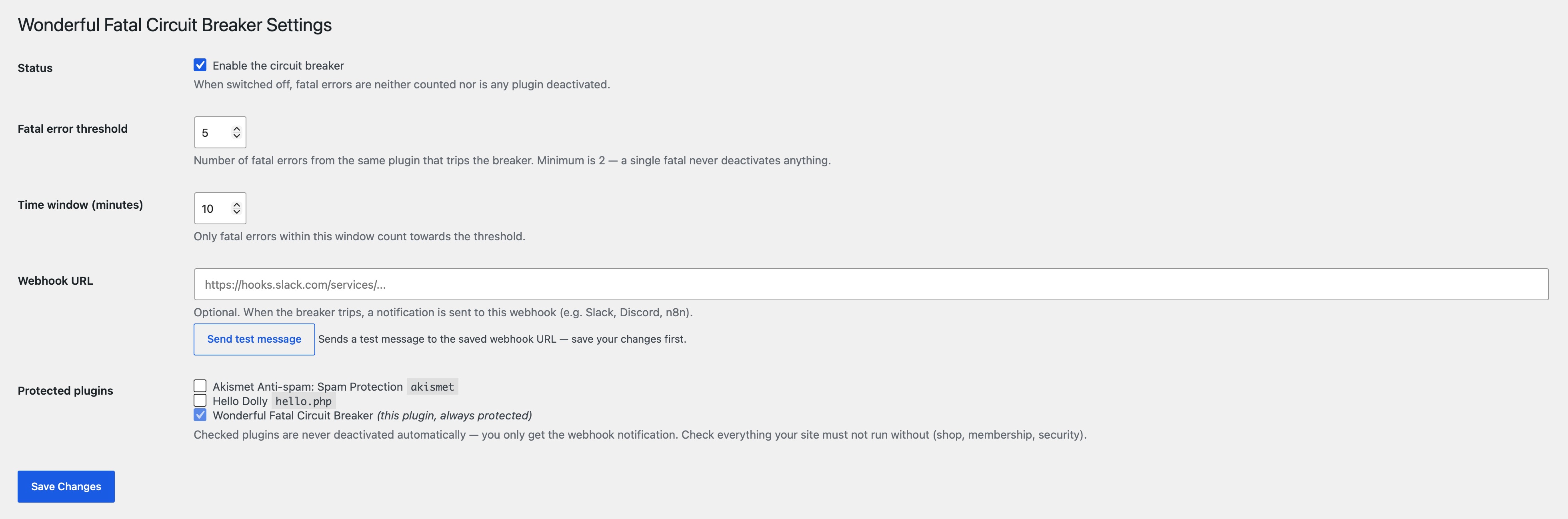
This plugin works like an electrical circuit breaker: it counts PHP fatal errors per plugin within a configurable time window. When the same plugin keeps crashing (default: 5 fatals within 10 minutes), the breaker trips and the plugin is deactivated automatically. Your site keeps running without the broken plugin instead of staying down.
Plugins your site must not run without (shop, membership, security) can be ticked off as protected — they are never deactivated automatically. For protected plugins you only get a notification, so a human can decide.
Optionally, a webhook URL (Slack, Discord, n8n, …) can be configured. Whenever the breaker trips — or a protected plugin keeps crashing — a notification is sent there.
What the breaker does when it trips:
- Removes the broken plugin from the active plugins — without running any of its deactivation hooks (the plugin is broken; running its code would be exactly the wrong move).
- Shows a persistent admin notice with the error details until you reactivate the plugin.
- Sends a webhook notification if a webhook URL is configured.
Installation
- Upload the
wonderful-fatal-circuit-breakerfolder to the/wp-content/plugins/directory. - Activate the plugin through the ‘Plugins’ menu in WordPress.
- Go to Settings > Fatal Circuit Breaker in your admin dashboard.
- Tick off the plugins that must never be deactivated automatically.
- Optionally enter a webhook URL and verify it with the Send test message button. That’s it!
Frequently asked questions
Which error types are counted?
E_ERROR, E_PARSE, E_CORE_ERROR, and E_COMPILE_ERROR — the errors that actually take a site down. Warnings, notices, and deprecations are ignored.
Can a single fatal error deactivate one of my plugins?
No. The threshold has a hard minimum of 2, and the default is 5 fatals within 10 minutes. A one-off hiccup never trips the breaker.
What happens to plugins I marked as protected?
Nothing — they are never deactivated automatically. If a protected plugin keeps crashing, you receive a webhook notification (if configured) so you can act manually. This plugin itself is always protected.
Are all fatal errors caught?
Runtime fatals — the vast majority, e.g. a plugin crashing while rendering a page — are caught. Fatals that happen while WordPress is still loading the plugin files themselves (e.g. a syntax error in a plugin’s main file) occur before this plugin can register its handler and cannot be counted.
Does this work on multisite?
The breaker only manages the per-site active plugins. Network-activated plugins are never touched.
Does this plugin affect my site’s performance?
No. The plugin only runs a very lightweight check at the very end of a PHP process, and only if a fatal error has occurred. It has no impact on the performance during normal site operation.
Changelog
1.0.2
- Removed load_plugin_textdomain() call (translations are loaded automatically by WordPress.org since WP 4.6).
- Prefixed the test-notice transient and WP_Error codes with the full plugin prefix.
1.0.1
- Coding standards: prefixed global variables in uninstall.php.
1.0.0
- Initial release.
Screenshots
For developers
Is this your plugin? Show off the numbers.
Add a live badge to your site, docs or GitHub README. It updates on its own — no account needed.
FAQ
Wonderful Fatal Circuit Breaker: quick answers
Straight answers, pulled from live WordPress.org data.
Live data from WordPress.org · checked Sep 29, 2026
Is Wonderful Fatal Circuit Breaker free?
Yes. Wonderful Fatal Circuit Breaker is free to download and use from the official WordPress.org plugin directory.
Is Wonderful Fatal Circuit Breaker safe to use in 2026?
Wonderful Fatal Circuit Breaker works, but test it on a staging site before relying on it in 2026. It runs on 30+ sites and was last updated 3 months ago, and scores 58/100 on our health check.
How many websites use Wonderful Fatal Circuit Breaker?
Wonderful Fatal Circuit Breaker is active on 30+ WordPress websites and has been downloaded 244 times since it launched in July 2026. It was downloaded 69 times in the last 30 days.
Does Wonderful Fatal Circuit Breaker work with WordPress 7.1?
Wonderful Fatal Circuit Breaker is officially tested up to WordPress 7.0.6, while the latest release is 7.1.2. It may still work, but try it on a staging site first.
What PHP version does Wonderful Fatal Circuit Breaker need?
Wonderful Fatal Circuit Breaker requires PHP 7.4 or higher. Most hosts run PHP 8.x today, so it works on any modern WordPress hosting.
When was Wonderful Fatal Circuit Breaker last updated?
The latest version, 1.0.2, was released on July 5, 2026 (3 months ago).
Who makes Wonderful Fatal Circuit Breaker?
Wonderful Fatal Circuit Breaker is developed and maintained by wonderfulplugins.
Powered by PageForge
Want thousands of pages that rank like these? Build them in an afternoon.
This directory runs on the same engine as PageForge. Turn any spreadsheet, CSV or API into thousands of fast, SEO-ready WordPress pages — with schema, internal links and AI-written copy baked in.
- CSV, Google Sheets & API data sources
- AI content, schema & internal links per page
- Works with Elementor, Gutenberg, Yoast & Rank Math
- Free on WordPress.org — no credit card


