



WMX Pull Product Images
Fetch a supplier's product images from a URL into your WooCommerce product gallery, no manual downloading, uploading, or renaming.

Solid choice
WMX Pull Product Images is a solid plugin choice in 2026, with a few things worth checking first. Was last updated 1 day ago, and scores 64/100 on our health check.
- Actively developed — last update 1 day ago
- Tested with the latest WordPress (7.1)
- Small user base (<10 active installs)
- Very few reviews so far
How does it stack up?
Side-by-side on installs, updates, ratings & support



Daily downloads
Not enough data yet.
Download spikes usually follow a new release — each site that auto-updates counts as a download.
Rankings
Where WMX Pull Product Images stands todayWordPress.org search rankings
Live position in the plugin search, top 100| Keyword | Position |
|---|---|
| image import | >100 |
| media library | >100 |
| product gallery | >100 |
| product images | >100 |
| woocommerce | >100 |
About WMX Pull Product Images
From the official readme · v1.5.17Description
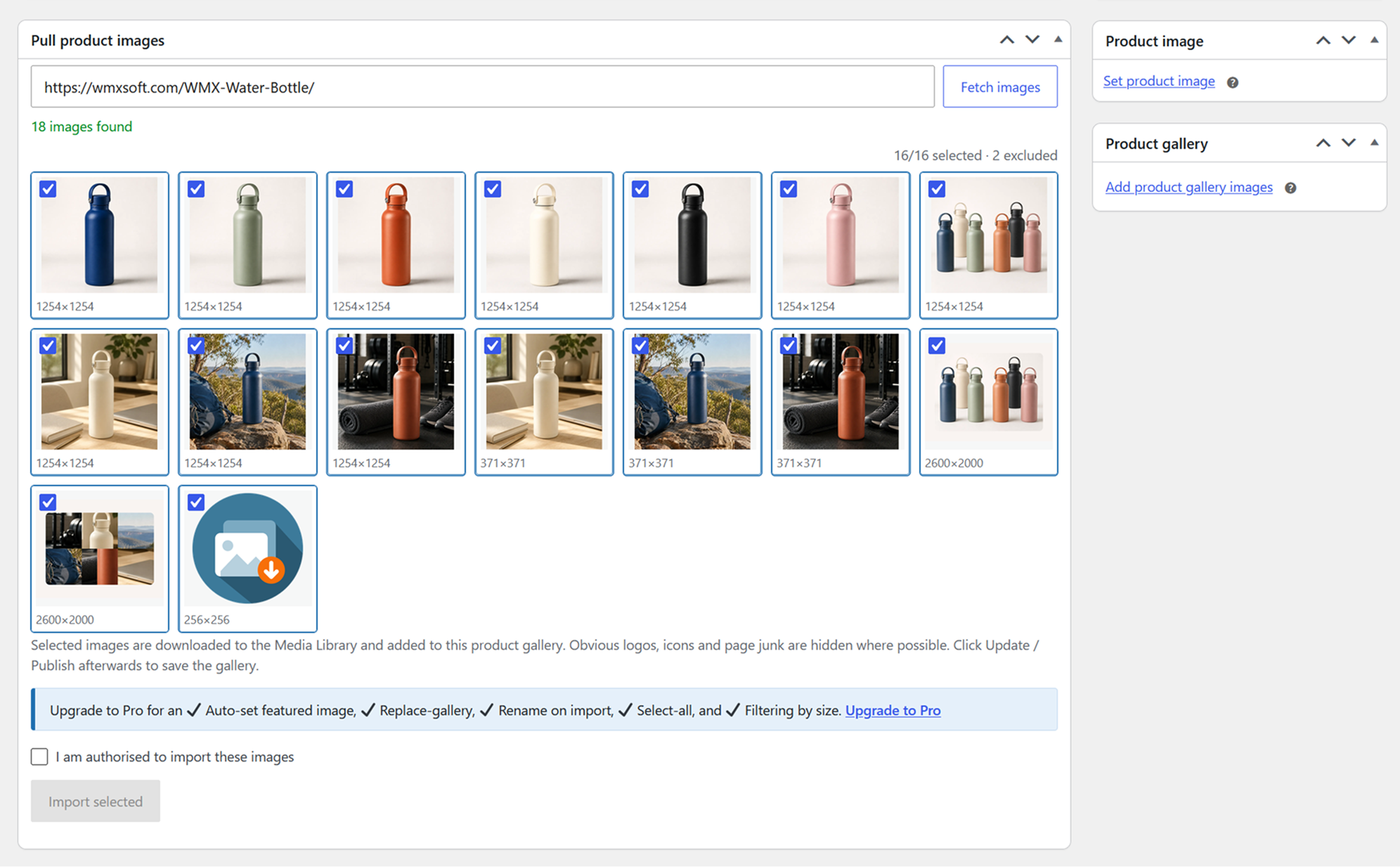
Paste a supplier’s product-page URL on the WooCommerce product edit screen, tick the images you want, and pull them into the Media Library and your product gallery, no manual downloading, uploading, or renaming.
Free
- A “Pull product images” box on the classic WooCommerce product editor.
- Fetch every image from a supplier’s product page by pasting its URL.
- Resolves thumbnail and resize variants back to the original, full-resolution file (WordPress, Shopify, Magento, BigCommerce, imgix / Squarespace).
- Shows each image’s real dimensions (read from the file header) so you can judge quality before importing.
- Hides obvious logos, icons and page junk automatically.
- Preview and hand-pick the images you want, then import them into the product gallery.
- Preserves the supplier’s alt text.
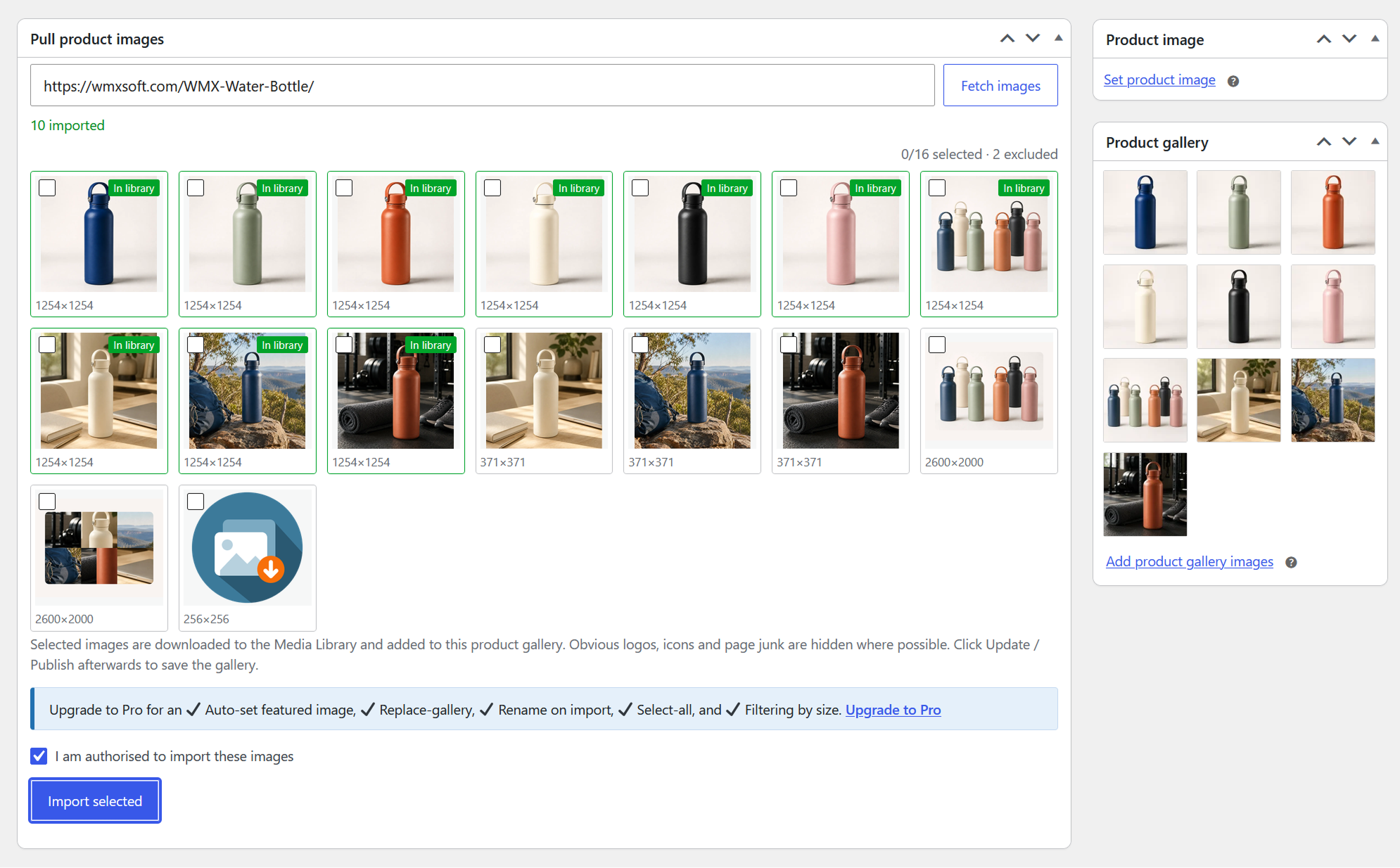
- Safe re-imports: an image already in your Media Library is reused, never downloaded twice.
- If a page can’t be fetched (e.g. a bot challenge), paste its page source and the same detection runs on it.
Pro
Upgrade to Pro (through wmxsoft.com) for the power features:
- Automatically set the featured image from your first pick.
- Replace-gallery mode and finer gallery controls.
- Filter images by size with an interactive slider (for large galleries), plus a configurable minimum size.
- One-click “select all”, drag-to-select a group of images, and rename files to the product slug on import.
- Remember your preferences between imports.
How it works
- Edit or add a product. The “Pull product images” box appears below the editor.
- Paste the supplier’s product page URL and click Fetch images.
- Pick the images you want and click Import selected, and they are added to the product gallery.
- Click Update or Publish to save the gallery with the product.
The page is fetched server-side and parsed for og:image, JSON-LD, itemprop/image_src meta, preload links, img/srcset/picture, lazy-load templates, image-bearing data-* attributes, inline CSS backgrounds, lightbox links, and gallery JSON embedded in scripts (Magento, BigCommerce, Squarespace, Vue/React apps). Galleries that are built entirely in the browser after page load, with no image URLs in the HTML source, cannot be seen.
External services
When you use the image tools, the plugin makes outbound HTTP requests from your web server to two things, only when you ask it to:
- the supplier product-page URL you paste (to read the page and find images), and
- the image URLs on that page (to read dimensions and to download the images you select).
WordPress’s safe HTTP layer blocks requests to private/internal hosts, including on redirects. Make sure you are entitled to use the supplier’s imagery on your store.
The plugin uses the Freemius service for the Pro upgrade and, in the Pro version, to deliver updates and validate licences. It may contact api.freemius.com with basic environment information (such as site URL and plugin/WordPress versions); the Pro version additionally sends your licence key. See the Freemius Terms (https://freemius.com/terms/) and Privacy Policy (https://freemius.com/privacy/).
Installation
- In wp-admin go to Plugins > Add New, search for “WMX Pull Product Images”, then Install and Activate. Or upload the plugin ZIP via Plugins > Add New > Upload Plugin, or copy the
wmx-pull-product-imagesfolder intowp-content/plugins/. - Activate the plugin. WooCommerce must be active.
- (Pro, optional) Set the minimum image width and height under Settings > Pull Product Images (default 400 x 400).
Frequently asked questions
What’s the difference between Free and Pro?
Free fetches a supplier’s images, resolves them to full resolution, shows their dimensions, hides obvious junk, and lets you hand-pick and import them into the product gallery. Pro adds automation and scale: auto-set featured image, replace-gallery mode, filter and sort by dimensions, select-all, rename on import, and remembered preferences.
Does it work with the new block-based product editor?
It targets the classic WooCommerce product editor (the one WPBakery runs alongside). It does not target the block-based product editor.
A supplier page returns no images. Why?
Some sites build their gallery in the browser from a separate API call after the page loads, leaving no image URLs in the HTML source; those cannot be detected. The page is also fetched by your server (not your browser), so sites behind a Cloudflare (or similar) bot challenge that requires JavaScript cannot be fetched at all. Developers can adjust the outgoing request with the wmxppi_user_agent and wmxppi_http_args filters. When a page can’t be fetched, use Paste page source: open the page in your own browser (which passes the challenge), view its source, copy it, and paste it into the box…
Which image types are supported?
JPEG, PNG, WebP, and AVIF, up to 25 MB each.
Will it re-download images I already imported?
No. Each attachment stores its source URL, so an image already in the Media Library is reused instead of downloaded again.
Are there hooks for developers?
Yes: wmxppi_images ( array $images, string $url, string $source, int $post_id ) – filter candidates before they are shown. wmxppi_http_args ( array $args, string $accept ) – adjust the page request. wmxppi_user_agent ( string $user_agent ) – change the User-Agent used to fetch pages and images. wmxppi_min_size ( array { min_width, min_height } ) – override the saved minimum size (Pro). wmxppi_max_images ( int $max ) – default 80.
Changelog
1.5.17
- Minor internal tidy-ups.
1.5.16
- Code tidy-up for the WordPress.org review. No change to how the plugin works.
1.5.15
- Internal names now use the
wmxppiprefix. If you hooked the plugin’s filters, switch to the newwmxppi_*names.
1.5.14
- The free version now contains only the free features. Pro features come with the Pro version, which the plugin offers to install when you upgrade.
1.4.13
- Copies of the free version downloaded from wmxsoft.com now update in wp-admin.
1.3.12
- Housekeeping. No functional change.
Screenshots
For developers
Is this your plugin? Show off the numbers.
Add a live badge to your site, docs or GitHub README. It updates on its own — no account needed.
Best WMX Pull Product Images alternatives
All image import plugins →FAQ
WMX Pull Product Images: quick answers
Straight answers, pulled from live WordPress.org data.
Live data from WordPress.org · checked Oct 13, 2026
Is WMX Pull Product Images free?
Yes. WMX Pull Product Images is free to download and use from the official WordPress.org plugin directory.
Is WMX Pull Product Images safe to use in 2026?
WMX Pull Product Images is a solid plugin choice in 2026, with a few things worth checking first. Was last updated 1 day ago, and scores 64/100 on our health check.
How many websites use WMX Pull Product Images?
WMX Pull Product Images is active on <10 WordPress websites and has been downloaded 44 times since it launched in October 2026. It was downloaded 31 times in the last 30 days.
Does WMX Pull Product Images work with WordPress 7.1?
Yes. The developer has tested WMX Pull Product Images up to WordPress 7.1.3, the latest release. It requires WordPress 6.2 or newer.
What PHP version does WMX Pull Product Images need?
WMX Pull Product Images requires PHP 7.4 or higher. Most hosts run PHP 8.x today, so it works on any modern WordPress hosting.
When was WMX Pull Product Images last updated?
The latest version, 1.5.17, was released on October 12, 2026 (1 day ago).
Who makes WMX Pull Product Images?
WMX Pull Product Images is developed and maintained by WEBMATRIX.
What are the best alternatives to WMX Pull Product Images?
The most popular alternatives to WMX Pull Product Images are URL Image Importer (900+ installs), Sage Auto Upload Images (40+ installs) and Michael Cloud Image Auto Im… (<10 installs).
Powered by PageForge
Want thousands of pages that rank like these? Build them in an afternoon.
This directory runs on the same engine as PageForge. Turn any spreadsheet, CSV or API into thousands of fast, SEO-ready WordPress pages — with schema, internal links and AI-written copy baked in.
- CSV, Google Sheets & API data sources
- AI content, schema & internal links per page
- Works with Elementor, Gutenberg, Yoast & Rank Math
- Free on WordPress.org — no credit card


