



Widget Context
Show and hide widgets on specific posts, pages and sections of your site.

Solid choice
Widget Context is a solid plugin choice in 2026, with a few things worth checking first. It runs on 30K+ sites, is rated 4.5/5 and was last updated 4 months ago, and scores 67/100 on our health check.
- Proven at scale on 30K+ active sites
- Loved by users — 4.5/5 from 97 reviews
- Only tested up to WordPress 6.9 (latest is 7.1)
How does it stack up?
Side-by-side on installs, updates, ratings & support


Daily downloads
Download spikes usually follow a new release — each site that auto-updates counts as a download.
Rankings
Where Widget Context stands todayWordPress.org search rankings
Live position in the plugin search, top 100| Keyword | Position |
|---|---|
| context | #1 |
| logic | #34 |
| widget | #19 |
| widget context | #1 |
| widgets | #68 |
Version adoption
Share of active sites per release.
Rating breakdown
★★★★★★★★★★ 4.5 from 97 reviews
About Widget Context
From the official readme · v1.4.0Description
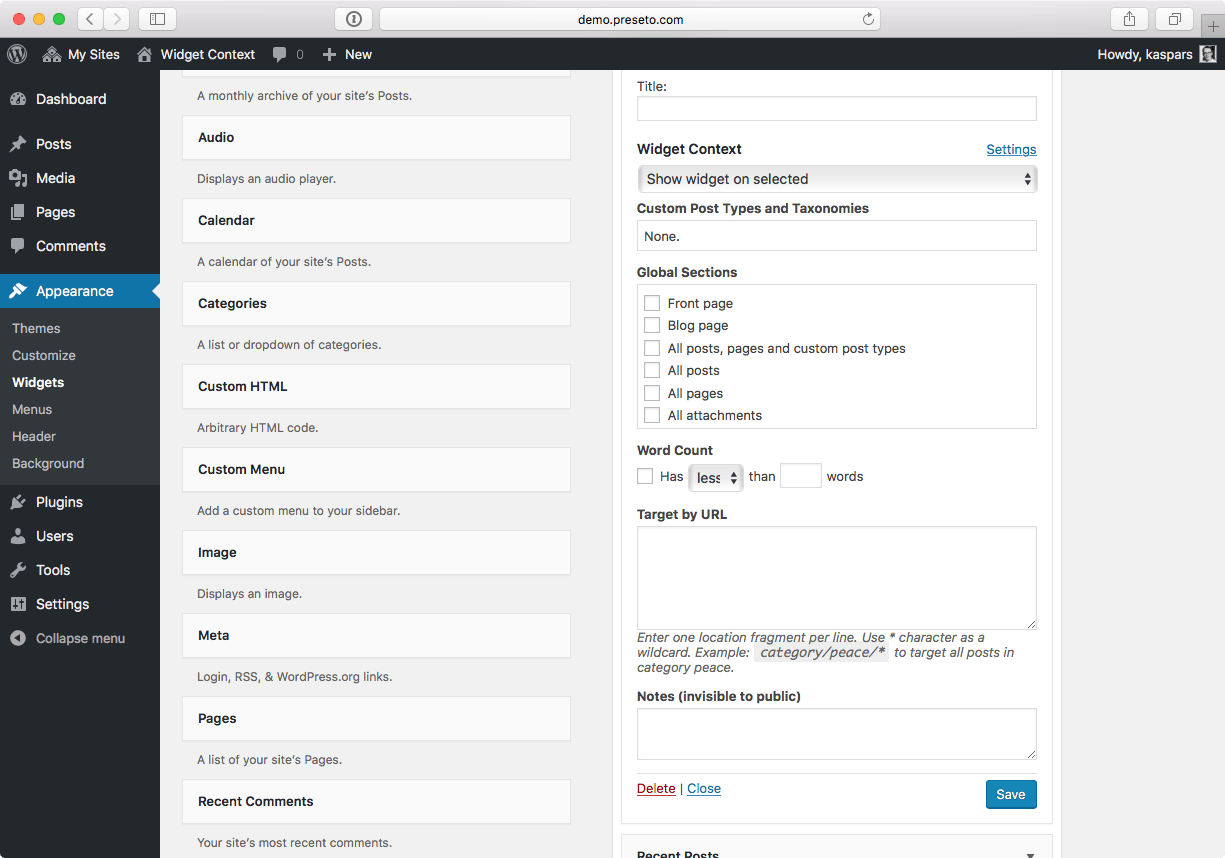
Use Widget Context to show and hide widgets on certain sections of your site — front page, posts, pages, archives, search, etc. Use targeting by URLs (with wildcard support) for maximum flexibility.
Premium Support
Subscribe to our Premium Support service and get the PRO 🚀 version of the plugin for free when it’s launched! Your support enables consistent maintenance and new feature development, and is greatly appreciated.
Contribute
- Suggest code improvements on GitHub.
- Report bugs and suggestions on WordPress.org forums.
- Help translate to your language.
Documentation
Widget visibility can be configured under individual widget settings under “Appearance → Widgets” in your WordPress administration area or through the widget editing interface in the Customizer.
Target by URL
The “Target by URL” is a powerful feature for targeting sections of your website based on the request URLs. It was inspired by a similar feature in the Drupal CMS.
Use relative URLs such as page/sub-page instead of absolute URLs https://example.com/page/sub-page because relative URLs are more flexible and make the logic portable between different domains and server environments.
Wildcards
Use the wildcard symbol * for matching dynamic parts of the URL. For example:
-
topic/widgets/*to match all posts in the widgets category, if your permalink structure is set to/topic/%category%/%postname%. -
page-slug/*to match all child pages of the page-slug parent page. -
Use a trailing
?*to capture URL with all query arguments such asutm_source, etc. For example, for everyblog/post-slugalso includeblog/post-slug?*.
Exclude by URL
Specify URLs to ignore even if they’re matched by any of the other context rules. For example, enter example/sub-page to hide a widget on this page even when “All Posts” is selected under “Global Sections”.
Installation
- Search for Widget Context under “Plugins → Add New” in your WordPress dashboard.
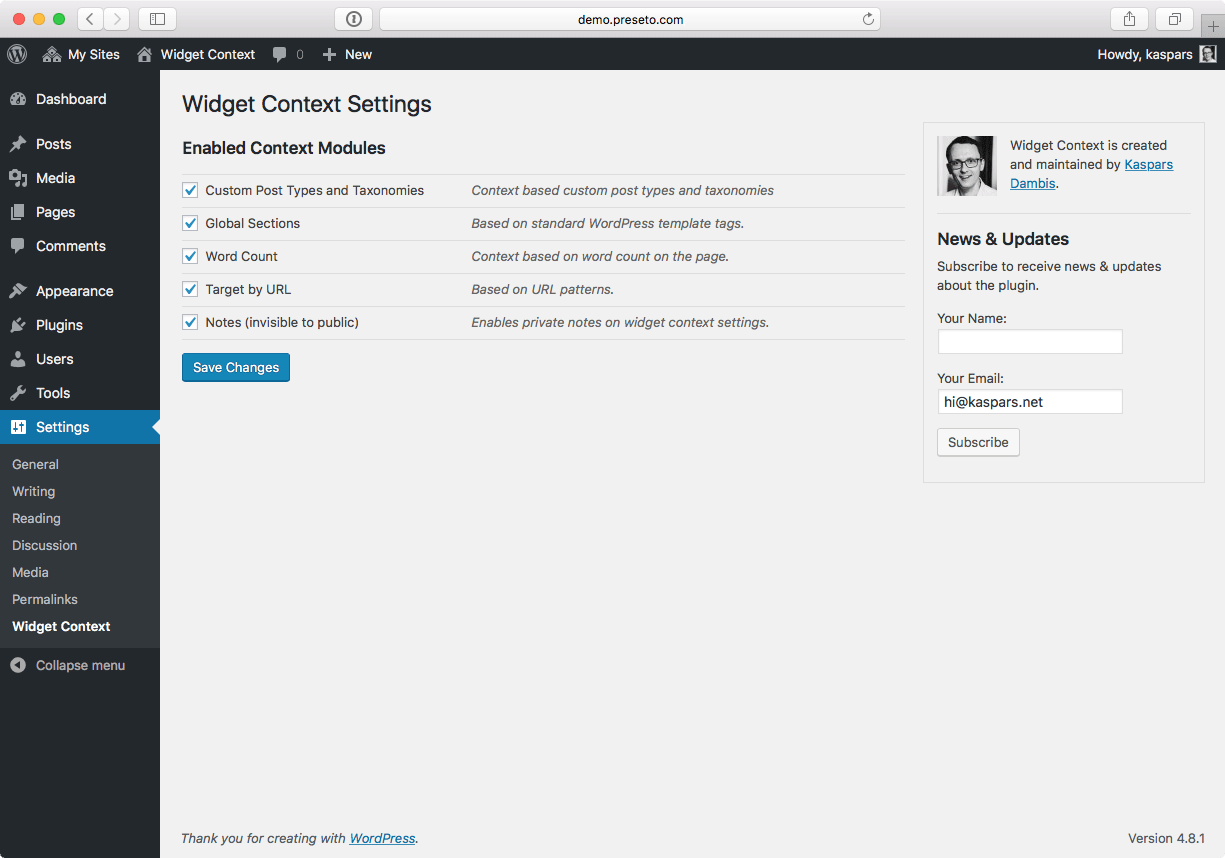
- Widget Context settings will appear automatically under each widget under “Appearance → Widgets”.
- Visit “Settings → Widget Context” to configure the available widget visibility contexts.
Changelog
PHP 5.6 is now the minimum supported version of PHP. Also included is developer tooling update and improved PHP unit tests.
1.4.0 (May 18, 2026)
- Security: Ensure widget context settings can only be changed by logged-in administrators intentionally (CVE-2026-7615).
- Require PHP 7.4 to match the WordPress core requirements.
- Feature: Add a toggle to enable the legacy widget interface (non-block).
1.3.3 (August 31, 2024)
- Mark as tested with WordPress 6.6 and PHP 8.2, see #72.
1.3.2 (April 27, 2020)
- Bugfix: Fix the Widget Context settings link in the widget controls after moving the settings under the “Appearance” menu for usability (closer to the widget settings).
- Feature: Add a link to the plugin settings in the plugin admin list, too.
1.3.1 (April 24, 2020)
- Bugfix: better support for URL rules with query parameters.
1.3.0 (April 23, 2020)
- Introduce the long-awaited “Exclude by URL” feature to prevent certain URLs from showing or hiding a widget when it’s matched by any other visibility rule.
- Introduce premium support to help maintain the plugin. Subscribe now to get the PRO version of the Widget Context for free when it’s launched!
1.2.0 (August 20, 2019)
- Set PHP 5.6 as the minimum supported version of PHP to match WordPress core.
- Developer tooling update: introduce PHP autoloading, PHP unit tests with proper mocking, linting for JS, switch to Docker inside a Vagrant wrapper for local development environment and update to the latest version of WordPress coding standards (see #50).
Screenshots
For developers
Is this your plugin? Show off the numbers.
Add a live badge to your site, docs or GitHub README. It updates on its own — no account needed.
Best Widget Context alternatives
All context plugins →


FAQ
Widget Context: quick answers
Straight answers, pulled from live WordPress.org data.
Live data from WordPress.org · checked Sep 26, 2026
Is Widget Context free?
Yes. Widget Context is free to download and use from the official WordPress.org plugin directory.
Is Widget Context safe to use in 2026?
Widget Context is a solid plugin choice in 2026, with a few things worth checking first. It runs on 30K+ sites, is rated 4.5/5 and was last updated 4 months ago, and scores 67/100 on our health check.
How many websites use Widget Context?
Widget Context is active on 30K+ WordPress websites and has been downloaded 1,010,712 times since it launched in July 2009. It was downloaded 3,714 times in the last 30 days.
Does Widget Context work with WordPress 7.1?
Widget Context is officially tested up to WordPress 6.9.9, while the latest release is 7.1.2. It may still work, but try it on a staging site first.
What PHP version does Widget Context need?
Widget Context requires PHP 7.4 or higher. Most hosts run PHP 8.x today, so it works on any modern WordPress hosting.
When was Widget Context last updated?
The latest version, 1.4.0, was released on May 18, 2026 (4 months ago).
Who makes Widget Context?
Widget Context is developed and maintained by Kaspars.
What are the best alternatives to Widget Context?
The most popular alternatives to Widget Context are Conditional Menus (60K+ installs), Widgets Control (800+ installs) and Widget Manager Light (600+ installs).
Powered by PageForge
Want thousands of pages that rank like these? Build them in an afternoon.
This directory runs on the same engine as PageForge. Turn any spreadsheet, CSV or API into thousands of fast, SEO-ready WordPress pages — with schema, internal links and AI-written copy baked in.
- CSV, Google Sheets & API data sources
- AI content, schema & internal links per page
- Works with Elementor, Gutenberg, Yoast & Rank Math
- Free on WordPress.org — no credit card


