



WebFacing™ – Email Accounts management for cPanel®
WebFacing™ - Email Accounts management for cPanel®

Safe pick
Yes — WebFacing™ is a safe, well-maintained plugin to use in 2026. It runs on 200+ sites, is rated 5/5 and was last updated 3 weeks ago, and scores 81/100 on our health check.
- Actively developed — last update 3 weeks ago
- Tested with the latest WordPress (7.1)
- Small user base (200+ active installs)
- Needs PHP 8.3 or newer
How does it stack up?
Side-by-side on installs, updates, ratings & support



Daily downloads
Download spikes usually follow a new release — each site that auto-updates counts as a download.
Rankings
Where WebFacing™ stands todayWordPress.org search rankings
Live position in the plugin search, top 100| Keyword | Position |
|---|---|
| auto-reply | #7 |
| backup | >100 |
| cpanel | #1 |
| >100 | |
| membership | >100 |
Version adoption
Share of active sites per release.
Rating breakdown
★★★★★★★★★★ 5 from 8 reviews
About WebFacing™
From the official readme · v5.4Description
🕸️ By WebFacing™. Read, send, show, manage, list, create, add, remove or delete email accounts, old messages, forwarders and autoresponders.
One click read, send and manage all your emails without a login step. Update notification recipients. Backup and download your complete cPanel® account.
This plugin requires your site is hosted on a cPanel® equipped server.
It uses it’s UAPI through shell access by default, or via HTTP API. Using without shell_exec initially requires a temporary access token generated in the cPanel® native interface.
Translation ready. Ready translations are
- Norwegian (bokmål)
Current features
- REMOVED: Dashboard widget with three live graphic server memory usage and server load gauge charts (can eassily be minimized or hidden via Screen Options or programatically)
- WP Block for frontend access user’s own Webmail
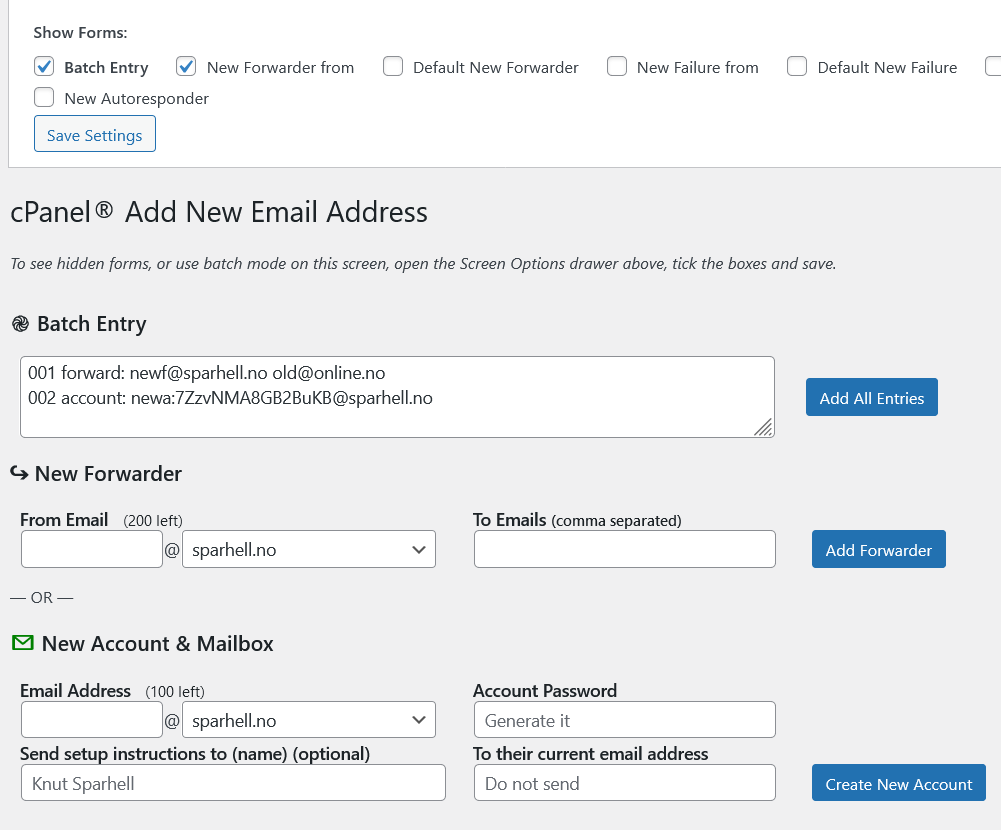
- Bulk entry of forwarders and email accounts (as free trial only, very limited use)
- Screen Options to select visible forms on New Email screen, saved for as user option (and per site for Multisite)
- Shortcode
[wf_cpanel_email_webmail]or as[wf_cpanel_email_webmail]My Email[/wf_cpanel_email_webmail]for frontend access user’s own Webmail - cPanel® API Tokens Management – needed in case
shell_execis not available or when accessing a remote server - Backup complete cPanel® hosting account to file, and download it
- Restore account backup files by extracting it to a folder (experimental)
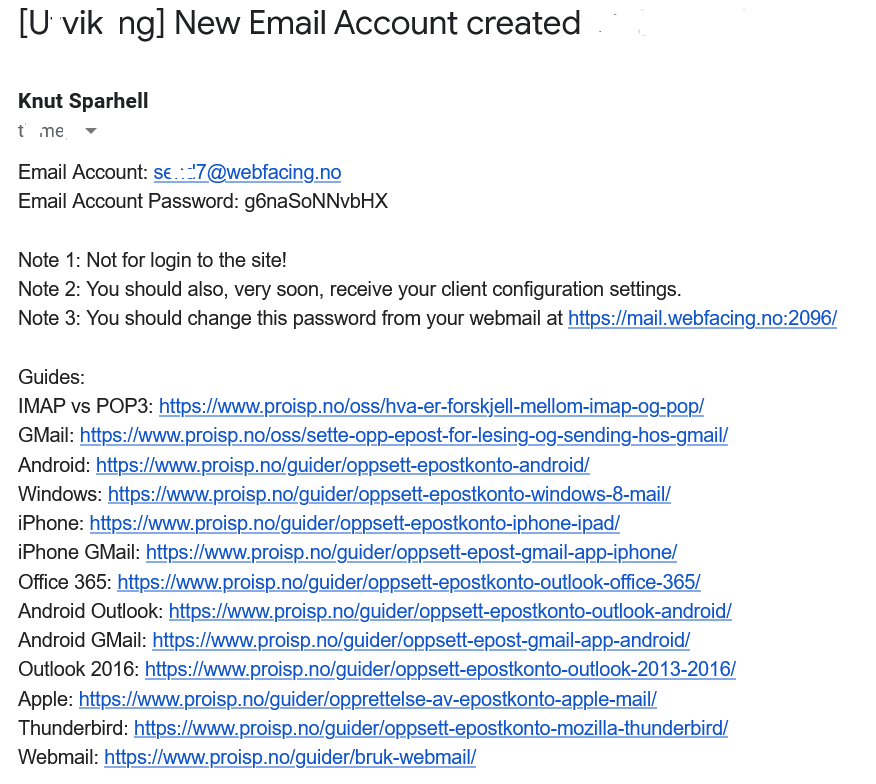
- Semi automated migration to new email server, including setup of new accounts for users, with sending setup instructions, passwords and links to setup guides for most common email clients
- Add 10 single Email Accounts per week (without Pro nag) — actually unlimited
- Remove single/multiple Email Accounts
- List mailboxes with number of messages for each box
- Remove old messages from mailboxes (older than 52 weeks as default)
- Shrink a mailbox (empty it)
- Change storage quota for for email accounts
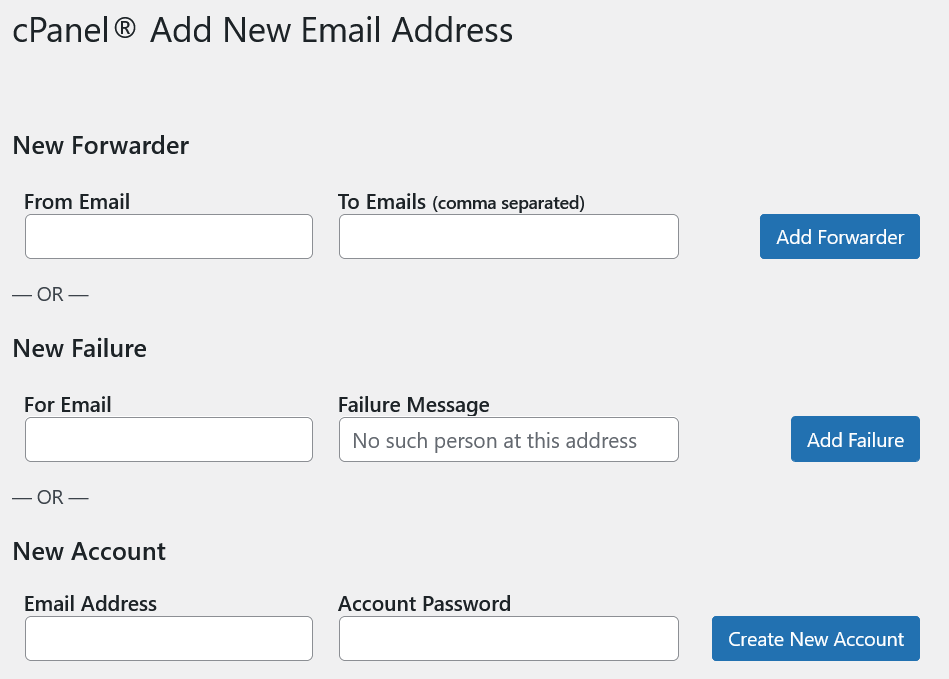
- Add 20 forwarders per week (without Pro nag) — actually unlimited
- Add/remove single/multiple Email Failure addresses or Blackhole addresses
- Add/delete/edit email autoresponders (for, subject, body, from, start, stop, interval)
- Send single cPanel® Email Account Instruction (Client Setup) to specfied address
- Send multipe cPanel® Email Account Instructions (Client Setups) to yourself for distribution
- Open your cPanel® Webmail app for selected account (single click/tap – no further login needed!)
- Set/change Email Account passwords
- Set Default Email Address (catch-all) as forwarder, failure or blackhole
- View/change Notification/Contact Email Addresses
- Access for any user to view and read their own emails, if given the
cpanelcapability (Use custom code or a Roles/Capabilities Manager plugin) -
Support for subdomain email addresses when the main domain is a subdomain (only)
-
In case the
shell_execfunction is disabled in your server PHP configuration, create a token in native cPanel® interface and add one of these lines to yourwp-config.phpfile,functions.phpin your child theme, in Must-use plugin or a custom regular pluginconst WF_CPANEL_API_TOKEN = 'my-temp-api-token';define( 'WF_CPANEL_API_TOKEN', 'my-temp-api-token' );- See Manage API Tokens in cPanel®
- The
WF_CPANEL_API_TOKENconstant may be removed when a new token is created and activated from the plugin admin page
-
Option to set the default visibility for users on New Email screen (users may still set their own preferences):
add_filter( 'wf-cpanel-email-new-email_user-option', static function( bool $default, string $option, int $user_id ) {

if ( $option === 'wc-show-new-blackhole' /*or by $user_id*/ ) {

$default = true/*false*/;

}

return $default;

}, 10, 3 );
-
Option to allow other users than those with
manage_optionscapability to manage email adresses, single- or multisite, one of the following:add_filter( 'wf_cpanel_email_capability', static fn( string $cap ): string => $my_cpanel_email_cap );add_filter( 'wf_cpanel_email_capability', static fn( string $cap ) => 'edit_published_pages' );
-
Option to allow other users than those with
manage_optionscapability to see the dashboard widget, or remove it, one of the following:add_filter( 'wf_cpanel_email_widget_capability', static fn( string $cap ): string => $my_cpanel_widget_cap );add_filter( 'wf_cpanel_email_widget_capability', static fn( string $cap ) => 'edit_published_pages' );add_filter( 'wf_cpanel_email_widget_capability', static fn( string $cap ) => 'do_not_allow' );
-
Option to alter the refresh interval in seconds for the dashboard widget, one of the following:
add_filter( 'wf_cpanel_email_widget_interval', static fn( int $interval ): int => $my_cpanel_widget_interval );add_filter( 'wf_cpanel_email_widget_interval', static fn( int $interval ) => 45 );
-
Option to limit email addresses to current site domain, even for single site admins, one of the following
const WF_CPANEL_EMAIL_SITE_DOMAIN_ONLY = true;define( 'WF_CPANEL_EMAIL_SITE_DOMAIN_ONLY', true );add_filter( 'wf_cpanel_email_site_domain_only', '__return_true' );add_filter( 'wf_cpanel_email_site_domain_only', fn() => true );
-
Multisite Network: Option not to limit email addresses to current subsite domain, for site admins that are not network (super) admins, one of the following:
const WF_CPANEL_EMAIL_SITE_DOMAIN_ONLY = false;define( 'WF_CPANEL_EMAIL_SITE_DOMAIN_ONLY', false );add_filter( 'wf_cpanel_email_site_domain_only', '__return_false' );add_filter( 'wf_cpanel_email_site_domain_only', fn() => false );
-
Many optional parameters and API filters for the shortcode output, see
includes/ShortCode.phpuntil further tested and documented -
If you want to access another user on the server, use one of the following
const WF_CPANEL_USER = 'my-username';define( 'WF_CPANEL_USER', 'my-username' );
-
If you want to access a remote server, use one of the following
const WF_CPANEL_HOST = 'my-host';define( 'WF_CPANEL_HOST', 'my-host' );- using
WF_CPANEL_HOSTrequiresWF_CPANEL_USERto also be defined
-
Automaticallly create new accounts when a new user is registered?
add_action( ‘user_register’, static function( int $user_id, array $userdata ): void {
// What to do just after the registraton here, like this (adds an email address that forwards to all users, a mailing list):
if ( method_exists( ‘WebFacing\cPanel\UAPI’, ‘add_forwarder’ ) ) {
\WebFacing\cPanel\UAPI::add_forwarder( ‘all-users@yoursite.tld, ‘$userdata[‘user_email’] );
}
}, 2 ); -
Site Health
- Tests and information
- Check auto detecting and current email routing in an extra Site Health tab (to any email address sent from your server)
Possible future features
- Scheduled automatic removal of old messages in/from mailboxes
- Import migration list for create account, send instructions and password to current address
- Delete selected email messages from mailboxes (by selectd message age etc.)
- Suspend/unsuspend incoming/outgoing for email accounts (if requested)
- Suspend/unsuspend login to email accounts (if requested)
- Domain level email forwarding
- Domain Managament
- DNS Zone editing
Limitations, security, privacy – be warned
- Maximum New Forwarders = 20, Maximum New Accounts = 5, weekly reset
- Trial: Maximum New Forwarders as bulk entry = 4, Maximum New Accounts as bulk entry = 2
- Now works without shell access! Will not work at all if
shell_execis disabled inphp.ini - Works only for admins, or other users with a custom
cpanelcapability and email on site domain (so far) - Any admin (if multisite, only network admins), or user with the filtered capability, on a site, can fully access any account on the cPanel® server instance
- No AYS warnings for delete actions
- If several sites/admins share the same cPanel® account, without being part of a WP Multisite network, no bulletproof separation, because of the way the cPanel® UAPI CLI works, with or without this plugin
Pro Addon
- Pro Addon plugin was released May 1, 2023 at https://webfacing.eu/plugin/wf-cpanel-email-accounts-pro/ and will unlock in bulk entry new forwarders and new accounts to the numbers in the purchesed license
Frequently asked questions
Does this (free) plugin limit the it’s use in any way?
Yes, in bulk entry of new forwaders and new accounts is considered a just trial for the Pro Edition, not included or supported in free plugin after being used once No, in spite the that it will ask you, in a standard, dismissable admin notice, to consider the Pro addon after 20 new forwarders, or 10 new accounts, per week, it doesn’t stop you from continuing to add more
The latest version has a regression and don’t work as well as it did in previous version, but other things are fixed and I like the new features, what can I do?
Please, immediately download and reinstall the previous version from the Advanced tab here, observe that the new issues are no longer present, then post in the support forum here.
Does this plugin add database tables, store many options, crons/scheduled tasks, custom post type content or lines to `wp-config.php` or write to any existing file?
No, no, no, no, and no. It stores transients, and, in case they are stored in the database (no persistent object cache), automatically deletes the expired ones from the options table. Account backup files are stored. If access tokens are created, then their names, corresponding host name, and which one is active, are stored as an option.
Does it require my login information to cPanel® or store any account passwords?
No. Nope. You may manually enter an API token in wp-config.php in case the shell_exec function is disabled.
Can it be used to serve my users or members on a frontend page?
Yes. Use the shortcode [wf_cpanel_email_webmail]. Many parametres for users, many filters the defaults, for developers. See `includes/ShortCode.php´ for details.
Does it work with WP Multisite Network?
Yes. Subsite admin access is then limited by default (filterable option). Unreliable site admin user separation may occur.
Can it manage other cPanel® instances than the one my site is on?
Yes. You need three constants (you must declare or define them in ´wp-config.php´ or in another plugin) WF_CPANEL_HOST, WF_CPANEL_USER and (temporarily) WF_CPANEL_API_TOKEN
Does it work without being on cPanel®?
No.
Can I contribute to this plugin?
Yes, please. Use the support forum for feedback, reports and suggestions.
Can I contact you by email for support, maybe with screen shots, or ask for new features that I need?
No, please use the support forum here if not using the Pro Addon.
Can I contact you by email to suggest a new feature that I believe to be useful for many and I can describe a use case for?
Yes, use support@webfacing.eu
Can I donate to the continued maintenance and further development of this plugin?
Report bugs or suggest enhancements or new features in the Support forum. Use the Donate button on the right sidebar on this page.
Changelog
5.4
- Sep 18, 2026
- Fixed a vulnerability, by removing the Dashboard gauges that had stopped working anyway
- Bump tested up to WP
- Bump tested up to PHP
5.3.6
- Jan 10, 2025
- Bump tested up to PHP
5.3.5
- Nov 14, 2024
- Bump tested up to
5.3.4
- Jun 2, 2024
- Add an explanation to why the gauges are missing in the dashboard widget when the cPanel® feature
serverstatusis unavaliable. This probably because of an outdated cPanel® version. The widget can, as always, be hidden, at least until your cPanel® is updated.
5.3.3
- Jun 1, 2024
- Remove debug and console logging
- Minor wording fixes
5.3.2
- May 31, 2024
- Replaced very static ‘Virtual’ dashboard widget gauge with ‘Database’ (DB Threads_connected) with a logaritmic scale 1% to 100% relative to
max_connectionsvariable - Add title attributes (tooltips) to resource usage widget gauges with the actually retrieved values
- Add Name Servers to Site Health Info
- Add SPF record validation to Site Health Info
- Add PTR record validation to Site Health Info
Screenshots

![Your page button example using Webmail block or shortcode [wf_cpanel_email_webmail] (text and styling friendly, filterable CSS classes)](https://ps.w.org/wf-cpanel-email-accounts/assets/screenshot-4.png?rev=2812777)
For developers
Is this your plugin? Show off the numbers.
Add a live badge to your site, docs or GitHub README. It updates on its own — no account needed.
Best WebFacing™ alternatives
All auto-reply plugins →FAQ
WebFacing™: quick answers
Straight answers, pulled from live WordPress.org data.
Live data from WordPress.org · checked Oct 11, 2026
Is WebFacing™ free?
Yes. WebFacing™ is free to download and use from the official WordPress.org plugin directory.
Is WebFacing™ safe to use in 2026?
Yes — WebFacing™ is a safe, well-maintained plugin to use in 2026. It runs on 200+ sites, is rated 5/5 and was last updated 3 weeks ago, and scores 81/100 on our health check.
How many websites use WebFacing™?
WebFacing™ is active on 200+ WordPress websites and has been downloaded 24,814 times since it launched in April 2021. It was downloaded 432 times in the last 30 days.
Does WebFacing™ work with WordPress 7.1?
Yes. The developer has tested WebFacing™ up to WordPress 7.1.3, the latest release. It requires WordPress 6.6 or newer.
What PHP version does WebFacing™ need?
WebFacing™ requires PHP 8.3 or higher. Most hosts run PHP 8.x today, so it works on any modern WordPress hosting.
When was WebFacing™ last updated?
The latest version, 5.4, was released on September 21, 2026 (3 weeks ago).
Who makes WebFacing™?
WebFacing™ is developed and maintained by Knut Sparhell.
What are the best alternatives to WebFacing™?
The most popular alternatives to WebFacing™ are bbPress Activity Tracker (10+ installs), AI Auto Responder Light (10+ installs) and Aotum8 Review Manager (<10 installs).
Powered by PageForge
Want thousands of pages that rank like these? Build them in an afternoon.
This directory runs on the same engine as PageForge. Turn any spreadsheet, CSV or API into thousands of fast, SEO-ready WordPress pages — with schema, internal links and AI-written copy baked in.
- CSV, Google Sheets & API data sources
- AI content, schema & internal links per page
- Works with Elementor, Gutenberg, Yoast & Rank Math
- Free on WordPress.org — no credit card


