



Management App for WooCommerce – Order notifications, Order management, Lead management, Uptime Monitoring
Woocommerce Mobile App - manage your woocommerce products, get order notifications, and manage orders and leads from your mobile phone.

Use with caution
Management App for WooCommerce works, but test it on a staging site before relying on it in 2026. It runs on 800+ sites, is rated 4/5 and was last updated 2 months ago, and scores 58/100 on our health check.
- Small user base (800+ active installs)
How does it stack up?
Side-by-side on installs, updates, ratings & support



Daily downloads
Download spikes usually follow a new release — each site that auto-updates counts as a download.
Rankings
Where Management App for WooComme… stands todayWordPress.org search rankings
Live position in the plugin search, top 100| Keyword | Position |
|---|---|
| woocommerce app | #20 |
| order notifications | #14 |
| wemanage | #1 |
| Woocommerce Admin | >100 |
| woocommerce management app | #7 |
Version adoption
Share of active sites per release.
Rating breakdown
★★★★★★★★★★ 4 from 9 reviews
About Management App for WooCommerce
From the official readme · v1.3.18Description
Simple Woocommerce Management App
With the WEmanage app you can manage your woocommerce website from anywhere at any time
Woocommerce management was never been easier.
NO JETPACK NEEDED
Download WEmanage APP
What can be done with the app?
WEmanage app is full of useful woocommerce admin features:
- Receive notifications for every sale on the site – including failed or canceled orders!
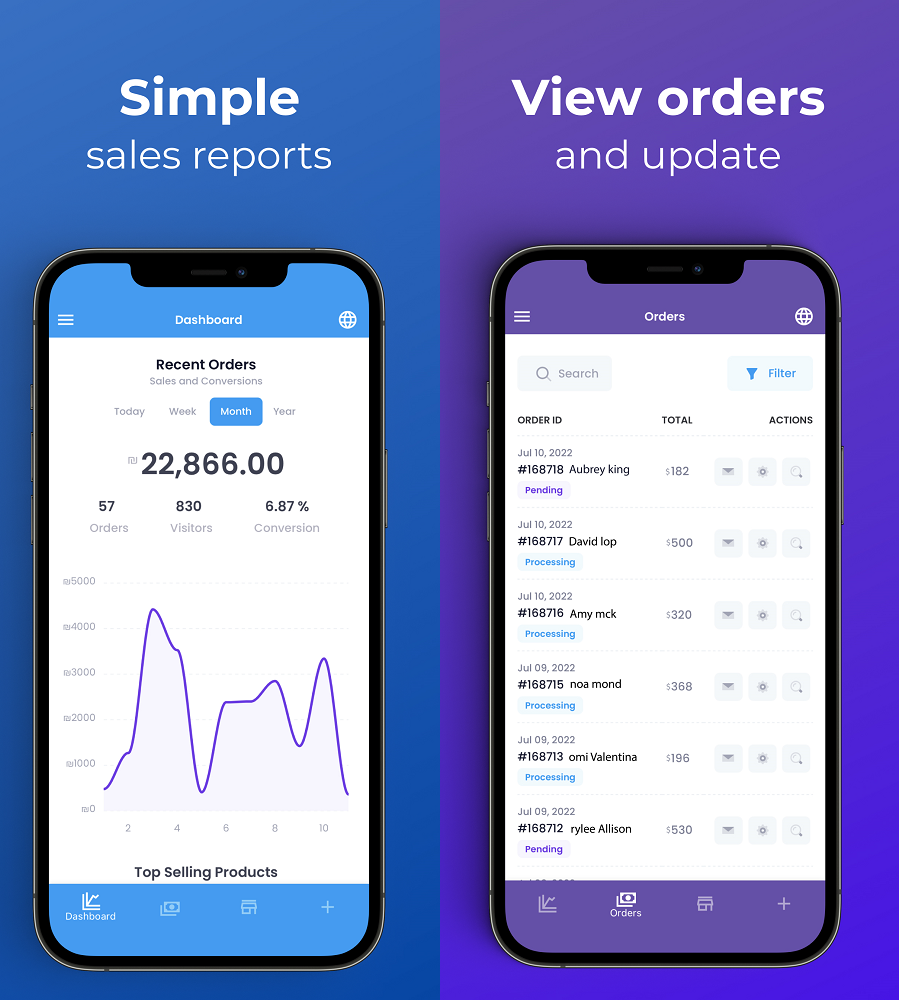
- View orders in real-time.
- Contacting buyers in one click – Via email, phone, or WhatsApp!
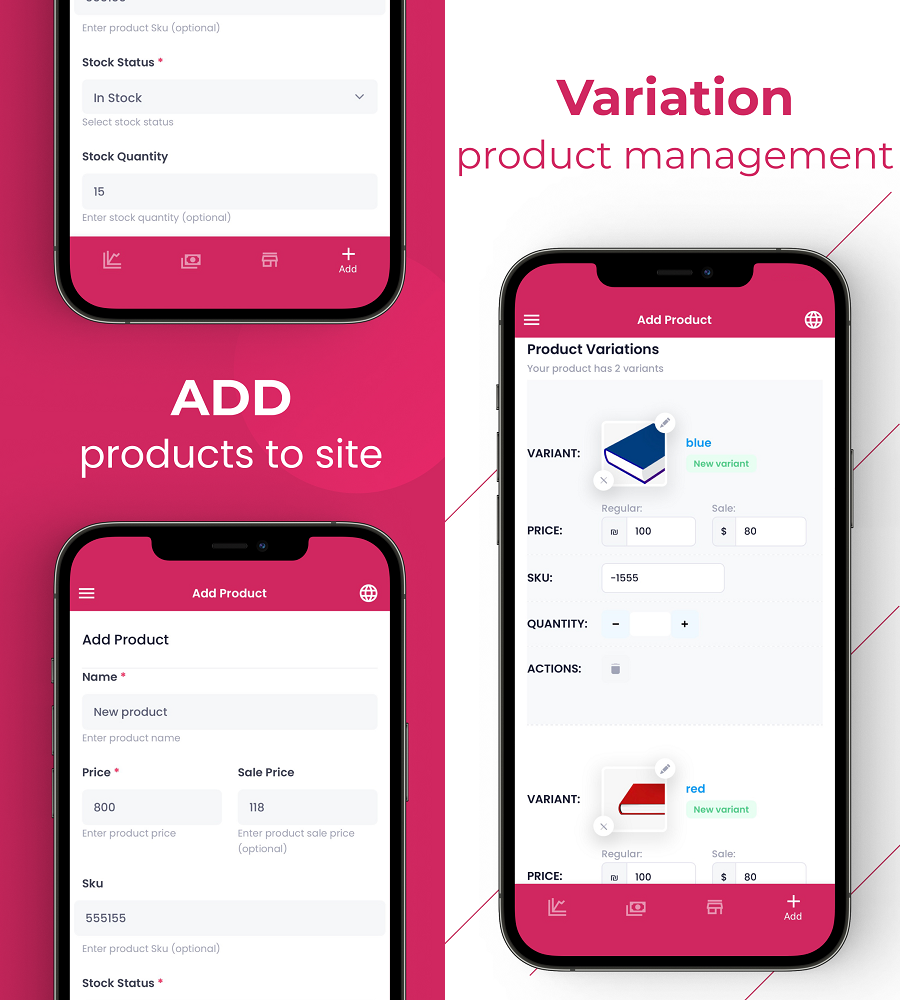
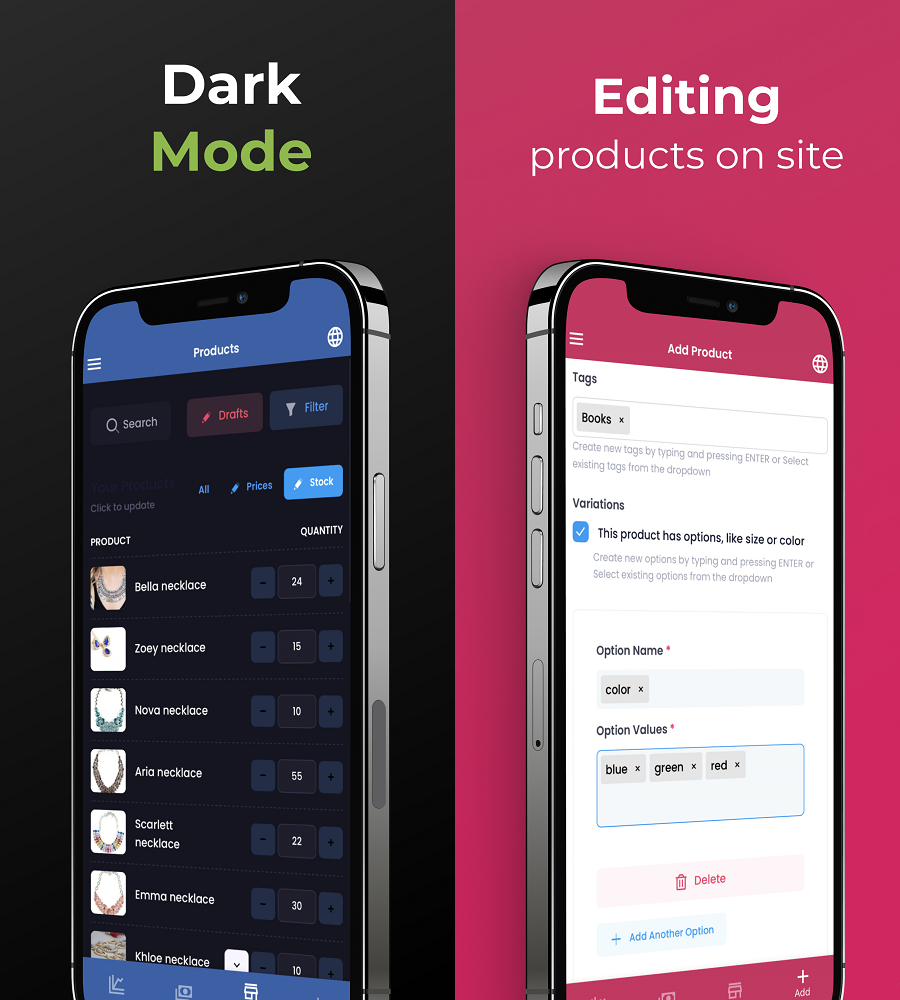
- Adding new products to the site – Includes products with many variations!
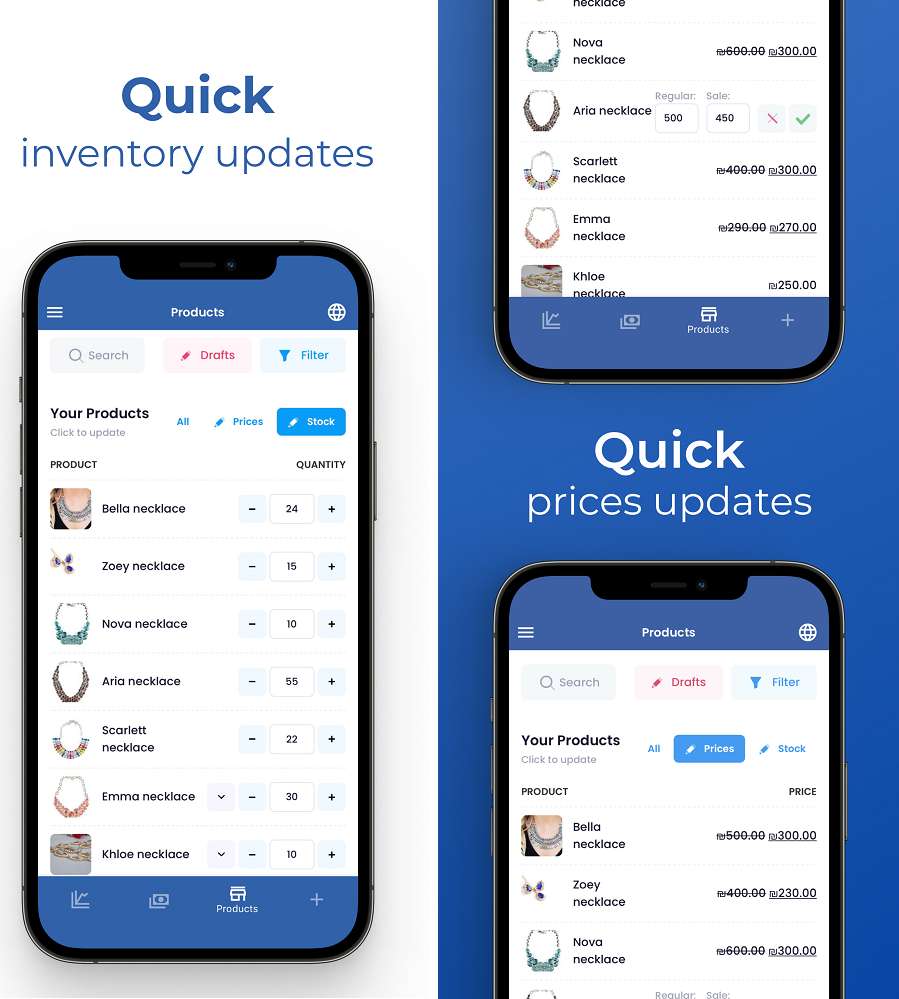
- Extremely fast update of product prices – Includes bulk editing and variation editing!
- Extremely fast product inventory management – Including product variations stock!
- Viewing site sales reports – Site visits, purchases, conversion rate.
- Get mobile notifications for contact form 7 and Elementor form leads.
- Monitor website uptime and get a notification for any issue with your phone.
- Live chat with customers as they visit your store.
- Create and manage coupons on the go.
- Add sub-users to help you manage your woocommerce store
- Manage many woocommerce stores in one interface and app
And many more features are on the way!
What is the difference between WEmanage App and WooCommerce App?
WEmanage app is a woocommerce app alternative for those who are looking for management capabilities that don’t really only on woocommerce but also on many different plugins used in large volumes.
Our app focuses on the simple and non-technological store owner that needs to manage his or her store on a day-to-day basis within seconds. here are some examples:
- Totally different user experienceֲ – simplified!
- Very quick inventory and price changes in bulk or as a single.
- Receiving order notifications on failed and canceled status too.
- Receiving lead notifications on Elmentor forms and CF7 forms.
- Receiving up-time notifications for SSL expiration or website unavailability.
- Key actions such as call, mail, or WhatsApp customers with a tap.
- Coupan management and communication with live coupons.
- Inventory management for easy logistics.
- and more..
Coming up next release:
- Warehouse pick-list improvement to show all products to collect as a list by date and order with assigned sub-user.
- Tracking improvement to show all purchases with UTM sources (notification, order page).
- Analytics improvement to show simple reports via each source, medium, and campaign!
- Adding smart insights to help store owners make marketing decisions.
Is it safe to use WEmanage App?
Yes. completely.
- Our system acts as an intermediary between your website and the mobile management app.
- Neither we nor any other party has the ability to connect to your website or see your information.
- All communication is end-to-end encrypted.
Admin management via mobile app
Adding and managing products was never been easier.
- You can add new products to your woocommerce website via the comfort of your phone in a very simple process – one screen only.
- You can manage products by bulk edit (mark and action), by quick edit (click to edit variations), or by full edit (full edit page).
By adding products to woocommerce via the mobile app you enjoy some extra features:
- All images are compressed for website optimization.
- All variations are added as global variations automatically (for filtering).
- Product variations are created automatedly from attributes (as in Shopify)
Order management via mobile app
Manage woocommerce orders on the go with real-time notifications and quick actions.
Stop relying on order emails and start getting your order notifications On your mobile phone. get order notifications not only for successful orders but also for failed and canceled orders so you can win them back when it’s still possible.
- WooCommerce to WhatsApp – click to update buyers from the order page.
- Order pick list to WhatsApp – click to update buyers of order status.
More about wemanage
WEmanage is a Website Management Company with over 15 years of experience.
We built this App and web interface based on our client’s demands and we will continue to improve the app’s capabilities more and more so that everyone can enjoy full control over their website!
our official service website:
WEmanage – Website Management services
our mobile app website:
Woocommerce admin app
Installation
INSTALL WEMANAGE APP FROM WITHIN WORDPRESS
- Visit the plugins page within your dashboard and select Add New,
- Search for WEmanage;
- Activate WEmanage from your Plugins page.
- You will be transferred automatically to the settings page.
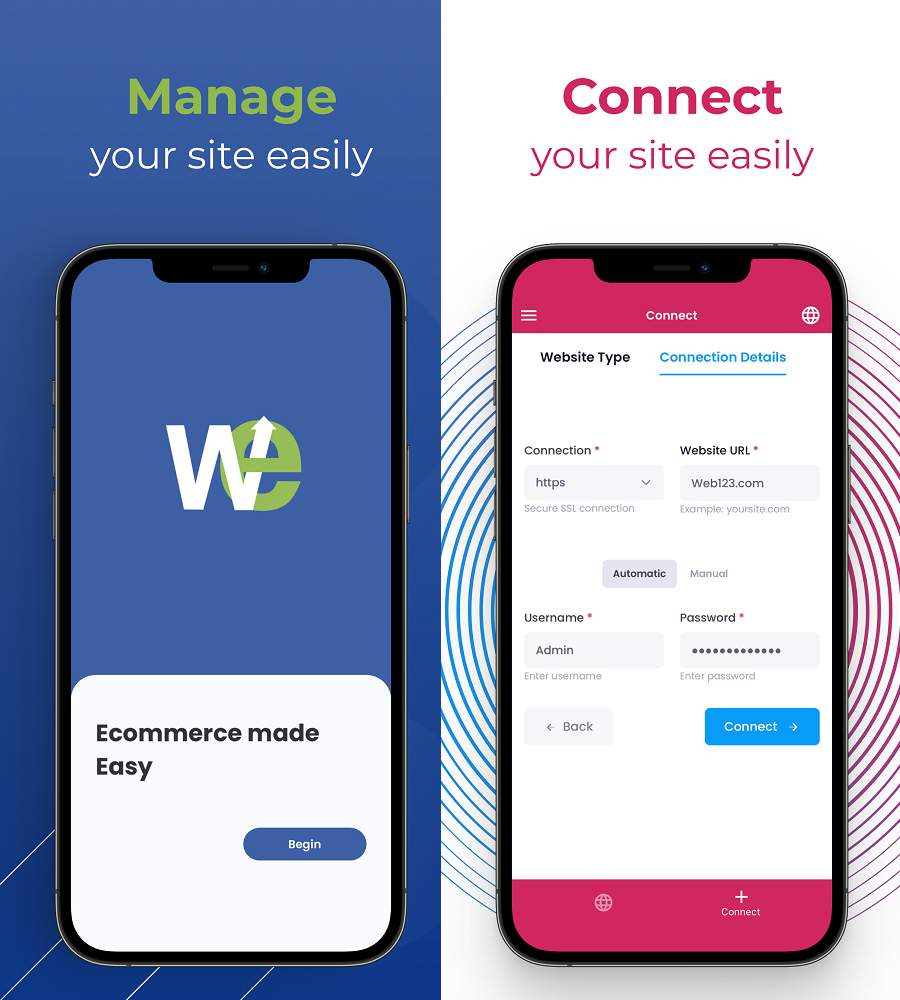
To connect woocommerce website to the app you have 2 options:
CONNECT WEMANAGE APP AUTOMATICALLY
- Go to: WEmanagee Web interface or download and install WEmanage App.
- Sign up and add your website – our system will do the entire process for you..
- Enjoy!
CONNECT WEMANAGE APP MANUALLY
- Install and activate WEmanage plugin on your website.
- Activate and Copy a secure and temporary code that will be shown to you.
- Paste the code in WEmanage App.
- enjoy!
AFTER ACTIVATION AND APP CONNECTION
- You don’t need to do anything else.
- Check your app and make sure all is working 🙂
- Youג€™re done!
Frequently asked questions
Why is the service free?
The application allows free use for 30 days. After that, you may need to pay premium to enjoy all the benefits.
Is there support in the process of adding a website?
If you encounter a problem, the system will offer you to open a service ticket so that we can help you connect the site successfully!
Can any website make use of the WEmanage app?
Basically Yes. But there are sites that block communication and then server-side actions will be required to enable it.
How to uninstall the plugin?
Simply deactivate and delete the plugin. This will automatically disconnect any connection between the site and the application
Can I manage the woocommerce notifications?
Yes. As you open the mobile app you can click on the menu to see the notifications setting screen. you can decide to turn on or off different notifications: Order notifications Chat notifications Lead notifications Up-time notifications Insight notifications We strongly recommend leaving all woocommerce notifications on as it helps you manage your woocommerce site. be aware: Woocommerce push notifications need approval on your mobile phone when installing the app.
How do I turn leads management on or off?
Leads management is activated by default. the app will capture and notify you of any new leads for the following form types: Elementor forms Contact form 7 forms (CF7) If you want to turn off any form’s notification -ֲ you must go to settings in the leads screen and click on exclude form. you can see the form ID on top of any lead, all you need to do is to copy and paste the ID to exclude leads capture from the specific form.
How does the website up-time monitor work?
If activated (you must go to tools>monitor to activate the capability), our bot will start checking your side every 5 minutes. the bot will check the following tests: Website availability monitor – is the website live? Website response time – is the website fast enough? Website SSL certificate – is the certificate valid? Any issue found will respond with a live time machine turning off alert and it will continue every minute until the issue is resolved. If the issue takes more time to resolve go ahead and turn off uptime monitor notifications – and turn it back on when fixed.
How to activate live chat on the website?
Live chat is not on by default. to use live chat on your woocommerce site, go to tools > chat > settings screen in WEmanage app and set your logo, colors, opening messages, and auto-response times and then click on the activate toggle to show chat on the website. With live chat, you can chat with customers on your site in real-time and give them coupons with a click as part of your conversation to make sure they complete purchases on your site. Anytime a visitor starts a chat, you will receive a chat request notification to answer any questions or concerns visitors may have.
How do I manage woocommerce products quickly?
Our app is designed for simple people. so, anyone can manage products easily on their mobile phone. to manage products’ go to the products tab and view the following options: Find products – by searching, filtering, and drafts. Quick actions tabs – by full edit, inventory (stock) management, price management. Bulk edit – mark products to edit and click edit selected for temporary or permanent bulk changes. It may take a day or two but when you get around the product management section but when you do – here is what can be done: Show or hide woocommerce products with a click on the eye icon…
How to manage woocommerce orders in WEmanage app?
Any new order on woocommerce will automatically appear on your orders screen on the app. You will get an order notification for the following statuses: Woocommerce new order notification Woocommerce failed order notification Woocmmerce canceled order notification With any new order, you can perform actions: Send the buyer a message via call or email or WhatsApp. Manage orders via picklist and update buyers on progress. Change order status to any supported woo commerce status.
What can I do with woocommerce UTM reports?
UTM information is very valuable when making decisions about ad budgets and directing resources to bring in more customers. our plugin is evolving and rapidly improving to give you the best control over your site. By collecting UTM parameters we can attach any visitor to their source. then, we can attach that important data to your goals: Woocommerce order UTM CF7 (contact form 7) lead UTM Elementor forms lead UTM You will be able to see the source icon (google, Facebook, Instagram, TikTok, etc) beside woocommerce order notification, and inside woocommerce order details in the app. You will…
Changelog
1.3.18
fix small issues
1.3.18
- תאימות מלאה ל-WordPress 7.0.2
- חדש: קישור “איפוס מפתח חיבור” בתחתית עמוד ההגדרות — מוחק את המפתח הקיים, מנקה מפתחות API ודגלי חיבור, ומייצר מפתח חדש (שימושי בשכפול סביבות פיתוח שבהן האתר “זוכר” טוקן של אתר אחר)
- הוסר: מודול המבצעים המובנה (WM Promotions) — כולל הטאב בהגדרות, ה-API וכל קבצי המנוע
1.3.17
- תיקון קריטי: Promotions Loader — טעינה דו-שלבית (constants מיד, WooCommerce classes אחרי woocommerce_loaded)
- טאב מבצעים כעת מציג תוכן תקין
- הוספת fallback ידידותי אם loader טרם הופעל
1.3.17
- תיקון קריטי PHP 7.4: match() ב-promotions.php + str_starts_with ב-leads.php
- טאב מבצעים: טופס יצירת מבצע מהיר ישירות מהגדרות התוסף
- PHP 8+ syntax scan — נקי לחלוטין
1.3.17
- מנוע מבצעים מובנה — WM Promotions כלול ישירות בתוסף ללא תלות
- אין צורך בתוסף WM Promotions נפרד — הכל עובד מהקופסה
- תאימות מלאה עם תוסף WM Promotions אם מותקן (לא יטעין פעמיים)
- ניהול מבצעים מהאפליקציה זמין לכל לקוחות WeManage
1.3.17
- Promotions API — חיבור לתוסף WM Promotions (רשימה, CRUD, toggle, סטטוס)
- Settings — טאב SEO עם ציון כולל וזיהוי plugin
- Settings — טאב מבצעים עם סיכום סטטוסים ורשימה
Screenshots


For developers
Is this your plugin? Show off the numbers.
Add a live badge to your site, docs or GitHub README. It updates on its own — no account needed.
Best Management App for WooCommerce alternatives
All woocommerce app plugins →




FAQ
Management App for WooCommerce: quick answers
Straight answers, pulled from live WordPress.org data.
Live data from WordPress.org · checked Oct 4, 2026
Is Management App for WooCommerce free?
Yes. Management App for WooCommerce is free to download and use from the official WordPress.org plugin directory.
Is Management App for WooCommerce safe to use in 2026?
Management App for WooCommerce works, but test it on a staging site before relying on it in 2026. It runs on 800+ sites, is rated 4/5 and was last updated 2 months ago, and scores 58/100 on our health check.
How many websites use Management App for WooCommerce?
Management App for WooCommerce is active on 800+ WordPress websites and has been downloaded 18,792 times since it launched in February 2023. It was downloaded 293 times in the last 30 days.
Does Management App for WooCommerce work with WordPress 7.1?
Management App for WooCommerce is officially tested up to WordPress 7.0.6, while the latest release is 7.1.2. It may still work, but try it on a staging site first.
What PHP version does Management App for WooCommerce need?
Management App for WooCommerce requires PHP 5.6.20 or higher. Most hosts run PHP 8.x today, so it works on any modern WordPress hosting.
When was Management App for WooCommerce last updated?
The latest version, 1.3.18, was released on August 5, 2026 (2 months ago).
Who makes Management App for WooCommerce?
Management App for WooCommerce is developed and maintained by Yisrael Buchwald.
What are the best alternatives to Management App for WooCommerce?
The most popular alternatives to Management App for WooCommerce are MStore API (2K+ installs), Hippoo Mobile App for WooCo… (1K+ installs) and App Builder (600+ installs).
Powered by PageForge
Want thousands of pages that rank like these? Build them in an afternoon.
This directory runs on the same engine as PageForge. Turn any spreadsheet, CSV or API into thousands of fast, SEO-ready WordPress pages — with schema, internal links and AI-written copy baked in.
- CSV, Google Sheets & API data sources
- AI content, schema & internal links per page
- Works with Elementor, Gutenberg, Yoast & Rank Math
- Free on WordPress.org — no credit card


