


Weight Based Shipping for WooCommerce
Table rate shipping by weight for WooCommerce: weight brackets, shipping per lb or kg, free shipping over an amount, rates by country or order total.

Safe pick
Yes — Weight Based Shipping for WooCo… is a safe, well-maintained plugin to use in 2026. It runs on 50K+ sites, is rated 4.6/5 and was last updated 1 month ago, and scores 82/100 on our health check.
- Proven at scale on 50K+ active sites
- Loved by users — 4.6/5 from 83 reviews
- Tested with the latest WordPress (7.1)
How does it stack up?
Side-by-side on installs, updates, ratings & support



Daily downloads
Download spikes usually follow a new release — each site that auto-updates counts as a download.
Rankings
Where Weight Based Shipping for W… stands todayWordPress.org search rankings
Live position in the plugin search, top 100| Keyword | Position |
|---|---|
| advanced shipping | #3 |
| table rate shipping | #4 |
| weight based shipping | #1 |
| woocommerce free shipping | #6 |
| woocommerce shipping | #8 |
Version adoption
Share of active sites per release.
Rating breakdown
★★★★★★★★★★ 4.6 from 83 reviews
About Weight Based Shipping for WooCommerce
From the official readme · v6.20.0Description
Weight Based Shipping brings shipping by weight to WooCommerce. Your price list becomes a table of rules — weight brackets, a price per pound or kilogram, free shipping over an amount, a different rate per country — and the plugin calculates the shipping cost your customer sees at checkout from that table.
The plugin has been in the directory since 2013 and runs on more than 50,000 stores. There is no carrier account to open and no rate service to connect: prices come from your own table and are calculated inside your store.
Weight brackets
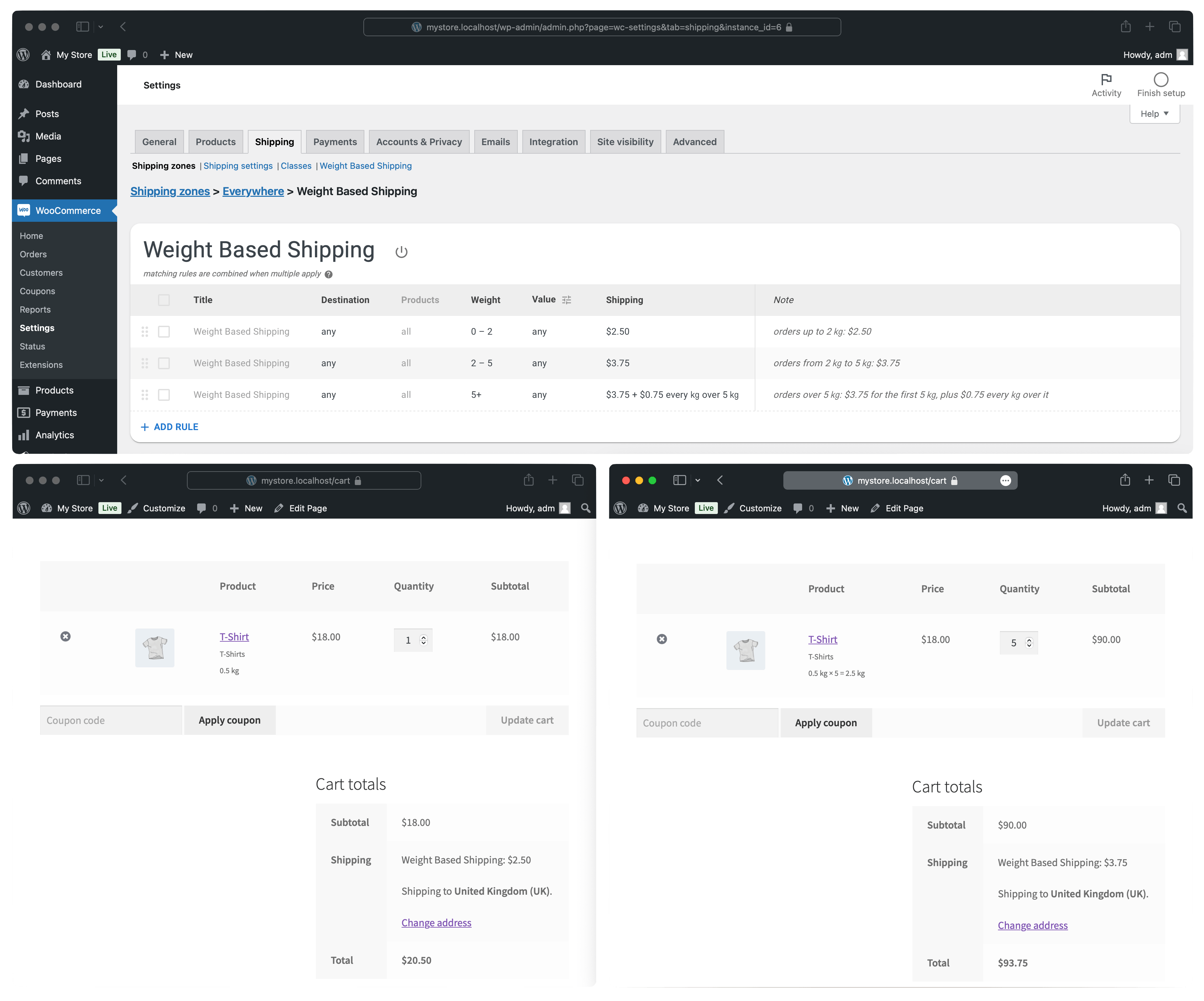
A price for every weight range, the way carrier price lists are written and what table rate shipping usually means: up to 2 kg $5.00, 2 to 5 kg $8.00, over 5 kg $12.00. Weights come from your products, in kilograms, grams, pounds, or ounces — whichever unit your store uses.
Shipping per lb or per kg
Charge by weight itself rather than by range: $1.50 for every 0.5 kg, or a straight price per kilogram or per pound. Add a base amount and you get the familiar “$3.75 for the first 5 kg, plus $0.75 for every kilogram over it”.
Free shipping over an amount
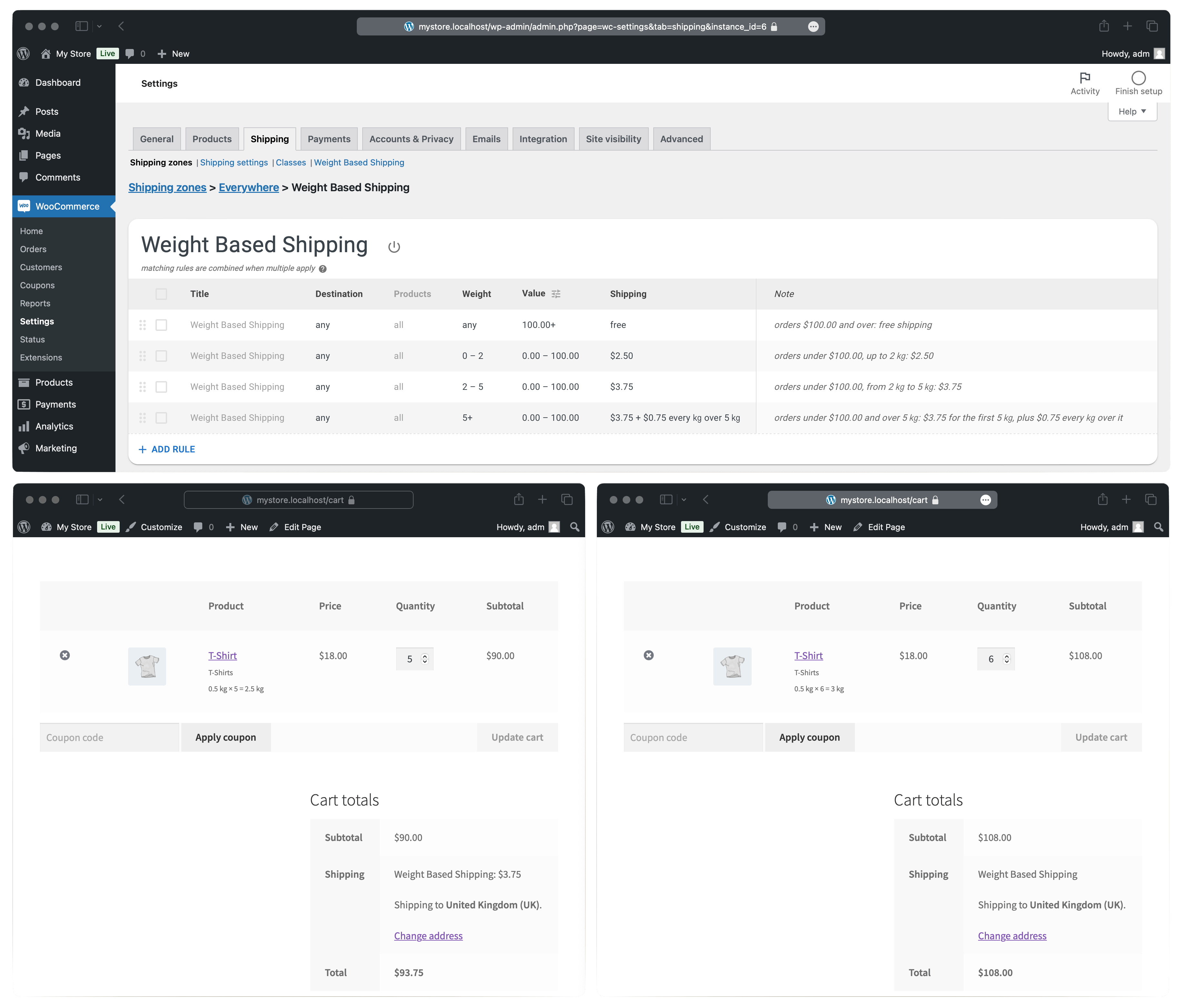
Free delivery once the cart reaches your threshold, normal rates below it. The threshold can be an order amount or a weight — free shipping up to 10 kg, paid above.
Rates by order total
Price shipping by the cart total as well as by weight: $6.00 under $50, $3.00 from $50 to $100, free from $100. Weight and order total also combine in one rule, so free shipping over $100 can stop at 10 kg and let heavier orders pay their way.
Flat rates, handling fees, and surcharges
Not every line of a price list depends on weight. A rule can add a fixed amount — a flat national rate, a handling fee, a surcharge on oversized orders — and applies only to the orders it is meant for.
Shipping rates by country
Different shipping rates for different countries in one table: a domestic rate, a rate for neighbouring countries, and a rest-of-the-world rate. For finer geography, down to postcodes, the method slots into WooCommerce shipping zones.
Quantity based shipping
For products of a uniform weight, weight stands in for quantity: $4.00 for every 0.5 kg is $4.00 per 0.5 kg item. The quantity based shipping recipe extends that to bulk pricing.
Several shipping options at checkout
Standard and Express, or delivery alongside pickup: add the method to a zone as many times as you have options, each with its own name, its own rules, and its own price.
Rule priority
Rules that both apply add up — a handling fee on top of a per-class rate, as a mixed cart should be priced. Rules meant as alternatives get conditions that cannot both hold, such as 0–2 kg and 2–5 kg, and only one of them applies.
For everything beyond that, the Pro edition adds mods:
— Stop ends the evaluation at its rule: the first match wins, and a rule placed higher overrides everything below it.
— Drop takes the items a rule has already priced out of the calculation, so nothing is charged twice.
— Deny withholds the method from orders it must not carry — a weight your carrier does not accept.
— Require shows the method only for orders that match — a refrigerated option only when something frozen is in the cart.
Mods has the details.
Rates by shipping class [Pro]
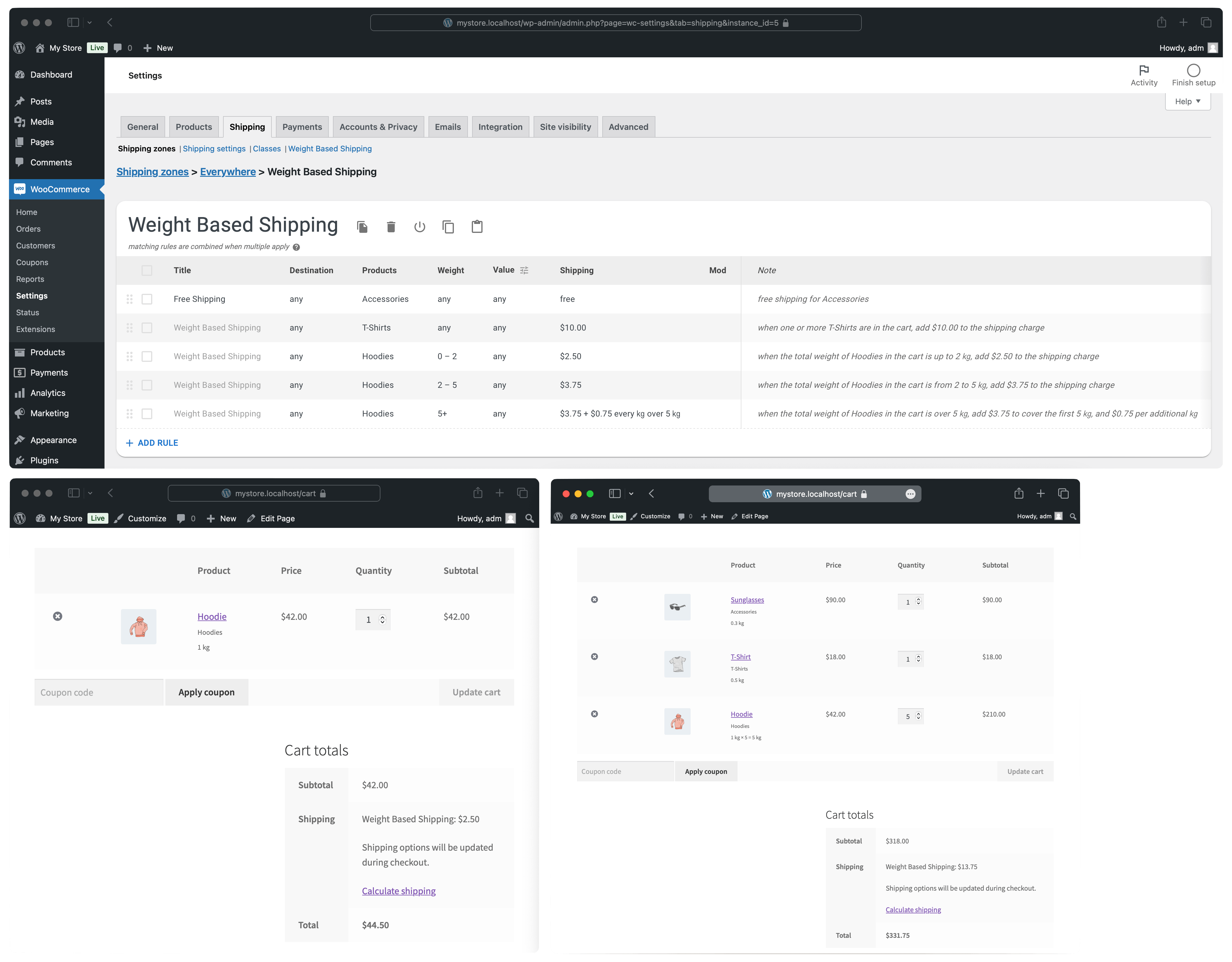
Pro rules can target a shipping class, so each kind of product is priced its own way: a flat price for T-shirts, a per-kilogram rate for bulky goods, a surcharge on anything fragile. The same targeting decides free shipping product by product — items that never ship free, items that do not count toward the threshold, or one product that makes the whole order free.
Split shipping [Pro]
Pro keeps several tables inside one shipping method. When two of them each cover part of the cart — a frozen courier and an ordinary parcel — the customer sees one combined option, priced as the sum of both parts. Multiple shipping options covers both arrangements.
Copy rules from staging to production [Pro]
Build and test the price list on a staging or local site, then move it to the live store without retyping a number: copy a table, or just the rules you pick, and paste it on the other site. The transfer goes through the ordinary clipboard, so there is no file to export and upload. Copy and paste shows it step by step.
Pro also brings undo and redo, value thresholds converted by an active currency switcher, and direct email support. Compare the editions.
Documentation
Getting started builds a first price list, how rules work explains matching and combining, and troubleshooting covers a checkout that reports no shipping options. Recipes are worked setups: shipping by weight, shipping per lb, free shipping over an amount, rates by country, and rates by shipping class.
Install the plugin, open the starter table, and replace the numbers with your own. If anything does not add up, ask in the support forum.
Like the plugin? Leave a review!
Installation
- Install and activate the plugin from Plugins → Add Plugin, or upload the Pro package from your purchase email.
- Make sure your products have weights (Product data → Shipping); a product without one counts as zero.
- Go to WooCommerce → Settings → Shipping, open a zone, and add the Weight Based Shipping method.
- Open it and replace the numbers in the starter table with your own.
Rules use the store’s weight unit, set at WooCommerce → Settings → Products, so settle on kg, g, lbs, or oz first. Getting started walks through the same steps with screenshots.
Changelog
6.20.0
- Split-shipping breakdown: show in the cart and checkout blocks as well; add visibility settings; format in multiple lines for better readability.
- Tested with WooCommerce 11.2.
6.19.0
- Fix order subtotal might be incorrectly detected for block-based Cart.
- Fix a fatal error on the cart and checkout pages with Local Pickup Plus.
6.18.0
- Fix Local Pickup or other global shipping methods are not available on checkout when the global WBS method is enabled.
6.17.0
- PRO: Restore updates check.
- Tested with WooCommerce 11.1.
6.16.1
- Tested with WordPress 7.1, WooCommerce 11.0.
6.16.0
- PRO: Update the updater code.
- Tested with WordPress 7.0, WooCommerce 10.8.
Screenshots
For developers
Is this your plugin? Show off the numbers.
Add a live badge to your site, docs or GitHub README. It updates on its own — no account needed.
Best Weight Based Shipping for Woo… alternatives
All advanced shipping plugins →


FAQ
Weight Based Shipping for WooCommer…: quick answers
Straight answers, pulled from live WordPress.org data.
Source: WordPress.org
Is Weight Based Shipping for WooCo… free?
Yes. Weight Based Shipping for WooCo… is free to download and use from the official WordPress.org plugin directory.
Is Weight Based Shipping for WooCo… safe to use in 2026?
Yes — Weight Based Shipping for WooCo… is a safe, well-maintained plugin to use in 2026. It runs on 50K+ sites, is rated 4.6/5 and was last updated 1 month ago, and scores 82/100 on our health check.
How many websites use Weight Based Shipping for WooCo…?
Weight Based Shipping for WooCo… is active on 50K+ WordPress websites and has been downloaded 2,895,372 times since it launched in July 2013. It was downloaded 18,631 times in the last 30 days.
Does Weight Based Shipping for WooCo… work with WordPress 7.1?
Yes. The developer has tested Weight Based Shipping for WooCo… up to WordPress 7.1.5, the latest release. It requires WordPress 5.8 or newer.
What PHP version does Weight Based Shipping for WooCo… need?
Weight Based Shipping for WooCo… requires PHP 7.3 or higher. Most hosts run PHP 8.x today, so it works on any modern WordPress hosting.
When was Weight Based Shipping for WooCo… last updated?
The latest version, 6.20.0, was released on October 16, 2026 (1 month ago).
Who makes Weight Based Shipping for WooCo…?
Weight Based Shipping for WooCo… is developed and maintained by Dan (weight based shipping).
What are the best alternatives to Weight Based Shipping for WooCo…?
The most popular alternatives to Weight Based Shipping for WooCo… are Weight Based Shipping Table… (100K+ installs), Advanced Free Shipping for… (40K+ installs) and Codiepress Advanced Rule Ba… (100+ installs).
Powered by PageForge
One template and a spreadsheet. A real page for every search.
PageForge turns each row of a CSV into a WordPress page with its own title, URL, SEO fields and schema, built on the layout you already designed. Free on WordPress.org.
- CSV and XLSX, plus Google Sheets on Professional and Enterprise
- Its own title, URL, SEO fields and schema for every page
- Works with the block editor, Elementor, Divi and Avada
- Free on WordPress.org, no credit card