



Affiliate Sales in Google Analytics and other tools
See which content earns, attribute every affiliate sale to its traffic, and sync conversions to Google Analytics, Google Ads, Meta and more.

Safe pick
Yes — Affiliate Sales in Google Analy… is a safe, well-maintained plugin to use in 2026. It runs on 1K+ sites, is rated 4.8/5 and was last updated 3 days ago, and scores 81/100 on our health check.
- Actively developed — last update 3 days ago
- Tested with the latest WordPress (7.1)
- Momentum — downloads up 15.5% vs the previous 30 days
Daily downloads
Download spikes usually follow a new release — each site that auto-updates counts as a download.
Rankings
Where Affiliate Sales in Google A… stands todayWordPress.org search rankings
Live position in the plugin search, top 100| Keyword | Position |
|---|---|
| affiliate conversion tracking | #11 |
| affiliate dashboard | #22 |
| google ads integration | #33 |
| google analytics integration | #35 |
| subid tracking | #1 |
Version adoption
Share of active sites per release.
Rating breakdown
★★★★★★★★★★ 4.8 from 12 reviews
About Affiliate Sales in Google Analytics and…
From the official readme · v5.5.3Description
The affiliate conversion tracking plugin for WordPress. wecantrack connects you to 450+ affiliate networks, attributes every sale back to the page, click and traffic source that earned it, then sends that revenue data into the tools you already use: Google Analytics 4, Google Ads, Meta, TikTok, Microsoft Ads and more.
Most affiliate plugins count clicks. wecantrack tracks what those clicks actually earned.
wecantrack was built by affiliate publishers in 2019 and is backed by a strategic investment from Awin, one of the world’s largest affiliate networks.
The problem with affiliate data
If you publish affiliate content, your sales data is scattered. Every network has its own dashboard, so you log into five or more of them just to see what you made. You cannot tell which article drove a sale, which traffic source converts, or whether your paid campaigns are profitable, because the conversion never makes it back to the page or the ad that caused it. So you guess.
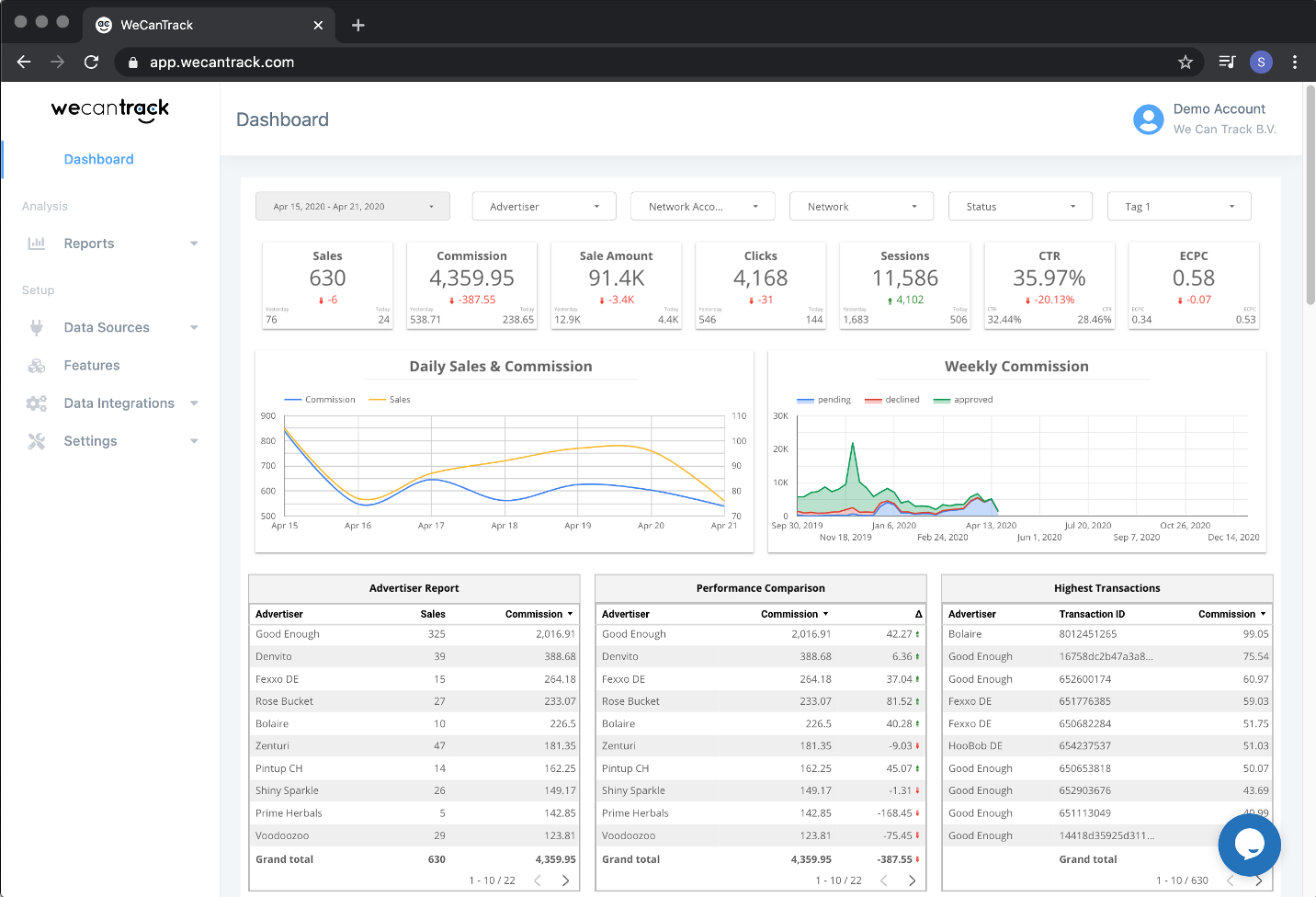
wecantrack closes that gap. The plugin adds a unique click ID to your affiliate links, tracks the session and click behind each one, and matches it to the conversion data we pull from your networks. The result is one affiliate dashboard showing revenue, clicks, conversions and EPC across every network, broken down by page, traffic source and campaign.
Set up tracking in minutes, no developer needed
- One-click install. Add the plugin, paste your wecantrack API key, and tracking starts. No code and no tags to place by hand.
- Automatic click IDs. The plugin inserts unique SubIDs in your affiliate links for you, so every conversion traces back to the exact click.
- Safe by design. If the service is ever unreachable, links fall back to their original URL, so nothing breaks for your visitors.
Works with your existing link setup
Already cloaking links with Pretty Links, ThirstyAffiliates, Lasso, Redirection or Datafeedr? Keep them. wecantrack runs alongside your cloaker and places the click ID during the redirect, server side, adding link cloaking and conversion attribution those plugins do not provide, without changing how you work.
Turn affiliate sales into marketing data
Once your conversions are attributed, send them anywhere you optimise:
- Google Analytics 4. See affiliate revenue as conversions next to the rest of your traffic, by landing page and source.
- Google Ads, Meta, Microsoft Ads, TikTok, Snapchat, Pinterest, Reddit. Feed real sales back to the ad platforms so smart bidding optimises on revenue, not clicks.
- Looker Studio, BigQuery, Zapier and webhooks. Build custom dashboards or pipe the data into your own stack.
Built for affiliate publishers
Bloggers, media publishers, coupon and deal sites and price comparison sites use wecantrack to see which content earns, retarget the right audiences, and run paid campaigns on CPA and ROAS.
“WeCanTrack takes the guessing out of affiliate marketing and provides a one-stop-shop for all your dashboarding needs. No more checking 5+ networks daily to see your commission, but enjoy the data and insights the way you like.”
MissThing, WordPress.org review“All the affiliate data gathered in one place, before using this software we would not even know where the conversions came from. Now we get detailed data about EPC, CR and other data that we can use to increase our turnover.”
arminza, WordPress.org review
Rated 4.8 on WordPress.org and 4.9 on G2.
What you need to know
The plugin connects to your wecantrack account, which you can start with a free 15-day trial, no credit card required. Creating an account and connecting your networks takes about 10 minutes. Learn more on the wecantrack WordPress plugin page.
Translations
- English – default, always included
Credits
Installation
- Create an account at wecantrack.com.
- Connect your affiliate networks and websites using the setup guide.
- Install the plugin: upload the
wecantrackfolder to/wp-content/plugins/, or install it from the Plugins screen in WordPress. - Activate the plugin through the Plugins menu.
- Open the new
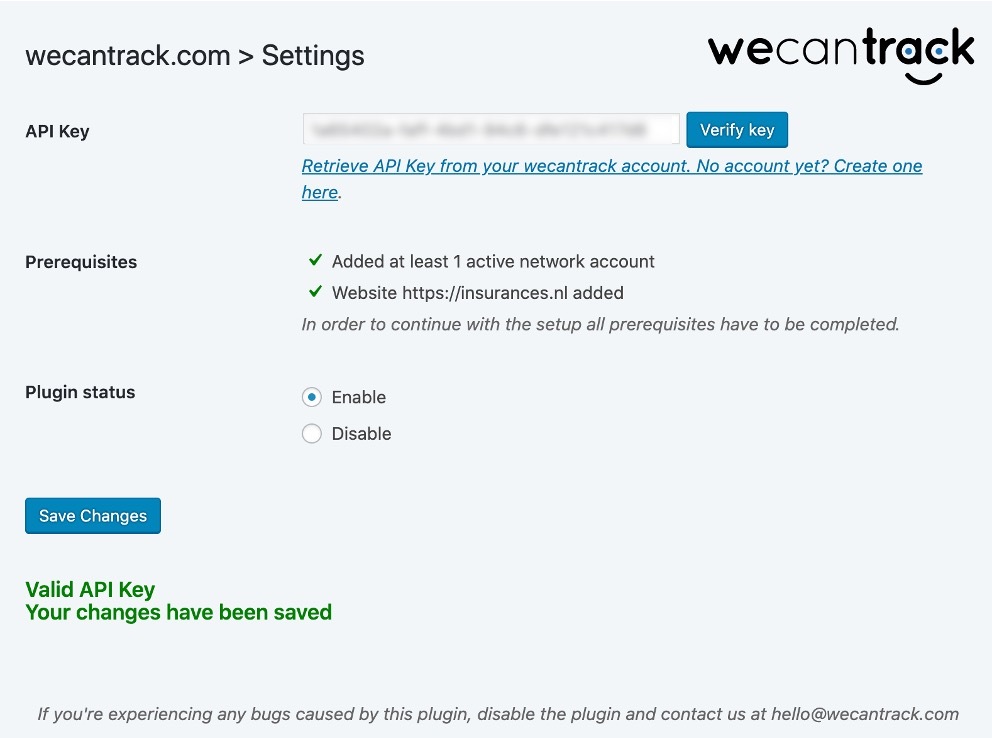
wecantrackmenu, go to Settings, paste your API key and click Verify. - Follow the testing steps in the WordPress plugin guide before enabling.
- When the test passes, set Plugin status to
enable, clear theEnable plugin when URL containsfield, and save your changes. - Test once more. You are done.
If a test does not pass, contact support@wecantrack.com and we will help.
Frequently asked questions
What does the wecantrack plugin do?
It adds a unique click ID to your affiliate links, tracks the sessions and clicks on your site, and matches them to the conversion data wecantrack pulls from your affiliate networks. You get one dashboard showing which pages, sources and campaigns earn, and you can send that data to Google Analytics and your ad platforms.
Do I need a wecantrack account?
Yes. The plugin connects your site to your wecantrack account using an API key. Creating an account is free and comes with a 15-day trial.
Do I have to use the plugin, or can I use the JavaScript tag?
Either works. We recommend the plugin for WordPress sites because it stays compatible with cloaking plugins and handles click IDs server side during the redirect.
How do I track affiliate sales in Google Analytics?
Connect your networks in wecantrack, install this plugin, and enable the Google Analytics integration in your account. Attributed conversions then appear in GA4 as events next to your traffic. Full guide: tracking affiliate sales in Google Analytics.
Can I optimise Google Ads, Meta or TikTok on affiliate conversions?
Yes. wecantrack pushes attributed affiliate sales to Google Ads, Meta, Microsoft, TikTok, Snapchat, Pinterest and Reddit as conversions, so smart bidding can optimise on real revenue.
Which affiliate networks are supported?
More than 450, connected by API, postback URL or automated import. See the full list of supported networks.
Does it work with Pretty Links, ThirstyAffiliates or other cloaking plugins?
Yes. The plugin is compatible with Pretty Links, ThirstyAffiliates, Lasso, Redirection, Datafeedr and most redirect plugins, and places the click ID during the redirect.
What happens if wecantrack is unreachable? Will my links break?
No. Links fall back to their original URL, so your visitors are never affected.
Why are some conversions not showing yet?
We can only attribute conversions that carry our click ID. Clicks from before you installed can still convert under the network cookie window, so coverage grows over the first few weeks. If clicks are not registering at all, it may be a cloaking, caching or URL-pattern issue, so contact support@wecantrack.com.
Are multisite installs supported?
Not yet. Contact support@wecantrack.com if you need this.
Changelog
5.5.3 – 9th October 2026
- Exclude the tracking script from FlyingPress’s “Delay JavaScript” feature, which would otherwise hold tracking back until the browser is idle or the visitor interacts with the page
- Purge FlyingPress’s page cache when settings are saved
- FlyingPress now shows as supported in the Optimizer compatibility panel
- Tag health check: a manually added legacy (v1) snippet on a site set up for the new tag is now reported as such, instead of as a cached copy of the script
5.5.2 – 1st October 2026
- Exclude the tracking script from Breeze’s “Delay JS” and “Defer JS” features, which would otherwise delay tracking until the visitor interacts with the page
- Fix Breeze’s cache not being purged when settings are saved
- Breeze now shows as supported in the Optimizer compatibility panel
5.5.1 – 15th September 2026
- Exclude the tracking script from WP Fastest Cache’s “Combine JS” and “Render Blocking JS” features and from Jetpack Boost’s “Defer Non-Essential JavaScript” feature via tag-level opt-out attributes
- Exclude the tracking script from Debloat’s “Delay JS” and “Defer JS” features, which would otherwise rewrite the tag and delay tracking until the visitor interacts with the page
- Purge Jetpack Boost’s page cache when settings are saved
- WP Fastest Cache, Jetpack Boost and Debloat now show as supported in the Optimizer compatibility panel
5.5.0 – 21st August 2026
- New “Optimizer compatibility” panel on the settings page: shows which page optimization plugins are active and confirms the tracking script is automatically excluded from their JavaScript optimization
- New “Tag health check”: fetches your homepage and verifies the tracking tag visitors actually receive, detecting missing tags, tags belonging to a different website in your account, and stale copies of the script bundled by an optimizer
- Optimizer plugins we cannot exclude automatically yet, and failed tag checks, are reported to wecantrack (authenticated with your own API key) so support can help proactively and native exclusions can be added in future releases
5.4.1 – 21st August 2026
- Exclude the tracking script from SiteGround Optimizer’s “Combine JavaScript Files” feature, which downloads external scripts into a combined bundle and would keep serving a stale copy of the tracking script
5.4.0 – 19th August 2026
- Prevent page-optimization plugins from breaking the tracking script: the wct.js tag is now automatically excluded from minification, combination, deferral and delaying in WP Rocket, LiteSpeed Cache, Autoptimize, W3 Total Cache, WP-Optimize and Perfmatters, including installs using a custom proxy domain
- Add opt-out attributes to the script tags for optimizers without exclusion hooks (Cloudflare Rocket Loader, FlyingPress and others)
Screenshots
For developers
Is this your plugin? Show off the numbers.
Add a live badge to your site, docs or GitHub README. It updates on its own — no account needed.
FAQ
Affiliate Sales in Google Analytics…: quick answers
Straight answers, pulled from live WordPress.org data.
Live data from WordPress.org · checked Oct 12, 2026
Is Affiliate Sales in Google Analy… free?
Yes. Affiliate Sales in Google Analy… is free to download and use from the official WordPress.org plugin directory.
Is Affiliate Sales in Google Analy… safe to use in 2026?
Yes — Affiliate Sales in Google Analy… is a safe, well-maintained plugin to use in 2026. It runs on 1K+ sites, is rated 4.8/5 and was last updated 3 days ago, and scores 81/100 on our health check.
How many websites use Affiliate Sales in Google Analy…?
Affiliate Sales in Google Analy… is active on 1K+ WordPress websites and has been downloaded 48,691 times since it launched in April 2020. It was downloaded 2,370 times in the last 30 days.
Does Affiliate Sales in Google Analy… work with WordPress 7.1?
Yes. The developer has tested Affiliate Sales in Google Analy… up to WordPress 7.1.3, the latest release. It requires WordPress 5.0 or newer.
What PHP version does Affiliate Sales in Google Analy… need?
Affiliate Sales in Google Analy… requires PHP 7.4 or higher. Most hosts run PHP 8.x today, so it works on any modern WordPress hosting.
When was Affiliate Sales in Google Analy… last updated?
The latest version, 5.5.3, was released on October 9, 2026 (3 days ago).
Who makes Affiliate Sales in Google Analy…?
Affiliate Sales in Google Analy… is developed and maintained by wecantrack.
Powered by PageForge
Want thousands of pages that rank like these? Build them in an afternoon.
This directory runs on the same engine as PageForge. Turn any spreadsheet, CSV or API into thousands of fast, SEO-ready WordPress pages — with schema, internal links and AI-written copy baked in.
- CSV, Google Sheets & API data sources
- AI content, schema & internal links per page
- Works with Elementor, Gutenberg, Yoast & Rank Math
- Free on WordPress.org — no credit card


