



WebP Image Converter & Replacer – Convert to WebP, No Duplicates
Convert images to WebP and replace originals—no duplicates. Save storage and speed up your site. Auto-convert on upload & bulk tools (premium).

Solid choice
WebP Image Converter & Replacer is a solid plugin choice in 2026, with a few things worth checking first. It runs on 100+ sites, is rated 3/5 and was last updated 2 weeks ago, and scores 69/100 on our health check.
- Actively developed — last update 2 weeks ago
- Tested with the latest WordPress (7.1)
- Momentum — downloads up 143.3% vs the previous 30 days
- Small user base (100+ active installs)
- Very few reviews so far
How does it stack up?
Side-by-side on installs, updates, ratings & support


Daily downloads
Download spikes usually follow a new release — each site that auto-updates counts as a download.
Rankings
Where WebP Image Converter & Repl… stands todayWordPress.org search rankings
Live position in the plugin search, top 100| Keyword | Position |
|---|---|
| convert to webp | #23 |
| image optimization | >100 |
| media library | >100 |
| webp | #35 |
| webp converter | #13 |
Version adoption
Share of active sites per release.
Rating breakdown
★★★★★★★★★★ 3 from 2 reviews
About WebP Image Converter & Replacer
From the official readme · v1.1.8Description
WebP Image Converter & Replacer converts your images (JPEG, PNG, static GIF) to WebP, replaces originals only when smaller, and updates database references so your site transparently serves .webp. No duplicate files. No front-end bloat. Just faster pages and less disk usage.
Why this plugin
– No Duplicate Images: Converts and replaces originals when WebP is smaller, keeping /uploads lean.
– Real Performance Gains: WebP typically reduces size ~25–35% at similar quality, aiding Core Web Vitals.
– Safety First: Never deletes the original unless conversion succeeds and the WebP is smaller.
– Full DB Integration: All generated sizes are converted; URLs in content/meta are updated to .webp.
– On-Server Only: Uses PHP GD or Imagick. No external API, keys, or privacy concerns.
– Lightweight: Runs only during conversion—nothing extra on the front end.
Free features
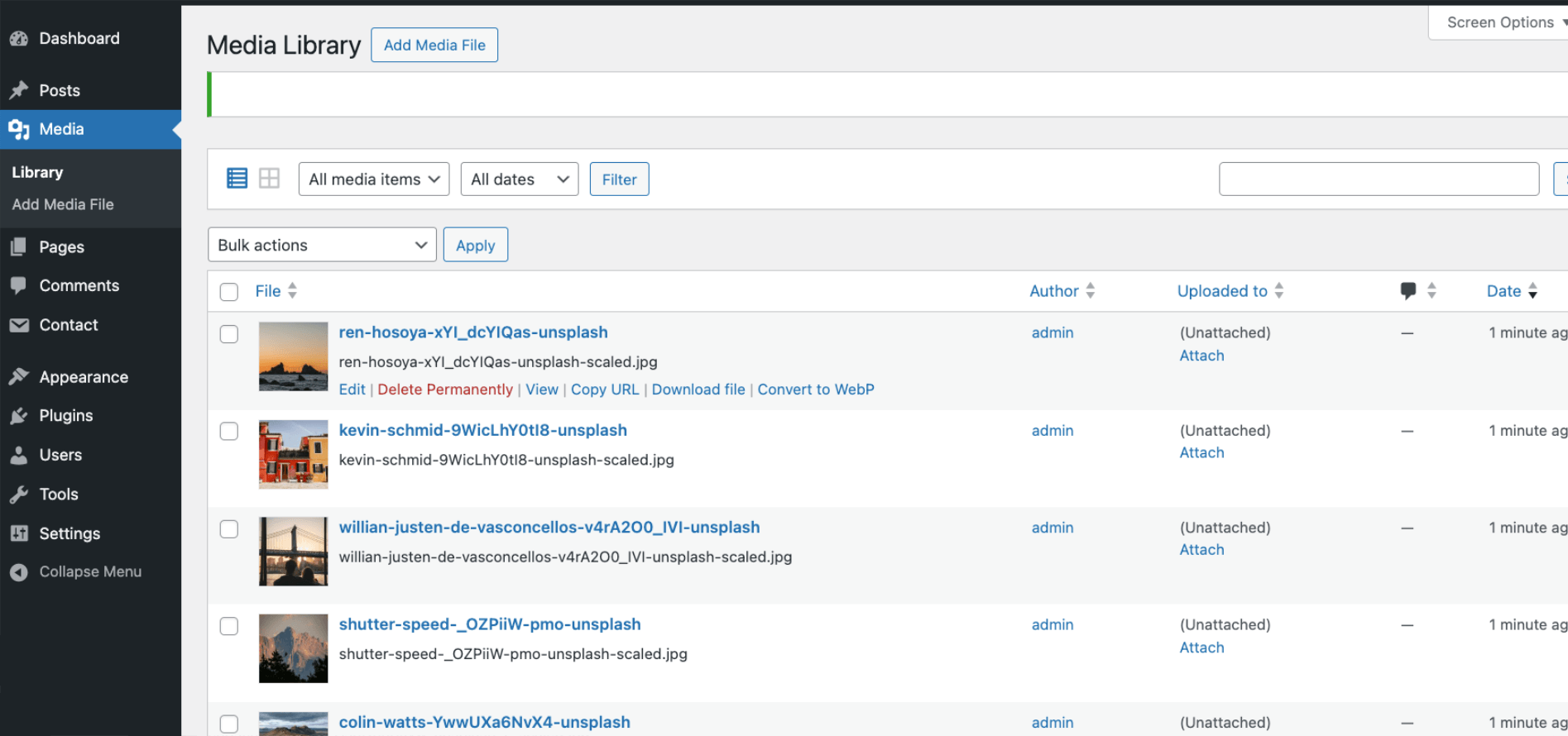
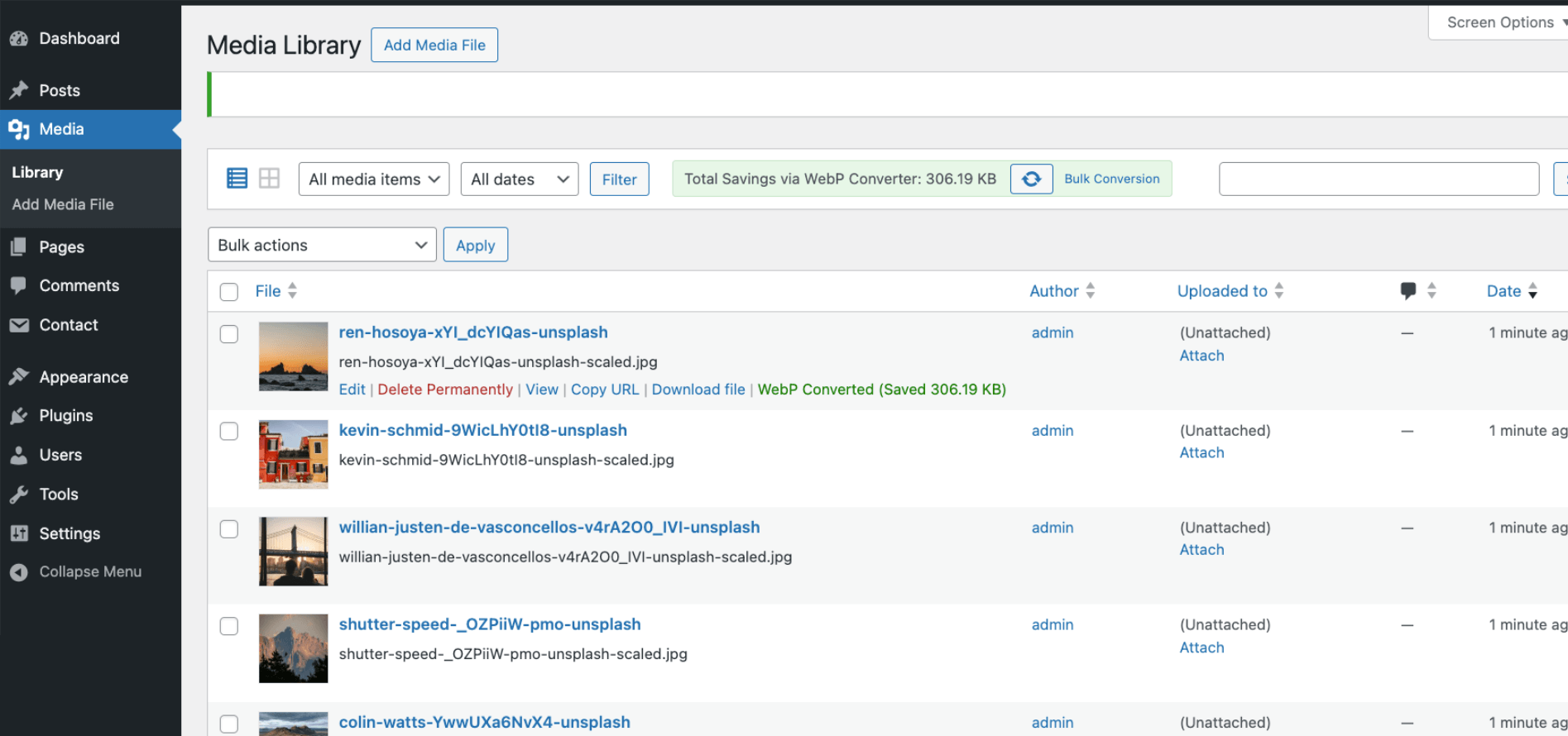
– Convert individual images from Media → Library (list view).
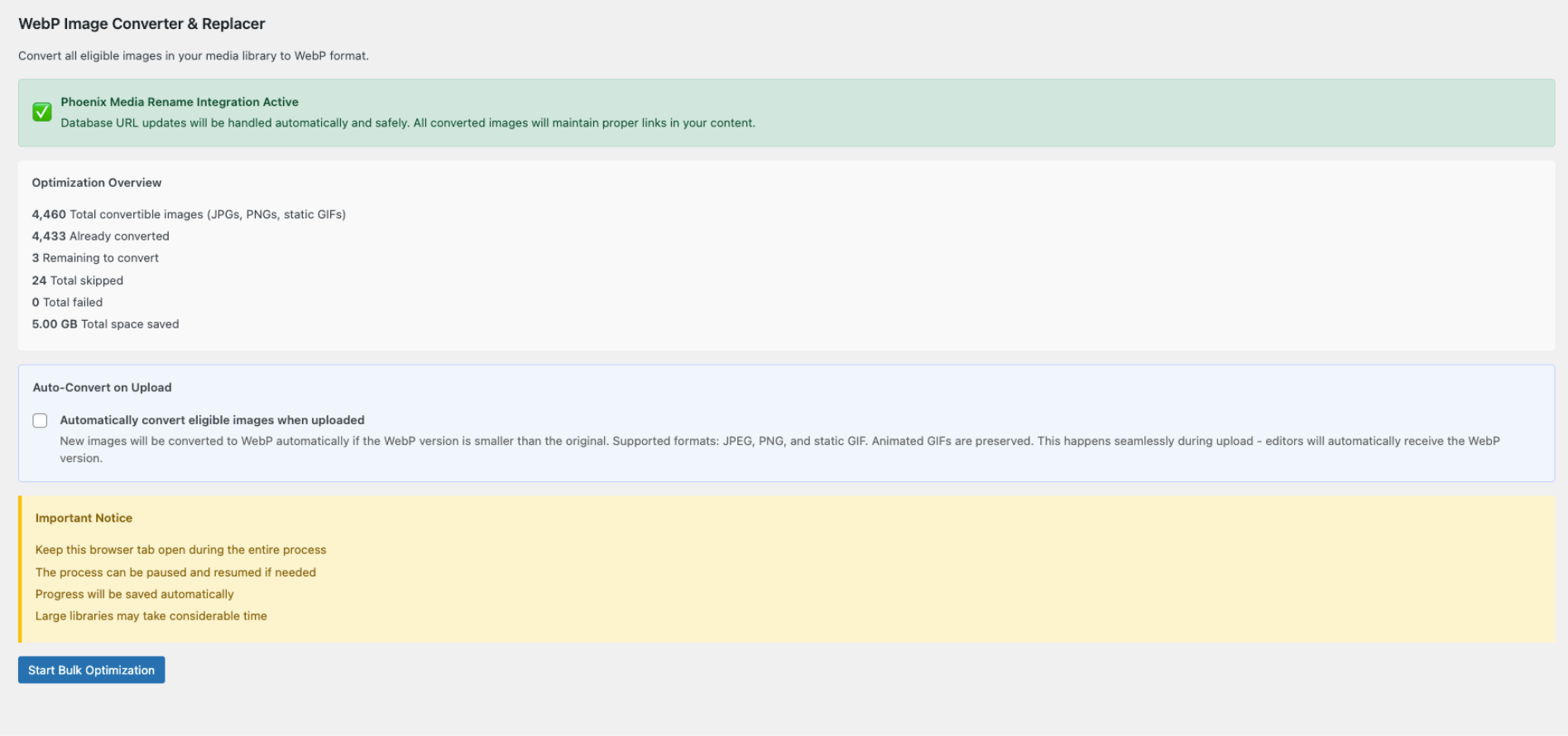
– Optimization Overview with counts: convertible, converted, remaining, skipped, failed, total space saved.
– Smart memory handling to avoid PHP exhaustion on large images.
Premium features
– Auto-convert on upload: New images become WebP automatically.
– Bulk convert selected: Multi-select in Media Library (list view).
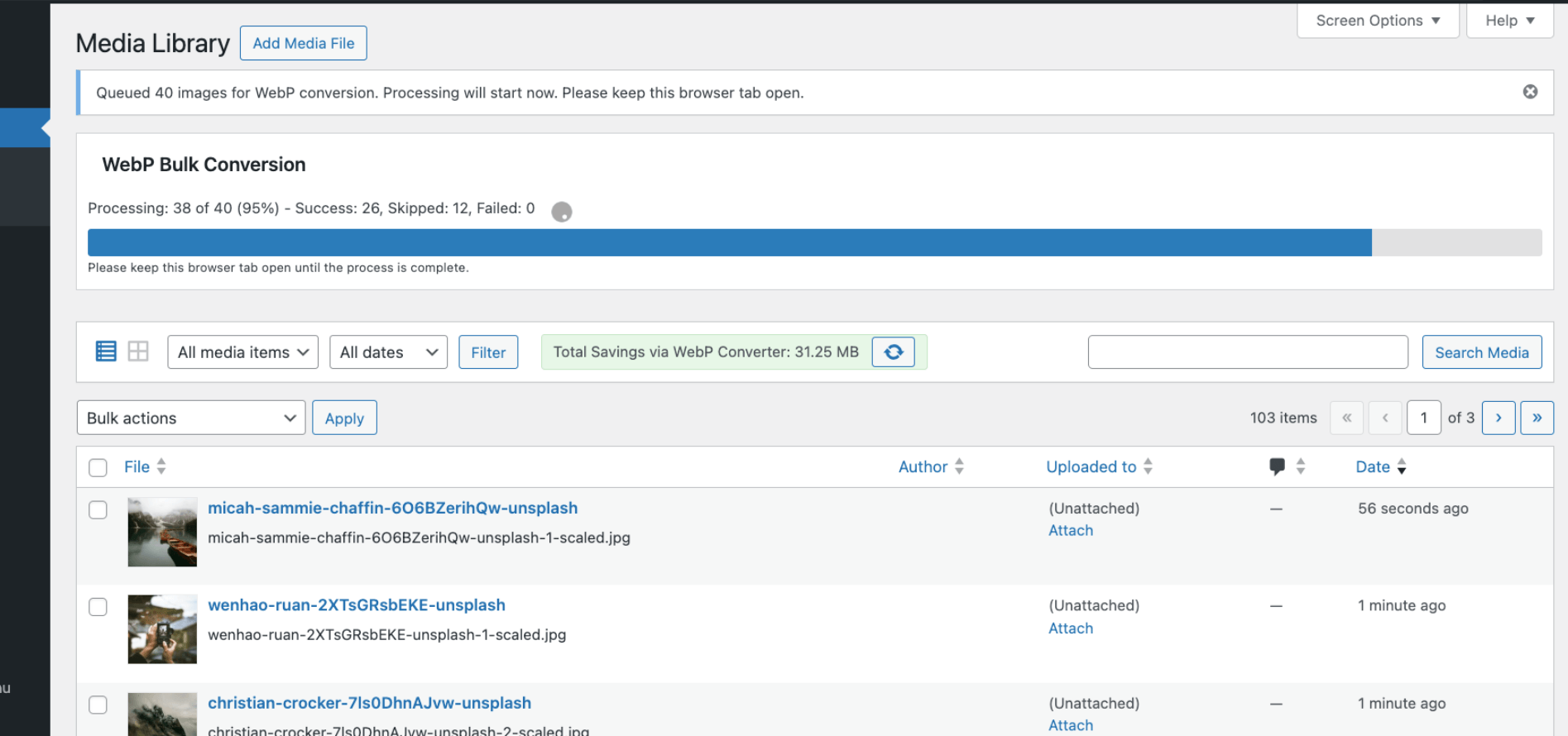
– Bulk convert all: Library-wide conversion with progress + pause/resume.
Whether you’re tight on storage or chasing better performance, this is a safe, effective way to modernize images.
IMPORTANT: Because originals may be deleted, back up your /wp-content/uploads/ and database before converting. Test on staging if possible.
How it works
- Plugin checks server support (GD/Imagick with WebP).
- You convert images (single/bulk/premium auto).
- If the
.webpis smaller, the original file is removed and all DB refs switch to.webp. - Your site now serves WebP transparently—no theme changes required.
Usage
Optimization Overview
– Settings → Media → “WebP Image Converter & Replacer”
– See totals converted/remaining/skipped/failed and space saved.
Convert individual images
– Media → Library (list view) → Convert to WebP link under each item.
Premium
– Auto-convert on upload: toggle under Settings → Media.
– Bulk convert selected: select items in Media Library (list view) → bulk action Convert to WebP.
– Bulk convert all: Start Bulk Optimization with progress + pause/resume.
After conversion
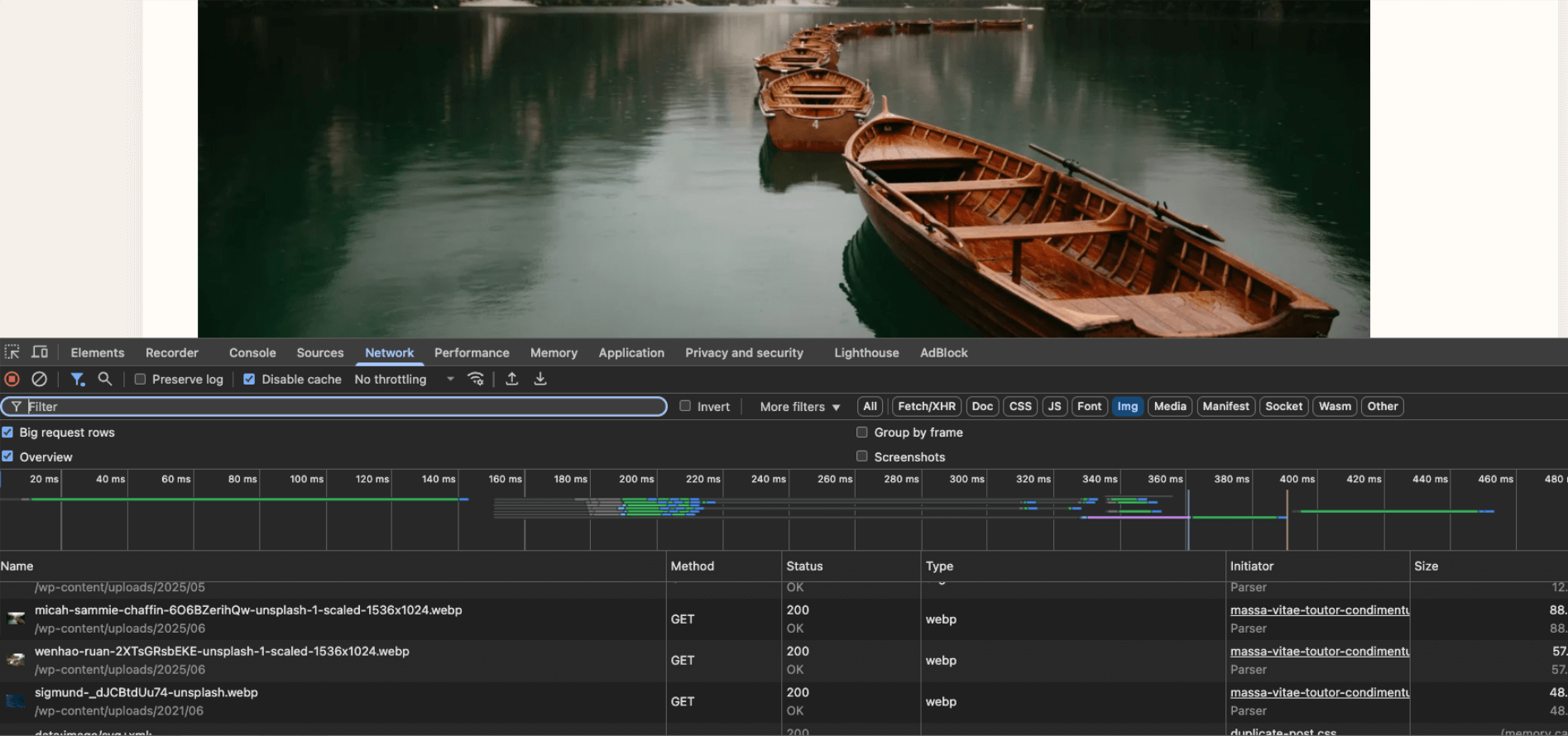
– Verify pages serve .webp in browser dev tools.
– Clear any caches/CDN.
Phoenix Media Rename Integration
We integrate with Phoenix Media Rename to safely update all database references.
Why Phoenix?
– Mature, reliable database URL updates across posts, custom fields, widgets, Customizer, etc.
– Reduces risk vs. “DIY” find/replace logic used by other optimizers.
– Lets this plugin focus on conversion while Phoenix handles DB updates.
Flow
1. Convert to WebP.
2. Phoenix updates URLs from .jpg/.png/.gif to .webp.
3. Your site serves WebP with no broken links.
Installation
- Back up
/wp-content/uploads/and your database. - Install via Plugins → Add New (search “WebP Image Converter & Replacer”) or upload the ZIP.
- Activate.
- Ensure Imagick or GD with WebP is available (the plugin will warn if not).
- Go to Settings → Media → WebP Image Converter & Replacer for overview & tools.
- (Recommended) Install Phoenix Media Rename for robust database URL updates (see below).
Frequently asked questions
Will this plugin delete my images?
Only if the WebP conversion succeeds and the WebP is smaller. Otherwise, the original stays. Always keep backups.
Why are the “space saved” numbers sometimes larger than the single file size?
WordPress creates multiple thumbnail sizes. Savings are calculated across the original + all thumbs vs. their WebP equivalents. Thumbnails can outweigh the original file, so total savings can exceed the original’s size.
What if I uninstall the plugin?
Your site will continue serving the existing WebP files. Settings are removed; deleted originals are not restored.
Does this compress or just change format?
It converts format using standard WebP quality defaults (approx. 80–85). No downscaling or custom per-image quality controls in this version.
Can I change WebP quality?
Not via UI. Advanced users can use the webpicr_webp_quality filter (0–100). Default is 80. Example (custom plugin or theme functions.php): add_filter( ‘webpicr_webp_quality’, function( $quality, $source_path, $dest_path ) { return 72; // lower = smaller files; higher = better quality }, 10, 3 );
AVIF or other formats?
Currently WebP only. AVIF may be added when browser and server support are broadly stable.
Animated GIFs?
We auto-detect animated gifs and mark them as skipped, we do not convert them.
Multisite support?
Yes. Network-activate, then run conversions per site. Always back up each site first.
I hit a timeout/error.
Use bulk pause/resume, try smaller batches, or raise PHP memory/time limits. The plugin includes memory guards, but extreme libraries may need server tweaks.
Does it support all browsers?
Modern browsers do. Legacy/very old browsers may not; if those matter, use a different approach.
Does conversion update links in posts?
Phoenix Media Rename does. This plugin does not rewrite post content. Phoenix covers the builders and themes. After Phoenix finishes, the optimized WebP replaces the converted file and thumbnails are not generated a second time.
Changelog
Wide images that lost their original-file link are converted like a normal big upload, so posts get the WebP thumbnail URLs.
1.1.8
- Bug fix: Conversion generates only the thumbnail sizes the site still has registered. Older sizes listed in the attachment metadata are deleted after Phoenix finishes. Empty name-scaled-WxH leftovers are deleted. Files that were never in the metadata are left on disk
- The saved-bytes total includes those deleted thumbnails minus the new WebP thumbnails. Files that were never in the metadata are not counted
- Bulk convert leaves out wide images whose original-file link is missing, so those JPEGs are not kept beside a new WebP set
1.1.7
- Bug fix: Wide images whose metadata no longer points at the full original still use that sibling file, so Phoenix rewrites thumbnail URLs and thumbnails are not named name-scaled-WxH
1.1.6
- Bug fix: Keep Phoenix Media Rename responsible for content URL updates
- Bug fix: After Phoenix renames and generates thumbnails once, swap in the optimized WebP without generating thumbnails again. The second regeneration was stacking another
-scaledfile and a second thumbnail set - Bug fix: After Phoenix finishes, delete thumbnails still listed in the pre-convert metadata that Phoenix did not remove because those sizes are no longer registered
- Bug fix: Images over the 2560px big-image threshold no longer produce a
-scaled-scaledfile or leave the old-scaledJPEG behind. Phoenix was copying the full original because the library file was already named-scaled, and thumbnail generation never finished - Bug fix: Big-image thumbnail URLs in post content are rewritten. Phoenix only searches posts for the attached filename, which is
name-scaled, so URLs such asname-640x800.jpgwere skipped
1.1.5
- Enhancement (Premium): Retry Failed & Skipped — re-queue images locked out of bulk after disk-full or other failures
- Bug fix: Stop showing “all eligible converted” when the queue is empty only because items are failed/skipped
1.1.4
- Compatibility: Tested with WordPress 7.1
- Bug fix: Set image/webp MIME type after Phoenix-assisted conversions (single, bulk, and auto-convert)
- Bug fix: Restore missing total-savings helper used by timeout status polling
- Bug fix: Align auto-convert success/failure meta keys with the current
_webpicr_*schema - Bug fix: Store size meta on Phoenix auto-convert so Recalculate Savings stays accurate
- Bug fix: Use tracked conversion counters instead of stale legacy SQL counts
- Bug fix: Auto-convert in the block editor — defer until WP 7.1 media finalize so image blocks/srcset use WebP URLs (not mixed PNG sizes)
- Security: Require upload/edit caps on conversion status AJAX checks
- Enhancement: Documented
webpicr_webp_qualityfilter for advanced quality control
1.1.3
- Bug fix: “Fix WebP MIME Types” Utility
- Enhancement: MIME type updated after metadata generation
Screenshots

For developers
Is this your plugin? Show off the numbers.
Add a live badge to your site, docs or GitHub README. It updates on its own — no account needed.
Best WebP Image Converter & Replac… alternatives
All convert to webp plugins →FAQ
WebP Image Converter & Replacer: quick answers
Straight answers, pulled from live WordPress.org data.
Live data from WordPress.org · checked Oct 7, 2026
Is WebP Image Converter & Replacer free?
Yes. WebP Image Converter & Replacer is free to download and use from the official WordPress.org plugin directory.
Is WebP Image Converter & Replacer safe to use in 2026?
WebP Image Converter & Replacer is a solid plugin choice in 2026, with a few things worth checking first. It runs on 100+ sites, is rated 3/5 and was last updated 2 weeks ago, and scores 69/100 on our health check.
How many websites use WebP Image Converter & Replacer?
WebP Image Converter & Replacer is active on 100+ WordPress websites and has been downloaded 67,475 times since it launched in June 2025. It was downloaded 742 times in the last 30 days.
Does WebP Image Converter & Replacer work with WordPress 7.1?
Yes. The developer has tested WebP Image Converter & Replacer up to WordPress 7.1.3, the latest release. It requires WordPress 5.8 or newer.
What PHP version does WebP Image Converter & Replacer need?
WebP Image Converter & Replacer requires PHP 7.4 or higher. Most hosts run PHP 8.x today, so it works on any modern WordPress hosting.
When was WebP Image Converter & Replacer last updated?
The latest version, 1.1.8, was released on September 24, 2026 (2 weeks ago).
Who makes WebP Image Converter & Replacer?
WebP Image Converter & Replacer is developed and maintained by Core Essentials.
What are the best alternatives to WebP Image Converter & Replacer?
The most popular alternatives to WebP Image Converter & Replacer are PrinterFlo Image Optimizer (<10 installs), Perxel Image Optimizer (<10 installs) and HoatzinMedia (<10 installs).
Powered by PageForge
Want thousands of pages that rank like these? Build them in an afternoon.
This directory runs on the same engine as PageForge. Turn any spreadsheet, CSV or API into thousands of fast, SEO-ready WordPress pages — with schema, internal links and AI-written copy baked in.
- CSV, Google Sheets & API data sources
- AI content, schema & internal links per page
- Works with Elementor, Gutenberg, Yoast & Rank Math
- Free on WordPress.org — no credit card


