


WebDiagnosis Site Audit
The only WordPress site audit that tells you what to fix. 170+ checks. Clear priorities. Actionable fixes.

Solid choice
WebDiagnosis Site Audit is a solid plugin choice in 2026, with a few things worth checking first. It runs on 10+ sites, is rated 5/5 and was last updated 3 days ago, and scores 73/100 on our health check.
- Actively developed — last update 3 days ago
- Tested with the latest WordPress (7.1)
- Small user base (10+ active installs)
- Very few reviews so far
How does it stack up?
Side-by-side on installs, updates, ratings & support



Daily downloads
Download spikes usually follow a new release — each site that auto-updates counts as a download.
Rankings
Where WebDiagnosis Site Audit stands todayWordPress.org search rankings
Live position in the plugin search, top 100| Keyword | Position |
|---|---|
| audit | #53 |
| diagnostic | #82 |
| performance | >100 |
| security | >100 |
| site health | #55 |
Version adoption
Share of active sites per release.
Rating breakdown
★★★★★★★★★★ 5 from 1 reviews
About WebDiagnosis Site Audit
From the official readme · v1.4.0Description
Find what’s actually wrong with your WordPress site, and know exactly what to fix.
WebDiagnosis Site Audit is the WordPress audit that tells you what to fix, not just another score or generic list of recommendations.
Run 170+ automated checks across 14 critical areas including SEO, security, performance, accessibility, WordPress configuration, eco-design, and more.
Every finding tells you what was detected, why it matters, how urgent it is, and how to fix it.
Stop auditing. Start fixing.
Most audit tools give you a score and leave you to figure out what it means.
WebDiagnosis turns 170+ checks into a clear, prioritized action plan.
- 170+ checks across 14 themes
- Clear severity: Blocker, Major, Minor
- No false alarms: unverified checks are reported as “Not verifiable”
- Actionable findings: every issue includes its impact and recommended fix
- Practical guidance: know what needs to change, who can do it, and how difficult it is
Built to be trusted
A score can tell you that something is wrong. A diagnosis tells you what to do next.
WebDiagnosis never guesses when the required data cannot be verified, and never turns a minor recommendation into an emergency.
The result: less time interpreting reports, more time fixing what actually matters.
One plugin. A complete website diagnosis.
Audit the dimensions that matter to modern WordPress websites:
- SEO & technical SEO
- Security
- Performance & Core Web Vitals
- Accessibility
- WordPress configuration
- Eco-design & sustainability
- And more
Know what matters. Fix what matters.
Other audit tools tell you how your website scores.
WebDiagnosis tells you what’s wrong and what to fix first.
External Services
This plugin connects to an external service to perform website diagnostics.
The plugin sends technical data about the site, never its posts, pages, comments or user
accounts. This data is sent only once you have accepted data sharing, and you can withdraw that
consent at any time from the plugin settings. Every request the plugin makes is listed below,
including the few it makes on its own.
Service name: WebDiagnosis
Service URL: https://webdiagnosis.io/en/
What the service is used for:
The service analyzes the WordPress website configuration and provides a diagnostic report with recommendations about performance, security and best practices.
What data is sent when a diagnostic runs:
- Site URL, WordPress version, language and main WordPress settings (debug mode, permalinks, file editing, automatic updates, XML-RPC)
- Server details: PHP and MySQL versions, PHP limits, disk space, database size, caching, cron and file permissions
- Installed plugins and themes, with their versions and update status
- Security settings: whether the security keys are set, whether an account named “admin” exists and its role (never its password or email address)
- The latest entries of the PHP error log: error type, message, line, and file path relative to the site root
- Names, sizes and paths of sensitive files found under the site root (backups, database dumps, private keys). Their content is never read nor sent
- Findings of a scan of the active theme’s code: file path, line and a short code excerpt for each finding
- Content statistics: number of images with or without alternative text, menu locations, presence of the default sample content
- How the diagnostic was started: from the plugin interface, the WP-CLI command, the REST endpoints or the Abilities API. The service uses it only for its usage statistics
- A random number generated for each diagnostic and kept on the site for one hour. During the diagnostic, the service calls the site back once, at
/wp-json/webdiagnosis/v1/ownership, to check that the request really came from this site before running its security checks (login page, sensitive files). The site answers with a fingerprint of the service’s challenge, never with the number itself
When data is sent:
- When a diagnostic is explicitly requested: from the plugin interface, from the WP-CLI command, or through the plugin’s authenticated REST endpoints or the WordPress Abilities API.
- When a fatal PHP error occurs on the site, and only if data sharing is accepted: the error type and message, its file path relative to the site root, its line, the page URL, the time, and the PHP and WordPress versions, so that the site owner can be alerted. Errors that could not be sent at once are retried every hour.
- Once a day, and only if you have linked the plugin to a WebDiagnosis account with a subscription key: the site URL and that key, to keep the account status shown in the plugin up to date.
- When you request help from an expert or send feedback from the plugin: your name, your email address and your message, so that the WebDiagnosis team can answer you.
- When you accept data sharing, deactivate, reactivate or delete the plugin, and only if data sharing is accepted: the site URL, the plugin version and the event, so that the service knows whether the plugin is still in use.
Links to the service:
* Privacy policy: https://webdiagnosis.io/en/privacy-policy/
* Terms of service: https://webdiagnosis.io/en/terms-of-service/
Installation
- Download and install WebDiagnosis Site Audit from the WordPress plugins directory.
- Activate the plugin through the Plugins screen in WordPress.
- Go to Site Audit in the WordPress admin menu to run your first diagnostic.
Frequently asked questions
Does this plugin slow down my site?
No. Diagnostics only run when you trigger them. The plugin adds no frontend scripts and does not affect your visitors’ page load times.
What data is collected?
The diagnostic uses technical data such as your WordPress and PHP versions, active plugins, theme information, and server configuration. No personal data or site content is transmitted.
Do I need a WebDiagnosis account?
No. The plugin works standalone, with free diagnostics at regular intervals. A WebDiagnosis account unlocks multi-page analysis, unlimited diagnostics, history, and monitoring.
Why does a check sometimes say “Not verifiable”?
Because WebDiagnosis doesn’t guess. If a check cannot access the data it needs, it reports “Not verifiable” instead of raising a potentially false issue.
Is this plugin affiliated with WordPress?
No. WebDiagnosis Site Audit is an independent plugin developed by WebDiagnosis. It is not affiliated with, endorsed by, or sponsored by WordPress, the WordPress Foundation, or Automattic.
Changelog
Diagnostics now cover several pages instead of the home page alone, and check known vulnerabilities of WordPress, plugins and theme. Security checks run once the service has verified the site. Recommended for every site.
1.4.0
- Pages whose HTML is an empty shell built by JavaScript are listed in the report, with the content checks that could not be carried out on them, instead of those checks being reported as passed
- When the site’s anti-bot protection (Cloudflare, for instance) blocks the diagnostic robot, the plugin says so and explains how to allow it, instead of reporting the site as unreachable
- The diagnostic now covers several pages, chosen automatically to cover different types of page (home, contact, product page or article). The dashboard shows them above the summary and lets you filter the diagnostic on one of them; Settings > Analysed pages explains how they are chosen
- Known vulnerabilities of the installed WordPress version, plugins and theme (parent theme included) are now checked against the Wordfence Intelligence database, with the version to install and the english details
- Affected items look the same in every check: one row each, with the version or value, a severity badge, a detail line and the action to take when there is one
1.3.1
- Free diagnostics can now be run far more often: the WebDiagnosis service sets the waiting time between two of them (one hour to start with) and a maximum per 24 hours (five to start with), instead of one per day
- When the free quota is reached, the plugin shows the exact time of the next possible diagnostic, and says when the 24-hour maximum is the reason, instead of announcing it for tomorrow
- Deleting the plugin now removes all of its settings, including the automated-access log and settings, which were left behind
- Several tests improved
1.3.0
- New security checks: an exposed Git or Subversion repository, a readable .env or credentials file, a forgotten phpinfo page, and backups, database dumps or private keys left downloadable under the site root
- New check on the PHP error log: warnings and fatal errors repeating on every page load are now reported, with the file and the line
- New check on the theme: content IDs written directly in templates that point to a page or post since deleted
- Several tests improved and wording fixed in the summary and in the report
- WP-CLI: output and help are now in English by default, with a new
--lang=froption - The follow-up token received from the WebDiagnosis service is now checked before use
- The External Services section of this readme now lists all the data sent and when
1.2.0
- Added an optional automated-access surface (REST route, WP-CLI command, WordPress Abilities API) so an AI agent or an integration pipeline can request an audit
- The
.htaccesscheck now sends only a yes/no verdict, never the file’s content - Settings are now split into tabs, and data sharing can be accepted from there without having to run a diagnostic first
- Fixed two diagnostic status messages that were not translatable
1.1.0
- Fixed and improved several checks
- Restored 56 checks that were silently skipped
- Fixed how translatable strings are handled, so the plugin can be translated into any language
- Strengthened the checks run before a release is published
1.0.0
- Initial public release
- 14 diagnostic themes, 170+ checks
- Structured data validated against search engine requirements
- Plain-language explanation and fix for every finding
- Bilingual interface (English/French)
- Expert assistance request and feedback form
- Optional connected mode with the WebDiagnosis platform
Screenshots


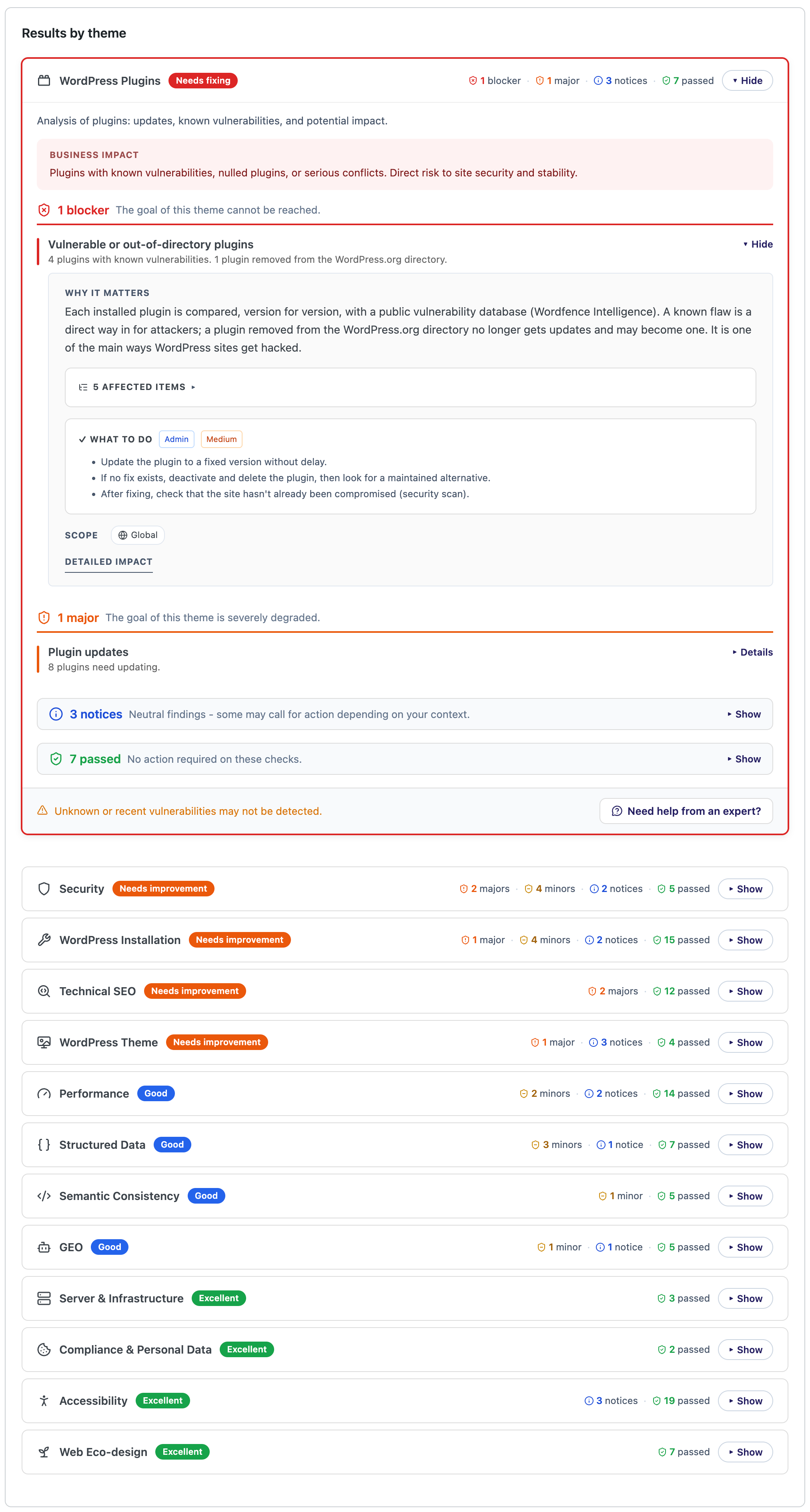
For developers
Is this your plugin? Show off the numbers.
Add a live badge to your site, docs or GitHub README. It updates on its own — no account needed.
Best WebDiagnosis Site Audit alternatives
All audit plugins →




FAQ
WebDiagnosis Site Audit: quick answers
Straight answers, pulled from live WordPress.org data.
Live data from WordPress.org · checked Oct 14, 2026
Is WebDiagnosis Site Audit free?
Yes. WebDiagnosis Site Audit is free to download and use from the official WordPress.org plugin directory.
Is WebDiagnosis Site Audit safe to use in 2026?
WebDiagnosis Site Audit is a solid plugin choice in 2026, with a few things worth checking first. It runs on 10+ sites, is rated 5/5 and was last updated 3 days ago, and scores 73/100 on our health check.
How many websites use WebDiagnosis Site Audit?
WebDiagnosis Site Audit is active on 10+ WordPress websites and has been downloaded 412 times since it launched in September 2026. It was downloaded 416 times in the last 30 days.
Does WebDiagnosis Site Audit work with WordPress 7.1?
Yes. The developer has tested WebDiagnosis Site Audit up to WordPress 7.1.3, the latest release. It requires WordPress 6.0 or newer.
What PHP version does WebDiagnosis Site Audit need?
WebDiagnosis Site Audit requires PHP 7.4 or higher. Most hosts run PHP 8.x today, so it works on any modern WordPress hosting.
When was WebDiagnosis Site Audit last updated?
The latest version, 1.4.0, was released on October 11, 2026 (3 days ago).
Who makes WebDiagnosis Site Audit?
WebDiagnosis Site Audit is developed and maintained by Nicolas Blandel.
What are the best alternatives to WebDiagnosis Site Audit?
The most popular alternatives to WebDiagnosis Site Audit are Audit Trail (20K+ installs), MYAIO (400+ installs) and Sa11y, the accessibility qu… (300+ installs).
Powered by PageForge
Want thousands of pages that rank like these? Build them in an afternoon.
This directory runs on the same engine as PageForge. Turn any spreadsheet, CSV or API into thousands of fast, SEO-ready WordPress pages — with schema, internal links and AI-written copy baked in.
- CSV, Google Sheets & API data sources
- AI content, schema & internal links per page
- Works with Elementor, Gutenberg, Yoast & Rank Math
- Free on WordPress.org — no credit card


