



Webcomic
Comic publishing power for the web. Turn your WordPress-powered site into a comic publishing platform with Webcomic.

Consider an alternative
Webcomic shows warning signs in 2026 — compare the alternatives below before installing. It runs on 600+ sites, is rated 4/5 and was last updated 4 years ago, and scores 35/100 on our health check.
- Small user base (600+ active installs)
- No update in 4 years
- Only tested up to WordPress 5.9 (latest is 7.1)
How does it stack up?
Side-by-side on installs, updates, ratings & support



Daily downloads
Download spikes usually follow a new release — each site that auto-updates counts as a download.
Rankings
Where Webcomic stands todayWordPress.org search rankings
Live position in the plugin search, top 100| Keyword | Position |
|---|---|
| comic | #30 |
| media | >100 |
| shortcode | >100 |
| webcomic | #5 |
| widget | >100 |
Version adoption
Share of active sites per release.
Rating breakdown
★★★★★★★★★★ 4 from 13 reviews
About Webcomic
From the official readme · v5.0.8Description
Webcomic provides a host of features related to creating, managing, and sharing comics on the web.
Comic Management
Webcomic organizes comics into collections – custom post types dedicated to a specific comic series. Publish any number of distinct comic series on a single WordPress site, each with it’s own unique settings. Manage comic media using WordPress’ own media management features.
Theme Integration
Webcomic adds a new section to the Customizer that’s all about integrating comics into your site’s theme. The Universal integration method supports most themes, but methods for integrating with themes built specifically for Webcomic and themes built for other comic plugins are also available. If none of the standard integration methods work with your theme you can use custom actions to add comic features right where you want them.
Powerful Tools
Webcomic includes a variety of tools for working with comics and getting comics up and running on your WordPress-powered site. Use the Generator to automatically create and publish comics for any number of uploaded media items, or use the Matcher to match media items with existing comics. Use collection-specific settings to organize your comics into categories and tags, customize your comic URL’s, and more.
Unlimited Potential
Those are some of Webcomic’s standard features, but there are other components included with Webcomic that provide a variety of new settings, shortcodes, template tags, and widgets. Take your online comic publishing even further with:
- Alert, which adds settings for creating buffer and hiatus email alerts. Never forget an update with customizable email alerts.
- Character, which allows you to tag character appearances and use character-based archives.
- Commerce, which adds PayPal-based print selling and donation features.
- Restrict, which adds features for restricting access to comics based on age or user role.
- Storyline, which allows you to organize comics by storyline and use storyline-based archives.
- Transcribe, which adds comic transcription features for SEO-enhancing text alternatives to your comics.
- Twitter, which adds settings for updating your Twitter account status when publishing comics.
Special Thanks
To everyone that continues to use and support Webcomic.
Installation
Install Webcomic from the Plugins > Add New screen by searching for webcomic (the first result should be the one you’re looking for) or by downloading the plugin archive and uploading it to your site.
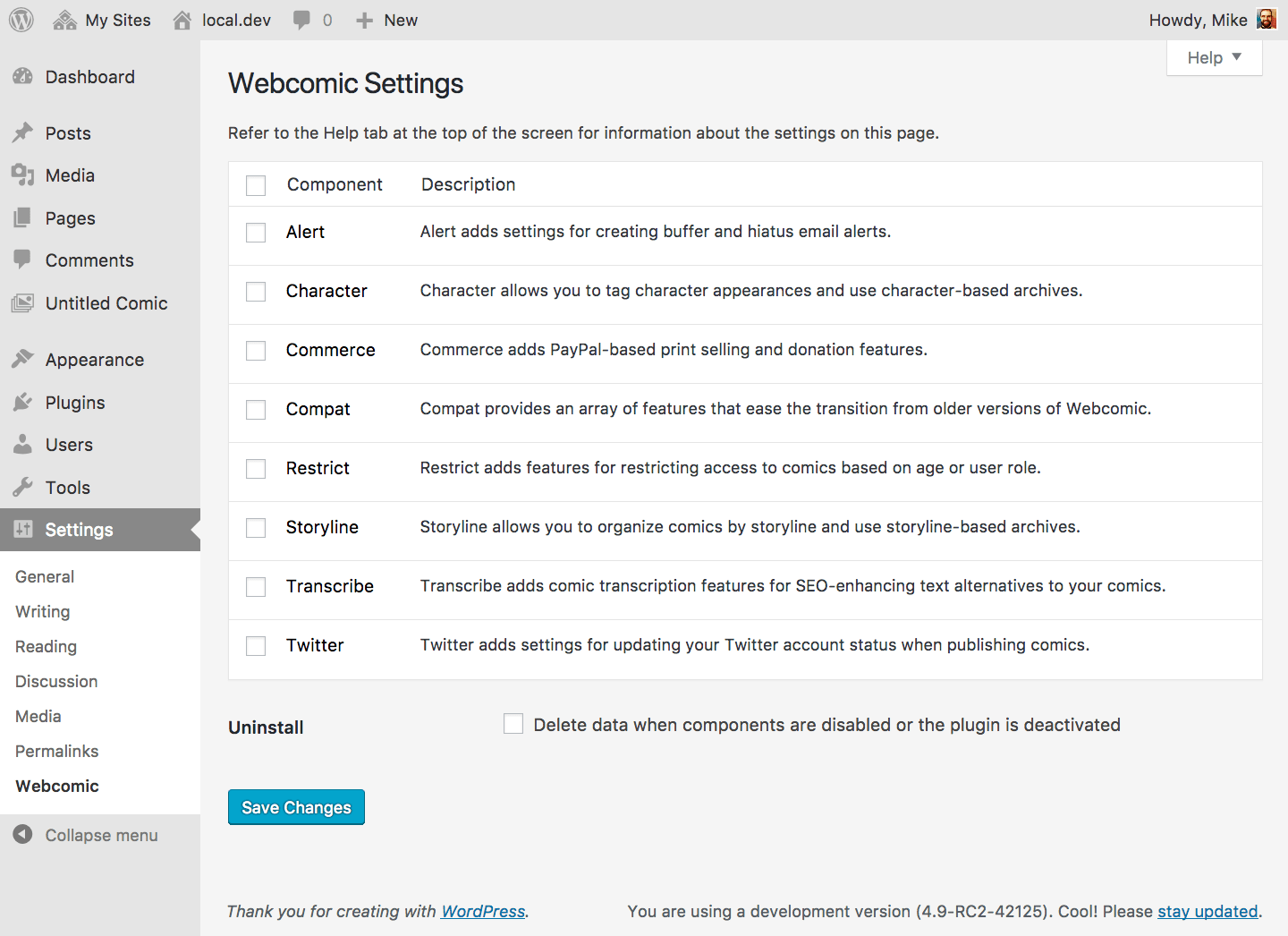
One activated, you can choose which components to use on the Settings > Webcomic screen. If this is a new installation you should see your first comic collection, Untitled Comic, in the sidebar. You can adjust collection-specific settings on the Untitled Comic > Settings screen. Most components will add settings to this screen.
You’ll want to visit the Webcomic section of the Customizer to adjust integration settings for your site theme. The Universal integration method supports most themes, but methods for integrating with themes built specifically for Webcomic and themes built for other comic plugins are also available. If none of the standard integration methods work with your theme you can use custom actions to add comic features right where you want them.
Frequently asked questions
Need help?
All administration screens related to Webcomic include contextual help with support links. If you’re new to Webcomic you may want to start by reading the User Guide.
Want to help?
If you’re a friendly and knowledgable Webcomic user, please chime in and help others out on the Support Forum, Discord Server, or Issue Tracker. If you’re more technically-inclined, pull requests are always welcome.
Changelog
Visit https://mgsisk.com/webcomic/Upgrading-to-Webcomic-5 for important information about this version.
5.0.6 (2018-06-06)
Added
– Development configurations for Code Climate and TravisCI
Changed
– CSS refactored to adhere to stricter stylelint configuration
– JavaScript refactored to adhere to stricter eslint configuration
– Removed Atom configuration
– Task runner to NPM
Fixed
– Incorrect variable reference in compat template tag
– Static analysis and code sniffing issues
– Compat webcomic_link shortcodes not using $content for link text
5.0.0 – Phoenix Down (2018-01-21)
Refactored everything into a functional component-based architecture.
Added
– Assets for the WordPress plugin directory
– Changelog to provide a curated, chronologically ordered list of notable changes for each version
– Code of conduct for project participants
– Contributing guidelines, issue template, and pull request template for project contributors
– Details view on plugin and collection settings pages
– Development configurations for Atom, Babel, Composer, Eslint, Git, Homebrew, MarkdownLint, Node, Phan, PHP Code Sniffer, PHPMD, PHPUnit, PostCSS, Rollup, Stylelint, and Vagrant
– Support document for users
Changed
– Alert functionality refactored into the alert component
– Character functionality refactored into the character and taxonomy components
– Commerce functionality refactored into the commerce component
– Contextual help for all administrative screens
– Core functionality refactored into the plugin and collection components
– CSS assets refactored based on component, processed with PostCSS
– Deprecated functionality refactored into the compat component
– Integration is now configurable in a new Customizer section
– JavaScript assets refactored based on component, processed with Babel, Rollup, and UglifyJS
– Plugin license is now GPL-2.0+
– Plugin versions now follow Semantic Versioning
– Readme now contains more descriptive, useful information
– Restrict functionality refactored into the restrict component
– Storyline functionality refactored into the storyline and taxonomy components
– Transcript functionality refactored into the transcribe component
– Twitter functionality refactored into the twitter component
– User experience improved for all administrative screens
– Webcomic Attacher is now the Webcomic Matcher, lives in the Tools menu
– Webcomic Commerce is now the Webcomic IPN Log
– Webcomic Generator now lives in the Tools menu
Deprecated
– WebcomicTag class
– All [Webcomic]-prefixed widgets
– All plugin-specific theme templates
– Custom media sizes and related features
– Data attributes for gestures and keyboard shortcuts
– The classic behavior of all shortcodes and template tags
– These shortcodes are fully deprecated:
– [purchase_webcomic_link]
– [the_related_webcomics]
– [the_webcomic_characters]
– [the_webcomic_collections]
– [the_webcomic_storylines]
– [the_webcomic]
– [verify_webcomic_age]
– [verify_webcomic_role]
– [webcomic_character_avatar]
– [webcomic_character_cloud]
– [webcomic_character_crossovers]
– [webcomic_collection_cloud]
– [webcomic_collection_crossovers]
– [webcomic_collection_poster]
– [webcomic_collection_print_amount]
– [webcomic_count]
– [webcomic_crossover_description]
– [webcomic_crossover_poster]
– [webcomic_crossover_title]
– [webcomic_donation_amount]
– [webcomic_donation_form]
– [webcomic_dropdown_characters]
– [webcomic_dropdown_collections]
– [webcomic_dropdown_storylines]
– [webcomic_list_characters]
– [webcomic_list_collections]
– [webcomic_list_storylines]
– [webcomic_print_adjustment]
– [webcomic_print_amount]
– [webcomic_print_form]
– [webcomic_storyline_cloud]
– [webcomic_storyline_cover]
– [webcomic_storyline_crossovers]
– [webcomic_transcripts_link]
– These template tags are fully deprecated:
– has_webcomic_attachments
– has_webcomic_crossover
– have_webcomic_transcripts
– is_a_webcomic_attachment
– is_webcomic_archive
– is_webcomic_attachment
– is_webcomic_crossover
– purchase_webcomic_link
– the_related_webcomics
– the_verify_webcomic_age
– the_webcomic_characters
– the_webcomic_collections
– the_webcomic_storylines
– the_webcomic_transcript_authors
– the_webcomic_transcript_languages
– the_webcomic
– verify_webcomic_age
– verify_webcomic_role
– webcomic_character_avatar
– webcomic_character_cloud
– webcomic_character_crossovers
– webcomic_collection_cloud
– webcomic_collection_crossovers
– webcomic_collection_poster
– webcomic_collection_print_amount
– webcomic_count
– webcomic_crossover_description
– webcomic_crossover_poster
– webcomic_crossover_title
– webcomic_donation_amount
– webcomic_donation_fields
– webcomic_donation_form
– webcomic_dropdown_characters
– webcomic_dropdown_collections
– webcomic_dropdown_storylines
– webcomic_dropdown_transcript_languages
– webcomic_list_characters
– webcomic_list_collections
– webcomic_list_storylines
– webcomic_list_transcript_languages
– webcomic_print_adjustment
– webcomic_print_amount
– webcomic_print_fields
– webcomic_print_form
– webcomic_prints_available
– webcomic_storyline_cloud
– webcomic_storyline_cover
– webcomic_storyline_crossovers
– webcomic_transcript_fields
– webcomic_transcripts_link
– webcomic_transcripts_template
Removed
– <meta> tags for Generator and OpenGraph data
– tmhOAuth library
– webcomic_image property on WP_Term objects
– webcomic-attachment-## class for post_class()
– Webcomic theme header
– All component classes
– Collection sorting on the Pages screen
– Conversion options and related features
– Custom media sizes and related features
– Data attributes for dynamic comic loading
– Legacy upgrade tool and related features
– Outdated media contexts for the Media administrative screen
– Outdated plugin files and assets
– Transcript language setting for collections
Fixed
– Bugs found in previous releases
Screenshots



For developers
Is this your plugin? Show off the numbers.
Add a live badge to your site, docs or GitHub README. It updates on its own — no account needed.
Best Webcomic alternatives
All comic plugins →





FAQ
Webcomic: quick answers
Straight answers, pulled from live WordPress.org data.
Live data from WordPress.org · checked Oct 2, 2026
Is Webcomic free?
Yes. Webcomic is free to download and use from the official WordPress.org plugin directory.
Is Webcomic safe to use in 2026?
Webcomic shows warning signs in 2026 — compare the alternatives below before installing. It runs on 600+ sites, is rated 4/5 and was last updated 4 years ago, and scores 35/100 on our health check.
How many websites use Webcomic?
Webcomic is active on 600+ WordPress websites and has been downloaded 70,371 times since it launched in December 2008. It was downloaded 140 times in the last 30 days.
Does Webcomic work with WordPress 7.1?
Webcomic is officially tested up to WordPress 5.9.18, while the latest release is 7.1.2. It may still work, but try it on a staging site first.
What PHP version does Webcomic need?
Webcomic requires PHP 7.0 or higher. Most hosts run PHP 8.x today, so it works on any modern WordPress hosting.
When was Webcomic last updated?
The latest version, 5.0.8, was released on May 11, 2022 (4 years ago).
Who makes Webcomic?
Webcomic is developed and maintained by Mike.
What are the best alternatives to Webcomic?
The most popular alternatives to Webcomic are Word Balloon (10K+ installs), Toocheke Companion (1K+ installs) and ComicPress to Comic Easel M… (300+ installs).
Powered by PageForge
Want thousands of pages that rank like these? Build them in an afternoon.
This directory runs on the same engine as PageForge. Turn any spreadsheet, CSV or API into thousands of fast, SEO-ready WordPress pages — with schema, internal links and AI-written copy baked in.
- CSV, Google Sheets & API data sources
- AI content, schema & internal links per page
- Works with Elementor, Gutenberg, Yoast & Rank Math
- Free on WordPress.org — no credit card


