


Webcasata Filter Gallery
Create beautiful filterable image galleries with dropdown filtering, lightbox, load more pagination, shortcode and Gutenberg block support.

Use with caution
Webcasata Filter Gallery works, but test it on a staging site before relying on it in 2026. Was last updated 11 hours ago, and scores 52/100 on our health check.
- Actively developed — last update 11 hours ago
- Small user base (<10 active installs)
- Very few reviews so far
- Only tested up to WordPress 6.9 (latest is 7.1)
How does it stack up?
Side-by-side on installs, updates, ratings & support



Daily downloads
Download spikes usually follow a new release — each site that auto-updates counts as a download.
Rankings
Where Webcasata Filter Gallery stands todayWordPress.org search rankings
Live position in the plugin search, top 100| Keyword | Position |
|---|---|
| filter | >100 |
| filterable gallery | >100 |
| gallery | >100 |
| image gallery | >100 |
| lightbox | >100 |
About Webcasata Filter Gallery
From the official readme · v2.4.2Description
Webcasata Filter Gallery lets you build stunning, responsive image galleries where visitors can instantly filter images using custom dropdown menus — all without any page reload.
Key Features
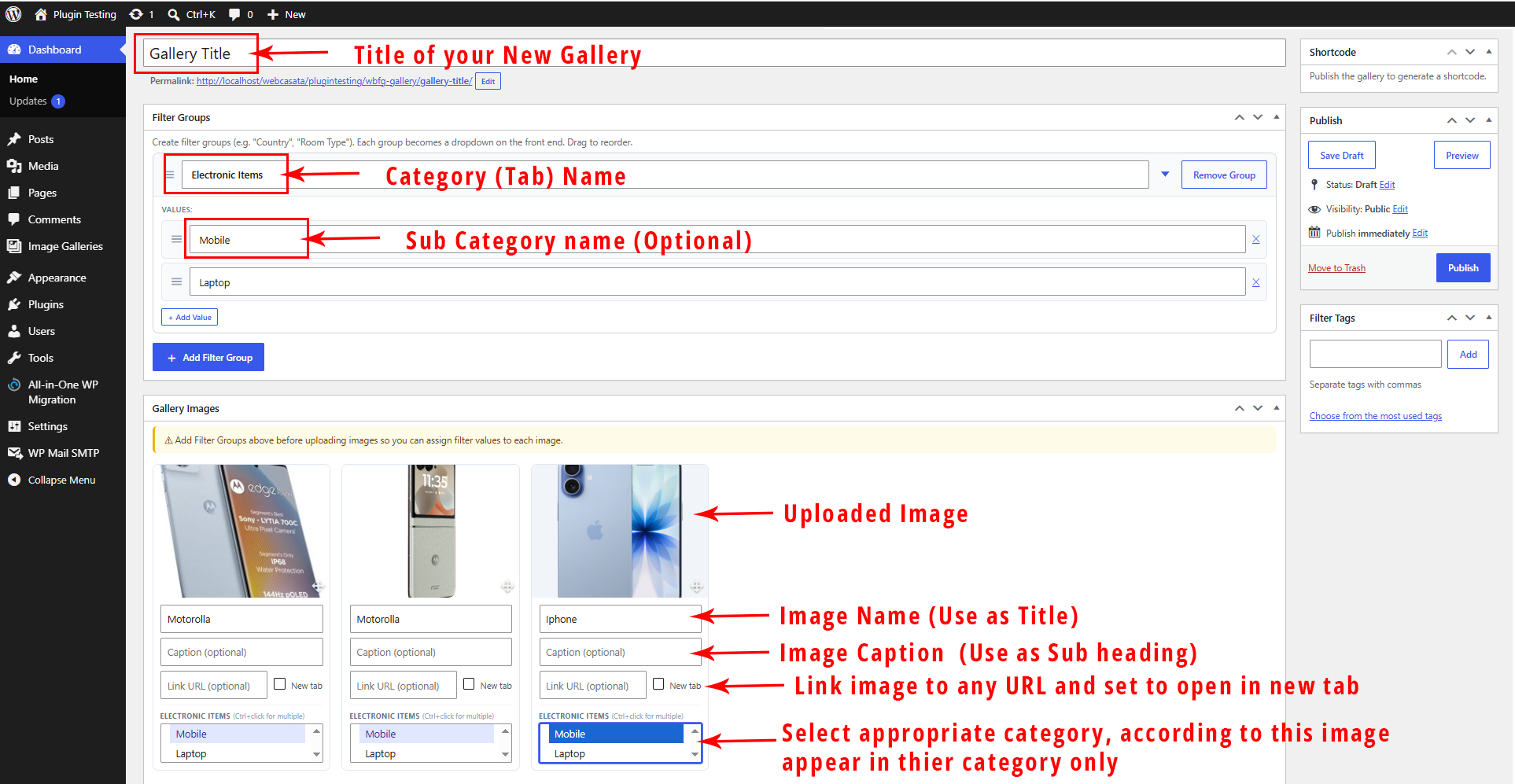
- Multi-group dropdown filtering — Create filter groups (e.g. “Country”, “Room Type”). Each becomes a styled dropdown on the front end.
- AND logic across groups, OR within a group — Country=India AND Room=Kitchen; image can belong to multiple countries.
- Custom styled dropdowns — Single-select, closes on pick, with active pill indicators.
- Real-time title search — Search box with 220ms debounce filters images as you type.
- Equal Grid & Masonry layouts — Choose your preferred display style.
- Configurable columns — 1 to 6 columns with automatic responsive breakpoints.
- Slide / Fade / None animations — Smooth transitions when switching filters.
- Load More pagination — Shows a configurable number of images on load; load more on click. Set to -1 to show all.
- Built-in Lightbox — Full-screen image viewer with prev/next, keyboard support, and optional Visit Link button.
- Image URL link — Assign an external URL to any image, with optional new tab.
- Image Title & Caption — Display below each image. Title hideable via shortcode.
- Filter labels on image cards — Show assigned filter values as badge labels or ribbons.
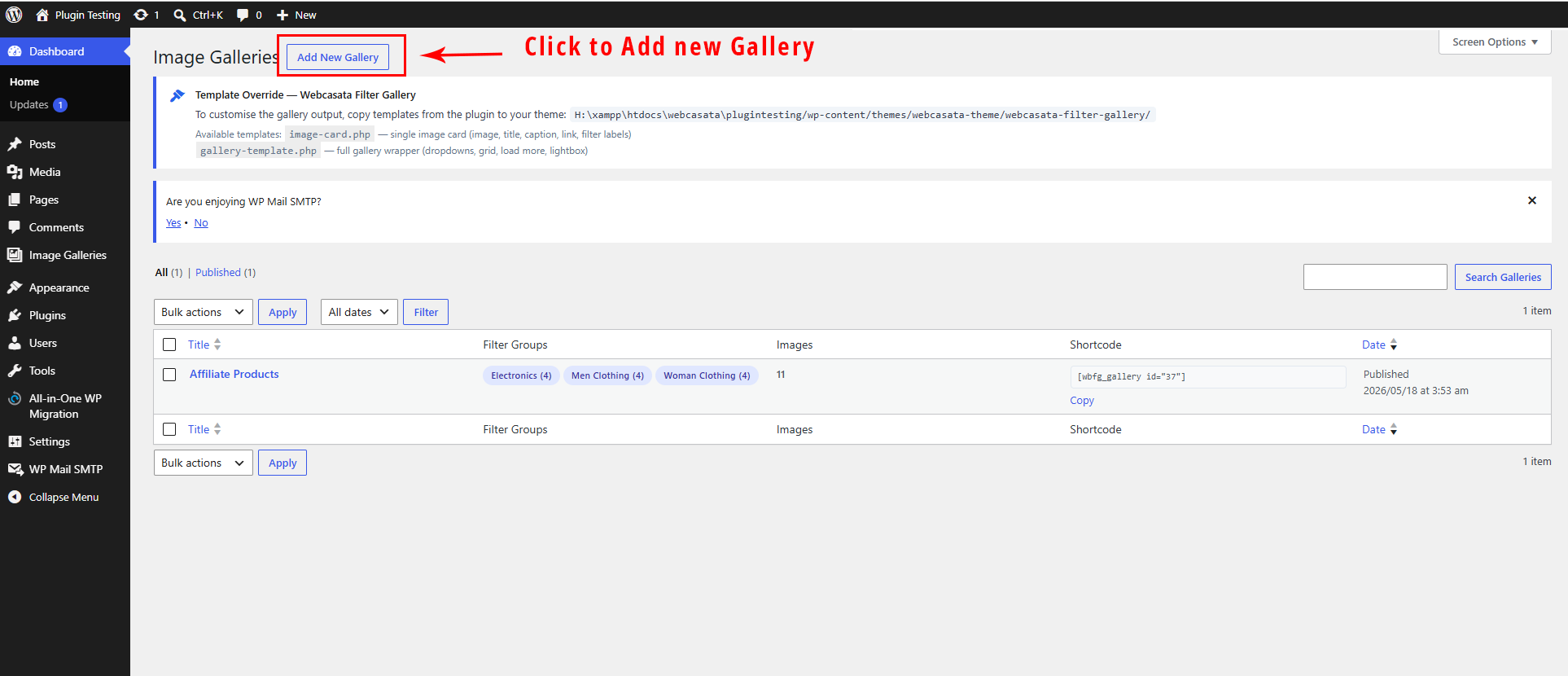
- Template override system — WooCommerce-style. Copy templates to your theme to customise layout completely.
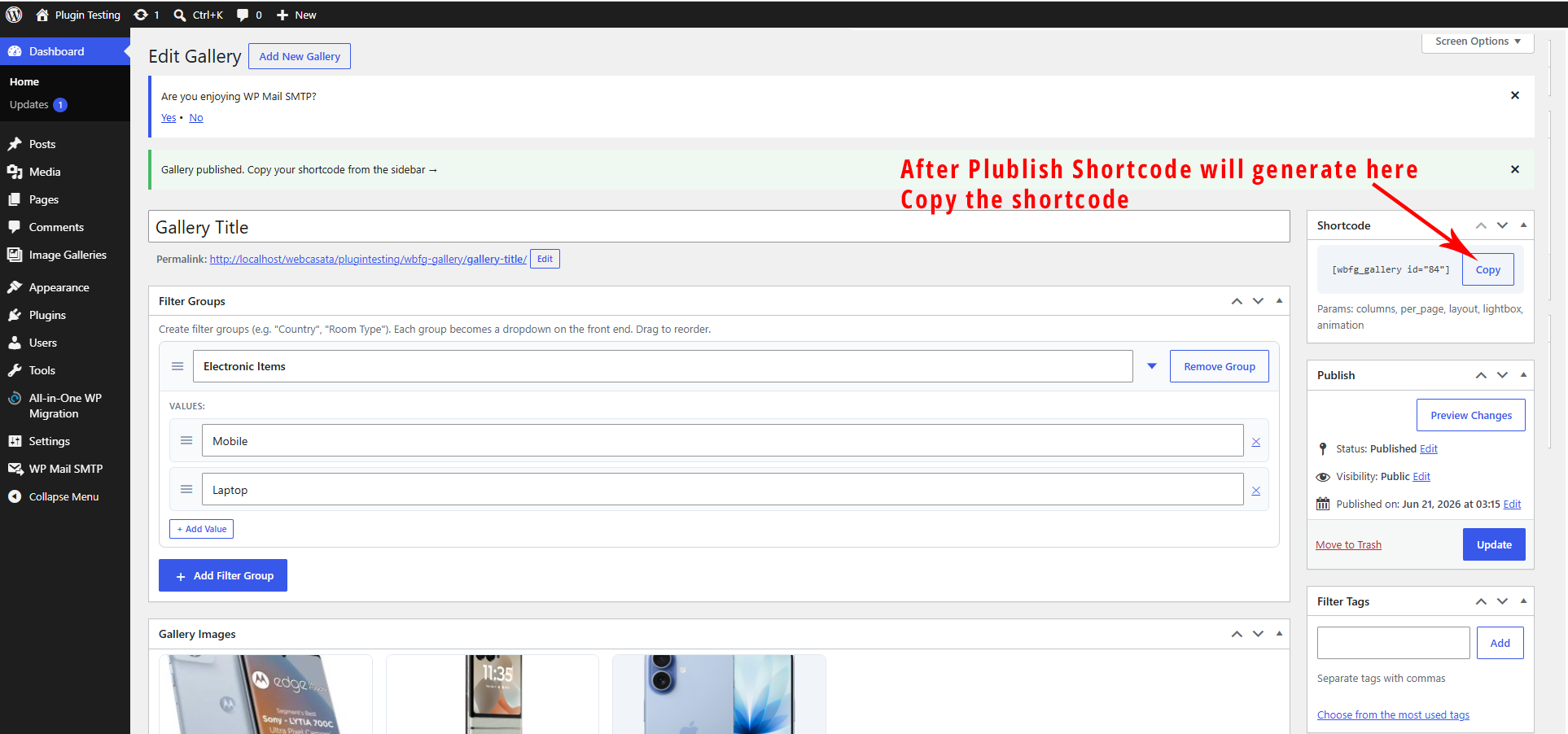
- Shortcode —
[wbfg_gallery id="X"]with full inline attribute overrides. - Gutenberg Block — Live preview block with full sidebar controls.
- Per-gallery custom CSS — Fine-tune each gallery independently.
- Global settings — Control defaults for all galleries from one Settings page.
- Accessibility — ARIA roles, keyboard-navigable dropdowns, focus management.
- Fully responsive — Mobile-first CSS with sensible breakpoints.
Template Override System
Copy templates to your active theme to customise the output:
your-theme/webcasata-filter-gallery/image-card.php
your-theme/webcasata-filter-gallery/gallery-template.php
All image variables are available in image-card.php: $image, $title, $caption, $link_url, $link_new_tab, $filters, $lightbox, $show_title, $index, $gallery_id.
Shortcode Parameters
[wbfg_gallery id="X" columns="3" show_all="yes" per_page="6" loadmore="6" layout="grid" lightbox="yes" animation="slide" title="show"]
Parameter
Values
Default
id
Gallery post ID
(required)
columns
1–6
3
show_all
yes / no
yes
per_page
number or -1
6
loadmore
number
6
layout
grid / masonry
grid
lightbox
yes / no
yes
animation
slide / fade / none
slide
title
show / hide
show
The Image Size setting (Thumbnail / Medium / Full) is configured globally in Settings → Display Settings and applies to all galleries.
Credits
Developed by Vishal Singh at Webcasata.
Installation
- Upload the
webcasata-filter-galleryfolder to/wp-content/plugins/. - Activate the plugin through Plugins › Installed Plugins.
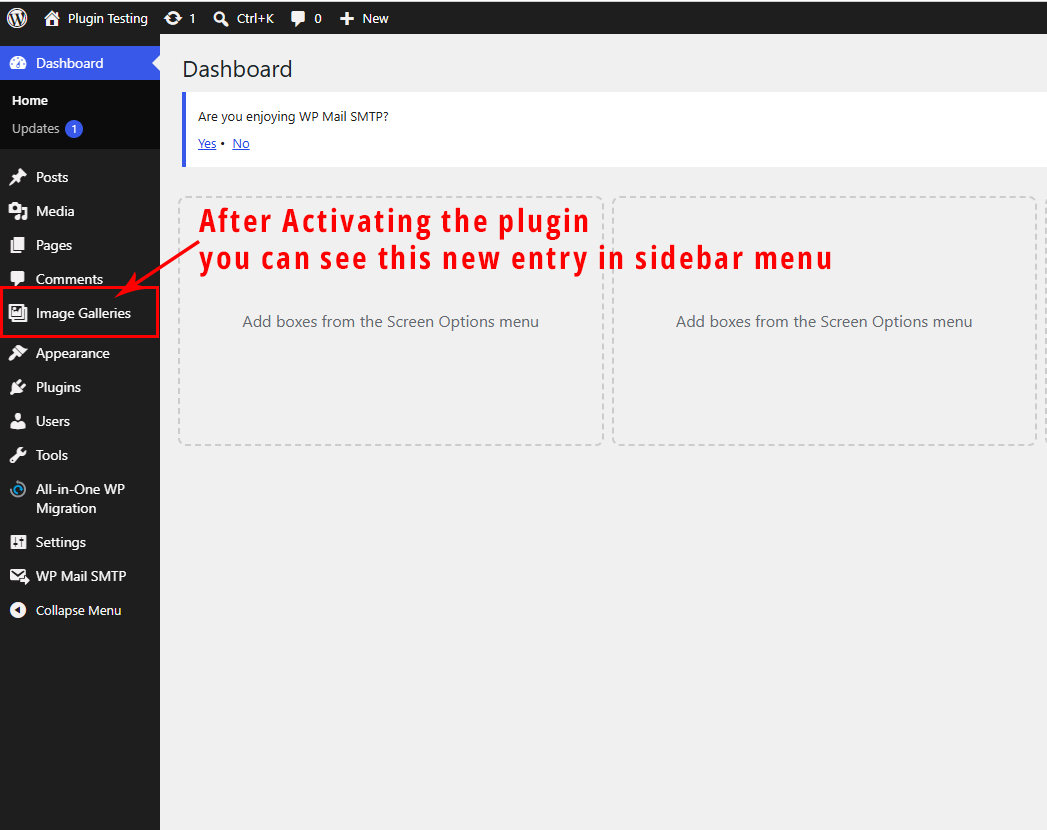
- Go to Filter Galleries › Add New to create your first gallery.
- Add filter groups and values, upload images, assign filter values, and publish.
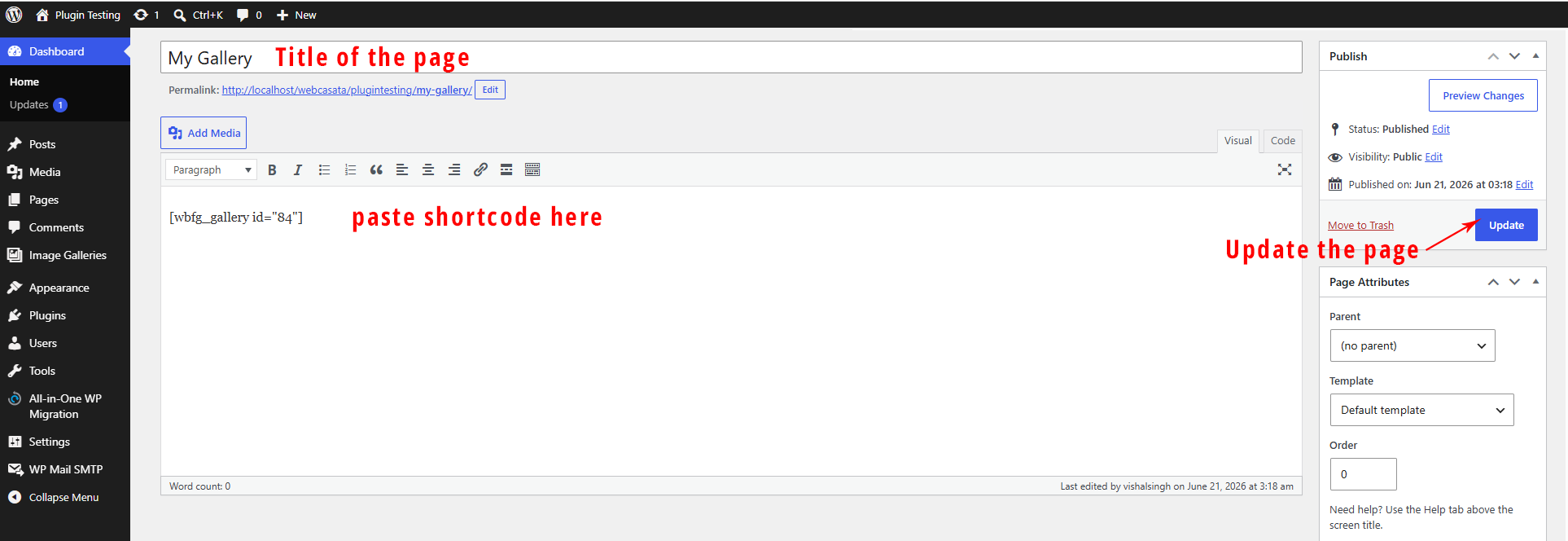
- Copy the shortcode from the sidebar and paste it into any page or post.
Frequently asked questions
Can one image belong to multiple filter values?
Yes. Each image has a multi-select box per filter group. Hold Ctrl/Cmd to select multiple values — e.g. a cuisine image can be tagged as both India and USA.
How does the filtering logic work?
AND logic across groups, OR within a group. If you select Country=India and Room=Kitchen, only images assigned to India (or both India and USA) AND Kitchen are shown.
Can I customise the image card layout?
Yes — copy image-card.php from the plugin’s templates/ folder to your-theme/webcasata-filter-gallery/image-card.php and edit freely. All image data is available as PHP variables.
How do I show all images without a Load More button?
Set per_page="-1" in the shortcode, or set “Images on Page Load” to -1 in the Settings page.
Does this plugin slow down my site?
CSS and JavaScript are only enqueued on pages that contain a gallery shortcode or block. Images use native loading="lazy".
Changelog
Adds template override system. Existing galleries work without any changes.
2.4.2
- Fix: Filter value multi-select now requires Ctrl+click; plain click toggles only the clicked value (deselects all others).
- Fix: All filter groups are now collapsed by default when opening the gallery edit screen.
- Fix: Version number correctly incremented so WordPress update screen shows the new version.
2.4.0
- New: Image Size setting — choose Thumbnail, Medium, or Full for gallery rendering (Settings page → Display Settings).
- Improved: Admin image cards now preview at the selected image size and images fill the card with no white space.
- Improved: Fresh, polished admin panel design — cleaner meta boxes, card-based settings page, refined colour scheme and typography.
- Fix: Data Management card now uses CSS class instead of inline styles.
2.3.0
- New: WooCommerce-style template override system (image-card.php, gallery-template.php).
- New: Filter value labels displayed on each image card (badge and ribbon styles).
- New:
FIG_Templateclass withlocate(),load(),is_overridden()methods. - New: Admin notice showing theme override path and active overrides.
- Improved:
render_item()now delegates to template system; fallback inline renderer kept. - Fix: Per-gallery custom CSS now uses
wp_add_inline_style()instead of inline<style>tag. - Fix: Settings page styles moved to
wp_add_inline_style().
2.0.0
- New: Multi-group dropdown filtering with AND logic across groups, OR within a group.
- New: Custom styled single-select dropdowns replace flat filter tabs.
- New: Images support multiple filter values per group via multi-select admin UI.
- New: Image title displayed below each image (hideable via shortcode title=”hide”).
- New: Image URL link field with open-in-new-tab option.
- New: Visit Link button inside lightbox when image has a URL.
- New: Real-time title search box with debounce and clear button.
- New: Filter group collapse/expand in admin edit screen.
- New: Active filter pill tags shown above gallery with individual remove buttons.
- New: Initial count supports -1 to show all images (no Load More button).
- Improved: Filter assignment uses scrollable multi-select box (handles 50+ values).
- Improved: All filtering is client-side — instant, no AJAX round-trips.
- Improved: Backward compatible with v1 flat-tag galleries.
1.0.0
- Initial release.
Screenshots

For developers
Is this your plugin? Show off the numbers.
Add a live badge to your site, docs or GitHub README. It updates on its own — no account needed.
Best Webcasata Filter Gallery alternatives
All filter plugins →





FAQ
Webcasata Filter Gallery: quick answers
Straight answers, pulled from live WordPress.org data.
Live data from WordPress.org · checked Sep 30, 2026
Is Webcasata Filter Gallery free?
Yes. Webcasata Filter Gallery is free to download and use from the official WordPress.org plugin directory.
Is Webcasata Filter Gallery safe to use in 2026?
Webcasata Filter Gallery works, but test it on a staging site before relying on it in 2026. Was last updated 11 hours ago, and scores 52/100 on our health check.
How many websites use Webcasata Filter Gallery?
Webcasata Filter Gallery is active on <10 WordPress websites and has been downloaded 336 times since it launched in June 2026. It was downloaded 106 times in the last 30 days.
Does Webcasata Filter Gallery work with WordPress 7.1?
Webcasata Filter Gallery is officially tested up to WordPress 6.9.9, while the latest release is 7.1.2. It may still work, but try it on a staging site first.
What PHP version does Webcasata Filter Gallery need?
Webcasata Filter Gallery requires PHP 7.4 or higher. Most hosts run PHP 8.x today, so it works on any modern WordPress hosting.
When was Webcasata Filter Gallery last updated?
The latest version, 2.4.2, was released on September 30, 2026 (11 hours ago).
Who makes Webcasata Filter Gallery?
Webcasata Filter Gallery is developed and maintained by webcasata.
What are the best alternatives to Webcasata Filter Gallery?
The most popular alternatives to Webcasata Filter Gallery are HUSKY (80K+ installs), Search & Filter (50K+ installs) and Allow HTML in Category Desc… (8K+ installs).
Powered by PageForge
Want thousands of pages that rank like these? Build them in an afternoon.
This directory runs on the same engine as PageForge. Turn any spreadsheet, CSV or API into thousands of fast, SEO-ready WordPress pages — with schema, internal links and AI-written copy baked in.
- CSV, Google Sheets & API data sources
- AI content, schema & internal links per page
- Works with Elementor, Gutenberg, Yoast & Rank Math
- Free on WordPress.org — no credit card


