



SmartyParcel – Shipping Automation & Order Tracking for GLS, InPost, Nova Post and more
The easiest way to automate shipping in WooCommerce: pickup points at checkout (list or map), one-click shipping labels and order tracking.

Safe pick
Yes — SmartyParcel is a safe, well-maintained plugin to use in 2026. It runs on 7K+ sites, is rated 4.6/5 and was last updated 20 hours ago, and scores 87/100 on our health check.
- Loved by users — 4.6/5 from 56 reviews
- Actively developed — last update 20 hours ago
- Tested with the latest WordPress (7.1)
- Momentum — downloads up 63.2% vs the previous 30 days
How does it stack up?
Side-by-side on installs, updates, ratings & support



Daily downloads
Download spikes usually follow a new release — each site that auto-updates counts as a download.
Rankings
Where SmartyParcel stands todayWordPress.org search rankings
Live position in the plugin search, top 100| Keyword | Position |
|---|---|
| gls | #2 |
| meest | #2 |
| nova post | #1 |
| order tracking | #11 |
| postnord | #2 |
Version adoption
Share of active sites per release.
Rating breakdown
★★★★★★★★★★ 4.6 from 56 reviews
About SmartyParcel
From the official readme · v1.23.1Description
SmartyParcel helps your WooCommerce store grow by taking shipping routine off your hands. Connect your carriers and automate shipping from checkout to delivery: pickup points at checkout, one-click shipping labels, order tracking and customer notifications — all from one platform. Trusted by 7,000+ WooCommerce stores.
Product Overview
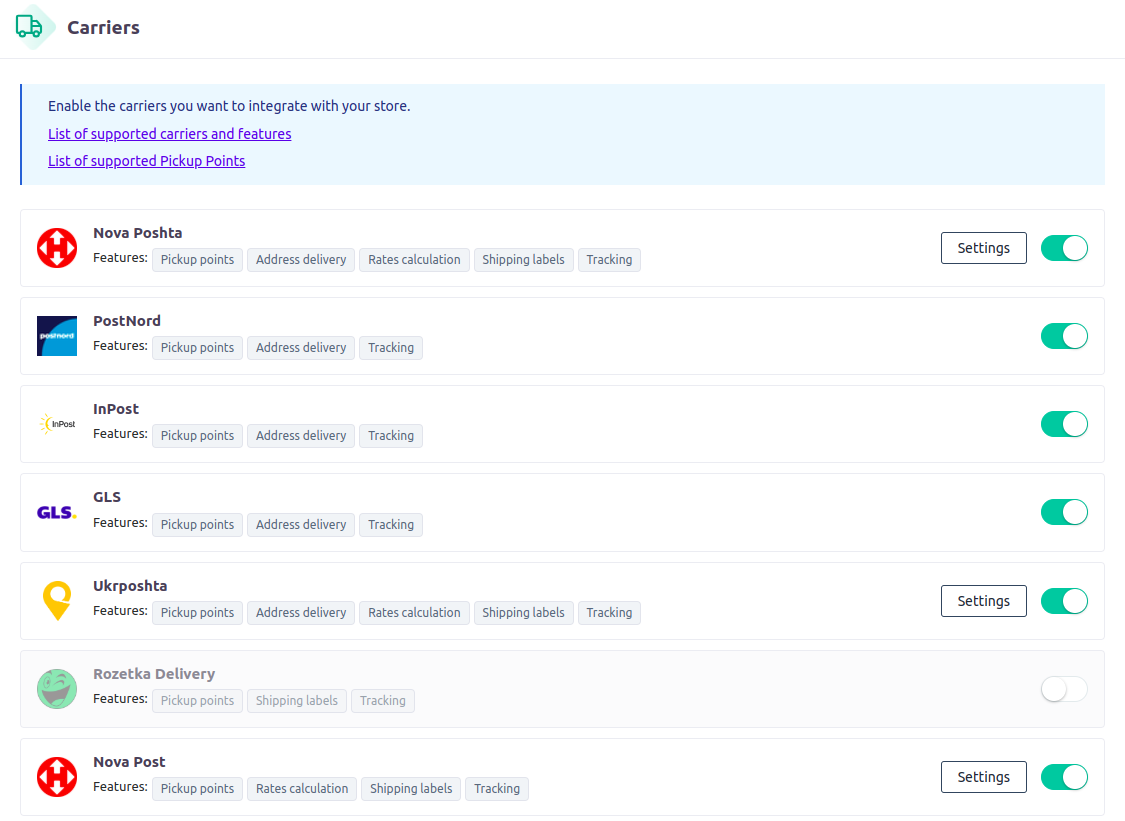
Supported carriers
Documentation
Example: setting up PostNord pickup points in the WooCommerce checkout.
Features
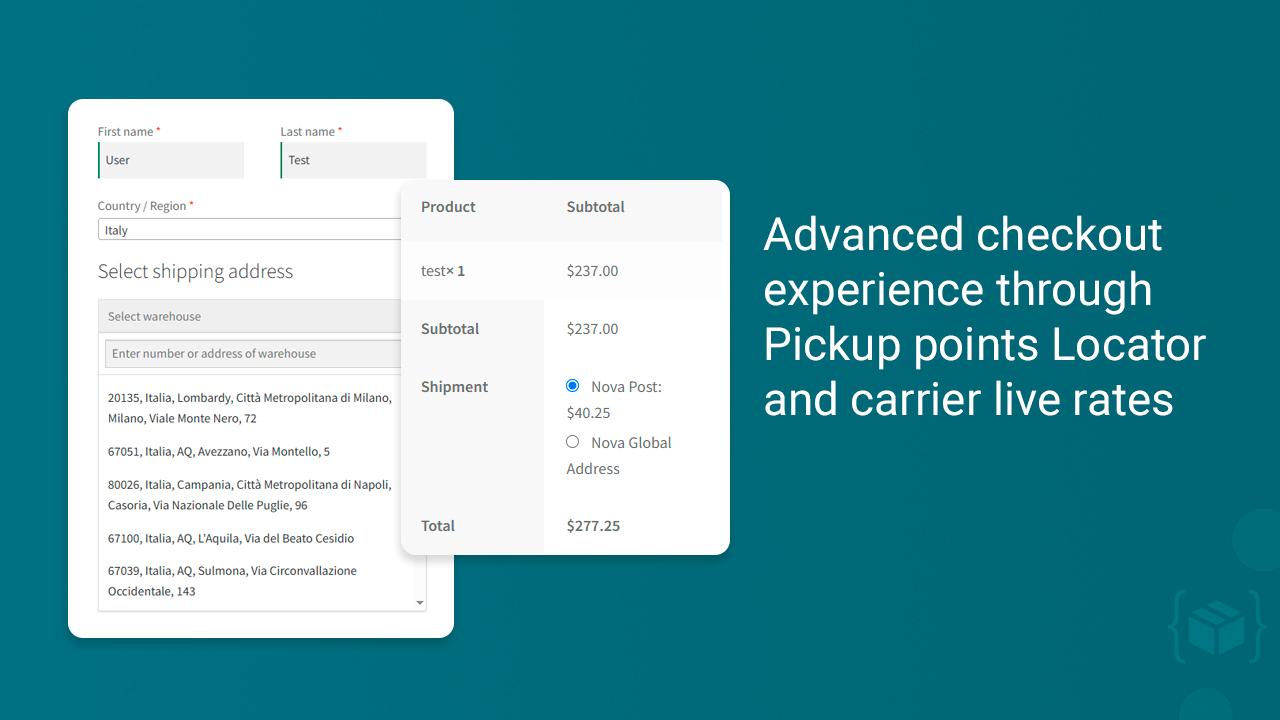
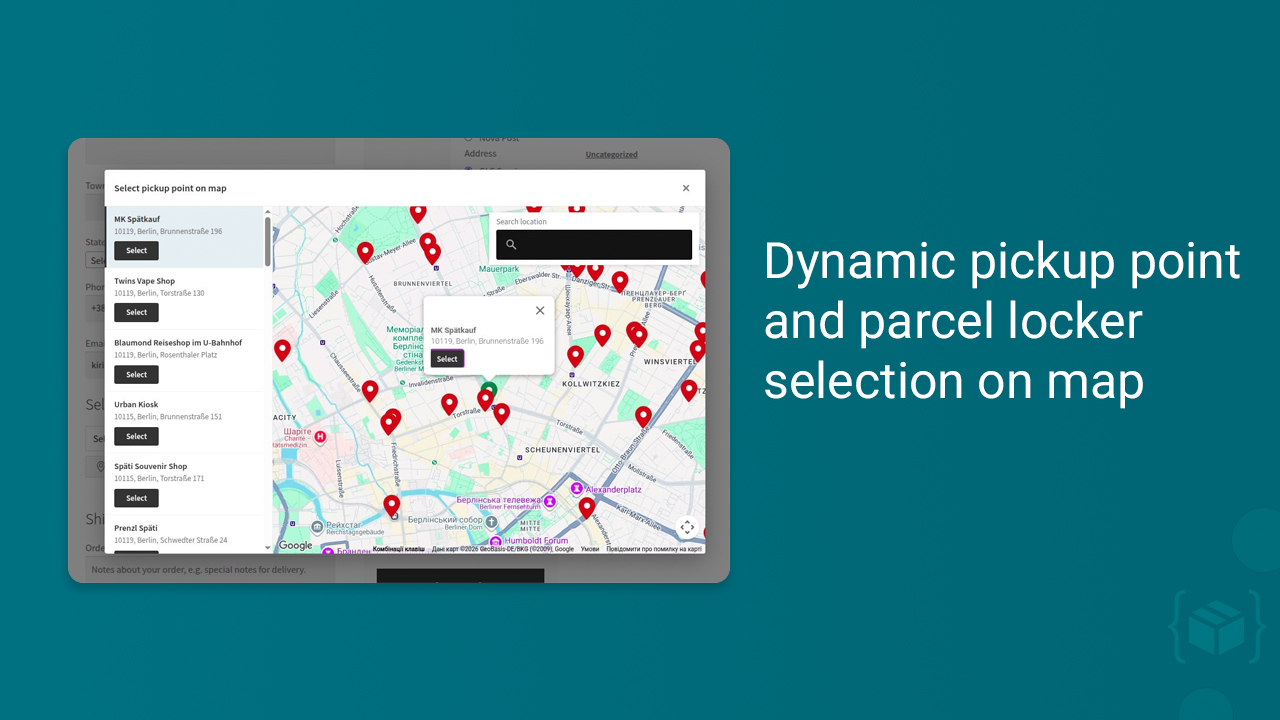
- Pickup point selection built into the WooCommerce checkout — a searchable list, plus an optional Google map view.
- Separate shipping methods per delivery type, so “To pickup point” and “Courier to address” are two distinct options in the WooCommerce shipping zone.
- Points are loaded live from the carrier network, with opening hours, addresses and parcel size limits where the carrier provides them.
- Works with WooCommerce shipping zones, so each country gets exactly the carriers you ship there with.
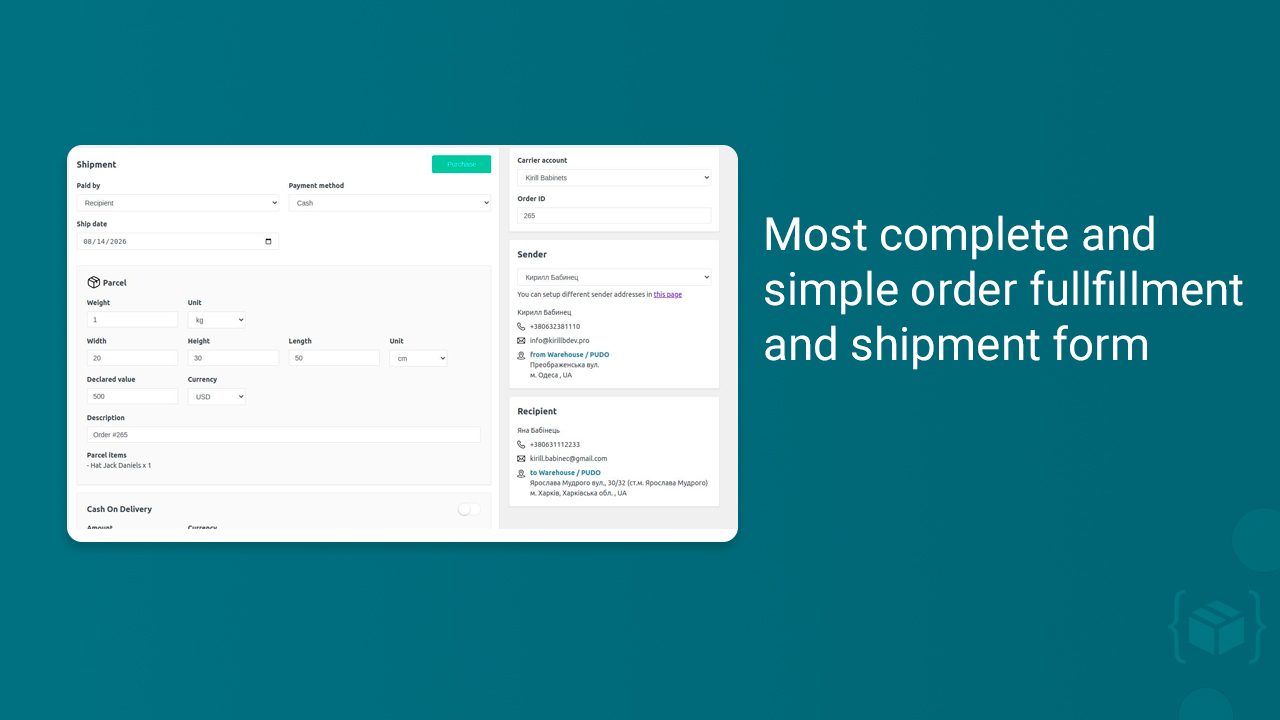
- Create domestic and international shipping labels in a few clicks.
- Bulk label creation and printing (paid plans).
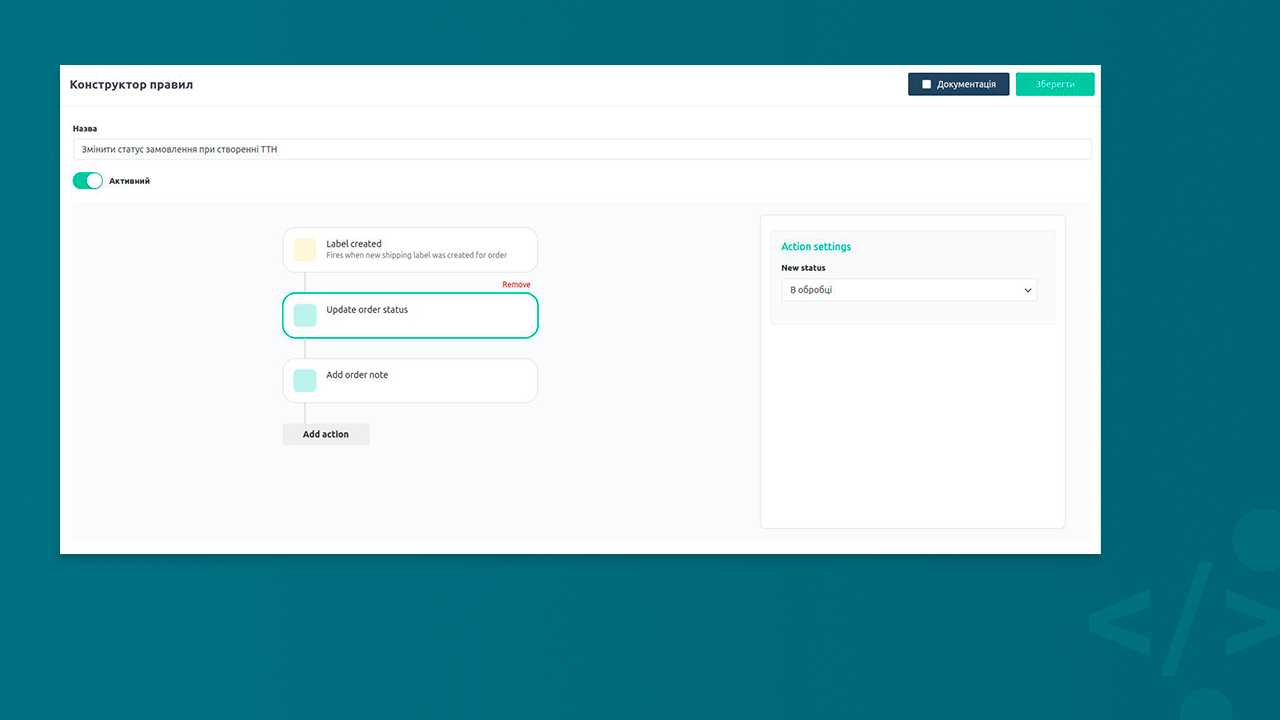
- Rule-based automation: create labels automatically on order status change, on payment, or on your own conditions.
- Shipping rules: prepare shipments automatically by your criteria (for example, choose the carrier by parcel weight or add extra services and more).
- Easy to ship from multiple sender addresses.
- Provide carrier live-rates at checkout for your customers (paid plans).
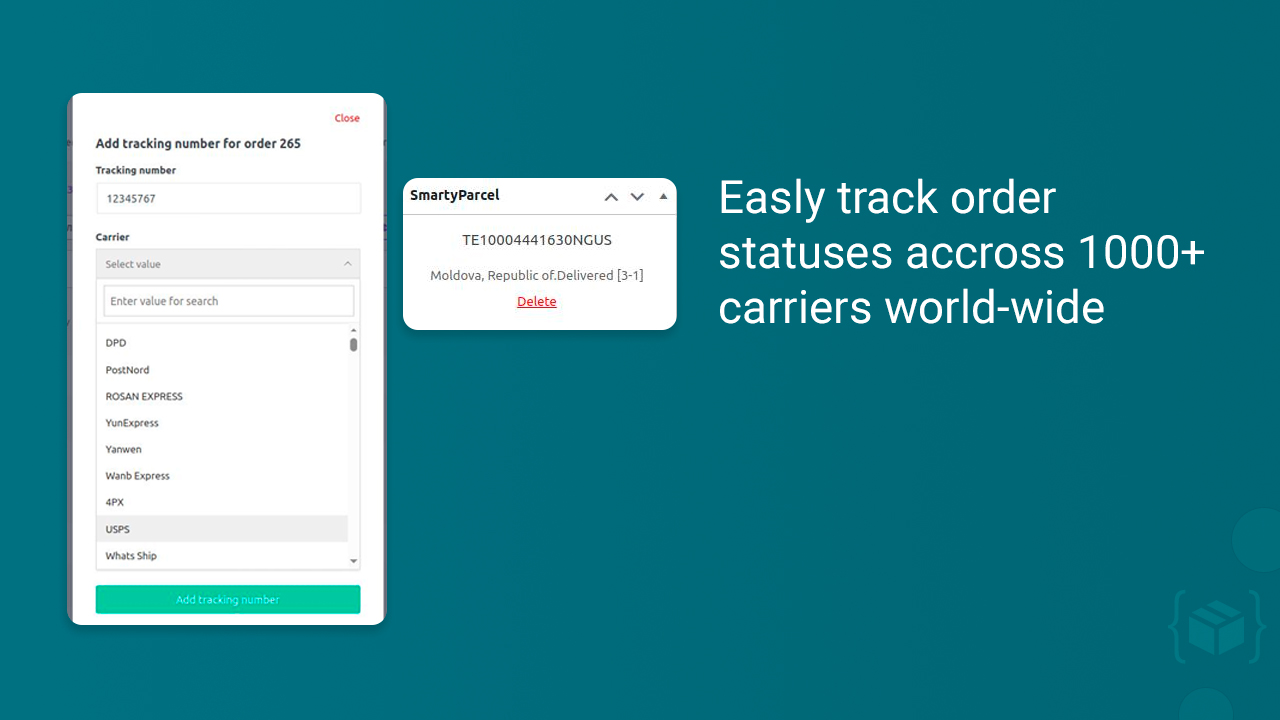
- Advanced order tracking with real-time status sync and customer notifications (Email and SMS).
Pickup point selector at checkout (ParcelShops, Parcel Lockers, Service Points)
- GLS (Europe)
- InPost (Poland only, for now)
- PostNord
- Nova Post
- Nova Poshta (Ukraine)
- Ukrposhta
- Meest
- Rozetka Delivery
No API keys or contracts required.
Supported carriers
GLS, InPost, Meest, Nova Post, Nova Poshta, PostNord, Nova Global, Rozetka Delivery, Ukrposhta and many more. We’re continuously integrating new carriers and features!
Compatibility
- WooCommerce HPOS (High-Performance Order Storage) and legacy order storage.
- WPML, Polylang and multi-currency stores.
- PHP 8.0+, tested with the latest WordPress and WooCommerce releases.
External services
This plugin uses SmartyParcel API to provide advanced logistic functions (like create labels, tracking etc.) and also external API to collect user feedbacks and installation telemetry, which includes the store URL and the WordPress administrator email address (Privacy Policy).
Installation
Minimum Requirements
- PHP 8.0 or greater is recommended
- MySQL 5.7 or greater is recommended
Automatic installation
Automatic installation is the easiest option as WordPress handles the file transfers itself and you don’t need to leave your web browser. To do an automatic install of plugin, log in to your WordPress dashboard, navigate to the Plugins menu, and click Add New.
In the search field type “SmartyParcel” and click Search Plugins. Once you’ve found it you can view details about it such as the point release, rating, and description. Most importantly of course, you can install it by simply clicking “Install Now”.
Manual installation
The manual installation method involves downloading this plugin and uploading it to your webserver via your favourite FTP application. The WordPress codex contains instructions on how to do this here.
Updating
Automatic updates should work like a charm; as always though, ensure you backup your site just in case.
Frequently asked questions
Which carriers does SmartyParcel support?
SmartyParcel natively integrates GLS, InPost, PostNord, Nova Post, Nova Poshta, Ukrposhta, Rozetka Delivery, Meest and Nova Global.
How do customers choose a pickup point or parcel locker at checkout?
The plugin adds a pickup point selector to the WooCommerce checkout for every enabled carrier. Customers search the carrier network by city or address and pick a pickup point, parcel locker or service point; the selected point is saved with the order and used when the shipping label is created.
Can customers select a pickup point on a map?
Yes. Besides the searchable list, the pickup point selector has a Google Maps mode with search by city and street. It requires a Google Maps API key, which is set in the plugin settings.
Can I create and print shipping labels in bulk?
Yes, on paid plans. Select any number of WooCommerce orders and create and print their shipping labels in one run, instead of opening orders one by one. Labels can also be generated automatically by rules — on order status change, on payment, or on your own conditions.
Does the plugin support cash on delivery (COD)?
Yes. COD is supported for Nova Poshta, Ukrposhta, Meest and Rozetka Delivery. We are working on extending cash on delivery support to more carriers.
Can I use SmartyParcel solely for order tracking?
Yes. If you already create shipping labels in other tools or directly with carriers, SmartyParcel can run as a centralized tracking engine only: real-time status updates, automated status syncing in WooCommerce and customer notifications.
Does the plugin support WooCommerce HPOS?
Yes. The plugin is fully compatible with WooCommerce High-Performance Order Storage (custom order tables) and with the legacy order storage.
Does the plugin work with WPML, Polylang and multi-currency stores?
Yes. The plugin is compatible with WPML and Polylang, and works in multi-currency stores. Carrier data at checkout is shown in the language configured for the carrier.
Does the plugin support WooCommerce checkout blocks?
Unfortunately, the plugin doesn’t support checkout blocks yet, but we are working on it.
Changelog
Version 1.23.1 / (25.09.2026)
- Added GLS Service Point delivery shipping method.
- Added GLS Address delivery shipping method.
- Added GLS to pickup point selection from Google Map.
- Added Nova Post Address delivery shipping method.
- Added rates calculation for Nova Post address delivery.
- Changed api endpoint for batch and auto label creation.
Version 1.23.0 / (19.09.2026)
- Introduced Pickup point selection from Google Map. Supported carriers: Nova Poshta, InPost and PostNord. Requires SmartyParcel Locator API.
- Added checking for manage_woocommerce permissions for admin routes (Patchstack issue).
- Remove legacy Tools page.
Version 1.22.5 / (07.09.2026)
- Restored default value for the active carriers option.
Version 1.22.4 / (07.09.2026)
- Added InPost Service Point delivery shipping method.
- Added InPost Address delivery shipping method.
- Implemented Pickup Points selection for InPost (Poland).
Version 1.22.3 / (01.09.2026)
- Improved order sync mechanism.
Version 1.22.2 / (28.08.2026)
- Added PostNord Service Point delivery shipping method.
- Added PostNord Address delivery shipping method.
- Implemented SmartyParcel Locator (PUDO search) for PostNord carrier.
Screenshots
For developers
Is this your plugin? Show off the numbers.
Add a live badge to your site, docs or GitHub README. It updates on its own — no account needed.
Best SmartyParcel alternatives
All gls plugins →





FAQ
SmartyParcel: quick answers
Straight answers, pulled from live WordPress.org data.
Live data from WordPress.org · checked Sep 26, 2026
Is SmartyParcel free?
Yes. SmartyParcel is free to download and use from the official WordPress.org plugin directory.
Is SmartyParcel safe to use in 2026?
Yes — SmartyParcel is a safe, well-maintained plugin to use in 2026. It runs on 7K+ sites, is rated 4.6/5 and was last updated 20 hours ago, and scores 87/100 on our health check.
How many websites use SmartyParcel?
SmartyParcel is active on 7K+ WordPress websites and has been downloaded 171,826 times since it launched in June 2019. It was downloaded 6,641 times in the last 30 days.
Does SmartyParcel work with WordPress 7.1?
Yes. The developer has tested SmartyParcel up to WordPress 7.1.2, the latest release. It requires WordPress a recent version or newer.
What PHP version does SmartyParcel need?
SmartyParcel requires PHP 8.0 or higher. Most hosts run PHP 8.x today, so it works on any modern WordPress hosting.
When was SmartyParcel last updated?
The latest version, 1.23.1, was released on September 25, 2026 (20 hours ago).
Who makes SmartyParcel?
SmartyParcel is developed and maintained by kirillbdev.
What are the best alternatives to SmartyParcel?
The most popular alternatives to SmartyParcel are Csomagpontok és Címkék WooC… (7K+ installs), DEPRECATED (5K+ installs) and GLS Shipping for WooCommerce (2K+ installs).
Powered by PageForge
Want thousands of pages that rank like these? Build them in an afternoon.
This directory runs on the same engine as PageForge. Turn any spreadsheet, CSV or API into thousands of fast, SEO-ready WordPress pages — with schema, internal links and AI-written copy baked in.
- CSV, Google Sheets & API data sources
- AI content, schema & internal links per page
- Works with Elementor, Gutenberg, Yoast & Rank Math
- Free on WordPress.org — no credit card


