



Cart PDF for WooCommerce
Adds ability for users and guests to download their WooCommerce cart as PDF

Safe pick
Yes — Cart PDF for WooCommerce is a safe, well-maintained plugin to use in 2026. It runs on 1K+ sites, is rated 5/5 and was last updated 2 months ago, and scores 87/100 on our health check.
- Loved by users — 5/5 from 26 reviews
- Tested with the latest WordPress (7.1)
Daily downloads
Download spikes usually follow a new release — each site that auto-updates counts as a download.
Version adoption
Share of active sites per release.
Rating breakdown
★★★★★★★★★★ 5 from 26 reviews
About Cart PDF for WooCommerce
From the official readme · v3.4.0Description
Adds ability for users and guests to download their WooCommerce cart as PDF. Useful for many cases such as if a user needs a quote before completing purchase.
Features
- Full PDF template customization
- Send copy of each generated cart PDF to admin
- Capture customer / guest information from checkout and display on generated PDF
Installation
- Upload plugin and then activate
- Ensure WooCommerce is installed and activated as well
Frequently asked questions
How to view or open PDF instead of download?
Add the following code snippet to your themes functions.php: function child_theme_wc_cart_pdf_destination( $dest ) { if ( class_exists( '\WCCartPDF\Mpdf\Output\Destination' ) ) { $dest = \WCCartPDF\Mpdf\Output\Destination::INLINE; } return $dest; } add_filter( 'wc_cart_pdf_destination', 'child_theme_wc_cart_pdf_destination' );
How to require user to be logged in to download cart as PDF?
Add the following code snippet to your themes functions.php: /** * Remove the default download cart button */ remove_action( 'woocommerce_proceed_to_checkout', 'wc_cart_pdf_button', 21 ); /** * Replace the default download cart button with our own logic to display a login notice for guests */ function child_theme_wc_cart_pdf_button() { if( ! is_cart() || WC()->cart->is_empty() ) { return; } if ( is_user_logged_in() ) : ?>
Product images are not showing on PDF
Try adding the following to your wp-config.php file: define( 'WC_CART_PDF_THUMBNAIL_COMPATIBILITY', true );
How can I customize the PDF template?
Copy the PDF template from the plugin folder wc-cart-pdf/templates/cart-table.php into your child theme folder child-theme/woocommerce/wc-cart-pdf/cart-table.php. From there you can modify the PDF template in your child theme.
Changelog
2.0.0 * PDF generation library changed from Dompdf to mPDF * Requires PHP >= 5.6.0
3.4.0
* Reduce plugin size by cleaning up extra ttfonts included from mPDF
3.3.0
* Compatibility with WordPress 7.1
3.2.0
* Rename plugin to Cart PDF for WooCommerce
3.1.2
* Fix product thumbnail width too large
* Add filters wc_cart_pdf_thumbnail_width and wc_cart_pdf_thumbnail_height
3.1.1
* Fix JS error select.getCustomerData() undefined under certain scenarios
3.1
* Compatibility with WP 6.7
3.0.2
* Fix PDF template not translating the date
3.0.1
* Fix PDF not generating when changing shipping method
3.0.0
* BREAKING CHANGE: Scoped dependencies to prevent collisions. References to namespace \Mpdf is now \WCCartPDF\Mpdf
2.10.0
* Set minimum compatibility to PHP 8+
2.9.4
* Fix fatal error due to missing second parameter on woocommerce_email_styles filter. (Filter removed)
2.9.3
* Fix wc_cart_pdf_filename filter not being applied to admin copy
2.9.2
* Update compatibility with WooCommerce cart and checkout blocks
2.9.1
* Fix Georgian language not displaying all characters
2.9.0
* Compatibility with All Products for Woo Subscriptions
* Improve PDF product thumbnail compatibility
2.8.0
* Migrate settings to WooCommerce > Settings > Integration > Cart PDF
* Add ability to capture customer details via modal popup before downloading cart as PDF
* Additional compatbility with WooCommerce blocks
2.7.0
* Add Cart PDF Button block
2.6.0
* HPOS (high performance order storage) compatibility
2.5.0
* TranslatePress compatibility
2.4.0
* Update broken image compatibility
* Add debug capability using constant define( 'WC_CART_PDF_DEBUG', true ); to wp-config.php
2.3.1
* Update compatibility
2.3.0
* Improve multilingual capabilities
* Add customizer control to open PDF in new tab
2.2.3
* Update compatibility
2.2.2
* Update compatibility
2.2.1
* Fix capture customer not working properly for logged in users
2.2.0
* Add customizer option to display unique generated PDF number on PDF
2.1.7
* Disable lazy loading product thumbnails by default
* Add define( 'WC_CART_PDF_THUMBNAIL_COMPATIBILITY', true ); to wp-config.php in an attempt to fix product thumbnails not loading
2.1.6
* Fix logo rendering on cart table PDF template
2.1.5
* Fix capture customer feature to only capture certain checkout fields
2.1.4
* Customizer option to show Download Cart as PDF button on checkout
* Ability to capture customer and guest information from checkout and display on PDF
2.1.3
* Add language translation file
* Stylesheet changes
2.1.2
* Add compatibility with Gravity PDF plugin
2.1.1
* Send admin email as HTML
2.1.0
* Ability to send an emailed copy of generated PDF to admin
* Add date to PDF
* Add customer details to PDF
2.0.6
* Update compatibility tag
* Two new hooks to modify PDF output
2.0.5
* WordPress 5.4 compatibility
* Add support for coupons displaying on PDF
* Add minimum PHP requirements admin notice and prevent loading if not satisfied
* Minor styling update to PDF
2.0.4
* Added compatibility with Visual Products Configurator
* Perform WC cart calculate_totals() method prior to generating PDF
* Added customizer setting to modify download cart as PDF button label
2.0.3
* Fix composer dependencies
2.0.2
* Update compatibility
2.0.1
* Fix product thumbnails too large
2.0.0
* Change PDF library from Dompdf to mPDF
* Add support for RTL languages
1.0.5
* Fix CSS for language support
* Default font to Noto Sans for language support
* Update Dompdf
1.0.4
* Add PDF template actions hooks wc_cart_pdf_before_template and wc_cart_pdf_after_template
1.0.3
* Add customizer option to change PDF header logo, width and alignment
* Adjustments to default widths and styling of PDF cart table
* Bug fix: Expand {site_title} variable placeholder in PDF footer text
1.0.2
* Tested up to WordPress 5.1
* Add wc_cart_pdf_stream_options filter for stream options
1.0.1
* Add compatibility with TM Extra Product Options
* Add ability to override PDF template and CSS through the theme folder woocommerce/wc-cart-pdf/
* Add filter to change PDF filename
* Add shipping and taxes to PDF
* Add WooCommerce error notice if nonce is invalid
* Add action hook before PDF is generated
1.0.0
* Initial plugin release
Screenshots
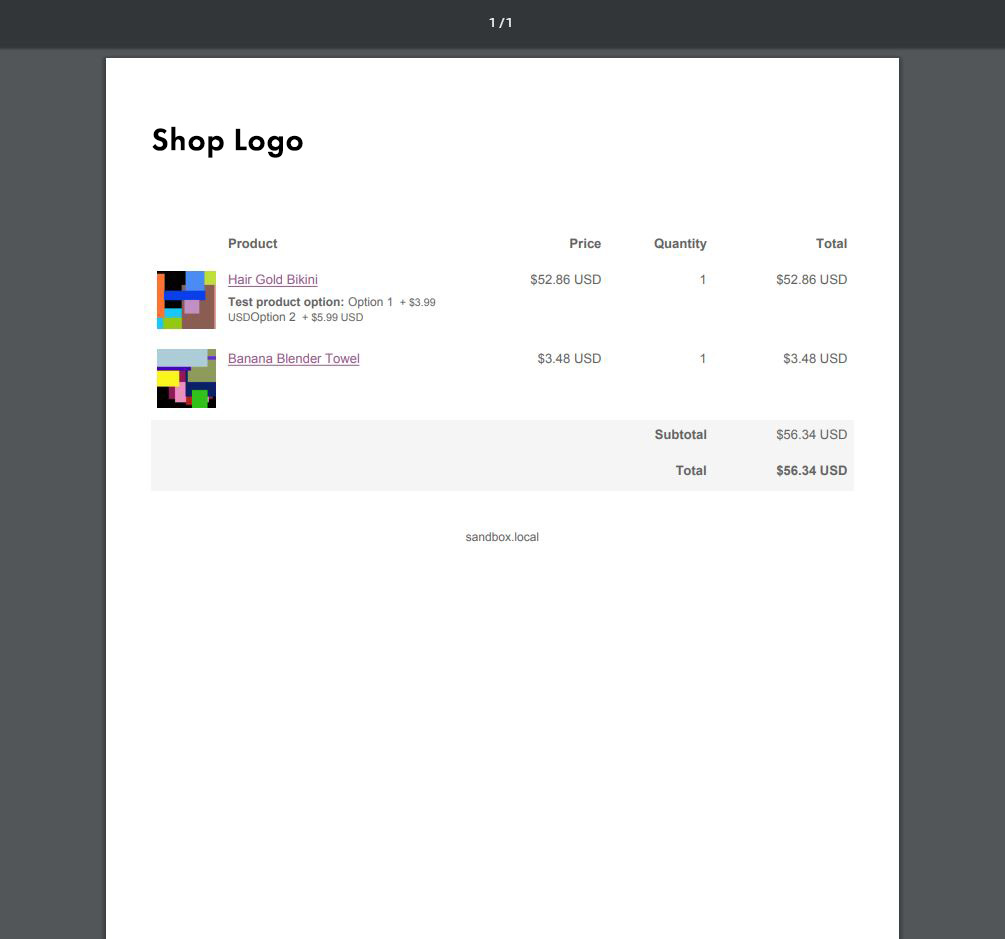
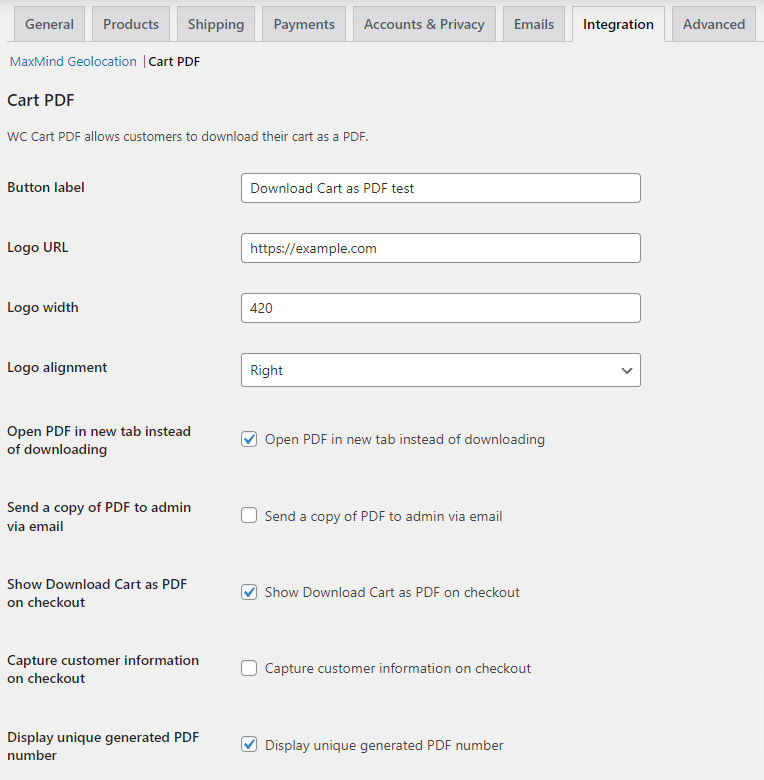
For developers
Is this your plugin? Show off the numbers.
Add a live badge to your site, docs or GitHub README. It updates on its own — no account needed.
FAQ
Cart PDF for WooCommerce: quick answers
Straight answers, pulled from live WordPress.org data.
Live data from WordPress.org · checked Oct 21, 2026
Is Cart PDF for WooCommerce free?
Yes. Cart PDF for WooCommerce is free to download and use from the official WordPress.org plugin directory.
Is Cart PDF for WooCommerce safe to use in 2026?
Yes — Cart PDF for WooCommerce is a safe, well-maintained plugin to use in 2026. It runs on 1K+ sites, is rated 5/5 and was last updated 2 months ago, and scores 87/100 on our health check.
How many websites use Cart PDF for WooCommerce?
Cart PDF for WooCommerce is active on 1K+ WordPress websites and has been downloaded 35,147 times since it launched in February 2019. It was downloaded 645 times in the last 30 days.
Does Cart PDF for WooCommerce work with WordPress 7.1?
Yes. The developer has tested Cart PDF for WooCommerce up to WordPress 7.1.3, the latest release. It requires WordPress 6.2 or newer.
What PHP version does Cart PDF for WooCommerce need?
Cart PDF for WooCommerce requires PHP 8.0.0 or higher. Most hosts run PHP 8.x today, so it works on any modern WordPress hosting.
When was Cart PDF for WooCommerce last updated?
The latest version, 3.4.0, was released on August 27, 2026 (2 months ago).
Who makes Cart PDF for WooCommerce?
Cart PDF for WooCommerce is developed and maintained by CloudCatch.
Powered by PageForge
Want thousands of pages that rank like these? Build them in an afternoon.
This directory runs on the same engine as PageForge. Turn any spreadsheet, CSV or API into thousands of fast, SEO-ready WordPress pages — with schema, internal links and AI-written copy baked in.
- CSV, Google Sheets & API data sources
- AI content, schema & internal links per page
- Works with Elementor, Gutenberg, Yoast & Rank Math
- Free on WordPress.org — no credit card


