


WC-AC Hook
Integrates WooCommerce with ActiveCampaign by adding or updating a contact on ActiveCampaign with specified tags, when an order is created at checkout

Use with caution
WC-AC Hook works, but test it on a staging site before relying on it in 2026. It runs on 1K+ sites, is rated 5/5 and was last updated 8 months ago, and scores 43/100 on our health check.
- Only tested up to WordPress 6.9 (latest is 7.1)
How does it stack up?
Side-by-side on installs, updates, ratings & support



Daily downloads
Download spikes usually follow a new release — each site that auto-updates counts as a download.
Rankings
Where WC-AC Hook stands todayWordPress.org search rankings
Live position in the plugin search, top 100| Keyword | Position |
|---|---|
| activecampaign | #21 |
| woocommerce | >100 |
Version adoption
Share of active sites per release.
Rating breakdown
★★★★★★★★★★ 5 from 15 reviews
About WC-AC Hook
From the official readme · v1.4.3Description
Integrates WooCommerce with ActiveCampaign by adding or updating a contact on ActiveCampaign with specified tags, when an order is created on WooCommerce at checkout. You also have the option of a checkbox at checkout to mimic a subscription form and allow contacts to signup to marketing.
Using the plugin means that all of your shop customers will be automatically created as contacts on ActiveCampaign. They will have their first name, last name, email and phone number taken from their billing details on their order. You must specify (in the plugin settings) on which ActiveCampaign list contacts are added or updated.
You may tag all contacts created in this way with multiple tags e.g. you may want to track that the source is your WooCommerce shop and that an order has been created. It is also possible to add tags based on each product item on an order e.g. if you want to know exactly what items a customer has ordered or perhaps a type of item (by using the same tag for multiple products).
This enables you to use ActiveCampaign automations (or integration with other applications) based on shop orders and products.
You have the option in settings to track order status. This means that contacts are created as soon as an order is created at checkout, and the suffix (pending), (failed), (processing), (on-hold), (cancelled) or (completed) will be appended to the last tags listed. The tags will be updated as the status changes. Please read the FAQs for an example to help you understand this option.
If a customer already exists as a contact on ActiveCampaign their details will be updated (note that a new contact will have a status of active, but updates will retain the existing contact status for the ActiveCampaign list).
A WooCommerce system status log called wc-ac-hook*.log can be checked for errors.
Installation
You must have WooCommerce installed and have an ActiveCampaign account to make use of this plugin.
- For manual code install upload and extract the plugin to the
/wp-content/plugins/directory. - Activate the plugin through the ‘Plugins’ menu in WordPress.
- Goto settings page for this plugin from the ‘Plugins’ menu or the ‘WooCommerce > Settings > Integration’ tab then:
- Enter your ActiveCampaign URL (in the format accountname.api-us1.com) and your ActiveCampaign API key, which you will find under Settings > Developer > API Access when logged into your ActiveCampaign account;
- Enter the ActiveCampaign list ID to which contacts are added or updated;
- Enter the default tag(s) that are added to the contact.
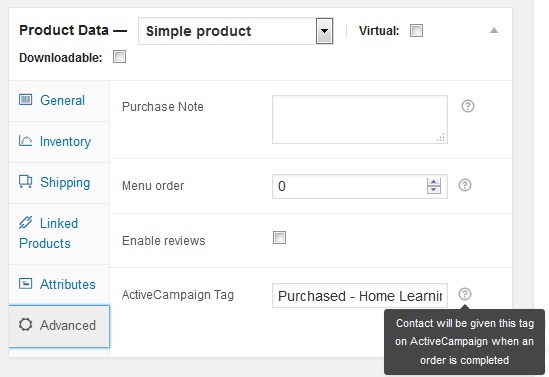
- If you wish to have tags associated with each product you must enter these on each products ‘Advanced Data’ fields.
Read the FAQs for more information regarding how to change the settings to track order status and to allow customers to signup to marketing at checkout (to mimic an ActiveCampaign subscription form).
If you deactivate the plugin all settings will be retained until you uninstall (delete). Note that the tags in advanced product data will be retained even if the plugin is deleted.
Frequently asked questions
How do I find the ActiveCampaign list ID?
Login to your ActiveCampaign account Click ‘Lists’ from the menu Click on the number of contacts by the list title Look in the URL you will see listid=#
I’m having problems syncing contacts, can I view a debug log?
If you are having problems syncing with ActiveCampaign then the first thing to check is for error messages in the debug log. To do this you must enable debug logging (if it has not been enabled by default). Login as a WordPress admin or shop manager Select the menu ‘WooCommerce > Settings > Integration > WC-AC Hook’ Ensure that the ‘Debug Log’ option is checked to enable logging You can view the debug log at ‘WooCommerce > System status > Logs > wc-ac-hook-*’. Select the log and click on view. If you switch on debug logging then you will need to wait for you next shop order before you will…
When will a contact be created or updated on ActiveCampaign?
By default only when the order status is changed to ‘Completed’. Optionally you can change the settings so that it is done when an order is created at checkout with a status of ‘Processing’. Alternatively, if you have selected the track order status option, then it is done when an order is created at checkout whatever the status, and whenever the order status changes. Note that if you create an order manually, using the administrator panel, then the contact will only be created or updated on ActiveCampaign after the status of the order is changed. A contact will also be created or updated on…
Can I track order status and abandoned carts?
You now have the option in settings to track order status. This means that contacts are created as soon as an order is created at checkout, and the suffix (pending), (failed), (processing), (on-hold), (cancelled) or (completed) will be appended to the last tags listed. The tags will be updated as the status changes. To give you an example of how this works: In settings you have the following two Default Tag(s) = WC Order, WC-Last-Order A product has an ActiveCampaign Tag = Purchased-Widget A customer enters an order and goes to PayPal, a contact would be created on ActiveCampaign with the…
Can I mimic form subscriptions on ActiveCampaign e.g. for double opt in to marketing?
The plugin now has the capability, through a checkbox at checkout (after order notes), to allow customers to opt in or out of email marketing. Allowing customers to subscribe through this method will trigger a form subscription on ActiveCampaign and trigger any associated actions e.g. subscribe to list, add tags and double opt in. To set this up, use the ‘Signup to Marketing’, ‘Checkbox Label’ and ‘Marketing Form ID’ options under the menu ‘WooCommerce > Settings > Integration > WC-AC Hook’. When using this form subscription, you would typically use the form to subscribe the contact to a…
Can I synchronise other fields or e-commerce data with ActiveCampaign?
ActiveCampaign have released version 3 of their API which supports ‘Deep Data Integration’ e.g. more order details such as order values and number of items purchased. ActiveCampaign have also launched their own integration with WooCommerce which is now available to account holders with ‘Plus’ plans and upwards. Given this development, there are no plans to add this capability to this plugin at this point in time.
Can I have multiple product tags?
Yes you can add multiple ActiveCampaign tags to a product separated by commas. Note that if you are using the option to track order status, the status will only be added to the last tag listed.
Changelog
Marketing checkbox at checkout to mimic subscription form
1.4.3
- Fix to replace relative path with
dirname(__FILE__)to ensure correct code included
1.4.2
- Fix to stop PHP notices
- Declare HPOS compatibility
- Meta data (wc_ac_marketing_checkbox) saved with HPOS
1.4.1
- Fix to error when used with other ActiveCampaign plugin(s)
1.4
- Fix name clashes with use of PHP namespace
- This version now has minimum requirement of PHP >= 5.3.0
- Fix to stop PHP notices
1.3.2
- Extended debug logging to show tags added
- Tweak to field help text
- Tweak to settings link from plugins list
- Fix to stop PHP notices
1.3.1
- Fix for elegant failure if activation attempted without WooCommerce
- ActiveCampaign API updated to v2.0.3
Screenshots

For developers
Is this your plugin? Show off the numbers.
Add a live badge to your site, docs or GitHub README. It updates on its own — no account needed.
Best WC-AC Hook alternatives
All activecampaign plugins →




FAQ
WC-AC Hook: quick answers
Straight answers, pulled from live WordPress.org data.
Live data from WordPress.org · checked Oct 11, 2026
Is WC-AC Hook free?
Yes. WC-AC Hook is free to download and use from the official WordPress.org plugin directory.
Is WC-AC Hook safe to use in 2026?
WC-AC Hook works, but test it on a staging site before relying on it in 2026. It runs on 1K+ sites, is rated 5/5 and was last updated 8 months ago, and scores 43/100 on our health check.
How many websites use WC-AC Hook?
WC-AC Hook is active on 1K+ WordPress websites and has been downloaded 22,402 times since it launched in March 2015. It was downloaded 262 times in the last 30 days.
Does WC-AC Hook work with WordPress 7.1?
WC-AC Hook is officially tested up to WordPress 6.9.10, while the latest release is 7.1.3. It may still work, but try it on a staging site first.
What PHP version does WC-AC Hook need?
WC-AC Hook requires PHP 5.3 or higher. Most hosts run PHP 8.x today, so it works on any modern WordPress hosting.
When was WC-AC Hook last updated?
The latest version, 1.4.3, was released on February 20, 2026 (8 months ago).
Who makes WC-AC Hook?
WC-AC Hook is developed and maintained by mtreherne.
What are the best alternatives to WC-AC Hook?
The most popular alternatives to WC-AC Hook are ActiveCampaign (40K+ installs), CartBounty (10K+ installs) and ActiveCampaign for WooComme… (5K+ installs).
Powered by PageForge
Want thousands of pages that rank like these? Build them in an afternoon.
This directory runs on the same engine as PageForge. Turn any spreadsheet, CSV or API into thousands of fast, SEO-ready WordPress pages — with schema, internal links and AI-written copy baked in.
- CSV, Google Sheets & API data sources
- AI content, schema & internal links per page
- Works with Elementor, Gutenberg, Yoast & Rank Math
- Free on WordPress.org — no credit card


