



Walls.io: Social Media Feed
Embed Walls.io social walls into WordPress posts with just one click!

Solid choice
Walls.io: Social Media Feed is a solid plugin choice in 2026, with a few things worth checking first. It runs on 1K+ sites, is rated 3.8/5 and was last updated 4 months ago, and scores 62/100 on our health check.
How does it stack up?
Side-by-side on installs, updates, ratings & support



Daily downloads
Download spikes usually follow a new release — each site that auto-updates counts as a download.
Rankings
Where Walls.io: Social Media Feed stands todayWordPress.org search rankings
Live position in the plugin search, top 100| Keyword | Position |
|---|---|
| instagram feed | #37 |
| Social Media Aggregator | #3 |
| social media embed | #20 |
| Social Media Feed | #17 |
| twitter feed | #23 |
Version adoption
Share of active sites per release.
Rating breakdown
★★★★★★★★★★ 3.8 from 6 reviews
About Walls.io: Social Media Feed
From the official readme · v3.0.14Description
Are you looking for a social wall solution to showcase posts from various social platforms right on your website?
With Walls.io you can collect posts, photos and videos from multiple social media networks in one place and display them in a customizable social media feed that you can easily embed into your website. Unlike other social walls, Walls.io goes beyond social media also giving you the possibility to let visitors upload content directly to the wall using Direct Posts.
To use this plugin you first need to get a social wall account on walls.io, where you can create and customize a social media feed and add sources to it.
The Walls.io WordPress plugin makes it very easy for you to add your social media feed to WordPress. No programming skills are needed. It only takes a minute.
Walls.io Social Wall
- Go to walls.io, start a trial, add sources, customize the design and set up post moderation.
- Go and grab the link to your wall by clicking on its URL in the upper left corner of the Settings page.
Embed on a page or a post
Add your Walls.io social media feed on any post or page using the WordPress Gutenberg editor. Simply create a new block, search for “walls”, select the Walls.io plugin, enter your wall’s URL and click “Embed”.
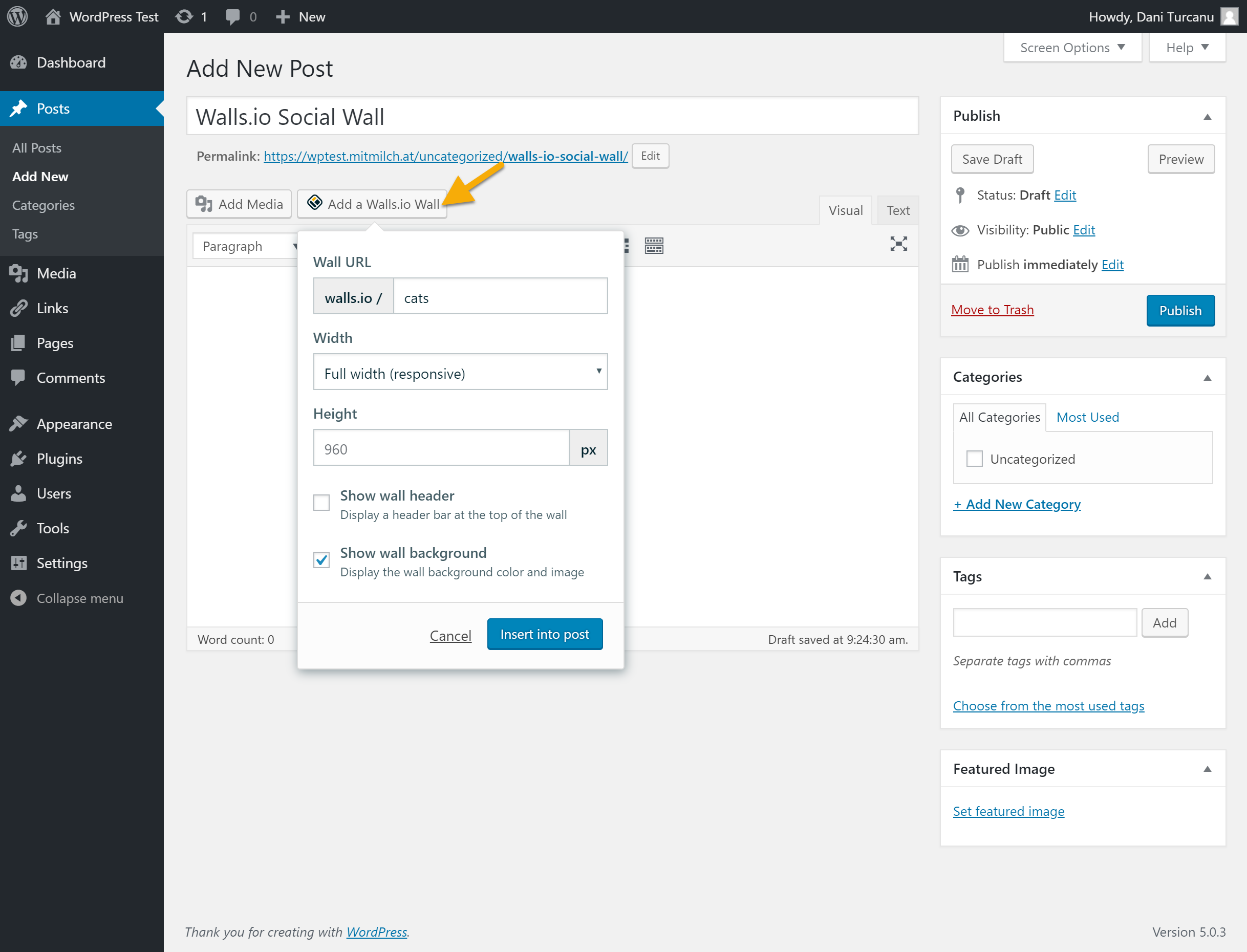
If you’re still using the old WordPress editor, go into edit mode and click the “Add a Walls.io Wall” button at the top of the editor. A new window will open where you can add your Walls.io social wall URL.
Support
If you have any questions or suggestions, please don’t hesitate to contact us at support@walls.io.
Features
Walls.io puts all your social media feeds in one place, allows you to moderate the content, design the feed so that it matches your brand’s website, and even post custom content. Here are the main features of the Walls.io social media feed:
- It collects social content from multiple social platforms: Facebook, Twitter, Instagram, YouTube, TikTok, Pinterest, Linkedin, ВКонтакте (VKontakte), Flickr, Tumblr, Reddit, Vimeo, and others.
- It allows your community to directly publish image and text posts to your wall without having to use any social media platform. The Direct Posts feature is your way of inviting absolutely anyone to interact with your social wall and upload exclusive user-generated content.
- It’s easy to customize in terms of design: you can choose from different themes and further customize backgrounds, fonts, tile colors and even use CSS for even more amazing design tweaks.
- It has a powerful spam detection algorithm behind it, and filters spam based on text analysis as well as image-based NSFW detection, which helps keep spammy posts away from your social feed.
- It offers advanced moderation options including language filters and blacklist filters for both keywords and profiles.
- It allows you to add your own content to the mix (not only social media posts): custom content can contain details about your next event, information about your latest product, posts promoting a great product feature, interesting facts about your company, testimonials from your clients or employees – you name it!
- The social feed is completely responsive and mobile-ready. A social feed looks great on any screen size and in any container width.
Installation
- Find the plugin under the Plugins menu in WordPress and then activate it.
- Download the plugin zip file, unzip it, and upload it to your WordPress site under the /wp-includes/plugins directory.
Changelog
3.0.14
- Add Photo Booth support
3.0.13
- Update compatibility versions
3.0.12
- Fix Gutenberg block for WordPress 6.5.5
3.0.11
- Update sign up link
3.0.10
- Update plugin description
3.0.9
- Fix classic editor buttons to display custom popover
Screenshots


For developers
Is this your plugin? Show off the numbers.
Add a live badge to your site, docs or GitHub README. It updates on its own — no account needed.
Best Walls.io: Social Media Feed alternatives
All instagram feed plugins →





FAQ
Walls.io: Social Media Feed: quick answers
Straight answers, pulled from live WordPress.org data.
Live data from WordPress.org · checked Oct 4, 2026
Is Walls.io: Social Media Feed free?
Yes. Walls.io: Social Media Feed is free to download and use from the official WordPress.org plugin directory.
Is Walls.io: Social Media Feed safe to use in 2026?
Walls.io: Social Media Feed is a solid plugin choice in 2026, with a few things worth checking first. It runs on 1K+ sites, is rated 3.8/5 and was last updated 4 months ago, and scores 62/100 on our health check.
How many websites use Walls.io: Social Media Feed?
Walls.io: Social Media Feed is active on 1K+ WordPress websites and has been downloaded 35,408 times since it launched in June 2018. It was downloaded 312 times in the last 30 days.
Does Walls.io: Social Media Feed work with WordPress 7.1?
Walls.io: Social Media Feed is officially tested up to WordPress 7.0.6, while the latest release is 7.1.2. It may still work, but try it on a staging site first.
When was Walls.io: Social Media Feed last updated?
The latest version, 3.0.14, was released on May 25, 2026 (4 months ago).
Who makes Walls.io: Social Media Feed?
Walls.io: Social Media Feed is developed and maintained by wallsio.
What are the best alternatives to Walls.io: Social Media Feed?
The most popular alternatives to Walls.io: Social Media Feed are Smash Balloon Social Photo… (1M+ installs), Social Feed Gallery (80K+ installs) and Spotlight Social Feeds (60K+ installs).
Powered by PageForge
Want thousands of pages that rank like these? Build them in an afternoon.
This directory runs on the same engine as PageForge. Turn any spreadsheet, CSV or API into thousands of fast, SEO-ready WordPress pages — with schema, internal links and AI-written copy baked in.
- CSV, Google Sheets & API data sources
- AI content, schema & internal links per page
- Works with Elementor, Gutenberg, Yoast & Rank Math
- Free on WordPress.org — no credit card


