



Bitcoin and Altcoin Wallets
Custodial cryptocurrency wallets.

Use with caution
Bitcoin and Altcoin Wallets works, but test it on a staging site before relying on it in 2026. It runs on 50+ sites, is rated 4.8/5 and was last updated 8 months ago, and scores 56/100 on our health check.
- Loved by users — 4.8/5 from 27 reviews
- Small user base (50+ active installs)
- Only tested up to WordPress 6.9 (latest is 7.1)
How does it stack up?
Side-by-side on installs, updates, ratings & support


Daily downloads
Download spikes usually follow a new release — each site that auto-updates counts as a download.
Rankings
Where Bitcoin and Altcoin Wallets stands todayWordPress.org search rankings
Live position in the plugin search, top 100| Keyword | Position |
|---|---|
| altcoin | #2 |
| bitcoin | #14 |
| cryptocurrency | #45 |
| custodial | #7 |
| wallet | #18 |
Version adoption
Share of active sites per release.
Rating breakdown
★★★★★★★★★★ 4.8 from 27 reviews
About Bitcoin and Altcoin Wallets
From the official readme · v6.4.1Description
Custodial cryptocurrency wallets.
At a glance
Bitcoin and Altcoin Wallets is a FREE WordPress plugin by dashed-slug.
Your users can deposit, withdraw and transfer Bitcoins and other cryptocurrencies on your site.
Free wallet adapter extensions
You can extend this plugin to work with other coins if you install wallet adapters.
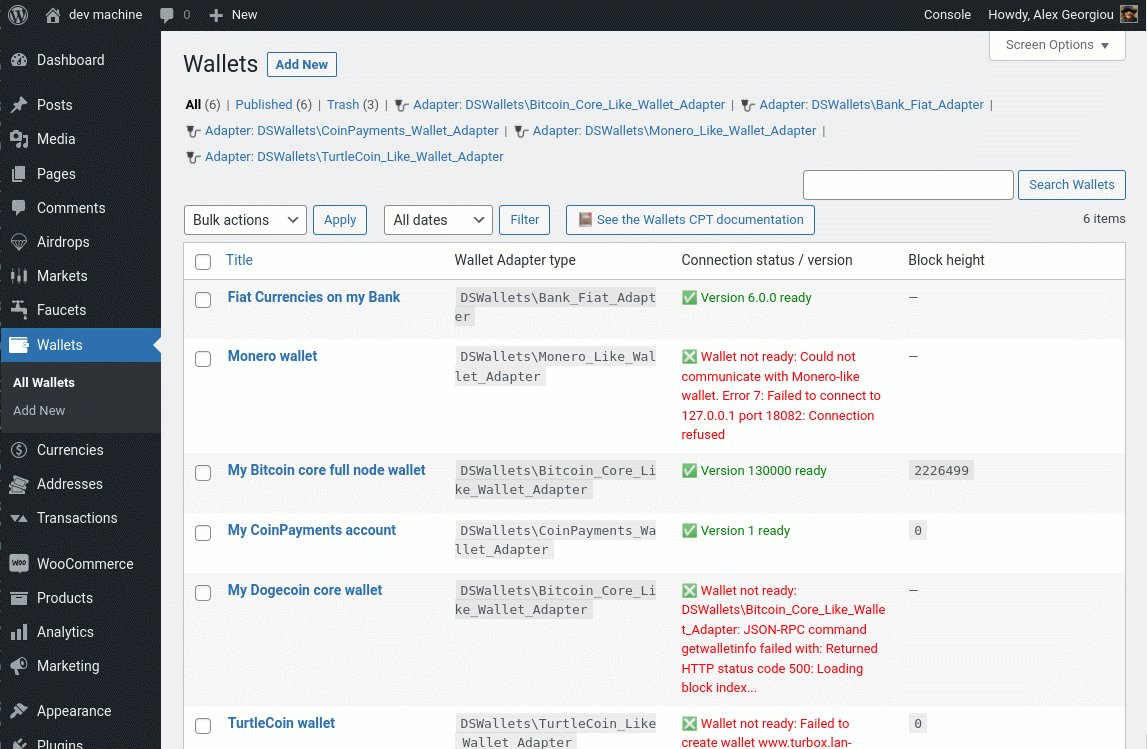
There is a built-in wallet adapter that lets you connect with Bitcoin core and similar wallets, such as: Dogecoin core, Bitcoin ABC (Bitcoin Cash wallet), Litecoin core, etc. Any wallet that uses the Bitcoin core RPC API is compatible.
The following wallet adapters are available for free to all dashed-slug subscribers.
- lnd and tapd Wallet Adapter extension – Connect to an lnd node, and perform transactions on the Bitcoin Lightning network. Also connect to a tapd node to mint and transact Taproot Assets.
- CoinPayments Adapter extension – Third-party wallet for many cryptocurrencies. Saves you from the hassle of hosting wallets on servers. But you don’t control the private keys.
- Monero Coin Adapter extension – Full node wallet adapter for Monero and its forks.
- TurtleCoin Adapter extension – Full node wallet adapter for TurtleCoin and its forks.
You do not have to pay for membership to get the wallet adapters.
Premium app extensions
Premium dashed-slug members get unlimited access to download all the premium extensions:
- Exchange extension – Allows your users to enter market orders and exchange cryptocurrencies.
- Airdrop extension – Distribute coins or pay interest to your users by performing airdrops and recurring airdrops.
- Faucet extension – Reward your users for solving CAPTCHAs.
- Paywall extension – Let users pay for subscription to various user roles, and use shortcodes to control what content they see, based on these roles.
- Tip the Author extension – Allows users with cryptocurrency wallets to tip content authors.
- WooCommerce Cryptocurrency Payment Gateway extension – Let logged in users pay at WooCommerce checkout from their cryptocurrency wallet.
Premium members get auto-updates for any installed extensions. See how to set up auto-updates.
follow the slime
Find the dashed-slug on the web:
- Twitter: https://twitter.com/DashedSlug
- RSS feed: https://www.dashed-slug.net/category/news/feed
- Youtube channel: https://www.youtube.com/dashedslugnet
- GitHub: https://github.com/dashed-slug
Donating
This is a free plugin built by the dashed-slug team!
- Bitcoin:
1DaShEDyeAwEc4snWq14hz5EBQXeHrVBxy - Litecoin:
LdaShEdER2UuhMPvv33ttDPu89mVgu4Arf - Dogecoin:
DASHEDj9RrTzQoJvP3WC48cFzUerKcYxHc
Installation
To get started, install the plugin and follow the on-screen installation wizzard.
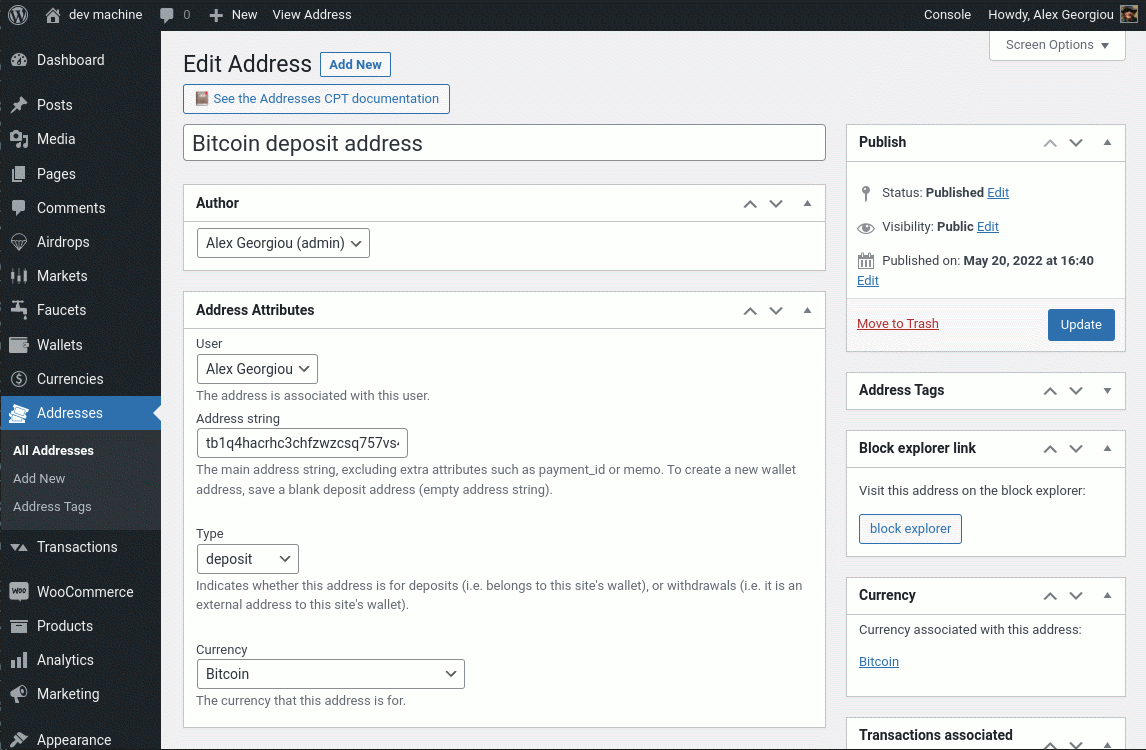
You can also consult the documentation. In the WordPress admin screens, see Wallets Admin Docs → wallets → Installation instructions.
Disclaimer
By using this free plugin, you accept all responsibility for storing and handling user funds.
Under no circumstances is dashed-slug.net or any of its affiliates responsible for any damages incurred by the use of this plugin.
By continuing to use the Bitcoin and Altcoin Wallets plugin, you indicate that you have understood and agreed to this disclaimer.
Frequently asked questions
Where is the plugin’s documentation?
Since version 6.0.0, the plugin displays its own documentation in the admin screens. Just go to the Wallets Admin Docs menu, where you’ll find the documentation for the plugin, and for any plugin extensions you have installed. Developers can study the PHPdocumentor pages at: https://wallets-phpdoc.dashed-slug.net/
How secure is it?
When users issue transactions, these can require verification via an email link by the user. Additionally, you can require that an admin also verifies each transaction. (See “Confirmations” in the documentation). Of course, the plugin is only as secure as your WordPress installation is. You should take extra time to secure your WordPress installation, because it will have access to your hot wallets. At a minimum you should do the following: Install a security plugin such as Wordfence. Read the Codex resources on Hardening WordPress. If you are connecting to an RPC API on a different machine…
I am installing a bitcoin full node on my server. How can I run it as a service so that it is always running?
This will depend on the Linux distribution on your server. To setup bitcoin core as a service on systemd I used this guide. Here is my /etc/systemd/system/bitcoin.service file: [Unit] Description=Bitcoin wallet service After=network.target StartLimitBurst=5 StartLimitIntervalSec=10 [Service] Type=simple Restart=always RestartSec=1 User=alexg ExecStart=/usr/local/bin/bitcoind [Install] WantedBy=multi-user.target You will need to edit the user name to match yours, and possibly the path to your bitcoind binary. Follow the article to set the service to run automatically on system restart. You…
Can I control which users have a wallet?
Yes, simply assign the has_wallets capability to the appropriate users or user roles. You should also assign more capabilities, such as list_wallet_transactions, send_funds_to_user, and withdraw_funds_from_wallet. You can control the capabilities per user role by navigating to: Settings → Bitcoin and Altcoin Wallets → Capabilities.
Can I use the plugin to create an investment / interest paying site?
Yes, you can use the premium Airdrop extension to perform recurring airdrops. These can effectively be paid out in the form of an interest on the user’s wallet.
Can I use the plugin to create a WooCommerce store that accepts cryptocurrencies?
Yes, you can use the premium WooCommerce Cryptocurrency Payment Gateway extension. With it, users can use their on-site balance to checkout their shopping carts.
Can I use the plugin to create a crypto faucet?
Yes, you can use the premium Faucet extension to let users earn crypto by solving CAPTCHAs.
Can I use the plugin to create a crypto exchange?
Yes, you can use the premium Exchange extension to create market pairs. However the markets are local only, which means that no liquidity is imported from other exchanges. Read the disclaimers.
Can I use the plugin to do a token sale?
No, this plugin is not suitable for token sales. However, you could, of course, setup markets using the Exchange extension, and set a large limit sell order with your admin account. This will allow users to buy your shillcoin. You can even disable buying or selling separately.
Can I use the plugin to accept tips for articles?
Yes, you can use the premium Tip the author extension. This lets you attach a tipping UI to posts/articles. You can control where the tipping UI is shown, by post type, category, tags, or even author. Only authors with the receive_tip capability can receive tips, and only users with the tip_the_author capability can send tips.
Can I use the plugin to create a paywall?
Not yet. However, a premium extension to let you do just that is currently in development.
How can I change the plugin’s code?
The plugin and its extensions are yours to edit. You are free to hack them as much as you like. However, you are generally discouraged from doing so, for the following reasons: I cannot provide support to modified versions of the plugin. Editing the code can have unintended consequences. If you do any modifications to the code, any subsequent update will overwrite your changes. Therefore, it is not recommended to simply fire away your favorite editor and hack away themes or plugins. Whenever possible, use an existing hook (action or filter) to modify the behavior of the plugin. Then, add your…
Why is my CSS not being applied to the UI elements?
This is usually due to the plugin’s CSS rules hiding your own rules. Don’t just spam !important, instead take the time to study CSS rule specificity. If you are unsure how to apply a particular rule on the plugin’s UIs, you can contact me.
How can I change something in the UI elements?
There are several ways to do this, depending on what type of change you want to apply. Please check the documentation under Frontend and Shortcodes → Modifying the UI appearance.
How can I perform transactions from my PHP code?
There are two ways to do this: You can create DSWallets\Transaction objects, populate all the fields, then save the obects to the DB. For details, check the documentation under: Developer reference → Working with custom post type objects, and the PHPDocumentor page for the Transaction class for example code. You can use the Legacy PHP-API. This is compatible with previous versions of the plugin.
How can I perform transactions from the JavaScript frontend?
There are two ways to do this: You can use the WP-REST API. Consult the documentation under: Developer reference → Wallet APIs → WP-REST-API.
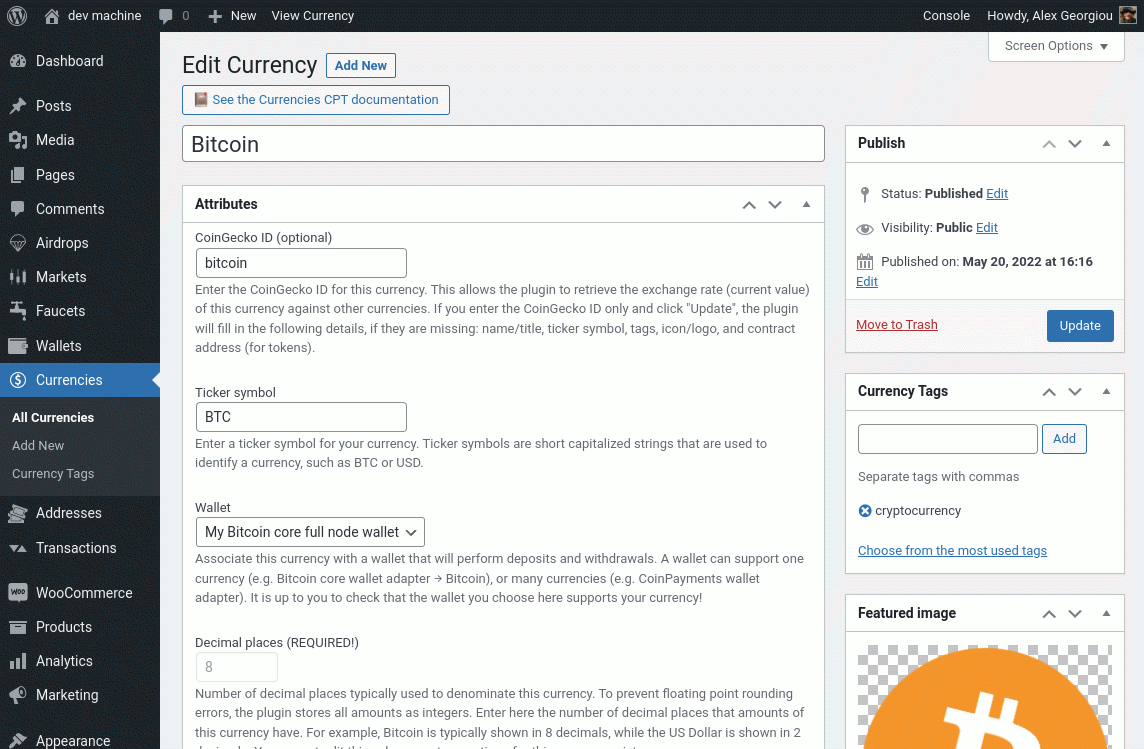
How can I change the wallet backing a particular currency?
It is possible that, for a particular cryptocurrency you may want to replace the wallet backing it with another wallet. For example, you may be offering Bitcoin via the CoinPayments service, and want to start using a Bitcoin core full node wallet. Or you may be using Bitcoin core, and you want to move to a new wallet.dat file. This has become a lot easier with versions 6.0.0 and later, because Currencies and Wallets are now decoupled: Create the new Wallet with the built-in Bitcoin adapter for full nodes. Connect to your new full node wallet. Edit your Currency, in this case, Bitcoin. Set the…
How does the plugin work in multisite installations?
How it works depends on whether the plugin (and its extensions) are network-activated or not. In network-activated setups, users have one balance ber currency, across all sites the network. If the plugin is NOT network-activated, users have a different balance on each site on the network, and each site can have different currencies and wallets. Note that the plugin and its extensions MUST either all be network activated, OR all must be activated on individual blogs. Do not mix-and-match network-activated and non-network-activated wallets plugins. Consult the documentation section Multisite…
How to handle a hack/cyberattack?
While the latest WordPress version is often secure, the same cannot be said about all the WordPress plugins out there. Every day new security vulnerabilities are found involving WordPress plugins. Since WordPress is such a popular software platform, it gets a lot of attention from hackers. Take an immediate backup of the site, and the server it runs on, if possible. This will preserve any traces that the hackers may have left behind. Funds theft is a crime and you can report it to the police, just like any other hack. It’s best if you are prepared beforehand: Keep the software on the site…
How can I become a premium member and get access to the app extensions?
Paying members can download the available App extensions and can download updates to those extensions. Study the available Membership plans
Changelog
Version 6.4.1 adresses an issue where emails with too many recipients would be rejected by SMTP servers.
6.4.1
- Add: New filterable setting “Outgoing e-mails recipient batch size”. For emails with multiple recipients, the recipients are batched and the email is sent multiple times to work around the max recipient limitats of SMTP servers.
6.4.0
- Add: New feature allowing old transactions to be aggregated to reduce DB table sizes and improve performance.
- Add: Upon plugin activation, an index is added to the postmeta table’s columns post_id and meta_key, to improve performance.
6.3.3
- Fix: Issue affecting creating new transactions from admin, introduced in 6.3.2, now fixed.
6.3.2
- Fix: Security issue where a logged in user with access to the admin screens could perform XSS attacks is now fixed.
- Fix: Deprecation warnings in PHP8.4 about implicitly nullable types are now squashed.
- Improve: Along with easycron, the plugin also now suggests cron-job.org which is a free alternative.
6.3.1
- Fix: Issue regarding editing addresses/transactions via the admin screens, introduced in 6.2.6, is now fixed.
6.3.0
- Add: It is now possible to submit bank transfer requests with a combination of SWIFT/BIC and Account Number. This will be useful for African countries.
- Improve: Saving transactions and addresses to the DB is now much faster. This should improve the UI experience when submitting transactions.
- Fix: When submitting a bank transfer request, it is no longer possible to click the submit button again while another request is underway.
Screenshots
![[wallets_deposit] - Users can view their deposit addresses, create new addresses, and associate them with a label.](https://ps.w.org/wallets/assets/screenshot-1.png?rev=2857585)
![[wallets_move] - Users can transfer funds to other users on the system, off-chain. Whether they pay fees to your site is up to you.](https://ps.w.org/wallets/assets/screenshot-2.png?rev=2857585)
![[wallets_withdraw] - Users can request to withdraw funds to an external wallet.](https://ps.w.org/wallets/assets/screenshot-3.png?rev=2857585)
![[wallets_balance] - Users can view their balances, either one-by-one, or as a list. Equivalent amounts can be shown in USD, EUR, BTC or other currencies that you choose.](https://ps.w.org/wallets/assets/screenshot-4.png?rev=2857585)
![[wallets_transactions] - Users can view paginated details on their past transactions. You can choose which columns are rendered and in what order.](https://ps.w.org/wallets/assets/screenshot-5.png?rev=2857585)

For developers
Is this your plugin? Show off the numbers.
Add a live badge to your site, docs or GitHub README. It updates on its own — no account needed.
Best Bitcoin and Altcoin Wallets alternatives
All altcoin plugins →FAQ
Bitcoin and Altcoin Wallets: quick answers
Straight answers, pulled from live WordPress.org data.
Live data from WordPress.org · checked Oct 10, 2026
Is Bitcoin and Altcoin Wallets free?
Yes. Bitcoin and Altcoin Wallets is free to download and use from the official WordPress.org plugin directory.
Is Bitcoin and Altcoin Wallets safe to use in 2026?
Bitcoin and Altcoin Wallets works, but test it on a staging site before relying on it in 2026. It runs on 50+ sites, is rated 4.8/5 and was last updated 8 months ago, and scores 56/100 on our health check.
How many websites use Bitcoin and Altcoin Wallets?
Bitcoin and Altcoin Wallets is active on 50+ WordPress websites and has been downloaded 90,909 times since it launched in January 2017. It was downloaded 186 times in the last 30 days.
Does Bitcoin and Altcoin Wallets work with WordPress 7.1?
Bitcoin and Altcoin Wallets is officially tested up to WordPress 6.9.10, while the latest release is 7.1.3. It may still work, but try it on a staging site first.
What PHP version does Bitcoin and Altcoin Wallets need?
Bitcoin and Altcoin Wallets requires PHP 7.2 or higher. Most hosts run PHP 8.x today, so it works on any modern WordPress hosting.
When was Bitcoin and Altcoin Wallets last updated?
The latest version, 6.4.1, was released on January 30, 2026 (8 months ago).
Who makes Bitcoin and Altcoin Wallets?
Bitcoin and Altcoin Wallets is developed and maintained by dashed-slug.net.
What are the best alternatives to Bitcoin and Altcoin Wallets?
The most popular alternatives to Bitcoin and Altcoin Wallets are CoinPayments.net Payment Ga… (1K+ installs), WP Faucet Direct (10+ installs) and CS Easy Digital Downloads B… (<10 installs).
Powered by PageForge
Want thousands of pages that rank like these? Build them in an afternoon.
This directory runs on the same engine as PageForge. Turn any spreadsheet, CSV or API into thousands of fast, SEO-ready WordPress pages — with schema, internal links and AI-written copy baked in.
- CSV, Google Sheets & API data sources
- AI content, schema & internal links per page
- Works with Elementor, Gutenberg, Yoast & Rank Math
- Free on WordPress.org — no credit card


