



WalkTheWeb
WalkTheWeb provides a Metaverse 3D Store front-end for your WooCommerce store in less than 5 minutes, to give you more Internet traffic and sales!

Consider an alternative
WalkTheWeb shows warning signs in 2026 — compare the alternatives below before installing. It runs on 10+ sites and was last updated 1 year ago, and scores 32/100 on our health check.
- Small user base (10+ active installs)
- Very few reviews so far
- No update in over a year
- Only tested up to WordPress 6.8 (latest is 7.1)
Daily downloads
Download spikes usually follow a new release — each site that auto-updates counts as a download.
Rankings
Where WalkTheWeb stands todayWordPress.org search rankings
Live position in the plugin search, top 100| Keyword | Position |
|---|---|
| 3d_internet | #1 |
| ecommerce | >100 |
| Metaverse | #5 |
| shopping_cart | #2 |
| woocommerce | >100 |
Version adoption
Share of active sites per release.
About WalkTheWeb
From the official readme · v3.0.2Description
HTTP3D Inc., WalkTheWeb
About this plugin
Extend your WooCommerce online store into the realm where over 700 million people play online games!
WalkTheWeb 3D Store plugin creates a 3D Store for 3D Internet Metaverse/Multiverse in about 5 minutes. Works like a 3D Game and integrates your products from WooCommerce.
Think of a 3D Store as a 3D Graphical extension of your current online store – traditional website. A 3D Store shows your online store products, short descriptions, prices, and categories with links that open your online store product pages and shopping cart. We do not do any transactions for your online store or shopping cart, only redirect users to your online store; in a new browser tab or iframe based on permissions and settings you choose.
The maintenance of your products, categories, images, shopping cart, and checkout process all stay in WooCommerce. We are not trying to reinvent the wheel! You have a store, we can help you reach more customers by adding a 3D Store!
Your 3D Store is designed to be placed into many 3D Communities consisting of games, entertainment, amusement rides, animations, houses, businesses, and other 3D Stores. You maintain your 3D Store Building in one place and your 3D Store can be added to many 3D Communities. Read more at walktheweb.com.
WalkTheWeb Service is FREE
WalkTheWeb is a Software as a Service – SaaS – for the purpose of creating, publishing, and hosting 3D Websites.
3D Websites are FREE to have, use, edit, and operate.
You can create as many 3D Buildings, 3D Communities, 3D Things, and 3D Avatars as you like for free. Use this plugin for the wizard and basic settings or go directly to the WalkTheWeb 3D Internet website Administration for full access to custimize your 3D Websites.
Free for you and free for your visitors!
3D Community https://3d.walktheweb.com/PUBLISHNAME and
3D Building https://3d.walktheweb.com/buildings/PUBLISHNAME
are always free and established when you create your 3D Website.
PUBLISHNAMEs are on a first come first serve basis; with exception that we may revoke an official name if someone proves legal legitimacy to do so. Example: US Trademarks or copyrights. We do not allow vulgar or adult-only names or products. At this time all 3D Stores need to be appropriate for all ages; we do not cater to adult – 18 and above only – 3D Stores.
Optional Premium Upgrades and Services
Optional Premium Upgrades and Services are paid additions and services. They are not required at any time.
HTTP3D Inc. – WalkTheWeb offers:
– Multiplayer services
– Custom 3D Website design services
– Use your Custom domain name for your 3D Website, like http://3d.YOURDOMAINNAME.com
– Secure SSL Certs for your custom domain names, like https://3d.YOURDOMAINNAME.com
– Service and Support Plans.
These are all optional paid services and upgrades.
Note that adding a Custom Domain Name like http://3d.YourDomainName.com works in addition to your original https://3d.walktheweb.com/PUBLISHNAME. You can have more than one Custom Domain Name displaying the same 3D Community.
All 3D Websites for 3D Browsing start with HTTP://3D or HTTPS://3D
These are U.S. Service Trademarks of HTTP3D Inc – WalkTheWeb that signify and help identify that you will see a 3D Browsing website based on a web address (URL).
Menu Options
Getting Started – Dashboard
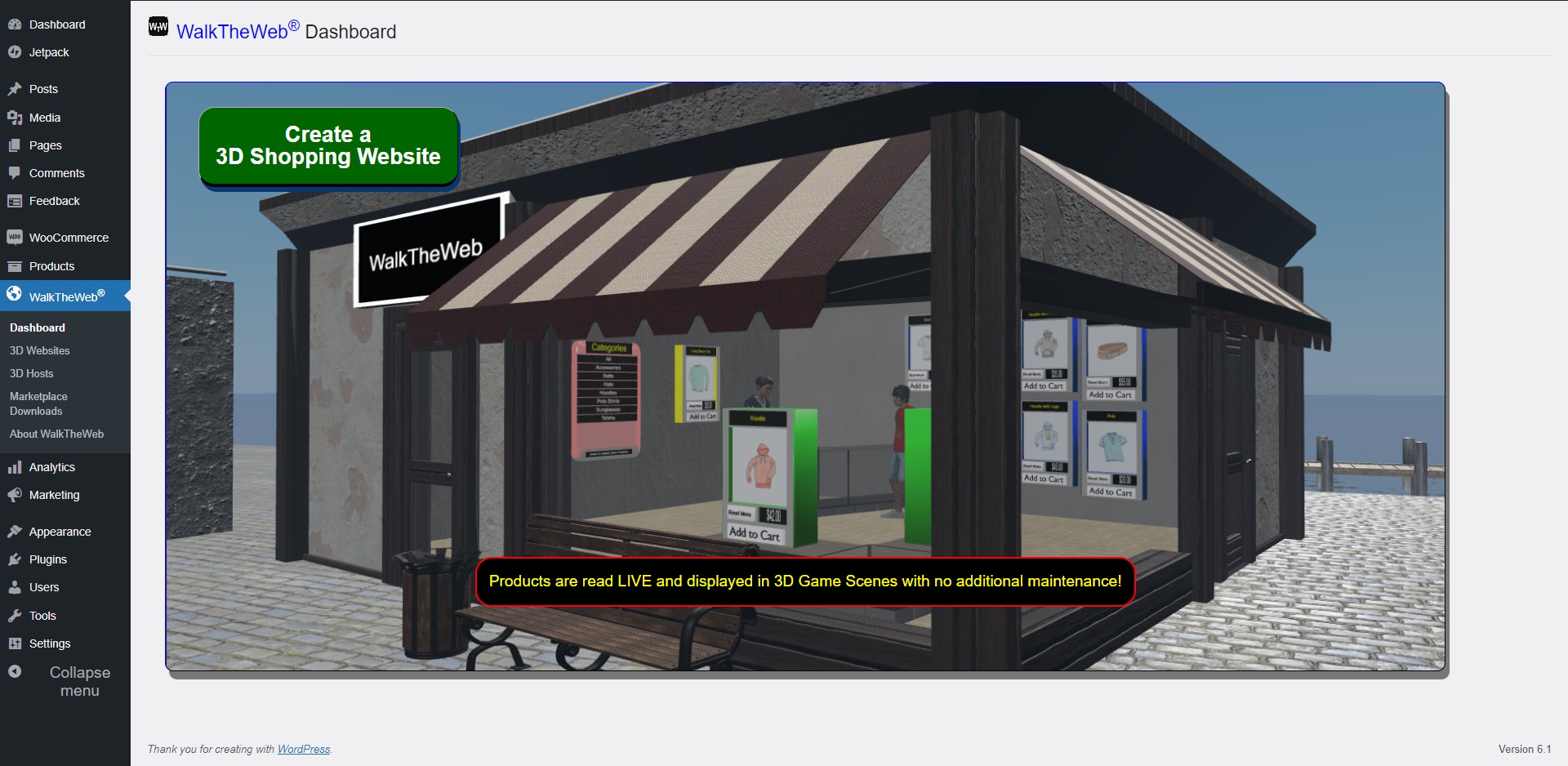
Dashboard is to show you about 3D Internet and 3D Stores. It is the entry point to get started.
Click the Create a 3D Shopping Website button to begin!
The Wizard Steps take you through 5 steps to creating a 3D Store Website:
- Select a 3D Building from our list of 3D Store Templates.
- Select a 3D Community (3D Scene and landscape) from our list of 3D Community Templates.
- Set your 3D Host, 3D Store Name, and URL – https://3d.walktheweb.com/YourBusinessName.
- Set the permissions: WalkTheWeb® User Account and WooCommerce API Key; easy with the wizard.
- Click Create it!
It takes about 5 Minutes and your 3D Website is up and running!
3D Websites
3D Websites shows your list of created 3D Shopping Scenes and 3D Shopping Buildings.
3D Shopping Scene is the complete 3D Scene with Landscape and your 3D Shopping Store. This is the 3D Website you share with others to visit your 3D Store.
3D Shopping Building is a 3D Website with only the 3D Shopping Building. When you add your 3D Store Building to multiple 3D Scenes, you can open this link to work your 3D Shopping Store. Work One 3D Store in Many 3D Scenes! Any multiplayer 3D Avatars from all 3D Scenes showing your 3D Store will be visible and using your keyboard you can chat. Hit enter to send a message to all in your 3D Scene or right click and choose Chat for one-on-one messages.
3D Hosts
3D Hosts are websites using WalkTheWeb 3D Internet Open-Source software. It can be downloaded on GitHub: github.com/HTTP3D/WalkTheWeb
When you add a 3D Host to the list on this page, the 3D Host will be available as an option when adding a new 3D Shopping Website. You must have Admin or Host access on the WalkTheWeb Host website to connect and add a 3D Website.
Marketplace Downloads
Marketplace Downloads are 3D Comunities, 3D Buildings (and 3D Stores), 3D Things, and 3D Avatars you can add to your 3D Websites. They are hosted by WalkTheWeb and many of them are free to download and use in your 3D Scenes.
When you select one to download, it will prompt you for the WalkTheWeb server to send the request. After, when you log onto the server, the downloads will appear in the Download Queue on the Dashboard page under Admin Mode. If you are not logged in when requesting the download, you will need to access the 3D Website from the same computer to complete the download (IP Address based list).
WalkTheWeb has 4 types of template downloads:
- 3D Buildings, which 3D Stores are a small number of select 3D Buildings from the many Shared 3D Building Templates. The 3D Buildings can be added to any 3D Scene to create 3D Internet Cities.
- 3D Communities, these are the 3D Scenes. Some include basic buildings, roads, trees, etc.
- 3D Things, which includes tables, chairs, trees, bushes, fountains, cash registers, and many other 3D Thing Templates.
- 3D Avatars, are the set of avatars a new user can choose when they visit your 3D Website.
About WalkTheWeb
About WalkTheWeb provides many resources for using WalkTheWeb 3D Internet as well as contact information.
If you would like to contact Dr. Aaron Dishno, the founder and CIO of WalkTheWeb (HTTP3D Inc.), please use the Discord link. Aaron welcomes questions and suggestions for enhancements.
Installation
Minimum Requirements for Plugin
- PHP version 5.2.4 or greater (PHP 5.6 or greater is recommended)
- WalkTheWeb requires WordPress version 4.7+
- WalkTheWeb requires WooCommerce 3.3.0+. This solely relies on the WooCommerce API, so it is easily tested and confirmed. If you see products and the links work, it is good to go!
- Your WordPress website needs to be running secure – https – have an SSL Cert. The SSL Cert can be terminated at a load balancer. This is used to make secure calls from the 3D Store to retrieve – read only – product information, product lists, product images, category lists, and products by category from WooCommerce. Without it, you can create your 3D Store at walktheweb.com directly, but your products will not show until it is set. We believe this is best practice for 3D Stores, online stores, and working with Application Programming Interface – API – calls to WooCommerce.
- WalkTheWeb plugin requires Internet Access – used to connect to the https://3d.walktheweb.com and https://www.walktheweb.com websites where your 3D Website is created and hosted.
- JavaScript must be turned ON or Enabled in your browser. The WalkTheWeb® plugin uses JavaScript to show and hide various sections of the plugin settings page based on the tabs menu item selected. JavaScript also uses JSON calls to retrieve templates, synchronize with walktheweb.com, and save your settings.
- Allow Popups may be required for some of the test buttons. They open the test pages in additional browser Tabs.
You may also want to see 3D Browsing requirements to visit your 3D Store.
Minimal Requirements for 3D Browsing
- HTML 5 Compatible Browser.
- JavaScript must be turned ON or Enabled in your browser.
- Accepts Mouse, Keyboard, or Touch for 3D Browsing movement (Pan and Walk the view).
- Internet Access; it is 3D Internet!
Minimal Requirements for HTTP3D Editor – WalkTheWeb 3D Internet
- All of the 3D Browsing Requirements above.
- 3D Website Administration requires a computer with mouse – it is not fully optimized for mobile devices.
Installation
Automatic installation is accomplised in the web browser. To start, log in to your WordPress dashboard, navigate to the Plugins menu and click Add New.
In the search field type walktheweb and click Search Plugins. Just click Install Now. When completed, click Activate!
The manual installation method is described by WordPress. Download the WalkTheWeb plugin to begin.
After the WalkTheWeb plugin is active, navigate to WalkTheWeb 3D Store in your administration menu.
Frequently asked questions
What is 3D Internet, WalkTheWeb, and HTTP3D?
Invented by Dr. Aaron Dishno in 2012 and patented in multiple countries (USA Patent Number 9,940,404) – concept of 3D Internet Browsing is like combining a first-person video game with browsing the Internet. This concept includes three main elements: 3D Buildings or structures are websites. Pan and Walk first person movement in, out, and between the 3D Building Websites. Ability to Connect multiple 3D Building Websites to create 3D Community Websites or cities. Furthermore, the concept continues with the ability to host 3D Building and 3D Community websites anywhere on the Internet, connect…
Can I change the 3D Store Design
Customizing your 3D Buildings and 3D Communities can be done at the WalkTheWeb 3D Host 3d.walktheweb.com. Using your WalkTheWeb Login, you can go to https://3d.walktheweb.com or your 3D Host, Login, and select Admin Mode from the Menu bar. You can now open your 3D Buildings, 3D Communities, and customize the Designs. Here are some step-by-step tutorials with videos to help
How do I change the number, size, color, or position of Product Displays in my 3D Store?
Using the WalkTheWeb 3D CMS website or your 3D Host, you can edit the product displays by right clicking on the 3D Object as you view your 3D Website. If you click a 3D Object that is part of a 3D Building in a 3D Community, it provides a link to open the 3D Building directly to edit the 3D Object. A box with settings will appear. As you change the values, you will see the updated version in your browser. Here are some step-by-step tutorials with videos to help
Tell me more about the Wizard Steps?
Step 1 – The list of 3D Buildings – 3D Stores – is dynamically retrieved from the https://3dnet.walktheweb.com website. This allows us to expand the offered 3D Store templates. Step 2 – The list of 3D Communities – 3D Scenes – is dynamically retrieved from the https://3dnet.walktheweb.com website. This allows us to expand the offered 3D Scene templates. Step 3 – Select your 3D Host. Your 3D Store name is populated using your Blog Name by default. You can name each 3D Store you create differently. The free URL naming all starts with https://3d.walktheweb.com/ and appends your chosen Publish…
Internationalization (i18n)?
We have added the i18n – 18 characters between i and n – functions to the general text to support the basics for i18n. We are using the default WordPress i18n. Future upgrades will most likely address particular instances of translation.
Contact Us and Support
We take pride in supporting all of our users with the best service possible. Have any questions for us? If you have any questions about our products or services, please feel free to contact us. HTTP3D Inc. (DBA WalkTheWeb) PO BOX 6547 San Diego, CA 92166 Contact or ask Aaron questions on Discord: https://discord.gg/MW7MG2t GitHub: https://github.com/HTTP3D/WalkTheWeb YouTube: WalkTheWeb3D LinkedIn: WalkTheWeb Facebook: WalkTheWeb Twitter: WalkTheWeb Instagram: WalkTheWeb3D Although we do prioritize our Premium support clients, your request and concerns will be addressed ASAP. Thank you for…
Changelog
Updated WooCommerce tested version by confirming (HPOS) High Performance Order Storage compatibility. Fixed bug with adding WalkTheWeb 3D Host API Key validation. Fixed bug with adding tables on first install.
1.0.0
- This is the first version of the 3D Store Wizard Installer.
- It works with WalkTheWeb 3D Browsing CMS host versions 2.5+.
- Also see: WalkTheWeb 3D Browsing CMS release notes.
1.0.1
- Added HTTP Header support directly into plugin to allow the shopping cart to be placed in an iframe on your 3D Websites. There is no longer a need for an additional outside plugin to do this functionality.
- Security was improved for connecting with the walktheweb.com API.
1.0.2
- Fixed bug in new WalkTheWeb user registration.
1.0.3
- Fixed bug in new WalkTheWeb class function reference.
2.0.0
- Complete new rewrite using all of the latest features of WalkTheWeb 3.5.4.
- Also see: WalkTheWeb 3D Host Updates
2.0.0
- Complete new rewrite using all of the latest features of WalkTheWeb 3D Internet 3.5.4.
- Also see: WalkTheWeb 3D Host Updates
Screenshots




For developers
Is this your plugin? Show off the numbers.
Add a live badge to your site, docs or GitHub README. It updates on its own — no account needed.
FAQ
WalkTheWeb: quick answers
Straight answers, pulled from live WordPress.org data.
Live data from WordPress.org · checked Oct 15, 2026
Is WalkTheWeb free?
Yes. WalkTheWeb is free to download and use from the official WordPress.org plugin directory.
Is WalkTheWeb safe to use in 2026?
WalkTheWeb shows warning signs in 2026 — compare the alternatives below before installing. It runs on 10+ sites and was last updated 1 year ago, and scores 32/100 on our health check.
How many websites use WalkTheWeb?
WalkTheWeb is active on 10+ WordPress websites and has been downloaded 2,837 times since it launched in April 2018. It was downloaded 51 times in the last 30 days.
Does WalkTheWeb work with WordPress 7.1?
WalkTheWeb is officially tested up to WordPress 6.8.11, while the latest release is 7.1.3. It may still work, but try it on a staging site first.
What PHP version does WalkTheWeb need?
WalkTheWeb requires PHP 5.2.4 or higher. Most hosts run PHP 8.x today, so it works on any modern WordPress hosting.
When was WalkTheWeb last updated?
The latest version, 3.0.2, was released on April 22, 2025 (1 year ago).
Who makes WalkTheWeb?
WalkTheWeb is developed and maintained by Dr. Aaron Dishno.
Powered by PageForge
Want thousands of pages that rank like these? Build them in an afternoon.
This directory runs on the same engine as PageForge. Turn any spreadsheet, CSV or API into thousands of fast, SEO-ready WordPress pages — with schema, internal links and AI-written copy baked in.
- CSV, Google Sheets & API data sources
- AI content, schema & internal links per page
- Works with Elementor, Gutenberg, Yoast & Rank Math
- Free on WordPress.org — no credit card


