


VidLog Video Analytics
Track self-hosted video plays and page views inside WordPress with instant logging, watched time tracking, CSV exports, and clean monthly logs.

Solid choice
VidLog Video Analytics is a solid plugin choice in 2026, with a few things worth checking first. It runs on 10+ sites, is rated 5/5 and was last updated 3 weeks ago, and scores 73/100 on our health check.
- Actively developed — last update 3 weeks ago
- Tested with the latest WordPress (7.1)
- Small user base (10+ active installs)
- Very few reviews so far
Daily downloads
Download spikes usually follow a new release — each site that auto-updates counts as a download.
Rankings
Where VidLog Video Analytics stands todayWordPress.org search rankings
Live position in the plugin search, top 100| Keyword | Position |
|---|---|
| page analytics | >100 |
| video analytics | #48 |
| video stats | #38 |
| video tracking | #90 |
| visitor logs | >100 |
Version adoption
Share of active sites per release.
Rating breakdown
★★★★★★★★★★ 5 from 1 reviews
About VidLog Video Analytics
From the official readme · v2.2.4Description
Video stats
NEW: VidLog now tracks how long visitors watch your videos, giving you deeper insight beyond simple play counts.
VidLog gives you immediate insight into how your self-hosted videos are being watched, directly inside your WordPress dashboard.
Install VidLog to start tracking self-hosted video plays, watched time, page views, referrers, locations, and CSV exports without adding a separate analytics dashboard.
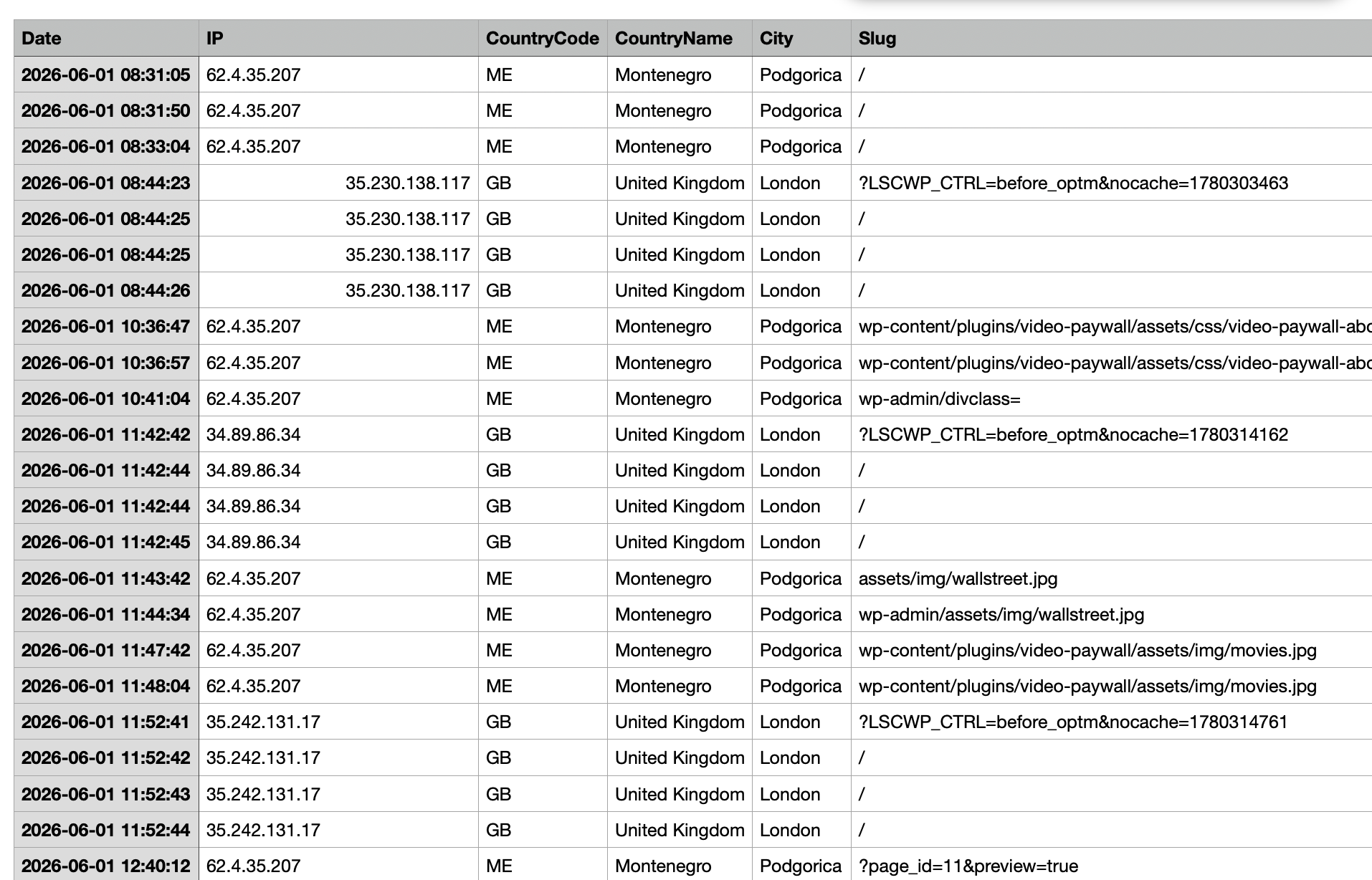
The moment a visitor presses PLAY, VidLog records the view and stores key details such as:
- Date and time
- IP address
- Country/City
- Page slug
- Video file
- Referrer source
- Pages viewed
- Watched time (minutes viewed per session)
If you use self-hosted video files like .mp4, .webm, .mov, .m4v, .avi, or .m3u8, VidLog helps you understand what people are watching, where they are coming from, and which videos perform best. The plugin also logs instant visits on your site pages, logging the same metadata.
Page stats
VidLog also instantly logs what pages visitors view on your site. The log contains the same metadata as video views. It counts all page visits, not only unique visits.
Why site owners use VidLog
- Instant logging the moment a visitor presses PLAY
- Instant logging the moment a page is visited
- Watched time tracking for self-hosted videos
- Clean monthly video and page logs inside WordPress
- CSV exports for reporting and backup
- Referrer tracking to see where visitors came from
- Lightweight setup with no external analytics dashboard required
- Simple dashboard for reviewing logs directly in WordPress
Perfect for
- Filmmakers and video creators
- Membership sites
- Online courses and educators
- Video tutorials
- Agencies managing client video content
- Any WordPress site using self-hosted videos
Important: VidLog tracks self-hosted video files. It does not track YouTube or Vimeo embeds.
External services
The link to upgrade to pro opens a new tab with a link to the plugin’s website.
Video Tutorial
Need help getting started? Watch the full VidLog setup tutorial here:
Watch on YouTube:
https://www.youtube.com/watch?v=6O_DzQ3838I
Features
VidLog includes instant video play logging, page view logging, watched time tracking, CSV exports, monthly log storage, and clean logs directly inside WordPress.
For a full feature list and more details about VidLog PRO, visit:
https://theappmill.com/vidlog/index.html
Install VidLog Free for clean video and page logs. Upgrade to VidLog PRO when you want visual charts, top 10 lists, and faster insight into your most active content.
VidLog PRO
Want deeper insights? VidLog PRO adds an Advanced Stats area for both Video plays and Page views, right inside WordPress with:
- Top 10 videos chart
- Top 10 countries chart
- Top 10 referrers chart
- Complete analytics lists below each chart
- Faster insight into which content performs best
- A clearer overview of viewer behavior across your video library
If you want more than raw logs and CSV exports, VidLog PRO gives you a more visual analytics experience directly in your WordPress dashboard.
Included Analytics
VidLog helps you answer questions like:
- Which videos are being watched the most?
- Which countries send the most viewers?
- Which referrers drive the most plays?
- Which pages are being visited the most?
- Which month had the most activity?
- Which exact files and slugs were viewed?
- How long are visitors watching videos?
External Services
This plugin uses the following external service to enrich log data with geolocation information:
- ip-api.com –
http://ip-api.com/json/ - Purpose: resolves IP addresses into country data for analytics logs
- Data sent: the visitor IP address
- Service privacy policy: https://ip-api.com/docs/legal
This plugin also displays country flag images using:
- flagcdn.com –
https://flagcdn.com/ - Purpose: displays a small country flag icon next to log entries in the dashboard
- Data sent: no personal data is sent by the plugin; the browser loads the flag image file directly
- Service privacy policy: https://flagcdn.com/privacy/
This plugin also includes a link in the plugin UI to:
- The AppMill – https://theappmill.com/vidlog/index.html
- Purpose: product and plugin information only
- No visitor log data is sent to this site by the plugin
Credits
Developed by The AppMill.
Installation
- Upload the plugin folder to
/wp-content/plugins/, or install it through the WordPress Plugins screen. - Activate VidLog from the Plugins menu.
- Open VidLog in your WordPress dashboard.
- Add self-hosted video files to your pages or posts using WordPress video blocks, HTML5 video tags, or another self-hosted video setup.
- Confirm that your video source points to a supported file type such as
.mp4,.webm,.mov,.m4v,.avi, or.m3u8. - Visit the public page and press PLAY on the video to create a test log entry.
- Return to the VidLog dashboard and check the Video Views table.
- Open the Page Views screen to confirm that page visits are being logged.
- Use the month selector to review older logs when needed.
- Export video or page logs as CSV files for reporting, backups, or client summaries.
- Review referrers, country, city, page slug, video file, and watched time data to understand visitor behavior.
- Upgrade to VidLog PRO if you need visual top 10 charts and deeper analytics directly inside WordPress.
Watch the setup tutorial:
Watch on YouTube:
Frequently asked questions
Does VidLog work with YouTube or Vimeo embeds?
No. VidLog is built for self-hosted video files inside WordPress.
Does VidLog slow down my website?
No. Logging is lightweight and designed to happen immediately when a visitor starts playback or visits a page.
Can I export my logs?
Yes. You can export monthly logs as CSV files directly from the plugin dashboard.
What kind of videos can it track?
VidLog works with common self-hosted formats such as .mp4, .webm, .mov, .m4v, .avi, and .m3u8. It logs unique video plays and can also track watched time during playback sessions.
What kind of pages can it track?
VidLog works with all pages on your website. It logs every page visit directly inside WordPress, including repeat visits to the same page, so you can review monthly activity and export the data when needed.
Where do I see the stats?
Inside your WordPress admin area under VidLog, where you can view video and page logs and export CSV files. Advanced Stats with top 10 charts and deeper analytics are available in VidLog PRO.
Changelog
Restores Page Views month filtering and CSV export controls, including All Time export support.
2.2.4
- Restored the month selector on the Page Views screen.
- Added Page Views CSV export controls to match the Video Views screen.
- Added All Time filtering and CSV export support for Page Views.
- Improved Page Views row deletion when viewing All Time results.
2.2.3
- Completely suppressed notices from other plugins on VidLog admin screens
- Added protection against notices injected after page load
2.2.2
- Prevented notices from other WordPress plugins from appearing inside VidLog admin headers
- Tested with WordPress 7.0.3
2.2.1
- Design changes
- Added link to website for more information
2.2.0
- Modernized plugin header metadata and asset versioning
- Improved admin screen styling for log filters, actions, and tables
- Fixed PHP 7 compatibility by removing PHP 8-only function usage
- Fixed admin pagination nonce handling
- Scoped upgrade page styles so they only load on the VidLog upgrade page
- Added a tutorial
2.1.0
- Added “Watched” tracking for self-hosted videos
- Added watched time logging in minutes per playback session
- Improved video analytics by tracking play-pause-play behavior
- Fixed CSV issue causing empty rows
- Added automatic cleanup of malformed CSV rows
- Improved CSV stability and data consistency
Screenshots




For developers
Is this your plugin? Show off the numbers.
Add a live badge to your site, docs or GitHub README. It updates on its own — no account needed.
FAQ
VidLog Video Analytics: quick answers
Straight answers, pulled from live WordPress.org data.
Live data from WordPress.org · checked Oct 17, 2026
Is VidLog Video Analytics free?
Yes. VidLog Video Analytics is free to download and use from the official WordPress.org plugin directory.
Is VidLog Video Analytics safe to use in 2026?
VidLog Video Analytics is a solid plugin choice in 2026, with a few things worth checking first. It runs on 10+ sites, is rated 5/5 and was last updated 3 weeks ago, and scores 73/100 on our health check.
How many websites use VidLog Video Analytics?
VidLog Video Analytics is active on 10+ WordPress websites and has been downloaded 1,224 times since it launched in December 2025. It was downloaded 215 times in the last 30 days.
Does VidLog Video Analytics work with WordPress 7.1?
Yes. The developer has tested VidLog Video Analytics up to WordPress 7.1.3, the latest release. It requires WordPress 5.0 or newer.
What PHP version does VidLog Video Analytics need?
VidLog Video Analytics requires PHP 7.0 or higher. Most hosts run PHP 8.x today, so it works on any modern WordPress hosting.
When was VidLog Video Analytics last updated?
The latest version, 2.2.4, was released on September 24, 2026 (3 weeks ago).
Who makes VidLog Video Analytics?
VidLog Video Analytics is developed and maintained by Lise Rasmussen.
Powered by PageForge
Want thousands of pages that rank like these? Build them in an afternoon.
This directory runs on the same engine as PageForge. Turn any spreadsheet, CSV or API into thousands of fast, SEO-ready WordPress pages — with schema, internal links and AI-written copy baked in.
- CSV, Google Sheets & API data sources
- AI content, schema & internal links per page
- Works with Elementor, Gutenberg, Yoast & Rank Math
- Free on WordPress.org — no credit card


