



Videopack
Makes video thumbnails, allows resolution switching, and embeds responsive self-hosted videos and galleries.

Solid choice
Videopack is a solid plugin choice in 2026, with a few things worth checking first. It runs on 10K+ sites, is rated 4.8/5 and was last updated 1 month ago, and scores 74/100 on our health check.
- Proven at scale on 10K+ active sites
- Loved by users — 4.8/5 from 63 reviews
- Tested with the latest WordPress (7.1)
Daily downloads
Download spikes usually follow a new release — each site that auto-updates counts as a download.
Rankings
Where Videopack stands todayWordPress.org search rankings
Live position in the plugin search, top 100| Keyword | Position |
|---|---|
| resolutions | #2 |
| thumbnail | #25 |
| video | #28 |
| video gallery | #56 |
| video player | #26 |
Version adoption
Share of active sites per release.
Rating breakdown
★★★★★★★★★★ 4.8 from 63 reviews
About Videopack
From the official readme · v4.10.6Description
A plugin to make video players, thumbnails, multiple resolutions, and video galleries.
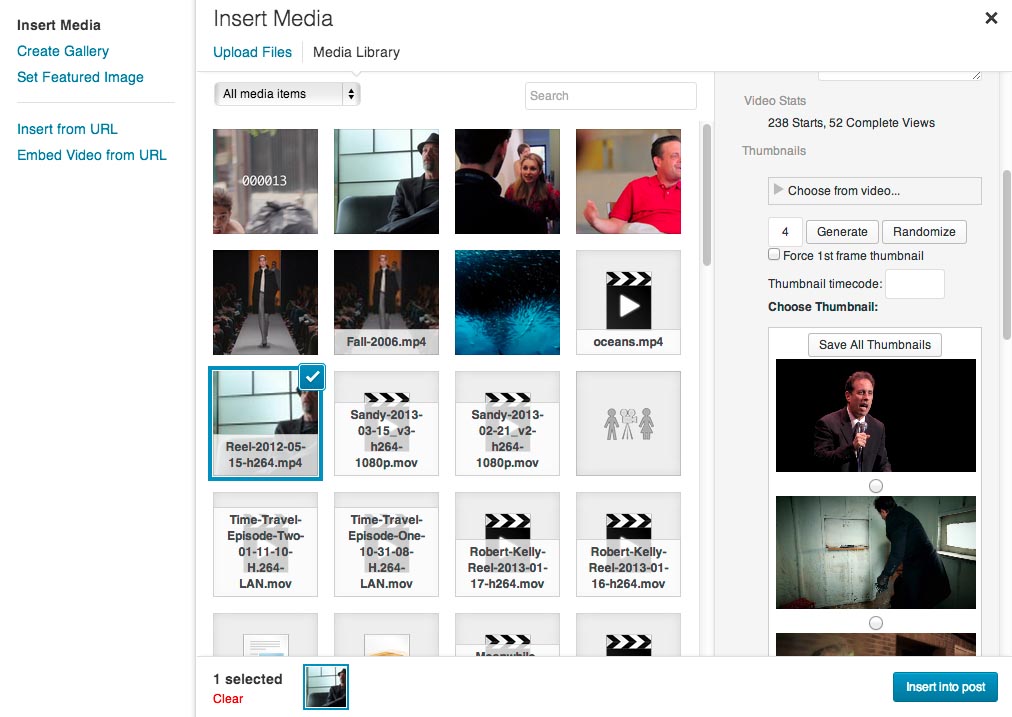
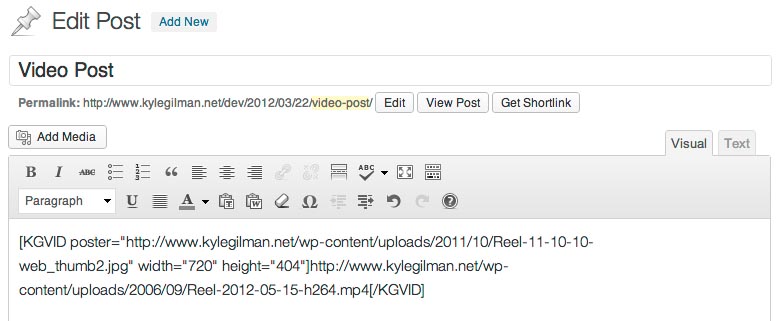
This video plugin adds several options to any video uploaded to the WordPress Media Library. If your video can be played natively in your browser, or if you have FFMPEG installed on your server (optional), you can generate thumbnails from your video. Using either the “Generate” or “Randomize” buttons will create a selection to choose from. Click “Insert into Post” and you’ll get a shortcode in the post editor that will make a flexible, responsive video player.
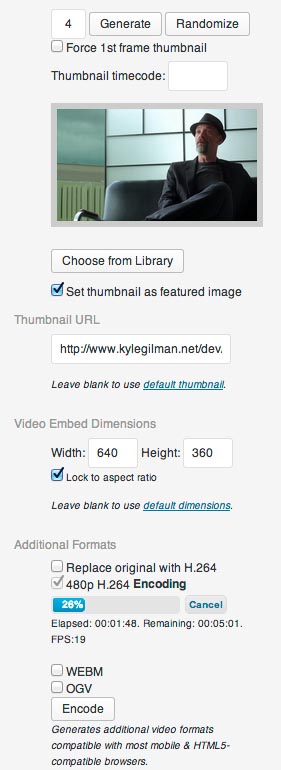
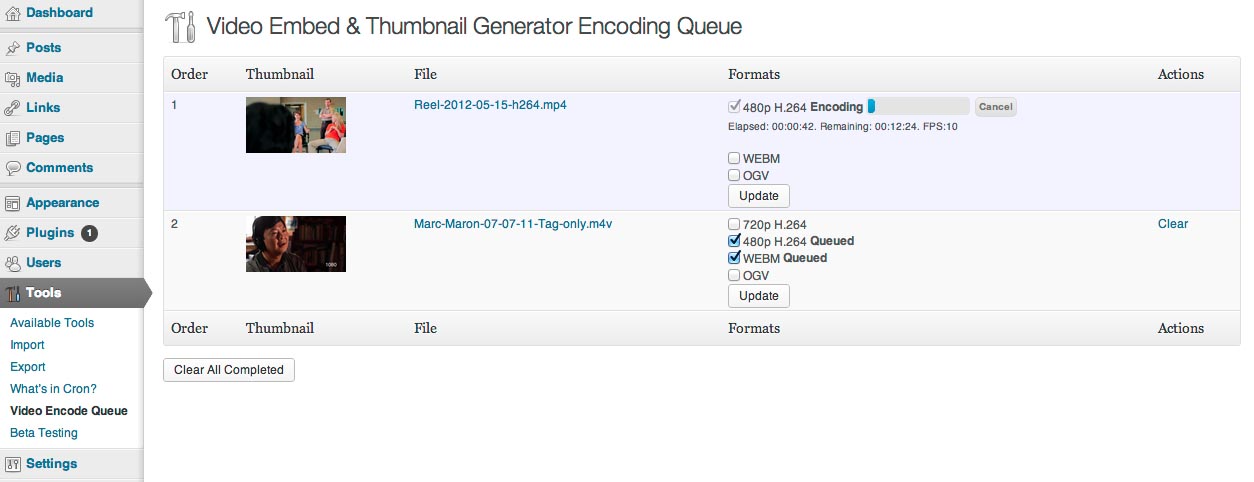
If you provide multiple H.264 resolutions, Videopack can automatically select the one closest to the size of the player or a resolution of your choice, and provide a button for users to select the resolution manually. If FFMPEG is installed on your server, Videopack can encode the videos automatically.
You can also use Videopack to create a popup video gallery. The shortcode uses options similar to the WordPress image gallery shortcode. In its simplest form it will create a gallery of all videos attached to the post.
You can now add advertisements to your videos using the Videopack Ads premium add-on which you can purchase from the Add-ons tab of the Videopack Settings page or on the Videopack website.
Not compatible with the Block Editor. Please continue to use the Classic Editor.
Visit the Videopack Documentation pages for more info.
Installation
- Upload the unzipped folder
video-embed-thumbnail-generatorto the/wp-content/plugins/directory. - Activate the plugin through the ‘Plugins’ menu in WordPress.
Frequently asked questions
Why doesn’t my video play?
Most of the time your video doesn’t play because it’s not encoded in the right format. Videos have containers like mp4, mov, ogv, mkv, etc and within those containers there are video and audio codecs like H.264, MPEG-4, VP8, etc. The best option for this plugin is an mp4 container with H.264 video and AAC audio. It’s confusing, but there is a codec usually identified simply as “MPEG-4” of “MPEG-4 Visual” which is not the same thing as H.264 even if it’s in an mp4 container. mp4s with MPEG-4 video will not play in most browsers, and if you don’t use AAC audio you won’t get any audio. I highly…
Why does my video have to download completely before it starts playing?
mp4/m4v/mov files have something called a moov atom that gives the video player information about the content of the video (dimensions, duration, codecs, etc). Depending on the program you used to make your video, the moov atom can be at the beginning or the end of the file. Most video players will wait until they find the moov atom before starting playback. Otherwise it doesn’t know how to display the information it’s downloading. If it’s at the beginning of the file, playback starts very soon after the user hits the play button. If it’s at the end of the file, the whole video has to…
Why doesn’t this work with YouTube?
WordPress already has a built-in system for embedding videos from YouTube, Vimeo, Dailymotion, etc. Just put the URL into your post and WordPress will automatically convert it to an embedded video using oEmbed. You don’t need this plugin to do that. If you’re trying to generate new thumbnails from YouTube videos, I’m not going to risk Google’s wrath by providing that functionality. I’m not even sure I could figure out how to do it anyway.
Why can’t I make thumbnails?
If you’re like most users and don’t have FFMPEG installed on your server, Videopack relies on your browser’s built-in ability to play videos. Google Chrome is best when making thumbnails because it supports the most formats. Wikipedia has a great chart that explains which browsers work with which video formats.
How can I change the watermark’s size or position?
The watermark option is a simple image overlay and is styled using CSS. The default styling is .kgvid_watermark img { display: block; position: absolute; bottom: 7%; right: 5%; z-index: 1; margin: 0px; max-width: 10%; box-shadow: none; } You can override any of those settings in either your theme’s custom CSS area or using the Jetpack “Custom CSS” module. If you want to make the watermark bigger, try something like .kgvid_watermark img { max-width: 20%; } If you want to put it in the upper left instead of the lower right, try something like this: .kgvid_watermark img { top: 7%; left: 5%; }
I’m getting an error message FFMPEG not found at /usr/local/bin/. You can embed existing videos, but video thumbnail generation and Mobile/HTML5 video encoding is not possible without FFMPEG.
You can get instructions to install FFMPEG for several different Linux distributions at https://www.tecmint.com/install-ffmpeg-in-linux/ You do not need the obsolete FFMPEG-PHP module/extension. It does not work with Videopack. Videopack can use FFMPEG to make thumbnails and create alternate video formats. Unfortunately most servers don’t have FFMPEG installed and most shared hosting plans don’t allow you to install FFMPEG because of the system resources it requires. You’re getting this error message because you don’t have FFMPEG installed in the most common directory. If you know you have…
How can I encode videos in directories protected by .htaccess passwords?
Enter the username & password in the Videopack settings page, “FFMPEG Settings” tab, or use the “Embed from URL” tab and enter the URL in this format http://username:password@yourdomain.com/uploads/2012/01/awesomevid.mp4 in the Video URL field.
Changelog
Videopack now requires PHP version 7.2.5. This Videopack update is a significant security update. There might be some features that break because I wasn't able to test every possible configuration. Use WP Rollback to return to version 4.7.5 if you encounter any big problems.
4.10.6 – August 23, 2026
- Security fix: restricted the kgvid_count_play AJAX handler to a play-counter allowlist to prevent unauthenticated overwriting of attachment metadata.
- Security fix: added missing and stricter capability checks across admin AJAX handlers to prevent lower-privileged or unauthorized users from triggering encoding, thumbnail generation, post reparenting, deletion, or other users’ encode jobs.
- Security hardening: added direct file access protection to several plugin files.
- Fixed incorrect plugin license header and a few missing/mismatched translation text domains.
- Fixed bug that appended an unstable “?id=” query string to video source URLs, which could cause the same video to be indexed by search engines multiple times.
- Fixed bug that hid the thumbnail generation controls in the Media Library for Authors and other non-Editor roles viewing their own uploaded videos.
- Fixed bug that could show incorrect users in the error notification email dropdown on the settings page.
- Fixed bug that caused a fatal error when video posts are duplicated.
- Fixed bug that triggered _load_textdomain_just_in_time (again).
- Added ‘videopack_save_thumb_location’ filter to set thumbnails to save to a custom location.
- Updated dependencies Video.js, Freemius SDK, and Symfony/Process
4.10.5 – January 24, 2026
- Fixed bug that caused 404 errors when WordPress Default Player is selected.
- Fixed bug that incorrectly formatted thumbnails when set to display when video ends.
- Fixed bug that prevented disabling “Show Download Link” on the settings page.
- Fixed bug that triggered _load_textdomain_just_in_time too early.
- Updated dependencies Video.js, Freemius SDK, and Symfony/Process.
4.10.4 – July 11, 2025
- Security update to fix XSS vulnerability in popup video gallery.
- Updated Freemius SDK to v2.12.1 and symfony/polyfill-php80 to v1.32.0
4.10.3 – Januray 27, 2025
- Fixed bug that left FFMPEG settings enabled when FFMPEG is not present on server.
- Fixed bug that limited the list of users to email encoding errors to.
- Updated Video.js to v8.20.0, Freemius SDK to v2.11.0, and Symfony/Process to v5.4.47
4.10.2 – May 8, 2024
- Fixed bug that prevented disabling the “Set all videos to expand to 100% of their containers” setting.
- Better resizing for the settings page sample video.
4.10.1 – April 7, 2024
- Switched custom database query for looking up attachment IDs via URLs to the WordPress function attachment_url_to_postid() which could result in some video URLs no longer returning attachment IDs when the video player code is generated. That would prevent features like video play recording in the WordPress database, and would only apply to shortcodes that don’t include attachment IDs. Please let me know if this happens to you.
- Revised thumbnail generation to work with PNG as a fallback when GD is not configured to support JPG.
- Fixed “replace original” encoding when newly-encoded files are a different format from the original. Original formats are now deleted after the replacement encode format is complete.
- Added extra check that attachment files are deleted when deleting encoded video formats.
- Fixed bug that always enabled the custom format encode setting.
- Fixed typo in FFMPEG rotation test filename.
- Made sample video on the Videopack settings page responsive.
- Added WordPress Playground Blueprint for easy plugin previews.
- Added a VIDEOPACK_FREEMIUS_ENABLED constant to disable loading Freemius.
- Confirmed compatibility with FFMPEG v7.0
- Updated Freemius SDK to v2.7.0
Screenshots
For developers
Is this your plugin? Show off the numbers.
Add a live badge to your site, docs or GitHub README. It updates on its own — no account needed.
FAQ
Videopack: quick answers
Straight answers, pulled from live WordPress.org data.
Live data from WordPress.org · checked Sep 26, 2026
Is Videopack free?
Yes. Videopack is free to download and use from the official WordPress.org plugin directory.
Is Videopack safe to use in 2026?
Videopack is a solid plugin choice in 2026, with a few things worth checking first. It runs on 10K+ sites, is rated 4.8/5 and was last updated 1 month ago, and scores 74/100 on our health check.
How many websites use Videopack?
Videopack is active on 10K+ WordPress websites and has been downloaded 1,142,013 times since it launched in October 2011. It was downloaded 4,064 times in the last 30 days.
Does Videopack work with WordPress 7.1?
Yes. The developer has tested Videopack up to WordPress 7.1.2, the latest release. It requires WordPress 5.9 or newer.
What PHP version does Videopack need?
Videopack requires PHP 7.2 or higher. Most hosts run PHP 8.x today, so it works on any modern WordPress hosting.
When was Videopack last updated?
The latest version, 4.10.6, was released on August 23, 2026 (1 month ago).
Who makes Videopack?
Videopack is developed and maintained by Kyle Gilman.
Powered by PageForge
Want thousands of pages that rank like these? Build them in an afternoon.
This directory runs on the same engine as PageForge. Turn any spreadsheet, CSV or API into thousands of fast, SEO-ready WordPress pages — with schema, internal links and AI-written copy baked in.
- CSV, Google Sheets & API data sources
- AI content, schema & internal links per page
- Works with Elementor, Gutenberg, Yoast & Rank Math
- Free on WordPress.org — no credit card


