


Vibrate SMS
SMS for stores in Israel: WooCommerce order updates for customers, alerts for your team, manual messages and an SMS log with delivery status.

Solid choice
Vibrate SMS is a solid plugin choice in 2026, with a few things worth checking first. Was last updated 3 weeks ago, and scores 64/100 on our health check.
- Actively developed — last update 3 weeks ago
- Tested with the latest WordPress (7.1)
- Small user base (<10 active installs)
- Very few reviews so far
How does it stack up?
Side-by-side on installs, updates, ratings & support



Daily downloads
Download spikes usually follow a new release — each site that auto-updates counts as a download.
Rankings
Where Vibrate SMS stands todayWordPress.org search rankings
Live position in the plugin search, top 100| Keyword | Position |
|---|---|
| israel | #42 |
| order notifications | >100 |
| sms | >100 |
| text message | >100 |
| woocommerce | >100 |
About Vibrate SMS
From the official readme · v1.2.3Description
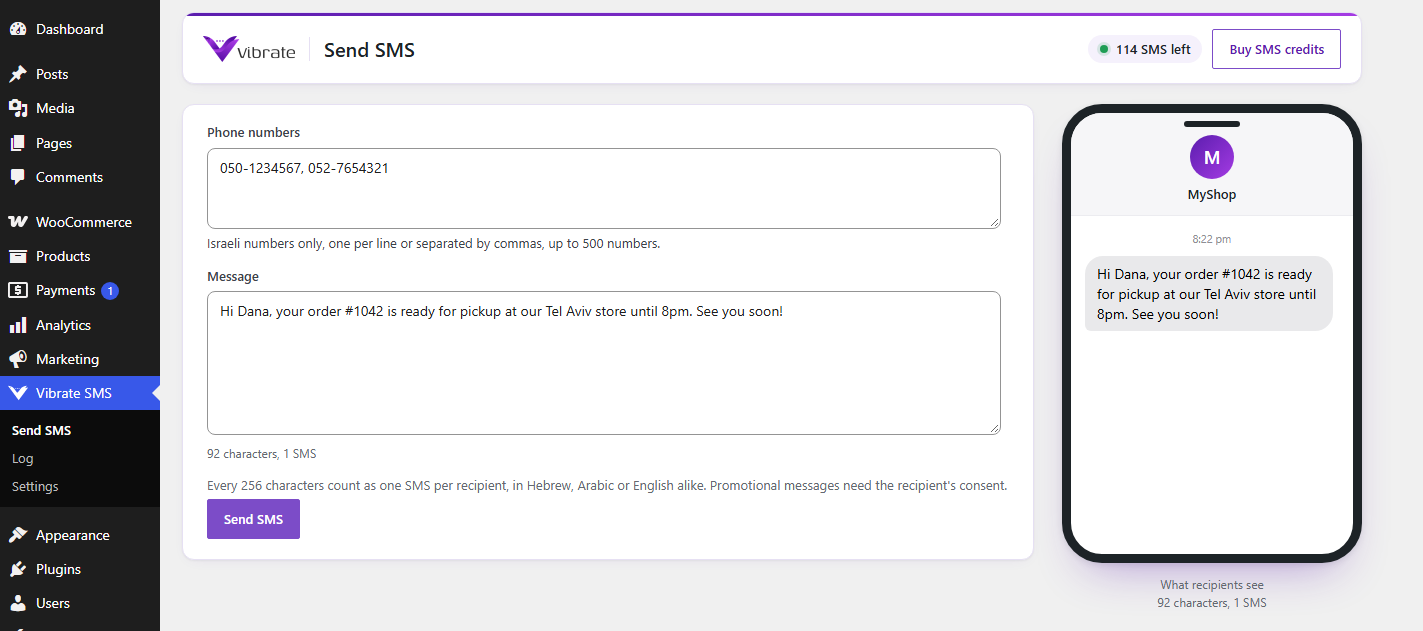
Vibrate SMS connects your WordPress site to Vibrate, the Israeli SMS and WhatsApp Business platform, with direct connections to every Israeli carrier. One SMS is up to 256 characters in Hebrew, Arabic or English alike.
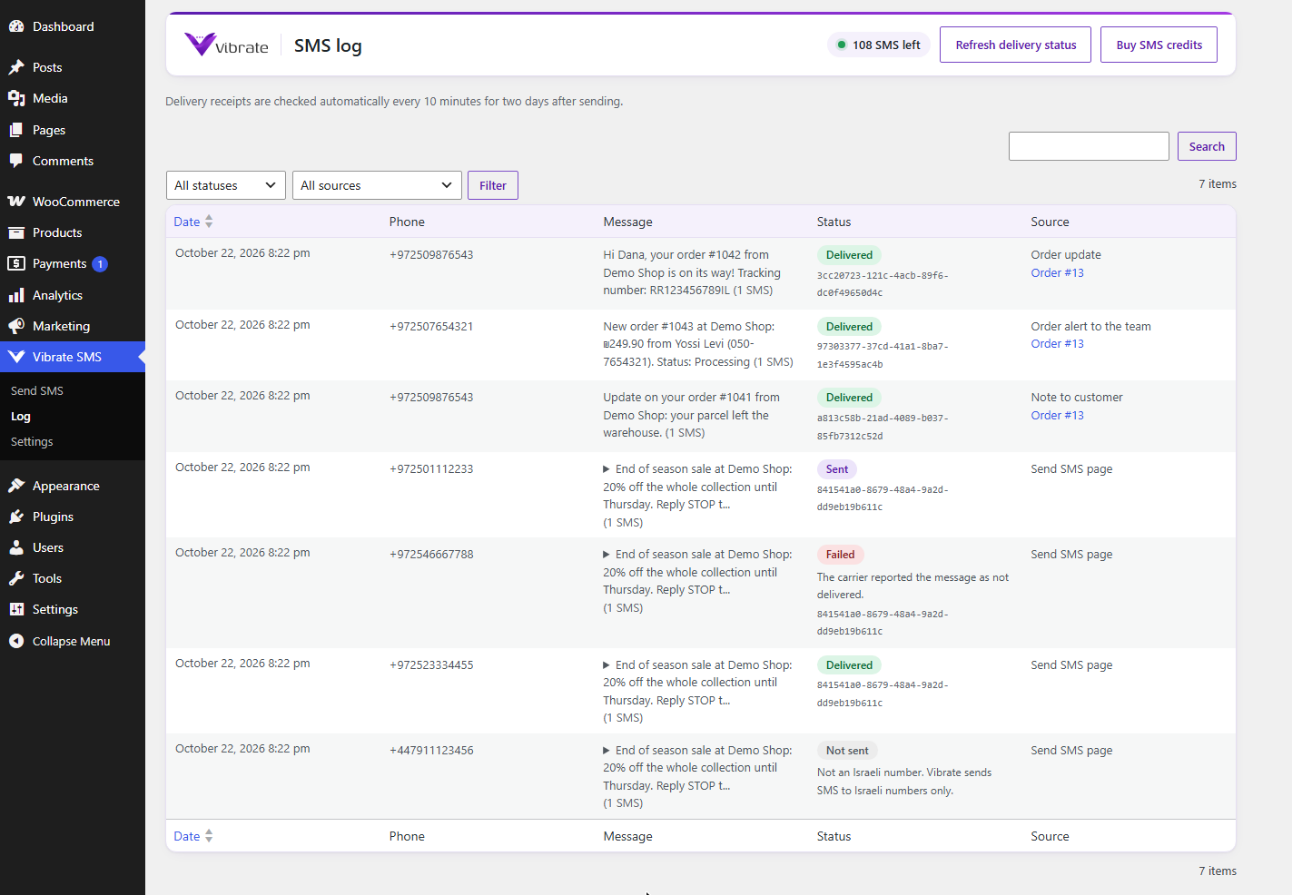
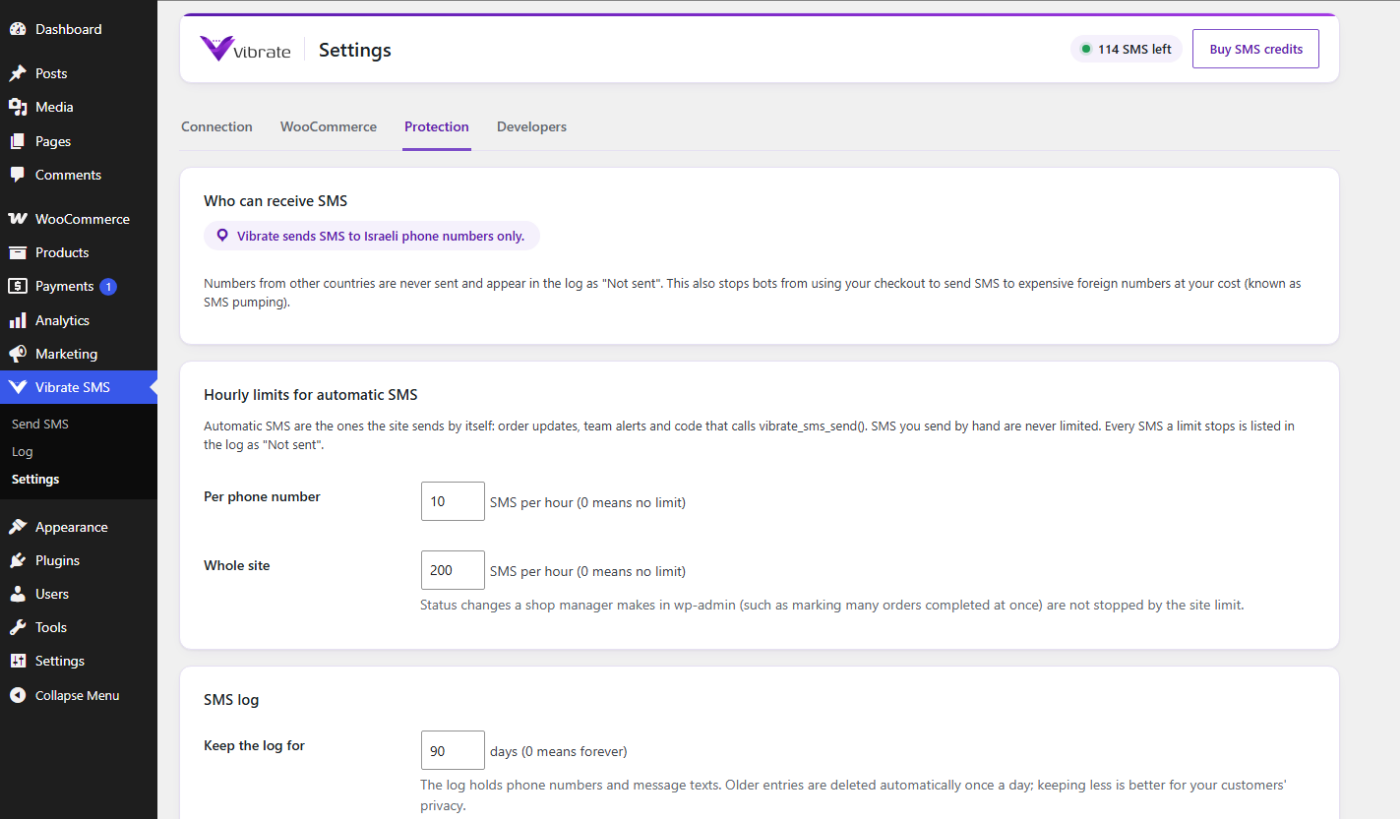
For businesses in Israel. Vibrate delivers SMS to Israeli phone numbers only. Numbers from other countries are never sent and are listed in the SMS log as not sent.
WooCommerce
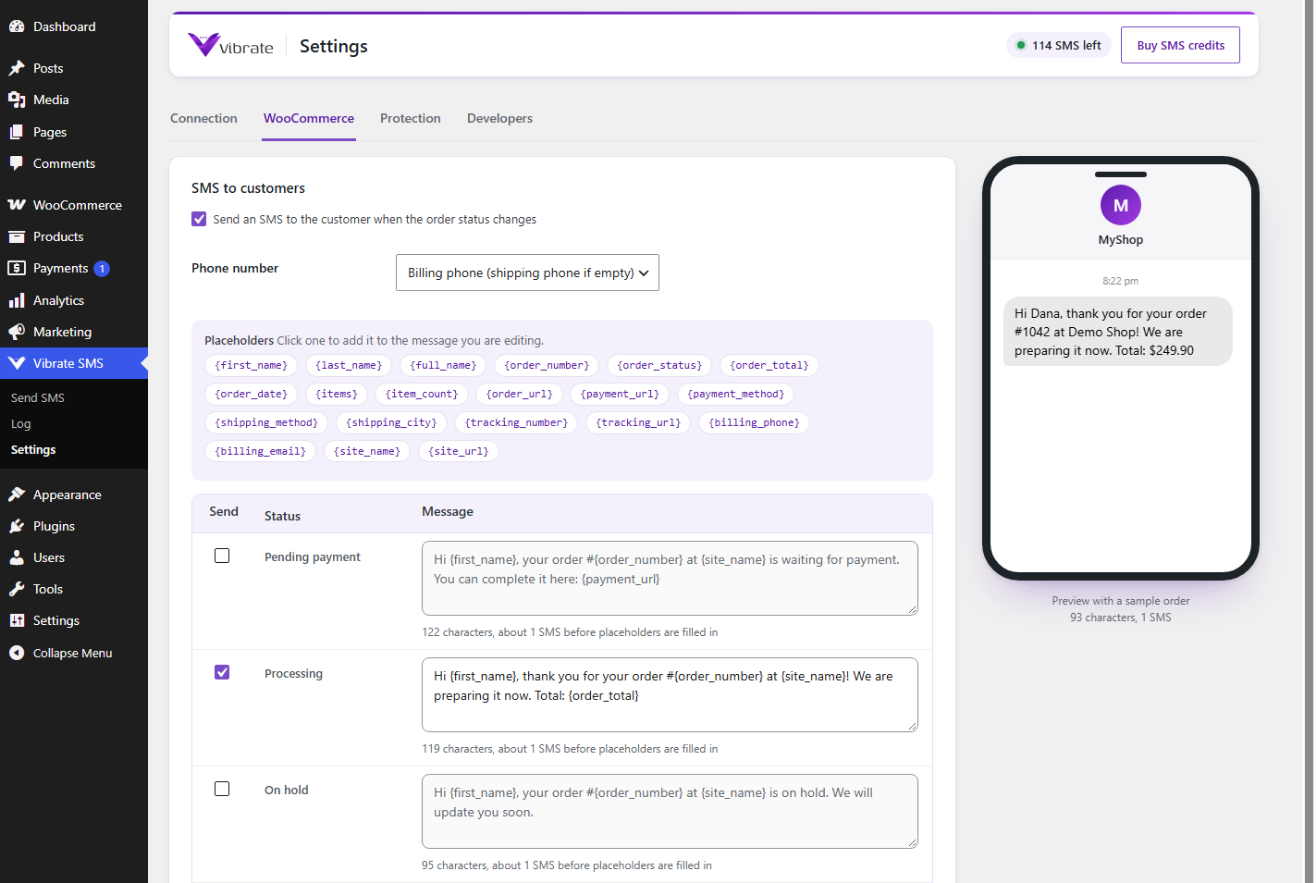
- An SMS to the customer for every order status you choose (processing, completed, on hold, cancelled, refunded, failed, pending payment and custom statuses), each with its own message.
- Placeholders such as {first_name}, {order_number}, {order_total}, {items}, {payment_url}, {order_url} and {tracking_number}.
- Alerts to the shop team’s phones when an order is placed or changes status.
- An SMS for every “Note to customer” you add to an order (optional).
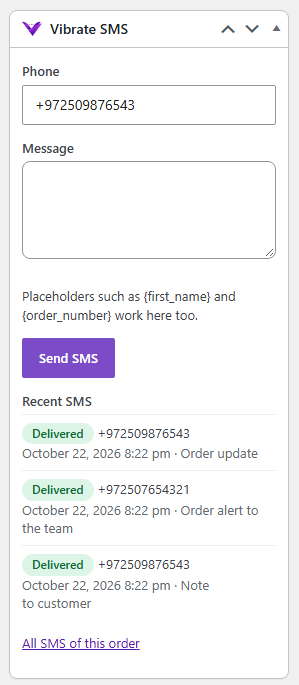
- Send an SMS to the customer straight from the order screen, with the order’s SMS history next to it.
- A private order note for every SMS sent, refused or blocked.
- Compatible with HPOS (custom order tables) and the block checkout.
Everywhere else
- A Send SMS page in wp-admin for one or many numbers.
- An SMS log with delivery status (accepted, sent, delivered, failed), refreshed automatically from Vibrate.
vibrate_sms_send()anddo_action( 'vibrate_sms_send', ... )for developers, plus filters and actions for every step.
Built with care
- The access key is encrypted at rest with your site’s own salts, never printed back into the page, and can live in wp-config.php instead.
- Every send carries an Idempotency-Key, so a retry after a timeout can never deliver or bill the same SMS twice.
- Order SMS are sent in the background (Action Scheduler), so checkouts never wait for the SMS API, and they are retried automatically when Vibrate cannot be reached.
- Protection against SMS pumping: SMS go to Israeli numbers only, with hourly limits per number and per site, and names typed by customers are stripped of links before they reach an SMS.
- Each order status is texted at most once per order.
- Works with WordPress privacy tools (export and erase personal data), with a configurable log retention period.
- Right-to-left screens are fully supported.
You need a Vibrate account with SMS credits, an access key and an approved sender. Open an account.
Developers
$result = vibrate_sms_send( '050-1234567', 'Your table is ready.' );
Returns an array (status, batch_key, run_id, recipients, blocked, units) or a WP_Error. Pass array( 'async' => true ) to queue it in the background and array( 'source' => 'my_plugin' ) to label it in the log.
Filters: vibrate_sms_pre_send, vibrate_sms_send_order_sms, vibrate_sms_order_message, vibrate_sms_order_placeholders, vibrate_sms_order_phone, vibrate_sms_send_async, vibrate_sms_rate_limit_exempt_sources, vibrate_sms_send_capability, vibrate_sms_settings_capability.
Actions: vibrate_sms_send, vibrate_sms_sent, vibrate_sms_failed.
API reference: https://www.vibrate.co.il/developers
External services
This plugin sends SMS through the Vibrate API (https://api.vibrate.co.il), operated by Lightup Software Engineering. It needs a Vibrate account, and it contacts the API only once you enter an access key. Every request carries that key, and its user agent names the plugin and WordPress versions and your site’s address.
- When an SMS is sent (from the Send SMS page, for an order, or through vibrate_sms_send()), it sends the recipient’s phone number, the message text and your sender name.
- To track delivery, it asks for the status of messages it sent, by the ID Vibrate returned: every 10 minutes for two days after sending, and when you click Refresh delivery status.
- On the plugin’s admin pages and when you click Test connection, it asks for your Vibrate account’s name, email and SMS balance.
Vibrate terms of service: https://www.vibrate.co.il/en/terms-of-service
Vibrate privacy policy: https://www.vibrate.co.il/en/privacy-policy
The SMS log stays in your WordPress database and is deleted after the retention period you choose (90 days by default).
Installation
- In WordPress go to Plugins > Add New Plugin and search for “Vibrate SMS”.
- Click Install Now, then Activate.
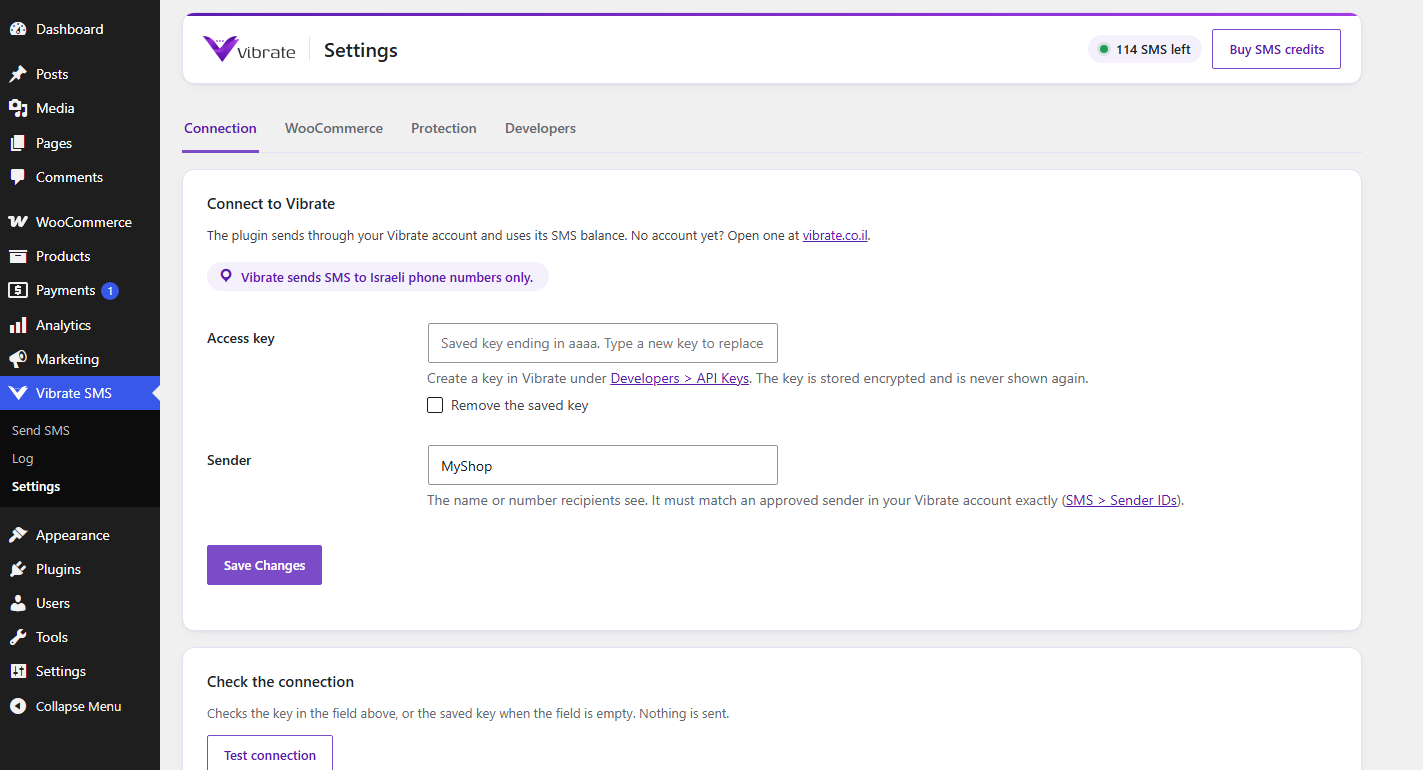
- In Vibrate, create an access key under Developers > API Keys and make sure your sender is approved under SMS > Sender IDs.
- In WordPress go to Vibrate SMS > Settings, paste the access key, enter the sender exactly as it appears in Vibrate, and click Save.
- Click Test connection, then send yourself a test SMS.
- With WooCommerce, choose which order statuses send an SMS under Vibrate SMS > Settings > WooCommerce.
Updates appear in Dashboard > Updates like any other plugin.
Changelog
1.2.3
- The saved sender and message templates drop any HTML markup.
- Each setting declares its sanitizing function where it is registered, and the bundled translations load from their own file.
1.2.2
- Requires WordPress 6.2 or later: database queries now pass the log table’s name to $wpdb->prepare() as an identifier.
- The readme lists what the plugin sends to Vibrate, and when (External services).
1.2.1
- Fixed the text shown in the SMS log for a message the carrier reports as not delivered: it no longer says the credit is refunded, which is not the case.
1.2.0
- Israel only, said plainly: the plugin sends to Israeli phone numbers only, and says so on the settings and Send SMS pages and in this readme.
- The options to allow other countries and the default country code setting were removed. Team alert numbers must be Israeli too.
1.1.0
- New design in the Vibrate look: the Vibrate menu icon, a page header with your SMS balance, and a phone preview that shows each message as the recipient will see it, with order templates filled in from a sample order.
- Guided first-time setup in three steps.
- Israeli numbers that cannot exist (not 8 or 9 digits after 972) are refused before anything is sent.
1.0.0
- First release: WooCommerce order SMS, team alerts, notes to the customer, SMS from the order screen, Send SMS page, SMS log with delivery status, developer API, abuse protection, encrypted access key, Hebrew and Arabic translations.
Screenshots
For developers
Is this your plugin? Show off the numbers.
Add a live badge to your site, docs or GitHub README. It updates on its own — no account needed.
Best Vibrate SMS alternatives
All israel plugins →




FAQ
Vibrate SMS: quick answers
Straight answers, pulled from live WordPress.org data.
Source: WordPress.org
Is Vibrate SMS free?
Yes. Vibrate SMS is free to download and use from the official WordPress.org plugin directory.
Is Vibrate SMS safe to use in 2026?
Vibrate SMS is a solid plugin choice in 2026, with a few things worth checking first. Was last updated 3 weeks ago, and scores 64/100 on our health check.
How many websites use Vibrate SMS?
Vibrate SMS is active on <10 WordPress websites and has been downloaded 147 times since it launched in October 2026. It was downloaded 155 times in the last 30 days.
Does Vibrate SMS work with WordPress 7.1?
Yes. The developer has tested Vibrate SMS up to WordPress 7.1.5, the latest release. It requires WordPress 6.2 or newer.
What PHP version does Vibrate SMS need?
Vibrate SMS requires PHP 7.4 or higher. Most hosts run PHP 8.x today, so it works on any modern WordPress hosting.
When was Vibrate SMS last updated?
The latest version, 1.2.3, was released on October 27, 2026 (3 weeks ago).
Who makes Vibrate SMS?
Vibrate SMS is developed and maintained by Vibrate.
What are the best alternatives to Vibrate SMS?
The most popular alternatives to Vibrate SMS are IL Privacy & Cookie Consent (200+ installs), Allpay Payment Gateway (70+ installs) and EDigital Accessibility Tool… (40+ installs).
Powered by PageForge
One template and a spreadsheet. A real page for every search.
PageForge turns each row of a CSV into a WordPress page with its own title, URL, SEO fields and schema, built on the layout you already designed. Free on WordPress.org.
- CSV and XLSX, plus Google Sheets on Professional and Enterprise
- Its own title, URL, SEO fields and schema for every page
- Works with the block editor, Elementor, Divi and Avada
- Free on WordPress.org, no credit card