



Vertical Menu Block for Sidebar Accordion Menu
Vertical menu block is a powerful and flexible Gutenberg block plugin that allows you to create fully customizable vertical accordion menus for your WordPress website. Built specifically for the WordPress block editor…

Solid choice
Vertical Menu Block for Sidebar… is a solid plugin choice in 2026, with a few things worth checking first. It runs on 90+ sites and was last updated 3 days ago, and scores 68/100 on our health check.
- Actively developed — last update 3 days ago
- Tested with the latest WordPress (7.1)
- Small user base (90+ active installs)
- Very few reviews so far
How does it stack up?
Side-by-side on installs, updates, ratings & support


Daily downloads
Download spikes usually follow a new release — each site that auto-updates counts as a download.
Rankings
Where Vertical Menu Block for Sid… stands todayWordPress.org search rankings
Live position in the plugin search, top 100| Keyword | Position |
|---|---|
| accordion menu | #31 |
| block | >100 |
| menu | >100 |
| sidebar menu | #37 |
| vertical menu | #24 |
Version adoption
Share of active sites per release.
About Vertical Menu Block for Sidebar Accordi…
From the official readme · v1.05Description
Vertical menu block is a powerful and flexible Gutenberg block plugin that allows you to create fully customizable vertical accordion menus for your WordPress website. Built specifically for the WordPress block editor, this vertical menu block is ideal for sidebars, navigation panels, and widget areas, helping you organize complex navigation structures in a clean and user-friendly way.
Using collapsible vertical sidebar menus improves overall site usability by allowing visitors to expand and collapse submenus only when needed. This approach saves valuable screen space, keeps layouts visually clean, and enhances readability—especially on mobile and tablet devices.
Designed with performance, accessibility, and flexibility in mind, the vertical menu block works seamlessly with the native Gutenberg editor and is compatible with all modern WordPress themes. Whether you’re building a blog, portfolio, business website, or WooCommerce store, this vertical menu block helps you deliver a professional, responsive, and accessible navigation experience across all devices.
Quick Links
👉 Upgrade to Pro: Explore all Features of Vertical Sidebar Menu Block
👉 Live Demo with Menu: Try Vertical Sidebar Menu Block Demo
👉 Live Demo with Product Categories: Try Vertical Sidebar Menu Block Demo
👉 Support: Support
Key Features
- Select Any Navigation Menu: Easily choose and display any existing WordPress navigation menu.
- Menu Depth Control: Define how many submenu levels to display for better structure and usability.
- Accordion-Style Navigation: Submenus expand and collapse smoothly for a clean, organized look.
- Auto-Expand Current Menu Item: Automatically expands the menu to reveal the current page for improved navigation clarity.
- Persistent Expanded State: Keeps menu items expanded after page reloads, providing a consistent browsing experience.
- Advanced Typography Options: Customize font family, size, and style separately for parent and child menu items.
- Flexible Styling Controls: Adjust colors, backgrounds, spacing, and hover effects for parent, child, and active menu items.
- Theme Compatibility: Works seamlessly with any modern WordPress theme and fully supports the Gutenberg block editor.
- Dedicated Support: Receive expert assistance from a responsive support team whenever you need help.
Source Code and Development
This plugin uses wp-scripts which comes with modern build tools like Webpack and npm to generate production-ready files. The uncompressed source code is included in the plugin’s src/ directory for transparency and review. Developers can access the source code directly or contribute via the GitHub repository.
To build the plugin from source:
- Install Node.js and npm.
- Run
npm installto install dependencies. - Use
npm run buildto compile the assets.
For more details, see the documentation in the WordPress developer resources:
WordPress Developer Resources – Get started with wp-scripts
For details, see the documentation in the GitHub repository:
GitHub – Vertical Sidebar Menu Block
Credits
This plugin includes a modified version of the Navgoco jQuery plugin by Tefra, which is licensed under the BSD-3-Clause License. Original library copyright © Tefra. The modified version complies with the BSD-3-Clause License.
Installation
Install and Activate the Plugin
- Download the plugin from the WordPress Plugin Repository.
- Navigate to your WordPress admin dashboard.
- Go to Plugins > Add New, click Upload Plugin, and upload the downloaded .zip file.
- Alternatively, search for “Vertical Sidebar Menu Block” in the plugin repository directly from your admin dashboard and click Install Now.
- Once installed, click Activate to enable the plugin on your site.
Using the Block on a Page or Post
- Open the page or post where you want to add the menu using the WordPress block editor.
- Search for “Vertical Sidebar Menu Block” in the block library and add it to your content.
- Select a navigation menu from the block’s settings panel.
- If no menu exists, go to Appearance > Menus in the admin panel to create a new menu.
Using the Block in a Widget Area
- Go to Appearance > Widgets or Appearance > Customize > Widgets.
- Add a block widget and search for the “Vertical Sidebar Menu Block.”
- Place the block in the desired widget area and select a navigation menu.
Frequently asked questions
Is this plugin compatible with all themes?
Yes, the Vertical Sidebar Menu Block is designed to work seamlessly with any WordPress theme.
What are the minimum WordPress and PHP version requirements?
WordPress Version: 6.6 or higher PHP Version: 7.4 or higher
Does this plugin work with WooCommerce?
Yes, it is fully compatible with WooCommerce and can display product categories or custom menus.
Does this plugin support saving expanded menu items after page reload?
Yes, the plugin remembers the expanded menu state to improve user experience.
Where can I find the source code?
The source code is included in the src/ folder of the plugin and is available on GitHub: GitHub Repository
Changelog
1.0
- Initial release.
1.01
- Addressed WordPress.org plugin review feedback.
1.02
- Addressed WordPress.org plugin 2nd review feedback.
1.03
- Addressed WordPress.org plugin 3nd review feedback.
1.04
- Some style issue fixed.
1.05
- WP Rocket issue fixed.
Screenshots
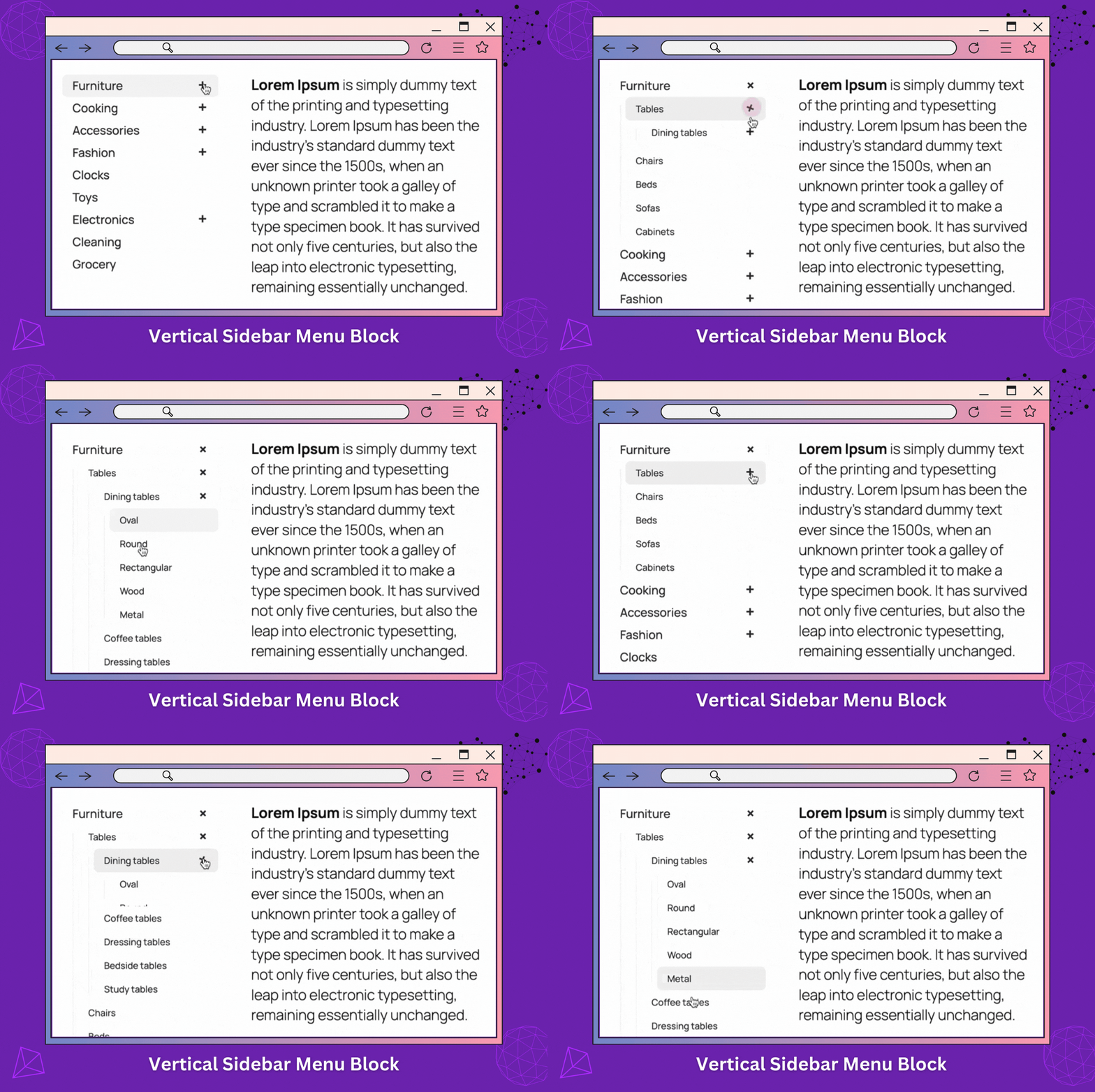


For developers
Is this your plugin? Show off the numbers.
Add a live badge to your site, docs or GitHub README. It updates on its own — no account needed.
Best Vertical Menu Block for Sideb… alternatives
All accordion menu plugins →

FAQ
Vertical Menu Block for Sidebar Acc…: quick answers
Straight answers, pulled from live WordPress.org data.
Live data from WordPress.org · checked Sep 26, 2026
Is Vertical Menu Block for Sidebar… free?
Yes. Vertical Menu Block for Sidebar… is free to download and use from the official WordPress.org plugin directory.
Is Vertical Menu Block for Sidebar… safe to use in 2026?
Vertical Menu Block for Sidebar… is a solid plugin choice in 2026, with a few things worth checking first. It runs on 90+ sites and was last updated 3 days ago, and scores 68/100 on our health check.
How many websites use Vertical Menu Block for Sidebar…?
Vertical Menu Block for Sidebar… is active on 90+ WordPress websites and has been downloaded 1,858 times since it launched in January 2025. It was downloaded 117 times in the last 30 days.
Does Vertical Menu Block for Sidebar… work with WordPress 7.1?
Yes. The developer has tested Vertical Menu Block for Sidebar… up to WordPress 7.1.2, the latest release. It requires WordPress 6.6 or newer.
What PHP version does Vertical Menu Block for Sidebar… need?
Vertical Menu Block for Sidebar… requires PHP 7.4 or higher. Most hosts run PHP 8.x today, so it works on any modern WordPress hosting.
When was Vertical Menu Block for Sidebar… last updated?
The latest version, 1.05, was released on September 23, 2026 (3 days ago).
Who makes Vertical Menu Block for Sidebar…?
Vertical Menu Block for Sidebar… is developed and maintained by WPBean.
What are the best alternatives to Vertical Menu Block for Sidebar…?
The most popular alternatives to Vertical Menu Block for Sidebar… are Iks Menu (10K+ installs), WPB Accordion Menu (10K+ installs) and Accordion Menu (100+ installs).
Powered by PageForge
Want thousands of pages that rank like these? Build them in an afternoon.
This directory runs on the same engine as PageForge. Turn any spreadsheet, CSV or API into thousands of fast, SEO-ready WordPress pages — with schema, internal links and AI-written copy baked in.
- CSV, Google Sheets & API data sources
- AI content, schema & internal links per page
- Works with Elementor, Gutenberg, Yoast & Rank Math
- Free on WordPress.org — no credit card


