


User Menus – Nav Menu Visibility
Show/hide menu items to logged in users, logged out users or specific user roles. Display logged in user details in menu. Add a logout link to menu.

Solid choice
User Menus – Nav Menu Visibility is a solid plugin choice in 2026, with a few things worth checking first. It runs on 80K+ sites, is rated 5/5 and was last updated 2 months ago, and scores 77/100 on our health check.
- Proven at scale on 80K+ active sites
- Loved by users — 5/5 from 1,282 reviews
- Tested with the latest WordPress (7.1)
How does it stack up?
Side-by-side on installs, updates, ratings & support



Daily downloads
Download spikes usually follow a new release — each site that auto-updates counts as a download.
Rankings
Where User Menus stands todayWordPress.org search rankings
Live position in the plugin search, top 100| Keyword | Position |
|---|---|
| logout | #18 |
| menu | #20 |
| menus | #2 |
| nav menu | #4 |
| user-menu | #1 |
Version adoption
Share of active sites per release.
Rating breakdown
★★★★★★★★★★ 5 from 1,282 reviews
About User Menus – Nav Menu Visibility
From the official readme · v1.3.2Description
User Menus is the perfect plugin for websites that have logged in users.
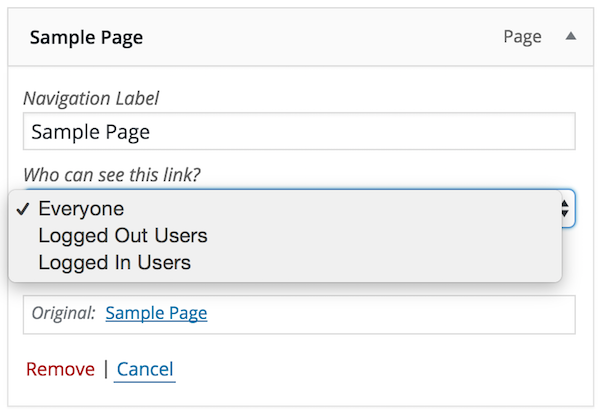
The plugin gives you more control over your nav menu by allowing you to apply visibility controls to menu items e.g., who can see each menu item (everyone, logged out users, logged in users, specific user roles).
It also enables you to display logged in user information in the navigation menu e.g., “Hello, John Doe”.
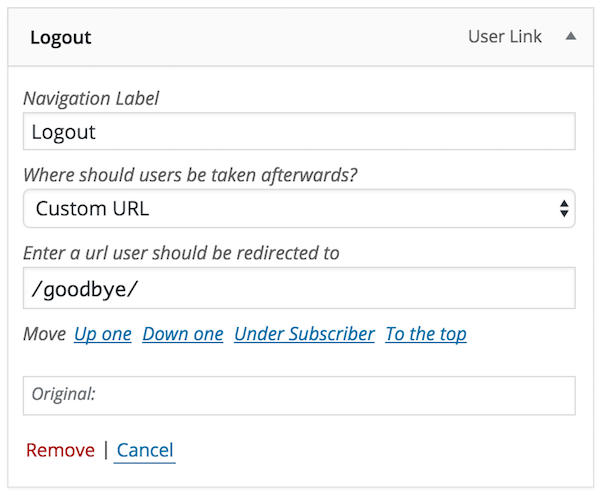
Lastly, the plugin allows you to add login, register, and logout links to your menu.
Full Feature List
User Menus allows you to do the following:
- Display menu items to everyone
- Display menu items to only logged out users
- Display menu items to only logged in users
- Display menu items to users with or without a specific user role.
- Show a logged in user’s {avatar} in a menu item with a custom size option.
- Show a logged in user’s {username} in a menu item
- Show a logged in user’s {first_name} in a menu item
- Show a logged in user’s {last_name} in a menu item
- Show a logged in user’s {display_name} in a menu item
- Show a logged in user’s nickname} in a menu item
- Show a logged in user’s {email} in a menu item
- Add a logout link to the menu (optional redirect settings)
- Add a register link to the menu (optional redirect settings)
- Add a login link to the menu (optional redirect settings)
** Includes a custom Menu Importer that will allow migrating User Menus data with the normal menu export/import.
Created by Code Atlantic
User Menus is built by the Code Atlantic team. We create high-quality WordPress plugins that help you grow your WordPress sites.
Check out some of our most popular plugins:
- Popup Maker – #1 Popup & Marketing Plugin for WordPress
- Content Control – Restrict Access to Pages and Posts
Requires WordPress 4.6 and PHP 5.6
Installation
Minimum Requirements
- WordPress 4.6 or greater
- PHP version 5.6 or greater
Installation
- Install User Menus either via the WordPress.org plugin repository or by uploading the files to your server.
- Activate User Menus.
- Go to wp-admin > Appearance > Menus and edit your menu.
If you need help getting started with User Menus, please see the FAQs that explain how to use the plugin.
Changelog
v1.3.2 – 07/19/2023
- Security: Fixes from the freemius library, notice can be seen here
v1.3.1 – 11/04/2022
- Tweak: Patch file mismatches in freemius/core/svn in last version.
v1.3.0 – 09/13/2022
- Tweak: Upgrade freemius sdk to v2.4.5 for PHP 8.1 compatibility.
v1.2.9 – 03/02/2022
- Tweak: Downgrade freemius sdk to the latest stable (previously version was Release Candidate).
v1.2.8 – 03/02/2022
- Tweak: Update freemius sdk to the latest version.
v1.2.7 – 07/21/2021
- Fix: Bug due to variable type mismatch which caused children of protected items to be rendered.
Screenshots

For developers
Is this your plugin? Show off the numbers.
Add a live badge to your site, docs or GitHub README. It updates on its own — no account needed.
Best User Menus alternatives
All logout plugins →




FAQ
User Menus – Nav Menu Visibility: quick answers
Straight answers, pulled from live WordPress.org data.
Live data from WordPress.org · checked Nov 17, 2026
Is User Menus – Nav Menu Visibility free?
Yes. User Menus – Nav Menu Visibility is free to download and use from the official WordPress.org plugin directory.
Is User Menus – Nav Menu Visibility safe to use in 2026?
User Menus – Nav Menu Visibility is a solid plugin choice in 2026, with a few things worth checking first. It runs on 80K+ sites, is rated 5/5 and was last updated 2 months ago, and scores 77/100 on our health check.
How many websites use User Menus – Nav Menu Visibility?
User Menus – Nav Menu Visibility is active on 80K+ WordPress websites and has been downloaded 910,038 times since it launched in August 2016. It was downloaded 2,998 times in the last 30 days.
Does User Menus – Nav Menu Visibility work with WordPress 7.1?
Yes. The developer has tested User Menus – Nav Menu Visibility up to WordPress 7.1.0, the latest release. It requires WordPress 4.6 or newer.
What PHP version does User Menus – Nav Menu Visibility need?
User Menus – Nav Menu Visibility requires PHP 5.6 or higher. Most hosts run PHP 8.x today, so it works on any modern WordPress hosting.
When was User Menus – Nav Menu Visibility last updated?
The latest version, 1.3.2, was released on September 13, 2026 (2 months ago).
Who makes User Menus – Nav Menu Visibility?
User Menus – Nav Menu Visibility is developed and maintained by Daniel Iser.
What are the best alternatives to User Menus – Nav Menu Visibility?
The most popular alternatives to User Menus – Nav Menu Visibility are Login or Logout Menu Item (20K+ installs), Inactive Logout (20K+ installs) and WPForce Logout (8K+ installs).
Powered by PageForge
Want thousands of pages that rank like these? Build them in an afternoon.
This directory runs on the same engine as PageForge. Turn any spreadsheet, CSV or API into thousands of fast, SEO-ready WordPress pages — with schema, internal links and AI-written copy baked in.
- CSV, Google Sheets & API data sources
- AI content, schema & internal links per page
- Works with Elementor, Gutenberg, Yoast & Rank Math
- Free on WordPress.org — no credit card


