


Use Any Font | Custom Font Uploader
Upload custom fonts with custom font uploader. Auto converts to woff2 for better performance. Self-hosted, GDPR compliant, and easy custom font plugin

Safe pick
Yes — Use Any Font is a safe, well-maintained plugin to use in 2026. It runs on 200K+ sites, is rated 4.7/5 and was last updated 3 weeks ago, and scores 88/100 on our health check.
- Proven at scale on 200K+ active sites
- Loved by users — 4.7/5 from 1,149 reviews
- Actively developed — last update 3 weeks ago
- Tested with the latest WordPress (7.1)
How does it stack up?
Side-by-side on installs, updates, ratings & support



Daily downloads
Download spikes usually follow a new release — each site that auto-updates counts as a download.
Rankings
Where Use Any Font stands todayWordPress.org search rankings
Live position in the plugin search, top 100| Keyword | Position |
|---|---|
| custom fonts | #4 |
| Font Manager | #1 |
| font uploader | #1 |
| google fonts | #7 |
| typography | #8 |
Version adoption
Share of active sites per release.
Rating breakdown
★★★★★★★★★★ 4.7 from 1,149 reviews
About Use Any Font | Custom Font Uploader
From the official readme · v6.4.1Description
Upload any custom fonts to give your site an elegant look. Easily change fonts without CSS knowledge or select from 23,871+ predefined fonts to add to your site, including Google fonts stored on your server.
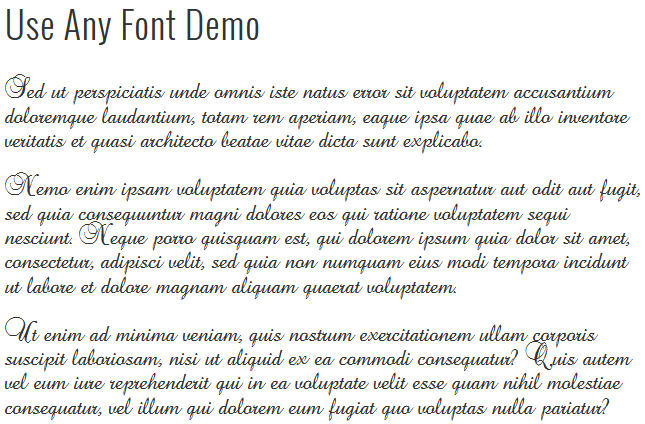
Click HERE for a Use Any Font working demo.
Use Any Font lets you install custom fonts in your WordPress website. Unlike other font embed services, it doesn’t limit your font choices or store your custom fonts on a remote server. Upload any font format (ttf, otf, woff) and our font uploader auto converts it to woff2 for faster load times and compatibility across all browsers. With our easy-to-use font uploader, you can seamlessly add custom fonts and manage your site’s typography. The plugin supports self-hosted and GDPR-compliant solutions, ensuring your fonts are SEO-friendly and quickly embedded with @font-face.
Key Features
- Easy Font Upload, Supports all browsers :
Upload font in one format, all required format for browser compatibily is auto converted by our font convertor. Supports ttf, otf, woff, and woff2 font formats. - Fastest Font Load ( 30% Faster ) :
Automatically convert uploaded custom fonts to compressed woff2 format with Brotli, achieving 30% faster loading. - Easy Font Assign :
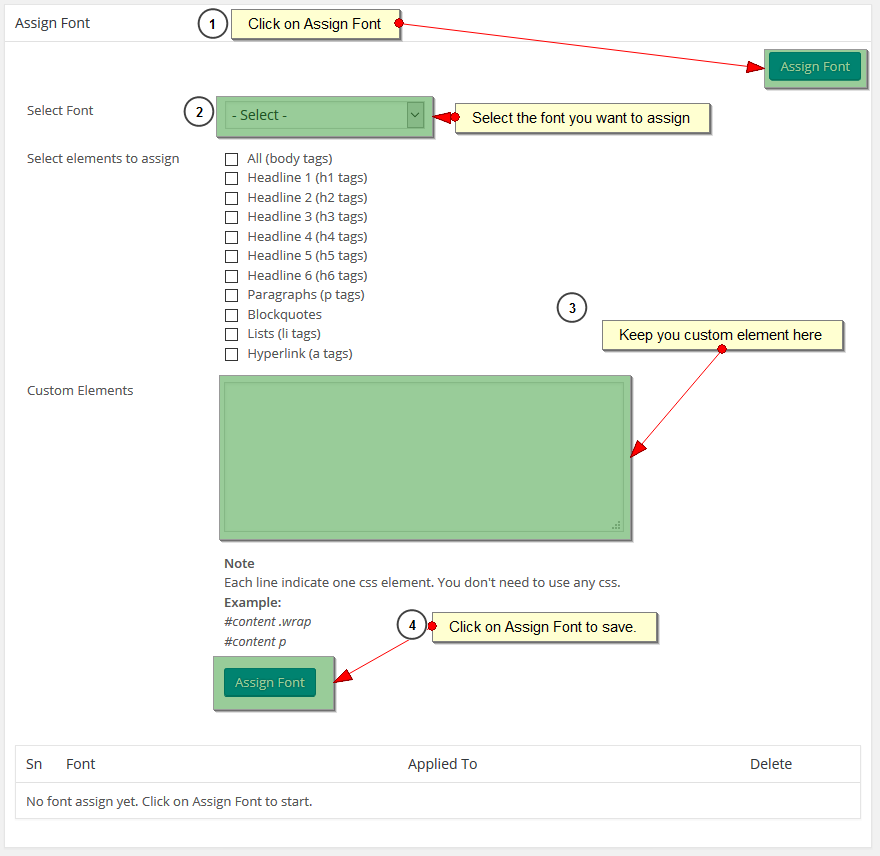
Quickly assign uploaded font with inbuilt font assign interface. You can select pre defined html tags or assign it to custom css. - SEO Friendly & GDPR compliant :
Fonts embedded with @font-face CSS for quick loading and SEO benefits. Custom Fonts are stored on Your Server for Faster Loading and full GDPR compliant - Large Font Upload upto 25 MB :
Some fonts are larger in size. Our font uploader allows you to upload custom font upto 25 MB. - Font Variations :
Upload custom fonts with their various styles and weights. - Editor and Visual Builder Support :
Use uploaded custom fonts from WordPress Editor, Gutenberg Editor,
Divi Builder,
Site Origin Page Buider,
Elementor Page Builder,
Beaver Builder,
Themify Builder,
Kadence Theme and Blocks,
Oxygen Builder,
Generate Press,
Astra Theme,
Ocean WP Theme,
Bricks Builder,
Themeisle,
Revolution Slider,
WPBakery Page Builder ( Js Composer ),
More… and any visual builder using the class. - Theme Compatibility :
Custom fonts uploaded can be directly used from Theme options panel for major themeforest themes like Avada, X Theme, Flatsome, Salient, Porto, Shopkeeper, Oshine, WPLMS Learning Management System Theme, KLEO, WoodMart, ListingPro, SimpleMag, ROSA 1, 907, Voice, Grand Restaurant, LeadEngine, Service Finder, MagPlus, Hostiko, Adifier, Puca, GreenMart, Reco, VidoRev, Halena and many more known themes. (1000+). Check out full list here. - Language Support :
Assign fonts based on language with WPML and Polylang plugins. - Font Display Property :
CSS property managing font loading behavior in @font-face.
Support
- Visit our Support Forum for quick issue resolution.
- Utilize our Facebook Message widget on our website at https://dineshkarki.com.np.
- Reach out via email using the form found at https://dineshkarki.com.np/contact.
Font Conversion API Usage
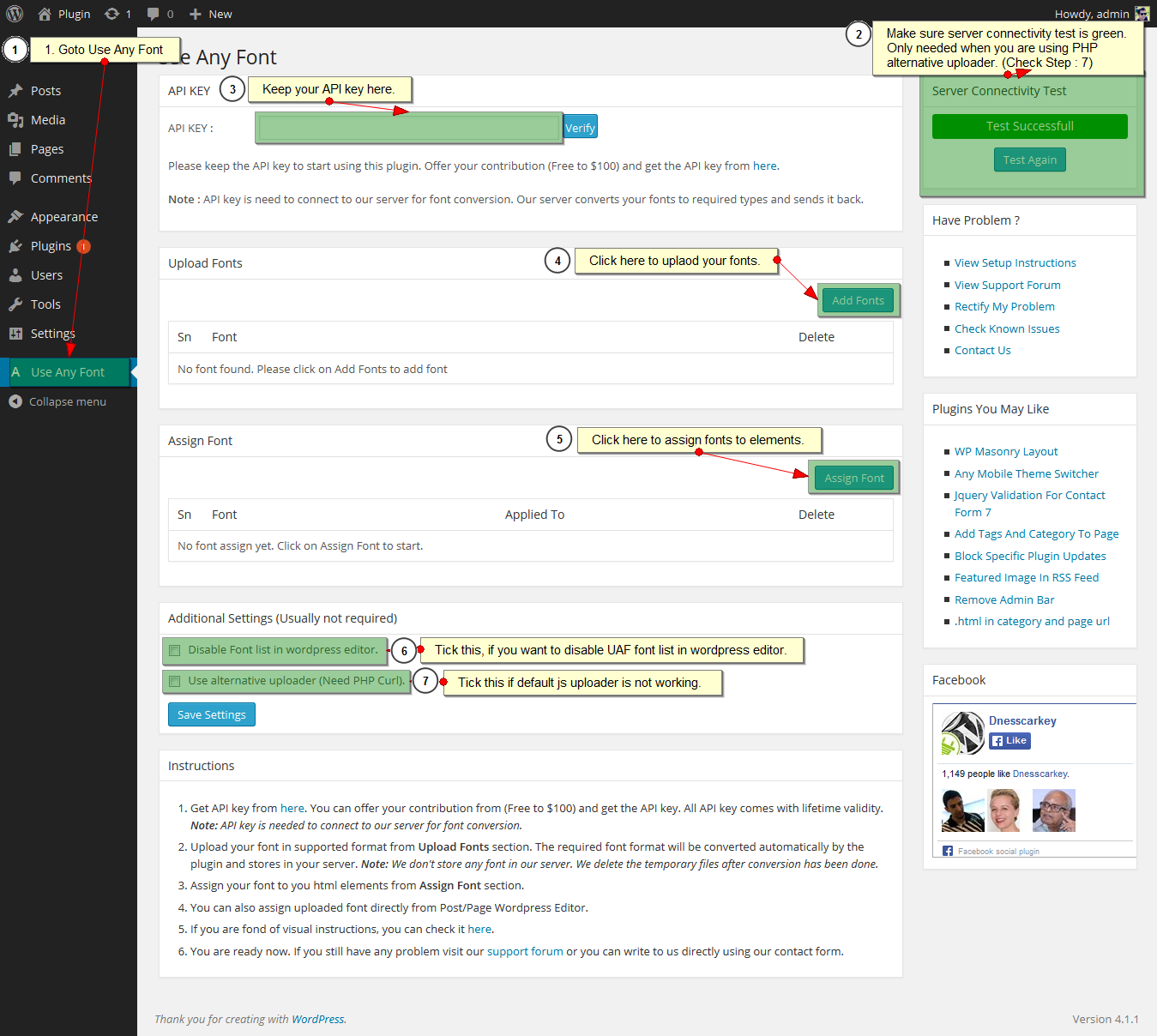
- You need API key to connect to our server for font conversion. Our server converts your font and sends it back. You can get key from here. You can also generate Lite / Test API key from button at top of the plugin page. Note : Lite / Test API only allow single font conversion.
- Use Any Font uses Font Conversion API developed by Dnesscarkey. Font conversion API helps the plugin to convert the font files in different format (woff, woff2 but not limited to) for faster loading, and multiple browser support. Plugins sends the request to Font conversion server with font files, font conversion server converts it and returns the converted files. Once the conversion is completed, font files are automatically deleted.
- We don’t store your fonts in our server neither any of your information except the API key details. Our server deletes the temporary file after the font upload is complete. Your font files are served from your own server.
- For font conversion, our plugin uses server2.dnesscarkey.org and server3.dnesscarkey.org and it is only dedicated to Use Any Font plugin.
- For Font Conversion API terms and condition. Please visit here.
Installation Video
Integration for Themes / Plugin Developers
You can use uaf_get_font_families(); function to get the list of custom fonts uploaded with Use Any Font. You can add it in your font family select box or list.
if (function_exists(‘uaf_get_font_families’)){
$uaf_font_families = uaf_get_font_families(); // Returns Array
}
Please do write us after integration and we will add it in our supported list and create a discount code for your users.
Installation
- Search Use Any Font and click on Install.
- Activate the use-any-font plugin through the ‘Plugins’ menu in WordPress.
- Get the API key and verify it (Needed to connect to server for font conversion).
- Select Use Any Font under Settings
- Upload / Add custom font.
- Assign your custom font to elements.
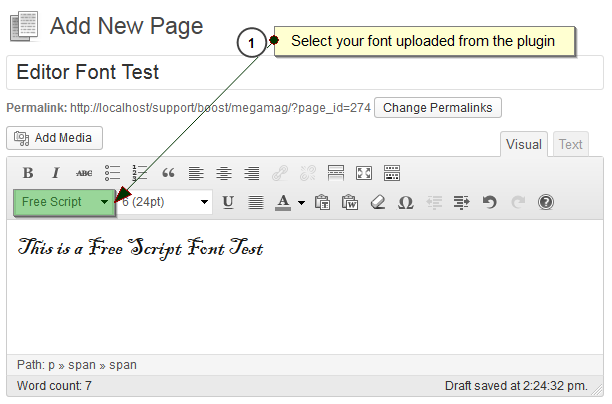
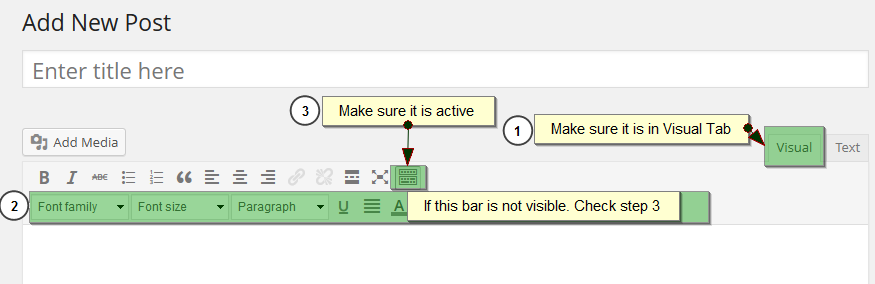
- You can also assign the custom font directly from wordpress page/post editor.
- Your fonts are working in your site now.
- You may refer to Screenshots tab for visual instructions.
Frequently asked questions
Which font format does plugin accepts and the font size ?
Currently, we accept ttf, otf, woff, and woff2 font formats, but you only need to upload the font in one format; other necessary formats for browser compatibility are automatically generated by our font converter. Font files up to 25MB are acceptable. However, we recommend using smaller ones whenever possible, as the font file size directly affects your site’s load time.
From where can i get the font files ?
Mostly you can download the font files from internet. There are many sites that offer fonts. One of font directory we really like is Ultimate Fonts. They only have free fonts which are even free for commercial use. So you can install font and use in any website.
Does it works with multiple fonts ?
Ya, it works with multiple fonts. For multiple font conversion request, you need to get the Premium Key.
How to add font variations ?
Goto Font Upload Tab Click on Font Upload button in the right side. Tick enable multiple font variation option. After that you will get select box to select the font weight and style. Please make sure you use the same custom font name for all the variations.
Do i need to manually convert fonts ?
No, you don’t need to do it yourself. Just upload your font (supports most of the font format), and the plugin’s font convertor does the rest.
Does it work with Visual Builder like Divi Builder ?
Ya, it works with any visual builder. For that you can assign class to those elements. Class name are same as font name. Also, we have full support for Divi Builder and SiteOrigin Page Builder. You can assign fonts using their font family dropdown. You can check video for more details. Divi Builder : https://www.youtube.com/watch?v=Y24TtwNHFMY Site Origin Page Buider : https://www.youtube.com/watch?v=dA-iXWZSCYs
Does it works with any theme ?
Its built-in Font Upload and Font assign section allows you to assign custom fonts to any theme. However, for popular themes like Avada, X Theme, Flatsome, Salient, Porto, Shopkeeper, Oshine, WPLMS Learning Management System Theme, KLEO, WoodMart, ListingPro, SimpleMag, ROSA 1, 907, Voice, Grand Restaurant, LeadEngine, Service Finder, MagPlus, Hostiko, Adifier, Puca, GreenMart, Reco, VidoRev, Halena and many more known themes. (1000+). Check out full list here., we have added extra features that allows you to assign the custom font to your theme using the theme options panel.
Can I assign font based on language ?
Yes, our plugin allows you to assign fonts based on language. Currently, it supports WPML and Polylang, offering a quick font changer based on the language used. If you are using another multilingual plugin, please contact us, and we will try to integrate it with our plugin.
Where are my fonts stored ?
All fonts are stored on your server. Our server only converts the fonts and sends them back. They are stored in the wp-content/uploads/useanyfont folder. Therefore, there won’t be different font paths; they will be identical to your site URL.
Does my font depends upon plugin’s server uptime ?
No, our server is needed during font conversion only. After that all fonts are served from your own server.
Not working for me. What can i do ?
Visit our Support Forum for quick issue resolution. Utilize our Facebook Message widget on our website at https://dineshkarki.com.np. Reach out via email using the form found at https://dineshkarki.com.np/contact.
How can theme / plugin developer integrate Use Any Font ?
You can use uaf_get_font_families(); function to get the list of custom fonts uploaded with Use Any Font. You can add it in your font family select box or list. if (function_exists(‘uaf_get_font_families’)){ $uaf_font_families = uaf_get_font_families(); // Returns Array } Please do write us after integration and we will add it in our supported list.
Changelog
6.4.1
- Added font stretch (width variations) and oblique style support to font variations.
6.4
- Modernized block editor theme.json integration using the wp_theme_json_data_theme filter hook.
- Added nonce security verification to predefined font imports to mitigate potential CSRF.
6.3.14
- Added validation for font assign section.
- Fixed special characters issue in custom element box.
6.3.13
- Fixed API key issue.
6.3.12
- Improved error handling for file write permission issues during font upload.
6.3.11
- Fixed Admin Notice hide issue.
Screenshots

For developers
Is this your plugin? Show off the numbers.
Add a live badge to your site, docs or GitHub README. It updates on its own — no account needed.
Best Use Any Font alternatives
All custom fonts plugins →




FAQ
Use Any Font | Custom Font Uploader: quick answers
Straight answers, pulled from live WordPress.org data.
Live data from WordPress.org · checked Sep 26, 2026
Is Use Any Font free?
Yes. Use Any Font is free to download and use from the official WordPress.org plugin directory.
Is Use Any Font safe to use in 2026?
Yes — Use Any Font is a safe, well-maintained plugin to use in 2026. It runs on 200K+ sites, is rated 4.7/5 and was last updated 3 weeks ago, and scores 88/100 on our health check.
How many websites use Use Any Font?
Use Any Font is active on 200K+ WordPress websites and has been downloaded 7,550,916 times since it launched in December 2012. It was downloaded 35,695 times in the last 30 days.
Does Use Any Font work with WordPress 7.1?
Yes. The developer has tested Use Any Font up to WordPress 7.1.2, the latest release. It requires WordPress 4.0 or newer.
What PHP version does Use Any Font need?
Use Any Font requires PHP 7.0 or higher. Most hosts run PHP 8.x today, so it works on any modern WordPress hosting.
When was Use Any Font last updated?
The latest version, 6.4.1, was released on September 3, 2026 (3 weeks ago).
Who makes Use Any Font?
Use Any Font is developed and maintained by Dnesscarkey.
What are the best alternatives to Use Any Font?
The most popular alternatives to Use Any Font are Custom Fonts (400K+ installs), Fonts Plugin (200K+ installs) and Fonts (8K+ installs).
Powered by PageForge
Want thousands of pages that rank like these? Build them in an afternoon.
This directory runs on the same engine as PageForge. Turn any spreadsheet, CSV or API into thousands of fast, SEO-ready WordPress pages — with schema, internal links and AI-written copy baked in.
- CSV, Google Sheets & API data sources
- AI content, schema & internal links per page
- Works with Elementor, Gutenberg, Yoast & Rank Math
- Free on WordPress.org — no credit card


