



UPI QR Code Payment Gateway
This Plugin enables WooCommerce shop owners to get direct and instant payments through UPI apps like GPay, PhonePe, Paytm or any banking UPI app.

Use with caution
UPI QR Code Payment Gateway works, but test it on a staging site before relying on it in 2026. It runs on 1K+ sites, is rated 5/5 and was last updated 4 months ago, and scores 56/100 on our health check.
How does it stack up?
Side-by-side on installs, updates, ratings & supportDaily downloads
Download spikes usually follow a new release — each site that auto-updates counts as a download.
Rankings
Where UPI QR Code Payment Gateway stands todayWordPress.org search rankings
Live position in the plugin search, top 100| Keyword | Position |
|---|---|
| gpay | #2 |
| paytm upi | #2 |
| qrcode | #11 |
| upi payment | #2 |
| woocommerce | >100 |
Version adoption
Share of active sites per release.
Rating breakdown
★★★★★★★★★★ 5 from 5 reviews
About UPI QR Code Payment Gateway
From the official readme · v1.4.3Description
This Plugin enables WooCommerce shopowners to get direct and instant payments through UPI apps like Google Pay, Whatsapp, Amazon Pay Paytm, BHIM, PhonePe or any banking UPI app to save payment gateway charges in India.
UPI QR Code Payment Gateway
UPI (Unified Payments Interface) is a payment standard owned by National Payment Corporation of India, a government owned instant payment solution. UPI works 24×7 and is free subject to prevalent government guidelines.
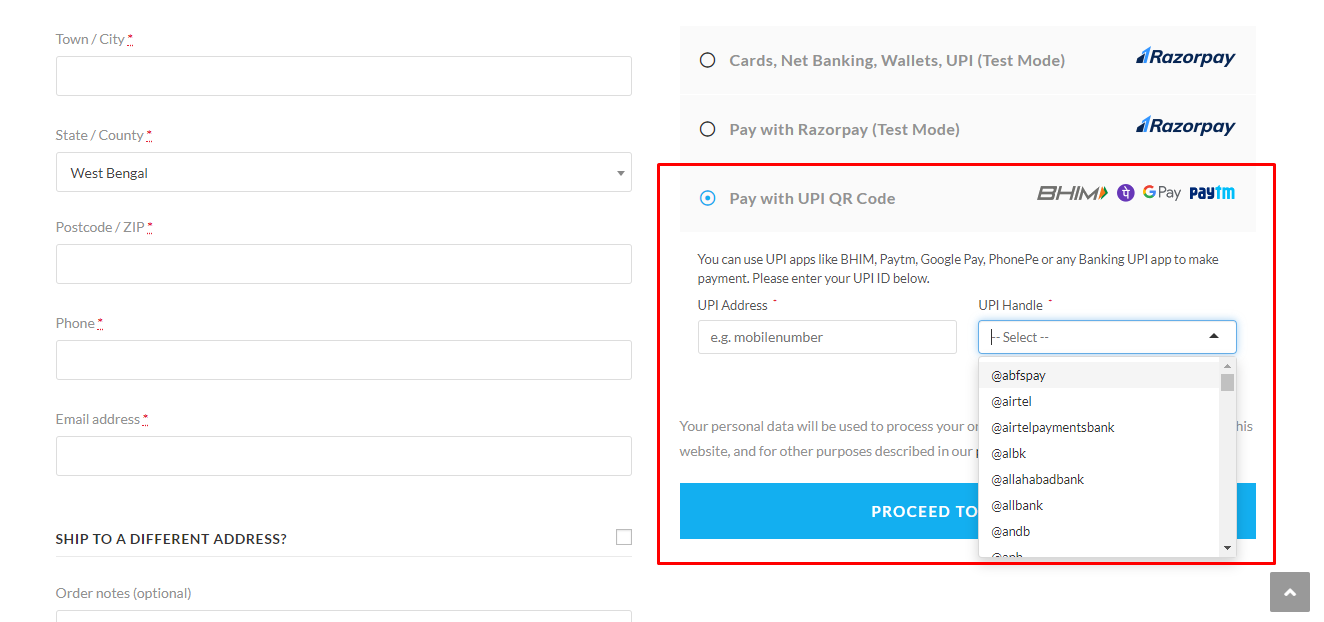
When this plugin is installed, a customer will see UPI as a payment option. When customer chooses it, it will open a page which shows the UPI QR Code containing the payment details and in mobile it will also show a button which takes customer to the list of installed UPI mobile applications. Customer can choose an app and pay the required amount.
Like UPI QR Code Payment Gateway plugin? Consider leaving a 5 star review.
Benefits
- Simple & Easy to Setup.
- Avoid Payment Gateway Fees.
- Instant Money Settlement.
- Direct Payment.
- 100% Success Rate.
- Send QR Code link to Customer.
- 24×7 Availability.
- Multisite Network Supported.
- No KYC, No GST number Required.
- No Hidden or Additional Charges.
Detailed Steps
- Customer will see UPI as a payment option in WooCommerce Checkout page.
- When customer chooses it, it will open a page which shows the UPI QR Code containing the payment details and in mobile it will also show a button which takes customer to the list of installed UPI mobile applications.
- Customer can scan the QR Code using any UPI app or choose an app from mobile to pay the required order amount.
- After successful payment, a 12-digits Transaction/UTR ID will appear in the Customer’s UPI app from which he/she made the payment.
- After that, customer needs to enter that 12 digit transaction number to the “Enter the Transaction ID” textbox and click submit.
- After successful submission of the ID, the order will be marked as on hold (customizable).
- Now, Merchant gets a notification on the mobile on his/her UPI app (Google Pay/PhonePe/BHIM/Paytm etc.)
- Merchant opens notification, sees a payment made. Sees the “Order ID”.
- Merchant opens the WooCommerce Dashboard, checks the “pending orders” for this Order ID.
- Checks the order details and processes it (shipping etc) and makes the orders as “processing” or “completed”.
Compatibility
- This plugin is fully compatible with WordPress Version 4.6 and beyond and also compatible with any WordPress theme.
Support
- Community support via the support forums at WordPress.org.
Installation
- Visit ‘Plugins > Add New’.
- Search for ‘UPI QR Code Payment Gateway’ and install it.
- Or you can upload the
woo-upi-qr-code-paymentfolder to the/wp-content/plugins/directory manually. - Activate UPI QR Code Payment Gateway from your Plugins page.
- After activation go to ‘WooCommerce > Settings > Payments > UPI QR Code’.
- Enable options and save changes.
Frequently asked questions
Is there any admin interface for this plugin?
Yes. You can access this from ‘WooCommerce > Settings > Payments > UPI QR Code’.
How to use this plugin?
Go to ‘WooCommerce > Settings > Payments > UPI QR Code’, enable/disable options as per your need and save your changes.
Is this plugin compatible with any themes?
Yes, this plugin is compatible with any theme. Also, compatible with Divi, Astra themes.
I want auto verification after payment is done. Is is possible?
Unfortunately no, automatic payment verification is not possible as NPCI does not allow to use their API and verify the traansaction of any website.
The plugin isn’t working or have a bug?
Post detailed information about the issue in the support forum and we will work to fix it.
Changelog
Release Date: Jun 07, 2026 Added compatibility with WordPress version 7.0.0.
If you like UPI QR Code Payment Gateway, please take a moment to give a 5-star rating. It helps to keep development and support going strong. Thank you!
1.4.3
Release Date: Jun 07, 2026
- Added compatibility with WordPress version 7.0.0.
1.4.2
Release Date: January 04, 2025
- Fixed: Setting Page.
1.4.1
Release Date: December 28, 2024
- Tested with WordPress v6.7.1 and WooCommerce v9.5.1
1.4.0
Release Date: March 7, 2024
- Tweak: PHP 8.3 Support.
- Added: Support for WooCommerce Block-based checkout.
- Added: Security check on submission.
- Added: Screenshot upload field.
1.3.0
Release Date: May 31, 2022
- Added: Merchant Category Code input option.
- Tested with WordPress v6.0 and WooCommerce v6.8.2.
1.2.0
Release Date: March 18, 2021
- Added: Option to add Merchant Codes according to the latest UPI Specification. Please use a valid Merchant UPI VPA ID (not user UPI ID), otherwise all payments will be failed.
- Added: A button to download the QR Codes on Mobile Devices easily.
- Tweak: Hide Copy UPI ID button by default. It can enabled via this filter:
add_filter( 'dwu_show_upi_id_copy_button', '__return_true' );.
Screenshots



For developers
Is this your plugin? Show off the numbers.
Add a live badge to your site, docs or GitHub README. It updates on its own — no account needed.
Best UPI QR Code Payment Gateway alternatives
All gpay plugins →| Rank | Plugin | Active installs |
|---|---|---|
| 2 |
 Chikkili- Google Pay India for Woocommerce
Chikkili-google-pay-for-woocommerce plugin help shop owners accept payments through the…
Chikkili- Google Pay India for Woocommerce
Chikkili-google-pay-for-woocommerce plugin help shop owners accept payments through the…
|
100+ |
FAQ
UPI QR Code Payment Gateway: quick answers
Straight answers, pulled from live WordPress.org data.
Live data from WordPress.org · checked Oct 10, 2026
Is UPI QR Code Payment Gateway free?
Yes. UPI QR Code Payment Gateway is free to download and use from the official WordPress.org plugin directory.
Is UPI QR Code Payment Gateway safe to use in 2026?
UPI QR Code Payment Gateway works, but test it on a staging site before relying on it in 2026. It runs on 1K+ sites, is rated 5/5 and was last updated 4 months ago, and scores 56/100 on our health check.
How many websites use UPI QR Code Payment Gateway?
UPI QR Code Payment Gateway is active on 1K+ WordPress websites and has been downloaded 33,144 times since it launched in March 2021. It was downloaded 410 times in the last 30 days.
Does UPI QR Code Payment Gateway work with WordPress 7.1?
UPI QR Code Payment Gateway is officially tested up to WordPress 7.0.0, while the latest release is 7.1.3. It may still work, but try it on a staging site first.
What PHP version does UPI QR Code Payment Gateway need?
UPI QR Code Payment Gateway requires PHP 7.4 or higher. Most hosts run PHP 8.x today, so it works on any modern WordPress hosting.
When was UPI QR Code Payment Gateway last updated?
The latest version, 1.4.3, was released on June 7, 2026 (4 months ago).
Who makes UPI QR Code Payment Gateway?
UPI QR Code Payment Gateway is developed and maintained by Dew Technolab.
What are the best alternatives to UPI QR Code Payment Gateway?
The most popular alternatives to UPI QR Code Payment Gateway are Chikkili- Google Pay India… (100+ installs).
Powered by PageForge
Want thousands of pages that rank like these? Build them in an afternoon.
This directory runs on the same engine as PageForge. Turn any spreadsheet, CSV or API into thousands of fast, SEO-ready WordPress pages — with schema, internal links and AI-written copy baked in.
- CSV, Google Sheets & API data sources
- AI content, schema & internal links per page
- Works with Elementor, Gutenberg, Yoast & Rank Math
- Free on WordPress.org — no credit card


